<?xml version="1.0" encoding="utf-8"?><?xml-stylesheet type="text/xsl" href="atom.xsl"?>
<feed xmlns="http://www.w3.org/2005/Atom">
    <id>https://developers.dhis2.org/blog</id>
    <title>DHIS2 Developer Portal Blog</title>
    <updated>2026-03-11T00:00:00.000Z</updated>
    <generator>https://github.com/jpmonette/feed</generator>
    <link rel="alternate" href="https://developers.dhis2.org/blog"/>
    <subtitle>DHIS2 Developer Portal Blog</subtitle>
    <icon>https://developers.dhis2.org/img/favicon.ico</icon>
    <entry>
        <title type="html"><![CDATA[Updating App Hub Guidelines for External Service Integrations]]></title>
        <id>https://developers.dhis2.org/blog/2026/03/app-hub-route-update</id>
        <link href="https://developers.dhis2.org/blog/2026/03/app-hub-route-update"/>
        <updated>2026-03-11T00:00:00.000Z</updated>
        <summary type="html"><![CDATA[To ensure high quality of the apps on the App Hub, we have made updates to the App Hub security guidelines for apps that communicate with external services.]]></summary>
        <content type="html"><![CDATA[<p>To ensure high quality of the apps on the App Hub, we have made updates to the App Hub security guidelines for apps that communicate with external services.
Apps that connect to external APIs must no longer handle third-party credentials in browser-accessible storage for direct client-side use. Instead, external-service communication should be performed through <a href="https://docs.dhis2.org/en/develop/using-the-api/dhis-core-version-master/route.html" target="_blank" rel="noopener noreferrer">DHIS2 Routes</a> so that credentials and upstream authentication live on the server side, and access can be controlled through DHIS2 authorization and sharing.</p>
<p>This change is reflected in the updated <a href="https://developers.dhis2.org/docs/guides/apphub-guidelines/" target="_blank" rel="noopener noreferrer">App Hub Submission Guidelines</a>. The use of hard-coded secrets is discouraged, and server-side synchronization processes are strongly recommended rather than browser-based ones.</p>
<p>We recommend that all app maintainers implement these new security updates by <strong>mid-June 2026</strong> (ahead of the <a href="https://dac2026.dhis2.org/" target="_blank" rel="noopener noreferrer">DHIS2 Annual Conference</a>). After the annual conference, the DHIS2 Extensibility Team will review all of the apps on the App Hub, and remove all apps that do not follow the updated security guidelines. To help with the migration, we have included an example of the old pattern and how it can be updated using routes.</p>
<h2 class="anchor anchorWithStickyNavbar_LWe7" id="the-old-pattern">The old pattern<a href="https://developers.dhis2.org/blog/2026/03/app-hub-route-update#the-old-pattern" class="hash-link" aria-label="Direct link to The old pattern" title="Direct link to The old pattern">​</a></h2>
<p>A common older pattern has been to store API tokens or similar configurations in the <a href="https://docs.dhis2.org/en/develop/using-the-api/dhis-core-version-master/data-store.html" target="_blank" rel="noopener noreferrer">DataStore</a> or <a href="https://docs.dhis2.org/en/develop/using-the-api/dhis-core-version-master/data-store.html#webapi_user_data_store" target="_blank" rel="noopener noreferrer">UserDataStore</a>, read those values in the browser, and then send requests straight to the external service. Even when data store values are encrypted at rest, the core issue remains: if the browser can read a credential, the browser can expose said credential through network requests, logs or browser tooling.</p>
<h3 class="anchor anchorWithStickyNavbar_LWe7" id="1-user-enters-credentials-through-app-ui">1. User enters credentials through app UI<a href="https://developers.dhis2.org/blog/2026/03/app-hub-route-update#1-user-enters-credentials-through-app-ui" class="hash-link" aria-label="Direct link to 1. User enters credentials through app UI" title="Direct link to 1. User enters credentials through app UI">​</a></h3>
<p>One common pattern was for apps to have dedicated UI pages where the user would fill in URL, username and password for the external service. In some cases this was configured manually in the data store instead, but the effect is the same.</p>
<h3 class="anchor anchorWithStickyNavbar_LWe7" id="2-credentials-are-persisted-in-the-userdatastore">2. Credentials are persisted in the UserDataStore<a href="https://developers.dhis2.org/blog/2026/03/app-hub-route-update#2-credentials-are-persisted-in-the-userdatastore" class="hash-link" aria-label="Direct link to 2. Credentials are persisted in the UserDataStore" title="Direct link to 2. Credentials are persisted in the UserDataStore">​</a></h3>
<p>The credentials were then written to the DHIS2 <code>UserDataStore</code> (or <code>DataStore</code>) under an app-specific namespace. At runtime, the app reads them back, delivering the plaintext values straight into the browser.</p>
<h3 class="anchor anchorWithStickyNavbar_LWe7" id="3-the-app-calls-the-external-api-directly">3. The app calls the external API directly<a href="https://developers.dhis2.org/blog/2026/03/app-hub-route-update#3-the-app-calls-the-external-api-directly" class="hash-link" aria-label="Direct link to 3. The app calls the external API directly" title="Direct link to 3. The app calls the external API directly">​</a></h3>
<p>With the credentials now available, the app authenticates against the external service and makes requests directly from the browser. This is typically implemented by reading credentials from the data store, attaching them to outbound requests, and then calling the third-party API from frontend code.</p>
<p>Regardless of which client-side data library is used, this pattern still exposes plaintext credentials to the browser runtime.</p>
<p>Even though the data store may encrypt values at rest on the server (by setting the <code>?encrypt=true</code> <a href="https://docs.dhis2.org/en/develop/using-the-api/dhis-core-version-master/data-store.html#webapi_data_store_create_values" target="_blank" rel="noopener noreferrer">query string parameter</a>), the browser receives plaintext credentials to use them. From that point they are visible in JavaScript memory, network request payloads, console logs, and any XSS vulnerability.</p>
<h2 class="anchor anchorWithStickyNavbar_LWe7" id="the-new-required-pattern-using-routes">The new required pattern using Routes<a href="https://developers.dhis2.org/blog/2026/03/app-hub-route-update#the-new-required-pattern-using-routes" class="hash-link" aria-label="Direct link to The new required pattern using Routes" title="Direct link to The new required pattern using Routes">​</a></h2>
<p>With <a href="https://docs.dhis2.org/en/develop/using-the-api/dhis-core-version-master/route.html" target="_blank" rel="noopener noreferrer">DHIS2 Routes</a>, the DHIS2 server acts as a proxy. Credentials are stored server-side and never sent to the browser once the route has been configured.</p>
<h3 class="anchor anchorWithStickyNavbar_LWe7" id="1-a-dhis2-system-administrator-creates-the-route">1. A DHIS2 system administrator creates the route<a href="https://developers.dhis2.org/blog/2026/03/app-hub-route-update#1-a-dhis2-system-administrator-creates-the-route" class="hash-link" aria-label="Direct link to 1. A DHIS2 system administrator creates the route" title="Direct link to 1. A DHIS2 system administrator creates the route">​</a></h3>
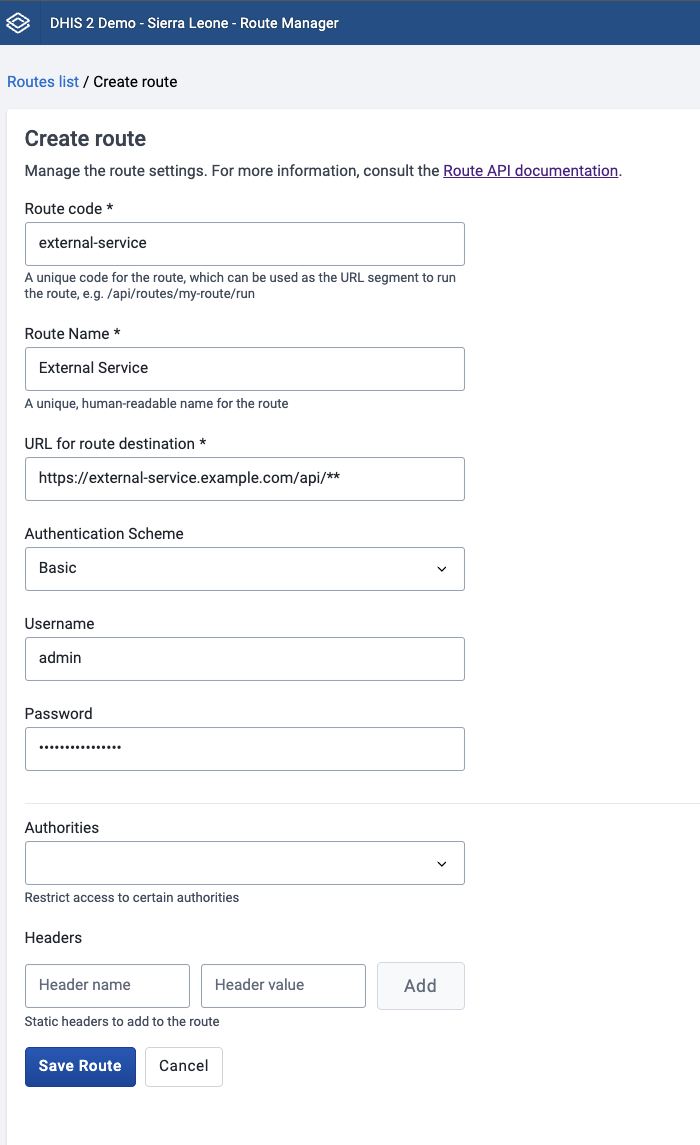
<p>This is done once, and can be done either through the <a href="https://docs.dhis2.org/en/use/user-guides/dhis-core-version-master/maintaining-the-system/route-manager.html" target="_blank" rel="noopener noreferrer">Route Manager App</a> (available on the <a href="https://apps.dhis2.org/app/5dbe9ab8-46bd-411e-b22f-905f08a81d78" target="_blank" rel="noopener noreferrer">App Hub</a>) or directly via the API:</p>
<div class="language-json codeBlockContainer_Ckt0 theme-code-block" style="--prism-color:#bfc7d5;--prism-background-color:#292d3e"><div class="codeBlockContent_biex"><pre tabindex="0" class="prism-code language-json codeBlock_bY9V thin-scrollbar" style="color:#bfc7d5;background-color:#292d3e"><code class="codeBlockLines_e6Vv"><span class="token-line" style="color:#bfc7d5"><span class="token plain">POST /api/routes</span><br></span><span class="token-line" style="color:#bfc7d5"><span class="token plain"></span><span class="token punctuation" style="color:rgb(199, 146, 234)">{</span><span class="token plain"></span><br></span><span class="token-line" style="color:#bfc7d5"><span class="token plain">    </span><span class="token property">"name"</span><span class="token operator" style="color:rgb(137, 221, 255)">:</span><span class="token plain"> </span><span class="token string" style="color:rgb(195, 232, 141)">"External Service"</span><span class="token punctuation" style="color:rgb(199, 146, 234)">,</span><span class="token plain"></span><br></span><span class="token-line" style="color:#bfc7d5"><span class="token plain">    </span><span class="token property">"code"</span><span class="token operator" style="color:rgb(137, 221, 255)">:</span><span class="token plain"> </span><span class="token string" style="color:rgb(195, 232, 141)">"external-service"</span><span class="token punctuation" style="color:rgb(199, 146, 234)">,</span><span class="token plain"></span><br></span><span class="token-line" style="color:#bfc7d5"><span class="token plain">    </span><span class="token property">"url"</span><span class="token operator" style="color:rgb(137, 221, 255)">:</span><span class="token plain"> </span><span class="token string" style="color:rgb(195, 232, 141)">"https://external-service.example.com/api/**"</span><span class="token punctuation" style="color:rgb(199, 146, 234)">,</span><span class="token plain"></span><br></span><span class="token-line" style="color:#bfc7d5"><span class="token plain">    </span><span class="token property">"auth"</span><span class="token operator" style="color:rgb(137, 221, 255)">:</span><span class="token plain"> </span><span class="token punctuation" style="color:rgb(199, 146, 234)">{</span><span class="token plain"></span><br></span><span class="token-line" style="color:#bfc7d5"><span class="token plain">        </span><span class="token property">"type"</span><span class="token operator" style="color:rgb(137, 221, 255)">:</span><span class="token plain"> </span><span class="token string" style="color:rgb(195, 232, 141)">"http-basic"</span><span class="token punctuation" style="color:rgb(199, 146, 234)">,</span><span class="token plain"></span><br></span><span class="token-line" style="color:#bfc7d5"><span class="token plain">        </span><span class="token property">"username"</span><span class="token operator" style="color:rgb(137, 221, 255)">:</span><span class="token plain"> </span><span class="token string" style="color:rgb(195, 232, 141)">"admin"</span><span class="token punctuation" style="color:rgb(199, 146, 234)">,</span><span class="token plain"></span><br></span><span class="token-line" style="color:#bfc7d5"><span class="token plain">        </span><span class="token property">"password"</span><span class="token operator" style="color:rgb(137, 221, 255)">:</span><span class="token plain"> </span><span class="token string" style="color:rgb(195, 232, 141)">"mySecretPassword"</span><span class="token plain"></span><br></span><span class="token-line" style="color:#bfc7d5"><span class="token plain">    </span><span class="token punctuation" style="color:rgb(199, 146, 234)">}</span><span class="token punctuation" style="color:rgb(199, 146, 234)">,</span><span class="token plain"></span><br></span><span class="token-line" style="color:#bfc7d5"><span class="token plain">    </span><span class="token property">"authorities"</span><span class="token operator" style="color:rgb(137, 221, 255)">:</span><span class="token plain"> </span><span class="token punctuation" style="color:rgb(199, 146, 234)">[</span><span class="token string" style="color:rgb(195, 232, 141)">"MY_APP_AUTHORITY"</span><span class="token punctuation" style="color:rgb(199, 146, 234)">]</span><span class="token plain"></span><br></span><span class="token-line" style="color:#bfc7d5"><span class="token plain"></span><span class="token punctuation" style="color:rgb(199, 146, 234)">}</span><br></span></code></pre><div class="buttonGroup__atx"><button type="button" aria-label="Copy code to clipboard" title="Copy" class="clean-btn"><span class="copyButtonIcons_eSgA" aria-hidden="true"><svg viewBox="0 0 24 24" class="copyButtonIcon_y97N"><path fill="currentColor" d="M19,21H8V7H19M19,5H8A2,2 0 0,0 6,7V21A2,2 0 0,0 8,23H19A2,2 0 0,0 21,21V7A2,2 0 0,0 19,5M16,1H4A2,2 0 0,0 2,3V17H4V3H16V1Z"></path></svg><svg viewBox="0 0 24 24" class="copyButtonSuccessIcon_LjdS"><path fill="currentColor" d="M21,7L9,19L3.5,13.5L4.91,12.09L9,16.17L19.59,5.59L21,7Z"></path></svg></span></button></div></div></div>
<p><img decoding="async" loading="lazy" alt="Configuring a route through the Route Manager App" src="https://developers.dhis2.org/assets/images/route-manager-app-example-49542a1240222c661aa91dbe13cfa69f.png" width="700" height="1145" class="img_ev3q"></p>
<p>A few things to note:</p>
<ul>
<li>the <code>**</code> wildcard means sub-paths are passed through to the upstream service. More information can be found in the <a href="https://docs.dhis2.org/en/develop/using-the-api/dhis-core-version-master/route.html#wildcard-routes" target="_blank" rel="noopener noreferrer">routes documentation</a></li>
<li>The credentials are encrypted on the server and cannot be read back via the API</li>
<li>The <code>authorities</code> array lets users with that authority run the route without needing full route-management permissions.</li>
<li>Several <a href="https://docs.dhis2.org/en/develop/using-the-api/dhis-core-version-master/route.html#running-a-route-with-authentication" target="_blank" rel="noopener noreferrer">authentication modes</a> are supported, like <code>http-basic</code>, <code>api-token</code> and <code>oauth2-client-credentials</code>.</li>
</ul>
<div class="theme-admonition theme-admonition-note admonition_xJq3 alert alert--secondary"><div class="admonitionHeading_Gvgb"><span class="admonitionIcon_Rf37"><svg viewBox="0 0 14 16"><path fill-rule="evenodd" d="M6.3 5.69a.942.942 0 0 1-.28-.7c0-.28.09-.52.28-.7.19-.18.42-.28.7-.28.28 0 .52.09.7.28.18.19.28.42.28.7 0 .28-.09.52-.28.7a1 1 0 0 1-.7.3c-.28 0-.52-.11-.7-.3zM8 7.99c-.02-.25-.11-.48-.31-.69-.2-.19-.42-.3-.69-.31H6c-.27.02-.48.13-.69.31-.2.2-.3.44-.31.69h1v3c.02.27.11.5.31.69.2.2.42.31.69.31h1c.27 0 .48-.11.69-.31.2-.19.3-.42.31-.69H8V7.98v.01zM7 2.3c-3.14 0-5.7 2.54-5.7 5.68 0 3.14 2.56 5.7 5.7 5.7s5.7-2.55 5.7-5.7c0-3.15-2.56-5.69-5.7-5.69v.01zM7 .98c3.86 0 7 3.14 7 7s-3.14 7-7 7-7-3.12-7-7 3.14-7 7-7z"></path></svg></span>note</div><div class="admonitionContent_BuS1"><p>The DHIS2 server must also allow the target host in <code>dhis.conf</code>:</p><div class="language-properties codeBlockContainer_Ckt0 theme-code-block" style="--prism-color:#bfc7d5;--prism-background-color:#292d3e"><div class="codeBlockContent_biex"><pre tabindex="0" class="prism-code language-properties codeBlock_bY9V thin-scrollbar" style="color:#bfc7d5;background-color:#292d3e"><code class="codeBlockLines_e6Vv"><span class="token-line" style="color:#bfc7d5"><span class="token plain">route.remote_servers_allowed = https://external-service.example.com/</span><br></span></code></pre><div class="buttonGroup__atx"><button type="button" aria-label="Copy code to clipboard" title="Copy" class="clean-btn"><span class="copyButtonIcons_eSgA" aria-hidden="true"><svg viewBox="0 0 24 24" class="copyButtonIcon_y97N"><path fill="currentColor" d="M19,21H8V7H19M19,5H8A2,2 0 0,0 6,7V21A2,2 0 0,0 8,23H19A2,2 0 0,0 21,21V7A2,2 0 0,0 19,5M16,1H4A2,2 0 0,0 2,3V17H4V3H16V1Z"></path></svg><svg viewBox="0 0 24 24" class="copyButtonSuccessIcon_LjdS"><path fill="currentColor" d="M21,7L9,19L3.5,13.5L4.91,12.09L9,16.17L19.59,5.59L21,7Z"></path></svg></span></button></div></div></div><p>As of DHIS2 v42 and later, the default permitted routes are <code>https://*</code>, so you may not need change the config if you are on a newer version of DHIS2.</p></div></div>
<h3 class="anchor anchorWithStickyNavbar_LWe7" id="2-the-app-can-then-call-the-external-service-through-the-route">2. The app can then call the external service through the route<a href="https://developers.dhis2.org/blog/2026/03/app-hub-route-update#2-the-app-can-then-call-the-external-service-through-the-route" class="hash-link" aria-label="Direct link to 2. The app can then call the external service through the route" title="Direct link to 2. The app can then call the external service through the route">​</a></h3>
<div class="language-jsx codeBlockContainer_Ckt0 theme-code-block" style="--prism-color:#bfc7d5;--prism-background-color:#292d3e"><div class="codeBlockContent_biex"><pre tabindex="0" class="prism-code language-jsx codeBlock_bY9V thin-scrollbar" style="color:#bfc7d5;background-color:#292d3e"><code class="codeBlockLines_e6Vv"><span class="token-line" style="color:#bfc7d5"><span class="token keyword module" style="font-style:italic">import</span><span class="token plain"> </span><span class="token imports punctuation" style="color:rgb(199, 146, 234)">{</span><span class="token imports"> useDataQuery </span><span class="token imports punctuation" style="color:rgb(199, 146, 234)">}</span><span class="token plain"> </span><span class="token keyword module" style="font-style:italic">from</span><span class="token plain"> </span><span class="token string" style="color:rgb(195, 232, 141)">'@dhis2/app-runtime'</span><span class="token plain"></span><br></span><span class="token-line" style="color:#bfc7d5"><span class="token plain" style="display:inline-block"></span><br></span><span class="token-line" style="color:#bfc7d5"><span class="token plain"></span><span class="token keyword" style="font-style:italic">const</span><span class="token plain"> eventsQuery </span><span class="token operator" style="color:rgb(137, 221, 255)">=</span><span class="token plain"> </span><span class="token punctuation" style="color:rgb(199, 146, 234)">{</span><span class="token plain"></span><br></span><span class="token-line" style="color:#bfc7d5"><span class="token plain">    </span><span class="token literal-property property">events</span><span class="token operator" style="color:rgb(137, 221, 255)">:</span><span class="token plain"> </span><span class="token punctuation" style="color:rgb(199, 146, 234)">{</span><span class="token plain"></span><br></span><span class="token-line" style="color:#bfc7d5"><span class="token plain">        </span><span class="token literal-property property">resource</span><span class="token operator" style="color:rgb(137, 221, 255)">:</span><span class="token plain"> </span><span class="token string" style="color:rgb(195, 232, 141)">'routes/external-service/run/events'</span><span class="token punctuation" style="color:rgb(199, 146, 234)">,</span><span class="token plain"></span><br></span><span class="token-line" style="color:#bfc7d5"><span class="token plain">    </span><span class="token punctuation" style="color:rgb(199, 146, 234)">}</span><span class="token punctuation" style="color:rgb(199, 146, 234)">,</span><span class="token plain"></span><br></span><span class="token-line" style="color:#bfc7d5"><span class="token plain"></span><span class="token punctuation" style="color:rgb(199, 146, 234)">}</span><span class="token plain"></span><br></span><span class="token-line" style="color:#bfc7d5"><span class="token plain" style="display:inline-block"></span><br></span><span class="token-line" style="color:#bfc7d5"><span class="token plain"></span><span class="token keyword module" style="font-style:italic">export</span><span class="token plain"> </span><span class="token keyword" style="font-style:italic">const</span><span class="token plain"> </span><span class="token function-variable function" style="color:rgb(130, 170, 255)">useExternalEvents</span><span class="token plain"> </span><span class="token operator" style="color:rgb(137, 221, 255)">=</span><span class="token plain"> </span><span class="token punctuation" style="color:rgb(199, 146, 234)">(</span><span class="token punctuation" style="color:rgb(199, 146, 234)">)</span><span class="token plain"> </span><span class="token arrow operator" style="color:rgb(137, 221, 255)">=&gt;</span><span class="token plain"> </span><span class="token punctuation" style="color:rgb(199, 146, 234)">{</span><span class="token plain"></span><br></span><span class="token-line" style="color:#bfc7d5"><span class="token plain">    </span><span class="token keyword" style="font-style:italic">const</span><span class="token plain"> </span><span class="token punctuation" style="color:rgb(199, 146, 234)">{</span><span class="token plain"> data</span><span class="token punctuation" style="color:rgb(199, 146, 234)">,</span><span class="token plain"> loading</span><span class="token punctuation" style="color:rgb(199, 146, 234)">,</span><span class="token plain"> error </span><span class="token punctuation" style="color:rgb(199, 146, 234)">}</span><span class="token plain"> </span><span class="token operator" style="color:rgb(137, 221, 255)">=</span><span class="token plain"> </span><span class="token function" style="color:rgb(130, 170, 255)">useDataQuery</span><span class="token punctuation" style="color:rgb(199, 146, 234)">(</span><span class="token plain">eventsQuery</span><span class="token punctuation" style="color:rgb(199, 146, 234)">)</span><span class="token plain"></span><br></span><span class="token-line" style="color:#bfc7d5"><span class="token plain" style="display:inline-block"></span><br></span><span class="token-line" style="color:#bfc7d5"><span class="token plain">    </span><span class="token keyword control-flow" style="font-style:italic">return</span><span class="token plain"> </span><span class="token punctuation" style="color:rgb(199, 146, 234)">{</span><span class="token plain"></span><br></span><span class="token-line" style="color:#bfc7d5"><span class="token plain">        </span><span class="token literal-property property">events</span><span class="token operator" style="color:rgb(137, 221, 255)">:</span><span class="token plain"> data</span><span class="token operator" style="color:rgb(137, 221, 255)">?.</span><span class="token plain">events</span><span class="token punctuation" style="color:rgb(199, 146, 234)">,</span><span class="token plain"></span><br></span><span class="token-line" style="color:#bfc7d5"><span class="token plain">        loading</span><span class="token punctuation" style="color:rgb(199, 146, 234)">,</span><span class="token plain"></span><br></span><span class="token-line" style="color:#bfc7d5"><span class="token plain">        error</span><span class="token punctuation" style="color:rgb(199, 146, 234)">,</span><span class="token plain"></span><br></span><span class="token-line" style="color:#bfc7d5"><span class="token plain">    </span><span class="token punctuation" style="color:rgb(199, 146, 234)">}</span><span class="token plain"></span><br></span><span class="token-line" style="color:#bfc7d5"><span class="token plain"></span><span class="token punctuation" style="color:rgb(199, 146, 234)">}</span><br></span></code></pre><div class="buttonGroup__atx"><button type="button" aria-label="Copy code to clipboard" title="Copy" class="clean-btn"><span class="copyButtonIcons_eSgA" aria-hidden="true"><svg viewBox="0 0 24 24" class="copyButtonIcon_y97N"><path fill="currentColor" d="M19,21H8V7H19M19,5H8A2,2 0 0,0 6,7V21A2,2 0 0,0 8,23H19A2,2 0 0,0 21,21V7A2,2 0 0,0 19,5M16,1H4A2,2 0 0,0 2,3V17H4V3H16V1Z"></path></svg><svg viewBox="0 0 24 24" class="copyButtonSuccessIcon_LjdS"><path fill="currentColor" d="M21,7L9,19L3.5,13.5L4.91,12.09L9,16.17L19.59,5.59L21,7Z"></path></svg></span></button></div></div></div>
<p>The app will now only talk to the DHIS2 server, and the server will handle the upstream authentication. The app will therefore no longer need to maintain credential input forms, fetch credentials from the Data store, or make direct requests to external services.</p>
<h1>Are you maintaining an app? This is what you should check</h1>
<p>Before submitting or updating an app on the App Hub, you should check the following:</p>
<ul>
<li>Does the app read third-party credentials in browser code?</li>
<li>Does the app call an external API directly from the frontend?</li>
<li>Can that communication be replaced with a DHIS2 route? If so:<!-- -->
<ul>
<li>Remember to configure <code>route.remote_servers_allowed</code> on the server.</li>
<li>Restrict route creation and editing to appropriate administrators.</li>
</ul>
</li>
</ul>
<p>If you have any questions about migrating your app, please reach out on the <a href="https://community.dhis2.org/" target="_blank" rel="noopener noreferrer">DHIS2 Community of Practice</a>.</p>]]></content>
        <author>
            <name>Johan Gangsås Hole</name>
            <uri>https://github.com/johanghole</uri>
        </author>
        <category label="announcement" term="announcement"/>
        <category label="route" term="route"/>
        <category label="security" term="security"/>
    </entry>
    <entry>
        <title type="html"><![CDATA[MOSIP Integration Demo with DHIS2]]></title>
        <id>https://developers.dhis2.org/blog/2026/02/mosip-integration-demo</id>
        <link href="https://developers.dhis2.org/blog/2026/02/mosip-integration-demo"/>
        <updated>2026-02-01T00:00:00.000Z</updated>
        <summary type="html"><![CDATA[The DHIS2 core team recently collaborated with MOSIP, HISP Sri Lanka, and Symbionix on an interesting demo of an ID provider integration with DHIS2 that we're excited to share. MOSIP develops open-source ID provider services, a valuable part of digital public infrastructure, and the intention of this project is to show an integration between MOSIP and DHIS2, where both patients and health care providers can verify their identity with a common ID provider service. This demo integration also incorporates a shared electronic health registry (EHR), and demonstrates how using the EHR and a common ID provider across different digital health services can promote continuity of data across the health sector.]]></summary>
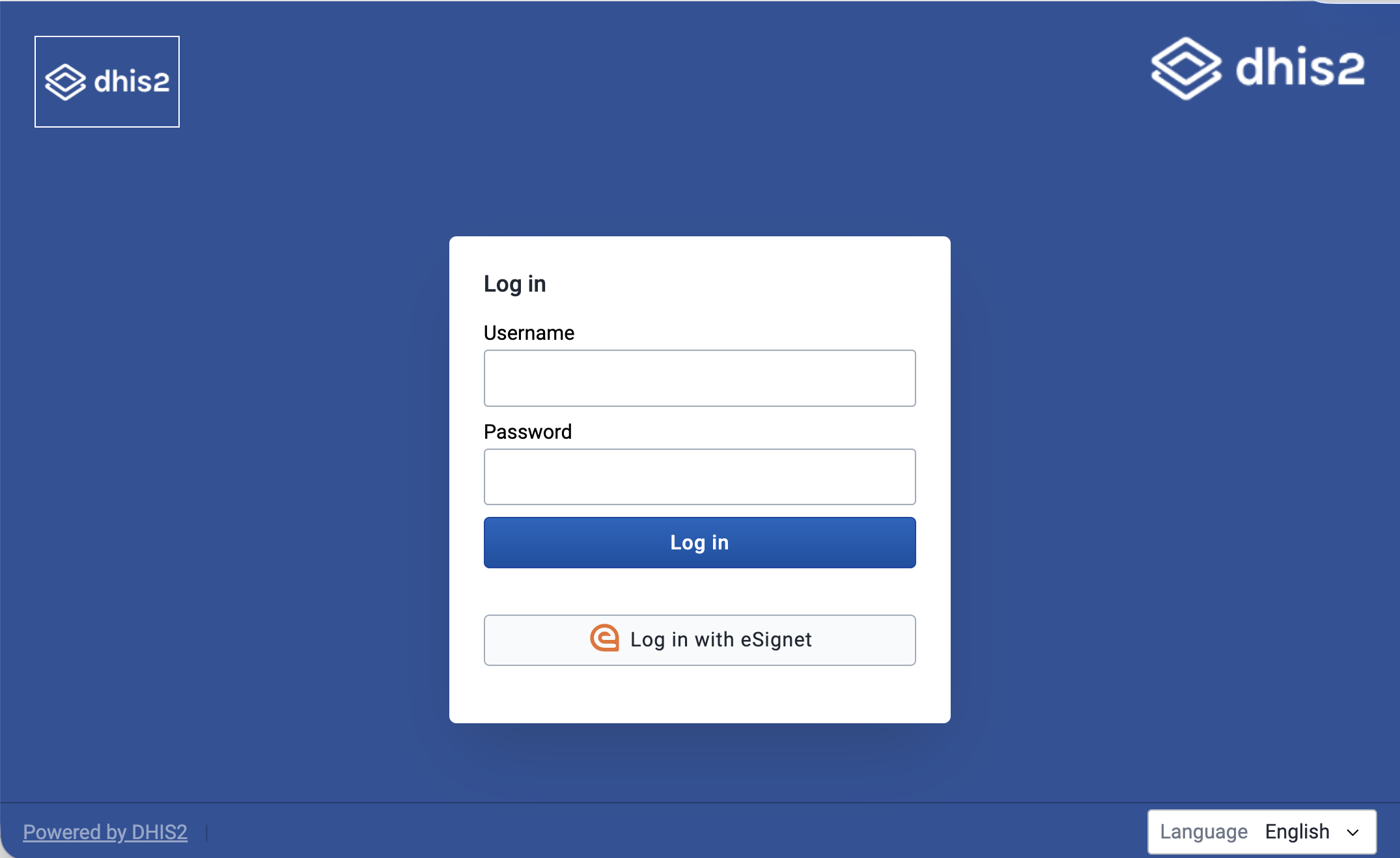
        <content type="html"><![CDATA[<p>The DHIS2 core team recently collaborated with <a href="https://www.mosip.io/" target="_blank" rel="noopener noreferrer">MOSIP</a>, <a href="https://hispsrilanka.org/" target="_blank" rel="noopener noreferrer">HISP Sri Lanka</a>, and <a href="https://www.symbionix.co/" target="_blank" rel="noopener noreferrer">Symbionix</a> on an interesting demo of an ID provider integration with DHIS2 that we're excited to share. MOSIP develops open-source ID provider services, a valuable part of digital public infrastructure, and the intention of this project is to show an integration between MOSIP and DHIS2, where both patients and health care providers can verify their identity with a common ID provider service. This demo integration also incorporates a shared electronic health registry (EHR), and demonstrates how using the EHR and a common ID provider across different digital health services can promote continuity of data across the health sector.</p>
<p><img decoding="async" loading="lazy" alt="Logging in to DHIS2 with eSignet" src="https://developers.dhis2.org/assets/images/dhis2-login-screenshot-f37df474b45d089cb32df2044ba9281a.png" width="2150" height="1318" class="img_ev3q"></p>
<h2 class="anchor anchorWithStickyNavbar_LWe7" id="the-use-case">The use case<a href="https://developers.dhis2.org/blog/2026/02/mosip-integration-demo#the-use-case" class="hash-link" aria-label="Direct link to The use case" title="Direct link to The use case">​</a></h2>
<h3 class="anchor anchorWithStickyNavbar_LWe7" id="background">Background<a href="https://developers.dhis2.org/blog/2026/02/mosip-integration-demo#background" class="hash-link" aria-label="Direct link to Background" title="Direct link to Background">​</a></h3>
<p>In order to demonstrate an integration with an ID provider, a realistic use case was chosen as a foundation: an antenatal care (ANC) program that matches that used in Sri Lanka. The use case covers a patient's journey across three types of services, tied together by a shared EHR (the National EHR, or NEHR, in this demo) and a common ID provider service:</p>
<ol>
<li>A Public Health Midwife (PHM) clinic, where the patient is enrolled into a DHIS2 ANC program and ANC events are recorded</li>
<li>A Patient Portal, where the patient can log in to see their own health records</li>
<li>A Clinician Portal, where specialists at other facilities can search for patients' histories when patients are referred to them</li>
</ol>
<p><a href="https://docs.esignet.io/" target="_blank" rel="noopener noreferrer">eSignet</a>, an OIDC provider developed by MOSIP, features prominently in this use case. It's used both for users to log in to services using their national ID, and to verify a patient at the point of care.</p>
<p>To support the continuity of data across the three services, there are three ways patients can be uniquely identified:</p>
<ol>
<li>Their national ID, which is <em>purely optional</em>. If the patient doesn't want to share it for whatever reason, one of the following options can be used.</li>
<li>A Personal Health Number (PHN): a human-friendly code that can identify a patient in the health care system without use of their national ID. One can be generated by any authorized clinic.</li>
<li>eSignet also provides a unique identifier for a person in the ID system, which is separate from their national ID used to verify themself. This is a more machine-friendly value that can be used to uniquely identify a person in a domain without using their national ID.</li>
</ol>
<h3 class="anchor anchorWithStickyNavbar_LWe7" id="the-full-patient-journey">The full patient journey<a href="https://developers.dhis2.org/blog/2026/02/mosip-integration-demo#the-full-patient-journey" class="hash-link" aria-label="Direct link to The full patient journey" title="Direct link to The full patient journey">​</a></h3>
<p>The following is the full patient journey in this ANC use case:</p>
<ol>
<li>A pregnant mother arrives at a PHM clinic.</li>
<li>The PHM logs into DHIS2 using eSignet, using their national ID to authenticate.<!-- -->
<ol>
<li>In the Capture app, the ANC enrollment form has a button to let the <em>patient</em> use eSignet to verify their identity and authorize use of some of their personal info.</li>
<li>A PHN can either be generated for the patient, or an existing one can be used.<!-- -->
<ol>
<li>Behind the scenes, eSignet's unique (non-national ID) identifier is also saved for the patient.</li>
<li>The national ID is optional to share here.</li>
<li>The clinic worker then completes the enrollment, and can enter data for other ANC stages.</li>
</ol>
</li>
<li>Enrollment and other program stages can be completed in DHIS2.</li>
</ol>
</li>
<li>Each time a patient’s data is updated in DHIS2, it’s synced to a National Electronic Health Registry (NEHR), which is shared across the digital services in the health domain</li>
<li>Later, the mother can visit a Patient Portal website, where they can log in using eSignet. Once verified, they can view their health history in the NEHR, again without needing to share their national ID if they don't want to.</li>
<li>When the mother is referred to a specialist later, a specialist clinician can use a Clinician Portal website to search the NEHR for the patient's previous history to continue care.</li>
</ol>
<p>Now that the use case is laid out, the rest of this article will focus on the technical aspects of enabling this patient journey. To see what the steps of the journey look like in practice, have a look at the short videos in the sections describing those features.</p>
<h2 class="anchor anchorWithStickyNavbar_LWe7" id="the-integration">The integration<a href="https://developers.dhis2.org/blog/2026/02/mosip-integration-demo#the-integration" class="hash-link" aria-label="Direct link to The integration" title="Direct link to The integration">​</a></h2>
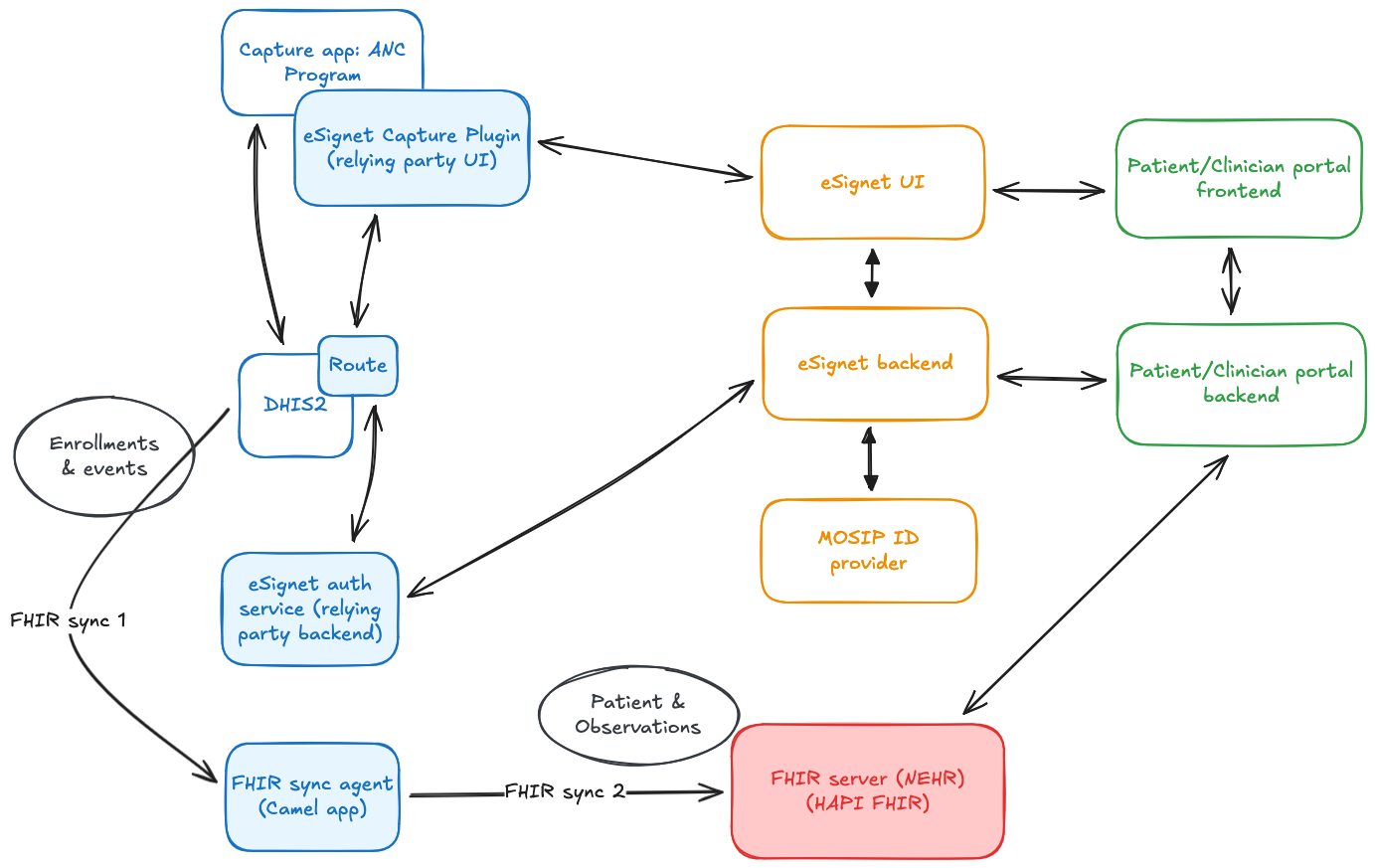
<p><img decoding="async" loading="lazy" alt="MOSIP-DHIS2-Sri Lanka-Symbionix integration architecture" src="https://developers.dhis2.org/assets/images/mosip-integration-architecture-57731af3fbf1c368db2d39da0c4ae9aa.png" width="1383" height="873" class="img_ev3q"></p>
<p>To achieve this integration, the following components were set up, as shown in the diagram above:</p>
<ol>
<li>A DHIS2 instance, customized to use eSignet as an OIDC provider for user login</li>
<li>Several components to enable the OIDC flow for patient verification in the Capture app:<!-- -->
<ol>
<li>A data entry form field plugin for the Capture app, which handles the front-end portion of the OIDC flow</li>
<li>A backend eSignet auth service, which handles the back-channel portion of the OIDC flow</li>
<li>A route, which is used to securely connect the Capture plugin to the backend eSignet auth service</li>
</ol>
</li>
<li>An NEHR, a FHIR server modeled after the one designed in Sri Lanka. It uses a custom Patient profile.</li>
<li>A Patient Portal, where a patient can log in using eSignet to see their data from the NEHR</li>
<li>A Clinician Portal, where a clinician can search the NEHR for the history of a patient that's been referred to them</li>
</ol>
<p>The eSignet components and MOSIP ID provider services are hosted at MOSIP's <a href="https://collab.mosip.net/" target="_blank" rel="noopener noreferrer">Collab environment</a>.</p>
<h3 class="anchor anchorWithStickyNavbar_LWe7" id="dhis2-login-using-esignet">DHIS2 login using eSignet<a href="https://developers.dhis2.org/blog/2026/02/mosip-integration-demo#dhis2-login-using-esignet" class="hash-link" aria-label="Direct link to DHIS2 login using eSignet" title="Direct link to DHIS2 login using eSignet">​</a></h3>
<video width="100%" autoplay="" muted="" playsinline="" controls=""><source src="/vid/mosip-integration/dhis2-login.mp4" type="video/mp4"></video>
<p>At the time of working on this integration demo, DHIS2 supports <a href="https://docs.dhis2.org/en/manage/reference/openid-connect-oidc.html" target="_blank" rel="noopener noreferrer">logging in using an OIDC flow</a> from a few providers (Google, Azure, WSO2, and Okta), and also has <a href="https://docs.dhis2.org/en/manage/reference/openid-connect-oidc.html?h=#generic-providers" target="_blank" rel="noopener noreferrer">some generic support</a> for other OIDC providers, if they fit some constraints.</p>
<p>A couple of eSignet’s features weren’t those that were generically supported by DHIS2, however, so a couple changes had to be made specially for this case:</p>
<ul>
<li>eSignet uses <code>private_key_jwt</code> as its authentication method, which had to be added to the generic provider support.</li>
<li>The <code>userInfo</code> response from eSignet is a signed JWT, which needed a verification step to be added.</li>
<li>X509 thumbprints were added to the public keys shown on the DHIS2 instance to match the server-side keys.</li>
</ul>
<p>These features will soon be added to the core in a generic way, so more people can take advantage of them.</p>
<p>Other than that, setting up eSignet as an OIDC login provider for DHIS2 was the same as for other generic providers:</p>
<ol>
<li>A Java key store was generated using the Java <code>keytool</code> util: <code>keytool -genkey -alias {key-alias} -keyalg RSA -keystore {keystore-filename}.jks -storepass {keystore-pass} -keypass {key-pass}</code> (replace the values in braces <code>{}</code> with your own).</li>
<li>An eSignet icon is added to <code>dhis-web-commons</code> to use on the login page button.</li>
<li>DHIS2 configuration for the OIDC login was set up in <code>dhis.conf</code>, which looks like the snippet below.</li>
<li>DHIS2 was registered as a client for the eSignet provider, using a public key from DHIS2’s well-known endpoint.</li>
</ol>
<p>At that point, after restarting the server, login using eSignet was ready to go.</p>
<div class="language-conf codeBlockContainer_Ckt0 theme-code-block" style="--prism-color:#bfc7d5;--prism-background-color:#292d3e"><div class="codeBlockTitle_Ktv7">dhis.conf</div><div class="codeBlockContent_biex"><pre tabindex="0" class="prism-code language-conf codeBlock_bY9V thin-scrollbar" style="color:#bfc7d5;background-color:#292d3e"><code class="codeBlockLines_e6Vv"><span class="token-line" style="color:#bfc7d5"><span class="token plain">oauth2.server.enabled = on</span><br></span><span class="token-line" style="color:#bfc7d5"><span class="token plain" style="display:inline-block"></span><br></span><span class="token-line" style="color:#bfc7d5"><span class="token plain"># Enables JWT Bearer tokens usage</span><br></span><span class="token-line" style="color:#bfc7d5"><span class="token plain">oidc.jwt.token.authentication.enabled = on</span><br></span><span class="token-line" style="color:#bfc7d5"><span class="token plain" style="display:inline-block"></span><br></span><span class="token-line" style="color:#bfc7d5"><span class="token plain"># Enables OIDC login</span><br></span><span class="token-line" style="color:#bfc7d5"><span class="token plain">oidc.oauth2.login.enabled = on</span><br></span><span class="token-line" style="color:#bfc7d5"><span class="token plain" style="display:inline-block"></span><br></span><span class="token-line" style="color:#bfc7d5"><span class="token plain"># eSignet variables:</span><br></span><span class="token-line" style="color:#bfc7d5"><span class="token plain">oidc.provider.esignet.client_id = {client-id}</span><br></span><span class="token-line" style="color:#bfc7d5"><span class="token plain">oidc.provider.esignet.client_secret = my-client-secret # Not used for the private_key_jwt auth method</span><br></span><span class="token-line" style="color:#bfc7d5"><span class="token plain">oidc.provider.esignet.mapping_claim = email</span><br></span><span class="token-line" style="color:#bfc7d5"><span class="token plain">oidc.provider.esignet.scopes = profile openid</span><br></span><span class="token-line" style="color:#bfc7d5"><span class="token plain">oidc.provider.esignet.authorization_uri = https://esignet-mosipid.collab.mosip.net/authorize</span><br></span><span class="token-line" style="color:#bfc7d5"><span class="token plain">oidc.provider.esignet.token_uri = https://esignet-mosipid.collab.mosip.net/v1/esignet/oauth/v2/token</span><br></span><span class="token-line" style="color:#bfc7d5"><span class="token plain">oidc.provider.esignet.user_info_uri = https://esignet-mosipid.collab.mosip.net/v1/esignet/oidc/userinfo</span><br></span><span class="token-line" style="color:#bfc7d5"><span class="token plain">oidc.provider.esignet.issuer_uri = https://esignet-mosipid.collab.mosip.net/v1/esignet</span><br></span><span class="token-line" style="color:#bfc7d5"><span class="token plain">oidc.provider.esignet.jwk_uri = https://esignet-mosipid.collab.mosip.net/.well-known/jwks.json</span><br></span><span class="token-line" style="color:#bfc7d5"><span class="token plain">oidc.provider.esignet.client_authentication_method = private_key_jwt</span><br></span><span class="token-line" style="color:#bfc7d5"><span class="token plain">oidc.provider.esignet.keystore_path = {path-to-keystore}</span><br></span><span class="token-line" style="color:#bfc7d5"><span class="token plain">oidc.provider.esignet.keystore_password = {keystore-pass}</span><br></span><span class="token-line" style="color:#bfc7d5"><span class="token plain">oidc.provider.esignet.key_alias = {key-alias}</span><br></span><span class="token-line" style="color:#bfc7d5"><span class="token plain">oidc.provider.esignet.key_password = {key-pass}</span><br></span><span class="token-line" style="color:#bfc7d5"><span class="token plain">oidc.provider.esignet.jwk_set_url = https://mosip.integration.dhis2.org/api/publicKeys/esignet/jwks.json</span><br></span><span class="token-line" style="color:#bfc7d5"><span class="token plain">oidc.provider.esignet.redirect_url = https://mosip.integration.dhis2.org/oauth2/code/esignet</span><br></span><span class="token-line" style="color:#bfc7d5"><span class="token plain">oidc.provider.esignet.display_alias = Log in with eSignet</span><br></span><span class="token-line" style="color:#bfc7d5"><span class="token plain">oidc.provider.esignet.login_image = /dhis-web-commons/oidc/esignet.svg</span><br></span></code></pre><div class="buttonGroup__atx"><button type="button" aria-label="Copy code to clipboard" title="Copy" class="clean-btn"><span class="copyButtonIcons_eSgA" aria-hidden="true"><svg viewBox="0 0 24 24" class="copyButtonIcon_y97N"><path fill="currentColor" d="M19,21H8V7H19M19,5H8A2,2 0 0,0 6,7V21A2,2 0 0,0 8,23H19A2,2 0 0,0 21,21V7A2,2 0 0,0 19,5M16,1H4A2,2 0 0,0 2,3V17H4V3H16V1Z"></path></svg><svg viewBox="0 0 24 24" class="copyButtonSuccessIcon_LjdS"><path fill="currentColor" d="M21,7L9,19L3.5,13.5L4.91,12.09L9,16.17L19.59,5.59L21,7Z"></path></svg></span></button></div></div></div>
<h3 class="anchor anchorWithStickyNavbar_LWe7" id="capture-plugin-for-esignet-verification-for-patient">Capture plugin for eSignet verification for patient<a href="https://developers.dhis2.org/blog/2026/02/mosip-integration-demo#capture-plugin-for-esignet-verification-for-patient" class="hash-link" aria-label="Direct link to Capture plugin for eSignet verification for patient" title="Direct link to Capture plugin for eSignet verification for patient">​</a></h3>
<video width="100%" autoplay="" muted="" playsinline="" controls=""><source src="/vid/mosip-integration/capture-plugin.mp4" type="video/mp4"></video>
<p>For the next step in the patient journey, the ANC clinic worker will enroll the patient in the DHIS2 ANC program. At this stage, the <em>patient</em> can use eSignet to verify their identity using their national ID, and autofill several fields in the form at the same time.</p>
<p>In the real world, this is imagined as the clinic worker handing the device over to the patient, who types in their ID, then receives a one-time password (or other two-factor authentication method) on their personal device, which they can use to finish the flow on the clinic’s device. Then they can choose which personal info values from the ID system they authorize DHIS2 to access. Once complete, the patient will be verified, and fields in the enrollment form will be filled. Note: other flows can be used for real-world use cases, like sending a link to the user’s device to go through the whole flow there.</p>
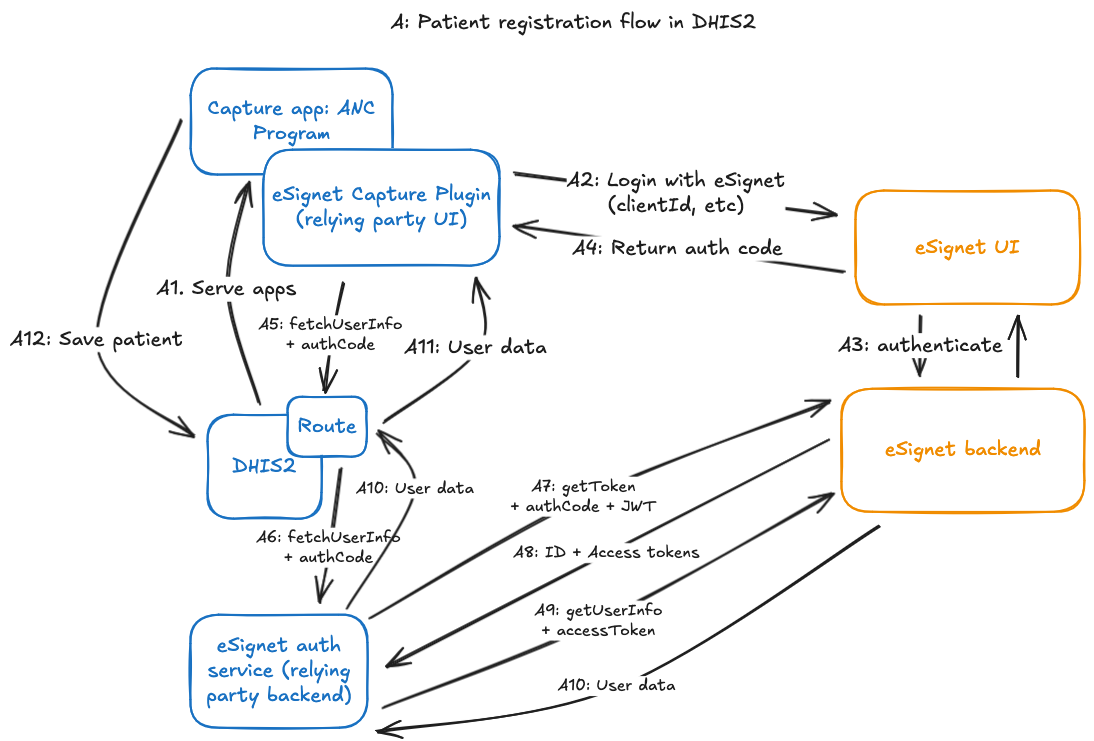
<p>The eSignet verification flow from the Capture app is accomplished by several components to orchestrate the OIDC verification flow, as shown in the diagram below:</p>
<ol>
<li>A Capture <a href="https://developers.dhis2.org/docs/capture-plugins/developer/form-field-plugins/introduction" target="_blank" rel="noopener noreferrer">form field plugin</a> renders the “Verify with National ID” button and kicks off the OIDC flow when clicked.<!-- -->
<ol>
<li>This opens a new window to save the Capture app form state, and points it to the eSignet UI to start the front-end portion of the OIDC flow.</li>
<li>When the user finishes verification in the eSignet UI, they’ll get redirected to a page in the plugin app, which will capture the authorization grant that eSignet attaches to the redirected URL.</li>
<li>Then, it will use a <a href="https://docs.dhis2.org/en/develop/using-the-api/dhis-core-version-master/route.html?h=route" target="_blank" rel="noopener noreferrer">Route</a> to send on that authorization grant to the backend eSignet auth service which will continue the back-channel portion of the OIDC flow.</li>
</ol>
</li>
<li>The backend eSignet auth service continues the back-channel portion of the OIDC flow:<!-- -->
<ol>
<li>It uses the private key set up for this client (configured independently from the DHIS2 login) to:<!-- -->
<ol>
<li>use the authorization grant returned from the frontend to retrieve an access token for the authenticated patient, then</li>
<li>use the access token to retrieve demographic information about the patient (name, email, etc.)</li>
</ol>
</li>
<li>(Note: for the purposes of this demo, we were able to use the docker image of MOSIP’s <a href="https://github.com/mosip/esignet-mock-services/tree/master/mock-relying-party-service" target="_blank" rel="noopener noreferrer">mock relying party backend service</a>, providing necessary variables as environment variables)</li>
</ol>
</li>
</ol>
<p>The user info for the patient is then returned as the result of the request to the Route, which can then be used to populate the fields in the enrollment form.</p>
<p><img decoding="async" loading="lazy" alt="eSignet OIDC flow with Capture plugin" src="https://developers.dhis2.org/assets/images/mosip-integration-detailed-plugin-flow-639d758cbbb5be2423cbb4c4d60fe0c2.png" width="1094" height="741" class="img_ev3q"></p>
<p>Behind the scenes, once the patient's information is returned to populate the field, eSignet's unique identifier for the person -- the <code>sub</code> property of the <code>userInfo</code> returned by the OIDC flow -- is saved as an attribute on the tracked entity using a hidden field in the enrollment form.</p>
<p>After that, another plugin in the form lets the clinic worker generate a PHN for the patient or use an existing one.</p>
<h3 class="anchor anchorWithStickyNavbar_LWe7" id="fhir-sync-agent">FHIR Sync Agent<a href="https://developers.dhis2.org/blog/2026/02/mosip-integration-demo#fhir-sync-agent" class="hash-link" aria-label="Direct link to FHIR Sync Agent" title="Direct link to FHIR Sync Agent">​</a></h3>
<p>The FHIR Sync Agent is a small Java application powered by <a href="https://developers.dhis2.org/docs/integration/apache-camel/" target="_blank" rel="noopener noreferrer">Apache Camel</a> that mirrors the ANC enrollments from DHIS2 to NEHR as FHIR patients. More concretely, the agent:</p>
<ol>
<li>listens for new or updated tracked entity IDs in the DHIS2 database,</li>
<li>fetches the new or updated tracked entity by its ID from the DHIS2 Web API,</li>
<li>translates the entity into a FHIR <a href="https://www.hl7.org/fhir/patient.html" target="_blank" rel="noopener noreferrer">Patient resource</a>, and then</li>
<li>upserts the FHIR resource in a <a href="https://hapifhir.io/" target="_blank" rel="noopener noreferrer">HAPI FHIR</a> server that conforms to the <a href="https://ig.hiu.lk/nehr/" target="_blank" rel="noopener noreferrer">Sri Lanka NEHR FHIR Implementation Guide</a></li>
</ol>
<p>Let us dive into the above sequence of actions.</p>
<p>The synchronisation is kicked off from the DHIS2 database thanks to <a href="https://www.postgresql.org/docs/current/logical-replication.html" target="_blank" rel="noopener noreferrer">PostgreSQL logical replication</a>. The database notifies the agent when a tracked entity is created or updated. The notification carries the ID of the tracked entity which the agent uses to call the DHIS2 Web API and fetch the tracked entity. This tracked entity, which includes enrollments and attributes, becomes the source of truth for the subsequent transformation that follows.</p>
<p>In this demo, the transformation is unidirectional: DHIS2 is the source while the FHIR server is the target. The agent needs to transform the tracked entity into FHIR resources that conform with the structure and semantics defined in the Sri Lanka NEHR Implementation Guide. Most of the tracked entity attributes map directly to a FHIR <code>Patient</code> resource. Additional clinical data within attributes is mapped into <code>Observation</code> resources and linked to the <code>Patient</code>. The <code>Patient</code> resource acts as the anchor for the rest of the mapped resources, so they are linked back to the same patient to preserve the data model from DHIS2. Tracker program stages contain most of the clinical data. Each completed event results in a FHIR <code>Encounter</code>, with <code>Observation</code> resources created from program stage data elements and linked back to that encounter and patient. These resources are then pushed to the NEHR-compliant FHIR server, where they are used by the patient and clinical portals.</p>
<p>The transformation itself is implemented with <a href="https://datasonnet.com/" target="_blank" rel="noopener noreferrer">DataSonnet</a>: a Java flavour of <a href="https://jsonnet.org/" target="_blank" rel="noopener noreferrer">Jsonnet</a> for declaratively mapping JSON. Expressing complex mappings between DHIS2 and FHIR resources in DataSonnet allowed us to stay away from writing low-level Java transformation code. The main DataSonnet mapping definition constructs identifiers, iterates over relevant program stage events, and imports DataSonnet libraries to transform the events into individual FHIR resources which are then assembled into a FHIR bundle within the main mapping definition. A simplified version of this mapping definition is shown below:</p>
<div class="language-json codeBlockContainer_Ckt0 theme-code-block" style="--prism-color:#bfc7d5;--prism-background-color:#292d3e"><div class="codeBlockContent_biex"><pre tabindex="0" class="prism-code language-json codeBlock_bY9V thin-scrollbar" style="color:#bfc7d5;background-color:#292d3e"><code class="codeBlockLines_e6Vv"><span class="token-line" style="color:#bfc7d5"><span class="token comment" style="color:rgb(105, 112, 152);font-style:italic">// fhirBundle.ds</span><span class="token plain"></span><br></span><span class="token-line" style="color:#bfc7d5"><span class="token plain" style="display:inline-block"></span><br></span><span class="token-line" style="color:#bfc7d5"><span class="token plain"></span><span class="token comment" style="color:rgb(105, 112, 152);font-style:italic">// Import resource-level mappers from DataSonnet modules</span><span class="token plain"></span><br></span><span class="token-line" style="color:#bfc7d5"><span class="token plain">import patient_entry</span><span class="token punctuation" style="color:rgb(199, 146, 234)">,</span><span class="token plain"> practitioner</span><span class="token punctuation" style="color:rgb(199, 146, 234)">,</span><span class="token plain"> encounter</span><span class="token punctuation" style="color:rgb(199, 146, 234)">,</span><span class="token plain"> registration</span><span class="token punctuation" style="color:rgb(199, 146, 234)">,</span><span class="token plain"> visit</span><span class="token punctuation" style="color:rgb(199, 146, 234)">,</span><span class="token plain"> referral</span><br></span><span class="token-line" style="color:#bfc7d5"><span class="token plain" style="display:inline-block"></span><br></span><span class="token-line" style="color:#bfc7d5"><span class="token plain">phn    = attr(body</span><span class="token punctuation" style="color:rgb(199, 146, 234)">,</span><span class="token plain"> PHN_ATTR_UID)</span><br></span><span class="token-line" style="color:#bfc7d5"><span class="token plain">events = completedEvents(body)</span><br></span><span class="token-line" style="color:#bfc7d5"><span class="token plain" style="display:inline-block"></span><br></span><span class="token-line" style="color:#bfc7d5"><span class="token plain">entries(tei) =</span><br></span><span class="token-line" style="color:#bfc7d5"><span class="token plain">    patient(tei)</span><br></span><span class="token-line" style="color:#bfc7d5"><span class="token plain">  + practitioner(tei.updatedBy)</span><br></span><span class="token-line" style="color:#bfc7d5"><span class="token plain">  + for ev in events</span><span class="token operator" style="color:rgb(137, 221, 255)">:</span><span class="token plain"></span><br></span><span class="token-line" style="color:#bfc7d5"><span class="token plain">        encounter(phn</span><span class="token punctuation" style="color:rgb(199, 146, 234)">,</span><span class="token plain"> ev)</span><br></span><span class="token-line" style="color:#bfc7d5"><span class="token plain">      + registration(phn</span><span class="token punctuation" style="color:rgb(199, 146, 234)">,</span><span class="token plain"> ev)</span><br></span><span class="token-line" style="color:#bfc7d5"><span class="token plain">      + visit(phn</span><span class="token punctuation" style="color:rgb(199, 146, 234)">,</span><span class="token plain"> ev)</span><br></span><span class="token-line" style="color:#bfc7d5"><span class="token plain">      + referral(phn</span><span class="token punctuation" style="color:rgb(199, 146, 234)">,</span><span class="token plain"> ev)</span><br></span><span class="token-line" style="color:#bfc7d5"><span class="token plain" style="display:inline-block"></span><br></span><span class="token-line" style="color:#bfc7d5"><span class="token plain"></span><span class="token punctuation" style="color:rgb(199, 146, 234)">{</span><span class="token plain"></span><br></span><span class="token-line" style="color:#bfc7d5"><span class="token plain">  resourceType</span><span class="token operator" style="color:rgb(137, 221, 255)">:</span><span class="token plain"> </span><span class="token string" style="color:rgb(195, 232, 141)">"Bundle"</span><span class="token punctuation" style="color:rgb(199, 146, 234)">,</span><span class="token plain"></span><br></span><span class="token-line" style="color:#bfc7d5"><span class="token plain">  type</span><span class="token operator" style="color:rgb(137, 221, 255)">:</span><span class="token plain"> </span><span class="token string" style="color:rgb(195, 232, 141)">"transaction"</span><span class="token punctuation" style="color:rgb(199, 146, 234)">,</span><span class="token plain"></span><br></span><span class="token-line" style="color:#bfc7d5"><span class="token plain">  entry</span><span class="token operator" style="color:rgb(137, 221, 255)">:</span><span class="token plain"> entries(body)</span><br></span><span class="token-line" style="color:#bfc7d5"><span class="token plain"></span><span class="token punctuation" style="color:rgb(199, 146, 234)">}</span><br></span></code></pre><div class="buttonGroup__atx"><button type="button" aria-label="Copy code to clipboard" title="Copy" class="clean-btn"><span class="copyButtonIcons_eSgA" aria-hidden="true"><svg viewBox="0 0 24 24" class="copyButtonIcon_y97N"><path fill="currentColor" d="M19,21H8V7H19M19,5H8A2,2 0 0,0 6,7V21A2,2 0 0,0 8,23H19A2,2 0 0,0 21,21V7A2,2 0 0,0 19,5M16,1H4A2,2 0 0,0 2,3V17H4V3H16V1Z"></path></svg><svg viewBox="0 0 24 24" class="copyButtonSuccessIcon_LjdS"><path fill="currentColor" d="M21,7L9,19L3.5,13.5L4.91,12.09L9,16.17L19.59,5.59L21,7Z"></path></svg></span></button></div></div></div>
<p>All domain-specific mapping lives in the imported DataSonnet modules. We designed the transformation layer with each <code>*.libsonnet</code> module mapping a single concern and mirroring the FHIR resource it produces. There are modules for patient, practitioners, encounters, registrations, visits and referrals. Each module takes a tracked entity, enrollment, or event as input and returns one or more FHIR resources. The modules also contain helpers for concatenating values with IDs before constructing FHIR resources.</p>
<p>As an example, an abridged version of the patient module used is shown below:</p>
<div class="language-json codeBlockContainer_Ckt0 theme-code-block" style="--prism-color:#bfc7d5;--prism-background-color:#292d3e"><div class="codeBlockContent_biex"><pre tabindex="0" class="prism-code language-json codeBlock_bY9V thin-scrollbar" style="color:#bfc7d5;background-color:#292d3e"><code class="codeBlockLines_e6Vv"><span class="token-line" style="color:#bfc7d5"><span class="token comment" style="color:rgb(105, 112, 152);font-style:italic">// patientResource.libsonnet</span><span class="token plain"></span><br></span><span class="token-line" style="color:#bfc7d5"><span class="token plain" style="display:inline-block"></span><br></span><span class="token-line" style="color:#bfc7d5"><span class="token plain"></span><span class="token punctuation" style="color:rgb(199, 146, 234)">{</span><span class="token plain"></span><br></span><span class="token-line" style="color:#bfc7d5"><span class="token plain">  patient_entry(ds</span><span class="token punctuation" style="color:rgb(199, 146, 234)">,</span><span class="token plain"> tei)</span><span class="token operator" style="color:rgb(137, 221, 255)">:</span><span class="token operator" style="color:rgb(137, 221, 255)">:</span><span class="token plain"></span><br></span><span class="token-line" style="color:#bfc7d5"><span class="token plain" style="display:inline-block"></span><br></span><span class="token-line" style="color:#bfc7d5"><span class="token plain">    </span><span class="token comment" style="color:rgb(105, 112, 152);font-style:italic">// Attribute UIDs (examples)</span><span class="token plain"></span><br></span><span class="token-line" style="color:#bfc7d5"><span class="token plain">    local ATTR_FULLNAME = </span><span class="token string" style="color:rgb(195, 232, 141)">"VQl0wK3eqiw"</span><span class="token plain">;</span><br></span><span class="token-line" style="color:#bfc7d5"><span class="token plain">    local ATTR_PHN      = </span><span class="token string" style="color:rgb(195, 232, 141)">"IrUmPkFMDU5"</span><span class="token plain">;</span><br></span><span class="token-line" style="color:#bfc7d5"><span class="token plain">    local ATTR_DOB      = </span><span class="token string" style="color:rgb(195, 232, 141)">"Yie7mOY913J"</span><span class="token plain">;</span><br></span><span class="token-line" style="color:#bfc7d5"><span class="token plain">    local ATTR_GENDER   = </span><span class="token string" style="color:rgb(195, 232, 141)">"p7zizFkC6Lv"</span><span class="token plain">;</span><br></span><span class="token-line" style="color:#bfc7d5"><span class="token plain" style="display:inline-block"></span><br></span><span class="token-line" style="color:#bfc7d5"><span class="token plain">    </span><span class="token comment" style="color:rgb(105, 112, 152);font-style:italic">// Helpers</span><span class="token plain"></span><br></span><span class="token-line" style="color:#bfc7d5"><span class="token plain">    local getAttrById(uid) = ...;</span><br></span><span class="token-line" style="color:#bfc7d5"><span class="token plain">    local parseName(fullName) = ...;</span><br></span><span class="token-line" style="color:#bfc7d5"><span class="token plain" style="display:inline-block"></span><br></span><span class="token-line" style="color:#bfc7d5"><span class="token plain">    </span><span class="token punctuation" style="color:rgb(199, 146, 234)">{</span><span class="token plain"></span><br></span><span class="token-line" style="color:#bfc7d5"><span class="token plain">      fullUrl</span><span class="token operator" style="color:rgb(137, 221, 255)">:</span><span class="token plain"> </span><span class="token string" style="color:rgb(195, 232, 141)">"urn:uuid:"</span><span class="token plain"> + tei.trackedEntity</span><span class="token punctuation" style="color:rgb(199, 146, 234)">,</span><span class="token plain"></span><br></span><span class="token-line" style="color:#bfc7d5"><span class="token plain">      resource</span><span class="token operator" style="color:rgb(137, 221, 255)">:</span><span class="token plain"> </span><span class="token punctuation" style="color:rgb(199, 146, 234)">{</span><span class="token plain"></span><br></span><span class="token-line" style="color:#bfc7d5"><span class="token plain">        resourceType</span><span class="token operator" style="color:rgb(137, 221, 255)">:</span><span class="token plain"> </span><span class="token string" style="color:rgb(195, 232, 141)">"Patient"</span><span class="token punctuation" style="color:rgb(199, 146, 234)">,</span><span class="token plain"></span><br></span><span class="token-line" style="color:#bfc7d5"><span class="token plain" style="display:inline-block"></span><br></span><span class="token-line" style="color:#bfc7d5"><span class="token plain">        </span><span class="token comment" style="color:rgb(105, 112, 152);font-style:italic">// NEHR profile</span><span class="token plain"></span><br></span><span class="token-line" style="color:#bfc7d5"><span class="token plain">        meta</span><span class="token operator" style="color:rgb(137, 221, 255)">:</span><span class="token plain"> </span><span class="token punctuation" style="color:rgb(199, 146, 234)">{</span><span class="token plain"></span><br></span><span class="token-line" style="color:#bfc7d5"><span class="token plain">          profile</span><span class="token operator" style="color:rgb(137, 221, 255)">:</span><span class="token plain"> </span><span class="token punctuation" style="color:rgb(199, 146, 234)">[</span><span class="token plain"></span><br></span><span class="token-line" style="color:#bfc7d5"><span class="token plain">            </span><span class="token string" style="color:rgb(195, 232, 141)">"http://fhir.health.gov.lk/ips/StructureDefinition/ips-patient"</span><span class="token plain"></span><br></span><span class="token-line" style="color:#bfc7d5"><span class="token plain">          </span><span class="token punctuation" style="color:rgb(199, 146, 234)">]</span><span class="token plain"></span><br></span><span class="token-line" style="color:#bfc7d5"><span class="token plain">        </span><span class="token punctuation" style="color:rgb(199, 146, 234)">}</span><span class="token punctuation" style="color:rgb(199, 146, 234)">,</span><span class="token plain"></span><br></span><span class="token-line" style="color:#bfc7d5"><span class="token plain" style="display:inline-block"></span><br></span><span class="token-line" style="color:#bfc7d5"><span class="token plain">        </span><span class="token comment" style="color:rgb(105, 112, 152);font-style:italic">// Identifiers resolved from DHIS2 attributes</span><span class="token plain"></span><br></span><span class="token-line" style="color:#bfc7d5"><span class="token plain">        identifier</span><span class="token operator" style="color:rgb(137, 221, 255)">:</span><span class="token plain"> </span><span class="token punctuation" style="color:rgb(199, 146, 234)">[</span><span class="token plain"></span><br></span><span class="token-line" style="color:#bfc7d5"><span class="token plain">          </span><span class="token punctuation" style="color:rgb(199, 146, 234)">{</span><span class="token plain"></span><br></span><span class="token-line" style="color:#bfc7d5"><span class="token plain">            system</span><span class="token operator" style="color:rgb(137, 221, 255)">:</span><span class="token plain"> </span><span class="token string" style="color:rgb(195, 232, 141)">"http://fhir.health.gov.lk/ips/identifier/phn"</span><span class="token punctuation" style="color:rgb(199, 146, 234)">,</span><span class="token plain"></span><br></span><span class="token-line" style="color:#bfc7d5"><span class="token plain">            value</span><span class="token operator" style="color:rgb(137, 221, 255)">:</span><span class="token plain"> getAttrById(ATTR_PHN)</span><br></span><span class="token-line" style="color:#bfc7d5"><span class="token plain">          </span><span class="token punctuation" style="color:rgb(199, 146, 234)">}</span><span class="token plain"></span><br></span><span class="token-line" style="color:#bfc7d5"><span class="token plain">        </span><span class="token punctuation" style="color:rgb(199, 146, 234)">]</span><span class="token punctuation" style="color:rgb(199, 146, 234)">,</span><span class="token plain"></span><br></span><span class="token-line" style="color:#bfc7d5"><span class="token plain" style="display:inline-block"></span><br></span><span class="token-line" style="color:#bfc7d5"><span class="token plain">        </span><span class="token comment" style="color:rgb(105, 112, 152);font-style:italic">// Core demographics</span><span class="token plain"></span><br></span><span class="token-line" style="color:#bfc7d5"><span class="token plain">        name</span><span class="token operator" style="color:rgb(137, 221, 255)">:</span><span class="token plain"> parseName(getAttrById(ATTR_FULLNAME))</span><span class="token punctuation" style="color:rgb(199, 146, 234)">,</span><span class="token plain"></span><br></span><span class="token-line" style="color:#bfc7d5"><span class="token plain">        birthDate</span><span class="token operator" style="color:rgb(137, 221, 255)">:</span><span class="token plain"> getAttrById(ATTR_DOB)</span><span class="token punctuation" style="color:rgb(199, 146, 234)">,</span><span class="token plain"></span><br></span><span class="token-line" style="color:#bfc7d5"><span class="token plain">        gender</span><span class="token operator" style="color:rgb(137, 221, 255)">:</span><span class="token plain"> ds.lower(getAttrById(ATTR_GENDER))</span><br></span><span class="token-line" style="color:#bfc7d5"><span class="token plain">      </span><span class="token punctuation" style="color:rgb(199, 146, 234)">}</span><span class="token punctuation" style="color:rgb(199, 146, 234)">,</span><span class="token plain"></span><br></span><span class="token-line" style="color:#bfc7d5"><span class="token plain" style="display:inline-block"></span><br></span><span class="token-line" style="color:#bfc7d5"><span class="token plain">      </span><span class="token comment" style="color:rgb(105, 112, 152);font-style:italic">// Idempotent upsert using NEHR PHN identifier</span><span class="token plain"></span><br></span><span class="token-line" style="color:#bfc7d5"><span class="token plain">      request</span><span class="token operator" style="color:rgb(137, 221, 255)">:</span><span class="token plain"> </span><span class="token punctuation" style="color:rgb(199, 146, 234)">{</span><span class="token plain"></span><br></span><span class="token-line" style="color:#bfc7d5"><span class="token plain">        method</span><span class="token operator" style="color:rgb(137, 221, 255)">:</span><span class="token plain"> </span><span class="token string" style="color:rgb(195, 232, 141)">"PUT"</span><span class="token punctuation" style="color:rgb(199, 146, 234)">,</span><span class="token plain"></span><br></span><span class="token-line" style="color:#bfc7d5"><span class="token plain">        url</span><span class="token operator" style="color:rgb(137, 221, 255)">:</span><span class="token plain"> </span><span class="token string" style="color:rgb(195, 232, 141)">"Patient?identifier=http://fhir.health.gov.lk/ips/identifier/phn|"</span><span class="token plain"></span><br></span><span class="token-line" style="color:#bfc7d5"><span class="token plain">             + getAttrById(ATTR_PHN)</span><br></span><span class="token-line" style="color:#bfc7d5"><span class="token plain">      </span><span class="token punctuation" style="color:rgb(199, 146, 234)">}</span><span class="token plain"></span><br></span><span class="token-line" style="color:#bfc7d5"><span class="token plain">    </span><span class="token punctuation" style="color:rgb(199, 146, 234)">}</span><span class="token plain"></span><br></span><span class="token-line" style="color:#bfc7d5"><span class="token plain"></span><span class="token punctuation" style="color:rgb(199, 146, 234)">}</span><br></span></code></pre><div class="buttonGroup__atx"><button type="button" aria-label="Copy code to clipboard" title="Copy" class="clean-btn"><span class="copyButtonIcons_eSgA" aria-hidden="true"><svg viewBox="0 0 24 24" class="copyButtonIcon_y97N"><path fill="currentColor" d="M19,21H8V7H19M19,5H8A2,2 0 0,0 6,7V21A2,2 0 0,0 8,23H19A2,2 0 0,0 21,21V7A2,2 0 0,0 19,5M16,1H4A2,2 0 0,0 2,3V17H4V3H16V1Z"></path></svg><svg viewBox="0 0 24 24" class="copyButtonSuccessIcon_LjdS"><path fill="currentColor" d="M21,7L9,19L3.5,13.5L4.91,12.09L9,16.17L19.59,5.59L21,7Z"></path></svg></span></button></div></div></div>
<p>Visit, registration and referral mappings follow the same structure. Event data elements are turned into clinical resources (e.g., <code>Observation</code>) and linked back to both the encounter and the patient. The DataSonnet script then assembles the bundle, while modules define and populate the structure of each resource.</p>
<p>This structure worked well for the demo. The mappings are easy to set up, and changes tend to stay local to a single file. The transformation layer stays decoupled from the Camel route logic of the <code>fhir-sync-agent</code>. Adding a new mapping usually means writing a Jsonnet module and including it in the DataSonnet entry point. It is also easier to test due to this decoupling. Example tracker payloads can be run through the transformation and validated against expected FHIR output at both resource and bundle level, which made the NEHR alignment validation easier.</p>
<p>Due to this decoupling, it is also easier to test. Example tracker payloads can be run through the transformation and validated against expected FHIR output at both resource and bundle level, which made the NEHR alignment validation easier.</p>
<h2 class="anchor anchorWithStickyNavbar_LWe7" id="patient--clinician-portals">Patient &amp; Clinician Portals<a href="https://developers.dhis2.org/blog/2026/02/mosip-integration-demo#patient--clinician-portals" class="hash-link" aria-label="Direct link to Patient &amp; Clinician Portals" title="Direct link to Patient &amp; Clinician Portals">​</a></h2>
<p>Once patient data is synced to the NEHR, other services can take advantage of it too. The team at Symbionix developed a patient portal, where a patient can use eSignet to log in to the portal and view their visit history; and a clinician portal, where a specialist clinician at another facility can search for a patient’s history.</p>
<p>Both portals are standalone web apps. The Patient Portal uses eSignet to allow patients to log in using their national ID and choose which ID data they want to share with the portal. Then, the Patient Portal searches for the patient’s information from the NEHR, using eSignet’s unique identifier for that person in the health domain, i.e. the <code>sub</code> value on the person’s <code>userInfo</code> payload returned from the OIDC auth flow. This makes it unnecessary for the patient to share their national ID with the portal if they don’t want to.</p>
<p>The NEHR returns FHIR resources for the patient (their summary, encounters, and observations), and the portal uses those to render the patient’s history.</p>
<video width="100%" autoplay="" muted="" playsinline="" controls=""><source src="/vid/mosip-integration/patient-portal.mp4" type="video/mp4"></video>
<p>In the Clinician Portal (a simulated EMR), a clinician can search for a patient in the NEHR by several parameters, including the PHN mentioned in <a href="https://developers.dhis2.org/blog/2026/02/mosip-integration-demo#the-use-case">the use case section</a> above. The FHIR resources are collected from the NEHR and rendered as patient results, then a patient can be clicked on to view the patient’s history.</p>
<video width="100%" autoplay="" muted="" playsinline="" controls=""><source src="/vid/mosip-integration/clinician-portal.mp4" type="video/mp4"></video>
<h2 class="anchor anchorWithStickyNavbar_LWe7" id="next-steps">Next steps<a href="https://developers.dhis2.org/blog/2026/02/mosip-integration-demo#next-steps" class="hash-link" aria-label="Direct link to Next steps" title="Direct link to Next steps">​</a></h2>
<p>The demo has been a successful proof of concept for an integration between DHIS2 and MOSIP’s identity provider services, and showcases good ways of taking advantage of that continuity of patient data across multiple health domain services.</p>
<p>To make such an integration easier in the future, there are several useful things that can be developed:</p>
<ol>
<li>Features to expand OIDC login for DHIS2 users, as mentioned above, so using eSignet for login is supported out-of-the-box</li>
<li>A more generic plugin for verifying with eSignet in the Capture app</li>
<li>A more generic relying party backend service for the back-channel part of the OIDC flow, that takes advantage of all of eSignet’s OIDC features</li>
<li>Written guidance and documentation on setting up these components to make production integrations, including a fully-fledged reference implementation</li>
<li>Advanced DHIS2 interoperability features:<!-- -->
<ol>
<li>Data mapping at the Routes, for example to map User Info from eSignet to T.E. attribute values in DHIS2</li>
<li>An eventing system for tracked entities</li>
</ol>
</li>
</ol>
<p>(The last two features combined would replace the need for the FHIR sync agent in the integration, by sending an event via a route that maps TE data to FHIR)</p>
<p>All these would be valuable as supports to DHIS2-MOSIP integrations, so they are in the wishlist for future development.</p>
<h2 class="anchor anchorWithStickyNavbar_LWe7" id="closing-thoughts">Closing thoughts<a href="https://developers.dhis2.org/blog/2026/02/mosip-integration-demo#closing-thoughts" class="hash-link" aria-label="Direct link to Closing thoughts" title="Direct link to Closing thoughts">​</a></h2>
<p>If you want to dive into the code and investigate the nitty gritty of the implementation, feel free to browse the <a href="https://github.com/dhis2/reference-dhis2-mosip-integration/tree/FEAT(INTEROP-87)-Sri-Lanka-demo" target="_blank" rel="noopener noreferrer">reference repository for the integration</a> to look into the code and the integration setup (although, disclaimer: the repository is not yet documented as of the publishing of the blog).</p>
<p>Finally, special thanks to MOSIP, HISP Sri Lanka, and Symbionix for collaborating on this project. This is an exciting integration, and we at DHIS2 look forward to more!</p>]]></content>
        <author>
            <name>Johan Gangsås Hole</name>
            <uri>https://github.com/johanghole</uri>
        </author>
        <author>
            <name>Kai Vandivier</name>
            <uri>https://github.com/KaiVandivier</uri>
        </author>
        <category label="reference implementation" term="reference implementation"/>
        <category label="announcement" term="announcement"/>
        <category label="mosip" term="mosip"/>
        <category label="symbionix" term="symbionix"/>
        <category label="fhir" term="fhir"/>
        <category label="plugin" term="plugin"/>
        <category label="route" term="route"/>
    </entry>
    <entry>
        <title type="html"><![CDATA[Announcing Civil Registry Lookup Reference Implementation]]></title>
        <id>https://developers.dhis2.org/blog/2025/11/announcing-civil-registry-lookup-reference-implementation</id>
        <link href="https://developers.dhis2.org/blog/2025/11/announcing-civil-registry-lookup-reference-implementation"/>
        <updated>2025-11-27T00:00:00.000Z</updated>
        <summary type="html"><![CDATA[The DHIS2 2025 Annual Conference gave us a sneak peek into our first DHIS2 reference implementations. These artefacts, which the HISP UiO core team is gradually rolling out, guide you in implementing common use cases. A reference implementation is not meant to be prescriptive or an off-the-shelf solution. Instead, it is a well-documented starting point that focuses on certain characteristics (e.g., reliability) over others (e.g., performance). In addition to serving as an example, such an artefact can be adapted or modified for use in production DHIS2 implementations. Today, I am thrilled to announce the general availability of the Civil Registry Lookup Reference Implementation.]]></summary>
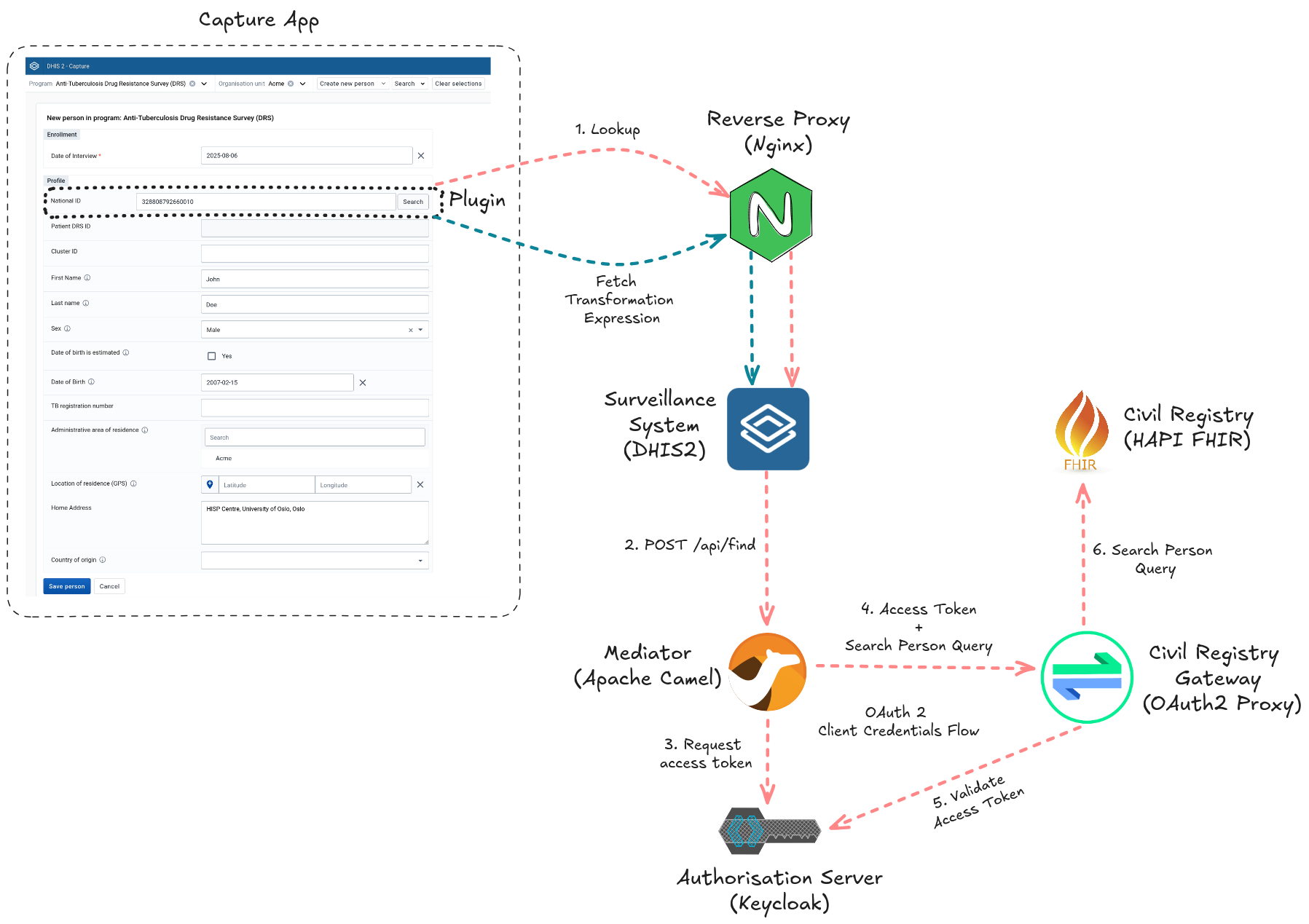
        <content type="html"><![CDATA[<p>The <a href="https://youtu.be/Kz6216OsN74?list=PLo6Seh-066Rw-rq2ujVcsf0Ka0EhMLuaE&amp;t=3104" target="_blank" rel="noopener noreferrer">DHIS2 2025 Annual Conference</a> gave us a sneak peek into our first DHIS2 reference implementations. These artefacts, which the HISP UiO core team is <a href="https://community.dhis2.org/t/announcing-the-reference-org-unit-sync-implementation/66514" target="_blank" rel="noopener noreferrer">gradually rolling out</a>, guide you in implementing common use cases. A reference implementation is not meant to be prescriptive or an off-the-shelf solution. Instead, it is a well-documented starting point that focuses on certain characteristics (e.g., reliability) over others (e.g., performance). In addition to serving as an example, such an artefact can be adapted or modified for use in production DHIS2 implementations. Today, I am thrilled to announce the general availability of the <a href="https://github.com/dhis2/reference-civil-registry-lookup" target="_blank" rel="noopener noreferrer">Civil Registry Lookup Reference Implementation</a>.</p>
<p><img decoding="async" loading="lazy" alt="Civil Registry Lookup Reference Implementation" src="https://developers.dhis2.org/assets/images/ref-civil-registry-lookup-implementation-cd8455bbec432efed1ca536384e5b12a.png" width="1797" height="1269" class="img_ev3q"></p>
<p>A civil registry is a national database for storing personal details of citizens. Whereas DHIS2 can be configured to support the collection and management of civil registry data, HISP UiO identified a need from the DHIS2 community for the <a href="https://docs.dhis2.org/en/use/user-guides/dhis-core-version-master/tracking-individual-level-data/capture.html" target="_blank" rel="noopener noreferrer">Capture app</a> to integrate with civil registries. Such integration would allow a Tracker programme to look up information from the civil registry to automatically populate forms. Automatic population reduces the chances of errors and provides a quick way to prefill forms with patient information that is accurate and up-to-date.</p>
<p>In this reference implementation, we demonstrate a fully functional, self-contained example of a DHIS2 Capture enrollment form that looks up as well as transforms personal identifiable and demographic citizen information from a <a href="https://en.wikipedia.org/wiki/Fast_Healthcare_Interoperability_Resources" target="_blank" rel="noopener noreferrer">FHIR-based</a> civil registry, before prefilling fields with this information in a form used to carry out an <a href="https://docs.dhis2.org/en/implement/health/tuberculosis/anti-tuberculosis-drug-resistance-survey-drs/design.html" target="_blank" rel="noopener noreferrer">Anti-Tuberculosis Drug Resistance Survey (anti-TB DRS)</a>. We are excited to also showcase the latest DHIS2 features such as <a href="https://developers.dhis2.org/docs/capture-plugins/developer/getting-started" target="_blank" rel="noopener noreferrer">Capture plugins</a> and <a href="https://docs.dhis2.org/en/develop/using-the-api/dhis-core-version-master/route.html" target="_blank" rel="noopener noreferrer">routes</a>. This example has already been successfully <a href="https://www.youtube.com/live/H52mIcbjx6A?si=YaQNu7dY-RQ2HdOa&amp;t=24276" target="_blank" rel="noopener noreferrer">adapted by Uzbekistan's National Tuberculosis Programme</a> and deployed in several national electronic registries as part of the country’s health management information system.</p>
<p>The diagram above conceptualises the key components and interactions of the Civil Registry Lookup Reference Implementation. Let us walk through the lookup workflow:</p>
<ol>
<li>From the Capture app, the health worker begins enrolling a participant into the Anti-TB DRS programme.</li>
<li>The health worker obtains the national ID from the participant and types it into a Capture plugin field which is part of the programme form.</li>
<li>When the health worker clicks the search button next to the national ID field, the Capture app plugin transmits a request to look up the participant by their national ID to a DHIS2 route.</li>
<li>The DHIS2 route proxies the request to a mediator sitting in front of the civil registry.</li>
<li>The mediator obtains an access token from an authorisation server and includes this token in a query it sends to the civil registry</li>
<li>A gateway intercepts the query and validates the token before forwarding the authorised query to the civil registry.</li>
<li>If found, the civil registry responds with the person's details contained within a <a href="https://hl7.org/fhir/bundle.html" target="_blank" rel="noopener noreferrer">FHIR bundle</a>.</li>
<li>The response is returned to the downstream client, that is, the plugin.</li>
<li>The plugin uses a mapping file, downloaded from DHIS2's data store, to transform the FHIR bundle into a structure it can read. Having the transformation rules reside in the data store allows you to edit the mapping without having to modify, rebuild, and reinstall the plugin source code whenever the transformation output is adjusted or the JSON structure of the civil registry response changes.</li>
<li>The plugin proceeds to autopopulate the personal identifiable and demographic information form fields with the transformed output.</li>
</ol>
<p>When adapting this implementation to your own context, the civil registry lookup workflow itself will remain more or less the same. Likely customisation points would be (1) the Tracker programme, (2) the lookup key, (3) the person details exchanged, (4) the civil registry response mapping, the (5) underlying technologies, as well as the (6) security controls. For example, during customisation, you might:</p>
<ul>
<li>Change the Anti-TB DRS Tracker programme to an Antenatal one.</li>
<li>Replace the national ID lookup key with a Personal Health Number (PHN).</li>
<li>Swap the data store mapping definition with one that expects a non-FHIR structure.</li>
<li>Substitute the <a href="https://developers.dhis2.org/docs/integration/apache-camel/" target="_blank" rel="noopener noreferrer">Apache Camel</a> mediator with <a href="https://openhim.org/" target="_blank" rel="noopener noreferrer">OpenHIM</a> or <a href="https://www.openfn.org/" target="_blank" rel="noopener noreferrer">OpenFn</a>. It is worth noting that a mediator might not be even needed depending on the constraints you have.</li>
<li>Replace the HAPI FHIR civil registry with <a href="https://www.opencrvs.org/" target="_blank" rel="noopener noreferrer">OpenCRVS</a>.</li>
<li>Add rate limiting to reduce the risk of person lookup abuse and replace the OAuth 2 Client Credentials Flow with an authentication mechanism that is aligned with your security policy.</li>
</ul>
<p>The documentation together with the code of this reference implementation live in a <a href="https://github.com/dhis2/reference-civil-registry-lookup" target="_blank" rel="noopener noreferrer">GitHub repository</a>. Head over to its <a href="https://github.com/dhis2/reference-civil-registry-lookup/blob/main/README.md" target="_blank" rel="noopener noreferrer">README</a> file to learn more about each of the artefact’s components, deployment, and running the workflow. We look forward to hearing your questions and feedback on the <a href="https://community.dhis2.org/" target="_blank" rel="noopener noreferrer">DHIS2 Community of Practice</a>.</p>]]></content>
        <author>
            <name>Claude Mamo</name>
            <uri>https://github.com/cjmamo</uri>
        </author>
        <category label="reference implementation" term="reference implementation"/>
        <category label="announcement" term="announcement"/>
    </entry>
    <entry>
        <title type="html"><![CDATA[App Platform v12]]></title>
        <id>https://developers.dhis2.org/blog/2024/12/app-platform-v12</id>
        <link href="https://developers.dhis2.org/blog/2024/12/app-platform-v12"/>
        <updated>2024-12-13T00:00:00.000Z</updated>
        <summary type="html"><![CDATA[Good news! Vite and React 18 in the app platform are ready to use! Vite replaces the deprecated Create React App (CRA) for starting and build apps, and React v18 replaces v16.]]></summary>
        <content type="html"><![CDATA[<p>Good news! Vite and React 18 in the app platform are ready to use! Vite replaces the deprecated Create React App (CRA) for starting and build apps, and React v18 replaces v16.</p>
<p>We're very excited for these updates — both will significantly modernize the App Platform, and Vite will be a big upgrade from CRA. It will greatly improve the developer experience, and with greater control over the configuration, it will open up some powerful new possibilities for the platform.</p>
<p>Here are some tips about what to expect, and how to easily upgrade to the latest version of <code>@dhis2/cli-app-scripts</code> to take advantage of Vite and React 18.</p>
<h3 class="anchor anchorWithStickyNavbar_LWe7" id="notable-changes">Notable changes<a href="https://developers.dhis2.org/blog/2024/12/app-platform-v12#notable-changes" class="hash-link" aria-label="Direct link to Notable changes" title="Direct link to Notable changes">​</a></h3>
<p>These are some things that you'll see right away after upgrading:</p>
<ul>
<li>It's fast! Starting up an app is nearly instant, and building an app is about 3-4 times faster compared to CRA</li>
<li>Plugins are handled better:<!-- -->
<ul>
<li>Start-up of both the app and plugin is nearly instant</li>
<li>The app and plugin are run on the same port</li>
<li>Support for a plugin without an app is improved</li>
<li>Code is shared between entrypoints, which makes bundles smaller</li>
<li>Hot Module Replacement (HMR) for code changes in the plugin will be as fast as in the app</li>
</ul>
</li>
<li>There are some new TypeScript features:<!-- -->
<ul>
<li>Bootstrapping an app with a TypeScript template is supported: <code>d2-app-scripts init --typescript my-app</code>. See the <a href="https://developers.dhis2.org/docs/app-platform/scripts/init"><code>init</code> docs</a> for more about the command</li>
<li>Vite has native support for TypeScript</li>
<li>Although not in the App Platform package, with the latest <code>@dhis2/cli-style</code>, TypeScript type checking is performed when running <code>d2-style lint</code></li>
<li>With <code>@dhis2/ui</code> version 9, the UI library is now typed as well</li>
</ul>
</li>
<li>There's a small suite of tools available in the CLI when running an app in dev mode:<!-- -->
<ul>
<li>With the dev server running, press <code>h + enter</code> to see the options</li>
<li>Options include exposing the server on LAN, opening the app in the browser, cleanly quitting the server, and restarting the dev server (which can be helpful if you're modifying libraries in <code>node_modules</code>)</li>
</ul>
</li>
<li>The build output includes a summary to inspect chunks</li>
</ul>
<h3 class="anchor anchorWithStickyNavbar_LWe7" id="future-changes">Future changes<a href="https://developers.dhis2.org/blog/2024/12/app-platform-v12#future-changes" class="hash-link" aria-label="Direct link to Future changes" title="Direct link to Future changes">​</a></h3>
<p>With Vite, the door is open for some big future improvements. We've already created JIRA tickets for these, so if you're interested in staying up-to-date on them you can watch these tickets.</p>
<ul>
<li>Extensible config: developers can add their own options to the Vite config, for example a plugin for Flow types, or to define import aliases (<a href="https://dhis2.atlassian.net/browse/LIBS-706" target="_blank" rel="noopener noreferrer">LIBS-706</a>)</li>
<li>Arbitrary entrypoints, beyond app/plugin/lib: Make a regular app, a configuration app, a capture plugin, a dashboard plugin, and more all from the same repo and sharing code between them (<a href="https://dhis2.atlassian.net/browse/LIBS-394" target="_blank" rel="noopener noreferrer">LIBS-394</a>)</li>
</ul>
<p>With respect to TypeScript, work is also under way to add types to data fetching tools using specs generated from OpenAPI (<a href="https://dhis2.atlassian.net/browse/LIBS-523" target="_blank" rel="noopener noreferrer">LIBS-523</a>).</p>
<h2 class="anchor anchorWithStickyNavbar_LWe7" id="getting-started">Getting started<a href="https://developers.dhis2.org/blog/2024/12/app-platform-v12#getting-started" class="hash-link" aria-label="Direct link to Getting started" title="Direct link to Getting started">​</a></h2>
<p>By running these steps, you should be able to run your app right away:</p>
<ol>
<li><code>yarn add @dhis2/app-runtime @dhis2/ui -D @dhis2/cli-app-scripts</code></li>
<li><code>npx yarn-deduplicate yarn.lock &amp;&amp; yarn</code></li>
<li>Try out <code>yarn start --allowJsxInJs</code>, and your app should be running 🚀</li>
</ol>
<p>There will be some other changes you will want to make, which are described in detail in the <a href="https://developers.dhis2.org/docs/app-platform/migration/v12">migration guide</a>. Our goal is to make it easy to adopt the new changes, so we have some tools to facilitate the process.</p>
<p>Head on over to the <a href="https://developers.dhis2.org/docs/app-platform/migration/v12">migration guide</a> for more detailed instructions and technical background information.</p>
<p>Enjoy the updates, and happy coding!</p>]]></content>
        <author>
            <name>DHIS2 Core Team</name>
        </author>
        <author>
            <name>Kai Vandivier</name>
            <uri>https://github.com/KaiVandivier</uri>
        </author>
        <category label="app platform" term="app platform"/>
        <category label="developer tools" term="developer tools"/>
        <category label="webapp" term="webapp"/>
        <category label="announcement" term="announcement"/>
    </entry>
    <entry>
        <title type="html"><![CDATA[Developer Portal has a new Navigation Structure]]></title>
        <id>https://developers.dhis2.org/blog/2024/11/developer-portal-restructure</id>
        <link href="https://developers.dhis2.org/blog/2024/11/developer-portal-restructure"/>
        <updated>2024-11-28T00:00:00.000Z</updated>
        <summary type="html"><![CDATA[In recent months, more and more documentation has been added to the Developer Portal. But with many new additions, the navigation structure of the Developer Portal has become a bit cluttered. To make it easier to find the information you need, we've restructured the navigation of the Developer Portal.]]></summary>
        <content type="html"><![CDATA[<p>In recent months, more and more documentation has been added to the Developer Portal. But with many new additions, the navigation structure of the Developer Portal has become a bit cluttered. To make it easier to find the information you need, we've restructured the navigation of the Developer Portal.</p>
<p>In this blogpost we'll quickly go over all the new releases, and how the new structure is implemented to not only make it more organized, but also to be more future-proof for new sections that will be added in the future.</p>
<p>The Developer Portal Docs section has always consisted of a split between Guides &amp; Tutorials and References. But as new sections have been added to the Developer Portal, such as the UI Library and Mobile UI docs, the navigation has become a bit cluttered. Therefore we decided to restructure the navigation of the Developer Portal.</p>
<h3 class="anchor anchorWithStickyNavbar_LWe7" id="ui-library">UI Library<a href="https://developers.dhis2.org/blog/2024/11/developer-portal-restructure#ui-library" class="hash-link" aria-label="Direct link to UI Library" title="Direct link to UI Library">​</a></h3>
<p>The UI library was previously hosted on a separate site, but we've now moved it to the Developer Portal. The UI Library is a collection of reusable components which can be used to build your own DHIS2 applications.  These components implement the <a href="https://developers.dhis2.org/design-system">DHIS2 Design System</a> which consists of best practices, predefined colors, an icon library and other patterns and principles. The Design System documentation is now separated from the Web UI components. The Design system is applicable to all DHIS2 applications (Web &amp; Android), while the Web UI components are specifically for use in web applications.</p>
<p>You can find the <a href="https://developers.dhis2.org/design-system">Design System</a> in the top bar navigation of the Developer Portal, while the <a href="https://developers.dhis2.org/docs/ui/webcomponents">Web UI components</a> are found in the Reference Docs section.</p>
<p>We've also moved the interactive demo into the developer portal, but it still lives as a separate page. You can find the <a href="https://developers.dhis2.org/demo/" target="_blank" rel="noopener noreferrer">Interactive Demo</a> from within each Web UI component page through the in-line demos.</p>
<h3 class="anchor anchorWithStickyNavbar_LWe7" id="mobile-documentation">Mobile Documentation<a href="https://developers.dhis2.org/blog/2024/11/developer-portal-restructure#mobile-documentation" class="hash-link" aria-label="Direct link to Mobile Documentation" title="Direct link to Mobile Documentation">​</a></h3>
<p>The Mobile Documentation has been introduced into the Developer portal only recently, and has shortly lived as a top-level navigation item. But as it <em>actually</em> had a place as a sub-section of the Guides &amp; Tutorials section, we've moved it there. You can find the <a href="https://developers.dhis2.org/docs/mobile">Mobile Documentation in the Guides &amp; Tutorials section</a>. You can expect more content to be added to this section in the near future.</p>
<h3 class="anchor anchorWithStickyNavbar_LWe7" id="splitting-of-guides--tutorials-from-reference-docs">Splitting of Guides &amp; Tutorials from Reference Docs<a href="https://developers.dhis2.org/blog/2024/11/developer-portal-restructure#splitting-of-guides--tutorials-from-reference-docs" class="hash-link" aria-label="Direct link to Splitting of Guides &amp; Tutorials from Reference Docs" title="Direct link to Splitting of Guides &amp; Tutorials from Reference Docs">​</a></h3>
<p>Previously, all guides, tutorial and references were found in the same section, hidden under the "docs" label in the top-level navigation. However, as the Developer Portal has grown, we've decided to split these two parts into two separate top-level sections. Guides &amp; Tutorials can be found in the <a href="https://developers.dhis2.org/docs">Guides &amp; Tutorials section</a>, while References can be found in the <a href="https://developers.dhis2.org/docs/references">Reference Docs section</a>. This makes it easier to find the information you need, and also makes it easier to add new sections in the future.</p>
<h2 class="anchor anchorWithStickyNavbar_LWe7" id="searching-within-developer-portal--ai">Searching within Developer Portal &amp; AI<a href="https://developers.dhis2.org/blog/2024/11/developer-portal-restructure#searching-within-developer-portal--ai" class="hash-link" aria-label="Direct link to Searching within Developer Portal &amp; AI" title="Direct link to Searching within Developer Portal &amp; AI">​</a></h2>
<p>Because many new sections have been added to the Developer Portal, the search bar on the top-right has also become more useful. Not only is it able to search whatever was there before the merge, but now it knows about many more pages. This is incredibly useful as a one-stop search.</p>
<p>But if  that is not enough, several months ago we released a new AI Search Assistent. This AI is accessible through the "Ask AI" button in the bottom-right corner of the Developer Portal. This is powered by the amazing <a href="https://kapa.ai/" target="_blank" rel="noopener noreferrer">Kapa AI</a> and is able to answer many of your questions. But as it knows much more than just what is in the Developer Portal, it can also answer questions about the DHIS2 Web API, the DHIS2 Community of Practice, and general usage of DHIS2.</p>
<p>If you're using this, make sure to give us feedback by pressing the thumbs-up or thumbs-down button after you've received an answer. Then, when applicable, you can add a comment to your rating which we'll be able to see. This will help us improve the AI over time.</p>
<h2 class="anchor anchorWithStickyNavbar_LWe7" id="conclusion">Conclusion<a href="https://developers.dhis2.org/blog/2024/11/developer-portal-restructure#conclusion" class="hash-link" aria-label="Direct link to Conclusion" title="Direct link to Conclusion">​</a></h2>
<p>We hope that with this new structure it will be easier to find the information you need. It should make the Developer Portal a more pleasant experience to use. If you have any feedback, please let us know on the <a href="https://community.dhis2.org/c/development/developer-portal/" target="_blank" rel="noopener noreferrer">Community of Practice</a>. We're always looking for ways to improve the Developer Portal, and your feedback is invaluable to us.</p>]]></content>
        <author>
            <name>Rene Pot</name>
            <uri>https://github.com/Topener</uri>
        </author>
        <category label="developer-portal" term="developer-portal"/>
    </entry>
    <entry>
        <title type="html"><![CDATA[Standing up a FHIR Gateway for DHIS2 from an Implementation Guide]]></title>
        <id>https://developers.dhis2.org/blog/2024/05/standing-up-a-fhir-gateway-for-dhis2-from-an-ig</id>
        <link href="https://developers.dhis2.org/blog/2024/05/standing-up-a-fhir-gateway-for-dhis2-from-an-ig"/>
        <updated>2024-05-20T00:00:00.000Z</updated>
        <summary type="html"><![CDATA[A modern vision of health interoperability is one where systems exchange health care data using the FHIR (Fast Health Interoperability Resources) standard to describe the types of resources and data to be exchanged. FHIR outlines these resources and data using what is called an Implementation Guide (IG). An IG specifies the rules for interoperability in a formal, machine-readable, and testable way. In this post, we will show you how to stand up a FHIR gateway for DHIS2 from an IG so that DHIS2 can interoperate with FHIR clients.]]></summary>
        <content type="html"><![CDATA[<p>A modern vision of health interoperability is one where systems exchange health care data using the <a href="https://en.wikipedia.org/wiki/Fast_Healthcare_Interoperability_Resources" target="_blank" rel="noopener noreferrer">FHIR (Fast Health Interoperability Resources)</a> standard to describe the types of resources and data to be exchanged. FHIR outlines these resources and data using what is called an <a href="https://www.hl7.org/fhir/implementationguide.html" target="_blank" rel="noopener noreferrer">Implementation Guide (IG)</a>. An IG specifies the rules for interoperability in a formal, machine-readable, and testable way. In this post, we will show you how to stand up a FHIR gateway for DHIS2 from an IG so that DHIS2 can interoperate with FHIR clients.</p>
<p>The following diagram illustrates the role of a FHIR gateway, or more accurately, a FHIR facade sitting in front of DHIS2:</p>
<p><img decoding="async" loading="lazy" alt="FHIR gateway" src="https://developers.dhis2.org/assets/images/fhir-gateway-56de2995c57154d84c7d8d2e896b5c71.png" width="1307" height="521" class="img_ev3q"></p>
<p>A FHIR facade is a layer of software translating FHIR exchanges between a FHIR client and a non-FHIR system. <a href="https://build.fhir.org/exchange-module.html" target="_blank" rel="noopener noreferrer">FHIR consists of numerous communication patterns</a> therefore this how-to will focus only on one: the <a href="https://www.hl7.org/fhir/http.html" target="_blank" rel="noopener noreferrer">RESTful API</a>. More precisely, we will demonstrate step-by-step how to build an <em>IG-first</em> FHIR facade that returns a FHIR <a href="https://build.fhir.org/questionnaireresponse.html" target="_blank" rel="noopener noreferrer">QuestionnaireResponse resource</a> from DHIS2 given a <a href="https://docs.dhis2.org/en/develop/using-the-api/dhis-core-version-240/tracker.html#tracked-entity" target="_blank" rel="noopener noreferrer">tracked entity</a> ID. IG-first is emphasised because this approach to building facades takes advantage of IG computability and all the benefits that go with it (e.g., enforcing separation of concerns between the IG author and the gateway implementer).</p>
<p>The facade in this how-to will (1) use the transmitted QuestionnaireResponse ID, as sent by the FHIR client, to fetch a tracked entity from DHIS2 to then (2) convert this entity into a QuestionnaireResponse thanks to the <a href="https://build.fhir.org/structuremap.html" target="_blank" rel="noopener noreferrer">IG StructureMap</a> before (3) returning it to the FHIR client. The engine powering the facade is <a href="https://camel.apache.org/manual/faq/what-is-camel.html" target="_blank" rel="noopener noreferrer">Apache Camel</a>: a Java integration framework for building message-oriented middleware.</p>
<p>Before drilling in, it is worth highlighting that there is no special reason why QuestionnaireResponse was selected to be the FHIR representation of a tracked entity other than it is conceptually easier to map from a tracked entity to a QuestionnaireResponse. Your data exchange requirements will dictate which FHIR resources to use for representing DHIS2 resources.</p>
<div class="theme-admonition theme-admonition-info admonition_xJq3 alert alert--info"><div class="admonitionHeading_Gvgb"><span class="admonitionIcon_Rf37"><svg viewBox="0 0 14 16"><path fill-rule="evenodd" d="M7 2.3c3.14 0 5.7 2.56 5.7 5.7s-2.56 5.7-5.7 5.7A5.71 5.71 0 0 1 1.3 8c0-3.14 2.56-5.7 5.7-5.7zM7 1C3.14 1 0 4.14 0 8s3.14 7 7 7 7-3.14 7-7-3.14-7-7-7zm1 3H6v5h2V4zm0 6H6v2h2v-2z"></path></svg></span>info</div><div class="admonitionContent_BuS1"><p>The subsequent code targeting the DHIS2 API is based on v40. Consult the <a href="https://docs.dhis2.org/en/develop/using-the-api/dhis-core-version-240/introduction.html" target="_blank" rel="noopener noreferrer">Web API documentation</a> and <a href="https://developers.dhis2.org/" target="_blank" rel="noopener noreferrer">other sources</a> to rewrite the code for your version of DHIS2. Furthermore, this guide assumes that the Sierra Leone demo database is used for the DHIS2 server. You will likely need to change the code or your DHIS2 configuration to successfully test the gateway in your environment.</p></div></div>
<h2 class="anchor anchorWithStickyNavbar_LWe7" id="authoring-the-fhir-ig">Authoring the FHIR IG<a href="https://developers.dhis2.org/blog/2024/05/standing-up-a-fhir-gateway-for-dhis2-from-an-ig#authoring-the-fhir-ig" class="hash-link" aria-label="Direct link to Authoring the FHIR IG" title="Direct link to Authoring the FHIR IG">​</a></h2>
<p>Since the IG <em>drives</em> the FHIR gateway, let us author a minimal gateway IG in <a href="https://build.fhir.org/ig/HL7/fhir-shorthand/" target="_blank" rel="noopener noreferrer">FHIR Shorthand (FSH)</a> that defines:</p>
<ol>
<li>
<p>A <a href="https://build.fhir.org/capabilitystatement.html" target="_blank" rel="noopener noreferrer">capability statement</a> declaring the capabilities that gateway implementations should follow. After authoring the IG, you will run the <a href="https://confluence.hl7.org/display/FHIR/IG+Publisher+Documentation" target="_blank" rel="noopener noreferrer">IG publisher</a> to convert the IG source content into a published IG. During this conversion, the publisher will generate an <a href="https://www.openapis.org/what-is-openapi" target="_blank" rel="noopener noreferrer">OpenAPI</a> definition JSON file from the capability statement. The importance of this file will <a href="https://developers.dhis2.org/blog/2024/05/standing-up-a-fhir-gateway-for-dhis2-from-an-ig#generating-gateway-endpoints">soon be explained</a>.</p>
</li>
<li>
<p>A partial DHIS2 tracked entity <a href="https://build.fhir.org/logical.html" target="_blank" rel="noopener noreferrer">logical model</a>. The logical model provides us with the means to describe non-FHIR resources, such as DHIS2 resources, in an IG. The logical model is referenced from the statically-typed mapping file explained next.</p>
</li>
</ol>
<div class="theme-admonition theme-admonition-info admonition_xJq3 alert alert--info"><div class="admonitionHeading_Gvgb"><span class="admonitionIcon_Rf37"><svg viewBox="0 0 14 16"><path fill-rule="evenodd" d="M7 2.3c3.14 0 5.7 2.56 5.7 5.7s-2.56 5.7-5.7 5.7A5.71 5.71 0 0 1 1.3 8c0-3.14 2.56-5.7 5.7-5.7zM7 1C3.14 1 0 4.14 0 8s3.14 7 7 7 7-3.14 7-7-3.14-7-7-7zm1 3H6v5h2V4zm0 6H6v2h2v-2z"></path></svg></span>info</div><div class="admonitionContent_BuS1"><p>The logical model does not necessarily need to be an abstraction of a DHIS2 resource: the model could be system-independent. The tracked entity is the logical model here because we want to avoid coding an additional step in the gateway that transforms the tracked entity to the system-independent model.</p></div></div>
<ol start="3">
<li>The mapping written in the <a href="https://build.fhir.org/mapping-language.html" target="_blank" rel="noopener noreferrer">FHIR Mapping Language (FML)</a> which turns a logical model instance (i.e., tracked entity) into a QuestionnaireResponse. As we will see later on, the mapping's underlying StructureMap will be executed in the FHIR gateway.</li>
</ol>
<p>With the help of <a href="https://fshschool.org/docs/" target="_blank" rel="noopener noreferrer">SUSHI</a>, a FSH reference implementation, create a skeleton IG using the terminal command:</p>
<div class="codeBlockContainer_Ckt0 theme-code-block" style="--prism-color:#bfc7d5;--prism-background-color:#292d3e"><div class="codeBlockContent_biex"><pre tabindex="0" class="prism-code language-text codeBlock_bY9V thin-scrollbar" style="color:#bfc7d5;background-color:#292d3e"><code class="codeBlockLines_e6Vv"><span class="token-line" style="color:#bfc7d5"><span class="token plain">sushi init</span><br></span></code></pre><div class="buttonGroup__atx"><button type="button" aria-label="Copy code to clipboard" title="Copy" class="clean-btn"><span class="copyButtonIcons_eSgA" aria-hidden="true"><svg viewBox="0 0 24 24" class="copyButtonIcon_y97N"><path fill="currentColor" d="M19,21H8V7H19M19,5H8A2,2 0 0,0 6,7V21A2,2 0 0,0 8,23H19A2,2 0 0,0 21,21V7A2,2 0 0,0 19,5M16,1H4A2,2 0 0,0 2,3V17H4V3H16V1Z"></path></svg><svg viewBox="0 0 24 24" class="copyButtonSuccessIcon_LjdS"><path fill="currentColor" d="M21,7L9,19L3.5,13.5L4.91,12.09L9,16.17L19.59,5.59L21,7Z"></path></svg></span></button></div></div></div>
<div class="theme-admonition theme-admonition-note admonition_xJq3 alert alert--secondary"><div class="admonitionHeading_Gvgb"><span class="admonitionIcon_Rf37"><svg viewBox="0 0 14 16"><path fill-rule="evenodd" d="M6.3 5.69a.942.942 0 0 1-.28-.7c0-.28.09-.52.28-.7.19-.18.42-.28.7-.28.28 0 .52.09.7.28.18.19.28.42.28.7 0 .28-.09.52-.28.7a1 1 0 0 1-.7.3c-.28 0-.52-.11-.7-.3zM8 7.99c-.02-.25-.11-.48-.31-.69-.2-.19-.42-.3-.69-.31H6c-.27.02-.48.13-.69.31-.2.2-.3.44-.31.69h1v3c.02.27.11.5.31.69.2.2.42.31.69.31h1c.27 0 .48-.11.69-.31.2-.19.3-.42.31-.69H8V7.98v.01zM7 2.3c-3.14 0-5.7 2.54-5.7 5.68 0 3.14 2.56 5.7 5.7 5.7s5.7-2.55 5.7-5.7c0-3.15-2.56-5.69-5.7-5.69v.01zM7 .98c3.86 0 7 3.14 7 7s-3.14 7-7 7-7-3.12-7-7 3.14-7 7-7z"></path></svg></span>note</div><div class="admonitionContent_BuS1"><p>Ensure that all prerequisites for running SUSHI have been met.</p></div></div>
<p>The above command gives you a series of prompts as shown below:</p>
<p><img decoding="async" loading="lazy" alt="SUSHI init" src="https://developers.dhis2.org/assets/images/sushi-init-a4c33fb9f6a40b8a274b6b26f4805269.png" width="1082" height="510" class="img_ev3q"></p>
<p>Arguably, the most important prompt is the one asking for the IG name. We name the IG <code>MinimalGatewayIG</code> and open the IG project from <a href="https://code.visualstudio.com/" target="_blank" rel="noopener noreferrer">Visual Studio Code (VS Code)</a>. In this guide, we will use VS Code to author the IG but feel free to choose whichever authoring tool you feel most comfortable with. VS Code was chosen here because the editor offers a <a href="https://github.com/standardhealth/vscode-language-fsh" target="_blank" rel="noopener noreferrer">FSH extension</a> that assists you while writing in FSH. The skeleton IG project produced from the SUSHI command, as viewed from VS Code, is displayed below:</p>
<p><img decoding="async" loading="lazy" alt="IG from VS Code" src="https://developers.dhis2.org/assets/images/ig-vscode-3292e9e285fd118b4bfdb078f457abb7.png" width="1444" height="652" class="img_ev3q"></p>
<p>The auto-generated <code>patient.fsh</code> file inside the <code>input/fsh</code> directory ought to be deleted since it is not needed.</p>
<h3 class="anchor anchorWithStickyNavbar_LWe7" id="capability-statement">Capability Statement<a href="https://developers.dhis2.org/blog/2024/05/standing-up-a-fhir-gateway-for-dhis2-from-an-ig#capability-statement" class="hash-link" aria-label="Direct link to Capability Statement" title="Direct link to Capability Statement">​</a></h3>
<p>The first FSH file we create in the IG is named <code>capability-statement.fsh</code> where it will be placed in the <code>input/fsh</code> directory. This file declares the capabilities of the gateway implementing this IG and should contain this text:</p>
<div class="language-fsh codeBlockContainer_Ckt0 theme-code-block" style="--prism-color:#bfc7d5;--prism-background-color:#292d3e"><div class="codeBlockContent_biex"><pre tabindex="0" class="prism-code language-fsh codeBlock_bY9V thin-scrollbar" style="color:#bfc7d5;background-color:#292d3e"><code class="codeBlockLines_e6Vv"><span class="token-line" style="color:#bfc7d5"><span class="token plain">Instance: Dhis2FhirGatewayCapabilities</span><br></span><span class="token-line" style="color:#bfc7d5"><span class="token plain">InstanceOf: CapabilityStatement</span><br></span><span class="token-line" style="color:#bfc7d5"><span class="token plain">Usage: #definition</span><br></span><span class="token-line" style="color:#bfc7d5"><span class="token plain">* name = "Dhis2FHIRGateway"</span><br></span><span class="token-line" style="color:#bfc7d5"><span class="token plain">* title = "DHIS2 FHIR Gateway"</span><br></span><span class="token-line" style="color:#bfc7d5"><span class="token plain">* status = #active</span><br></span><span class="token-line" style="color:#bfc7d5"><span class="token plain">* date = "2024-05-04"</span><br></span><span class="token-line" style="color:#bfc7d5"><span class="token plain">* description = "This statement defines the expected capabilities of systems wishing to conform to the gateway role."</span><br></span><span class="token-line" style="color:#bfc7d5"><span class="token plain">* kind = #requirements</span><br></span><span class="token-line" style="color:#bfc7d5"><span class="token plain">* fhirVersion = #4.0.1</span><br></span><span class="token-line" style="color:#bfc7d5"><span class="token plain">* format = #json</span><br></span><span class="token-line" style="color:#bfc7d5"><span class="token plain">* rest.mode = #server</span><br></span><span class="token-line" style="color:#bfc7d5"><span class="token plain" style="display:inline-block"></span><br></span><span class="token-line" style="color:#bfc7d5"><span class="token plain">* rest.resource[+].type = #QuestionnaireResponse</span><br></span><span class="token-line" style="color:#bfc7d5"><span class="token plain">* rest.resource[=].interaction.code = #read</span><br></span></code></pre><div class="buttonGroup__atx"><button type="button" aria-label="Copy code to clipboard" title="Copy" class="clean-btn"><span class="copyButtonIcons_eSgA" aria-hidden="true"><svg viewBox="0 0 24 24" class="copyButtonIcon_y97N"><path fill="currentColor" d="M19,21H8V7H19M19,5H8A2,2 0 0,0 6,7V21A2,2 0 0,0 8,23H19A2,2 0 0,0 21,21V7A2,2 0 0,0 19,5M16,1H4A2,2 0 0,0 2,3V17H4V3H16V1Z"></path></svg><svg viewBox="0 0 24 24" class="copyButtonSuccessIcon_LjdS"><path fill="currentColor" d="M21,7L9,19L3.5,13.5L4.91,12.09L9,16.17L19.59,5.59L21,7Z"></path></svg></span></button></div></div></div>
<p>As per the above capability statement, a server following this IG will only need to serve a single type of FHIR resource which is the QuestionnaireResponse.</p>
<h3 class="anchor anchorWithStickyNavbar_LWe7" id="logical-model">Logical Model<a href="https://developers.dhis2.org/blog/2024/05/standing-up-a-fhir-gateway-for-dhis2-from-an-ig#logical-model" class="hash-link" aria-label="Direct link to Logical Model" title="Direct link to Logical Model">​</a></h3>
<p>The next FSH file to create is <code>dhis2-logical-model.fsh</code>. This file defines the logical model for the DHIS2 tracked entity, along with its attributes, enrollments, events, and data values:</p>
<div class="language-fsh codeBlockContainer_Ckt0 theme-code-block" style="--prism-color:#bfc7d5;--prism-background-color:#292d3e"><div class="codeBlockContent_biex"><pre tabindex="0" class="prism-code language-fsh codeBlock_bY9V thin-scrollbar" style="color:#bfc7d5;background-color:#292d3e"><code class="codeBlockLines_e6Vv"><span class="token-line" style="color:#bfc7d5"><span class="token plain">Logical:         TrackedEntity</span><br></span><span class="token-line" style="color:#bfc7d5"><span class="token plain">Id:              tracked-entity-logical-model</span><br></span><span class="token-line" style="color:#bfc7d5"><span class="token plain">Title:           "Tracked Entity"</span><br></span><span class="token-line" style="color:#bfc7d5"><span class="token plain">Description:     "An entity that is tracked throughout DHIS2."</span><br></span><span class="token-line" style="color:#bfc7d5"><span class="token plain">* trackedEntity 1..1 string "Identifier of the tracked entity"</span><br></span><span class="token-line" style="color:#bfc7d5"><span class="token plain">* attributes 0..* Attribute "List of tracked entity attribute values owned by the tracked entity"</span><br></span><span class="token-line" style="color:#bfc7d5"><span class="token plain">* enrollments 0..* Enrollment "List of enrollments owned by the tracked entity"</span><br></span><span class="token-line" style="color:#bfc7d5"><span class="token plain" style="display:inline-block"></span><br></span><span class="token-line" style="color:#bfc7d5"><span class="token plain">Logical:        Attribute</span><br></span><span class="token-line" style="color:#bfc7d5"><span class="token plain">Id:             attribute</span><br></span><span class="token-line" style="color:#bfc7d5"><span class="token plain">Title:          "Attribute"</span><br></span><span class="token-line" style="color:#bfc7d5"><span class="token plain">Description:    "A data point within a tracked entity or an enrollment."</span><br></span><span class="token-line" style="color:#bfc7d5"><span class="token plain">* attribute 1..1 string "References the attribute definition ID that this attribute represents"</span><br></span><span class="token-line" style="color:#bfc7d5"><span class="token plain">* value 1..1 string "Value of the tracked entity attribute"</span><br></span><span class="token-line" style="color:#bfc7d5"><span class="token plain" style="display:inline-block"></span><br></span><span class="token-line" style="color:#bfc7d5"><span class="token plain">Logical:        Enrollment</span><br></span><span class="token-line" style="color:#bfc7d5"><span class="token plain">Id:             enrollment</span><br></span><span class="token-line" style="color:#bfc7d5"><span class="token plain">Title:          "Enrollment"</span><br></span><span class="token-line" style="color:#bfc7d5"><span class="token plain">Description:    "Enrollment"</span><br></span><span class="token-line" style="color:#bfc7d5"><span class="token plain">* events 0..* Event "List of events owned by the enrollment"</span><br></span><span class="token-line" style="color:#bfc7d5"><span class="token plain">* orgUnitName 1..1 string "Name of the organisation unit where the enrollment took place"</span><br></span><span class="token-line" style="color:#bfc7d5"><span class="token plain">* attributes 0..* Attribute "List of tracked entity attribute values connected to the enrollment"</span><br></span><span class="token-line" style="color:#bfc7d5"><span class="token plain" style="display:inline-block"></span><br></span><span class="token-line" style="color:#bfc7d5"><span class="token plain">Logical:        Event</span><br></span><span class="token-line" style="color:#bfc7d5"><span class="token plain">Id:             event</span><br></span><span class="token-line" style="color:#bfc7d5"><span class="token plain">Title:          "Event"</span><br></span><span class="token-line" style="color:#bfc7d5"><span class="token plain">Description:    "Event"</span><br></span><span class="token-line" style="color:#bfc7d5"><span class="token plain">* programStage 1..1 string "Identifier of the program stage"</span><br></span><span class="token-line" style="color:#bfc7d5"><span class="token plain">* createdAt 1..1 dateTime "Timestamp when the user created the event."</span><br></span><span class="token-line" style="color:#bfc7d5"><span class="token plain">* dataValues 0..* DataValue "List of data values connected to the event"</span><br></span><span class="token-line" style="color:#bfc7d5"><span class="token plain" style="display:inline-block"></span><br></span><span class="token-line" style="color:#bfc7d5"><span class="token plain">Logical:        DataValue</span><br></span><span class="token-line" style="color:#bfc7d5"><span class="token plain">Id:             data-value</span><br></span><span class="token-line" style="color:#bfc7d5"><span class="token plain">Title:          "Data Value"</span><br></span><span class="token-line" style="color:#bfc7d5"><span class="token plain">Description:    "A data point within an event."</span><br></span><span class="token-line" style="color:#bfc7d5"><span class="token plain">* dataElement 1..1 string "Identifier of the data element this data value represents"</span><br></span><span class="token-line" style="color:#bfc7d5"><span class="token plain">* value 1..1 string "Value of the data value"</span><br></span></code></pre><div class="buttonGroup__atx"><button type="button" aria-label="Copy code to clipboard" title="Copy" class="clean-btn"><span class="copyButtonIcons_eSgA" aria-hidden="true"><svg viewBox="0 0 24 24" class="copyButtonIcon_y97N"><path fill="currentColor" d="M19,21H8V7H19M19,5H8A2,2 0 0,0 6,7V21A2,2 0 0,0 8,23H19A2,2 0 0,0 21,21V7A2,2 0 0,0 19,5M16,1H4A2,2 0 0,0 2,3V17H4V3H16V1Z"></path></svg><svg viewBox="0 0 24 24" class="copyButtonSuccessIcon_LjdS"><path fill="currentColor" d="M21,7L9,19L3.5,13.5L4.91,12.09L9,16.17L19.59,5.59L21,7Z"></path></svg></span></button></div></div></div>
<h3 class="anchor anchorWithStickyNavbar_LWe7" id="mapping">Mapping<a href="https://developers.dhis2.org/blog/2024/05/standing-up-a-fhir-gateway-for-dhis2-from-an-ig#mapping" class="hash-link" aria-label="Direct link to Mapping" title="Direct link to Mapping">​</a></h3>
<p>Last, but not least, is the FML script mapping a tracked entity (i.e., an instance of the logical model) to a QuestionnaireResponse. Even though the mapping could be described directly in a FHIR StructureMap resource, FML is a more idiomatic way of describing the mapping. Name the file containing the FML <code>tracked-entity-to-bundle.fml</code> and place it under a new directory named <code>resources</code> within the existing <code>input</code> directory. Copy the script below to <code>tracked-entity-to-bundle.fml</code>:</p>
<div class="language-fml codeBlockContainer_Ckt0 theme-code-block" style="--prism-color:#bfc7d5;--prism-background-color:#292d3e"><div class="codeBlockContent_biex"><pre tabindex="0" class="prism-code language-fml codeBlock_bY9V thin-scrollbar" style="color:#bfc7d5;background-color:#292d3e"><code class="codeBlockLines_e6Vv"><span class="token-line" style="color:#bfc7d5"><span class="token plain">map "https://dhis2.org/fhir/StructureMap/TrackedEntityToBundle" = "Tracked Entity to Bundle Conversion"</span><br></span><span class="token-line" style="color:#bfc7d5"><span class="token plain" style="display:inline-block"></span><br></span><span class="token-line" style="color:#bfc7d5"><span class="token plain">uses "https://dhis2.org/StructureDefinition/tracked-entity-logical-model" alias TrackedEntityLogicalModel as source</span><br></span><span class="token-line" style="color:#bfc7d5"><span class="token plain">uses "http://hl7.org/fhir/StructureDefinition/Bundle" alias Bundle as target</span><br></span><span class="token-line" style="color:#bfc7d5"><span class="token plain">uses "http://hl7.org/fhir/StructureDefinition/BackboneElement" alias BackboneElement as target</span><br></span><span class="token-line" style="color:#bfc7d5"><span class="token plain">uses "http://hl7.org/fhir/StructureDefinition/QuestionnaireResponse" alias QuestionnaireResponse as target</span><br></span><span class="token-line" style="color:#bfc7d5"><span class="token plain">uses "http://hl7.org/fhir/StructureDefinition/Meta" alias Meta as target</span><br></span><span class="token-line" style="color:#bfc7d5"><span class="token plain">uses "http://hl7.org/fhir/StructureDefinition/Narrative" alias Narrative as target</span><br></span><span class="token-line" style="color:#bfc7d5"><span class="token plain">uses "http://hl7.org/fhir/StructureDefinition/Identifier" alias Identifier as target</span><br></span><span class="token-line" style="color:#bfc7d5"><span class="token plain" style="display:inline-block"></span><br></span><span class="token-line" style="color:#bfc7d5"><span class="token plain">group trackedEntityToBundle(source trackedEntity : TrackedEntityLogicalModel, target bundle : Bundle) {</span><br></span><span class="token-line" style="color:#bfc7d5"><span class="token plain">  trackedEntity -&gt; bundle.type = 'batch' "type";</span><br></span><span class="token-line" style="color:#bfc7d5"><span class="token plain">  trackedEntity as te -&gt;  ('A03MvHHogjR') as birthProgramStageId,  </span><br></span><span class="token-line" style="color:#bfc7d5"><span class="token plain">    evaluate(te, te.attributes.where(attribute = 'w75KJ2mc4zz').first().value) as name,  </span><br></span><span class="token-line" style="color:#bfc7d5"><span class="token plain">    evaluate(te, te.enrollments.first().repeat(events).where(programStage = birthProgramStageId).first().createdAt) as createdAt,  </span><br></span><span class="token-line" style="color:#bfc7d5"><span class="token plain">    bundle.entry as e then {</span><br></span><span class="token-line" style="color:#bfc7d5"><span class="token plain">      te -&gt; e.resource = create('QuestionnaireResponse') as qr then questionnaireResponse(createdAt, name, te, qr) "resource";</span><br></span><span class="token-line" style="color:#bfc7d5"><span class="token plain">      te.trackedEntity as id -&gt;  e.request = create('BackboneElement') as request, request.method = 'PUT',  request.url = append('QuestionnaireResponse?identifier=', id) "request";</span><br></span><span class="token-line" style="color:#bfc7d5"><span class="token plain">  } "bundle";</span><br></span><span class="token-line" style="color:#bfc7d5"><span class="token plain">}</span><br></span><span class="token-line" style="color:#bfc7d5"><span class="token plain" style="display:inline-block"></span><br></span><span class="token-line" style="color:#bfc7d5"><span class="token plain">group questionnaireResponse(source createdAt : dateTime, source name : string, source trackedEntity : TrackedEntityLogicalModel, target qr : QuestionnaireResponse) {</span><br></span><span class="token-line" style="color:#bfc7d5"><span class="token plain">  trackedEntity.trackedEntity as id -&gt; qr.id = id;</span><br></span><span class="token-line" style="color:#bfc7d5"><span class="token plain">  trackedEntity -&gt;  qr.meta = create('Meta') as meta, meta.profile = 'https://dhis2.org/fhir/StructureDefinition/QuestionnaireResponse' "meta";</span><br></span><span class="token-line" style="color:#bfc7d5"><span class="token plain">  trackedEntity -&gt; qr.text = create('Narrative') as narrative then narrative(name, trackedEntity, narrative) "text";</span><br></span><span class="token-line" style="color:#bfc7d5"><span class="token plain">  trackedEntity -&gt; qr.identifier = create('Identifier') as identifier then identifier(name, trackedEntity, identifier) "identifier";</span><br></span><span class="token-line" style="color:#bfc7d5"><span class="token plain">  trackedEntity -&gt; qr.questionnaire = 'https://dhis2.org/fhir/Questionnaire' "questionnaire";</span><br></span><span class="token-line" style="color:#bfc7d5"><span class="token plain">  trackedEntity -&gt; qr.status = 'completed' "status";</span><br></span><span class="token-line" style="color:#bfc7d5"><span class="token plain">  createdAt -&gt; qr.authored = createdAt "authored";</span><br></span><span class="token-line" style="color:#bfc7d5"><span class="token plain">}</span><br></span><span class="token-line" style="color:#bfc7d5"><span class="token plain" style="display:inline-block"></span><br></span><span class="token-line" style="color:#bfc7d5"><span class="token plain">group identifier(source name : string, source trackedEntity : TrackedEntityLogicalModel, target identifier : Identifier) {</span><br></span><span class="token-line" style="color:#bfc7d5"><span class="token plain">  trackedEntity as te -&gt;  identifier.system = 'http://dhis2.org/esavi/PRY', identifier.value = name "identifier";</span><br></span><span class="token-line" style="color:#bfc7d5"><span class="token plain">}</span><br></span><span class="token-line" style="color:#bfc7d5"><span class="token plain" style="display:inline-block"></span><br></span><span class="token-line" style="color:#bfc7d5"><span class="token plain">group narrative(source name : string, source trackedEntity : TrackedEntityLogicalModel, target narrative : Narrative) {</span><br></span><span class="token-line" style="color:#bfc7d5"><span class="token plain">  trackedEntity -&gt;  narrative.status = 'generated',  narrative.div = append('&lt;div xmlns=\"\"\"\"http://www.w3.org/1999/xhtml\"\"\"\"&gt;Name ', name, '&lt;/div&gt;') "narrative";</span><br></span><span class="token-line" style="color:#bfc7d5"><span class="token plain">}</span><br></span></code></pre><div class="buttonGroup__atx"><button type="button" aria-label="Copy code to clipboard" title="Copy" class="clean-btn"><span class="copyButtonIcons_eSgA" aria-hidden="true"><svg viewBox="0 0 24 24" class="copyButtonIcon_y97N"><path fill="currentColor" d="M19,21H8V7H19M19,5H8A2,2 0 0,0 6,7V21A2,2 0 0,0 8,23H19A2,2 0 0,0 21,21V7A2,2 0 0,0 19,5M16,1H4A2,2 0 0,0 2,3V17H4V3H16V1Z"></path></svg><svg viewBox="0 0 24 24" class="copyButtonSuccessIcon_LjdS"><path fill="currentColor" d="M21,7L9,19L3.5,13.5L4.91,12.09L9,16.17L19.59,5.59L21,7Z"></path></svg></span></button></div></div></div>
<p>The script maps the tracked entity to a <a href="https://www.hl7.org/fhir/bundle.html" target="_blank" rel="noopener noreferrer">FHIR Bundle</a> containing a QuestionnaireResponse. In particular, the script:</p>
<ol>
<li>
<p>Maps the <code>createdAt</code> timestamp of the first Tracker event with the program stage ID matching <code>A03MvHHogjR</code> to the QuestionnaireResponse <code>authored</code> data item</p>
</li>
<li>
<p>Maps the <code>name</code> tracked entity attribute to the QuestionnaireResponse <code>identifier</code> data item</p>
</li>
<li>
<p>Includes the <code>name</code> tracked entity attribute it in the QuestionnaireResponse <code>narrative.div</code> data item</p>
</li>
<li>
<p>Map the tracked entity ID to the QuestionnaireResponse <code>id</code> data item</p>
</li>
<li>
<p>Appends the tracked entity ID to the Bundle's <code>request.url</code> data item</p>
</li>
</ol>
<p>Apart from the mapping, the script hard-codes several data items in QuestionnaireResponse like the <code>meta.profile</code> and <code>status</code> data items.</p>
<p>The IG will be ready for consumption after it is published. Publishing means running from your terminal, where the current directory is the IG project directory, the following command and responding positively to any user prompts:</p>
<div class="codeBlockContainer_Ckt0 theme-code-block" style="--prism-color:#bfc7d5;--prism-background-color:#292d3e"><div class="codeBlockContent_biex"><pre tabindex="0" class="prism-code language-text codeBlock_bY9V thin-scrollbar" style="color:#bfc7d5;background-color:#292d3e"><code class="codeBlockLines_e6Vv"><span class="token-line" style="color:#bfc7d5"><span class="token plain">./_updatePublisher.sh &amp;&amp; ./_genonce.sh</span><br></span></code></pre><div class="buttonGroup__atx"><button type="button" aria-label="Copy code to clipboard" title="Copy" class="clean-btn"><span class="copyButtonIcons_eSgA" aria-hidden="true"><svg viewBox="0 0 24 24" class="copyButtonIcon_y97N"><path fill="currentColor" d="M19,21H8V7H19M19,5H8A2,2 0 0,0 6,7V21A2,2 0 0,0 8,23H19A2,2 0 0,0 21,21V7A2,2 0 0,0 19,5M16,1H4A2,2 0 0,0 2,3V17H4V3H16V1Z"></path></svg><svg viewBox="0 0 24 24" class="copyButtonSuccessIcon_LjdS"><path fill="currentColor" d="M21,7L9,19L3.5,13.5L4.91,12.09L9,16.17L19.59,5.59L21,7Z"></path></svg></span></button></div></div></div>
<div class="theme-admonition theme-admonition-tip admonition_xJq3 alert alert--success"><div class="admonitionHeading_Gvgb"><span class="admonitionIcon_Rf37"><svg viewBox="0 0 12 16"><path fill-rule="evenodd" d="M6.5 0C3.48 0 1 2.19 1 5c0 .92.55 2.25 1 3 1.34 2.25 1.78 2.78 2 4v1h5v-1c.22-1.22.66-1.75 2-4 .45-.75 1-2.08 1-3 0-2.81-2.48-5-5.5-5zm3.64 7.48c-.25.44-.47.8-.67 1.11-.86 1.41-1.25 2.06-1.45 3.23-.02.05-.02.11-.02.17H5c0-.06 0-.13-.02-.17-.2-1.17-.59-1.83-1.45-3.23-.2-.31-.42-.67-.67-1.11C2.44 6.78 2 5.65 2 5c0-2.2 2.02-4 4.5-4 1.22 0 2.36.42 3.22 1.19C10.55 2.94 11 3.94 11 5c0 .66-.44 1.78-.86 2.48zM4 14h5c-.23 1.14-1.3 2-2.5 2s-2.27-.86-2.5-2z"></path></svg></span>tip</div><div class="admonitionContent_BuS1"><p>Windows users should run:</p><div class="codeBlockContainer_Ckt0 theme-code-block" style="--prism-color:#bfc7d5;--prism-background-color:#292d3e"><div class="codeBlockContent_biex"><pre tabindex="0" class="prism-code language-text codeBlock_bY9V thin-scrollbar" style="color:#bfc7d5;background-color:#292d3e"><code class="codeBlockLines_e6Vv"><span class="token-line" style="color:#bfc7d5"><span class="token plain">_updatePublisher.bat &amp;&amp; _genonce.bat</span><br></span></code></pre><div class="buttonGroup__atx"><button type="button" aria-label="Copy code to clipboard" title="Copy" class="clean-btn"><span class="copyButtonIcons_eSgA" aria-hidden="true"><svg viewBox="0 0 24 24" class="copyButtonIcon_y97N"><path fill="currentColor" d="M19,21H8V7H19M19,5H8A2,2 0 0,0 6,7V21A2,2 0 0,0 8,23H19A2,2 0 0,0 21,21V7A2,2 0 0,0 19,5M16,1H4A2,2 0 0,0 2,3V17H4V3H16V1Z"></path></svg><svg viewBox="0 0 24 24" class="copyButtonSuccessIcon_LjdS"><path fill="currentColor" d="M21,7L9,19L3.5,13.5L4.91,12.09L9,16.17L19.59,5.59L21,7Z"></path></svg></span></button></div></div></div></div></div>
<p>Among the many newly created files in the new <code>output</code> directory, the command also produces the IG bundle named <code>package.tgz</code> and the OpenAPI definition <code>Dhis2FhirGatewayCapabilities.openapi.json</code>. The published IG can be viewed from the browser by opening the <code>output/index.html</code> file which is shown below:</p>
<p><img decoding="async" loading="lazy" alt="IG index" src="https://developers.dhis2.org/assets/images/ig-index-f246543b97b969f92b4b623364e3ea75.png" width="1622" height="485" class="img_ev3q"></p>
<p>Clicking on the <code>Artifacts</code> menu tab will list the IG artifacts you have authored:</p>
<p><img decoding="async" loading="lazy" alt="IG artifacts" src="https://developers.dhis2.org/assets/images/ig-artifacts-00ec96a9506e55c2e389369b1ef48f64.png" width="1167" height="703" class="img_ev3q"></p>
<h2 class="anchor anchorWithStickyNavbar_LWe7" id="creating-the-fhir-gateway">Creating the FHIR Gateway<a href="https://developers.dhis2.org/blog/2024/05/standing-up-a-fhir-gateway-for-dhis2-from-an-ig#creating-the-fhir-gateway" class="hash-link" aria-label="Direct link to Creating the FHIR Gateway" title="Direct link to Creating the FHIR Gateway">​</a></h2>
<p>The gateway IG we have just authored and published provides us with an authoritative source from which to create the FHIR gateway. As mentioned in the beginning of this guide, the gateway will be built with Camel so we will leverage the <a href="https://github.com/dhis2/camel-archetype-dhis2" target="_blank" rel="noopener noreferrer">Camel DHIS2 archetype</a> to create the scaffolding for a Camel application using the following command:</p>
<div class="theme-admonition theme-admonition-note admonition_xJq3 alert alert--secondary"><div class="admonitionHeading_Gvgb"><span class="admonitionIcon_Rf37"><svg viewBox="0 0 14 16"><path fill-rule="evenodd" d="M6.3 5.69a.942.942 0 0 1-.28-.7c0-.28.09-.52.28-.7.19-.18.42-.28.7-.28.28 0 .52.09.7.28.18.19.28.42.28.7 0 .28-.09.52-.28.7a1 1 0 0 1-.7.3c-.28 0-.52-.11-.7-.3zM8 7.99c-.02-.25-.11-.48-.31-.69-.2-.19-.42-.3-.69-.31H6c-.27.02-.48.13-.69.31-.2.2-.3.44-.31.69h1v3c.02.27.11.5.31.69.2.2.42.31.69.31h1c.27 0 .48-.11.69-.31.2-.19.3-.42.31-.69H8V7.98v.01zM7 2.3c-3.14 0-5.7 2.54-5.7 5.68 0 3.14 2.56 5.7 5.7 5.7s5.7-2.55 5.7-5.7c0-3.15-2.56-5.69-5.7-5.69v.01zM7 .98c3.86 0 7 3.14 7 7s-3.14 7-7 7-7-3.12-7-7 3.14-7 7-7z"></path></svg></span>note</div><div class="admonitionContent_BuS1"><p>Ensure that all prerequisites for running Camel Archetype DHIS2 have been met (e.g., <a href="https://maven.apache.org/" target="_blank" rel="noopener noreferrer">Maven</a>).</p></div></div>
<div class="codeBlockContainer_Ckt0 theme-code-block" style="--prism-color:#bfc7d5;--prism-background-color:#292d3e"><div class="codeBlockContent_biex"><pre tabindex="0" class="prism-code language-text codeBlock_bY9V thin-scrollbar" style="color:#bfc7d5;background-color:#292d3e"><code class="codeBlockLines_e6Vv"><span class="token-line" style="color:#bfc7d5"><span class="token plain">mvn -B org.apache.maven.plugins:maven-archetype-plugin:3.2.1:generate \</span><br></span><span class="token-line" style="color:#bfc7d5"><span class="token plain">-DarchetypeGroupId=org.hisp.dhis.integration.camel \</span><br></span><span class="token-line" style="color:#bfc7d5"><span class="token plain">-DarchetypeArtifactId=camel-archetype-dhis2 \</span><br></span><span class="token-line" style="color:#bfc7d5"><span class="token plain">-DarchetypeVersion=2.0.1 \</span><br></span><span class="token-line" style="color:#bfc7d5"><span class="token plain">-DgroupId=org.hisp.dhis.integration.fhir \</span><br></span><span class="token-line" style="color:#bfc7d5"><span class="token plain">-Dhawtio=Y \</span><br></span><span class="token-line" style="color:#bfc7d5"><span class="token plain">-Ddatasonnet=N \</span><br></span><span class="token-line" style="color:#bfc7d5"><span class="token plain">-Dfhir=N \</span><br></span><span class="token-line" style="color:#bfc7d5"><span class="token plain">-Dartemis=N \</span><br></span><span class="token-line" style="color:#bfc7d5"><span class="token plain">-DartifactId=dhis2-fhir-gateway \</span><br></span><span class="token-line" style="color:#bfc7d5"><span class="token plain">-Dversion=1.0.0-SNAPSHOT</span><br></span></code></pre><div class="buttonGroup__atx"><button type="button" aria-label="Copy code to clipboard" title="Copy" class="clean-btn"><span class="copyButtonIcons_eSgA" aria-hidden="true"><svg viewBox="0 0 24 24" class="copyButtonIcon_y97N"><path fill="currentColor" d="M19,21H8V7H19M19,5H8A2,2 0 0,0 6,7V21A2,2 0 0,0 8,23H19A2,2 0 0,0 21,21V7A2,2 0 0,0 19,5M16,1H4A2,2 0 0,0 2,3V17H4V3H16V1Z"></path></svg><svg viewBox="0 0 24 24" class="copyButtonSuccessIcon_LjdS"><path fill="currentColor" d="M21,7L9,19L3.5,13.5L4.91,12.09L9,16.17L19.59,5.59L21,7Z"></path></svg></span></button></div></div></div>
<div class="theme-admonition theme-admonition-tip admonition_xJq3 alert alert--success"><div class="admonitionHeading_Gvgb"><span class="admonitionIcon_Rf37"><svg viewBox="0 0 12 16"><path fill-rule="evenodd" d="M6.5 0C3.48 0 1 2.19 1 5c0 .92.55 2.25 1 3 1.34 2.25 1.78 2.78 2 4v1h5v-1c.22-1.22.66-1.75 2-4 .45-.75 1-2.08 1-3 0-2.81-2.48-5-5.5-5zm3.64 7.48c-.25.44-.47.8-.67 1.11-.86 1.41-1.25 2.06-1.45 3.23-.02.05-.02.11-.02.17H5c0-.06 0-.13-.02-.17-.2-1.17-.59-1.83-1.45-3.23-.2-.31-.42-.67-.67-1.11C2.44 6.78 2 5.65 2 5c0-2.2 2.02-4 4.5-4 1.22 0 2.36.42 3.22 1.19C10.55 2.94 11 3.94 11 5c0 .66-.44 1.78-.86 2.48zM4 14h5c-.23 1.14-1.3 2-2.5 2s-2.27-.86-2.5-2z"></path></svg></span>tip</div><div class="admonitionContent_BuS1"><p>Windows users should run:</p><div class="codeBlockContainer_Ckt0 theme-code-block" style="--prism-color:#bfc7d5;--prism-background-color:#292d3e"><div class="codeBlockContent_biex"><pre tabindex="0" class="prism-code language-text codeBlock_bY9V thin-scrollbar" style="color:#bfc7d5;background-color:#292d3e"><code class="codeBlockLines_e6Vv"><span class="token-line" style="color:#bfc7d5"><span class="token plain">mvn -B org.apache.maven.plugins:maven-archetype-plugin:3.2.1:generate ^</span><br></span><span class="token-line" style="color:#bfc7d5"><span class="token plain">-DarchetypeGroupId=org.hisp.dhis.integration.camel ^</span><br></span><span class="token-line" style="color:#bfc7d5"><span class="token plain">-DarchetypeArtifactId=camel-archetype-dhis2 ^</span><br></span><span class="token-line" style="color:#bfc7d5"><span class="token plain">-DarchetypeVersion=2.0.1 ^</span><br></span><span class="token-line" style="color:#bfc7d5"><span class="token plain">-DgroupId=org.hisp.dhis.integration.fhir ^</span><br></span><span class="token-line" style="color:#bfc7d5"><span class="token plain">-Dhawtio=Y ^</span><br></span><span class="token-line" style="color:#bfc7d5"><span class="token plain">-Ddatasonnet=N ^</span><br></span><span class="token-line" style="color:#bfc7d5"><span class="token plain">-Dfhir=N ^</span><br></span><span class="token-line" style="color:#bfc7d5"><span class="token plain">-Dartemis=N ^</span><br></span><span class="token-line" style="color:#bfc7d5"><span class="token plain">-DartifactId=dhis2-fhir-gateway ^</span><br></span><span class="token-line" style="color:#bfc7d5"><span class="token plain">-Dversion=1.0.0-SNAPSHOT</span><br></span></code></pre><div class="buttonGroup__atx"><button type="button" aria-label="Copy code to clipboard" title="Copy" class="clean-btn"><span class="copyButtonIcons_eSgA" aria-hidden="true"><svg viewBox="0 0 24 24" class="copyButtonIcon_y97N"><path fill="currentColor" d="M19,21H8V7H19M19,5H8A2,2 0 0,0 6,7V21A2,2 0 0,0 8,23H19A2,2 0 0,0 21,21V7A2,2 0 0,0 19,5M16,1H4A2,2 0 0,0 2,3V17H4V3H16V1Z"></path></svg><svg viewBox="0 0 24 24" class="copyButtonSuccessIcon_LjdS"><path fill="currentColor" d="M21,7L9,19L3.5,13.5L4.91,12.09L9,16.17L19.59,5.59L21,7Z"></path></svg></span></button></div></div></div></div></div>
<p>The project created from above command will be located in the directory <code>dhis2-fhir-gateway</code>. Opening it from VS Code will show you the following:</p>
<p><img decoding="async" loading="lazy" alt="App from VS Code" src="https://developers.dhis2.org/assets/images/app-vscode-5100010cc73658a9e88c16361d3d21da.png" width="1357" height="785" class="img_ev3q"></p>
<div class="theme-admonition theme-admonition-tip admonition_xJq3 alert alert--success"><div class="admonitionHeading_Gvgb"><span class="admonitionIcon_Rf37"><svg viewBox="0 0 12 16"><path fill-rule="evenodd" d="M6.5 0C3.48 0 1 2.19 1 5c0 .92.55 2.25 1 3 1.34 2.25 1.78 2.78 2 4v1h5v-1c.22-1.22.66-1.75 2-4 .45-.75 1-2.08 1-3 0-2.81-2.48-5-5.5-5zm3.64 7.48c-.25.44-.47.8-.67 1.11-.86 1.41-1.25 2.06-1.45 3.23-.02.05-.02.11-.02.17H5c0-.06 0-.13-.02-.17-.2-1.17-.59-1.83-1.45-3.23-.2-.31-.42-.67-.67-1.11C2.44 6.78 2 5.65 2 5c0-2.2 2.02-4 4.5-4 1.22 0 2.36.42 3.22 1.19C10.55 2.94 11 3.94 11 5c0 .66-.44 1.78-.86 2.48zM4 14h5c-.23 1.14-1.3 2-2.5 2s-2.27-.86-2.5-2z"></path></svg></span>tip</div><div class="admonitionContent_BuS1"><p>Head over the <a href="https://developers.dhis2.org/docs/integration/apache-camel/">DHIS2 developer docs</a> for a primer into Camel.</p></div></div>
<p>Currently, the generated template project has a single HTTP endpoint described in <code>dhis2-fhir-gateway/src/main/resources/camel/api.yaml</code>. This endpoint accepts an HTTP request and delegates its processing to the route described in <code>hello-word.camel.yaml</code>.</p>
<h3 class="anchor anchorWithStickyNavbar_LWe7" id="generating-gateway-endpoints">Generating Gateway Endpoints<a href="https://developers.dhis2.org/blog/2024/05/standing-up-a-fhir-gateway-for-dhis2-from-an-ig#generating-gateway-endpoints" class="hash-link" aria-label="Direct link to Generating Gateway Endpoints" title="Direct link to Generating Gateway Endpoints">​</a></h3>
<p>The ad hoc API of the Camel application just created from the archetype needs to be replaced with the gateway FHIR API as specified in the IG OpenAPI definition. To this end, we will employ a command-line runner together with a Camel extension to generate Camel integration points from the OpenAPI definition <code>Dhis2FhirGatewayCapabilities.openapi.json</code>.</p>
<p>Copy the OpenAPI definition <code>Dhis2FhirGatewayCapabilities.openapi.json</code> from the <code>output</code> directory of the IG project to the base directory <code>dhis2-fhir-gateway</code>. While you are at it, also copy the IG bundle <code>package.tgz</code> to the base directory. The IG archive will be referenced later on.</p>
<p>Proceed to <a href="https://www.jbang.dev/documentation/guide/latest/installation.html" target="_blank" rel="noopener noreferrer">install JBang</a>, which is the command-line runner previously referred to. Then, from the terminal, change the current directory to <code>dhis2-fhir-gateway</code> and generate the Camel integration points from the OpenAPI definition like so:</p>
<div class="codeBlockContainer_Ckt0 theme-code-block" style="--prism-color:#bfc7d5;--prism-background-color:#292d3e"><div class="codeBlockContent_biex"><pre tabindex="0" class="prism-code language-text codeBlock_bY9V thin-scrollbar" style="color:#bfc7d5;background-color:#292d3e"><code class="codeBlockLines_e6Vv"><span class="token-line" style="color:#bfc7d5"><span class="token plain">jbang "-Dcamel.jbang.version=4.5.0" camel@apache/camel generate rest --input Dhis2FhirGatewayCapabilities.openapi.json --output src/main/resources/camel/api.yaml</span><br></span></code></pre><div class="buttonGroup__atx"><button type="button" aria-label="Copy code to clipboard" title="Copy" class="clean-btn"><span class="copyButtonIcons_eSgA" aria-hidden="true"><svg viewBox="0 0 24 24" class="copyButtonIcon_y97N"><path fill="currentColor" d="M19,21H8V7H19M19,5H8A2,2 0 0,0 6,7V21A2,2 0 0,0 8,23H19A2,2 0 0,0 21,21V7A2,2 0 0,0 19,5M16,1H4A2,2 0 0,0 2,3V17H4V3H16V1Z"></path></svg><svg viewBox="0 0 24 24" class="copyButtonSuccessIcon_LjdS"><path fill="currentColor" d="M21,7L9,19L3.5,13.5L4.91,12.09L9,16.17L19.59,5.59L21,7Z"></path></svg></span></button></div></div></div>
<p>Running the above will replace the contents of the current <code>api.yaml</code> with:</p>
<div class="language-yaml codeBlockContainer_Ckt0 theme-code-block" style="--prism-color:#bfc7d5;--prism-background-color:#292d3e"><div class="codeBlockContent_biex"><pre tabindex="0" class="prism-code language-yaml codeBlock_bY9V thin-scrollbar" style="color:#bfc7d5;background-color:#292d3e"><code class="codeBlockLines_e6Vv"><span class="token-line" style="color:#bfc7d5"><span class="token punctuation" style="color:rgb(199, 146, 234)">-</span><span class="token plain"> </span><span class="token key atrule">rest</span><span class="token punctuation" style="color:rgb(199, 146, 234)">:</span><span class="token plain"></span><br></span><span class="token-line" style="color:#bfc7d5"><span class="token plain">    </span><span class="token key atrule">get</span><span class="token punctuation" style="color:rgb(199, 146, 234)">:</span><span class="token plain"></span><br></span><span class="token-line" style="color:#bfc7d5"><span class="token plain">    </span><span class="token punctuation" style="color:rgb(199, 146, 234)">-</span><span class="token plain"> </span><span class="token key atrule">id</span><span class="token punctuation" style="color:rgb(199, 146, 234)">:</span><span class="token plain"> </span><span class="token string" style="color:rgb(195, 232, 141)">"metadata"</span><span class="token plain"></span><br></span><span class="token-line" style="color:#bfc7d5"><span class="token plain">      </span><span class="token key atrule">path</span><span class="token punctuation" style="color:rgb(199, 146, 234)">:</span><span class="token plain"> </span><span class="token string" style="color:rgb(195, 232, 141)">"/metadata"</span><span class="token plain"></span><br></span><span class="token-line" style="color:#bfc7d5"><span class="token plain">      </span><span class="token key atrule">produces</span><span class="token punctuation" style="color:rgb(199, 146, 234)">:</span><span class="token plain"> </span><span class="token string" style="color:rgb(195, 232, 141)">"application/fhir+json"</span><span class="token plain"></span><br></span><span class="token-line" style="color:#bfc7d5"><span class="token plain">      </span><span class="token key atrule">param</span><span class="token punctuation" style="color:rgb(199, 146, 234)">:</span><span class="token plain"></span><br></span><span class="token-line" style="color:#bfc7d5"><span class="token plain">      </span><span class="token punctuation" style="color:rgb(199, 146, 234)">-</span><span class="token plain"> </span><span class="token key atrule">collectionFormat</span><span class="token punctuation" style="color:rgb(199, 146, 234)">:</span><span class="token plain"> </span><span class="token string" style="color:rgb(195, 232, 141)">"multi"</span><span class="token plain"></span><br></span><span class="token-line" style="color:#bfc7d5"><span class="token plain">        </span><span class="token key atrule">dataType</span><span class="token punctuation" style="color:rgb(199, 146, 234)">:</span><span class="token plain"> </span><span class="token string" style="color:rgb(195, 232, 141)">"string"</span><span class="token plain"></span><br></span><span class="token-line" style="color:#bfc7d5"><span class="token plain">        </span><span class="token key atrule">description</span><span class="token punctuation" style="color:rgb(199, 146, 234)">:</span><span class="token plain"> "Specify alternative response formats by their MIME</span><span class="token punctuation" style="color:rgb(199, 146, 234)">-</span><span class="token plain">types (when\</span><br></span><span class="token-line" style="color:#bfc7d5"><span class="token plain">          </span><span class="token key atrule">\ a client is unable acccess accept</span><span class="token punctuation" style="color:rgb(199, 146, 234)">:</span><span class="token plain"> header)"</span><br></span><span class="token-line" style="color:#bfc7d5"><span class="token plain">        </span><span class="token key atrule">name</span><span class="token punctuation" style="color:rgb(199, 146, 234)">:</span><span class="token plain"> </span><span class="token string" style="color:rgb(195, 232, 141)">"_format"</span><span class="token plain"></span><br></span><span class="token-line" style="color:#bfc7d5"><span class="token plain">        </span><span class="token key atrule">required</span><span class="token punctuation" style="color:rgb(199, 146, 234)">:</span><span class="token plain"> </span><span class="token boolean important" style="color:rgb(255, 88, 116)">false</span><span class="token plain"></span><br></span><span class="token-line" style="color:#bfc7d5"><span class="token plain">        </span><span class="token key atrule">type</span><span class="token punctuation" style="color:rgb(199, 146, 234)">:</span><span class="token plain"> </span><span class="token string" style="color:rgb(195, 232, 141)">"query"</span><span class="token plain"></span><br></span><span class="token-line" style="color:#bfc7d5"><span class="token plain">      </span><span class="token punctuation" style="color:rgb(199, 146, 234)">-</span><span class="token plain"> </span><span class="token key atrule">collectionFormat</span><span class="token punctuation" style="color:rgb(199, 146, 234)">:</span><span class="token plain"> </span><span class="token string" style="color:rgb(195, 232, 141)">"multi"</span><span class="token plain"></span><br></span><span class="token-line" style="color:#bfc7d5"><span class="token plain">        </span><span class="token key atrule">dataType</span><span class="token punctuation" style="color:rgb(199, 146, 234)">:</span><span class="token plain"> </span><span class="token string" style="color:rgb(195, 232, 141)">"boolean"</span><span class="token plain"></span><br></span><span class="token-line" style="color:#bfc7d5"><span class="token plain">        </span><span class="token key atrule">description</span><span class="token punctuation" style="color:rgb(199, 146, 234)">:</span><span class="token plain"> </span><span class="token string" style="color:rgb(195, 232, 141)">"Ask for a pretty printed response for human convenience"</span><span class="token plain"></span><br></span><span class="token-line" style="color:#bfc7d5"><span class="token plain">        </span><span class="token key atrule">name</span><span class="token punctuation" style="color:rgb(199, 146, 234)">:</span><span class="token plain"> </span><span class="token string" style="color:rgb(195, 232, 141)">"_pretty"</span><span class="token plain"></span><br></span><span class="token-line" style="color:#bfc7d5"><span class="token plain">        </span><span class="token key atrule">required</span><span class="token punctuation" style="color:rgb(199, 146, 234)">:</span><span class="token plain"> </span><span class="token boolean important" style="color:rgb(255, 88, 116)">false</span><span class="token plain"></span><br></span><span class="token-line" style="color:#bfc7d5"><span class="token plain">        </span><span class="token key atrule">type</span><span class="token punctuation" style="color:rgb(199, 146, 234)">:</span><span class="token plain"> </span><span class="token string" style="color:rgb(195, 232, 141)">"query"</span><span class="token plain"></span><br></span><span class="token-line" style="color:#bfc7d5"><span class="token plain">      </span><span class="token punctuation" style="color:rgb(199, 146, 234)">-</span><span class="token plain"> </span><span class="token key atrule">collectionFormat</span><span class="token punctuation" style="color:rgb(199, 146, 234)">:</span><span class="token plain"> </span><span class="token string" style="color:rgb(195, 232, 141)">"multi"</span><span class="token plain"></span><br></span><span class="token-line" style="color:#bfc7d5"><span class="token plain">        </span><span class="token key atrule">dataType</span><span class="token punctuation" style="color:rgb(199, 146, 234)">:</span><span class="token plain"> </span><span class="token string" style="color:rgb(195, 232, 141)">"string"</span><span class="token plain"></span><br></span><span class="token-line" style="color:#bfc7d5"><span class="token plain">        </span><span class="token key atrule">description</span><span class="token punctuation" style="color:rgb(199, 146, 234)">:</span><span class="token plain"> </span><span class="token string" style="color:rgb(195, 232, 141)">"Requests the server to return a designated subset of the resource"</span><span class="token plain"></span><br></span><span class="token-line" style="color:#bfc7d5"><span class="token plain">        </span><span class="token key atrule">name</span><span class="token punctuation" style="color:rgb(199, 146, 234)">:</span><span class="token plain"> </span><span class="token string" style="color:rgb(195, 232, 141)">"_summary"</span><span class="token plain"></span><br></span><span class="token-line" style="color:#bfc7d5"><span class="token plain">        </span><span class="token key atrule">required</span><span class="token punctuation" style="color:rgb(199, 146, 234)">:</span><span class="token plain"> </span><span class="token boolean important" style="color:rgb(255, 88, 116)">false</span><span class="token plain"></span><br></span><span class="token-line" style="color:#bfc7d5"><span class="token plain">        </span><span class="token key atrule">type</span><span class="token punctuation" style="color:rgb(199, 146, 234)">:</span><span class="token plain"> </span><span class="token string" style="color:rgb(195, 232, 141)">"query"</span><span class="token plain"></span><br></span><span class="token-line" style="color:#bfc7d5"><span class="token plain">        </span><span class="token key atrule">allowableValues</span><span class="token punctuation" style="color:rgb(199, 146, 234)">:</span><span class="token plain"></span><br></span><span class="token-line" style="color:#bfc7d5"><span class="token plain">        </span><span class="token punctuation" style="color:rgb(199, 146, 234)">-</span><span class="token plain"> </span><span class="token string" style="color:rgb(195, 232, 141)">"true"</span><span class="token plain"></span><br></span><span class="token-line" style="color:#bfc7d5"><span class="token plain">        </span><span class="token punctuation" style="color:rgb(199, 146, 234)">-</span><span class="token plain"> </span><span class="token string" style="color:rgb(195, 232, 141)">"text"</span><span class="token plain"></span><br></span><span class="token-line" style="color:#bfc7d5"><span class="token plain">        </span><span class="token punctuation" style="color:rgb(199, 146, 234)">-</span><span class="token plain"> </span><span class="token string" style="color:rgb(195, 232, 141)">"data"</span><span class="token plain"></span><br></span><span class="token-line" style="color:#bfc7d5"><span class="token plain">        </span><span class="token punctuation" style="color:rgb(199, 146, 234)">-</span><span class="token plain"> </span><span class="token string" style="color:rgb(195, 232, 141)">"count"</span><span class="token plain"></span><br></span><span class="token-line" style="color:#bfc7d5"><span class="token plain">        </span><span class="token punctuation" style="color:rgb(199, 146, 234)">-</span><span class="token plain"> </span><span class="token string" style="color:rgb(195, 232, 141)">"false"</span><span class="token plain"></span><br></span><span class="token-line" style="color:#bfc7d5"><span class="token plain">      </span><span class="token punctuation" style="color:rgb(199, 146, 234)">-</span><span class="token plain"> </span><span class="token key atrule">collectionFormat</span><span class="token punctuation" style="color:rgb(199, 146, 234)">:</span><span class="token plain"> </span><span class="token string" style="color:rgb(195, 232, 141)">"csv"</span><span class="token plain"></span><br></span><span class="token-line" style="color:#bfc7d5"><span class="token plain">        </span><span class="token key atrule">dataType</span><span class="token punctuation" style="color:rgb(199, 146, 234)">:</span><span class="token plain"> </span><span class="token string" style="color:rgb(195, 232, 141)">"array"</span><span class="token plain"></span><br></span><span class="token-line" style="color:#bfc7d5"><span class="token plain">        </span><span class="token key atrule">description</span><span class="token punctuation" style="color:rgb(199, 146, 234)">:</span><span class="token plain"> "Requests the server to return a collection of elements from\</span><br></span><span class="token-line" style="color:#bfc7d5"><span class="token plain">          \ the resource"</span><br></span><span class="token-line" style="color:#bfc7d5"><span class="token plain">        </span><span class="token key atrule">name</span><span class="token punctuation" style="color:rgb(199, 146, 234)">:</span><span class="token plain"> </span><span class="token string" style="color:rgb(195, 232, 141)">"_elements"</span><span class="token plain"></span><br></span><span class="token-line" style="color:#bfc7d5"><span class="token plain">        </span><span class="token key atrule">required</span><span class="token punctuation" style="color:rgb(199, 146, 234)">:</span><span class="token plain"> </span><span class="token boolean important" style="color:rgb(255, 88, 116)">false</span><span class="token plain"></span><br></span><span class="token-line" style="color:#bfc7d5"><span class="token plain">        </span><span class="token key atrule">type</span><span class="token punctuation" style="color:rgb(199, 146, 234)">:</span><span class="token plain"> </span><span class="token string" style="color:rgb(195, 232, 141)">"query"</span><span class="token plain"></span><br></span><span class="token-line" style="color:#bfc7d5"><span class="token plain">      </span><span class="token key atrule">to</span><span class="token punctuation" style="color:rgb(199, 146, 234)">:</span><span class="token plain"> </span><span class="token string" style="color:rgb(195, 232, 141)">"direct:metadata"</span><span class="token plain"></span><br></span><span class="token-line" style="color:#bfc7d5"><span class="token plain">    </span><span class="token punctuation" style="color:rgb(199, 146, 234)">-</span><span class="token plain"> </span><span class="token key atrule">id</span><span class="token punctuation" style="color:rgb(199, 146, 234)">:</span><span class="token plain"> </span><span class="token string" style="color:rgb(195, 232, 141)">"readQuestionnaireResponse"</span><span class="token plain"></span><br></span><span class="token-line" style="color:#bfc7d5"><span class="token plain">      </span><span class="token key atrule">path</span><span class="token punctuation" style="color:rgb(199, 146, 234)">:</span><span class="token plain"> </span><span class="token string" style="color:rgb(195, 232, 141)">"/QuestionnaireResponse/{rid}"</span><span class="token plain"></span><br></span><span class="token-line" style="color:#bfc7d5"><span class="token plain">      </span><span class="token key atrule">produces</span><span class="token punctuation" style="color:rgb(199, 146, 234)">:</span><span class="token plain"> </span><span class="token string" style="color:rgb(195, 232, 141)">"application/fhir+json"</span><span class="token plain"></span><br></span><span class="token-line" style="color:#bfc7d5"><span class="token plain">      </span><span class="token key atrule">param</span><span class="token punctuation" style="color:rgb(199, 146, 234)">:</span><span class="token plain"></span><br></span><span class="token-line" style="color:#bfc7d5"><span class="token plain">      </span><span class="token punctuation" style="color:rgb(199, 146, 234)">-</span><span class="token plain"> </span><span class="token key atrule">dataType</span><span class="token punctuation" style="color:rgb(199, 146, 234)">:</span><span class="token plain"> </span><span class="token string" style="color:rgb(195, 232, 141)">"string"</span><span class="token plain"></span><br></span><span class="token-line" style="color:#bfc7d5"><span class="token plain">        </span><span class="token key atrule">description</span><span class="token punctuation" style="color:rgb(199, 146, 234)">:</span><span class="token plain"> </span><span class="token string" style="color:rgb(195, 232, 141)">"id of the resource (=Resource.id)"</span><span class="token plain"></span><br></span><span class="token-line" style="color:#bfc7d5"><span class="token plain">        </span><span class="token key atrule">name</span><span class="token punctuation" style="color:rgb(199, 146, 234)">:</span><span class="token plain"> </span><span class="token string" style="color:rgb(195, 232, 141)">"rid"</span><span class="token plain"></span><br></span><span class="token-line" style="color:#bfc7d5"><span class="token plain">        </span><span class="token key atrule">required</span><span class="token punctuation" style="color:rgb(199, 146, 234)">:</span><span class="token plain"> </span><span class="token boolean important" style="color:rgb(255, 88, 116)">true</span><span class="token plain"></span><br></span><span class="token-line" style="color:#bfc7d5"><span class="token plain">        </span><span class="token key atrule">type</span><span class="token punctuation" style="color:rgb(199, 146, 234)">:</span><span class="token plain"> </span><span class="token string" style="color:rgb(195, 232, 141)">"path"</span><span class="token plain"></span><br></span><span class="token-line" style="color:#bfc7d5"><span class="token plain">      </span><span class="token punctuation" style="color:rgb(199, 146, 234)">-</span><span class="token plain"> </span><span class="token key atrule">collectionFormat</span><span class="token punctuation" style="color:rgb(199, 146, 234)">:</span><span class="token plain"> </span><span class="token string" style="color:rgb(195, 232, 141)">"multi"</span><span class="token plain"></span><br></span><span class="token-line" style="color:#bfc7d5"><span class="token plain">        </span><span class="token key atrule">dataType</span><span class="token punctuation" style="color:rgb(199, 146, 234)">:</span><span class="token plain"> </span><span class="token string" style="color:rgb(195, 232, 141)">"string"</span><span class="token plain"></span><br></span><span class="token-line" style="color:#bfc7d5"><span class="token plain">        </span><span class="token key atrule">description</span><span class="token punctuation" style="color:rgb(199, 146, 234)">:</span><span class="token plain"> </span><span class="token string" style="color:rgb(195, 232, 141)">"Requests the server to return a designated subset of the resource"</span><span class="token plain"></span><br></span><span class="token-line" style="color:#bfc7d5"><span class="token plain">        </span><span class="token key atrule">name</span><span class="token punctuation" style="color:rgb(199, 146, 234)">:</span><span class="token plain"> </span><span class="token string" style="color:rgb(195, 232, 141)">"_summary"</span><span class="token plain"></span><br></span><span class="token-line" style="color:#bfc7d5"><span class="token plain">        </span><span class="token key atrule">required</span><span class="token punctuation" style="color:rgb(199, 146, 234)">:</span><span class="token plain"> </span><span class="token boolean important" style="color:rgb(255, 88, 116)">false</span><span class="token plain"></span><br></span><span class="token-line" style="color:#bfc7d5"><span class="token plain">        </span><span class="token key atrule">type</span><span class="token punctuation" style="color:rgb(199, 146, 234)">:</span><span class="token plain"> </span><span class="token string" style="color:rgb(195, 232, 141)">"query"</span><span class="token plain"></span><br></span><span class="token-line" style="color:#bfc7d5"><span class="token plain">        </span><span class="token key atrule">allowableValues</span><span class="token punctuation" style="color:rgb(199, 146, 234)">:</span><span class="token plain"></span><br></span><span class="token-line" style="color:#bfc7d5"><span class="token plain">        </span><span class="token punctuation" style="color:rgb(199, 146, 234)">-</span><span class="token plain"> </span><span class="token string" style="color:rgb(195, 232, 141)">"true"</span><span class="token plain"></span><br></span><span class="token-line" style="color:#bfc7d5"><span class="token plain">        </span><span class="token punctuation" style="color:rgb(199, 146, 234)">-</span><span class="token plain"> </span><span class="token string" style="color:rgb(195, 232, 141)">"text"</span><span class="token plain"></span><br></span><span class="token-line" style="color:#bfc7d5"><span class="token plain">        </span><span class="token punctuation" style="color:rgb(199, 146, 234)">-</span><span class="token plain"> </span><span class="token string" style="color:rgb(195, 232, 141)">"data"</span><span class="token plain"></span><br></span><span class="token-line" style="color:#bfc7d5"><span class="token plain">        </span><span class="token punctuation" style="color:rgb(199, 146, 234)">-</span><span class="token plain"> </span><span class="token string" style="color:rgb(195, 232, 141)">"count"</span><span class="token plain"></span><br></span><span class="token-line" style="color:#bfc7d5"><span class="token plain">        </span><span class="token punctuation" style="color:rgb(199, 146, 234)">-</span><span class="token plain"> </span><span class="token string" style="color:rgb(195, 232, 141)">"false"</span><span class="token plain"></span><br></span><span class="token-line" style="color:#bfc7d5"><span class="token plain">      </span><span class="token punctuation" style="color:rgb(199, 146, 234)">-</span><span class="token plain"> </span><span class="token key atrule">collectionFormat</span><span class="token punctuation" style="color:rgb(199, 146, 234)">:</span><span class="token plain"> </span><span class="token string" style="color:rgb(195, 232, 141)">"multi"</span><span class="token plain"></span><br></span><span class="token-line" style="color:#bfc7d5"><span class="token plain">        </span><span class="token key atrule">dataType</span><span class="token punctuation" style="color:rgb(199, 146, 234)">:</span><span class="token plain"> </span><span class="token string" style="color:rgb(195, 232, 141)">"string"</span><span class="token plain"></span><br></span><span class="token-line" style="color:#bfc7d5"><span class="token plain">        </span><span class="token key atrule">description</span><span class="token punctuation" style="color:rgb(199, 146, 234)">:</span><span class="token plain"> "Specify alternative response formats by their MIME</span><span class="token punctuation" style="color:rgb(199, 146, 234)">-</span><span class="token plain">types (when\</span><br></span><span class="token-line" style="color:#bfc7d5"><span class="token plain">          </span><span class="token key atrule">\ a client is unable acccess accept</span><span class="token punctuation" style="color:rgb(199, 146, 234)">:</span><span class="token plain"> header)"</span><br></span><span class="token-line" style="color:#bfc7d5"><span class="token plain">        </span><span class="token key atrule">name</span><span class="token punctuation" style="color:rgb(199, 146, 234)">:</span><span class="token plain"> </span><span class="token string" style="color:rgb(195, 232, 141)">"_format"</span><span class="token plain"></span><br></span><span class="token-line" style="color:#bfc7d5"><span class="token plain">        </span><span class="token key atrule">required</span><span class="token punctuation" style="color:rgb(199, 146, 234)">:</span><span class="token plain"> </span><span class="token boolean important" style="color:rgb(255, 88, 116)">false</span><span class="token plain"></span><br></span><span class="token-line" style="color:#bfc7d5"><span class="token plain">        </span><span class="token key atrule">type</span><span class="token punctuation" style="color:rgb(199, 146, 234)">:</span><span class="token plain"> </span><span class="token string" style="color:rgb(195, 232, 141)">"query"</span><span class="token plain"></span><br></span><span class="token-line" style="color:#bfc7d5"><span class="token plain">      </span><span class="token punctuation" style="color:rgb(199, 146, 234)">-</span><span class="token plain"> </span><span class="token key atrule">collectionFormat</span><span class="token punctuation" style="color:rgb(199, 146, 234)">:</span><span class="token plain"> </span><span class="token string" style="color:rgb(195, 232, 141)">"multi"</span><span class="token plain"></span><br></span><span class="token-line" style="color:#bfc7d5"><span class="token plain">        </span><span class="token key atrule">dataType</span><span class="token punctuation" style="color:rgb(199, 146, 234)">:</span><span class="token plain"> </span><span class="token string" style="color:rgb(195, 232, 141)">"boolean"</span><span class="token plain"></span><br></span><span class="token-line" style="color:#bfc7d5"><span class="token plain">        </span><span class="token key atrule">description</span><span class="token punctuation" style="color:rgb(199, 146, 234)">:</span><span class="token plain"> </span><span class="token string" style="color:rgb(195, 232, 141)">"Ask for a pretty printed response for human convenience"</span><span class="token plain"></span><br></span><span class="token-line" style="color:#bfc7d5"><span class="token plain">        </span><span class="token key atrule">name</span><span class="token punctuation" style="color:rgb(199, 146, 234)">:</span><span class="token plain"> </span><span class="token string" style="color:rgb(195, 232, 141)">"_pretty"</span><span class="token plain"></span><br></span><span class="token-line" style="color:#bfc7d5"><span class="token plain">        </span><span class="token key atrule">required</span><span class="token punctuation" style="color:rgb(199, 146, 234)">:</span><span class="token plain"> </span><span class="token boolean important" style="color:rgb(255, 88, 116)">false</span><span class="token plain"></span><br></span><span class="token-line" style="color:#bfc7d5"><span class="token plain">        </span><span class="token key atrule">type</span><span class="token punctuation" style="color:rgb(199, 146, 234)">:</span><span class="token plain"> </span><span class="token string" style="color:rgb(195, 232, 141)">"query"</span><span class="token plain"></span><br></span><span class="token-line" style="color:#bfc7d5"><span class="token plain">      </span><span class="token punctuation" style="color:rgb(199, 146, 234)">-</span><span class="token plain"> </span><span class="token key atrule">collectionFormat</span><span class="token punctuation" style="color:rgb(199, 146, 234)">:</span><span class="token plain"> </span><span class="token string" style="color:rgb(195, 232, 141)">"csv"</span><span class="token plain"></span><br></span><span class="token-line" style="color:#bfc7d5"><span class="token plain">        </span><span class="token key atrule">dataType</span><span class="token punctuation" style="color:rgb(199, 146, 234)">:</span><span class="token plain"> </span><span class="token string" style="color:rgb(195, 232, 141)">"array"</span><span class="token plain"></span><br></span><span class="token-line" style="color:#bfc7d5"><span class="token plain">        </span><span class="token key atrule">description</span><span class="token punctuation" style="color:rgb(199, 146, 234)">:</span><span class="token plain"> "Requests the server to return a collection of elements from\</span><br></span><span class="token-line" style="color:#bfc7d5"><span class="token plain">          \ the resource"</span><br></span><span class="token-line" style="color:#bfc7d5"><span class="token plain">        </span><span class="token key atrule">name</span><span class="token punctuation" style="color:rgb(199, 146, 234)">:</span><span class="token plain"> </span><span class="token string" style="color:rgb(195, 232, 141)">"_elements"</span><span class="token plain"></span><br></span><span class="token-line" style="color:#bfc7d5"><span class="token plain">        </span><span class="token key atrule">required</span><span class="token punctuation" style="color:rgb(199, 146, 234)">:</span><span class="token plain"> </span><span class="token boolean important" style="color:rgb(255, 88, 116)">false</span><span class="token plain"></span><br></span><span class="token-line" style="color:#bfc7d5"><span class="token plain">        </span><span class="token key atrule">type</span><span class="token punctuation" style="color:rgb(199, 146, 234)">:</span><span class="token plain"> </span><span class="token string" style="color:rgb(195, 232, 141)">"query"</span><span class="token plain"></span><br></span><span class="token-line" style="color:#bfc7d5"><span class="token plain">      </span><span class="token key atrule">to</span><span class="token punctuation" style="color:rgb(199, 146, 234)">:</span><span class="token plain"> </span><span class="token string" style="color:rgb(195, 232, 141)">"direct:readQuestionnaireResponse"</span><br></span></code></pre><div class="buttonGroup__atx"><button type="button" aria-label="Copy code to clipboard" title="Copy" class="clean-btn"><span class="copyButtonIcons_eSgA" aria-hidden="true"><svg viewBox="0 0 24 24" class="copyButtonIcon_y97N"><path fill="currentColor" d="M19,21H8V7H19M19,5H8A2,2 0 0,0 6,7V21A2,2 0 0,0 8,23H19A2,2 0 0,0 21,21V7A2,2 0 0,0 19,5M16,1H4A2,2 0 0,0 2,3V17H4V3H16V1Z"></path></svg><svg viewBox="0 0 24 24" class="copyButtonSuccessIcon_LjdS"><path fill="currentColor" d="M21,7L9,19L3.5,13.5L4.91,12.09L9,16.17L19.59,5.59L21,7Z"></path></svg></span></button></div></div></div>
<p>The above generated YAML configures HTTP endpoints in <a href="https://camel.apache.org/manual/rest-dsl.html" target="_blank" rel="noopener noreferrer">Camel’s REST DSL</a>. It configures the application with endpoints that listen for HTTP requests on the <code>/metadata</code> and <code>/QuestionnaireResponse/{rid}</code> paths where <code>{rid}</code> is the QuestionnaireResponse ID (i.e., tracked entity ID). We are interested in the endpoint listening for QuestionnaireResponse requests: the metadata endpoint is beyond the scope of this guide.</p>
<h3 class="anchor anchorWithStickyNavbar_LWe7" id="executing-the-ig-structuremap">Executing the IG StructureMap<a href="https://developers.dhis2.org/blog/2024/05/standing-up-a-fhir-gateway-for-dhis2-from-an-ig#executing-the-ig-structuremap" class="hash-link" aria-label="Direct link to Executing the IG StructureMap" title="Direct link to Executing the IG StructureMap">​</a></h3>
<p>Before wiring the <code>/QuestionnaireResponse/{rid}</code> endpoint to the Camel route processing the request, create a Java class named <code>FhirMapper</code> in the <code>org.hisp.dhis.integration.fhir</code> package. This class will be referenced from the Camel route to transform the DHIS2 tracked entity to a FHIR QuestionnaireResponse. Implement <code>FhirMapper</code> as follows:</p>
<div class="language-java codeBlockContainer_Ckt0 theme-code-block" style="--prism-color:#bfc7d5;--prism-background-color:#292d3e"><div class="codeBlockContent_biex"><pre tabindex="0" class="prism-code language-java codeBlock_bY9V thin-scrollbar" style="color:#bfc7d5;background-color:#292d3e"><code class="codeBlockLines_e6Vv"><span class="token-line" style="color:#bfc7d5"><span class="token keyword" style="font-style:italic">package</span><span class="token plain"> </span><span class="token namespace" style="color:rgb(178, 204, 214)">org</span><span class="token namespace punctuation" style="color:rgb(199, 146, 234)">.</span><span class="token namespace" style="color:rgb(178, 204, 214)">hisp</span><span class="token namespace punctuation" style="color:rgb(199, 146, 234)">.</span><span class="token namespace" style="color:rgb(178, 204, 214)">dhis</span><span class="token namespace punctuation" style="color:rgb(199, 146, 234)">.</span><span class="token namespace" style="color:rgb(178, 204, 214)">integration</span><span class="token namespace punctuation" style="color:rgb(199, 146, 234)">.</span><span class="token namespace" style="color:rgb(178, 204, 214)">fhir</span><span class="token punctuation" style="color:rgb(199, 146, 234)">;</span><span class="token plain"></span><br></span><span class="token-line" style="color:#bfc7d5"><span class="token plain" style="display:inline-block"></span><br></span><span class="token-line" style="color:#bfc7d5"><span class="token plain"></span><span class="token keyword" style="font-style:italic">import</span><span class="token plain"> </span><span class="token import namespace" style="color:rgb(178, 204, 214)">org</span><span class="token import namespace punctuation" style="color:rgb(199, 146, 234)">.</span><span class="token import namespace" style="color:rgb(178, 204, 214)">apache</span><span class="token import namespace punctuation" style="color:rgb(199, 146, 234)">.</span><span class="token import namespace" style="color:rgb(178, 204, 214)">camel</span><span class="token import namespace punctuation" style="color:rgb(199, 146, 234)">.</span><span class="token import class-name" style="color:rgb(255, 203, 107)">Exchange</span><span class="token punctuation" style="color:rgb(199, 146, 234)">;</span><span class="token plain"></span><br></span><span class="token-line" style="color:#bfc7d5"><span class="token plain"></span><span class="token keyword" style="font-style:italic">import</span><span class="token plain"> </span><span class="token import namespace" style="color:rgb(178, 204, 214)">org</span><span class="token import namespace punctuation" style="color:rgb(199, 146, 234)">.</span><span class="token import namespace" style="color:rgb(178, 204, 214)">apache</span><span class="token import namespace punctuation" style="color:rgb(199, 146, 234)">.</span><span class="token import namespace" style="color:rgb(178, 204, 214)">camel</span><span class="token import namespace punctuation" style="color:rgb(199, 146, 234)">.</span><span class="token import class-name" style="color:rgb(255, 203, 107)">Expression</span><span class="token punctuation" style="color:rgb(199, 146, 234)">;</span><span class="token plain"></span><br></span><span class="token-line" style="color:#bfc7d5"><span class="token plain"></span><span class="token keyword" style="font-style:italic">import</span><span class="token plain"> </span><span class="token import namespace" style="color:rgb(178, 204, 214)">org</span><span class="token import namespace punctuation" style="color:rgb(199, 146, 234)">.</span><span class="token import namespace" style="color:rgb(178, 204, 214)">apache</span><span class="token import namespace punctuation" style="color:rgb(199, 146, 234)">.</span><span class="token import namespace" style="color:rgb(178, 204, 214)">camel</span><span class="token import namespace punctuation" style="color:rgb(199, 146, 234)">.</span><span class="token import class-name" style="color:rgb(255, 203, 107)">RuntimeCamelException</span><span class="token punctuation" style="color:rgb(199, 146, 234)">;</span><span class="token plain"></span><br></span><span class="token-line" style="color:#bfc7d5"><span class="token plain"></span><span class="token keyword" style="font-style:italic">import</span><span class="token plain"> </span><span class="token import namespace" style="color:rgb(178, 204, 214)">org</span><span class="token import namespace punctuation" style="color:rgb(199, 146, 234)">.</span><span class="token import namespace" style="color:rgb(178, 204, 214)">hl7</span><span class="token import namespace punctuation" style="color:rgb(199, 146, 234)">.</span><span class="token import namespace" style="color:rgb(178, 204, 214)">fhir</span><span class="token import namespace punctuation" style="color:rgb(199, 146, 234)">.</span><span class="token import namespace" style="color:rgb(178, 204, 214)">r5</span><span class="token import namespace punctuation" style="color:rgb(199, 146, 234)">.</span><span class="token import namespace" style="color:rgb(178, 204, 214)">elementmodel</span><span class="token import namespace punctuation" style="color:rgb(199, 146, 234)">.</span><span class="token import class-name" style="color:rgb(255, 203, 107)">Element</span><span class="token punctuation" style="color:rgb(199, 146, 234)">;</span><span class="token plain"></span><br></span><span class="token-line" style="color:#bfc7d5"><span class="token plain"></span><span class="token keyword" style="font-style:italic">import</span><span class="token plain"> </span><span class="token import namespace" style="color:rgb(178, 204, 214)">org</span><span class="token import namespace punctuation" style="color:rgb(199, 146, 234)">.</span><span class="token import namespace" style="color:rgb(178, 204, 214)">hl7</span><span class="token import namespace punctuation" style="color:rgb(199, 146, 234)">.</span><span class="token import namespace" style="color:rgb(178, 204, 214)">fhir</span><span class="token import namespace punctuation" style="color:rgb(199, 146, 234)">.</span><span class="token import namespace" style="color:rgb(178, 204, 214)">r5</span><span class="token import namespace punctuation" style="color:rgb(199, 146, 234)">.</span><span class="token import namespace" style="color:rgb(178, 204, 214)">elementmodel</span><span class="token import namespace punctuation" style="color:rgb(199, 146, 234)">.</span><span class="token import class-name" style="color:rgb(255, 203, 107)">Manager</span><span class="token punctuation" style="color:rgb(199, 146, 234)">;</span><span class="token plain"></span><br></span><span class="token-line" style="color:#bfc7d5"><span class="token plain"></span><span class="token keyword" style="font-style:italic">import</span><span class="token plain"> </span><span class="token import namespace" style="color:rgb(178, 204, 214)">org</span><span class="token import namespace punctuation" style="color:rgb(199, 146, 234)">.</span><span class="token import namespace" style="color:rgb(178, 204, 214)">hl7</span><span class="token import namespace punctuation" style="color:rgb(199, 146, 234)">.</span><span class="token import namespace" style="color:rgb(178, 204, 214)">fhir</span><span class="token import namespace punctuation" style="color:rgb(199, 146, 234)">.</span><span class="token import namespace" style="color:rgb(178, 204, 214)">r5</span><span class="token import namespace punctuation" style="color:rgb(199, 146, 234)">.</span><span class="token import namespace" style="color:rgb(178, 204, 214)">formats</span><span class="token import namespace punctuation" style="color:rgb(199, 146, 234)">.</span><span class="token import class-name" style="color:rgb(255, 203, 107)">IParser</span><span class="token punctuation" style="color:rgb(199, 146, 234)">;</span><span class="token plain"></span><br></span><span class="token-line" style="color:#bfc7d5"><span class="token plain"></span><span class="token keyword" style="font-style:italic">import</span><span class="token plain"> </span><span class="token import namespace" style="color:rgb(178, 204, 214)">org</span><span class="token import namespace punctuation" style="color:rgb(199, 146, 234)">.</span><span class="token import namespace" style="color:rgb(178, 204, 214)">hl7</span><span class="token import namespace punctuation" style="color:rgb(199, 146, 234)">.</span><span class="token import namespace" style="color:rgb(178, 204, 214)">fhir</span><span class="token import namespace punctuation" style="color:rgb(199, 146, 234)">.</span><span class="token import namespace" style="color:rgb(178, 204, 214)">utilities</span><span class="token import namespace punctuation" style="color:rgb(199, 146, 234)">.</span><span class="token import class-name" style="color:rgb(255, 203, 107)">ByteProvider</span><span class="token punctuation" style="color:rgb(199, 146, 234)">;</span><span class="token plain"></span><br></span><span class="token-line" style="color:#bfc7d5"><span class="token plain"></span><span class="token keyword" style="font-style:italic">import</span><span class="token plain"> </span><span class="token import namespace" style="color:rgb(178, 204, 214)">org</span><span class="token import namespace punctuation" style="color:rgb(199, 146, 234)">.</span><span class="token import namespace" style="color:rgb(178, 204, 214)">hl7</span><span class="token import namespace punctuation" style="color:rgb(199, 146, 234)">.</span><span class="token import namespace" style="color:rgb(178, 204, 214)">fhir</span><span class="token import namespace punctuation" style="color:rgb(199, 146, 234)">.</span><span class="token import namespace" style="color:rgb(178, 204, 214)">utilities</span><span class="token import namespace punctuation" style="color:rgb(199, 146, 234)">.</span><span class="token import class-name" style="color:rgb(255, 203, 107)">VersionUtilities</span><span class="token punctuation" style="color:rgb(199, 146, 234)">;</span><span class="token plain"></span><br></span><span class="token-line" style="color:#bfc7d5"><span class="token plain"></span><span class="token keyword" style="font-style:italic">import</span><span class="token plain"> </span><span class="token import namespace" style="color:rgb(178, 204, 214)">org</span><span class="token import namespace punctuation" style="color:rgb(199, 146, 234)">.</span><span class="token import namespace" style="color:rgb(178, 204, 214)">hl7</span><span class="token import namespace punctuation" style="color:rgb(199, 146, 234)">.</span><span class="token import namespace" style="color:rgb(178, 204, 214)">fhir</span><span class="token import namespace punctuation" style="color:rgb(199, 146, 234)">.</span><span class="token import namespace" style="color:rgb(178, 204, 214)">validation</span><span class="token import namespace punctuation" style="color:rgb(199, 146, 234)">.</span><span class="token import class-name" style="color:rgb(255, 203, 107)">IgLoader</span><span class="token punctuation" style="color:rgb(199, 146, 234)">;</span><span class="token plain"></span><br></span><span class="token-line" style="color:#bfc7d5"><span class="token plain"></span><span class="token keyword" style="font-style:italic">import</span><span class="token plain"> </span><span class="token import namespace" style="color:rgb(178, 204, 214)">org</span><span class="token import namespace punctuation" style="color:rgb(199, 146, 234)">.</span><span class="token import namespace" style="color:rgb(178, 204, 214)">hl7</span><span class="token import namespace punctuation" style="color:rgb(199, 146, 234)">.</span><span class="token import namespace" style="color:rgb(178, 204, 214)">fhir</span><span class="token import namespace punctuation" style="color:rgb(199, 146, 234)">.</span><span class="token import namespace" style="color:rgb(178, 204, 214)">validation</span><span class="token import namespace punctuation" style="color:rgb(199, 146, 234)">.</span><span class="token import class-name" style="color:rgb(255, 203, 107)">ValidationEngine</span><span class="token punctuation" style="color:rgb(199, 146, 234)">;</span><span class="token plain"></span><br></span><span class="token-line" style="color:#bfc7d5"><span class="token plain" style="display:inline-block"></span><br></span><span class="token-line" style="color:#bfc7d5"><span class="token plain"></span><span class="token keyword" style="font-style:italic">import</span><span class="token plain"> </span><span class="token import namespace" style="color:rgb(178, 204, 214)">java</span><span class="token import namespace punctuation" style="color:rgb(199, 146, 234)">.</span><span class="token import namespace" style="color:rgb(178, 204, 214)">io</span><span class="token import namespace punctuation" style="color:rgb(199, 146, 234)">.</span><span class="token import class-name" style="color:rgb(255, 203, 107)">ByteArrayOutputStream</span><span class="token punctuation" style="color:rgb(199, 146, 234)">;</span><span class="token plain"></span><br></span><span class="token-line" style="color:#bfc7d5"><span class="token plain"></span><span class="token keyword" style="font-style:italic">import</span><span class="token plain"> </span><span class="token import namespace" style="color:rgb(178, 204, 214)">java</span><span class="token import namespace punctuation" style="color:rgb(199, 146, 234)">.</span><span class="token import namespace" style="color:rgb(178, 204, 214)">io</span><span class="token import namespace punctuation" style="color:rgb(199, 146, 234)">.</span><span class="token import class-name" style="color:rgb(255, 203, 107)">IOException</span><span class="token punctuation" style="color:rgb(199, 146, 234)">;</span><span class="token plain"></span><br></span><span class="token-line" style="color:#bfc7d5"><span class="token plain"></span><span class="token keyword" style="font-style:italic">import</span><span class="token plain"> </span><span class="token import namespace" style="color:rgb(178, 204, 214)">java</span><span class="token import namespace punctuation" style="color:rgb(199, 146, 234)">.</span><span class="token import namespace" style="color:rgb(178, 204, 214)">net</span><span class="token import namespace punctuation" style="color:rgb(199, 146, 234)">.</span><span class="token import class-name" style="color:rgb(255, 203, 107)">URISyntaxException</span><span class="token punctuation" style="color:rgb(199, 146, 234)">;</span><span class="token plain"></span><br></span><span class="token-line" style="color:#bfc7d5"><span class="token plain"></span><span class="token keyword" style="font-style:italic">import</span><span class="token plain"> </span><span class="token import namespace" style="color:rgb(178, 204, 214)">java</span><span class="token import namespace punctuation" style="color:rgb(199, 146, 234)">.</span><span class="token import namespace" style="color:rgb(178, 204, 214)">nio</span><span class="token import namespace punctuation" style="color:rgb(199, 146, 234)">.</span><span class="token import namespace" style="color:rgb(178, 204, 214)">file</span><span class="token import namespace punctuation" style="color:rgb(199, 146, 234)">.</span><span class="token import class-name" style="color:rgb(255, 203, 107)">Paths</span><span class="token punctuation" style="color:rgb(199, 146, 234)">;</span><span class="token plain"></span><br></span><span class="token-line" style="color:#bfc7d5"><span class="token plain" style="display:inline-block"></span><br></span><span class="token-line" style="color:#bfc7d5"><span class="token plain"></span><span class="token keyword" style="font-style:italic">public</span><span class="token plain"> </span><span class="token keyword" style="font-style:italic">class</span><span class="token plain"> </span><span class="token class-name" style="color:rgb(255, 203, 107)">FhirMapper</span><span class="token plain"> </span><span class="token keyword" style="font-style:italic">implements</span><span class="token plain"> </span><span class="token class-name" style="color:rgb(255, 203, 107)">Expression</span><span class="token plain"> </span><span class="token punctuation" style="color:rgb(199, 146, 234)">{</span><span class="token plain"></span><br></span><span class="token-line" style="color:#bfc7d5"><span class="token plain" style="display:inline-block"></span><br></span><span class="token-line" style="color:#bfc7d5"><span class="token plain">    </span><span class="token keyword" style="font-style:italic">private</span><span class="token plain"> </span><span class="token keyword" style="font-style:italic">final</span><span class="token plain"> </span><span class="token class-name" style="color:rgb(255, 203, 107)">ValidationEngine</span><span class="token plain"> validationEngine</span><span class="token punctuation" style="color:rgb(199, 146, 234)">;</span><span class="token plain"></span><br></span><span class="token-line" style="color:#bfc7d5"><span class="token plain" style="display:inline-block"></span><br></span><span class="token-line" style="color:#bfc7d5"><span class="token plain">    </span><span class="token comment" style="color:rgb(105, 112, 152);font-style:italic">// this method is called when the Camel application is starting up</span><span class="token plain"></span><br></span><span class="token-line" style="color:#bfc7d5"><span class="token plain">    </span><span class="token keyword" style="font-style:italic">public</span><span class="token plain"> </span><span class="token class-name" style="color:rgb(255, 203, 107)">FhirMapper</span><span class="token punctuation" style="color:rgb(199, 146, 234)">(</span><span class="token punctuation" style="color:rgb(199, 146, 234)">)</span><span class="token plain"> </span><span class="token keyword" style="font-style:italic">throws</span><span class="token plain"> </span><span class="token class-name" style="color:rgb(255, 203, 107)">IOException</span><span class="token punctuation" style="color:rgb(199, 146, 234)">,</span><span class="token plain"> </span><span class="token class-name" style="color:rgb(255, 203, 107)">URISyntaxException</span><span class="token plain"> </span><span class="token punctuation" style="color:rgb(199, 146, 234)">{</span><span class="token plain"></span><br></span><span class="token-line" style="color:#bfc7d5"><span class="token plain" style="display:inline-block"></span><br></span><span class="token-line" style="color:#bfc7d5"><span class="token plain">        </span><span class="token comment" style="color:rgb(105, 112, 152);font-style:italic">// create transformation/validation engine</span><span class="token plain"></span><br></span><span class="token-line" style="color:#bfc7d5"><span class="token plain">        </span><span class="token class-name" style="color:rgb(255, 203, 107)">ValidationEngine</span><span class="token class-name punctuation" style="color:rgb(199, 146, 234)">.</span><span class="token class-name" style="color:rgb(255, 203, 107)">ValidationEngineBuilder</span><span class="token plain"> validationEngineBuilder </span><span class="token operator" style="color:rgb(137, 221, 255)">=</span><span class="token plain"> </span><span class="token keyword" style="font-style:italic">new</span><span class="token plain"> </span><span class="token class-name" style="color:rgb(255, 203, 107)">ValidationEngine</span><span class="token class-name punctuation" style="color:rgb(199, 146, 234)">.</span><span class="token class-name" style="color:rgb(255, 203, 107)">ValidationEngineBuilder</span><span class="token punctuation" style="color:rgb(199, 146, 234)">(</span><span class="token punctuation" style="color:rgb(199, 146, 234)">)</span><span class="token punctuation" style="color:rgb(199, 146, 234)">;</span><span class="token plain"></span><br></span><span class="token-line" style="color:#bfc7d5"><span class="token plain">        </span><span class="token keyword" style="font-style:italic">final</span><span class="token plain"> </span><span class="token class-name" style="color:rgb(255, 203, 107)">String</span><span class="token plain"> definitions </span><span class="token operator" style="color:rgb(137, 221, 255)">=</span><span class="token plain"> </span><span class="token class-name" style="color:rgb(255, 203, 107)">VersionUtilities</span><span class="token punctuation" style="color:rgb(199, 146, 234)">.</span><span class="token function" style="color:rgb(130, 170, 255)">packageForVersion</span><span class="token punctuation" style="color:rgb(199, 146, 234)">(</span><span class="token string" style="color:rgb(195, 232, 141)">"4.0.1"</span><span class="token punctuation" style="color:rgb(199, 146, 234)">)</span><span class="token plain"> </span><span class="token operator" style="color:rgb(137, 221, 255)">+</span><span class="token plain"> </span><span class="token string" style="color:rgb(195, 232, 141)">"#"</span><span class="token plain"> </span><span class="token operator" style="color:rgb(137, 221, 255)">+</span><span class="token plain"> </span><span class="token class-name" style="color:rgb(255, 203, 107)">VersionUtilities</span><span class="token punctuation" style="color:rgb(199, 146, 234)">.</span><span class="token function" style="color:rgb(130, 170, 255)">getCurrentVersion</span><span class="token punctuation" style="color:rgb(199, 146, 234)">(</span><span class="token string" style="color:rgb(195, 232, 141)">"4.0.1"</span><span class="token punctuation" style="color:rgb(199, 146, 234)">)</span><span class="token punctuation" style="color:rgb(199, 146, 234)">;</span><span class="token plain"></span><br></span><span class="token-line" style="color:#bfc7d5"><span class="token plain">        validationEngine </span><span class="token operator" style="color:rgb(137, 221, 255)">=</span><span class="token plain"> validationEngineBuilder</span><span class="token punctuation" style="color:rgb(199, 146, 234)">.</span><span class="token function" style="color:rgb(130, 170, 255)">fromSource</span><span class="token punctuation" style="color:rgb(199, 146, 234)">(</span><span class="token plain">definitions</span><span class="token punctuation" style="color:rgb(199, 146, 234)">)</span><span class="token punctuation" style="color:rgb(199, 146, 234)">;</span><span class="token plain"></span><br></span><span class="token-line" style="color:#bfc7d5"><span class="token plain" style="display:inline-block"></span><br></span><span class="token-line" style="color:#bfc7d5"><span class="token plain">        </span><span class="token comment" style="color:rgb(105, 112, 152);font-style:italic">// create IG loader</span><span class="token plain"></span><br></span><span class="token-line" style="color:#bfc7d5"><span class="token plain">        </span><span class="token class-name" style="color:rgb(255, 203, 107)">IgLoader</span><span class="token plain"> igLoader </span><span class="token operator" style="color:rgb(137, 221, 255)">=</span><span class="token plain"> </span><span class="token keyword" style="font-style:italic">new</span><span class="token plain"> </span><span class="token class-name" style="color:rgb(255, 203, 107)">IgLoader</span><span class="token punctuation" style="color:rgb(199, 146, 234)">(</span><span class="token plain">validationEngine</span><span class="token punctuation" style="color:rgb(199, 146, 234)">.</span><span class="token function" style="color:rgb(130, 170, 255)">getPcm</span><span class="token punctuation" style="color:rgb(199, 146, 234)">(</span><span class="token punctuation" style="color:rgb(199, 146, 234)">)</span><span class="token punctuation" style="color:rgb(199, 146, 234)">,</span><span class="token plain"> validationEngine</span><span class="token punctuation" style="color:rgb(199, 146, 234)">.</span><span class="token function" style="color:rgb(130, 170, 255)">getContext</span><span class="token punctuation" style="color:rgb(199, 146, 234)">(</span><span class="token punctuation" style="color:rgb(199, 146, 234)">)</span><span class="token punctuation" style="color:rgb(199, 146, 234)">,</span><span class="token plain"> validationEngine</span><span class="token punctuation" style="color:rgb(199, 146, 234)">.</span><span class="token function" style="color:rgb(130, 170, 255)">getVersion</span><span class="token punctuation" style="color:rgb(199, 146, 234)">(</span><span class="token punctuation" style="color:rgb(199, 146, 234)">)</span><span class="token punctuation" style="color:rgb(199, 146, 234)">,</span><span class="token plain"> validationEngine</span><span class="token punctuation" style="color:rgb(199, 146, 234)">.</span><span class="token function" style="color:rgb(130, 170, 255)">isDebug</span><span class="token punctuation" style="color:rgb(199, 146, 234)">(</span><span class="token punctuation" style="color:rgb(199, 146, 234)">)</span><span class="token punctuation" style="color:rgb(199, 146, 234)">)</span><span class="token punctuation" style="color:rgb(199, 146, 234)">;</span><span class="token plain"></span><br></span><span class="token-line" style="color:#bfc7d5"><span class="token plain" style="display:inline-block"></span><br></span><span class="token-line" style="color:#bfc7d5"><span class="token plain">        </span><span class="token comment" style="color:rgb(105, 112, 152);font-style:italic">// load into validation engine the MinimalGatewayIG from the IG package</span><span class="token plain"></span><br></span><span class="token-line" style="color:#bfc7d5"><span class="token plain">        igLoader</span><span class="token punctuation" style="color:rgb(199, 146, 234)">.</span><span class="token function" style="color:rgb(130, 170, 255)">loadIg</span><span class="token punctuation" style="color:rgb(199, 146, 234)">(</span><span class="token plain">validationEngine</span><span class="token punctuation" style="color:rgb(199, 146, 234)">.</span><span class="token function" style="color:rgb(130, 170, 255)">getIgs</span><span class="token punctuation" style="color:rgb(199, 146, 234)">(</span><span class="token punctuation" style="color:rgb(199, 146, 234)">)</span><span class="token punctuation" style="color:rgb(199, 146, 234)">,</span><span class="token plain"> validationEngine</span><span class="token punctuation" style="color:rgb(199, 146, 234)">.</span><span class="token function" style="color:rgb(130, 170, 255)">getBinaries</span><span class="token punctuation" style="color:rgb(199, 146, 234)">(</span><span class="token punctuation" style="color:rgb(199, 146, 234)">)</span><span class="token punctuation" style="color:rgb(199, 146, 234)">,</span><span class="token plain"> </span><span class="token class-name" style="color:rgb(255, 203, 107)">Paths</span><span class="token punctuation" style="color:rgb(199, 146, 234)">.</span><span class="token function" style="color:rgb(130, 170, 255)">get</span><span class="token punctuation" style="color:rgb(199, 146, 234)">(</span><span class="token string" style="color:rgb(195, 232, 141)">"package.tgz"</span><span class="token punctuation" style="color:rgb(199, 146, 234)">)</span><span class="token punctuation" style="color:rgb(199, 146, 234)">.</span><span class="token function" style="color:rgb(130, 170, 255)">toAbsolutePath</span><span class="token punctuation" style="color:rgb(199, 146, 234)">(</span><span class="token punctuation" style="color:rgb(199, 146, 234)">)</span><span class="token punctuation" style="color:rgb(199, 146, 234)">.</span><span class="token function" style="color:rgb(130, 170, 255)">toString</span><span class="token punctuation" style="color:rgb(199, 146, 234)">(</span><span class="token punctuation" style="color:rgb(199, 146, 234)">)</span><span class="token punctuation" style="color:rgb(199, 146, 234)">,</span><span class="token plain"> </span><span class="token boolean" style="color:rgb(255, 88, 116)">false</span><span class="token punctuation" style="color:rgb(199, 146, 234)">)</span><span class="token punctuation" style="color:rgb(199, 146, 234)">;</span><span class="token plain"></span><br></span><span class="token-line" style="color:#bfc7d5"><span class="token plain">    </span><span class="token punctuation" style="color:rgb(199, 146, 234)">}</span><span class="token plain"></span><br></span><span class="token-line" style="color:#bfc7d5"><span class="token plain" style="display:inline-block"></span><br></span><span class="token-line" style="color:#bfc7d5"><span class="token plain">    </span><span class="token annotation punctuation" style="color:rgb(199, 146, 234)">@Override</span><span class="token plain"></span><br></span><span class="token-line" style="color:#bfc7d5"><span class="token plain">    </span><span class="token comment" style="color:rgb(105, 112, 152);font-style:italic">// this method is called after receiving the tracked entity from DHIS2</span><span class="token plain"></span><br></span><span class="token-line" style="color:#bfc7d5"><span class="token plain">    </span><span class="token keyword" style="font-style:italic">public</span><span class="token plain"> </span><span class="token generics punctuation" style="color:rgb(199, 146, 234)">&lt;</span><span class="token generics class-name" style="color:rgb(255, 203, 107)">T</span><span class="token generics punctuation" style="color:rgb(199, 146, 234)">&gt;</span><span class="token plain"> </span><span class="token class-name" style="color:rgb(255, 203, 107)">T</span><span class="token plain"> </span><span class="token function" style="color:rgb(130, 170, 255)">evaluate</span><span class="token punctuation" style="color:rgb(199, 146, 234)">(</span><span class="token class-name" style="color:rgb(255, 203, 107)">Exchange</span><span class="token plain"> exchange</span><span class="token punctuation" style="color:rgb(199, 146, 234)">,</span><span class="token plain"> </span><span class="token class-name" style="color:rgb(255, 203, 107)">Class</span><span class="token generics punctuation" style="color:rgb(199, 146, 234)">&lt;</span><span class="token generics class-name" style="color:rgb(255, 203, 107)">T</span><span class="token generics punctuation" style="color:rgb(199, 146, 234)">&gt;</span><span class="token plain"> type</span><span class="token punctuation" style="color:rgb(199, 146, 234)">)</span><span class="token plain"> </span><span class="token punctuation" style="color:rgb(199, 146, 234)">{</span><span class="token plain"></span><br></span><span class="token-line" style="color:#bfc7d5"><span class="token plain">        </span><span class="token keyword" style="font-style:italic">try</span><span class="token plain"> </span><span class="token punctuation" style="color:rgb(199, 146, 234)">{</span><span class="token plain"></span><br></span><span class="token-line" style="color:#bfc7d5"><span class="token plain">            </span><span class="token comment" style="color:rgb(105, 112, 152);font-style:italic">// get JSON tracked entity from the Camel message</span><span class="token plain"></span><br></span><span class="token-line" style="color:#bfc7d5"><span class="token plain">            </span><span class="token class-name" style="color:rgb(255, 203, 107)">String</span><span class="token plain"> body </span><span class="token operator" style="color:rgb(137, 221, 255)">=</span><span class="token plain"> exchange</span><span class="token punctuation" style="color:rgb(199, 146, 234)">.</span><span class="token function" style="color:rgb(130, 170, 255)">getMessage</span><span class="token punctuation" style="color:rgb(199, 146, 234)">(</span><span class="token punctuation" style="color:rgb(199, 146, 234)">)</span><span class="token punctuation" style="color:rgb(199, 146, 234)">.</span><span class="token function" style="color:rgb(130, 170, 255)">getBody</span><span class="token punctuation" style="color:rgb(199, 146, 234)">(</span><span class="token class-name" style="color:rgb(255, 203, 107)">String</span><span class="token punctuation" style="color:rgb(199, 146, 234)">.</span><span class="token keyword" style="font-style:italic">class</span><span class="token punctuation" style="color:rgb(199, 146, 234)">)</span><span class="token punctuation" style="color:rgb(199, 146, 234)">;</span><span class="token plain"></span><br></span><span class="token-line" style="color:#bfc7d5"><span class="token plain" style="display:inline-block"></span><br></span><span class="token-line" style="color:#bfc7d5"><span class="token plain">            </span><span class="token comment" style="color:rgb(105, 112, 152);font-style:italic">// transform tracked entity into a QuestionnaireResponse</span><span class="token plain"></span><br></span><span class="token-line" style="color:#bfc7d5"><span class="token plain">            </span><span class="token class-name" style="color:rgb(255, 203, 107)">Element</span><span class="token plain"> qrAsElement </span><span class="token operator" style="color:rgb(137, 221, 255)">=</span><span class="token plain"> validationEngine</span><span class="token punctuation" style="color:rgb(199, 146, 234)">.</span><span class="token function" style="color:rgb(130, 170, 255)">transform</span><span class="token punctuation" style="color:rgb(199, 146, 234)">(</span><span class="token class-name" style="color:rgb(255, 203, 107)">ByteProvider</span><span class="token punctuation" style="color:rgb(199, 146, 234)">.</span><span class="token function" style="color:rgb(130, 170, 255)">forBytes</span><span class="token punctuation" style="color:rgb(199, 146, 234)">(</span><span class="token plain">body</span><span class="token punctuation" style="color:rgb(199, 146, 234)">.</span><span class="token function" style="color:rgb(130, 170, 255)">getBytes</span><span class="token punctuation" style="color:rgb(199, 146, 234)">(</span><span class="token punctuation" style="color:rgb(199, 146, 234)">)</span><span class="token punctuation" style="color:rgb(199, 146, 234)">)</span><span class="token punctuation" style="color:rgb(199, 146, 234)">,</span><span class="token plain"> </span><span class="token class-name" style="color:rgb(255, 203, 107)">Manager</span><span class="token class-name punctuation" style="color:rgb(199, 146, 234)">.</span><span class="token class-name" style="color:rgb(255, 203, 107)">FhirFormat</span><span class="token punctuation" style="color:rgb(199, 146, 234)">.</span><span class="token constant" style="color:rgb(130, 170, 255)">JSON</span><span class="token punctuation" style="color:rgb(199, 146, 234)">,</span><span class="token plain"> </span><span class="token string" style="color:rgb(195, 232, 141)">"https://dhis2.org/fhir/StructureMap/TrackedEntityToBundle"</span><span class="token punctuation" style="color:rgb(199, 146, 234)">)</span><span class="token punctuation" style="color:rgb(199, 146, 234)">;</span><span class="token plain"></span><br></span><span class="token-line" style="color:#bfc7d5"><span class="token plain" style="display:inline-block"></span><br></span><span class="token-line" style="color:#bfc7d5"><span class="token plain">            </span><span class="token class-name" style="color:rgb(255, 203, 107)">ByteArrayOutputStream</span><span class="token plain"> qrAsOutputStream </span><span class="token operator" style="color:rgb(137, 221, 255)">=</span><span class="token plain"> </span><span class="token keyword" style="font-style:italic">new</span><span class="token plain"> </span><span class="token class-name" style="color:rgb(255, 203, 107)">ByteArrayOutputStream</span><span class="token punctuation" style="color:rgb(199, 146, 234)">(</span><span class="token punctuation" style="color:rgb(199, 146, 234)">)</span><span class="token punctuation" style="color:rgb(199, 146, 234)">;</span><span class="token plain"></span><br></span><span class="token-line" style="color:#bfc7d5"><span class="token plain">            </span><span class="token comment" style="color:rgb(105, 112, 152);font-style:italic">// serialise the in-memory QuestionnaireResponse to JSON and write it to qrAsOutputStream</span><span class="token plain"></span><br></span><span class="token-line" style="color:#bfc7d5"><span class="token plain">            </span><span class="token keyword" style="font-style:italic">new</span><span class="token plain"> </span><span class="token class-name namespace" style="color:rgb(178, 204, 214)">org</span><span class="token class-name namespace punctuation" style="color:rgb(199, 146, 234)">.</span><span class="token class-name namespace" style="color:rgb(178, 204, 214)">hl7</span><span class="token class-name namespace punctuation" style="color:rgb(199, 146, 234)">.</span><span class="token class-name namespace" style="color:rgb(178, 204, 214)">fhir</span><span class="token class-name namespace punctuation" style="color:rgb(199, 146, 234)">.</span><span class="token class-name namespace" style="color:rgb(178, 204, 214)">r5</span><span class="token class-name namespace punctuation" style="color:rgb(199, 146, 234)">.</span><span class="token class-name namespace" style="color:rgb(178, 204, 214)">elementmodel</span><span class="token class-name namespace punctuation" style="color:rgb(199, 146, 234)">.</span><span class="token class-name" style="color:rgb(255, 203, 107)">JsonParser</span><span class="token punctuation" style="color:rgb(199, 146, 234)">(</span><span class="token plain">validationEngine</span><span class="token punctuation" style="color:rgb(199, 146, 234)">.</span><span class="token function" style="color:rgb(130, 170, 255)">getContext</span><span class="token punctuation" style="color:rgb(199, 146, 234)">(</span><span class="token punctuation" style="color:rgb(199, 146, 234)">)</span><span class="token punctuation" style="color:rgb(199, 146, 234)">)</span><span class="token punctuation" style="color:rgb(199, 146, 234)">.</span><span class="token function" style="color:rgb(130, 170, 255)">compose</span><span class="token punctuation" style="color:rgb(199, 146, 234)">(</span><span class="token plain">qrAsElement</span><span class="token punctuation" style="color:rgb(199, 146, 234)">,</span><span class="token plain"> qrAsOutputStream</span><span class="token punctuation" style="color:rgb(199, 146, 234)">,</span><span class="token plain"> </span><span class="token class-name" style="color:rgb(255, 203, 107)">IParser</span><span class="token class-name punctuation" style="color:rgb(199, 146, 234)">.</span><span class="token class-name" style="color:rgb(255, 203, 107)">OutputStyle</span><span class="token punctuation" style="color:rgb(199, 146, 234)">.</span><span class="token constant" style="color:rgb(130, 170, 255)">PRETTY</span><span class="token punctuation" style="color:rgb(199, 146, 234)">,</span><span class="token plain"> </span><span class="token keyword" style="font-style:italic">null</span><span class="token punctuation" style="color:rgb(199, 146, 234)">)</span><span class="token punctuation" style="color:rgb(199, 146, 234)">;</span><span class="token plain"></span><br></span><span class="token-line" style="color:#bfc7d5"><span class="token plain" style="display:inline-block"></span><br></span><span class="token-line" style="color:#bfc7d5"><span class="token plain">            </span><span class="token comment" style="color:rgb(105, 112, 152);font-style:italic">// return the QuestionnaireResponse as a string</span><span class="token plain"></span><br></span><span class="token-line" style="color:#bfc7d5"><span class="token plain">            </span><span class="token keyword" style="font-style:italic">return</span><span class="token plain"> </span><span class="token punctuation" style="color:rgb(199, 146, 234)">(</span><span class="token class-name" style="color:rgb(255, 203, 107)">T</span><span class="token punctuation" style="color:rgb(199, 146, 234)">)</span><span class="token plain"> qrAsOutputStream</span><span class="token punctuation" style="color:rgb(199, 146, 234)">.</span><span class="token function" style="color:rgb(130, 170, 255)">toString</span><span class="token punctuation" style="color:rgb(199, 146, 234)">(</span><span class="token punctuation" style="color:rgb(199, 146, 234)">)</span><span class="token punctuation" style="color:rgb(199, 146, 234)">;</span><span class="token plain"></span><br></span><span class="token-line" style="color:#bfc7d5"><span class="token plain">        </span><span class="token punctuation" style="color:rgb(199, 146, 234)">}</span><span class="token plain"> </span><span class="token keyword" style="font-style:italic">catch</span><span class="token plain"> </span><span class="token punctuation" style="color:rgb(199, 146, 234)">(</span><span class="token class-name" style="color:rgb(255, 203, 107)">Exception</span><span class="token plain"> e</span><span class="token punctuation" style="color:rgb(199, 146, 234)">)</span><span class="token plain"> </span><span class="token punctuation" style="color:rgb(199, 146, 234)">{</span><span class="token plain"></span><br></span><span class="token-line" style="color:#bfc7d5"><span class="token plain">            </span><span class="token keyword" style="font-style:italic">throw</span><span class="token plain"> </span><span class="token keyword" style="font-style:italic">new</span><span class="token plain"> </span><span class="token class-name" style="color:rgb(255, 203, 107)">RuntimeCamelException</span><span class="token punctuation" style="color:rgb(199, 146, 234)">(</span><span class="token plain">e</span><span class="token punctuation" style="color:rgb(199, 146, 234)">)</span><span class="token punctuation" style="color:rgb(199, 146, 234)">;</span><span class="token plain"></span><br></span><span class="token-line" style="color:#bfc7d5"><span class="token plain">        </span><span class="token punctuation" style="color:rgb(199, 146, 234)">}</span><span class="token plain"></span><br></span><span class="token-line" style="color:#bfc7d5"><span class="token plain">    </span><span class="token punctuation" style="color:rgb(199, 146, 234)">}</span><span class="token plain"></span><br></span><span class="token-line" style="color:#bfc7d5"><span class="token plain"></span><span class="token punctuation" style="color:rgb(199, 146, 234)">}</span><br></span></code></pre><div class="buttonGroup__atx"><button type="button" aria-label="Copy code to clipboard" title="Copy" class="clean-btn"><span class="copyButtonIcons_eSgA" aria-hidden="true"><svg viewBox="0 0 24 24" class="copyButtonIcon_y97N"><path fill="currentColor" d="M19,21H8V7H19M19,5H8A2,2 0 0,0 6,7V21A2,2 0 0,0 8,23H19A2,2 0 0,0 21,21V7A2,2 0 0,0 19,5M16,1H4A2,2 0 0,0 2,3V17H4V3H16V1Z"></path></svg><svg viewBox="0 0 24 24" class="copyButtonSuccessIcon_LjdS"><path fill="currentColor" d="M21,7L9,19L3.5,13.5L4.91,12.09L9,16.17L19.59,5.59L21,7Z"></path></svg></span></button></div></div></div>
<p>The code inside the constructor loads the IG within <code>package.tgz</code>. The <code>evaluate(...)</code> method, which is called from the Camel route, extracts the JSON payload from the message and executes the StructureMap <a href="https://dhis2.org/fhir/StructureMap/TrackedEntityToBundle" target="_blank" rel="noopener noreferrer">https://dhis2.org/fhir/StructureMap/TrackedEntityToBundle</a> to transform the tracked entity in the payload into a QuestionnaireResponse. Most of this code references classes in the <a href="https://github.com/hapifhir/org.hl7.fhir.core" target="_blank" rel="noopener noreferrer">HL7 FHIR Core reference implementation</a>. The reference implementation can be added to Java classpath by inserting the following dependency in the project's <code>pom.xml</code>:</p>
<div class="language-xml codeBlockContainer_Ckt0 theme-code-block" style="--prism-color:#bfc7d5;--prism-background-color:#292d3e"><div class="codeBlockContent_biex"><pre tabindex="0" class="prism-code language-xml codeBlock_bY9V thin-scrollbar" style="color:#bfc7d5;background-color:#292d3e"><code class="codeBlockLines_e6Vv"><span class="token-line" style="color:#bfc7d5"><span class="token tag punctuation" style="color:rgb(199, 146, 234)">&lt;</span><span class="token tag" style="color:rgb(255, 85, 114)">dependency</span><span class="token tag punctuation" style="color:rgb(199, 146, 234)">&gt;</span><span class="token plain"></span><br></span><span class="token-line" style="color:#bfc7d5"><span class="token plain">    </span><span class="token tag punctuation" style="color:rgb(199, 146, 234)">&lt;</span><span class="token tag" style="color:rgb(255, 85, 114)">groupId</span><span class="token tag punctuation" style="color:rgb(199, 146, 234)">&gt;</span><span class="token plain">ca.uhn.hapi.fhir</span><span class="token tag punctuation" style="color:rgb(199, 146, 234)">&lt;/</span><span class="token tag" style="color:rgb(255, 85, 114)">groupId</span><span class="token tag punctuation" style="color:rgb(199, 146, 234)">&gt;</span><span class="token plain"></span><br></span><span class="token-line" style="color:#bfc7d5"><span class="token plain">    </span><span class="token tag punctuation" style="color:rgb(199, 146, 234)">&lt;</span><span class="token tag" style="color:rgb(255, 85, 114)">artifactId</span><span class="token tag punctuation" style="color:rgb(199, 146, 234)">&gt;</span><span class="token plain">org.hl7.fhir.validation</span><span class="token tag punctuation" style="color:rgb(199, 146, 234)">&lt;/</span><span class="token tag" style="color:rgb(255, 85, 114)">artifactId</span><span class="token tag punctuation" style="color:rgb(199, 146, 234)">&gt;</span><span class="token plain"></span><br></span><span class="token-line" style="color:#bfc7d5"><span class="token plain">    </span><span class="token tag punctuation" style="color:rgb(199, 146, 234)">&lt;</span><span class="token tag" style="color:rgb(255, 85, 114)">version</span><span class="token tag punctuation" style="color:rgb(199, 146, 234)">&gt;</span><span class="token plain">6.3.4</span><span class="token tag punctuation" style="color:rgb(199, 146, 234)">&lt;/</span><span class="token tag" style="color:rgb(255, 85, 114)">version</span><span class="token tag punctuation" style="color:rgb(199, 146, 234)">&gt;</span><span class="token plain"></span><br></span><span class="token-line" style="color:#bfc7d5"><span class="token plain"></span><span class="token tag punctuation" style="color:rgb(199, 146, 234)">&lt;/</span><span class="token tag" style="color:rgb(255, 85, 114)">dependency</span><span class="token tag punctuation" style="color:rgb(199, 146, 234)">&gt;</span><br></span></code></pre><div class="buttonGroup__atx"><button type="button" aria-label="Copy code to clipboard" title="Copy" class="clean-btn"><span class="copyButtonIcons_eSgA" aria-hidden="true"><svg viewBox="0 0 24 24" class="copyButtonIcon_y97N"><path fill="currentColor" d="M19,21H8V7H19M19,5H8A2,2 0 0,0 6,7V21A2,2 0 0,0 8,23H19A2,2 0 0,0 21,21V7A2,2 0 0,0 19,5M16,1H4A2,2 0 0,0 2,3V17H4V3H16V1Z"></path></svg><svg viewBox="0 0 24 24" class="copyButtonSuccessIcon_LjdS"><path fill="currentColor" d="M21,7L9,19L3.5,13.5L4.91,12.09L9,16.17L19.59,5.59L21,7Z"></path></svg></span></button></div></div></div>
<h3 class="anchor anchorWithStickyNavbar_LWe7" id="processing-the-fhir-questionnaireresponse-request">Processing the FHIR QuestionnaireResponse Request<a href="https://developers.dhis2.org/blog/2024/05/standing-up-a-fhir-gateway-for-dhis2-from-an-ig#processing-the-fhir-questionnaireresponse-request" class="hash-link" aria-label="Direct link to Processing the FHIR QuestionnaireResponse Request" title="Direct link to Processing the FHIR QuestionnaireResponse Request">​</a></h3>
<p>We now wire the QuestionnaireResponse endpoint configured in <code>api.yaml</code> to a new Camel route which processes the FHIR request. Delete the <code>hello-world.camel.yaml</code> file and create a new YAML file named <code>read-questionnaire-response-route.camel.yaml</code>. Add a route to the file as shown below:</p>
<div class="language-yaml codeBlockContainer_Ckt0 theme-code-block" style="--prism-color:#bfc7d5;--prism-background-color:#292d3e"><div class="codeBlockContent_biex"><pre tabindex="0" class="prism-code language-yaml codeBlock_bY9V thin-scrollbar" style="color:#bfc7d5;background-color:#292d3e"><code class="codeBlockLines_e6Vv"><span class="token-line" style="color:#bfc7d5"><span class="token punctuation" style="color:rgb(199, 146, 234)">-</span><span class="token plain"> </span><span class="token key atrule">from</span><span class="token punctuation" style="color:rgb(199, 146, 234)">:</span><span class="token plain"></span><br></span><span class="token-line" style="color:#bfc7d5"><span class="token plain">    </span><span class="token key atrule">uri</span><span class="token punctuation" style="color:rgb(199, 146, 234)">:</span><span class="token plain"> direct</span><span class="token punctuation" style="color:rgb(199, 146, 234)">:</span><span class="token plain">readQuestionnaireResponse</span><br></span><span class="token-line" style="color:#bfc7d5"><span class="token plain">    </span><span class="token key atrule">steps</span><span class="token punctuation" style="color:rgb(199, 146, 234)">:</span><span class="token plain"></span><br></span><span class="token-line" style="color:#bfc7d5"><span class="token plain">      </span><span class="token punctuation" style="color:rgb(199, 146, 234)">-</span><span class="token plain"> </span><span class="token key atrule">setHeader</span><span class="token punctuation" style="color:rgb(199, 146, 234)">:</span><span class="token plain"></span><br></span><span class="token-line" style="color:#bfc7d5"><span class="token plain">          </span><span class="token key atrule">name</span><span class="token punctuation" style="color:rgb(199, 146, 234)">:</span><span class="token plain"> CamelDhis2.queryParams</span><br></span><span class="token-line" style="color:#bfc7d5"><span class="token plain">          </span><span class="token key atrule">groovy</span><span class="token punctuation" style="color:rgb(199, 146, 234)">:</span><span class="token plain"> </span><span class="token string" style="color:rgb(195, 232, 141)">"['program': 'IpHINAT79UW', 'ouMode': 'ACCESSIBLE']"</span><span class="token plain"></span><br></span><span class="token-line" style="color:#bfc7d5"><span class="token plain">      </span><span class="token punctuation" style="color:rgb(199, 146, 234)">-</span><span class="token plain"> </span><span class="token key atrule">toD</span><span class="token punctuation" style="color:rgb(199, 146, 234)">:</span><span class="token plain"></span><br></span><span class="token-line" style="color:#bfc7d5"><span class="token plain">          </span><span class="token key atrule">uri</span><span class="token punctuation" style="color:rgb(199, 146, 234)">:</span><span class="token plain"> dhis2</span><span class="token punctuation" style="color:rgb(199, 146, 234)">:</span><span class="token plain">get/resource</span><br></span><span class="token-line" style="color:#bfc7d5"><span class="token plain">          </span><span class="token key atrule">parameters</span><span class="token punctuation" style="color:rgb(199, 146, 234)">:</span><span class="token plain"></span><br></span><span class="token-line" style="color:#bfc7d5"><span class="token plain">            </span><span class="token key atrule">path</span><span class="token punctuation" style="color:rgb(199, 146, 234)">:</span><span class="token plain"> tracker/trackedEntities/$</span><span class="token punctuation" style="color:rgb(199, 146, 234)">{</span><span class="token plain">header.rid</span><span class="token punctuation" style="color:rgb(199, 146, 234)">}</span><span class="token plain"></span><br></span><span class="token-line" style="color:#bfc7d5"><span class="token plain">            </span><span class="token key atrule">fields</span><span class="token punctuation" style="color:rgb(199, 146, 234)">:</span><span class="token plain"> </span><span class="token string" style="color:rgb(195, 232, 141)">'*'</span><span class="token plain"></span><br></span><span class="token-line" style="color:#bfc7d5"><span class="token plain">            </span><span class="token key atrule">client</span><span class="token punctuation" style="color:rgb(199, 146, 234)">:</span><span class="token plain"> </span><span class="token string" style="color:rgb(195, 232, 141)">'#dhis2Client'</span><span class="token plain"></span><br></span><span class="token-line" style="color:#bfc7d5"><span class="token plain">      </span><span class="token punctuation" style="color:rgb(199, 146, 234)">-</span><span class="token plain"> </span><span class="token key atrule">transform</span><span class="token punctuation" style="color:rgb(199, 146, 234)">:</span><span class="token plain"></span><br></span><span class="token-line" style="color:#bfc7d5"><span class="token plain">          </span><span class="token key atrule">method</span><span class="token punctuation" style="color:rgb(199, 146, 234)">:</span><span class="token plain"></span><br></span><span class="token-line" style="color:#bfc7d5"><span class="token plain">            </span><span class="token key atrule">beanType</span><span class="token punctuation" style="color:rgb(199, 146, 234)">:</span><span class="token plain"> org.hisp.dhis.integration.fhir.FhirMapper</span><br></span></code></pre><div class="buttonGroup__atx"><button type="button" aria-label="Copy code to clipboard" title="Copy" class="clean-btn"><span class="copyButtonIcons_eSgA" aria-hidden="true"><svg viewBox="0 0 24 24" class="copyButtonIcon_y97N"><path fill="currentColor" d="M19,21H8V7H19M19,5H8A2,2 0 0,0 6,7V21A2,2 0 0,0 8,23H19A2,2 0 0,0 21,21V7A2,2 0 0,0 19,5M16,1H4A2,2 0 0,0 2,3V17H4V3H16V1Z"></path></svg><svg viewBox="0 0 24 24" class="copyButtonSuccessIcon_LjdS"><path fill="currentColor" d="M21,7L9,19L3.5,13.5L4.91,12.09L9,16.17L19.59,5.59L21,7Z"></path></svg></span></button></div></div></div>
<p>The route fetches the tracked entity from DHIS2, with the help of the DHIS2 component. <code>setHeader</code> is setting the query parameters to be included in the request sent out from the DHIS2 endpoint, that is, it sets the program ID query parameter to <code>IpHINAT79UW</code> and the organisation unit mode query parameter to <code>ACCESSIBLE</code>. The outbound DHIS2 endpoint configured in <code>dhis2:get/resource</code> is fetching a tracked entity by ID. The ID is a variable referencing a Camel message header as denoted in <code>${header.rid}</code>. The header <code>rid</code> is a path parameter bound to the QuestionnaireResponse ID.</p>
<div class="theme-admonition theme-admonition-tip admonition_xJq3 alert alert--success"><div class="admonitionHeading_Gvgb"><span class="admonitionIcon_Rf37"><svg viewBox="0 0 12 16"><path fill-rule="evenodd" d="M6.5 0C3.48 0 1 2.19 1 5c0 .92.55 2.25 1 3 1.34 2.25 1.78 2.78 2 4v1h5v-1c.22-1.22.66-1.75 2-4 .45-.75 1-2.08 1-3 0-2.81-2.48-5-5.5-5zm3.64 7.48c-.25.44-.47.8-.67 1.11-.86 1.41-1.25 2.06-1.45 3.23-.02.05-.02.11-.02.17H5c0-.06 0-.13-.02-.17-.2-1.17-.59-1.83-1.45-3.23-.2-.31-.42-.67-.67-1.11C2.44 6.78 2 5.65 2 5c0-2.2 2.02-4 4.5-4 1.22 0 2.36.42 3.22 1.19C10.55 2.94 11 3.94 11 5c0 .66-.44 1.78-.86 2.48zM4 14h5c-.23 1.14-1.3 2-2.5 2s-2.27-.86-2.5-2z"></path></svg></span>tip</div><div class="admonitionContent_BuS1"><p>Head over the <a href="https://developers.dhis2.org/docs/integration/camel-dhis2-component">DHIS2 developer docs</a> for a primer into the Camel DHIS2 Component.</p></div></div>
<p>The output of the DHIS2 endpoint, the JSON tracked entity in other words, is fed to an instance of <code>FhirMapper</code> which we defined previously. <code>FhirMapper</code> gives backs a QuestionnaireResponse and this becomes the gateway response to the FHIR client.</p>
<h3 class="anchor anchorWithStickyNavbar_LWe7" id="testing">Testing<a href="https://developers.dhis2.org/blog/2024/05/standing-up-a-fhir-gateway-for-dhis2-from-an-ig#testing" class="hash-link" aria-label="Direct link to Testing" title="Direct link to Testing">​</a></h3>
<p>The finishing touch is to rename the <code>HelloWorldRouteFunctionalTestCase</code> Java integration test to <code>FhirGatewayRouteFunctionalTestCase</code> and replace the endpoint under test such that the URL <code>http://localhost:%s/api/orgUnits</code> is substituted with <code>http://localhost:%s/api/QuestionnaireResponse/SBjuNw0Xtkn</code>. The complete integration test case is shown underneath:</p>
<div class="language-java codeBlockContainer_Ckt0 theme-code-block" style="--prism-color:#bfc7d5;--prism-background-color:#292d3e"><div class="codeBlockContent_biex"><pre tabindex="0" class="prism-code language-java codeBlock_bY9V thin-scrollbar" style="color:#bfc7d5;background-color:#292d3e"><code class="codeBlockLines_e6Vv"><span class="token-line" style="color:#bfc7d5"><span class="token keyword" style="font-style:italic">package</span><span class="token plain"> </span><span class="token namespace" style="color:rgb(178, 204, 214)">org</span><span class="token namespace punctuation" style="color:rgb(199, 146, 234)">.</span><span class="token namespace" style="color:rgb(178, 204, 214)">hisp</span><span class="token namespace punctuation" style="color:rgb(199, 146, 234)">.</span><span class="token namespace" style="color:rgb(178, 204, 214)">dhis</span><span class="token namespace punctuation" style="color:rgb(199, 146, 234)">.</span><span class="token namespace" style="color:rgb(178, 204, 214)">integration</span><span class="token namespace punctuation" style="color:rgb(199, 146, 234)">.</span><span class="token namespace" style="color:rgb(178, 204, 214)">fhir</span><span class="token namespace punctuation" style="color:rgb(199, 146, 234)">.</span><span class="token namespace" style="color:rgb(178, 204, 214)">route</span><span class="token punctuation" style="color:rgb(199, 146, 234)">;</span><span class="token plain"></span><br></span><span class="token-line" style="color:#bfc7d5"><span class="token plain" style="display:inline-block"></span><br></span><span class="token-line" style="color:#bfc7d5"><span class="token plain"></span><span class="token keyword" style="font-style:italic">import</span><span class="token plain"> </span><span class="token import namespace" style="color:rgb(178, 204, 214)">org</span><span class="token import namespace punctuation" style="color:rgb(199, 146, 234)">.</span><span class="token import namespace" style="color:rgb(178, 204, 214)">apache</span><span class="token import namespace punctuation" style="color:rgb(199, 146, 234)">.</span><span class="token import namespace" style="color:rgb(178, 204, 214)">camel</span><span class="token import namespace punctuation" style="color:rgb(199, 146, 234)">.</span><span class="token import class-name" style="color:rgb(255, 203, 107)">Exchange</span><span class="token punctuation" style="color:rgb(199, 146, 234)">;</span><span class="token plain"></span><br></span><span class="token-line" style="color:#bfc7d5"><span class="token plain"></span><span class="token keyword" style="font-style:italic">import</span><span class="token plain"> </span><span class="token import namespace" style="color:rgb(178, 204, 214)">org</span><span class="token import namespace punctuation" style="color:rgb(199, 146, 234)">.</span><span class="token import namespace" style="color:rgb(178, 204, 214)">junit</span><span class="token import namespace punctuation" style="color:rgb(199, 146, 234)">.</span><span class="token import namespace" style="color:rgb(178, 204, 214)">jupiter</span><span class="token import namespace punctuation" style="color:rgb(199, 146, 234)">.</span><span class="token import namespace" style="color:rgb(178, 204, 214)">api</span><span class="token import namespace punctuation" style="color:rgb(199, 146, 234)">.</span><span class="token import class-name" style="color:rgb(255, 203, 107)">Test</span><span class="token punctuation" style="color:rgb(199, 146, 234)">;</span><span class="token plain"></span><br></span><span class="token-line" style="color:#bfc7d5"><span class="token plain"></span><span class="token keyword" style="font-style:italic">import</span><span class="token plain"> </span><span class="token import namespace" style="color:rgb(178, 204, 214)">org</span><span class="token import namespace punctuation" style="color:rgb(199, 146, 234)">.</span><span class="token import namespace" style="color:rgb(178, 204, 214)">springframework</span><span class="token import namespace punctuation" style="color:rgb(199, 146, 234)">.</span><span class="token import namespace" style="color:rgb(178, 204, 214)">boot</span><span class="token import namespace punctuation" style="color:rgb(199, 146, 234)">.</span><span class="token import namespace" style="color:rgb(178, 204, 214)">test</span><span class="token import namespace punctuation" style="color:rgb(199, 146, 234)">.</span><span class="token import namespace" style="color:rgb(178, 204, 214)">web</span><span class="token import namespace punctuation" style="color:rgb(199, 146, 234)">.</span><span class="token import namespace" style="color:rgb(178, 204, 214)">server</span><span class="token import namespace punctuation" style="color:rgb(199, 146, 234)">.</span><span class="token import class-name" style="color:rgb(255, 203, 107)">LocalServerPort</span><span class="token punctuation" style="color:rgb(199, 146, 234)">;</span><span class="token plain"></span><br></span><span class="token-line" style="color:#bfc7d5"><span class="token plain" style="display:inline-block"></span><br></span><span class="token-line" style="color:#bfc7d5"><span class="token plain"></span><span class="token keyword" style="font-style:italic">import</span><span class="token plain"> </span><span class="token keyword" style="font-style:italic">static</span><span class="token plain"> </span><span class="token import static namespace" style="color:rgb(178, 204, 214)">org</span><span class="token import static namespace punctuation" style="color:rgb(199, 146, 234)">.</span><span class="token import static namespace" style="color:rgb(178, 204, 214)">junit</span><span class="token import static namespace punctuation" style="color:rgb(199, 146, 234)">.</span><span class="token import static namespace" style="color:rgb(178, 204, 214)">jupiter</span><span class="token import static namespace punctuation" style="color:rgb(199, 146, 234)">.</span><span class="token import static namespace" style="color:rgb(178, 204, 214)">api</span><span class="token import static namespace punctuation" style="color:rgb(199, 146, 234)">.</span><span class="token import static class-name" style="color:rgb(255, 203, 107)">Assertions</span><span class="token import static punctuation" style="color:rgb(199, 146, 234)">.</span><span class="token import static operator" style="color:rgb(137, 221, 255)">*</span><span class="token punctuation" style="color:rgb(199, 146, 234)">;</span><span class="token plain"></span><br></span><span class="token-line" style="color:#bfc7d5"><span class="token plain" style="display:inline-block"></span><br></span><span class="token-line" style="color:#bfc7d5"><span class="token plain"></span><span class="token keyword" style="font-style:italic">public</span><span class="token plain"> </span><span class="token keyword" style="font-style:italic">class</span><span class="token plain"> </span><span class="token class-name" style="color:rgb(255, 203, 107)">FhirGatewayRouteFunctionalTestCase</span><span class="token plain"> </span><span class="token keyword" style="font-style:italic">extends</span><span class="token plain"> </span><span class="token class-name" style="color:rgb(255, 203, 107)">AbstractRouteFunctionalTestCase</span><span class="token plain"> </span><span class="token punctuation" style="color:rgb(199, 146, 234)">{</span><span class="token plain"></span><br></span><span class="token-line" style="color:#bfc7d5"><span class="token plain">  </span><span class="token annotation punctuation" style="color:rgb(199, 146, 234)">@LocalServerPort</span><span class="token plain"> </span><br></span><span class="token-line" style="color:#bfc7d5"><span class="token plain">  </span><span class="token keyword" style="font-style:italic">private</span><span class="token plain"> </span><span class="token keyword" style="font-style:italic">int</span><span class="token plain"> serverPort</span><span class="token punctuation" style="color:rgb(199, 146, 234)">;</span><span class="token plain"></span><br></span><span class="token-line" style="color:#bfc7d5"><span class="token plain" style="display:inline-block"></span><br></span><span class="token-line" style="color:#bfc7d5"><span class="token plain">  </span><span class="token annotation punctuation" style="color:rgb(199, 146, 234)">@Test</span><span class="token plain"></span><br></span><span class="token-line" style="color:#bfc7d5"><span class="token plain">  </span><span class="token keyword" style="font-style:italic">public</span><span class="token plain"> </span><span class="token keyword" style="font-style:italic">void</span><span class="token plain"> </span><span class="token function" style="color:rgb(130, 170, 255)">testConfigure</span><span class="token punctuation" style="color:rgb(199, 146, 234)">(</span><span class="token punctuation" style="color:rgb(199, 146, 234)">)</span><span class="token plain"> </span><span class="token keyword" style="font-style:italic">throws</span><span class="token plain"> </span><span class="token class-name" style="color:rgb(255, 203, 107)">InterruptedException</span><span class="token plain"> </span><span class="token punctuation" style="color:rgb(199, 146, 234)">{</span><span class="token plain"></span><br></span><span class="token-line" style="color:#bfc7d5"><span class="token plain">    </span><span class="token class-name" style="color:rgb(255, 203, 107)">Exchange</span><span class="token plain"> exchange </span><span class="token operator" style="color:rgb(137, 221, 255)">=</span><span class="token plain"></span><br></span><span class="token-line" style="color:#bfc7d5"><span class="token plain">        producerTemplate</span><span class="token punctuation" style="color:rgb(199, 146, 234)">.</span><span class="token function" style="color:rgb(130, 170, 255)">request</span><span class="token punctuation" style="color:rgb(199, 146, 234)">(</span><span class="token plain"></span><br></span><span class="token-line" style="color:#bfc7d5"><span class="token plain">            </span><span class="token class-name" style="color:rgb(255, 203, 107)">String</span><span class="token punctuation" style="color:rgb(199, 146, 234)">.</span><span class="token function" style="color:rgb(130, 170, 255)">format</span><span class="token punctuation" style="color:rgb(199, 146, 234)">(</span><span class="token string" style="color:rgb(195, 232, 141)">"http://localhost:%s/api/QuestionnaireResponse/SBjuNw0Xtkn"</span><span class="token punctuation" style="color:rgb(199, 146, 234)">,</span><span class="token plain"> serverPort</span><span class="token punctuation" style="color:rgb(199, 146, 234)">)</span><span class="token punctuation" style="color:rgb(199, 146, 234)">,</span><span class="token plain"> e </span><span class="token operator" style="color:rgb(137, 221, 255)">-&gt;</span><span class="token plain"> </span><span class="token punctuation" style="color:rgb(199, 146, 234)">{</span><span class="token punctuation" style="color:rgb(199, 146, 234)">}</span><span class="token punctuation" style="color:rgb(199, 146, 234)">)</span><span class="token punctuation" style="color:rgb(199, 146, 234)">;</span><span class="token plain"></span><br></span><span class="token-line" style="color:#bfc7d5"><span class="token plain" style="display:inline-block"></span><br></span><span class="token-line" style="color:#bfc7d5"><span class="token plain">    </span><span class="token function" style="color:rgb(130, 170, 255)">assertEquals</span><span class="token punctuation" style="color:rgb(199, 146, 234)">(</span><span class="token number" style="color:rgb(247, 140, 108)">200</span><span class="token punctuation" style="color:rgb(199, 146, 234)">,</span><span class="token plain"> exchange</span><span class="token punctuation" style="color:rgb(199, 146, 234)">.</span><span class="token function" style="color:rgb(130, 170, 255)">getMessage</span><span class="token punctuation" style="color:rgb(199, 146, 234)">(</span><span class="token punctuation" style="color:rgb(199, 146, 234)">)</span><span class="token punctuation" style="color:rgb(199, 146, 234)">.</span><span class="token function" style="color:rgb(130, 170, 255)">getHeader</span><span class="token punctuation" style="color:rgb(199, 146, 234)">(</span><span class="token string" style="color:rgb(195, 232, 141)">"CamelHttpResponseCode"</span><span class="token punctuation" style="color:rgb(199, 146, 234)">)</span><span class="token punctuation" style="color:rgb(199, 146, 234)">)</span><span class="token punctuation" style="color:rgb(199, 146, 234)">;</span><span class="token plain"></span><br></span><span class="token-line" style="color:#bfc7d5"><span class="token plain">    </span><span class="token function" style="color:rgb(130, 170, 255)">assertNotNull</span><span class="token punctuation" style="color:rgb(199, 146, 234)">(</span><span class="token plain">exchange</span><span class="token punctuation" style="color:rgb(199, 146, 234)">.</span><span class="token function" style="color:rgb(130, 170, 255)">getMessage</span><span class="token punctuation" style="color:rgb(199, 146, 234)">(</span><span class="token punctuation" style="color:rgb(199, 146, 234)">)</span><span class="token punctuation" style="color:rgb(199, 146, 234)">.</span><span class="token function" style="color:rgb(130, 170, 255)">getBody</span><span class="token punctuation" style="color:rgb(199, 146, 234)">(</span><span class="token class-name" style="color:rgb(255, 203, 107)">String</span><span class="token punctuation" style="color:rgb(199, 146, 234)">.</span><span class="token keyword" style="font-style:italic">class</span><span class="token punctuation" style="color:rgb(199, 146, 234)">)</span><span class="token punctuation" style="color:rgb(199, 146, 234)">)</span><span class="token punctuation" style="color:rgb(199, 146, 234)">;</span><span class="token plain"></span><br></span><span class="token-line" style="color:#bfc7d5"><span class="token plain">  </span><span class="token punctuation" style="color:rgb(199, 146, 234)">}</span><span class="token plain"></span><br></span><span class="token-line" style="color:#bfc7d5"><span class="token plain"></span><span class="token punctuation" style="color:rgb(199, 146, 234)">}</span><br></span></code></pre><div class="buttonGroup__atx"><button type="button" aria-label="Copy code to clipboard" title="Copy" class="clean-btn"><span class="copyButtonIcons_eSgA" aria-hidden="true"><svg viewBox="0 0 24 24" class="copyButtonIcon_y97N"><path fill="currentColor" d="M19,21H8V7H19M19,5H8A2,2 0 0,0 6,7V21A2,2 0 0,0 8,23H19A2,2 0 0,0 21,21V7A2,2 0 0,0 19,5M16,1H4A2,2 0 0,0 2,3V17H4V3H16V1Z"></path></svg><svg viewBox="0 0 24 24" class="copyButtonSuccessIcon_LjdS"><path fill="currentColor" d="M21,7L9,19L3.5,13.5L4.91,12.09L9,16.17L19.59,5.59L21,7Z"></path></svg></span></button></div></div></div>
<h3 class="anchor anchorWithStickyNavbar_LWe7" id="running">Running<a href="https://developers.dhis2.org/blog/2024/05/standing-up-a-fhir-gateway-for-dhis2-from-an-ig#running" class="hash-link" aria-label="Direct link to Running" title="Direct link to Running">​</a></h3>
<p>Open <code>dhis2-fhir-gateway/src/main/resources/application.yaml</code> and set the key <code>dhis2.apiUrl</code> to the address of a DHIS2 demo server. We set the <code>apiUrl</code> to the DHIS2 demo server <code>https://play.im.dhis2.org/stable-2-40-3-1/api</code>.</p>
<div class="theme-admonition theme-admonition-tip admonition_xJq3 alert alert--success"><div class="admonitionHeading_Gvgb"><span class="admonitionIcon_Rf37"><svg viewBox="0 0 12 16"><path fill-rule="evenodd" d="M6.5 0C3.48 0 1 2.19 1 5c0 .92.55 2.25 1 3 1.34 2.25 1.78 2.78 2 4v1h5v-1c.22-1.22.66-1.75 2-4 .45-.75 1-2.08 1-3 0-2.81-2.48-5-5.5-5zm3.64 7.48c-.25.44-.47.8-.67 1.11-.86 1.41-1.25 2.06-1.45 3.23-.02.05-.02.11-.02.17H5c0-.06 0-.13-.02-.17-.2-1.17-.59-1.83-1.45-3.23-.2-.31-.42-.67-.67-1.11C2.44 6.78 2 5.65 2 5c0-2.2 2.02-4 4.5-4 1.22 0 2.36.42 3.22 1.19C10.55 2.94 11 3.94 11 5c0 .66-.44 1.78-.86 2.48zM4 14h5c-.23 1.14-1.3 2-2.5 2s-2.27-.86-2.5-2z"></path></svg></span>tip</div><div class="admonitionContent_BuS1"><p>The list of live DHIS2 demo servers is available from the <a href="https://play.dhis2.org/" target="_blank" rel="noopener noreferrer">DHIS2 play web page</a>.</p></div></div>
<p>From the terminal, running <code>mvn clean install</code> in the <code>dhis2-fhir-gateway</code> directory will build, test, and package the gateway application. To launch the gateway, run from within the same directory:</p>
<div class="codeBlockContainer_Ckt0 theme-code-block" style="--prism-color:#bfc7d5;--prism-background-color:#292d3e"><div class="codeBlockContent_biex"><pre tabindex="0" class="prism-code language-text codeBlock_bY9V thin-scrollbar" style="color:#bfc7d5;background-color:#292d3e"><code class="codeBlockLines_e6Vv"><span class="token-line" style="color:#bfc7d5"><span class="token plain">java -jar target/dhis2-fhir-gateway-1.0.0-SNAPSHOT.jar</span><br></span></code></pre><div class="buttonGroup__atx"><button type="button" aria-label="Copy code to clipboard" title="Copy" class="clean-btn"><span class="copyButtonIcons_eSgA" aria-hidden="true"><svg viewBox="0 0 24 24" class="copyButtonIcon_y97N"><path fill="currentColor" d="M19,21H8V7H19M19,5H8A2,2 0 0,0 6,7V21A2,2 0 0,0 8,23H19A2,2 0 0,0 21,21V7A2,2 0 0,0 19,5M16,1H4A2,2 0 0,0 2,3V17H4V3H16V1Z"></path></svg><svg viewBox="0 0 24 24" class="copyButtonSuccessIcon_LjdS"><path fill="currentColor" d="M21,7L9,19L3.5,13.5L4.91,12.09L9,16.17L19.59,5.59L21,7Z"></path></svg></span></button></div></div></div>
<p>When the gateway is up and running, open your browser and enter the address <code>http://localhost:8080/api/QuestionnaireResponse/SBjuNw0Xtkn</code> to send a request to the FHIR gateway running on your local machine. The gateway should respond to the browser with an <em>HTTP 200 OK</em> and the following Bundle resource:</p>
<div class="language-json codeBlockContainer_Ckt0 theme-code-block" style="--prism-color:#bfc7d5;--prism-background-color:#292d3e"><div class="codeBlockContent_biex"><pre tabindex="0" class="prism-code language-json codeBlock_bY9V thin-scrollbar" style="color:#bfc7d5;background-color:#292d3e"><code class="codeBlockLines_e6Vv"><span class="token-line" style="color:#bfc7d5"><span class="token punctuation" style="color:rgb(199, 146, 234)">{</span><span class="token plain"></span><br></span><span class="token-line" style="color:#bfc7d5"><span class="token plain">  </span><span class="token property">"resourceType"</span><span class="token operator" style="color:rgb(137, 221, 255)">:</span><span class="token plain"> </span><span class="token string" style="color:rgb(195, 232, 141)">"Bundle"</span><span class="token punctuation" style="color:rgb(199, 146, 234)">,</span><span class="token plain"></span><br></span><span class="token-line" style="color:#bfc7d5"><span class="token plain">  </span><span class="token property">"type"</span><span class="token operator" style="color:rgb(137, 221, 255)">:</span><span class="token plain"> </span><span class="token string" style="color:rgb(195, 232, 141)">"batch"</span><span class="token punctuation" style="color:rgb(199, 146, 234)">,</span><span class="token plain"></span><br></span><span class="token-line" style="color:#bfc7d5"><span class="token plain">  </span><span class="token property">"entry"</span><span class="token operator" style="color:rgb(137, 221, 255)">:</span><span class="token plain"> </span><span class="token punctuation" style="color:rgb(199, 146, 234)">[</span><span class="token plain"></span><br></span><span class="token-line" style="color:#bfc7d5"><span class="token plain">    </span><span class="token punctuation" style="color:rgb(199, 146, 234)">{</span><span class="token plain"></span><br></span><span class="token-line" style="color:#bfc7d5"><span class="token plain">      </span><span class="token property">"resource"</span><span class="token operator" style="color:rgb(137, 221, 255)">:</span><span class="token plain"> </span><span class="token punctuation" style="color:rgb(199, 146, 234)">{</span><span class="token plain"></span><br></span><span class="token-line" style="color:#bfc7d5"><span class="token plain">        </span><span class="token property">"resourceType"</span><span class="token operator" style="color:rgb(137, 221, 255)">:</span><span class="token plain"> </span><span class="token string" style="color:rgb(195, 232, 141)">"QuestionnaireResponse"</span><span class="token punctuation" style="color:rgb(199, 146, 234)">,</span><span class="token plain"></span><br></span><span class="token-line" style="color:#bfc7d5"><span class="token plain">        </span><span class="token property">"id"</span><span class="token operator" style="color:rgb(137, 221, 255)">:</span><span class="token plain"> </span><span class="token string" style="color:rgb(195, 232, 141)">"SBjuNw0Xtkn"</span><span class="token punctuation" style="color:rgb(199, 146, 234)">,</span><span class="token plain"></span><br></span><span class="token-line" style="color:#bfc7d5"><span class="token plain">        </span><span class="token property">"meta"</span><span class="token operator" style="color:rgb(137, 221, 255)">:</span><span class="token plain"> </span><span class="token punctuation" style="color:rgb(199, 146, 234)">{</span><span class="token plain"></span><br></span><span class="token-line" style="color:#bfc7d5"><span class="token plain">          </span><span class="token property">"profile"</span><span class="token operator" style="color:rgb(137, 221, 255)">:</span><span class="token plain"> </span><span class="token punctuation" style="color:rgb(199, 146, 234)">[</span><span class="token plain"></span><br></span><span class="token-line" style="color:#bfc7d5"><span class="token plain">            </span><span class="token string" style="color:rgb(195, 232, 141)">"https://dhis2.org/fhir/StructureDefinition/QuestionnaireResponse"</span><span class="token plain"></span><br></span><span class="token-line" style="color:#bfc7d5"><span class="token plain">          </span><span class="token punctuation" style="color:rgb(199, 146, 234)">]</span><span class="token plain"></span><br></span><span class="token-line" style="color:#bfc7d5"><span class="token plain">        </span><span class="token punctuation" style="color:rgb(199, 146, 234)">}</span><span class="token punctuation" style="color:rgb(199, 146, 234)">,</span><span class="token plain"></span><br></span><span class="token-line" style="color:#bfc7d5"><span class="token plain">        </span><span class="token property">"text"</span><span class="token operator" style="color:rgb(137, 221, 255)">:</span><span class="token plain"> </span><span class="token punctuation" style="color:rgb(199, 146, 234)">{</span><span class="token plain"></span><br></span><span class="token-line" style="color:#bfc7d5"><span class="token plain">          </span><span class="token property">"status"</span><span class="token operator" style="color:rgb(137, 221, 255)">:</span><span class="token plain"> </span><span class="token string" style="color:rgb(195, 232, 141)">"generated"</span><span class="token punctuation" style="color:rgb(199, 146, 234)">,</span><span class="token plain"></span><br></span><span class="token-line" style="color:#bfc7d5"><span class="token plain">          </span><span class="token property">"div"</span><span class="token operator" style="color:rgb(137, 221, 255)">:</span><span class="token plain"> </span><span class="token string" style="color:rgb(195, 232, 141)">"&lt;div xmlns=\"\"\"\"\"\"\"\"http://www.w3.org/1999/xhtml\"\"\"\"\"\"\"\"&gt;Name Tom&lt;/div&gt;"</span><span class="token plain"></span><br></span><span class="token-line" style="color:#bfc7d5"><span class="token plain">        </span><span class="token punctuation" style="color:rgb(199, 146, 234)">}</span><span class="token punctuation" style="color:rgb(199, 146, 234)">,</span><span class="token plain"></span><br></span><span class="token-line" style="color:#bfc7d5"><span class="token plain">        </span><span class="token property">"identifier"</span><span class="token operator" style="color:rgb(137, 221, 255)">:</span><span class="token plain"> </span><span class="token punctuation" style="color:rgb(199, 146, 234)">{</span><span class="token plain"></span><br></span><span class="token-line" style="color:#bfc7d5"><span class="token plain">          </span><span class="token property">"system"</span><span class="token operator" style="color:rgb(137, 221, 255)">:</span><span class="token plain"> </span><span class="token string" style="color:rgb(195, 232, 141)">"http://dhis2.org/esavi/PRY"</span><span class="token punctuation" style="color:rgb(199, 146, 234)">,</span><span class="token plain"></span><br></span><span class="token-line" style="color:#bfc7d5"><span class="token plain">          </span><span class="token property">"value"</span><span class="token operator" style="color:rgb(137, 221, 255)">:</span><span class="token plain"> </span><span class="token string" style="color:rgb(195, 232, 141)">"Tom"</span><span class="token plain"></span><br></span><span class="token-line" style="color:#bfc7d5"><span class="token plain">        </span><span class="token punctuation" style="color:rgb(199, 146, 234)">}</span><span class="token punctuation" style="color:rgb(199, 146, 234)">,</span><span class="token plain"></span><br></span><span class="token-line" style="color:#bfc7d5"><span class="token plain">        </span><span class="token property">"questionnaire"</span><span class="token operator" style="color:rgb(137, 221, 255)">:</span><span class="token plain"> </span><span class="token string" style="color:rgb(195, 232, 141)">"https://dhis2.org/fhir/Questionnaire"</span><span class="token punctuation" style="color:rgb(199, 146, 234)">,</span><span class="token plain"></span><br></span><span class="token-line" style="color:#bfc7d5"><span class="token plain">        </span><span class="token property">"status"</span><span class="token operator" style="color:rgb(137, 221, 255)">:</span><span class="token plain"> </span><span class="token string" style="color:rgb(195, 232, 141)">"completed"</span><span class="token punctuation" style="color:rgb(199, 146, 234)">,</span><span class="token plain"></span><br></span><span class="token-line" style="color:#bfc7d5"><span class="token plain">        </span><span class="token property">"authored"</span><span class="token operator" style="color:rgb(137, 221, 255)">:</span><span class="token plain"> </span><span class="token string" style="color:rgb(195, 232, 141)">"2017-10-01T12:27:37.822"</span><span class="token plain"></span><br></span><span class="token-line" style="color:#bfc7d5"><span class="token plain">      </span><span class="token punctuation" style="color:rgb(199, 146, 234)">}</span><span class="token punctuation" style="color:rgb(199, 146, 234)">,</span><span class="token plain"></span><br></span><span class="token-line" style="color:#bfc7d5"><span class="token plain">      </span><span class="token property">"request"</span><span class="token operator" style="color:rgb(137, 221, 255)">:</span><span class="token plain"> </span><span class="token punctuation" style="color:rgb(199, 146, 234)">{</span><span class="token plain"></span><br></span><span class="token-line" style="color:#bfc7d5"><span class="token plain">        </span><span class="token property">"method"</span><span class="token operator" style="color:rgb(137, 221, 255)">:</span><span class="token plain"> </span><span class="token string" style="color:rgb(195, 232, 141)">"PUT"</span><span class="token punctuation" style="color:rgb(199, 146, 234)">,</span><span class="token plain"></span><br></span><span class="token-line" style="color:#bfc7d5"><span class="token plain">        </span><span class="token property">"url"</span><span class="token operator" style="color:rgb(137, 221, 255)">:</span><span class="token plain"> </span><span class="token string" style="color:rgb(195, 232, 141)">"QuestionnaireResponse?identifier=SBjuNw0Xtkn"</span><span class="token plain"></span><br></span><span class="token-line" style="color:#bfc7d5"><span class="token plain">      </span><span class="token punctuation" style="color:rgb(199, 146, 234)">}</span><span class="token plain"></span><br></span><span class="token-line" style="color:#bfc7d5"><span class="token plain">    </span><span class="token punctuation" style="color:rgb(199, 146, 234)">}</span><span class="token plain"></span><br></span><span class="token-line" style="color:#bfc7d5"><span class="token plain">  </span><span class="token punctuation" style="color:rgb(199, 146, 234)">]</span><span class="token plain"></span><br></span><span class="token-line" style="color:#bfc7d5"><span class="token plain"></span><span class="token punctuation" style="color:rgb(199, 146, 234)">}</span><br></span></code></pre><div class="buttonGroup__atx"><button type="button" aria-label="Copy code to clipboard" title="Copy" class="clean-btn"><span class="copyButtonIcons_eSgA" aria-hidden="true"><svg viewBox="0 0 24 24" class="copyButtonIcon_y97N"><path fill="currentColor" d="M19,21H8V7H19M19,5H8A2,2 0 0,0 6,7V21A2,2 0 0,0 8,23H19A2,2 0 0,0 21,21V7A2,2 0 0,0 19,5M16,1H4A2,2 0 0,0 2,3V17H4V3H16V1Z"></path></svg><svg viewBox="0 0 24 24" class="copyButtonSuccessIcon_LjdS"><path fill="currentColor" d="M21,7L9,19L3.5,13.5L4.91,12.09L9,16.17L19.59,5.59L21,7Z"></path></svg></span></button></div></div></div>
<p>This concludes our journey in building a simple FHIR gateway for DHIS2. The IG together with the gateway code are available in the <a href="https://github.com/dhis2/integration-examples/tree/main/dhis2-fhir-gateway" target="_blank" rel="noopener noreferrer">integration-examples repo on GitHub</a>.</p>
<p>Do you plan to have your DHIS2 implementation interoperate with FHIR? Will this approach work for you? Share your DHIS2-to-FHIR thoughts, challenges, as well as success stories in the <a href="https://community.dhis2.org/" target="_blank" rel="noopener noreferrer">DHIS2 community of practice</a>!</p>]]></content>
        <author>
            <name>Claude Mamo</name>
            <uri>https://github.com/cjmamo</uri>
        </author>
        <category label="fhir" term="fhir"/>
        <category label="camel" term="camel"/>
        <category label="ig" term="ig"/>
        <category label="java" term="java"/>
    </entry>
    <entry>
        <title type="html"><![CDATA[UI 9 release, Announcing TypeScript Support]]></title>
        <id>https://developers.dhis2.org/blog/2023/12/18/announcing-typescript-ui9</id>
        <link href="https://developers.dhis2.org/blog/2023/12/18/announcing-typescript-ui9"/>
        <updated>2023-12-18T00:00:00.000Z</updated>
        <summary type="html"><![CDATA[We're pleased to announce the release of UI 9, which includes support for TypeScript. All the UI components and forms now have type definitions, which will make it easier to use UI in TypeScript projects, or have better auto-completion in JavaScript projects.]]></summary>
        <content type="html"><![CDATA[<p>We're pleased to announce the release of UI 9, which includes support for TypeScript. All the UI components and forms now have type definitions, which will make it easier to use UI in TypeScript projects, or have better auto-completion in JavaScript projects.</p>
<p>First things first, UI 9 is an easy upgrade from UI 8, however it does have a breaking change. Which is why the major version was bumped.</p>
<h2 class="anchor anchorWithStickyNavbar_LWe7" id="breaking-change">Breaking Change<a href="https://developers.dhis2.org/blog/2023/12/18/announcing-typescript-ui9#breaking-change" class="hash-link" aria-label="Direct link to Breaking Change" title="Direct link to Breaking Change">​</a></h2>
<p>The breaking change is, as specified in the <a href="https://developers.dhis2.org/design-system/package/changelog">releasenotes at the UI documentation page</a> and in the <a href="https://github.com/dhis2/ui/releases/tag/v9.0.0" target="_blank" rel="noopener noreferrer">Releases Section on GitHub</a></p>
<p><strong>constants</strong>: <code>buttonVariantPropType</code> has been removed from constants. This is mostly intended for internal use, but was part of the public API prior to this release.</p>
<h2 class="anchor anchorWithStickyNavbar_LWe7" id="typescript-support">TypeScript Support<a href="https://developers.dhis2.org/blog/2023/12/18/announcing-typescript-ui9#typescript-support" class="hash-link" aria-label="Direct link to TypeScript Support" title="Direct link to TypeScript Support">​</a></h2>
<p>Now comes the fun part of this release. There's TypeScript support for all UI components. This won't just benefit you when you're using TypeScript either. If you're using JavaScript, you'll get better auto-completion and type checking in your IDE.</p>
<h2 class="anchor anchorWithStickyNavbar_LWe7" id="installing-or-upgrading-to-version-9">Installing or Upgrading (to) version 9<a href="https://developers.dhis2.org/blog/2023/12/18/announcing-typescript-ui9#installing-or-upgrading-to-version-9" class="hash-link" aria-label="Direct link to Installing or Upgrading (to) version 9" title="Direct link to Installing or Upgrading (to) version 9">​</a></h2>
<p>At the moment of writing, the latest version of the UI Library is <code>v9.0.1</code>. To upgrade to this version, or install it freshly, you can run the following command on your existing React application.</p>
<div class="language-bash codeBlockContainer_Ckt0 theme-code-block" style="--prism-color:#bfc7d5;--prism-background-color:#292d3e"><div class="codeBlockContent_biex"><pre tabindex="0" class="prism-code language-bash codeBlock_bY9V thin-scrollbar" style="color:#bfc7d5;background-color:#292d3e"><code class="codeBlockLines_e6Vv"><span class="token-line" style="color:#bfc7d5"><span class="token plain">yarn install @dhis2/ui</span><br></span></code></pre><div class="buttonGroup__atx"><button type="button" aria-label="Copy code to clipboard" title="Copy" class="clean-btn"><span class="copyButtonIcons_eSgA" aria-hidden="true"><svg viewBox="0 0 24 24" class="copyButtonIcon_y97N"><path fill="currentColor" d="M19,21H8V7H19M19,5H8A2,2 0 0,0 6,7V21A2,2 0 0,0 8,23H19A2,2 0 0,0 21,21V7A2,2 0 0,0 19,5M16,1H4A2,2 0 0,0 2,3V17H4V3H16V1Z"></path></svg><svg viewBox="0 0 24 24" class="copyButtonSuccessIcon_LjdS"><path fill="currentColor" d="M21,7L9,19L3.5,13.5L4.91,12.09L9,16.17L19.59,5.59L21,7Z"></path></svg></span></button></div></div></div>
<p>Running this command will bump the your React Application to use the latest version of the UI Library, and with that you should have this in your <code>package.json</code>:</p>
<div class="language-json codeBlockContainer_Ckt0 theme-code-block" style="--prism-color:#bfc7d5;--prism-background-color:#292d3e"><div class="codeBlockContent_biex"><pre tabindex="0" class="prism-code language-json codeBlock_bY9V thin-scrollbar" style="color:#bfc7d5;background-color:#292d3e"><code class="codeBlockLines_e6Vv"><span class="token-line" style="color:#bfc7d5"><span class="token plain">  </span><span class="token property">"dependencies"</span><span class="token operator" style="color:rgb(137, 221, 255)">:</span><span class="token plain"> </span><span class="token punctuation" style="color:rgb(199, 146, 234)">{</span><span class="token plain"></span><br></span><span class="token-line" style="color:#bfc7d5"><span class="token plain">    </span><span class="token property">"@dhis2/ui"</span><span class="token operator" style="color:rgb(137, 221, 255)">:</span><span class="token plain"> </span><span class="token string" style="color:rgb(195, 232, 141)">"^9.0.1"</span><span class="token plain"></span><br></span><span class="token-line" style="color:#bfc7d5"><span class="token plain">  </span><span class="token punctuation" style="color:rgb(199, 146, 234)">}</span><br></span></code></pre><div class="buttonGroup__atx"><button type="button" aria-label="Copy code to clipboard" title="Copy" class="clean-btn"><span class="copyButtonIcons_eSgA" aria-hidden="true"><svg viewBox="0 0 24 24" class="copyButtonIcon_y97N"><path fill="currentColor" d="M19,21H8V7H19M19,5H8A2,2 0 0,0 6,7V21A2,2 0 0,0 8,23H19A2,2 0 0,0 21,21V7A2,2 0 0,0 19,5M16,1H4A2,2 0 0,0 2,3V17H4V3H16V1Z"></path></svg><svg viewBox="0 0 24 24" class="copyButtonSuccessIcon_LjdS"><path fill="currentColor" d="M21,7L9,19L3.5,13.5L4.91,12.09L9,16.17L19.59,5.59L21,7Z"></path></svg></span></button></div></div></div>
<h2 class="anchor anchorWithStickyNavbar_LWe7" id="using-auto-completion">Using Auto-Completion<a href="https://developers.dhis2.org/blog/2023/12/18/announcing-typescript-ui9#using-auto-completion" class="hash-link" aria-label="Direct link to Using Auto-Completion" title="Direct link to Using Auto-Completion">​</a></h2>
<p>In the examples below I'll be using VSCode, but most IDE's will have similar functionality.</p>
<p>Before, when using a version prior to 9.0.0, you'd get auto-completion like this:</p>
<p><img decoding="async" loading="lazy" alt="Auto-Completion without TypeScript" src="https://developers.dhis2.org/assets/images/ui8-4eeda4a304b6819e27967ed103d3d545.png" width="1164" height="614" class="img_ev3q"></p>
<p>But once upgraded, you will see the following:</p>
<p><img decoding="async" loading="lazy" alt="Auto-Completion with TypeScript" src="https://developers.dhis2.org/assets/images/ui9-ab6d0575c3ffbfc456e4e4e8af702d23.png" width="1182" height="584" class="img_ev3q"></p>
<p>As you can see, many properties are now autocompleted.  Previously, you had to either remember they existed or reference the <a href="https://developers.dhis2.org/docs/ui/webcomponents">documentation</a>. But now you no longer have to.</p>
<p>But it gets better. If you select one of the properties from the autocomplete, you'll get a description of what it does:</p>
<p><img decoding="async" loading="lazy" alt="Auto-Completion showing details for selected component" src="https://developers.dhis2.org/assets/images/autocomplete-details-29f817fe3cf7b733f47c4766111c5665.png" width="1558" height="474" class="img_ev3q"></p>
<p>This can be especially useful for callbacks, where the callback-signature can vary between components, and can be hard to remember.</p>
<p><img decoding="async" loading="lazy" alt="Auto-completion showing signature of onChange callback" src="https://developers.dhis2.org/assets/images/callback-signature-6c38f4a46b1c64dedf74179e4e9a1c0b.png" width="521" height="197" class="img_ev3q"></p>
<p><em>We can at a glance see that the <code>onChange</code>-callback has one parameter that is an object with a property <code>selected</code> that is an array of strings (which would be the IDs of the selected options).</em></p>
<p>This will hopefully result in less time spent looking up the documentation, and less use of <code>console.log</code> to try to figure out the shape of the data you're working with.</p>
<h2 class="anchor anchorWithStickyNavbar_LWe7" id="a-note-for-typescript-users">A note for TypeScript users<a href="https://developers.dhis2.org/blog/2023/12/18/announcing-typescript-ui9#a-note-for-typescript-users" class="hash-link" aria-label="Direct link to A note for TypeScript users" title="Direct link to A note for TypeScript users">​</a></h2>
<p>Previously you would have to declare the modules in a <code>global.d.ts</code> file to be able to work with the UI library, due to missing type definitions.
The easiest way to do this would be to put something like this in your global type definition file:</p>
<div class="language-ts codeBlockContainer_Ckt0 theme-code-block" style="--prism-color:#bfc7d5;--prism-background-color:#292d3e"><div class="codeBlockContent_biex"><pre tabindex="0" class="prism-code language-ts codeBlock_bY9V thin-scrollbar" style="color:#bfc7d5;background-color:#292d3e"><code class="codeBlockLines_e6Vv"><span class="token-line" style="color:#bfc7d5"><span class="token comment" style="color:rgb(105, 112, 152);font-style:italic">// global.d.ts</span><span class="token plain"></span><br></span><span class="token-line" style="color:#bfc7d5"><span class="token plain"></span><span class="token keyword" style="font-style:italic">declare</span><span class="token plain"> </span><span class="token keyword" style="font-style:italic">module</span><span class="token plain"> </span><span class="token string" style="color:rgb(195, 232, 141)">'@dhis2/ui'</span><span class="token plain"></span><br></span><span class="token-line" style="color:#bfc7d5"><span class="token plain"></span><span class="token keyword" style="font-style:italic">declare</span><span class="token plain"> </span><span class="token keyword" style="font-style:italic">module</span><span class="token plain"> </span><span class="token string" style="color:rgb(195, 232, 141)">'@dhis2/ui-icons'</span><span class="token plain"></span><br></span><span class="token-line" style="color:#bfc7d5"><span class="token plain"></span><span class="token keyword" style="font-style:italic">declare</span><span class="token plain"> </span><span class="token keyword" style="font-style:italic">module</span><span class="token plain"> </span><span class="token string" style="color:rgb(195, 232, 141)">'@dhis2/d2-i18n'</span><br></span></code></pre><div class="buttonGroup__atx"><button type="button" aria-label="Copy code to clipboard" title="Copy" class="clean-btn"><span class="copyButtonIcons_eSgA" aria-hidden="true"><svg viewBox="0 0 24 24" class="copyButtonIcon_y97N"><path fill="currentColor" d="M19,21H8V7H19M19,5H8A2,2 0 0,0 6,7V21A2,2 0 0,0 8,23H19A2,2 0 0,0 21,21V7A2,2 0 0,0 19,5M16,1H4A2,2 0 0,0 2,3V17H4V3H16V1Z"></path></svg><svg viewBox="0 0 24 24" class="copyButtonSuccessIcon_LjdS"><path fill="currentColor" d="M21,7L9,19L3.5,13.5L4.91,12.09L9,16.17L19.59,5.59L21,7Z"></path></svg></span></button></div></div></div>
<p>This would allow you to import components, however every component would be typed as <code>any</code>. <strong>If you have this in your project, you should be able to remove it once you've upgraded to <code>@dhis2/ui@9.0.1</code></strong>. We've also made types available for <code>@dhis2/d2-i18n</code> in a recent release.</p>
<h2 class="anchor anchorWithStickyNavbar_LWe7" id="a-small-disclaimer">A small disclaimer<a href="https://developers.dhis2.org/blog/2023/12/18/announcing-typescript-ui9#a-small-disclaimer" class="hash-link" aria-label="Direct link to A small disclaimer" title="Direct link to A small disclaimer">​</a></h2>
<p>We are working on improving the TypeScript support across the platform. This is a big step towards that goal, and we've also made some other small changes that should help make the platform as a whole be more TypeScript friendly.</p>
<p>These types are "just" type definitions, and the underlying source is still plain JavaScript. This means that there can be errors in the types, and we would appreciate if you report any issues or errors you run in to.</p>
<p>To submit an issue, head over to our <a href="https://dhis2.atlassian.net/jira/" target="_blank" rel="noopener noreferrer">JIRA</a> to report any errors, or if you prefer, you can contact us on the <a href="https://community.dhis2.org/" target="_blank" rel="noopener noreferrer">Community of Practice</a>.</p>
<p>Even better would be if you are able to fix the issue yourself, and submit a pull request. We're always happy to receive contributions from the community. Our repository is located at <a href="https://github.com/dhis2/ui" target="_blank" rel="noopener noreferrer">GitHub</a>.</p>
<p>If you're not sure how to contribute on GitHub or submit a JIRA issue, you can read more about it in our <a href="https://developers.dhis2.org/community/contribute/">Contributing Guidelines</a></p>]]></content>
        <author>
            <name>Rene Pot</name>
            <uri>https://github.com/Topener</uri>
        </author>
        <author>
            <name>Birk Johansson</name>
            <uri>https://github.com/Birkbjo</uri>
        </author>
        <category label="UI" term="UI"/>
        <category label="TypeScript" term="TypeScript"/>
    </entry>
    <entry>
        <title type="html"><![CDATA[A deep-dive on a Progressive Web App implementation for a React-based App Platform (DHIS2)]]></title>
        <id>https://developers.dhis2.org/blog/2023/08/pwa-tech-1</id>
        <link href="https://developers.dhis2.org/blog/2023/08/pwa-tech-1"/>
        <updated>2023-08-22T00:00:00.000Z</updated>
        <summary type="html"><![CDATA[We are excited about the recent release of Progressive Web App (PWA) features in our App Platform, which you can read about in this blog post introducing them, and we think we have some interesting stories to share about their development. We faced interesting design challenges as we sought to make these features easily generalizable to any app, and the ways we used available technologies to solve those challenges are quite unique. The purpose of this post is to share our novel approach to managing service worker lifecycles and other PWA functionality in a generic way.]]></summary>
        <content type="html"><![CDATA[<p>We are excited about the recent release of Progressive Web App (PWA) features in our App Platform, which you can read about in <a href="https://developers.dhis2.org/blog/2021/11/introducing-pwa" target="_blank" rel="noopener noreferrer">this blog post introducing them</a>, and we think we have some interesting stories to share about their development. We faced interesting design challenges as we sought to make these features easily generalizable to any app, and the ways we used available technologies to solve those challenges are quite unique. The purpose of this post is to share our novel approach to managing service worker lifecycles and other PWA functionality in a generic way.</p>
<p>At <a href="https://dhis2.org/" target="_blank" rel="noopener noreferrer">DHIS2</a>, we're a remote-first team of developers building the world's largest health information management system. DHIS2 is a free and open-source global public good developed at the University of Oslo. It is <a href="https://dhis2.org/in-action/" target="_blank" rel="noopener noreferrer">used in more than 90 countries around the world</a>, serving as the national health information system for more than 70 countries. It is a general-purpose data collection and analytics platform used to manage routine health service delivery as well as interventions targeting COVID-19, Malaria, HIV/AIDS, Tuberculosis, maternal and child health, and more. Our tech stack includes a postgres database, a Java server usually deployed on-premise, a native Android app, and more than 30 React-based web applications. To support the many web applications maintained by our team as well as those developed by <a href="https://developers.dhis2.org/community" target="_blank" rel="noopener noreferrer">a growing community of developers</a> around the world, we provide a suite of build tools and common application infrastructure we call the <a href="https://developers.dhis2.org/blog/2019/07/what-is-this-app-platform" target="_blank" rel="noopener noreferrer">App Platform</a>.</p>
<h2 class="anchor anchorWithStickyNavbar_LWe7" id="contents">Contents<a href="https://developers.dhis2.org/blog/2023/08/pwa-tech-1#contents" class="hash-link" aria-label="Direct link to Contents" title="Direct link to Contents">​</a></h2>
<ul>
<li><a href="https://developers.dhis2.org/blog/2023/08/pwa-tech-1#dhis2-app-platform">DHIS2 App Platform</a>
<ul>
<li><a href="https://developers.dhis2.org/blog/2023/08/pwa-tech-1#the-app-platform-at-build-time">The App Platform at build-time</a></li>
<li><a href="https://developers.dhis2.org/blog/2023/08/pwa-tech-1#the-app-platform-at-run-time">The App Platform at run-time</a></li>
<li><a href="https://developers.dhis2.org/blog/2023/08/pwa-tech-1#the-app-platform-orchestra">The App Platform orchestra</a></li>
</ul>
</li>
<li><a href="https://developers.dhis2.org/blog/2023/08/pwa-tech-1#into-progressive-web-apps-pwa">Into Progressive Web Apps (PWA)</a>
<ul>
<li><a href="https://developers.dhis2.org/blog/2023/08/pwa-tech-1#adding-installability">Adding installability</a></li>
<li><a href="https://developers.dhis2.org/blog/2023/08/pwa-tech-1#adding-simple-offline-capability">Adding simple offline capability</a></li>
<li><a href="https://developers.dhis2.org/blog/2023/08/pwa-tech-1#creating-a-service-worker-script-to-perform-offline-caching">Creating a service worker script to perform offline caching</a></li>
<li><a href="https://developers.dhis2.org/blog/2023/08/pwa-tech-1#compiling-the-service-worker-and-adding-it-to-the-app">Compiling the service worker and adding it to the app</a></li>
<li><a href="https://developers.dhis2.org/blog/2023/08/pwa-tech-1#using-a-config-option-to-enable-pwa-features">Using a config option to enable PWA features</a></li>
<li><a href="https://developers.dhis2.org/blog/2023/08/pwa-tech-1#managing-the-service-workers-updates-and-lifecycle">Managing the service worker's updates and lifecycle</a>
<ul>
<li><a href="https://developers.dhis2.org/blog/2023/08/pwa-tech-1#designing-a-good-user-experience-for-updating-pwa-apps">Designing a good user experience for updating PWA apps</a></li>
<li><a href="https://developers.dhis2.org/blog/2023/08/pwa-tech-1#implementation-of-the-app-update-flow">Implementation of the app update flow</a>
<ul>
<li><a href="https://developers.dhis2.org/blog/2023/08/pwa-tech-1#registration-of-the-service-worker">Registration of the service worker</a></li>
<li><a href="https://developers.dhis2.org/blog/2023/08/pwa-tech-1#automatically-applying-app-updates-when-possible">Automatically applying app updates when possible</a></li>
<li><a href="https://developers.dhis2.org/blog/2023/08/pwa-tech-1#providing-the-ui-for-manually-applying-updates">Providing the UI for manually applying updates</a></li>
</ul>
</li>
<li><a href="https://developers.dhis2.org/blog/2023/08/pwa-tech-1#handling-precached-static-assets-between-versions">Handling precached static assets between versions</a></li>
<li><a href="https://developers.dhis2.org/blog/2023/08/pwa-tech-1#adding-a-kill-switch-for-a-rogue-service-worker">Adding a kill switch for a rogue service worker</a></li>
</ul>
</li>
</ul>
</li>
<li><a href="https://developers.dhis2.org/blog/2023/08/pwa-tech-1#conclusion">Conclusion</a></li>
</ul>
<p>Let's start then with some necessary context about how our App Platform works.</p>
<h2 class="anchor anchorWithStickyNavbar_LWe7" id="dhis2-app-platform">DHIS2 App Platform<a href="https://developers.dhis2.org/blog/2023/08/pwa-tech-1#dhis2-app-platform" class="hash-link" aria-label="Direct link to DHIS2 App Platform" title="Direct link to DHIS2 App Platform">​</a></h2>
<p>DHIS2 is used in many different countries and in many different contexts. Each DHIS2 instance has specific requirements, use-cases, and user experience workflows. We wanted to make it as easy as possible for developers in other organizations to extend the core functionality of DHIS2 by creating their own web applications (among other types of extensions) and also to <a href="https://apps.dhis2.org/" target="_blank" rel="noopener noreferrer">share those apps with other implementers on our App Hub</a>. We also wanted to make our own lives easier when creating and maintaining the more than 30 web applications developed by our core developer team.</p>
<p>Enter the <a href="https://developers.dhis2.org/blog/2019/07/what-is-this-app-platform" target="_blank" rel="noopener noreferrer">App Platform</a>. The App Platform is a unified application architecture and build pipeline to simplify and standardize application development within the DHIS2 ecosystem. The platform provides many common services and functionalities -- including authentication and authorization, translation infrastructure, common UI components, and a data access layer -- that are required by all DHIS2 web applications, making it easier and faster to develop custom applications without reinventing the wheel.</p>
<p><img decoding="async" loading="lazy" src="https://user-images.githubusercontent.com/246555/150789100-ed368e7b-934b-49a2-a2b2-ae7d15bb5b51.png" alt="App Platform" class="img_ev3q"></p>
<p><em>Some features in this image are works in progress.</em></p>
<h3 class="anchor anchorWithStickyNavbar_LWe7" id="the-app-platform-at-build-time">The App Platform at build-time<a href="https://developers.dhis2.org/blog/2023/08/pwa-tech-1#the-app-platform-at-build-time" class="hash-link" aria-label="Direct link to The App Platform at build-time" title="Direct link to The App Platform at build-time">​</a></h3>
<p>The App Platform consists of a number of build-time components and development tools that you can find in our <a href="https://github.com/dhis2/app-platform/" target="_blank" rel="noopener noreferrer"><code>app-platform</code> repository</a>:</p>
<ol>
<li><strong>App Adapter</strong>: A wrapper for the app under development – it wraps the root component exported from the app's entry point (like <code>&lt;App /&gt;</code>) and performs other jobs.</li>
<li><strong>App Shell</strong>: Provides the HTML skeleton for the app and other assets, imports the root <code>&lt;App&gt;</code> component from the app under development's entry point, and wraps it with the App Adapter. It also provides some environment variables to the app.</li>
<li><strong>App Scripts CLI</strong>: Provides development tools and performs build-time jobs such as building the app itself and running a development server. (also part of <a href="https://developers.dhis2.org/docs/cli/">d2 global CLI</a>)</li>
</ol>
<h3 class="anchor anchorWithStickyNavbar_LWe7" id="the-app-platform-at-run-time">The App Platform at run-time<a href="https://developers.dhis2.org/blog/2023/08/pwa-tech-1#the-app-platform-at-run-time" class="hash-link" aria-label="Direct link to The App Platform at run-time" title="Direct link to The App Platform at run-time">​</a></h3>
<p>At run-time, our platform offers React components and hooks that provide services to the app under development. These are mainly two libraries:</p>
<ol>
<li>The <strong><a href="https://developers.dhis2.org/docs/app-runtime/getting-started">App Runtime library</a></strong> that uses a universal <code>&lt;Provider&gt;</code> component to provide context and support several useful services. The App Adapter adds the provider to apps using the platform by default. The services include:<!-- -->
<ol>
<li><strong>Data Service</strong>: Publishes a declarative API for sending and receiving data to and from the DHIS2 back-end</li>
<li><strong>Config Service</strong>: Exposes several app configuration parameters</li>
<li><strong>Alerts Service</strong>: Provides a declarative API for showing and hiding in-app alerts. This also coordinates with an Alerts Manager component in the App Adapter to show the UI</li>
</ol>
</li>
<li>A <strong>UI Library</strong> that offers reusable interface components that implement the DHIS2 <a href="https://developers.dhis2.org/design-system">design system</a>. See more at the <a href="https://developers.dhis2.org/docs/tutorials/ui-library">UI documentation</a> and the <a href="https://github.com/dhis2/ui" target="_blank" rel="noopener noreferrer"><code>ui</code> repository</a>.</li>
</ol>
<h3 class="anchor anchorWithStickyNavbar_LWe7" id="the-app-platform-orchestra">The App Platform orchestra<a href="https://developers.dhis2.org/blog/2023/08/pwa-tech-1#the-app-platform-orchestra" class="hash-link" aria-label="Direct link to The App Platform orchestra" title="Direct link to The App Platform orchestra">​</a></h3>
<p>To illustrate how the App Adapter, App Shell, and App Scripts CLI work together, consider this series of events that takes place when you initialize and build an app:</p>
<ol>
<li>Using the <a href="https://developers.dhis2.org/docs/cli/">d2 global CLI</a>, a new Platform app is <a href="https://developers.dhis2.org/docs/app-platform/bootstrapping">bootstrapped</a> using <code>d2 app scripts init new-app</code> in the terminal.</li>
<li>Inside the <code>new-app/</code> directory that the above script just created, the <code>yarn build</code> command is run which in turn runs <a href="https://developers.dhis2.org/docs/app-platform/scripts/build"><code>d2-app-scripts build</code></a>, which initiates the following steps. Any directory or file paths described below are relative to <code>new-app/</code>.</li>
<li>i18n jobs are executed (out of scope for this post).</li>
<li>The <code>build</code> script bootstraps a new App Shell in the <code>.d2/shell/</code> directory.</li>
<li>A web app manifest is generated.</li>
<li>The app code written in <code>src/</code> is transpiled and copied into the <code>.d2/shell/src/D2App/</code> directory.</li>
<li>Inside the Shell at this stage, the files are set up so that the root component exported from the <em>entry point</em> in the app under development (<code>&lt;App /&gt;</code> from <code>src/App.js</code> by default, now copied into <code>.d2/shell/src/D2App/App.js</code>) is <em>imported</em> by a file in the App Shell <a href="https://github.com/dhis2/app-platform/blob/master/shell/src/App.js" target="_blank" rel="noopener noreferrer">that wraps it with the App Adapter</a>, and then the <a href="https://github.com/dhis2/app-platform/blob/master/shell/src/index.js" target="_blank" rel="noopener noreferrer">wrapped app gets rendered</a> into an anchor node in the DOM.</li>
<li>The shell-encapsulated app that's now set up in the <code>.d2/shell/</code> directory is now basically a Create React App app, and <code>react-scripts</code> can be used to compile a minified production build. The <code>react-scripts build</code> script is run, and the build is output to the <code>build/app/</code> directory in the app root.</li>
<li>A zipped bundle of the app is also created and output to <code>build/bundle/</code>, which can be uploaded to a DHIS2 instance.</li>
</ol>
<p>This example will be useful to refer back to when reading about the build process later in this article. Some details of this process may change as we improve our build tooling, but this is the current design as of writing.</p>
<p>To contextualize and preview the sections to come, here are the extensions we make to this process to add PWA features into the App Platform:</p>
<ul>
<li>We add a service worker script to the App Shell that's bootstrapped in <strong>step 4</strong></li>
<li>We generate a PWA manifest alongside the web app manifest in <strong>step 5</strong></li>
<li>We extend the App Adapter in <strong>step 7</strong> to support several client-side PWA features</li>
<li>The service worker script in the App Shell gets compiled and added to the build app during <strong>step 8</strong></li>
</ul>
<h2 class="anchor anchorWithStickyNavbar_LWe7" id="into-progressive-web-apps-pwa">Into Progressive Web Apps (PWA)<a href="https://developers.dhis2.org/blog/2023/08/pwa-tech-1#into-progressive-web-apps-pwa" class="hash-link" aria-label="Direct link to Into Progressive Web Apps (PWA)" title="Direct link to Into Progressive Web Apps (PWA)">​</a></h2>
<p>Now that you have some background on our apps architecture and platform, let's talk about our implementation of Progressive Web App (PWA) technology and how it presented several design challenges as we developed it to be generalizable to any app. We wanted our App Platform-based web apps to support two defining features which are core to PWAs:</p>
<ul>
<li><strong>Installability</strong>, which means the app can be downloaded to a device and run like a native app, and</li>
<li><strong>Offline capability</strong>, meaning the app can support most or all of its features while the device is offline. This works both when the app is opened in a browser or as an installed app.</li>
</ul>
<p>Adding PWA features, especially offline capability, in the DHIS2 App Platform is a large task -- implementing PWA features can be complex enough in a single app, with some aspects being <a href="https://developers.google.com/web/fundamentals/primers/service-workers/lifecycle" target="_blank" rel="noopener noreferrer"><em>famously</em> tricky</a>.
On top of that, we have some other unique design criteria that add complexity to our project:</p>
<ul>
<li>The features should work in and be easy to add to <em>any</em> Platform app.</li>
<li>They should provide tools that any app can use for managing caching of individual content sections. We call these tools Cacheable Sections and intend for them to support our Dashboard app's use-case of saving individual dashboards for offline usage.</li>
<li>They should not cause side effects for apps that <em>don't</em> use the PWA features.</li>
</ul>
<p>For now, we'll cover installability and simple offline capability in this post. Cacheable sections are introduced in our <a href="https://developers.dhis2.org/blog/2021/11/introducing-pwa" target="_blank" rel="noopener noreferrer">PWA intro blog</a>, but since they are more complex and face numerous particular design challenges, they will be described in another deep-dive post. Stay tuned to the <a href="https://developers.dhis2.org/blog" target="_blank" rel="noopener noreferrer">DHIS2 developer's blog</a>.</p>
<h3 class="anchor anchorWithStickyNavbar_LWe7" id="adding-installability">Adding installability<a href="https://developers.dhis2.org/blog/2023/08/pwa-tech-1#adding-installability" class="hash-link" aria-label="Direct link to Adding installability" title="Direct link to Adding installability">​</a></h3>
<p>This is the simplest PWA feature to add; all that's needed is a <a href="https://web.dev/add-manifest/" target="_blank" rel="noopener noreferrer">PWA web manifest</a> file which adds metadata about the web app so that it can be installed on a device, then to link to it from the app's <code>index.html</code> file like so:</p>
<div class="language-html codeBlockContainer_Ckt0 theme-code-block" style="--prism-color:#bfc7d5;--prism-background-color:#292d3e"><div class="codeBlockContent_biex"><pre tabindex="0" class="prism-code language-html codeBlock_bY9V thin-scrollbar" style="color:#bfc7d5;background-color:#292d3e"><code class="codeBlockLines_e6Vv"><span class="token-line" style="color:#bfc7d5"><span class="token tag punctuation" style="color:rgb(199, 146, 234)">&lt;</span><span class="token tag" style="color:rgb(255, 85, 114)">link</span><span class="token tag" style="color:rgb(255, 85, 114)"></span><br></span><span class="token-line" style="color:#bfc7d5"><span class="token tag" style="color:rgb(255, 85, 114)">    </span><span class="token tag attr-name" style="color:rgb(255, 203, 107)">rel</span><span class="token tag attr-value punctuation attr-equals" style="color:rgb(199, 146, 234)">=</span><span class="token tag attr-value punctuation" style="color:rgb(199, 146, 234)">"</span><span class="token tag attr-value" style="color:rgb(255, 85, 114)">manifest</span><span class="token tag attr-value punctuation" style="color:rgb(199, 146, 234)">"</span><span class="token tag" style="color:rgb(255, 85, 114)"></span><br></span><span class="token-line" style="color:#bfc7d5"><span class="token tag" style="color:rgb(255, 85, 114)">    </span><span class="token tag attr-name" style="color:rgb(255, 203, 107)">crossorigin</span><span class="token tag attr-value punctuation attr-equals" style="color:rgb(199, 146, 234)">=</span><span class="token tag attr-value punctuation" style="color:rgb(199, 146, 234)">"</span><span class="token tag attr-value" style="color:rgb(255, 85, 114)">use-credentials</span><span class="token tag attr-value punctuation" style="color:rgb(199, 146, 234)">"</span><span class="token tag" style="color:rgb(255, 85, 114)"></span><br></span><span class="token-line" style="color:#bfc7d5"><span class="token tag" style="color:rgb(255, 85, 114)">    </span><span class="token tag attr-name" style="color:rgb(255, 203, 107)">href</span><span class="token tag attr-value punctuation attr-equals" style="color:rgb(199, 146, 234)">=</span><span class="token tag attr-value punctuation" style="color:rgb(199, 146, 234)">"</span><span class="token tag attr-value" style="color:rgb(255, 85, 114)">%PUBLIC_URL%/manifest.json</span><span class="token tag attr-value punctuation" style="color:rgb(199, 146, 234)">"</span><span class="token tag" style="color:rgb(255, 85, 114)"></span><br></span><span class="token-line" style="color:#bfc7d5"><span class="token tag" style="color:rgb(255, 85, 114)"></span><span class="token tag punctuation" style="color:rgb(199, 146, 234)">/&gt;</span><br></span></code></pre><div class="buttonGroup__atx"><button type="button" aria-label="Copy code to clipboard" title="Copy" class="clean-btn"><span class="copyButtonIcons_eSgA" aria-hidden="true"><svg viewBox="0 0 24 24" class="copyButtonIcon_y97N"><path fill="currentColor" d="M19,21H8V7H19M19,5H8A2,2 0 0,0 6,7V21A2,2 0 0,0 8,23H19A2,2 0 0,0 21,21V7A2,2 0 0,0 19,5M16,1H4A2,2 0 0,0 2,3V17H4V3H16V1Z"></path></svg><svg viewBox="0 0 24 24" class="copyButtonSuccessIcon_LjdS"><path fill="currentColor" d="M21,7L9,19L3.5,13.5L4.91,12.09L9,16.17L19.59,5.59L21,7Z"></path></svg></span></button></div></div></div>
<p>In the App Platform, this is implemented by extending the manifest generation step of the App Scripts CLI <code>build</code> script (<a href="https://developers.dhis2.org/blog/2023/08/pwa-tech-1#the-app-platform-orchestra">step 5</a> in the example build sequence above). The script accesses the app's config from <code>d2.config.js</code> and generates a <code>manifest.json</code> file with the appropriate app metadata, including name, description, icons, and theme colors; then writes that <code>manifest.json</code> to the resulting app's <code>public/</code> directory, which would be <code>.d2/shell/public/</code>. You can take a peek at the manifest generation source code in the App Scripts CLI <a href="https://github.com/dhis2/app-platform/blob/master/cli/src/lib/generateManifests.js" target="_blank" rel="noopener noreferrer">here</a>.</p>
<p>Then, the App Shell package contains the <code>index.html</code> file that the app will use, so that's where the link to the <code>manifest.json</code> file <a href="https://github.com/dhis2/app-platform/blob/1d0423e135b71d2005198287075e47d939040049/shell/public/index.html#L14-L18" target="_blank" rel="noopener noreferrer">will be added</a>.</p>
<p>All Platform apps generate a PWA web manifest, even if PWA is not enabled, but this alone will not make the app installable. A service worker with a <code>'fetch'</code> handler must be registered too, which is rather complex and described below.</p>
<h3 class="anchor anchorWithStickyNavbar_LWe7" id="adding-simple-offline-capability">Adding simple offline capability<a href="https://developers.dhis2.org/blog/2023/08/pwa-tech-1#adding-simple-offline-capability" class="hash-link" aria-label="Direct link to Adding simple offline capability" title="Direct link to Adding simple offline capability">​</a></h3>
<p>Basic offline capability is added to the platform by adding a <strong>service worker</strong> to the app. A service worker is a script that installs and runs alongside the app and has access to the app's network traffic by listening to <code>fetch</code> events from the app, then handles what to do with the requests and responses it receives.</p>
<p>The service worker can maintain offline caches with data that the app uses. Then, when the user's device is offline and the app makes a <code>fetch</code> event to request data, the service worker can use the offline cache to respond to the request instead needing to fetch that data over the network. This allows the app to work offline. You can read more about the basics of service workers <a href="https://developers.google.com/web/fundamentals/primers/service-workers" target="_blank" rel="noopener noreferrer">here</a>; the following sections assume some knowledge about the basics of how they work.</p>
<p>Implementing the service worker in the app platform takes several steps:</p>
<ol>
<li>Creating a service worker script to perform offline caching</li>
<li>Compiling the service worker and adding it to the app</li>
<li>Registering the service worker from the app if PWA is enabled in the app's config</li>
<li>Managing the service worker's updates and lifecycle</li>
</ol>
<h3 class="anchor anchorWithStickyNavbar_LWe7" id="creating-a-service-worker-script-to-perform-offline-caching">Creating a service worker script to perform offline caching<a href="https://developers.dhis2.org/blog/2023/08/pwa-tech-1#creating-a-service-worker-script-to-perform-offline-caching" class="hash-link" aria-label="Direct link to Creating a service worker script to perform offline caching" title="Direct link to Creating a service worker script to perform offline caching">​</a></h3>
<p>We use the <a href="https://developers.google.com/web/tools/workbox" target="_blank" rel="noopener noreferrer">Workbox</a> library and its utilities as a foundation for our service worker.</p>
<p>There are several different strategies available for caching data offline that balance performance, network usage, and data freshness. We settled on these strategies to provide basic offline functionality in Platform apps:</p>
<ol>
<li>Static assets that are part of the built app (javascript, CSS, images, and more) are <strong>precached</strong>.</li>
<li>Data that's requested during runtime always uses the network with a combination of a <strong>stale-while-revalidate</strong> strategy for fetched image assets and a <strong>network-first</strong> strategy for other data.</li>
</ol>
<p>If you want to read more about our decisions to use these strategies, they are explained in more depth in our <a href="https://developers.dhis2.org/blog/2021/11/introducing-pwa#what-youll-get-with-offline-caching" target="_blank" rel="noopener noreferrer">first PWA blog post</a>.</p>
<h3 class="anchor anchorWithStickyNavbar_LWe7" id="compiling-the-service-worker-and-adding-it-to-the-app">Compiling the service worker and adding it to the app<a href="https://developers.dhis2.org/blog/2023/08/pwa-tech-1#compiling-the-service-worker-and-adding-it-to-the-app" class="hash-link" aria-label="Direct link to Compiling the service worker and adding it to the app" title="Direct link to Compiling the service worker and adding it to the app">​</a></h3>
<p>An implementation constraint for service workers is that they must be a single, self-contained file when they are registered by the app to get installed in a user's browser, which means all of the service worker code and its dependencies must be compiled into a single file at build time. Our service worker depends on several external packages <em>and</em> is <a href="https://github.com/dhis2/app-platform/tree/master/pwa/src/service-worker" target="_blank" rel="noopener noreferrer">split up among several files</a> to keep it in digestible chunks before being <a href="https://github.com/dhis2/app-platform/blob/master/shell/src/service-worker.js" target="_blank" rel="noopener noreferrer">imported in the App Shell</a>, so we need some compilation tools in the Platform.</p>
<p>Workbox provides a <a href="https://developers.google.com/web/tools/workbox/modules/workbox-webpack-plugin" target="_blank" rel="noopener noreferrer">Webpack plugin</a> that can compile a service worker and then output the production build to the built app. Our <a href="https://developers.dhis2.org/blog/2023/08/pwa-tech-1#the-app-platform-orchestra">build process</a> takes advantage of Create React App (CRA)'s <code>build</code> script for the main compilation step once the app under development has been injected into our App Shell, and CRA happens to be configured out-of-the-box to use the Workbox-Webpack plugin to compile a service worker. It compiles a <code>service-worker.js</code> file in the CRA app's <code>src/</code> directory and outputs it into the built app's <code>public/</code> directory, so most of our compilation needs are met by using CRA.</p>
<p>The Workbox-Webpack plugin <em>also</em> injects a <strong>precache manifest</strong> into the compiled service worker, which is a list of the URLs that the service worker will fetch and cache upon installation. The plugin uses the list of minified static files that Webpack outputs from the build process to make this manifest, which covers the app's javascript and CSS chunks as well as the <code>index.html</code> file.</p>
<p>These do not cover <em>all</em> of the static assets in the app's <code>build</code> directory however; other files like icons, web manifests, and javascript files from vendors like <code>jQuery</code> need to be handled separately. To add those remaining files to the precache manifest, we added another step to <em>our</em> CLI's build process. After executing the CRA build step, we use the <a href="https://developers.google.com/web/tools/workbox/modules/workbox-build#injectmanifest_mode" target="_blank" rel="noopener noreferrer"><code>injectManifest</code></a> function from the <a href="https://developers.google.com/web/tools/workbox/modules/workbox-build" target="_blank" rel="noopener noreferrer"><code>workbox-build</code></a> package to read all of the <em>other</em> static files in the app's <code>build</code> directory, generate a manifest of those URLs, and inject <em>that</em> list into the compiled service worker at a prepared placeholder. You can see the resulting <code>injectManifest</code> code <a href="https://github.com/dhis2/app-platform/blob/master/cli/src/lib/pwa/injectPrecacheManifest.js" target="_blank" rel="noopener noreferrer">here</a>.</p>
<p>Handling these precache manifests correctly is also important for keeping the app up-to-date, which will be described in the <a href="https://developers.dhis2.org/blog/2023/08/pwa-tech-1#managing-the-service-workers-updates-and-lifecycle">"Managing the service worker's updates and lifecycle" section</a> below.</p>
<h3 class="anchor anchorWithStickyNavbar_LWe7" id="using-a-config-option-to-enable-pwa-features">Using a config option to enable PWA features<a href="https://developers.dhis2.org/blog/2023/08/pwa-tech-1#using-a-config-option-to-enable-pwa-features" class="hash-link" aria-label="Direct link to Using a config option to enable PWA features" title="Direct link to Using a config option to enable PWA features">​</a></h3>
<p>To implement the opt-in nature of the PWA features, the service worker should only be registered if PWA is enabled in the app's <a href="https://developers.dhis2.org/docs/app-platform/config">configuration</a>. We added an option to the <a href="https://developers.dhis2.org/docs/app-platform/config/d2-config-js-reference"><code>d2.config.js</code> app config file</a> that can enable PWA, which looks like this:</p>
<div class="language-diff codeBlockContainer_Ckt0 theme-code-block" style="--prism-color:#bfc7d5;--prism-background-color:#292d3e"><div class="codeBlockTitle_Ktv7">d2.config.js</div><div class="codeBlockContent_biex"><pre tabindex="0" class="prism-code language-diff codeBlock_bY9V thin-scrollbar" style="color:#bfc7d5;background-color:#292d3e"><code class="codeBlockLines_e6Vv"><span class="token-line" style="color:#bfc7d5"><span class="token plain">module.exports = {</span><br></span><span class="token-line" style="color:#bfc7d5"><span class="token plain"></span><span class="token unchanged prefix unchanged"> </span><span class="token unchanged line">   type: 'app',</span><br></span><span class="token-line" style="color:#bfc7d5"><span class="token unchanged line"></span><span class="token unchanged prefix unchanged"> </span><span class="token unchanged line">   title: 'My App',</span><br></span><span class="token-line" style="color:#bfc7d5"><span class="token unchanged line"></span><span class="token plain"></span><br></span><span class="token-line" style="color:#bfc7d5"><span class="token plain"></span><span class="token inserted-sign inserted prefix inserted" style="color:rgb(195, 232, 141)">+</span><span class="token inserted-sign inserted line" style="color:rgb(195, 232, 141)">   pwa: { enabled: true },</span><br></span><span class="token-line" style="color:#bfc7d5"><span class="token inserted-sign inserted line" style="color:rgb(195, 232, 141)"></span><span class="token plain"></span><br></span><span class="token-line" style="color:#bfc7d5"><span class="token plain"></span><span class="token unchanged prefix unchanged"> </span><span class="token unchanged line">   entryPoints: {</span><br></span><span class="token-line" style="color:#bfc7d5"><span class="token unchanged line"></span><span class="token unchanged prefix unchanged"> </span><span class="token unchanged line">       app: './src/App.js',</span><br></span><span class="token-line" style="color:#bfc7d5"><span class="token unchanged line"></span><span class="token unchanged prefix unchanged"> </span><span class="token unchanged line">   },</span><br></span><span class="token-line" style="color:#bfc7d5"><span class="token unchanged line"></span><span class="token plain">}</span><br></span></code></pre><div class="buttonGroup__atx"><button type="button" aria-label="Copy code to clipboard" title="Copy" class="clean-btn"><span class="copyButtonIcons_eSgA" aria-hidden="true"><svg viewBox="0 0 24 24" class="copyButtonIcon_y97N"><path fill="currentColor" d="M19,21H8V7H19M19,5H8A2,2 0 0,0 6,7V21A2,2 0 0,0 8,23H19A2,2 0 0,0 21,21V7A2,2 0 0,0 19,5M16,1H4A2,2 0 0,0 2,3V17H4V3H16V1Z"></path></svg><svg viewBox="0 0 24 24" class="copyButtonSuccessIcon_LjdS"><path fill="currentColor" d="M21,7L9,19L3.5,13.5L4.91,12.09L9,16.17L19.59,5.59L21,7Z"></path></svg></span></button></div></div></div>
<p>During the <code>d2-app-scripts</code> <code>start</code> or <code>build</code> processes, the config file is read, and a <code>PWA_ENABLED</code> value is added to the app's environment variables. Then, in the App Adapter's initialization logic, it registers or unregisters the service worker based on the the <code>PWA_ENABLED</code> environment variable.</p>
<p>The registration logic is described in more detail in the <a href="https://developers.dhis2.org/blog/2023/08/pwa-tech-1#registration-of-the-service-worker">"Registration of the service worker"</a> section below.</p>
<h3 class="anchor anchorWithStickyNavbar_LWe7" id="managing-the-service-workers-updates-and-lifecycle">Managing the service worker's updates and lifecycle<a href="https://developers.dhis2.org/blog/2023/08/pwa-tech-1#managing-the-service-workers-updates-and-lifecycle" class="hash-link" aria-label="Direct link to Managing the service worker's updates and lifecycle" title="Direct link to Managing the service worker's updates and lifecycle">​</a></h3>
<p>Managing the service worker's <a href="https://developers.google.com/web/fundamentals/primers/service-workers/lifecycle" target="_blank" rel="noopener noreferrer">lifecycle</a> is both complex and vitally important. Because the service worker is responsible for serving the app from cached files, it now has a role in what version of the app a user sees. Note that the service worker serves the app from a list of files that's set at the time it gets compiled. Because of this, the service worker itself needs to be updated in a user's browser in order to serve an updated version of the app.</p>
<p>If the service worker lifecycle and updates are managed poorly, the app can get stuck on an old version in a user's browser and never receive updates from the server. This can be hard to diagnose and harder to fix. The <a href="https://developers.dhis2.org/blog/2023/08/pwa-tech-1#handling-precached-static-assets-between-versions">"Handling precached static assets between versions" section</a> below explains more about why that happens.</p>
<p>Managing PWA updates can be a famously tricky problem, and we think we've come across a robust system to handle it which we'll describe below.</p>
<h4 class="anchor anchorWithStickyNavbar_LWe7" id="designing-a-good-user-experience-for-updating-pwa-apps">Designing a good user experience for updating PWA apps<a href="https://developers.dhis2.org/blog/2023/08/pwa-tech-1#designing-a-good-user-experience-for-updating-pwa-apps" class="hash-link" aria-label="Direct link to Designing a good user experience for updating PWA apps" title="Direct link to Designing a good user experience for updating PWA apps">​</a></h4>
<p>Managing service worker updates is complex from a UX perspective: we want the user to use the most up-to-date version of the app possible, but updating the service worker to activate new app updates in production requires a page reload, for reasons described below. Reloading can cause loss of unsaved data on the page, so we don't want to do that without the user's consent. Therefore, it poses a UX design challenge to notify and persuade users to reload the app to use new updates as soon as possible, and at the same time avoid any dangerous, unplanned page reloads.</p>
<p>What's more, we want to do so in the least invasive way possible, ideally without the user needing to think about anything technical. A notification like "An update is available" would be too invasive, and would even look suspicious to some users.</p>
<p>To address these needs, the UX design we settled on is this:</p>
<ol>
<li>First, if a service worker has installed and is ready, we won't activate it right away. We'll wait and try to sneak in an update without the user needing to do anything, if possible. What happens next depends on a few conditions.</li>
<li>If this is the first time a service worker is installing for this app, then any page reload will take advantage of the installed service worker, and PWA features will be ready in that reloaded page. If multiple tabs are open, they will each need to be reloaded to use the service worker and PWA features.</li>
<li>If the newly installed service worker is an update to an existing one, however, reloading will not automatically activate the waiting service worker.<!-- -->
<ol>
<li>If there is only one tab of this app open, then it's possible to safely sneak in the update the next time the user loads the page. Before loading the main interactive part of the app, the app shell checks for a waiting service worker, activates it if there is one, and then reloads, so the service worker can be safely updated without interfering with the user's activity.</li>
<li>If the user has multiple tabs of the app open, however, we can't sneak in a quick update and reload. This is because the active service worker controls all the active tabs at the same time, so to activate the new service worker, all the tabs need to be reloaded simultaneously. Reloading all of the tabs without the user's permission may lose unsaved data in the other open tabs, so we don't want to do that. In this case, we rely on the next to options to happen.</li>
</ol>
</li>
<li>If a new service worker is installed and waiting to take over, a notification will be visible at the bottom of the user's profile menu. If they click it, the waiting service worker will be directed to take over, and the page will reload.
<img decoding="async" loading="lazy" alt="Update available notification" src="https://developers.dhis2.org/assets/images/update-available-notification-cf053e81481e28618c2a4cee21b29e47.png" width="1696" height="1000" class="img_ev3q">
If there are multiple tabs open, a warning will be shown that all the tabs will reload, so the data in those tabs should be saved before proceeding. If possible, the number of tabs is shown in the modal to help the user account for forgotten tabs, as could happen if the user has many browser windows open or is on a mobile device.
<img decoding="async" loading="lazy" alt="Reload confirmation modal" src="https://developers.dhis2.org/assets/images/reload-confirmation-modal-2b28e674edbd801fe5fc6b55cbd714c5.png" width="2514" height="742" class="img_ev3q"></li>
<li>If none of the above cases happen, then the app will rely on the native browser behavior: after all open tabs of the app in this browser are closed, the new service worker will be active the next time the app is opened.</li>
</ol>
<p>There are also two improvements that we're working on implementing to improve this UX:</p>
<ol>
<li>When a new service worker is waiting, a badge will be shown on the user profile icon in the header bar to indicate that there's new information to check</li>
<li>Before any service worker is controlling the app, some UI element in the header bar will indicate that PWA features aren't available yet</li>
</ol>
<h4 class="anchor anchorWithStickyNavbar_LWe7" id="implementation-of-the-app-update-flow">Implementation of the app update flow<a href="https://developers.dhis2.org/blog/2023/08/pwa-tech-1#implementation-of-the-app-update-flow" class="hash-link" aria-label="Direct link to Implementation of the app update flow" title="Direct link to Implementation of the app update flow">​</a></h4>
<p>Implementing this update flow in the App Platform requires several cooperating features and lots of logic behind the scenes in the service worker code, the client-side service worker registration functions, and the React user interface.</p>
<p>To simplify communicating with the service worker from the React environment and abstract away usage of the <code>navigator.serviceWorker</code> APIs, we made an <a href="https://github.com/dhis2/app-platform/blob/1d0423e135b71d2005198287075e47d939040049/pwa/src/offline-interface/offline-interface.js#L22" target="_blank" rel="noopener noreferrer">Offline Interface object</a> that handles event-based communication with the service worker and exposes easier-to-use methods for registration and update operations. It also provides some functions that serve cacheable sections and complex offline capability which will be described in more detail in a follow-up PWA blog post.</p>
<p>Our service worker registration functions draw much from the Create React App PWA Template <a href="https://github.com/cra-template/pwa/blob/master/packages/cra-template-pwa/template/src/serviceWorkerRegistration.js" target="_blank" rel="noopener noreferrer">registration boilerplate</a>, which includes some useful logic like checking for a valid service worker, handling development situations on localhost, and some basic update-checking procedures. These features were a useful starting place, but our use-case required more complexity, which lead to the elaborations described below.</p>
<h5 class="anchor anchorWithStickyNavbar_LWe7" id="registration-of-the-service-worker">Registration of the service worker<a href="https://developers.dhis2.org/blog/2023/08/pwa-tech-1#registration-of-the-service-worker" class="hash-link" aria-label="Direct link to Registration of the service worker" title="Direct link to Registration of the service worker">​</a></h5>
<p>If PWA is enabled, a <a href="https://github.com/dhis2/app-platform/blob/10a9d15efc4187865f313823d5d1218824561fcd/pwa/src/lib/registration.js#L112" target="_blank" rel="noopener noreferrer"><code>register()</code> function</a> is <a href="https://github.com/dhis2/app-platform/blob/10a9d15efc4187865f313823d5d1218824561fcd/pwa/src/offline-interface/offline-interface.js#L24-L30" target="_blank" rel="noopener noreferrer">called</a> when an Offline Interface object is <a href="https://github.com/dhis2/app-platform/blob/10a9d15efc4187865f313823d5d1218824561fcd/adapter/src/index.js#L8" target="_blank" rel="noopener noreferrer">instantiated in the App Adapter</a> while the app is loading. The <code>register()</code> function listens for the <code>load</code> event on the <code>window</code> object before calling <code>navigator.serviceWorker.register()</code> to improve page load performance: the browser checks for a new service worker upon registration, and if there is one, the service worker will download and install any app assets it needs to precache. These downloads can be resource intensive, so they are delayed to avoid interfering with page responsiveness on first load.</p>
<p>The Offline Interface also <a href="https://github.com/dhis2/app-platform/blob/10a9d15efc4187865f313823d5d1218824561fcd/pwa/src/offline-interface/offline-interface.js#L36-L46" target="_blank" rel="noopener noreferrer">registers a listener</a> to the <code>controllerchange</code> event on <code>navigator.serviceWorker</code> that will reload the page when a new service worker takes control, i.e. starts handling fetch events. This is to make sure the app loads by using the latest precached assets.</p>
<p>Unlike some implementations, our service worker is designed to wait patiently once it installs. After it installs and activates for the first time, it does not <em>claim</em> the open clients, i.e. take control of those pages and start handling fetch events by using the <code>clients.claim()</code> API; instead it waits for the page to reload before taking control. This design ensures that a page is only ever controlled during its lifetime by <em>one</em> service worker or <em>none</em>; a reload is required for a service worker to take control of a page that was previously uncontrolled or to take over from a previous one. This makes sure the app only uses the core scripts and assets from <em>one</em> version of the app. The service worker also does not automatically <em>skip waiting</em> and take control of a page when a new update has installed; it will continue waiting for a signal from the app or for the default condition described in <a href="https://developers.dhis2.org/blog/2023/08/pwa-tech-1#user-experience">part 4 of the UX flow above</a>. What the service worker <em>does</em> do is <a href="https://github.com/dhis2/app-platform/blob/10a9d15efc4187865f313823d5d1218824561fcd/pwa/src/service-worker/service-worker.js#L187-L196" target="_blank" rel="noopener noreferrer">listen for messages</a> from the client instructing it to claim clients or skip waiting, which are sent went the user clicks the "Click to reload" option in the profile menu. The listeners look like this:</p>
<div class="language-js codeBlockContainer_Ckt0 theme-code-block" style="--prism-color:#bfc7d5;--prism-background-color:#292d3e"><div class="codeBlockContent_biex"><pre tabindex="0" class="prism-code language-js codeBlock_bY9V thin-scrollbar" style="color:#bfc7d5;background-color:#292d3e"><code class="codeBlockLines_e6Vv"><span class="token-line" style="color:#bfc7d5"><span class="token plain">self</span><span class="token punctuation" style="color:rgb(199, 146, 234)">.</span><span class="token method function property-access" style="color:rgb(130, 170, 255)">addEventListener</span><span class="token punctuation" style="color:rgb(199, 146, 234)">(</span><span class="token string" style="color:rgb(195, 232, 141)">'message'</span><span class="token punctuation" style="color:rgb(199, 146, 234)">,</span><span class="token plain"> </span><span class="token punctuation" style="color:rgb(199, 146, 234)">(</span><span class="token parameter">event</span><span class="token punctuation" style="color:rgb(199, 146, 234)">)</span><span class="token plain"> </span><span class="token arrow operator" style="color:rgb(137, 221, 255)">=&gt;</span><span class="token plain"> </span><span class="token punctuation" style="color:rgb(199, 146, 234)">{</span><span class="token plain"></span><br></span><span class="token-line" style="color:#bfc7d5"><span class="token plain">    </span><span class="token keyword control-flow" style="font-style:italic">if</span><span class="token plain"> </span><span class="token punctuation" style="color:rgb(199, 146, 234)">(</span><span class="token plain">event</span><span class="token punctuation" style="color:rgb(199, 146, 234)">.</span><span class="token property-access">data</span><span class="token punctuation" style="color:rgb(199, 146, 234)">.</span><span class="token property-access">type</span><span class="token plain"> </span><span class="token operator" style="color:rgb(137, 221, 255)">===</span><span class="token plain"> </span><span class="token string" style="color:rgb(195, 232, 141)">'CLAIM_CLIENTS'</span><span class="token punctuation" style="color:rgb(199, 146, 234)">)</span><span class="token plain"> </span><span class="token punctuation" style="color:rgb(199, 146, 234)">{</span><span class="token plain"></span><br></span><span class="token-line" style="color:#bfc7d5"><span class="token plain">        </span><span class="token comment" style="color:rgb(105, 112, 152);font-style:italic">// Calls clients.claim() and reloads all tabs:</span><span class="token plain"></span><br></span><span class="token-line" style="color:#bfc7d5"><span class="token plain">        </span><span class="token function" style="color:rgb(130, 170, 255)">claimClients</span><span class="token punctuation" style="color:rgb(199, 146, 234)">(</span><span class="token punctuation" style="color:rgb(199, 146, 234)">)</span><span class="token plain"></span><br></span><span class="token-line" style="color:#bfc7d5"><span class="token plain">    </span><span class="token punctuation" style="color:rgb(199, 146, 234)">}</span><span class="token plain"></span><br></span><span class="token-line" style="color:#bfc7d5"><span class="token plain">    </span><span class="token keyword control-flow" style="font-style:italic">if</span><span class="token plain"> </span><span class="token punctuation" style="color:rgb(199, 146, 234)">(</span><span class="token plain">event</span><span class="token punctuation" style="color:rgb(199, 146, 234)">.</span><span class="token property-access">data</span><span class="token punctuation" style="color:rgb(199, 146, 234)">.</span><span class="token property-access">type</span><span class="token plain"> </span><span class="token operator" style="color:rgb(137, 221, 255)">===</span><span class="token plain"> </span><span class="token string" style="color:rgb(195, 232, 141)">'SKIP_WAITING'</span><span class="token punctuation" style="color:rgb(199, 146, 234)">)</span><span class="token plain"> </span><span class="token punctuation" style="color:rgb(199, 146, 234)">{</span><span class="token plain"></span><br></span><span class="token-line" style="color:#bfc7d5"><span class="token plain">        self</span><span class="token punctuation" style="color:rgb(199, 146, 234)">.</span><span class="token method function property-access" style="color:rgb(130, 170, 255)">skipWaiting</span><span class="token punctuation" style="color:rgb(199, 146, 234)">(</span><span class="token punctuation" style="color:rgb(199, 146, 234)">)</span><span class="token plain"></span><br></span><span class="token-line" style="color:#bfc7d5"><span class="token plain">    </span><span class="token punctuation" style="color:rgb(199, 146, 234)">}</span><span class="token plain"></span><br></span><span class="token-line" style="color:#bfc7d5"><span class="token plain"></span><span class="token punctuation" style="color:rgb(199, 146, 234)">}</span><span class="token punctuation" style="color:rgb(199, 146, 234)">)</span><br></span></code></pre><div class="buttonGroup__atx"><button type="button" aria-label="Copy code to clipboard" title="Copy" class="clean-btn"><span class="copyButtonIcons_eSgA" aria-hidden="true"><svg viewBox="0 0 24 24" class="copyButtonIcon_y97N"><path fill="currentColor" d="M19,21H8V7H19M19,5H8A2,2 0 0,0 6,7V21A2,2 0 0,0 8,23H19A2,2 0 0,0 21,21V7A2,2 0 0,0 19,5M16,1H4A2,2 0 0,0 2,3V17H4V3H16V1Z"></path></svg><svg viewBox="0 0 24 24" class="copyButtonSuccessIcon_LjdS"><path fill="currentColor" d="M21,7L9,19L3.5,13.5L4.91,12.09L9,16.17L19.59,5.59L21,7Z"></path></svg></span></button></div></div></div>
<p><code>'CLAIM_CLIENTS'</code> is used the first time a service worker has installed for this app, and <code>'SKIP_WAITING'</code> is used when an updated service worker is installed and ready to take over. Below you can see more details about these messages.</p>
<h5 class="anchor anchorWithStickyNavbar_LWe7" id="automatically-applying-app-updates-when-possible">Automatically applying app updates when possible<a href="https://developers.dhis2.org/blog/2023/08/pwa-tech-1#automatically-applying-app-updates-when-possible" class="hash-link" aria-label="Direct link to Automatically applying app updates when possible" title="Direct link to Automatically applying app updates when possible">​</a></h5>
<p>The <a href="https://github.com/dhis2/app-platform/blob/master/adapter/src/components/PWALoadingBoundary.js" target="_blank" rel="noopener noreferrer"><code>PWALoadingBoundary</code></a> component enables the app to sneak in app updates upon page load in most cases without the user needing to know or do anything. It's <a href="https://github.com/dhis2/app-platform/blob/a3490e03a2c2c4e706b5fad644d8f3beffc4a81a/adapter/src/index.js#L21-L31" target="_blank" rel="noopener noreferrer">implemented in the App Adapter</a> and is supported by the Offline Interface. It wraps the rest of the app, and before rendering the component tree below it, it checks if there is a new service worker waiting to take over. If there is one, and only one tab of the app is open, it can instruct the new service worker to take over before loading the rest of the app. This allows the app to update and reload safely and without interfering with the user's work.</p>
<div class="language-jsx codeBlockContainer_Ckt0 theme-code-block" style="--prism-color:#bfc7d5;--prism-background-color:#292d3e"><div class="codeBlockContent_biex"><pre tabindex="0" class="prism-code language-jsx codeBlock_bY9V thin-scrollbar" style="color:#bfc7d5;background-color:#292d3e"><code class="codeBlockLines_e6Vv"><span class="token-line" style="color:#bfc7d5"><span class="token keyword module" style="font-style:italic">export</span><span class="token plain"> </span><span class="token keyword" style="font-style:italic">const</span><span class="token plain"> </span><span class="token function-variable function maybe-class-name" style="color:rgb(130, 170, 255)">PWALoadingBoundary</span><span class="token plain"> </span><span class="token operator" style="color:rgb(137, 221, 255)">=</span><span class="token plain"> </span><span class="token punctuation" style="color:rgb(199, 146, 234)">(</span><span class="token parameter punctuation" style="color:rgb(199, 146, 234)">{</span><span class="token parameter"> children </span><span class="token parameter punctuation" style="color:rgb(199, 146, 234)">}</span><span class="token punctuation" style="color:rgb(199, 146, 234)">)</span><span class="token plain"> </span><span class="token arrow operator" style="color:rgb(137, 221, 255)">=&gt;</span><span class="token plain"> </span><span class="token punctuation" style="color:rgb(199, 146, 234)">{</span><span class="token plain"></span><br></span><span class="token-line" style="color:#bfc7d5"><span class="token plain">    </span><span class="token keyword" style="font-style:italic">const</span><span class="token plain"> </span><span class="token punctuation" style="color:rgb(199, 146, 234)">[</span><span class="token plain">pwaReady</span><span class="token punctuation" style="color:rgb(199, 146, 234)">,</span><span class="token plain"> setPWAReady</span><span class="token punctuation" style="color:rgb(199, 146, 234)">]</span><span class="token plain"> </span><span class="token operator" style="color:rgb(137, 221, 255)">=</span><span class="token plain"> </span><span class="token function" style="color:rgb(130, 170, 255)">useState</span><span class="token punctuation" style="color:rgb(199, 146, 234)">(</span><span class="token boolean" style="color:rgb(255, 88, 116)">false</span><span class="token punctuation" style="color:rgb(199, 146, 234)">)</span><span class="token plain"></span><br></span><span class="token-line" style="color:#bfc7d5"><span class="token plain">    </span><span class="token keyword" style="font-style:italic">const</span><span class="token plain"> offlineInterface </span><span class="token operator" style="color:rgb(137, 221, 255)">=</span><span class="token plain"> </span><span class="token function" style="color:rgb(130, 170, 255)">useOfflineInterface</span><span class="token punctuation" style="color:rgb(199, 146, 234)">(</span><span class="token punctuation" style="color:rgb(199, 146, 234)">)</span><span class="token plain"></span><br></span><span class="token-line" style="color:#bfc7d5"><span class="token plain" style="display:inline-block"></span><br></span><span class="token-line" style="color:#bfc7d5"><span class="token plain">    </span><span class="token function" style="color:rgb(130, 170, 255)">useEffect</span><span class="token punctuation" style="color:rgb(199, 146, 234)">(</span><span class="token punctuation" style="color:rgb(199, 146, 234)">(</span><span class="token punctuation" style="color:rgb(199, 146, 234)">)</span><span class="token plain"> </span><span class="token arrow operator" style="color:rgb(137, 221, 255)">=&gt;</span><span class="token plain"> </span><span class="token punctuation" style="color:rgb(199, 146, 234)">{</span><span class="token plain"></span><br></span><span class="token-line" style="color:#bfc7d5"><span class="token plain">        </span><span class="token keyword" style="font-style:italic">const</span><span class="token plain"> </span><span class="token function-variable function" style="color:rgb(130, 170, 255)">checkRegistration</span><span class="token plain"> </span><span class="token operator" style="color:rgb(137, 221, 255)">=</span><span class="token plain"> </span><span class="token keyword" style="font-style:italic">async</span><span class="token plain"> </span><span class="token punctuation" style="color:rgb(199, 146, 234)">(</span><span class="token punctuation" style="color:rgb(199, 146, 234)">)</span><span class="token plain"> </span><span class="token arrow operator" style="color:rgb(137, 221, 255)">=&gt;</span><span class="token plain"> </span><span class="token punctuation" style="color:rgb(199, 146, 234)">{</span><span class="token plain"></span><br></span><span class="token-line" style="color:#bfc7d5"><span class="token plain">            </span><span class="token keyword" style="font-style:italic">const</span><span class="token plain"> registrationState </span><span class="token operator" style="color:rgb(137, 221, 255)">=</span><span class="token plain"></span><br></span><span class="token-line" style="color:#bfc7d5"><span class="token plain">                </span><span class="token keyword control-flow" style="font-style:italic">await</span><span class="token plain"> offlineInterface</span><span class="token punctuation" style="color:rgb(199, 146, 234)">.</span><span class="token method function property-access" style="color:rgb(130, 170, 255)">getRegistrationState</span><span class="token punctuation" style="color:rgb(199, 146, 234)">(</span><span class="token punctuation" style="color:rgb(199, 146, 234)">)</span><span class="token plain"></span><br></span><span class="token-line" style="color:#bfc7d5"><span class="token plain">            </span><span class="token keyword" style="font-style:italic">const</span><span class="token plain"> clientsInfo </span><span class="token operator" style="color:rgb(137, 221, 255)">=</span><span class="token plain"> </span><span class="token keyword control-flow" style="font-style:italic">await</span><span class="token plain"> offlineInterface</span><span class="token punctuation" style="color:rgb(199, 146, 234)">.</span><span class="token method function property-access" style="color:rgb(130, 170, 255)">getClientsInfo</span><span class="token punctuation" style="color:rgb(199, 146, 234)">(</span><span class="token punctuation" style="color:rgb(199, 146, 234)">)</span><span class="token plain"></span><br></span><span class="token-line" style="color:#bfc7d5"><span class="token plain">            </span><span class="token keyword control-flow" style="font-style:italic">if</span><span class="token plain"> </span><span class="token punctuation" style="color:rgb(199, 146, 234)">(</span><span class="token plain"></span><br></span><span class="token-line" style="color:#bfc7d5"><span class="token plain">                </span><span class="token punctuation" style="color:rgb(199, 146, 234)">(</span><span class="token plain">registrationState </span><span class="token operator" style="color:rgb(137, 221, 255)">===</span><span class="token plain"> </span><span class="token constant" style="color:rgb(130, 170, 255)">REGISTRATION_STATE_WAITING</span><span class="token plain"> </span><span class="token operator" style="color:rgb(137, 221, 255)">||</span><span class="token plain"></span><br></span><span class="token-line" style="color:#bfc7d5"><span class="token plain">                    registrationState </span><span class="token operator" style="color:rgb(137, 221, 255)">===</span><span class="token plain"></span><br></span><span class="token-line" style="color:#bfc7d5"><span class="token plain">                        </span><span class="token constant" style="color:rgb(130, 170, 255)">REGISTRATION_STATE_FIRST_ACTIVATION</span><span class="token punctuation" style="color:rgb(199, 146, 234)">)</span><span class="token plain"> </span><span class="token operator" style="color:rgb(137, 221, 255)">&amp;&amp;</span><span class="token plain"></span><br></span><span class="token-line" style="color:#bfc7d5"><span class="token plain">                clientsInfo</span><span class="token punctuation" style="color:rgb(199, 146, 234)">.</span><span class="token property-access">clientsCount</span><span class="token plain"> </span><span class="token operator" style="color:rgb(137, 221, 255)">===</span><span class="token plain"> </span><span class="token number" style="color:rgb(247, 140, 108)">1</span><span class="token plain"></span><br></span><span class="token-line" style="color:#bfc7d5"><span class="token plain">            </span><span class="token punctuation" style="color:rgb(199, 146, 234)">)</span><span class="token plain"> </span><span class="token punctuation" style="color:rgb(199, 146, 234)">{</span><span class="token plain"></span><br></span><span class="token-line" style="color:#bfc7d5"><span class="token plain">                </span><span class="token console class-name" style="color:rgb(255, 203, 107)">console</span><span class="token punctuation" style="color:rgb(199, 146, 234)">.</span><span class="token method function property-access" style="color:rgb(130, 170, 255)">log</span><span class="token punctuation" style="color:rgb(199, 146, 234)">(</span><span class="token plain"></span><br></span><span class="token-line" style="color:#bfc7d5"><span class="token plain">                    </span><span class="token string" style="color:rgb(195, 232, 141)">'Reloading on startup to activate waiting service worker'</span><span class="token plain"></span><br></span><span class="token-line" style="color:#bfc7d5"><span class="token plain">                </span><span class="token punctuation" style="color:rgb(199, 146, 234)">)</span><span class="token plain"></span><br></span><span class="token-line" style="color:#bfc7d5"><span class="token plain">                offlineInterface</span><span class="token punctuation" style="color:rgb(199, 146, 234)">.</span><span class="token method function property-access" style="color:rgb(130, 170, 255)">useNewSW</span><span class="token punctuation" style="color:rgb(199, 146, 234)">(</span><span class="token punctuation" style="color:rgb(199, 146, 234)">)</span><span class="token plain"></span><br></span><span class="token-line" style="color:#bfc7d5"><span class="token plain">            </span><span class="token punctuation" style="color:rgb(199, 146, 234)">}</span><span class="token plain"> </span><span class="token keyword control-flow" style="font-style:italic">else</span><span class="token plain"> </span><span class="token punctuation" style="color:rgb(199, 146, 234)">{</span><span class="token plain"></span><br></span><span class="token-line" style="color:#bfc7d5"><span class="token plain">                </span><span class="token function" style="color:rgb(130, 170, 255)">setPWAReady</span><span class="token punctuation" style="color:rgb(199, 146, 234)">(</span><span class="token boolean" style="color:rgb(255, 88, 116)">true</span><span class="token punctuation" style="color:rgb(199, 146, 234)">)</span><span class="token plain"></span><br></span><span class="token-line" style="color:#bfc7d5"><span class="token plain">            </span><span class="token punctuation" style="color:rgb(199, 146, 234)">}</span><span class="token plain"></span><br></span><span class="token-line" style="color:#bfc7d5"><span class="token plain">        </span><span class="token punctuation" style="color:rgb(199, 146, 234)">}</span><span class="token plain"></span><br></span><span class="token-line" style="color:#bfc7d5"><span class="token plain">        </span><span class="token function" style="color:rgb(130, 170, 255)">checkRegistration</span><span class="token punctuation" style="color:rgb(199, 146, 234)">(</span><span class="token punctuation" style="color:rgb(199, 146, 234)">)</span><span class="token punctuation" style="color:rgb(199, 146, 234)">.</span><span class="token keyword control-flow" style="font-style:italic">catch</span><span class="token punctuation" style="color:rgb(199, 146, 234)">(</span><span class="token punctuation" style="color:rgb(199, 146, 234)">(</span><span class="token parameter">err</span><span class="token punctuation" style="color:rgb(199, 146, 234)">)</span><span class="token plain"> </span><span class="token arrow operator" style="color:rgb(137, 221, 255)">=&gt;</span><span class="token plain"> </span><span class="token punctuation" style="color:rgb(199, 146, 234)">{</span><span class="token plain"></span><br></span><span class="token-line" style="color:#bfc7d5"><span class="token plain">            </span><span class="token console class-name" style="color:rgb(255, 203, 107)">console</span><span class="token punctuation" style="color:rgb(199, 146, 234)">.</span><span class="token method function property-access" style="color:rgb(130, 170, 255)">error</span><span class="token punctuation" style="color:rgb(199, 146, 234)">(</span><span class="token plain">err</span><span class="token punctuation" style="color:rgb(199, 146, 234)">)</span><span class="token plain"></span><br></span><span class="token-line" style="color:#bfc7d5"><span class="token plain">            </span><span class="token function" style="color:rgb(130, 170, 255)">setPWAReady</span><span class="token punctuation" style="color:rgb(199, 146, 234)">(</span><span class="token boolean" style="color:rgb(255, 88, 116)">true</span><span class="token punctuation" style="color:rgb(199, 146, 234)">)</span><span class="token plain"></span><br></span><span class="token-line" style="color:#bfc7d5"><span class="token plain">        </span><span class="token punctuation" style="color:rgb(199, 146, 234)">}</span><span class="token punctuation" style="color:rgb(199, 146, 234)">)</span><span class="token plain"></span><br></span><span class="token-line" style="color:#bfc7d5"><span class="token plain">    </span><span class="token punctuation" style="color:rgb(199, 146, 234)">}</span><span class="token punctuation" style="color:rgb(199, 146, 234)">,</span><span class="token plain"> </span><span class="token punctuation" style="color:rgb(199, 146, 234)">[</span><span class="token plain">offlineInterface</span><span class="token punctuation" style="color:rgb(199, 146, 234)">]</span><span class="token punctuation" style="color:rgb(199, 146, 234)">)</span><span class="token plain"></span><br></span><span class="token-line" style="color:#bfc7d5"><span class="token plain" style="display:inline-block"></span><br></span><span class="token-line" style="color:#bfc7d5"><span class="token plain">    </span><span class="token keyword control-flow" style="font-style:italic">return</span><span class="token plain"> pwaReady </span><span class="token operator" style="color:rgb(137, 221, 255)">?</span><span class="token plain"> children </span><span class="token operator" style="color:rgb(137, 221, 255)">:</span><span class="token plain"> </span><span class="token keyword null nil" style="font-style:italic">null</span><span class="token plain"></span><br></span><span class="token-line" style="color:#bfc7d5"><span class="token plain"></span><span class="token punctuation" style="color:rgb(199, 146, 234)">}</span><br></span></code></pre><div class="buttonGroup__atx"><button type="button" aria-label="Copy code to clipboard" title="Copy" class="clean-btn"><span class="copyButtonIcons_eSgA" aria-hidden="true"><svg viewBox="0 0 24 24" class="copyButtonIcon_y97N"><path fill="currentColor" d="M19,21H8V7H19M19,5H8A2,2 0 0,0 6,7V21A2,2 0 0,0 8,23H19A2,2 0 0,0 21,21V7A2,2 0 0,0 19,5M16,1H4A2,2 0 0,0 2,3V17H4V3H16V1Z"></path></svg><svg viewBox="0 0 24 24" class="copyButtonSuccessIcon_LjdS"><path fill="currentColor" d="M21,7L9,19L3.5,13.5L4.91,12.09L9,16.17L19.59,5.59L21,7Z"></path></svg></span></button></div></div></div>
<p>Upon render, the Loading Boundary first checks for any new service workers by using the Offline Interface's <code>getRegistrationState()</code> method, a convenience method for accessing the <a href="https://github.com/dhis2/app-platform/blob/a3490e03a2c2c4e706b5fad644d8f3beffc4a81a/pwa/src/lib/registration.js#L6-L29" target="_blank" rel="noopener noreferrer"><code>getRegistrationState()</code> registration function</a>. <code>getRegistrationState()</code> is a simplified check for service workers' installation status, intended to determine if there's a new service worker ready right now. It returns one of several values: <code>'UNREGISTERED'</code>, <code>'WAITING'</code> if there is an updated service worker ready, <code>'FIRST_ACTIVATION'</code> if this is the first time a service worker has installed, or <code>'ACTIVE'</code> if there's already a service worker in control and none currently waiting.</p>
<p>Then, to check how many tabs of the app are open, the <code>PWALoadingBoundary</code> uses the Offline Interface's <a href="https://github.com/dhis2/app-platform/blob/a3490e03a2c2c4e706b5fad644d8f3beffc4a81a/pwa/src/offline-interface/offline-interface.js#L162-L190" target="_blank" rel="noopener noreferrer"><code>getClientsInfo()</code> method</a>, which "asks" the ready service worker how many clients are associated with this service worker scope. To get this info accurately in every situation, the service worker needs to <a href="https://github.com/dhis2/app-platform/blob/a3490e03a2c2c4e706b5fad644d8f3beffc4a81a/pwa/src/service-worker/utils.js#L123-L138" target="_blank" rel="noopener noreferrer">perform some special checks</a>, as shown in the code below.</p>
<div class="language-js codeBlockContainer_Ckt0 theme-code-block" style="--prism-color:#bfc7d5;--prism-background-color:#292d3e"><div class="codeBlockContent_biex"><pre tabindex="0" class="prism-code language-js codeBlock_bY9V thin-scrollbar" style="color:#bfc7d5;background-color:#292d3e"><code class="codeBlockLines_e6Vv"><span class="token-line" style="color:#bfc7d5"><span class="token doc-comment comment" style="color:rgb(105, 112, 152);font-style:italic">/** Get all clients including uncontrolled, but only those within SW scope */</span><span class="token plain"></span><br></span><span class="token-line" style="color:#bfc7d5"><span class="token plain"></span><span class="token keyword module" style="font-style:italic">export</span><span class="token plain"> </span><span class="token keyword" style="font-style:italic">function</span><span class="token plain"> </span><span class="token function" style="color:rgb(130, 170, 255)">getAllClientsInScope</span><span class="token punctuation" style="color:rgb(199, 146, 234)">(</span><span class="token punctuation" style="color:rgb(199, 146, 234)">)</span><span class="token plain"> </span><span class="token punctuation" style="color:rgb(199, 146, 234)">{</span><span class="token plain"></span><br></span><span class="token-line" style="color:#bfc7d5"><span class="token plain">    </span><span class="token comment" style="color:rgb(105, 112, 152);font-style:italic">// Include uncontrolled clients: necessary to know if there are multiple</span><span class="token plain"></span><br></span><span class="token-line" style="color:#bfc7d5"><span class="token plain">    </span><span class="token comment" style="color:rgb(105, 112, 152);font-style:italic">// tabs open upon first SW installation</span><span class="token plain"></span><br></span><span class="token-line" style="color:#bfc7d5"><span class="token plain">    </span><span class="token keyword control-flow" style="font-style:italic">return</span><span class="token plain"> self</span><span class="token punctuation" style="color:rgb(199, 146, 234)">.</span><span class="token property-access">clients</span><span class="token plain"></span><br></span><span class="token-line" style="color:#bfc7d5"><span class="token plain">        </span><span class="token punctuation" style="color:rgb(199, 146, 234)">.</span><span class="token method function property-access" style="color:rgb(130, 170, 255)">matchAll</span><span class="token punctuation" style="color:rgb(199, 146, 234)">(</span><span class="token punctuation" style="color:rgb(199, 146, 234)">{</span><span class="token plain"></span><br></span><span class="token-line" style="color:#bfc7d5"><span class="token plain">            </span><span class="token literal-property property">includeUncontrolled</span><span class="token operator" style="color:rgb(137, 221, 255)">:</span><span class="token plain"> </span><span class="token boolean" style="color:rgb(255, 88, 116)">true</span><span class="token punctuation" style="color:rgb(199, 146, 234)">,</span><span class="token plain"></span><br></span><span class="token-line" style="color:#bfc7d5"><span class="token plain">        </span><span class="token punctuation" style="color:rgb(199, 146, 234)">}</span><span class="token punctuation" style="color:rgb(199, 146, 234)">)</span><span class="token plain"></span><br></span><span class="token-line" style="color:#bfc7d5"><span class="token plain">        </span><span class="token punctuation" style="color:rgb(199, 146, 234)">.</span><span class="token method function property-access" style="color:rgb(130, 170, 255)">then</span><span class="token punctuation" style="color:rgb(199, 146, 234)">(</span><span class="token punctuation" style="color:rgb(199, 146, 234)">(</span><span class="token parameter">clientsList</span><span class="token punctuation" style="color:rgb(199, 146, 234)">)</span><span class="token plain"> </span><span class="token arrow operator" style="color:rgb(137, 221, 255)">=&gt;</span><span class="token plain"></span><br></span><span class="token-line" style="color:#bfc7d5"><span class="token plain">            </span><span class="token comment" style="color:rgb(105, 112, 152);font-style:italic">// Filter to just clients within this SW scope, because other clients</span><span class="token plain"></span><br></span><span class="token-line" style="color:#bfc7d5"><span class="token plain">            </span><span class="token comment" style="color:rgb(105, 112, 152);font-style:italic">// on this domain but outside of SW scope are returned otherwise</span><span class="token plain"></span><br></span><span class="token-line" style="color:#bfc7d5"><span class="token plain">            clientsList</span><span class="token punctuation" style="color:rgb(199, 146, 234)">.</span><span class="token method function property-access" style="color:rgb(130, 170, 255)">filter</span><span class="token punctuation" style="color:rgb(199, 146, 234)">(</span><span class="token punctuation" style="color:rgb(199, 146, 234)">(</span><span class="token parameter">client</span><span class="token punctuation" style="color:rgb(199, 146, 234)">)</span><span class="token plain"> </span><span class="token arrow operator" style="color:rgb(137, 221, 255)">=&gt;</span><span class="token plain"></span><br></span><span class="token-line" style="color:#bfc7d5"><span class="token plain">                client</span><span class="token punctuation" style="color:rgb(199, 146, 234)">.</span><span class="token property-access">url</span><span class="token punctuation" style="color:rgb(199, 146, 234)">.</span><span class="token method function property-access" style="color:rgb(130, 170, 255)">startsWith</span><span class="token punctuation" style="color:rgb(199, 146, 234)">(</span><span class="token plain">self</span><span class="token punctuation" style="color:rgb(199, 146, 234)">.</span><span class="token property-access">registration</span><span class="token punctuation" style="color:rgb(199, 146, 234)">.</span><span class="token property-access">scope</span><span class="token punctuation" style="color:rgb(199, 146, 234)">)</span><span class="token plain"></span><br></span><span class="token-line" style="color:#bfc7d5"><span class="token plain">            </span><span class="token punctuation" style="color:rgb(199, 146, 234)">)</span><span class="token plain"></span><br></span><span class="token-line" style="color:#bfc7d5"><span class="token plain">        </span><span class="token punctuation" style="color:rgb(199, 146, 234)">)</span><span class="token plain"></span><br></span><span class="token-line" style="color:#bfc7d5"><span class="token plain"></span><span class="token punctuation" style="color:rgb(199, 146, 234)">}</span><br></span></code></pre><div class="buttonGroup__atx"><button type="button" aria-label="Copy code to clipboard" title="Copy" class="clean-btn"><span class="copyButtonIcons_eSgA" aria-hidden="true"><svg viewBox="0 0 24 24" class="copyButtonIcon_y97N"><path fill="currentColor" d="M19,21H8V7H19M19,5H8A2,2 0 0,0 6,7V21A2,2 0 0,0 8,23H19A2,2 0 0,0 21,21V7A2,2 0 0,0 19,5M16,1H4A2,2 0 0,0 2,3V17H4V3H16V1Z"></path></svg><svg viewBox="0 0 24 24" class="copyButtonSuccessIcon_LjdS"><path fill="currentColor" d="M21,7L9,19L3.5,13.5L4.91,12.09L9,16.17L19.59,5.59L21,7Z"></path></svg></span></button></div></div></div>
<p>The service worker uses the <a href="https://developer.mozilla.org/en-US/docs/Web/API/Clients/matchAll" target="_blank" rel="noopener noreferrer"><code>self.clients.matchAll()</code> API</a> with the <code>includeUncontrolled</code> option, since some tabs may be uncontrolled the first time the service worker installs. Then, since that function returns every open client on this domain, even ones outside of the scope of the service worker's control, the resulting clients need to be filtered down to just the clients in scope. After the service worker gets the right clients list, it posts a message back to the client to report the clients info. Then, the <code>getClientsInfo()</code> method returns a promise that either resolves to the clients info or rejects with a failure reason.</p>
<p>If there is a service worker waiting to take over (either the <code>'WAITING'</code> or <code>'FIRST_ACTIVATION'</code> conditions above), and there is only one tab of the app open, the <code>PWALoadingBoundary</code> will apply the ready update by calling the <a href="https://github.com/dhis2/app-platform/blob/a3490e03a2c2c4e706b5fad644d8f3beffc4a81a/pwa/src/offline-interface/offline-interface.js#L192-L219" target="_blank" rel="noopener noreferrer"><code>useNewSW()</code> method</a> on the Offline Interface. The method instructs the new service worker to take over:&nbsp;it detects if this new service worker is the first one that has installed for this app or an update to an existing service worker, then sends either a <code>'CLAIM_CLIENTS'</code> message to a first-install service worker or a <code>'SKIP_WAITING'</code> message to an updated service worker. Skipping waiting or claiming clients by the service worker both result in a&nbsp;<code>controllerchange</code>&nbsp;event in open clients, which triggers the event listener that the Offline Interface set up on <code>navigator.serviceWorker</code> to listen for that event (recall from the <a href="https://developers.dhis2.org/blog/2023/08/pwa-tech-1#registration-of-the-service-worker">"Registration of the service worker"</a> section). The listener will then call <code>window.location.reload()</code> to reload the page so that the page can load under the control of the new service worker.</p>
<p>If there isn't a new service worker or if there are multiple tabs open, then the rest of the app will load as normal. By doing this check before loading the app, the app can apply PWA updates without the user needing to do anything in most cases, which is a nice win for the user experience.</p>
<h5 class="anchor anchorWithStickyNavbar_LWe7" id="providing-the-ui-for-manually-applying-updates">Providing the UI for manually applying updates<a href="https://developers.dhis2.org/blog/2023/08/pwa-tech-1#providing-the-ui-for-manually-applying-updates" class="hash-link" aria-label="Direct link to Providing the UI for manually applying updates" title="Direct link to Providing the UI for manually applying updates">​</a></h5>
<p>The <a href="https://github.com/dhis2/app-platform/blob/master/adapter/src/utils/usePWAUpdateState.js" target="_blank" rel="noopener noreferrer"><code>usePWAUpdateState</code> hook</a> provides the logic to support the UI for applying updates manually, and the <a href="https://github.com/dhis2/app-platform/blob/master/adapter/src/components/ConnectedHeaderBar.js" target="_blank" rel="noopener noreferrer"><code>ConnectedHeaderBar</code> component</a> connects the hook to the relevant UI components. Like the <code>PWALoadingBoundary</code> component, the hook and the <code>ConnectedHeaderBar</code> component are implemented in the App Adapter and are supported by the Offline Interface. The code for both is shown below — look closely at the <code>usePWAUpdateState</code> hook's <code>onConfirmUpdate()</code> function, the <code>confirmReload()</code> function, and the <code>useEffect()</code> hook.</p>
<div class="language-jsx codeBlockContainer_Ckt0 theme-code-block" style="--prism-color:#bfc7d5;--prism-background-color:#292d3e"><div class="codeBlockContent_biex"><pre tabindex="0" class="prism-code language-jsx codeBlock_bY9V thin-scrollbar" style="color:#bfc7d5;background-color:#292d3e"><code class="codeBlockLines_e6Vv"><span class="token-line" style="color:#bfc7d5"><span class="token keyword module" style="font-style:italic">export</span><span class="token plain"> </span><span class="token keyword" style="font-style:italic">const</span><span class="token plain"> </span><span class="token function-variable function" style="color:rgb(130, 170, 255)">usePWAUpdateState</span><span class="token plain"> </span><span class="token operator" style="color:rgb(137, 221, 255)">=</span><span class="token plain"> </span><span class="token punctuation" style="color:rgb(199, 146, 234)">(</span><span class="token punctuation" style="color:rgb(199, 146, 234)">)</span><span class="token plain"> </span><span class="token arrow operator" style="color:rgb(137, 221, 255)">=&gt;</span><span class="token plain"> </span><span class="token punctuation" style="color:rgb(199, 146, 234)">{</span><span class="token plain"></span><br></span><span class="token-line" style="color:#bfc7d5"><span class="token plain">    </span><span class="token keyword" style="font-style:italic">const</span><span class="token plain"> offlineInterface </span><span class="token operator" style="color:rgb(137, 221, 255)">=</span><span class="token plain"> </span><span class="token function" style="color:rgb(130, 170, 255)">useOfflineInterface</span><span class="token punctuation" style="color:rgb(199, 146, 234)">(</span><span class="token punctuation" style="color:rgb(199, 146, 234)">)</span><span class="token plain"></span><br></span><span class="token-line" style="color:#bfc7d5"><span class="token plain">    </span><span class="token keyword" style="font-style:italic">const</span><span class="token plain"> </span><span class="token punctuation" style="color:rgb(199, 146, 234)">[</span><span class="token plain">updateAvailable</span><span class="token punctuation" style="color:rgb(199, 146, 234)">,</span><span class="token plain"> setUpdateAvailable</span><span class="token punctuation" style="color:rgb(199, 146, 234)">]</span><span class="token plain"> </span><span class="token operator" style="color:rgb(137, 221, 255)">=</span><span class="token plain"> </span><span class="token function" style="color:rgb(130, 170, 255)">useState</span><span class="token punctuation" style="color:rgb(199, 146, 234)">(</span><span class="token boolean" style="color:rgb(255, 88, 116)">false</span><span class="token punctuation" style="color:rgb(199, 146, 234)">)</span><span class="token plain"></span><br></span><span class="token-line" style="color:#bfc7d5"><span class="token plain">    </span><span class="token keyword" style="font-style:italic">const</span><span class="token plain"> </span><span class="token punctuation" style="color:rgb(199, 146, 234)">[</span><span class="token plain">clientsCount</span><span class="token punctuation" style="color:rgb(199, 146, 234)">,</span><span class="token plain"> setClientsCount</span><span class="token punctuation" style="color:rgb(199, 146, 234)">]</span><span class="token plain"> </span><span class="token operator" style="color:rgb(137, 221, 255)">=</span><span class="token plain"> </span><span class="token function" style="color:rgb(130, 170, 255)">useState</span><span class="token punctuation" style="color:rgb(199, 146, 234)">(</span><span class="token keyword null nil" style="font-style:italic">null</span><span class="token punctuation" style="color:rgb(199, 146, 234)">)</span><span class="token plain"></span><br></span><span class="token-line" style="color:#bfc7d5"><span class="token plain" style="display:inline-block"></span><br></span><span class="token-line" style="color:#bfc7d5"><span class="token plain">    </span><span class="token keyword" style="font-style:italic">const</span><span class="token plain"> </span><span class="token function-variable function" style="color:rgb(130, 170, 255)">onConfirmUpdate</span><span class="token plain"> </span><span class="token operator" style="color:rgb(137, 221, 255)">=</span><span class="token plain"> </span><span class="token punctuation" style="color:rgb(199, 146, 234)">(</span><span class="token punctuation" style="color:rgb(199, 146, 234)">)</span><span class="token plain"> </span><span class="token arrow operator" style="color:rgb(137, 221, 255)">=&gt;</span><span class="token plain"> </span><span class="token punctuation" style="color:rgb(199, 146, 234)">{</span><span class="token plain"></span><br></span><span class="token-line" style="color:#bfc7d5"><span class="token plain">        offlineInterface</span><span class="token punctuation" style="color:rgb(199, 146, 234)">.</span><span class="token method function property-access" style="color:rgb(130, 170, 255)">useNewSW</span><span class="token punctuation" style="color:rgb(199, 146, 234)">(</span><span class="token punctuation" style="color:rgb(199, 146, 234)">)</span><span class="token plain"></span><br></span><span class="token-line" style="color:#bfc7d5"><span class="token plain">    </span><span class="token punctuation" style="color:rgb(199, 146, 234)">}</span><span class="token plain"></span><br></span><span class="token-line" style="color:#bfc7d5"><span class="token plain">    </span><span class="token keyword" style="font-style:italic">const</span><span class="token plain"> </span><span class="token function-variable function" style="color:rgb(130, 170, 255)">onCancelUpdate</span><span class="token plain"> </span><span class="token operator" style="color:rgb(137, 221, 255)">=</span><span class="token plain"> </span><span class="token punctuation" style="color:rgb(199, 146, 234)">(</span><span class="token punctuation" style="color:rgb(199, 146, 234)">)</span><span class="token plain"> </span><span class="token arrow operator" style="color:rgb(137, 221, 255)">=&gt;</span><span class="token plain"> </span><span class="token punctuation" style="color:rgb(199, 146, 234)">{</span><span class="token plain"></span><br></span><span class="token-line" style="color:#bfc7d5"><span class="token plain">        </span><span class="token function" style="color:rgb(130, 170, 255)">setClientsCount</span><span class="token punctuation" style="color:rgb(199, 146, 234)">(</span><span class="token keyword null nil" style="font-style:italic">null</span><span class="token punctuation" style="color:rgb(199, 146, 234)">)</span><span class="token plain"></span><br></span><span class="token-line" style="color:#bfc7d5"><span class="token plain">    </span><span class="token punctuation" style="color:rgb(199, 146, 234)">}</span><span class="token plain"></span><br></span><span class="token-line" style="color:#bfc7d5"><span class="token plain" style="display:inline-block"></span><br></span><span class="token-line" style="color:#bfc7d5"><span class="token plain">    </span><span class="token keyword" style="font-style:italic">const</span><span class="token plain"> </span><span class="token function-variable function" style="color:rgb(130, 170, 255)">confirmReload</span><span class="token plain"> </span><span class="token operator" style="color:rgb(137, 221, 255)">=</span><span class="token plain"> </span><span class="token punctuation" style="color:rgb(199, 146, 234)">(</span><span class="token punctuation" style="color:rgb(199, 146, 234)">)</span><span class="token plain"> </span><span class="token arrow operator" style="color:rgb(137, 221, 255)">=&gt;</span><span class="token plain"> </span><span class="token punctuation" style="color:rgb(199, 146, 234)">{</span><span class="token plain"></span><br></span><span class="token-line" style="color:#bfc7d5"><span class="token plain">        offlineInterface</span><br></span><span class="token-line" style="color:#bfc7d5"><span class="token plain">            </span><span class="token punctuation" style="color:rgb(199, 146, 234)">.</span><span class="token method function property-access" style="color:rgb(130, 170, 255)">getClientsInfo</span><span class="token punctuation" style="color:rgb(199, 146, 234)">(</span><span class="token punctuation" style="color:rgb(199, 146, 234)">)</span><span class="token plain"></span><br></span><span class="token-line" style="color:#bfc7d5"><span class="token plain">            </span><span class="token punctuation" style="color:rgb(199, 146, 234)">.</span><span class="token method function property-access" style="color:rgb(130, 170, 255)">then</span><span class="token punctuation" style="color:rgb(199, 146, 234)">(</span><span class="token punctuation" style="color:rgb(199, 146, 234)">(</span><span class="token parameter punctuation" style="color:rgb(199, 146, 234)">{</span><span class="token parameter"> clientsCount </span><span class="token parameter punctuation" style="color:rgb(199, 146, 234)">}</span><span class="token punctuation" style="color:rgb(199, 146, 234)">)</span><span class="token plain"> </span><span class="token arrow operator" style="color:rgb(137, 221, 255)">=&gt;</span><span class="token plain"> </span><span class="token punctuation" style="color:rgb(199, 146, 234)">{</span><span class="token plain"></span><br></span><span class="token-line" style="color:#bfc7d5"><span class="token plain">                </span><span class="token keyword control-flow" style="font-style:italic">if</span><span class="token plain"> </span><span class="token punctuation" style="color:rgb(199, 146, 234)">(</span><span class="token plain">clientsCount </span><span class="token operator" style="color:rgb(137, 221, 255)">===</span><span class="token plain"> </span><span class="token number" style="color:rgb(247, 140, 108)">1</span><span class="token punctuation" style="color:rgb(199, 146, 234)">)</span><span class="token plain"> </span><span class="token punctuation" style="color:rgb(199, 146, 234)">{</span><span class="token plain"></span><br></span><span class="token-line" style="color:#bfc7d5"><span class="token plain">                    </span><span class="token comment" style="color:rgb(105, 112, 152);font-style:italic">// Just one client; go ahead and reload</span><span class="token plain"></span><br></span><span class="token-line" style="color:#bfc7d5"><span class="token plain">                    </span><span class="token function" style="color:rgb(130, 170, 255)">onConfirmUpdate</span><span class="token punctuation" style="color:rgb(199, 146, 234)">(</span><span class="token punctuation" style="color:rgb(199, 146, 234)">)</span><span class="token plain"></span><br></span><span class="token-line" style="color:#bfc7d5"><span class="token plain">                </span><span class="token punctuation" style="color:rgb(199, 146, 234)">}</span><span class="token plain"> </span><span class="token keyword control-flow" style="font-style:italic">else</span><span class="token plain"> </span><span class="token punctuation" style="color:rgb(199, 146, 234)">{</span><span class="token plain"></span><br></span><span class="token-line" style="color:#bfc7d5"><span class="token plain">                    </span><span class="token comment" style="color:rgb(105, 112, 152);font-style:italic">// Multiple clients; warn about data loss before reloading</span><span class="token plain"></span><br></span><span class="token-line" style="color:#bfc7d5"><span class="token plain">                    </span><span class="token function" style="color:rgb(130, 170, 255)">setClientsCount</span><span class="token punctuation" style="color:rgb(199, 146, 234)">(</span><span class="token plain">clientsCount</span><span class="token punctuation" style="color:rgb(199, 146, 234)">)</span><span class="token plain"></span><br></span><span class="token-line" style="color:#bfc7d5"><span class="token plain">                </span><span class="token punctuation" style="color:rgb(199, 146, 234)">}</span><span class="token plain"></span><br></span><span class="token-line" style="color:#bfc7d5"><span class="token plain">            </span><span class="token punctuation" style="color:rgb(199, 146, 234)">}</span><span class="token punctuation" style="color:rgb(199, 146, 234)">)</span><span class="token plain"></span><br></span><span class="token-line" style="color:#bfc7d5"><span class="token plain">            </span><span class="token punctuation" style="color:rgb(199, 146, 234)">.</span><span class="token keyword control-flow" style="font-style:italic">catch</span><span class="token punctuation" style="color:rgb(199, 146, 234)">(</span><span class="token punctuation" style="color:rgb(199, 146, 234)">(</span><span class="token parameter">reason</span><span class="token punctuation" style="color:rgb(199, 146, 234)">)</span><span class="token plain"> </span><span class="token arrow operator" style="color:rgb(137, 221, 255)">=&gt;</span><span class="token plain"> </span><span class="token punctuation" style="color:rgb(199, 146, 234)">{</span><span class="token plain"></span><br></span><span class="token-line" style="color:#bfc7d5"><span class="token plain">                </span><span class="token comment" style="color:rgb(105, 112, 152);font-style:italic">// Didn't get clients info</span><span class="token plain"></span><br></span><span class="token-line" style="color:#bfc7d5"><span class="token plain">                </span><span class="token console class-name" style="color:rgb(255, 203, 107)">console</span><span class="token punctuation" style="color:rgb(199, 146, 234)">.</span><span class="token method function property-access" style="color:rgb(130, 170, 255)">warn</span><span class="token punctuation" style="color:rgb(199, 146, 234)">(</span><span class="token plain">reason</span><span class="token punctuation" style="color:rgb(199, 146, 234)">)</span><span class="token plain"></span><br></span><span class="token-line" style="color:#bfc7d5"><span class="token plain" style="display:inline-block"></span><br></span><span class="token-line" style="color:#bfc7d5"><span class="token plain">                </span><span class="token comment" style="color:rgb(105, 112, 152);font-style:italic">// Go ahead with confirmation modal with `0` as clientsCount</span><span class="token plain"></span><br></span><span class="token-line" style="color:#bfc7d5"><span class="token plain">                </span><span class="token function" style="color:rgb(130, 170, 255)">setClientsCount</span><span class="token punctuation" style="color:rgb(199, 146, 234)">(</span><span class="token number" style="color:rgb(247, 140, 108)">0</span><span class="token punctuation" style="color:rgb(199, 146, 234)">)</span><span class="token plain"></span><br></span><span class="token-line" style="color:#bfc7d5"><span class="token plain">            </span><span class="token punctuation" style="color:rgb(199, 146, 234)">}</span><span class="token punctuation" style="color:rgb(199, 146, 234)">)</span><span class="token plain"></span><br></span><span class="token-line" style="color:#bfc7d5"><span class="token plain">    </span><span class="token punctuation" style="color:rgb(199, 146, 234)">}</span><span class="token plain"></span><br></span><span class="token-line" style="color:#bfc7d5"><span class="token plain" style="display:inline-block"></span><br></span><span class="token-line" style="color:#bfc7d5"><span class="token plain">    </span><span class="token function" style="color:rgb(130, 170, 255)">useEffect</span><span class="token punctuation" style="color:rgb(199, 146, 234)">(</span><span class="token punctuation" style="color:rgb(199, 146, 234)">(</span><span class="token punctuation" style="color:rgb(199, 146, 234)">)</span><span class="token plain"> </span><span class="token arrow operator" style="color:rgb(137, 221, 255)">=&gt;</span><span class="token plain"> </span><span class="token punctuation" style="color:rgb(199, 146, 234)">{</span><span class="token plain"></span><br></span><span class="token-line" style="color:#bfc7d5"><span class="token plain">        offlineInterface</span><span class="token punctuation" style="color:rgb(199, 146, 234)">.</span><span class="token method function property-access" style="color:rgb(130, 170, 255)">checkForNewSW</span><span class="token punctuation" style="color:rgb(199, 146, 234)">(</span><span class="token punctuation" style="color:rgb(199, 146, 234)">{</span><span class="token plain"></span><br></span><span class="token-line" style="color:#bfc7d5"><span class="token plain">            </span><span class="token function-variable function" style="color:rgb(130, 170, 255)">onNewSW</span><span class="token operator" style="color:rgb(137, 221, 255)">:</span><span class="token plain"> </span><span class="token punctuation" style="color:rgb(199, 146, 234)">(</span><span class="token punctuation" style="color:rgb(199, 146, 234)">)</span><span class="token plain"> </span><span class="token arrow operator" style="color:rgb(137, 221, 255)">=&gt;</span><span class="token plain"> </span><span class="token punctuation" style="color:rgb(199, 146, 234)">{</span><span class="token plain"></span><br></span><span class="token-line" style="color:#bfc7d5"><span class="token plain">                </span><span class="token function" style="color:rgb(130, 170, 255)">setUpdateAvailable</span><span class="token punctuation" style="color:rgb(199, 146, 234)">(</span><span class="token boolean" style="color:rgb(255, 88, 116)">true</span><span class="token punctuation" style="color:rgb(199, 146, 234)">)</span><span class="token plain"></span><br></span><span class="token-line" style="color:#bfc7d5"><span class="token plain">            </span><span class="token punctuation" style="color:rgb(199, 146, 234)">}</span><span class="token punctuation" style="color:rgb(199, 146, 234)">,</span><span class="token plain"></span><br></span><span class="token-line" style="color:#bfc7d5"><span class="token plain">        </span><span class="token punctuation" style="color:rgb(199, 146, 234)">}</span><span class="token punctuation" style="color:rgb(199, 146, 234)">)</span><span class="token plain"></span><br></span><span class="token-line" style="color:#bfc7d5"><span class="token plain">    </span><span class="token punctuation" style="color:rgb(199, 146, 234)">}</span><span class="token punctuation" style="color:rgb(199, 146, 234)">,</span><span class="token plain"> </span><span class="token punctuation" style="color:rgb(199, 146, 234)">[</span><span class="token plain">offlineInterface</span><span class="token punctuation" style="color:rgb(199, 146, 234)">]</span><span class="token punctuation" style="color:rgb(199, 146, 234)">)</span><span class="token plain"></span><br></span><span class="token-line" style="color:#bfc7d5"><span class="token plain" style="display:inline-block"></span><br></span><span class="token-line" style="color:#bfc7d5"><span class="token plain">    </span><span class="token keyword" style="font-style:italic">const</span><span class="token plain"> confirmationRequired </span><span class="token operator" style="color:rgb(137, 221, 255)">=</span><span class="token plain"> clientsCount </span><span class="token operator" style="color:rgb(137, 221, 255)">!==</span><span class="token plain"> </span><span class="token keyword null nil" style="font-style:italic">null</span><span class="token plain"></span><br></span><span class="token-line" style="color:#bfc7d5"><span class="token plain">    </span><span class="token keyword control-flow" style="font-style:italic">return</span><span class="token plain"> </span><span class="token punctuation" style="color:rgb(199, 146, 234)">{</span><span class="token plain"></span><br></span><span class="token-line" style="color:#bfc7d5"><span class="token plain">        updateAvailable</span><span class="token punctuation" style="color:rgb(199, 146, 234)">,</span><span class="token plain"></span><br></span><span class="token-line" style="color:#bfc7d5"><span class="token plain">        confirmReload</span><span class="token punctuation" style="color:rgb(199, 146, 234)">,</span><span class="token plain"></span><br></span><span class="token-line" style="color:#bfc7d5"><span class="token plain">        confirmationRequired</span><span class="token punctuation" style="color:rgb(199, 146, 234)">,</span><span class="token plain"></span><br></span><span class="token-line" style="color:#bfc7d5"><span class="token plain">        clientsCount</span><span class="token punctuation" style="color:rgb(199, 146, 234)">,</span><span class="token plain"></span><br></span><span class="token-line" style="color:#bfc7d5"><span class="token plain">        onConfirmUpdate</span><span class="token punctuation" style="color:rgb(199, 146, 234)">,</span><span class="token plain"></span><br></span><span class="token-line" style="color:#bfc7d5"><span class="token plain">        onCancelUpdate</span><span class="token punctuation" style="color:rgb(199, 146, 234)">,</span><span class="token plain"></span><br></span><span class="token-line" style="color:#bfc7d5"><span class="token plain">    </span><span class="token punctuation" style="color:rgb(199, 146, 234)">}</span><span class="token plain"></span><br></span><span class="token-line" style="color:#bfc7d5"><span class="token plain"></span><span class="token punctuation" style="color:rgb(199, 146, 234)">}</span><br></span></code></pre><div class="buttonGroup__atx"><button type="button" aria-label="Copy code to clipboard" title="Copy" class="clean-btn"><span class="copyButtonIcons_eSgA" aria-hidden="true"><svg viewBox="0 0 24 24" class="copyButtonIcon_y97N"><path fill="currentColor" d="M19,21H8V7H19M19,5H8A2,2 0 0,0 6,7V21A2,2 0 0,0 8,23H19A2,2 0 0,0 21,21V7A2,2 0 0,0 19,5M16,1H4A2,2 0 0,0 2,3V17H4V3H16V1Z"></path></svg><svg viewBox="0 0 24 24" class="copyButtonSuccessIcon_LjdS"><path fill="currentColor" d="M21,7L9,19L3.5,13.5L4.91,12.09L9,16.17L19.59,5.59L21,7Z"></path></svg></span></button></div></div></div>
<div class="language-jsx codeBlockContainer_Ckt0 theme-code-block" style="--prism-color:#bfc7d5;--prism-background-color:#292d3e"><div class="codeBlockContent_biex"><pre tabindex="0" class="prism-code language-jsx codeBlock_bY9V thin-scrollbar" style="color:#bfc7d5;background-color:#292d3e"><code class="codeBlockLines_e6Vv"><span class="token-line" style="color:#bfc7d5"><span class="token keyword module" style="font-style:italic">export</span><span class="token plain"> </span><span class="token keyword" style="font-style:italic">function</span><span class="token plain"> </span><span class="token function maybe-class-name" style="color:rgb(130, 170, 255)">ConnectedHeaderBar</span><span class="token punctuation" style="color:rgb(199, 146, 234)">(</span><span class="token punctuation" style="color:rgb(199, 146, 234)">)</span><span class="token plain"> </span><span class="token punctuation" style="color:rgb(199, 146, 234)">{</span><span class="token plain"></span><br></span><span class="token-line" style="color:#bfc7d5"><span class="token plain">    </span><span class="token keyword" style="font-style:italic">const</span><span class="token plain"> </span><span class="token punctuation" style="color:rgb(199, 146, 234)">{</span><span class="token plain"> appName </span><span class="token punctuation" style="color:rgb(199, 146, 234)">}</span><span class="token plain"> </span><span class="token operator" style="color:rgb(137, 221, 255)">=</span><span class="token plain"> </span><span class="token function" style="color:rgb(130, 170, 255)">useConfig</span><span class="token punctuation" style="color:rgb(199, 146, 234)">(</span><span class="token punctuation" style="color:rgb(199, 146, 234)">)</span><span class="token plain"></span><br></span><span class="token-line" style="color:#bfc7d5"><span class="token plain">    </span><span class="token keyword" style="font-style:italic">const</span><span class="token plain"> </span><span class="token punctuation" style="color:rgb(199, 146, 234)">{</span><span class="token plain"></span><br></span><span class="token-line" style="color:#bfc7d5"><span class="token plain">        updateAvailable</span><span class="token punctuation" style="color:rgb(199, 146, 234)">,</span><span class="token plain"></span><br></span><span class="token-line" style="color:#bfc7d5"><span class="token plain">        confirmReload</span><span class="token punctuation" style="color:rgb(199, 146, 234)">,</span><span class="token plain"></span><br></span><span class="token-line" style="color:#bfc7d5"><span class="token plain">        confirmationRequired</span><span class="token punctuation" style="color:rgb(199, 146, 234)">,</span><span class="token plain"></span><br></span><span class="token-line" style="color:#bfc7d5"><span class="token plain">        clientsCount</span><span class="token punctuation" style="color:rgb(199, 146, 234)">,</span><span class="token plain"></span><br></span><span class="token-line" style="color:#bfc7d5"><span class="token plain">        onConfirmUpdate</span><span class="token punctuation" style="color:rgb(199, 146, 234)">,</span><span class="token plain"></span><br></span><span class="token-line" style="color:#bfc7d5"><span class="token plain">        onCancelUpdate</span><span class="token punctuation" style="color:rgb(199, 146, 234)">,</span><span class="token plain"></span><br></span><span class="token-line" style="color:#bfc7d5"><span class="token plain">    </span><span class="token punctuation" style="color:rgb(199, 146, 234)">}</span><span class="token plain"> </span><span class="token operator" style="color:rgb(137, 221, 255)">=</span><span class="token plain"> </span><span class="token function" style="color:rgb(130, 170, 255)">usePWAUpdateState</span><span class="token punctuation" style="color:rgb(199, 146, 234)">(</span><span class="token punctuation" style="color:rgb(199, 146, 234)">)</span><span class="token plain"></span><br></span><span class="token-line" style="color:#bfc7d5"><span class="token plain" style="display:inline-block"></span><br></span><span class="token-line" style="color:#bfc7d5"><span class="token plain">    </span><span class="token keyword control-flow" style="font-style:italic">return</span><span class="token plain"> </span><span class="token punctuation" style="color:rgb(199, 146, 234)">(</span><span class="token plain"></span><br></span><span class="token-line" style="color:#bfc7d5"><span class="token plain">        </span><span class="token tag punctuation" style="color:rgb(199, 146, 234)">&lt;</span><span class="token tag punctuation" style="color:rgb(199, 146, 234)">&gt;</span><span class="token plain-text"></span><br></span><span class="token-line" style="color:#bfc7d5"><span class="token plain-text">            </span><span class="token tag punctuation" style="color:rgb(199, 146, 234)">&lt;</span><span class="token tag class-name" style="color:rgb(255, 203, 107)">HeaderBar</span><span class="token tag" style="color:rgb(255, 85, 114)"></span><br></span><span class="token-line" style="color:#bfc7d5"><span class="token tag" style="color:rgb(255, 85, 114)">                </span><span class="token tag attr-name" style="color:rgb(255, 203, 107)">appName</span><span class="token tag script language-javascript script-punctuation punctuation" style="color:rgb(199, 146, 234)">=</span><span class="token tag script language-javascript punctuation" style="color:rgb(199, 146, 234)">{</span><span class="token tag script language-javascript" style="color:rgb(255, 85, 114)">appName</span><span class="token tag script language-javascript punctuation" style="color:rgb(199, 146, 234)">}</span><span class="token tag" style="color:rgb(255, 85, 114)"></span><br></span><span class="token-line" style="color:#bfc7d5"><span class="token tag" style="color:rgb(255, 85, 114)">                </span><span class="token tag attr-name" style="color:rgb(255, 203, 107)">updateAvailable</span><span class="token tag script language-javascript script-punctuation punctuation" style="color:rgb(199, 146, 234)">=</span><span class="token tag script language-javascript punctuation" style="color:rgb(199, 146, 234)">{</span><span class="token tag script language-javascript" style="color:rgb(255, 85, 114)">updateAvailable</span><span class="token tag script language-javascript punctuation" style="color:rgb(199, 146, 234)">}</span><span class="token tag" style="color:rgb(255, 85, 114)"></span><br></span><span class="token-line" style="color:#bfc7d5"><span class="token tag" style="color:rgb(255, 85, 114)">                </span><span class="token tag attr-name" style="color:rgb(255, 203, 107)">onApplyAvailableUpdate</span><span class="token tag script language-javascript script-punctuation punctuation" style="color:rgb(199, 146, 234)">=</span><span class="token tag script language-javascript punctuation" style="color:rgb(199, 146, 234)">{</span><span class="token tag script language-javascript" style="color:rgb(255, 85, 114)">confirmReload</span><span class="token tag script language-javascript punctuation" style="color:rgb(199, 146, 234)">}</span><span class="token tag" style="color:rgb(255, 85, 114)"></span><br></span><span class="token-line" style="color:#bfc7d5"><span class="token tag" style="color:rgb(255, 85, 114)">            </span><span class="token tag punctuation" style="color:rgb(199, 146, 234)">/&gt;</span><span class="token plain-text"></span><br></span><span class="token-line" style="color:#bfc7d5"><span class="token plain-text">            </span><span class="token punctuation" style="color:rgb(199, 146, 234)">{</span><span class="token plain">confirmationRequired </span><span class="token operator" style="color:rgb(137, 221, 255)">?</span><span class="token plain"> </span><span class="token punctuation" style="color:rgb(199, 146, 234)">(</span><span class="token plain"></span><br></span><span class="token-line" style="color:#bfc7d5"><span class="token plain">                </span><span class="token tag punctuation" style="color:rgb(199, 146, 234)">&lt;</span><span class="token tag class-name" style="color:rgb(255, 203, 107)">ConfirmUpdateModal</span><span class="token tag" style="color:rgb(255, 85, 114)"></span><br></span><span class="token-line" style="color:#bfc7d5"><span class="token tag" style="color:rgb(255, 85, 114)">                    </span><span class="token tag attr-name" style="color:rgb(255, 203, 107)">clientsCount</span><span class="token tag script language-javascript script-punctuation punctuation" style="color:rgb(199, 146, 234)">=</span><span class="token tag script language-javascript punctuation" style="color:rgb(199, 146, 234)">{</span><span class="token tag script language-javascript" style="color:rgb(255, 85, 114)">clientsCount</span><span class="token tag script language-javascript punctuation" style="color:rgb(199, 146, 234)">}</span><span class="token tag" style="color:rgb(255, 85, 114)"></span><br></span><span class="token-line" style="color:#bfc7d5"><span class="token tag" style="color:rgb(255, 85, 114)">                    </span><span class="token tag attr-name" style="color:rgb(255, 203, 107)">onConfirm</span><span class="token tag script language-javascript script-punctuation punctuation" style="color:rgb(199, 146, 234)">=</span><span class="token tag script language-javascript punctuation" style="color:rgb(199, 146, 234)">{</span><span class="token tag script language-javascript" style="color:rgb(255, 85, 114)">onConfirmUpdate</span><span class="token tag script language-javascript punctuation" style="color:rgb(199, 146, 234)">}</span><span class="token tag" style="color:rgb(255, 85, 114)"></span><br></span><span class="token-line" style="color:#bfc7d5"><span class="token tag" style="color:rgb(255, 85, 114)">                    </span><span class="token tag attr-name" style="color:rgb(255, 203, 107)">onCancel</span><span class="token tag script language-javascript script-punctuation punctuation" style="color:rgb(199, 146, 234)">=</span><span class="token tag script language-javascript punctuation" style="color:rgb(199, 146, 234)">{</span><span class="token tag script language-javascript" style="color:rgb(255, 85, 114)">onCancelUpdate</span><span class="token tag script language-javascript punctuation" style="color:rgb(199, 146, 234)">}</span><span class="token tag" style="color:rgb(255, 85, 114)"></span><br></span><span class="token-line" style="color:#bfc7d5"><span class="token tag" style="color:rgb(255, 85, 114)">                </span><span class="token tag punctuation" style="color:rgb(199, 146, 234)">/&gt;</span><span class="token plain"></span><br></span><span class="token-line" style="color:#bfc7d5"><span class="token plain">            </span><span class="token punctuation" style="color:rgb(199, 146, 234)">)</span><span class="token plain"> </span><span class="token operator" style="color:rgb(137, 221, 255)">:</span><span class="token plain"> </span><span class="token keyword null nil" style="font-style:italic">null</span><span class="token punctuation" style="color:rgb(199, 146, 234)">}</span><span class="token plain-text"></span><br></span><span class="token-line" style="color:#bfc7d5"><span class="token plain-text">        </span><span class="token tag punctuation" style="color:rgb(199, 146, 234)">&lt;/</span><span class="token tag punctuation" style="color:rgb(199, 146, 234)">&gt;</span><span class="token plain"></span><br></span><span class="token-line" style="color:#bfc7d5"><span class="token plain">    </span><span class="token punctuation" style="color:rgb(199, 146, 234)">)</span><span class="token plain"></span><br></span><span class="token-line" style="color:#bfc7d5"><span class="token plain"></span><span class="token punctuation" style="color:rgb(199, 146, 234)">}</span><br></span></code></pre><div class="buttonGroup__atx"><button type="button" aria-label="Copy code to clipboard" title="Copy" class="clean-btn"><span class="copyButtonIcons_eSgA" aria-hidden="true"><svg viewBox="0 0 24 24" class="copyButtonIcon_y97N"><path fill="currentColor" d="M19,21H8V7H19M19,5H8A2,2 0 0,0 6,7V21A2,2 0 0,0 8,23H19A2,2 0 0,0 21,21V7A2,2 0 0,0 19,5M16,1H4A2,2 0 0,0 2,3V17H4V3H16V1Z"></path></svg><svg viewBox="0 0 24 24" class="copyButtonSuccessIcon_LjdS"><path fill="currentColor" d="M21,7L9,19L3.5,13.5L4.91,12.09L9,16.17L19.59,5.59L21,7Z"></path></svg></span></button></div></div></div>
<p>By using the <code>useEffect</code> hook with an empty dependency array, upon first render, the <code>usePWAUpdateState</code> hook checks for new service workers by calling the Offline Interface's <code>checkForNewSW()</code> method, which basically just exposes the <a href="https://github.com/dhis2/app-platform/blob/a3490e03a2c2c4e706b5fad644d8f3beffc4a81a/pwa/src/lib/registration.js#L31-L105" target="_blank" rel="noopener noreferrer"><code>checkForUpdates()</code> registration function</a>. Compared to the the <code>getRegistrationState()</code> function that the <code>PWALoadingBoundary</code> uses, <code>checkForUpdates()</code> is more complex, since it checks for service workers installed and ready, listens for new ones becoming available, and checks for installing service workers between those states. We need to check a number of variables to handle all the possible installation conditions:</p>
<ul>
<li>Service workers can be in one of the four steps of their lifecycle: installing, installed, activating, or activated</li>
<li>Multiple service workers can be simultaneously present in the <a href="https://developer.mozilla.org/en-US/docs/Web/API/ServiceWorkerRegistration" target="_blank" rel="noopener noreferrer">service worker registration object</a> as either <code>installing</code>, <code>waiting</code>, or <code>active</code></li>
<li>Sometimes the active service worker is not in <em>control</em> because it's the first service worker installation for this app</li>
</ul>
<p>For the full control flow, take a look at the <code>checkForUpdates()</code> <a href="https://github.com/dhis2/app-platform/blob/a3490e03a2c2c4e706b5fad644d8f3beffc4a81a/pwa/src/lib/registration.js#L31-L105" target="_blank" rel="noopener noreferrer">source code</a>.</p>
<p>If there <em>is</em> a new service ready, then the <code>onNewSW()</code> callback function provided as an argument to <code>checkForNewSW()</code> is called, which sets the <code>updateAvailable</code> boolean returned by the hook to <code>true</code>. The <code>ConnectedHeaderBar</code> component passes this value as a prop to the HeaderBar, which shows the "New app version available — Click to reload" notification in the user profile menu.</p>
<p><img decoding="async" loading="lazy" alt="Update available notification" src="https://developers.dhis2.org/assets/images/update-available-notification-cf053e81481e28618c2a4cee21b29e47.png" width="1696" height="1000" class="img_ev3q"></p>
<p>If the user opens the profile menu and clicks the "New version available" notification, the <code>confirmReload()</code> function in <code>usePWAUpdateState</code> is called. It handles the next part of the update flow by checking how many tabs of this app are open, so that if multiple tabs are open, a warning can be shown that they will all be reloaded. Like the <code>PWALoadingBoundary</code>, it uses the Offline Interface's <code>getClientsInfo()</code> method to get the number of clients associated with this service worker.</p>
<p>Once the clients info is received, if there is one client open for this service worker scope, <code>confirmReload()</code> will use the Offline Interface's <a href="https://github.com/dhis2/app-platform/blob/a3490e03a2c2c4e706b5fad644d8f3beffc4a81a/pwa/src/offline-interface/offline-interface.js#L192-L219" target="_blank" rel="noopener noreferrer"><code>useNewSW()</code> method</a> to instruct the new service worker to take control, as the <code>PWALoadingBoundary</code> does. If there are multiple clients open, or if the <code>getClientsInfo()</code> request fails, then the <code>confirmationRequired</code> boolean returned by the <code>usePWAUpdateState</code> hook will resolve to <code>true</code>. In the <code>ConnectedHeaderBar</code> component, this will result in rendering the <code>ConfirmReloadModal</code> that warns about data loss when all open tabs will be reloaded.</p>
<p><img decoding="async" loading="lazy" alt="Reload confirmation modal" src="https://developers.dhis2.org/assets/images/reload-confirmation-modal-2b28e674edbd801fe5fc6b55cbd714c5.png" width="2514" height="742" class="img_ev3q"></p>
<p>If the user clicks "Reload" in the modal, the <code>onConfirmUpdate()</code> function is called, which calls the <code>offlineInterface.useNewSW()</code> function and the update is triggered. If the user clicks "Cancel", the <code>onCancelUpdate()</code> function is called, which resets the <code>confirmationRequired</code> boolean to <code>false</code> by setting <code>clientsCount</code> to <code>null</code>, which will close the modal.</p>
<p>All these steps under the hood are coordinated to create the robust <a href="https://developers.dhis2.org/blog/2023/08/pwa-tech-1#designing-a-good-user-experience-for-updating-pwa-apps">user experienc described above</a> and make sure service workers and apps update correctly.</p>
<h4 class="anchor anchorWithStickyNavbar_LWe7" id="handling-precached-static-assets-between-versions">Handling precached static assets between versions<a href="https://developers.dhis2.org/blog/2023/08/pwa-tech-1#handling-precached-static-assets-between-versions" class="hash-link" aria-label="Direct link to Handling precached static assets between versions" title="Direct link to Handling precached static assets between versions">​</a></h4>
<p>As mentioned in the <a href="https://developers.dhis2.org/blog/2023/08/pwa-tech-1#compiling-the-service-worker-and-adding-it-to-the-app">"Compiling the service worker" section</a> above, when using precaching for app assets, there are several considerations that should be handled correctly with respect to app and service worker updates. Conveniently, these best practices are handled by the Workbox tools (the Webpack plugin and the <code>workbox-build</code> package) introduced earlier.</p>
<p>When using a precaching strategy, it's possible for an app to get stuck on old version in a user's client, even though there's a new version of the app on the server. Since precached assets will be served directly from the cache without accessing the network, new app updates will never be accessed until the <em>service worker itself</em> updates, downloads the new assets to use, and serves them.</p>
<p>To get the <em>service worker</em> to update, the script file on the server needs to be byte-different from the the file of the same name that's running on the client (<code>service-worker.js</code>, in our case). The browser checks for service worker updates upon navigation events in the service worker's scope or when the <code>navigator.serviceWorker.register</code> function is called. To make sure updates in app files on the server end up in clients' browsers, <em>revision info</em> is added to filenames in the service worker's precache manifest, if the filename doesn't already have it. When an app file is changed, the content hash will change in the precache manifest, and thus the contents of the <code>service-worker.js</code> file will be different.</p>
<p>Now, when a user's browser checks the <code>service-worker.js</code> file on the server, it will be byte-different, and the client will download and install new app assets to use.</p>
<p>You can read more about precaching with Workbox at the <a href="https://developers.google.com/web/tools/workbox/modules/workbox-precaching" target="_blank" rel="noopener noreferrer">Workbox documentation</a>.</p>
<h4 class="anchor anchorWithStickyNavbar_LWe7" id="adding-a-kill-switch-for-a-rogue-service-worker">Adding a kill switch for a rogue service worker<a href="https://developers.dhis2.org/blog/2023/08/pwa-tech-1#adding-a-kill-switch-for-a-rogue-service-worker" class="hash-link" aria-label="Direct link to Adding a kill switch for a rogue service worker" title="Direct link to Adding a kill switch for a rogue service worker">​</a></h4>
<p>In some cases, a service worker lifecycle can get out of control and an app can be stuck with a service worker serving old app assets. If the app doesn't detect a new service worker and doesn't offer the user the option to reload, the app in the user's browser will not be updated. This can be a difficult problem to debug, and requires manual steps by the user to resolve. As described in this article, we have worked hard to build our application platform in such a way that apps don't need to do anything special to deal with service worker updates -- it is all handled in the platform layer and the Offline Interface. We sometimes encounter this problem when an old version of an app once registered a service worker and served the app assets via a precaching strategy. Then, when a new version of the app is deployed without a service worker, there is no way for the newly deployed app to take over from the previous version. It would seem like the app was stuck on an old version and missing new fixes, even though a new version had been deployed to the server.</p>
<p>To handle this rogue service worker case, we added a <strong>kill-switch mode</strong> to the service worker in the platform which will help unstick apps with a service worker that's serving an old version of the app. This takes advantage of browsers' service worker update design: in response to a registration event or a navigation in scope of an active service worker, the browser will check the server for a new version of the service worker with the same filename, even if that service worker is cached. If there is a service worker on the server and it is byte-different from the active one, the browser will initiate the installation process of the new service worker downloaded from the server (this was relevant to the update process described above as well).</p>
<p>To take advantage of that process, every Platform app actually gets a compiled service worker called <code>service-worker.js</code> added to the built app, whether or not PWA is enabled. This helps a non-PWA app take over from and uninstall a PWA app that's installed in a user's browser. For non-PWA apps, the service worker will run this code if it does get installed to take over from a PWA app:</p>
<div class="language-js codeBlockContainer_Ckt0 theme-code-block" style="--prism-color:#bfc7d5;--prism-background-color:#292d3e"><div class="codeBlockContent_biex"><pre tabindex="0" class="prism-code language-js codeBlock_bY9V thin-scrollbar" style="color:#bfc7d5;background-color:#292d3e"><code class="codeBlockLines_e6Vv"><span class="token-line" style="color:#bfc7d5"><span class="token doc-comment comment" style="color:rgb(105, 112, 152);font-style:italic">/** Called if the `pwaEnabled` env var is not `true` */</span><span class="token plain"></span><br></span><span class="token-line" style="color:#bfc7d5"><span class="token plain"></span><span class="token keyword module" style="font-style:italic">export</span><span class="token plain"> </span><span class="token keyword" style="font-style:italic">function</span><span class="token plain"> </span><span class="token function" style="color:rgb(130, 170, 255)">setUpKillSwitchServiceWorker</span><span class="token punctuation" style="color:rgb(199, 146, 234)">(</span><span class="token punctuation" style="color:rgb(199, 146, 234)">)</span><span class="token plain"> </span><span class="token punctuation" style="color:rgb(199, 146, 234)">{</span><span class="token plain"></span><br></span><span class="token-line" style="color:#bfc7d5"><span class="token plain">    </span><span class="token comment" style="color:rgb(105, 112, 152);font-style:italic">// A simple, no-op service worker that takes immediate control and tears</span><span class="token plain"></span><br></span><span class="token-line" style="color:#bfc7d5"><span class="token plain">    </span><span class="token comment" style="color:rgb(105, 112, 152);font-style:italic">// everything down. Has no fetch handler.</span><span class="token plain"></span><br></span><span class="token-line" style="color:#bfc7d5"><span class="token plain">    self</span><span class="token punctuation" style="color:rgb(199, 146, 234)">.</span><span class="token method function property-access" style="color:rgb(130, 170, 255)">addEventListener</span><span class="token punctuation" style="color:rgb(199, 146, 234)">(</span><span class="token string" style="color:rgb(195, 232, 141)">'install'</span><span class="token punctuation" style="color:rgb(199, 146, 234)">,</span><span class="token plain"> </span><span class="token punctuation" style="color:rgb(199, 146, 234)">(</span><span class="token punctuation" style="color:rgb(199, 146, 234)">)</span><span class="token plain"> </span><span class="token arrow operator" style="color:rgb(137, 221, 255)">=&gt;</span><span class="token plain"> </span><span class="token punctuation" style="color:rgb(199, 146, 234)">{</span><span class="token plain"></span><br></span><span class="token-line" style="color:#bfc7d5"><span class="token plain">        self</span><span class="token punctuation" style="color:rgb(199, 146, 234)">.</span><span class="token method function property-access" style="color:rgb(130, 170, 255)">skipWaiting</span><span class="token punctuation" style="color:rgb(199, 146, 234)">(</span><span class="token punctuation" style="color:rgb(199, 146, 234)">)</span><span class="token plain"></span><br></span><span class="token-line" style="color:#bfc7d5"><span class="token plain">    </span><span class="token punctuation" style="color:rgb(199, 146, 234)">}</span><span class="token punctuation" style="color:rgb(199, 146, 234)">)</span><span class="token plain"></span><br></span><span class="token-line" style="color:#bfc7d5"><span class="token plain" style="display:inline-block"></span><br></span><span class="token-line" style="color:#bfc7d5"><span class="token plain">    self</span><span class="token punctuation" style="color:rgb(199, 146, 234)">.</span><span class="token method function property-access" style="color:rgb(130, 170, 255)">addEventListener</span><span class="token punctuation" style="color:rgb(199, 146, 234)">(</span><span class="token string" style="color:rgb(195, 232, 141)">'activate'</span><span class="token punctuation" style="color:rgb(199, 146, 234)">,</span><span class="token plain"> </span><span class="token keyword" style="font-style:italic">async</span><span class="token plain"> </span><span class="token punctuation" style="color:rgb(199, 146, 234)">(</span><span class="token punctuation" style="color:rgb(199, 146, 234)">)</span><span class="token plain"> </span><span class="token arrow operator" style="color:rgb(137, 221, 255)">=&gt;</span><span class="token plain"> </span><span class="token punctuation" style="color:rgb(199, 146, 234)">{</span><span class="token plain"></span><br></span><span class="token-line" style="color:#bfc7d5"><span class="token plain">        </span><span class="token console class-name" style="color:rgb(255, 203, 107)">console</span><span class="token punctuation" style="color:rgb(199, 146, 234)">.</span><span class="token method function property-access" style="color:rgb(130, 170, 255)">log</span><span class="token punctuation" style="color:rgb(199, 146, 234)">(</span><span class="token string" style="color:rgb(195, 232, 141)">'Removing previous service worker'</span><span class="token punctuation" style="color:rgb(199, 146, 234)">)</span><span class="token plain"></span><br></span><span class="token-line" style="color:#bfc7d5"><span class="token plain">        </span><span class="token comment" style="color:rgb(105, 112, 152);font-style:italic">// Unregister, in case app doesn't</span><span class="token plain"></span><br></span><span class="token-line" style="color:#bfc7d5"><span class="token plain">        self</span><span class="token punctuation" style="color:rgb(199, 146, 234)">.</span><span class="token property-access">registration</span><span class="token punctuation" style="color:rgb(199, 146, 234)">.</span><span class="token method function property-access" style="color:rgb(130, 170, 255)">unregister</span><span class="token punctuation" style="color:rgb(199, 146, 234)">(</span><span class="token punctuation" style="color:rgb(199, 146, 234)">)</span><span class="token plain"></span><br></span><span class="token-line" style="color:#bfc7d5"><span class="token plain">        </span><span class="token comment" style="color:rgb(105, 112, 152);font-style:italic">// Delete all caches</span><span class="token plain"></span><br></span><span class="token-line" style="color:#bfc7d5"><span class="token plain">        </span><span class="token keyword" style="font-style:italic">const</span><span class="token plain"> keys </span><span class="token operator" style="color:rgb(137, 221, 255)">=</span><span class="token plain"> </span><span class="token keyword control-flow" style="font-style:italic">await</span><span class="token plain"> self</span><span class="token punctuation" style="color:rgb(199, 146, 234)">.</span><span class="token property-access">caches</span><span class="token punctuation" style="color:rgb(199, 146, 234)">.</span><span class="token method function property-access" style="color:rgb(130, 170, 255)">keys</span><span class="token punctuation" style="color:rgb(199, 146, 234)">(</span><span class="token punctuation" style="color:rgb(199, 146, 234)">)</span><span class="token plain"></span><br></span><span class="token-line" style="color:#bfc7d5"><span class="token plain">        </span><span class="token keyword control-flow" style="font-style:italic">await</span><span class="token plain"> </span><span class="token known-class-name class-name" style="color:rgb(255, 203, 107)">Promise</span><span class="token punctuation" style="color:rgb(199, 146, 234)">.</span><span class="token method function property-access" style="color:rgb(130, 170, 255)">all</span><span class="token punctuation" style="color:rgb(199, 146, 234)">(</span><span class="token plain">keys</span><span class="token punctuation" style="color:rgb(199, 146, 234)">.</span><span class="token method function property-access" style="color:rgb(130, 170, 255)">map</span><span class="token punctuation" style="color:rgb(199, 146, 234)">(</span><span class="token punctuation" style="color:rgb(199, 146, 234)">(</span><span class="token parameter">key</span><span class="token punctuation" style="color:rgb(199, 146, 234)">)</span><span class="token plain"> </span><span class="token arrow operator" style="color:rgb(137, 221, 255)">=&gt;</span><span class="token plain"> self</span><span class="token punctuation" style="color:rgb(199, 146, 234)">.</span><span class="token property-access">caches</span><span class="token punctuation" style="color:rgb(199, 146, 234)">.</span><span class="token method function property-access" style="color:rgb(130, 170, 255)">delete</span><span class="token punctuation" style="color:rgb(199, 146, 234)">(</span><span class="token plain">key</span><span class="token punctuation" style="color:rgb(199, 146, 234)">)</span><span class="token punctuation" style="color:rgb(199, 146, 234)">)</span><span class="token punctuation" style="color:rgb(199, 146, 234)">)</span><span class="token plain"></span><br></span><span class="token-line" style="color:#bfc7d5"><span class="token plain">        </span><span class="token comment" style="color:rgb(105, 112, 152);font-style:italic">// Delete DB</span><span class="token plain"></span><br></span><span class="token-line" style="color:#bfc7d5"><span class="token plain">        </span><span class="token keyword control-flow" style="font-style:italic">await</span><span class="token plain"> </span><span class="token function" style="color:rgb(130, 170, 255)">deleteSectionsDB</span><span class="token punctuation" style="color:rgb(199, 146, 234)">(</span><span class="token punctuation" style="color:rgb(199, 146, 234)">)</span><span class="token plain"></span><br></span><span class="token-line" style="color:#bfc7d5"><span class="token plain">        </span><span class="token comment" style="color:rgb(105, 112, 152);font-style:italic">// Force refresh all windows</span><span class="token plain"></span><br></span><span class="token-line" style="color:#bfc7d5"><span class="token plain">        </span><span class="token keyword" style="font-style:italic">const</span><span class="token plain"> clients </span><span class="token operator" style="color:rgb(137, 221, 255)">=</span><span class="token plain"> </span><span class="token keyword control-flow" style="font-style:italic">await</span><span class="token plain"> self</span><span class="token punctuation" style="color:rgb(199, 146, 234)">.</span><span class="token property-access">clients</span><span class="token punctuation" style="color:rgb(199, 146, 234)">.</span><span class="token method function property-access" style="color:rgb(130, 170, 255)">matchAll</span><span class="token punctuation" style="color:rgb(199, 146, 234)">(</span><span class="token punctuation" style="color:rgb(199, 146, 234)">{</span><span class="token plain"> </span><span class="token literal-property property">type</span><span class="token operator" style="color:rgb(137, 221, 255)">:</span><span class="token plain"> </span><span class="token string" style="color:rgb(195, 232, 141)">'window'</span><span class="token plain"> </span><span class="token punctuation" style="color:rgb(199, 146, 234)">}</span><span class="token punctuation" style="color:rgb(199, 146, 234)">)</span><span class="token plain"></span><br></span><span class="token-line" style="color:#bfc7d5"><span class="token plain">        clients</span><span class="token punctuation" style="color:rgb(199, 146, 234)">.</span><span class="token method function property-access" style="color:rgb(130, 170, 255)">forEach</span><span class="token punctuation" style="color:rgb(199, 146, 234)">(</span><span class="token punctuation" style="color:rgb(199, 146, 234)">(</span><span class="token parameter">client</span><span class="token punctuation" style="color:rgb(199, 146, 234)">)</span><span class="token plain"> </span><span class="token arrow operator" style="color:rgb(137, 221, 255)">=&gt;</span><span class="token plain"> client</span><span class="token punctuation" style="color:rgb(199, 146, 234)">.</span><span class="token method function property-access" style="color:rgb(130, 170, 255)">navigate</span><span class="token punctuation" style="color:rgb(199, 146, 234)">(</span><span class="token plain">client</span><span class="token punctuation" style="color:rgb(199, 146, 234)">.</span><span class="token property-access">url</span><span class="token punctuation" style="color:rgb(199, 146, 234)">)</span><span class="token punctuation" style="color:rgb(199, 146, 234)">)</span><span class="token plain"></span><br></span><span class="token-line" style="color:#bfc7d5"><span class="token plain">    </span><span class="token punctuation" style="color:rgb(199, 146, 234)">}</span><span class="token punctuation" style="color:rgb(199, 146, 234)">)</span><span class="token plain"></span><br></span><span class="token-line" style="color:#bfc7d5"><span class="token plain"></span><span class="token punctuation" style="color:rgb(199, 146, 234)">}</span><br></span></code></pre><div class="buttonGroup__atx"><button type="button" aria-label="Copy code to clipboard" title="Copy" class="clean-btn"><span class="copyButtonIcons_eSgA" aria-hidden="true"><svg viewBox="0 0 24 24" class="copyButtonIcon_y97N"><path fill="currentColor" d="M19,21H8V7H19M19,5H8A2,2 0 0,0 6,7V21A2,2 0 0,0 8,23H19A2,2 0 0,0 21,21V7A2,2 0 0,0 19,5M16,1H4A2,2 0 0,0 2,3V17H4V3H16V1Z"></path></svg><svg viewBox="0 0 24 24" class="copyButtonSuccessIcon_LjdS"><path fill="currentColor" d="M21,7L9,19L3.5,13.5L4.91,12.09L9,16.17L19.59,5.59L21,7Z"></path></svg></span></button></div></div></div>
<p>It will skip waiting as soon as it's done installing to claim all open clients, and upon taking control, will unregister itself, delete all <code>CacheStorage</code> caches and a "sections" IndexedDB that will be introduced in a follow-up post about Cacheable Sections, then reload the page. After this reload, the service worker will be inactive, and the new app assets will be fetched from the server instead of served by the offline cache, allowing the app to run normally.</p>
<p>Ultimately, by including this kill-switch mode, we prevent apps from getting stuck in the future <em>and</em> we unstick apps that have been stuck in the past.</p>
<p>Be aware, however, that this might cause some loss of data if your app is also using the <code>CacheStorage</code> or Cacheable Section tools. It's highly unusual for a kill-switch worker to activate however, so running into such a problem is highly unlikely, but we want to point it out for the few developers who may be using those tools.</p>
<h2 class="anchor anchorWithStickyNavbar_LWe7" id="conclusion">Conclusion<a href="https://developers.dhis2.org/blog/2023/08/pwa-tech-1#conclusion" class="hash-link" aria-label="Direct link to Conclusion" title="Direct link to Conclusion">​</a></h2>
<p>We hope you enjoyed this introduction to the DHIS2 App Platform and to its PWA features. We covered installability, build tooling to read an app's config and compile a service worker, caching strategies, and service worker updates and lifecycle management. Many of the challenges and solutions we described are applicable to any PWA application developer. We hope that you have also come away with a deeper understanding of how these features work together to enable offline capability in DHIS2 apps. If you found this post interesting or useful please leave a comment below!</p>
<p>In a follow-up post we'll describe design challenges and solutions for creating the Cacheable Sections and some other App Runtime features that were described in the <a href="https://developers.dhis2.org/blog/2021/11/introducing-pwa" target="_blank" rel="noopener noreferrer">PWA introduction blog post</a> -- stay tuned to the <a href="https://developers.dhis2.org/blog" target="_blank" rel="noopener noreferrer">DHIS2 developer's blog</a>.</p>
<p>Is there anything you'd like to know more about on this subject, or have any other questions or comments? Feel free to reach out to us via <a href="mailto:community@dhis2.com" target="_blank" rel="noopener noreferrer">e-mail</a>, <a href="https://x.com/dhis_2" target="_blank" rel="noopener noreferrer">X</a>, <a href="https://bsky.app/profile/dhis2.org" target="_blank" rel="noopener noreferrer">BlueSky</a> or our <a href="https://community.dhis2.org/c/development/10" target="_blank" rel="noopener noreferrer">Community of Practice</a>! We're always happy to hear from interested developers and community members. If you would like to join our team to tackle challenges like the PWA implementation please check our <a href="https://dhis2.org/careers" target="_blank" rel="noopener noreferrer">careers section</a> in our website. All of our software team roles are remote-friendly, and we encourage people of all identities and backgrounds to apply.</p>]]></content>
        <author>
            <name>Kai Vandivier</name>
            <uri>https://github.com/KaiVandivier</uri>
        </author>
        <category label="dhis2" term="dhis2"/>
        <category label="health" term="health"/>
        <category label="java" term="java"/>
        <category label="javascript" term="javascript"/>
        <category label="react" term="react"/>
        <category label="pwa" term="pwa"/>
    </entry>
    <entry>
        <title type="html"><![CDATA[On Lab Integration]]></title>
        <id>https://developers.dhis2.org/blog/2023/08/on-lab-integration</id>
        <link href="https://developers.dhis2.org/blog/2023/08/on-lab-integration"/>
        <updated>2023-08-08T00:00:00.000Z</updated>
        <summary type="html"><![CDATA[COVID-19 has highlighted the importance of having public laboratories efficiently integrated with the rest of the healthcare architecture. It’s been shown through numerous case studies that connecting labs with the country’s health information exchanges (HIEs) significantly facilitates critical activities such as disease surveillance, notification of test results, reporting to stakeholders, and inventory control. It follows that DHIS2 can play a pivotal role in these use cases. Imagine the national Health Management Information System (HMIS) displaying the daily tally of new positive tuberculosis cases on its dashboard as soon as the test results are available at the lab, or a surveillance system notifying patients of their results. Another innovative use case gaining traction is for DHIS2 to collect the state of lab diagnostics (i.e., error rates, usage frequency, online status, etc…) in order to simplify their management.]]></summary>
        <content type="html"><![CDATA[<p>COVID-19 has highlighted the importance of having public laboratories efficiently integrated with the rest of the healthcare architecture. It’s been shown through numerous case studies that connecting labs with the country’s health information exchanges (HIEs) significantly facilitates critical activities such as disease surveillance, notification of test results, reporting to stakeholders, and inventory control. It follows that DHIS2 can play a pivotal role in these use cases. Imagine the national Health Management Information System (HMIS) displaying the daily tally of new positive tuberculosis cases on its dashboard as soon as the test results are available at the lab, or a surveillance system notifying patients of their results. Another innovative use case gaining traction is for DHIS2 to collect the state of lab diagnostics (i.e., error rates, usage frequency, online status, etc…) in order to simplify their management.</p>
<p><img decoding="async" loading="lazy" alt="A Lab" src="https://developers.dhis2.org/assets/images/lab-flow1-6122488e09b85cf9dde57c13661cd031.jpg" width="6661" height="5819" class="img_ev3q">
<em>A typical public lab (source: <a href="https://drdollah.com/laboratory-information-system-lis/" target="_blank" rel="noopener noreferrer">https://drdollah.com/laboratory-information-system-lis/</a>)</em></p>
<p>HISP Centre, for the past year or so, has been exploring the lab integration space to understand what’s been done so far, the challenges, and how it can be improved. A major hurdle we identified to seamlessly integrate labs with health systems is that labs around the globe have technicians, receptionists, and other personnel manually punching in data, copying and filtering spreadsheet rows, mapping test requests and results, and double-checking data for quality control. This is especially true for low and middle-income countries (LMICs).</p>
<p>In the initial COVID-19 testing response, such work practices couldn’t keep up with the volume of test requests and turnaround time suffered as a result. A number of countries couldn’t allow this state of affairs to continue therefore initiatives were created to partially or fully digitise their lab workflows. We’ve seen success stories in these initiatives. In Rwanda, <a href="https://dhis2.org/rwanda-covid-lab-integration/" target="_blank" rel="noopener noreferrer">for example</a>, <a href="https://hisprwanda.org/" target="_blank" rel="noopener noreferrer">HISP Rwanda</a> developed an application for the national reference lab that validates COVID-19 test orders at the reception stage followed by validation of test results prior to transmitting these results to Rwanda's DHIS2 Tracker COVID-19 surveillance instance. The application didn’t fully manage the workflow (e.g., spreadsheets were still shared out-of-band) as witnessed during our on-site visit but enough of the workflow was digitised to substantially reduce test turnaround time.</p>
<p><img decoding="async" loading="lazy" alt="Rwanda LIS dashboard" src="https://developers.dhis2.org/assets/images/rwanda-lis-dashboard-d46d430dafc50d60cc595c8c0f62c11d.png" width="5000" height="1240" class="img_ev3q">
<em>Dashboard of Rwanda’s LIS (source: HISP Rwanda)</em></p>
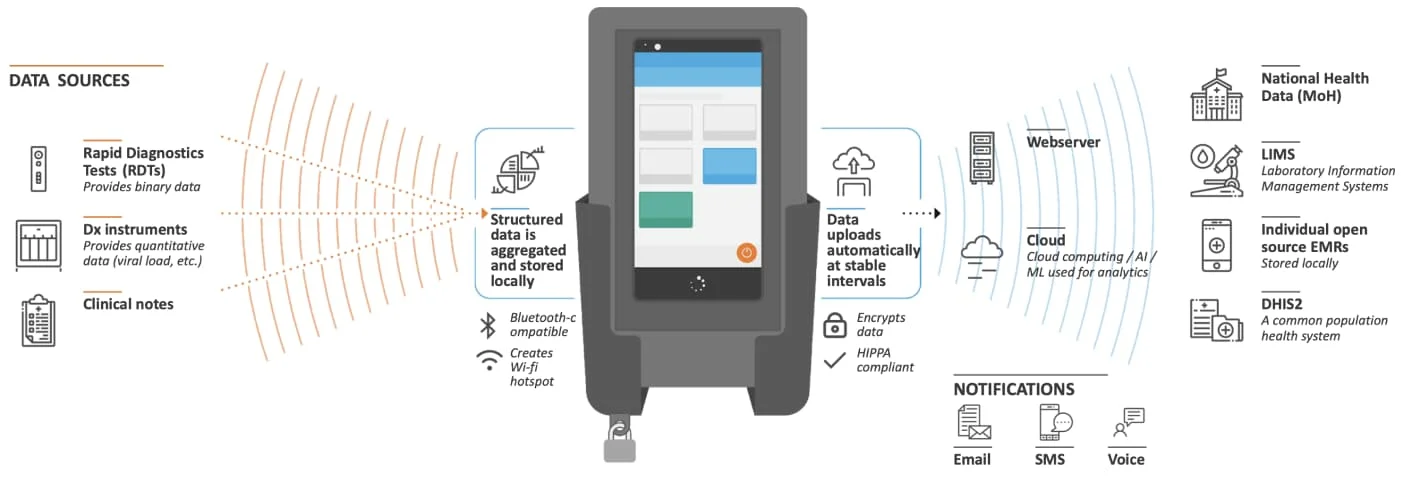
<p>What Rwanda created is a bespoke Laboratory Information System (LIS). Note that sometimes an LIS is referred to as a Laboratory Information Management System (LIMS<sup><a href="https://developers.dhis2.org/blog/2023/08/on-lab-integration#user-content-fn-1-0af0e4" id="user-content-fnref-1-0af0e4" data-footnote-ref="true" aria-describedby="footnote-label">1</a></sup>) though there are subtle differences between the two which won’t be discussed here for brevity purposes. As the name implies, an LIS is an information system geared towards supporting lab operations. It manages workflows, with varying levels of automation, and primarily collects lab data which then can be queried and shared with applications like an Electronic Medical Record (EMR).</p>
<p>It might be tempting to think that it’s a no-brainer for every lab to have an LIS. After all, such an application will help the integration of the lab data with the wider health ecosystem. The truth of the matter is that, based on our landscape analysis, a substantial number of  lab sites are underfunded and lack the IT resources (i.e., staff, hardware, etc…) to operate an LIS on-premise. In fact, an open-source LIS called <a href="https://www.lab-book.org/en/" target="_blank" rel="noopener noreferrer">LabBook</a> tries to reduce this problem by shipping the LIS as an ISO image. To avoid costly licence fees, the image is an Ubuntu operating system which has installed the LIS itself, an automated backup system, an antivirus, a firewall, and also an IM application. In theory, all a user needs to get started with LabBook is to import the image into a virtual environment (e.g., <a href="https://www.virtualbox.org/" target="_blank" rel="noopener noreferrer">VirtualBox</a>). Not even an Internet connection is required.</p>
<p>An off-premise LIS reduces the need for IT capacity at the lab facility. IT resources are pooled into a single site to operate a central LIS that labs would connect to. What about labs with limited or no connectivity? These labs would be left behind unless some offline approach is devised such as shipping the lab data to the centralised LIS for import or manual entry.</p>
<p>Offline functionality is the rationale behind <a href="https://edgedx.net/" target="_blank" rel="noopener noreferrer">edgeDx Node</a>. Node is an LIS supporting lab sites that do not have stable Internet connectivity. Diagnostic data from multiple sources is captured on an Android device that Node is managing. The device’s mobility allows employees, while performing their duties, to easily carry it around the lab and interact with it. When the device (re)joins the network, the diagnostic data is reconciled with the Node server. Apart from offline functionality, Node brings with it a plethora of features including device management as well as interoperability with DHIS2 and a variety of lab machines. The latter is a topic which will be touched upon later in this post.</p>
<p><img decoding="async" loading="lazy" alt="Node device" src="https://developers.dhis2.org/assets/images/node-device-ab74d863046a3559ea31ac3bb59b50d5.png" width="1412" height="480" class="img_ev3q">
<em>A Node device (source: <a href="https://edgedx.net/product/5fab511a00f47d13e8c8dd3e" target="_blank" rel="noopener noreferrer">https://edgedx.net/product/5fab511a00f47d13e8c8dd3e</a>)</em></p>
<p>Another barrier we’ve identified with LIS adoption is that not all labs operate the same way. Lab X may filter out positive test cases for retesting, while lab Y doesn’t. Lab X could also be validating the results in batches, whereas lab Y is validating them individually. The challenge is how to have an LIS that can cater for all these possible workflows, data flows, and types of data but at the same time be simple enough so that implementers don't struggle while customising it. The software team at HISP Centre is walking this very same tight rope for DHIS2! Some may argue that lab personnel should adapt their processes to the LIS’s “best practices” and not the other way around. The counterargument is that an opinionated LIS will meet resistance in its implementation and will likely be dropped at the first opportunity.</p>
<p><img decoding="async" loading="lazy" alt="Senaite setup screen" src="https://developers.dhis2.org/assets/images/senaite-setup-screen-53d0c1adb80c531de692f74842bea228.png" width="3104" height="1808" class="img_ev3q">
<em>Customisation on Senaite (source: <a href="https://www.senaite.com/docs/quickstart" target="_blank" rel="noopener noreferrer">https://www.senaite.com/docs/quickstart</a>)</em></p>
<p>The merits of implementing an LIS with DHIS2 Tracker should be considered. Proponents say that Tracker, with its customisable programs, offline support, vibrant community, and large footprint in many LMICs, is an ideal LIS stop-gap solution for a lab’s digitalisation journey. However, an LIS DHIS2 implementation, to be efficiently integrated with the HIE, has to communicate with lab equipment, EMRs, HISs (hospital information systems), and so on.</p>
<p>Weak interoperability of LISs has been a common theme in all our findings. Taking lab machines (a.k.a. analysers) as an example, we’ve reached the unfortunate conclusion that open-source LISs, at most, are interoperable with a fraction of the lab machines on the market. Lab machine communication interfaces are heterogeneous, especially across vendors. Instruments receive and send test data using proprietary or public messaging standards like <code>HL7v2</code>, <code>ASTM</code>, and <code>CLSI LIS2-A2</code>. To this day, there isn’t a universally accepted interoperability standard governing lab machines.</p>
<p>Adding to the complexity, analysers from different vendors talking in the same format doesn’t necessarily mean that they can be communicated with in the same manner. Let’s consider HL7v2. HL7v2 comes in versions which means analysers can be using any number of HL7v2 versions to exchange data. Incompatibilities might emerge between the versions therefore an LIS can't assume it's interoperable with all analysers which speak HL7v2 just because it can parse a particular version of HL7v2. Hold on, that’s not all. Within the same version, the vendor could be using their own flavour of the messages. If this is not sufficient, we have to contend with the different terminologies employed across the instruments. This last point is of special relevance when creating aggregate reports. We haven’t gotten started with the medium carrying the data. Serial? Ethernet?</p>
<p>Compounding the interoperability problem is the numerous accounts we heard of the difficulty in obtaining integration manuals from the analyser vendors. We also heard of how cumbersome it’s for LIS software engineers to test the analyser integration. Lab analysers are unlike today’s modern mobile phones. Engineers don’t have the luxury to test against an analyser emulator. Instead, they need to physically sit next to the machine and test the integration. One may start to appreciate why lab machine interoperability is a tough nut to crack.</p>
<p>Parallel initiatives are ongoing to improve LIS interoperability with lab machines. In one such initiative, the <a href="https://openelis-global.org/" target="_blank" rel="noopener noreferrer">OpenELIS</a> team developed, into their LIS, the ability to use <a href="https://openconceptlab.org/" target="_blank" rel="noopener noreferrer">Open Concept Lab</a> (OCL) as a terminology service in order to standardise (e.g., <a href="https://openconceptlab.org/" target="_blank" rel="noopener noreferrer">LOINC</a>) the nomenclature across machines. We came across one or two initiatives attempting to standardise lab machine communication though standardisation is not the only path to achieving interoperability with lab machines. Our colleagues at <a href="https://dhis2.udsm.ac.tz/" target="_blank" rel="noopener noreferrer">University of Dar es Salaam (UDSM) DHIS2 Lab</a> have recently <a href="https://github.com/udsm-dhis2-lab/machine-interfacing" target="_blank" rel="noopener noreferrer">open-sourced the bits of software</a> that obtains test results directly from their lab instruments. With enough contributions and interest, this middleware may become a practical low-cost sustainable approach to integrating an LIS and other health systems with lab equipment. Presently, the project provides integration for only a limited number of lab machine models.</p>
<p><img decoding="async" loading="lazy" alt="Middleware config page" src="https://developers.dhis2.org/assets/images/machine-0113c63000abfccab3886a0b97326935.png" width="2742" height="1878" class="img_ev3q">
<em>UDSM's lab machine middleware config page (source: <a href="https://github.com/udsm-dhis2-lab/machine-interfacing/blob/main/README.md" target="_blank" rel="noopener noreferrer">https://github.com/udsm-dhis2-lab/machine-interfacing/blob/main/README.md</a>)</em></p>
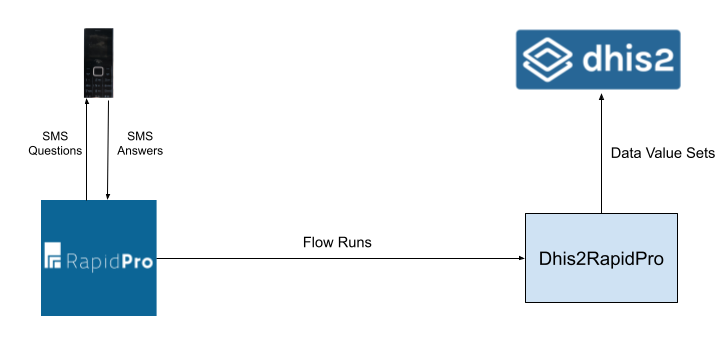
<p>Time will tell whether these initiatives will succeed but past experience suggests that a lot of investment and collaboration between the main actors is needed before these initiatives can start bearing fruit. On the other side of the coin, interoperability between LISs and health systems has arguably been more successful thanks to FHIR. Case in point is <a href="https://digitalsquare.org/blog/2020/6/24/fhir-based-interoperability-solution-for-openelis-and-openmrs" target="_blank" rel="noopener noreferrer">OpenELIS being able to exchange data with OpenMRS</a>, an EMR, using a FHIR workflow. It remains to be seen which EMRs, aside from OpenMRS, can replicate this interoperability with OpenELIS using FHIR.</p>
<p>Continuing on the subject of health system interoperability, it’s uncertain how the interoperability between an LIS and an HMIS, a common DHIS2 use case, should look like. Is it the role of the LIS to aggregate the lab data and deliver it in its aggregate form to the HMIS? If so, there are standards like <a href="https://wiki.ihe.net/index.php/Aggregate_Data_Exchange" target="_blank" rel="noopener noreferrer">Aggregate Data Exchange</a> (ADX) and FHIR’s <a href="https://wiki.ihe.net/index.php/Mobile_Aggregate_Data_Exchange_(mADX)" target="_blank" rel="noopener noreferrer">Mobile Aggregate Data Exchange</a> (mADX) that may act as the bridge between the LIS and the HMIS. Alternatively, is it the role of the HMIS to aggregate the lab data? Then it’s less clear for LIS engineers on what standards to follow. It’s possible that FHIR may help but more work is needed on this front to develop the necessary guidelines.</p>
<p>What’s your experience with lab integration? What did we miss? How can it be improved? Do you have an LIS DHIS2 implementation or are you planning to roll out one? We’d love to hear your thoughts at the <a href="https://community.dhis2.org/" target="_blank" rel="noopener noreferrer">DHIS2 community of practice</a>.</p>
<!-- -->
<section data-footnotes="true" class="footnotes"><h2 class="anchor anchorWithStickyNavbar_LWe7 sr-only" id="footnote-label">Footnotes<a href="https://developers.dhis2.org/blog/2023/08/on-lab-integration#footnote-label" class="hash-link" aria-label="Direct link to Footnotes" title="Direct link to Footnotes">​</a></h2>
<ol>
<li id="user-content-fn-1-0af0e4">
<p>Not to be confused with an LMIS which is a Logistics Management Information System <a href="https://developers.dhis2.org/blog/2023/08/on-lab-integration#user-content-fnref-1-0af0e4" data-footnote-backref="" aria-label="Back to reference 1" class="data-footnote-backref">↩</a></p>
</li>
</ol>
</section>]]></content>
        <author>
            <name>Claude Mamo</name>
            <uri>https://github.com/cjmamo</uri>
        </author>
        <category label="lab-integration" term="lab-integration"/>
        <category label="lis" term="lis"/>
        <category label="lab-machines" term="lab-machines"/>
    </entry>
    <entry>
        <title type="html"><![CDATA[2023 App Competition Results]]></title>
        <id>https://developers.dhis2.org/blog/2023/06/app-competition-results</id>
        <link href="https://developers.dhis2.org/blog/2023/06/app-competition-results"/>
        <updated>2023-06-30T00:00:00.000Z</updated>
        <summary type="html"><![CDATA[As we’ve recently had the DHIS2 Annual Conference, we’ve also completed the 2023 App Competition tied to the conference. On Thursday, the finalists were able, in 7 minutes, to present their Android or Web application, and once all were done, the audience decided which app they thought was the best.]]></summary>
        <content type="html"><![CDATA[<p><em>As we’ve recently had the DHIS2 Annual Conference, we’ve also completed the 2023 App Competition tied to the conference. On Thursday, the finalists were able, in 7 minutes, to present their Android or Web application, and once all were done, the audience decided which app they thought was the best.</em></p>
<p>But the competition didn’t start during the conference. Several months ago, the app competition for 2023 was announced, and the community was able to submit the application they thought would be able to impress the audience and the jury. But impressing the audience is one thing, actually having a useful application that could be used by more than just those who’ve developed it, was much more important. And all of the submissions met that criteria.</p>
<p>The DHIS2 community is more than just a few pockets of local organizations. We all face similar (or identical) problems, diseases, and challenges. And because of this, developing apps that can be used all over the globe is an incredibly good use of the developers’ time. This is why this was one of the important factors when judging the application, can it be reused by other organisations.</p>
<p>The submissions this year were of a very high quality, and the jury had a hard time choosing which app should be a finalist. They would’ve preferred to have many more finalists as many of the submissions were of such a high quality, but after careful consideration five applications were chosen to be the finalists, which were as followed:</p>
<ul>
<li><strong>DHIS2 Visualisation Studio</strong>
<ul>
<li>Developer: Albert Mutesasira</li>
<li>Organisation: HISP Uganda</li>
</ul>
</li>
<li><strong>JumpaDokter</strong>
<ul>
<li>Developer: Saldi Yusuf</li>
<li>Organisation: HISP Indonesia</li>
</ul>
</li>
<li><strong>DHIS2 Analytics Messenger</strong>
<ul>
<li>Developer: Eric Chingalo</li>
<li>Organisation: HISP Tanzania</li>
</ul>
</li>
<li><strong>Growth and Nutrition Monitoring System</strong>
<ul>
<li>Developer: Chaturanga Manchanayake</li>
<li>Organisation: HISP Sri Lanka</li>
</ul>
</li>
<li><strong>Homepage App</strong>
<ul>
<li>Developer: Ignacio Foche Pérez</li>
<li>Organisation: EyeSeeTea</li>
</ul>
</li>
</ul>
<p>You can read more about these applications in the finalists page on the Community of Practice here: <a href="https://community.dhis2.org/t/2023-dhis2-app-competition-finalists/53264" target="_blank" rel="noopener noreferrer">https://community.dhis2.org/t/2023-dhis2-app-competition-finalists/53264</a></p>
<p>We’ve had a diverse field of finalists this year. Two of the applications are built for Android and three for the web. All of the web applications were developed to be installed via the App Hub, while the Android apps are developed to be reused as open source applications.</p>
<p>Not all of the applications are open sourced yet, as they're still under active development, but keep an eye out on the Community of Practice for when they are released.</p>
<h3 class="anchor anchorWithStickyNavbar_LWe7" id="the-presentations">The Presentations<a href="https://developers.dhis2.org/blog/2023/06/app-competition-results#the-presentations" class="hash-link" aria-label="Direct link to The Presentations" title="Direct link to The Presentations">​</a></h3>
<p>The presentations of the finalists was on the Thursday of the DHIS2 Annual Conference to the entire physical and virtual audience. Each finalist was given exactly 7 minutes to present their application and explain why the app is great, should be used by others, and therefore why people should vote for them specifically.</p>
<p>After the presentations concluded, there was a 5-minute period in which every conference participant was able to vote on their favorite application, and when the 5 minutes were over, a total of 155 votes were cast.</p>
<p>The result was close, the first, second and third place each had 31, 26 and 24% of the votes respectively, once more illustrating how competitive the field was this year, and how high quality the apps were. In the end, the DHIS2 Analytics Messenger application from HISP Tanzania was chosen as the winner.</p>
<p>The entire poll result can be seen on the Community of Practice here: <a href="https://community.dhis2.org/t/voting-polls-for-the-5-finalists-of-the-dhis2-app-competition/53502" target="_blank" rel="noopener noreferrer">https://community.dhis2.org/t/voting-polls-for-the-5-finalists-of-the-dhis2-app-competition/53502</a></p>
<iframe width="560" height="315" src="https://www.youtube.com/embed/2XYclHVLKrI" title="YouTube video player" frameborder="0" allow="accelerometer; autoplay; clipboard-write; encrypted-media; gyroscope; picture-in-picture; web-share"></iframe>
<h3 class="anchor anchorWithStickyNavbar_LWe7" id="the-winning-application">The winning application<a href="https://developers.dhis2.org/blog/2023/06/app-competition-results#the-winning-application" class="hash-link" aria-label="Direct link to The winning application" title="Direct link to The winning application">​</a></h3>
<p>The winning application has the following description provided by the HISP Tanzania team:</p>
<p><em>The DHIS2 Analytics Messenger is an application that aims to make DHIS2 analytics data readily accessible to users. The application leverages the power of popular social messaging platforms, such as WhatsApp and Telegram, to deliver DHIS2 analytics to users. Given the increasing popularity of social messaging applications in recent years, there has been a growing potential for sharing DHIS2 analytics data through these media.</em></p>
<p>Eric Chingalo, the Developer of the application, has posted a longer description, a video demonstration, and a way to get in contact with them, also, on the Community of Practice. I highly recommend everyone to have a look at the application, and if you’re interested in using the application or helping develop extra features on top of it, we highly recommend reaching out to them: <a href="https://community.dhis2.org/t/dhis2-analytics-messenger/53477" target="_blank" rel="noopener noreferrer">https://community.dhis2.org/t/dhis2-analytics-messenger/53477</a></p>
<h3 class="anchor anchorWithStickyNavbar_LWe7" id="other-applications">Other applications<a href="https://developers.dhis2.org/blog/2023/06/app-competition-results#other-applications" class="hash-link" aria-label="Direct link to Other applications" title="Direct link to Other applications">​</a></h3>
<p>But just because we’ve got a winner, we should not disqualify the other amazing submissions of the app competition. Not only were the top-5 amazing, there were runner-ups that we felt also deserved a spot to present. Some of those got a spotlight to present their app in another session during the conference. A video of the presentations can be found on our Youtube channel, and directly, in the video below:</p>
<iframe width="560" height="315" src="https://www.youtube.com/embed/7dlTw4loy7k" title="YouTube video player" frameborder="0" allow="accelerometer; autoplay; clipboard-write; encrypted-media; gyroscope; picture-in-picture; web-share"></iframe>
<p>One of the goals we want you to keep in mind, all of the applications you’ve seen in this article or shared on the CoP during the conference, are intended to be shared! So if you feel one of the applications can be suitable for your organisation as well, get in touch with the respective organisations and see how you can work together to improve your DHIS2 systems.</p>]]></content>
        <author>
            <name>Rene Pot</name>
            <uri>https://github.com/Topener</uri>
        </author>
        <category label="dac2023" term="dac2023"/>
        <category label="app-competition" term="app-competition"/>
        <category label="android" term="android"/>
        <category label="web" term="web"/>
        <category label="apps" term="apps"/>
    </entry>
    <entry>
        <title type="html"><![CDATA[Introducing the DHIS2 Java SDK]]></title>
        <id>https://developers.dhis2.org/blog/2023/02/introducing-the-dhis2-java-sdk</id>
        <link href="https://developers.dhis2.org/blog/2023/02/introducing-the-dhis2-java-sdk"/>
        <updated>2023-02-20T00:00:00.000Z</updated>
        <summary type="html"><![CDATA[At HISP Centre, we've been engineering numerous run-of-the-mill integration projects where data is exchanged back and forth with DHIS2 through its Web API. Typically, this data is filtered, mapped, transformed, enriched, and routed to or from an application which could be the same DHIS2 instance, a different instance, or even a distinct application altogether.]]></summary>
        <content type="html"><![CDATA[<p>At HISP Centre, we've been engineering numerous run-of-the-mill integration projects where data is exchanged back and forth with DHIS2 through its <a href="https://docs.dhis2.org/en/develop/using-the-api/dhis-core-version-239/introduction.html" target="_blank" rel="noopener noreferrer">Web API</a>. Typically, this data is filtered, mapped, transformed, enriched, and routed to or from an application which could be the same DHIS2 instance, a different instance, or even a distinct application altogether.</p>
<p>Our programming language of choice for these projects is usually Java. Java has an <a href="https://camel.apache.org/" target="_blank" rel="noopener noreferrer">excellent ecosystem</a>, but in each project, we kept reinventing the wheel in terms of shipping the data out of and into DHIS2. Our productivity was being hampered by the repetitive and time-consuming tasks of writing code to serialise in-memory objects, deserialise JSON, handle network failures, authenticate, log events, pool remote connections, retry HTTP errors, and so on. We needed a lightweight flexible library that implemented the low-level plumbing. To this end, the DHIS2 Java SDK was born.</p>
<p><a href="https://github.com/dhis2/dhis2-java-sdk" target="_blank" rel="noopener noreferrer">DHIS2 Java SDK</a> is a small open-source, non-opinionated library that aims to provide the nuts and bolts for consuming the DHIS2 Web API. Specifically, it provides a fluent-like interface for creating, fetching, modifying, and deleting DHIS2 resources. The application developer can focus on the domain logic and not get bogged down with low-level details concerning DHIS2 API communication like authentication, retries, and pagination. Furthermore, with its type-safe resource model, the SDK aids application developers in writing client code that is compatible with the version of DHIS2 they’re integrating with.</p>
<p>The DHIS2 Java SDK binary and its dependencies are available for download from the Maven Central repository. From your Maven project, add the SDK to the <a href="https://maven.apache.org/pom.html#Dependencies" target="_blank" rel="noopener noreferrer">dependencies section</a> inside the <em>POM</em> like this:</p>
<div class="language-xml codeBlockContainer_Ckt0 theme-code-block" style="--prism-color:#bfc7d5;--prism-background-color:#292d3e"><div class="codeBlockContent_biex"><pre tabindex="0" class="prism-code language-xml codeBlock_bY9V thin-scrollbar" style="color:#bfc7d5;background-color:#292d3e"><code class="codeBlockLines_e6Vv"><span class="token-line" style="color:#bfc7d5"><span class="token tag punctuation" style="color:rgb(199, 146, 234)">&lt;</span><span class="token tag" style="color:rgb(255, 85, 114)">dependencies</span><span class="token tag punctuation" style="color:rgb(199, 146, 234)">&gt;</span><span class="token plain"></span><br></span><span class="token-line" style="color:#bfc7d5"><span class="token plain">    ...</span><br></span><span class="token-line" style="color:#bfc7d5"><span class="token plain">    </span><span class="token tag punctuation" style="color:rgb(199, 146, 234)">&lt;</span><span class="token tag" style="color:rgb(255, 85, 114)">dependency</span><span class="token tag punctuation" style="color:rgb(199, 146, 234)">&gt;</span><span class="token plain"></span><br></span><span class="token-line" style="color:#bfc7d5"><span class="token plain">        </span><span class="token tag punctuation" style="color:rgb(199, 146, 234)">&lt;</span><span class="token tag" style="color:rgb(255, 85, 114)">groupId</span><span class="token tag punctuation" style="color:rgb(199, 146, 234)">&gt;</span><span class="token plain">org.hisp.dhis.integration.sdk</span><span class="token tag punctuation" style="color:rgb(199, 146, 234)">&lt;/</span><span class="token tag" style="color:rgb(255, 85, 114)">groupId</span><span class="token tag punctuation" style="color:rgb(199, 146, 234)">&gt;</span><span class="token plain"></span><br></span><span class="token-line" style="color:#bfc7d5"><span class="token plain">        </span><span class="token tag punctuation" style="color:rgb(199, 146, 234)">&lt;</span><span class="token tag" style="color:rgb(255, 85, 114)">artifactId</span><span class="token tag punctuation" style="color:rgb(199, 146, 234)">&gt;</span><span class="token plain">dhis2-java-sdk</span><span class="token tag punctuation" style="color:rgb(199, 146, 234)">&lt;/</span><span class="token tag" style="color:rgb(255, 85, 114)">artifactId</span><span class="token tag punctuation" style="color:rgb(199, 146, 234)">&gt;</span><span class="token plain"></span><br></span><span class="token-line" style="color:#bfc7d5"><span class="token plain">        </span><span class="token tag punctuation" style="color:rgb(199, 146, 234)">&lt;</span><span class="token tag" style="color:rgb(255, 85, 114)">version</span><span class="token tag punctuation" style="color:rgb(199, 146, 234)">&gt;</span><span class="token plain">1.0.0</span><span class="token tag punctuation" style="color:rgb(199, 146, 234)">&lt;/</span><span class="token tag" style="color:rgb(255, 85, 114)">version</span><span class="token tag punctuation" style="color:rgb(199, 146, 234)">&gt;</span><span class="token plain"></span><br></span><span class="token-line" style="color:#bfc7d5"><span class="token plain">    </span><span class="token tag punctuation" style="color:rgb(199, 146, 234)">&lt;/</span><span class="token tag" style="color:rgb(255, 85, 114)">dependency</span><span class="token tag punctuation" style="color:rgb(199, 146, 234)">&gt;</span><span class="token plain"></span><br></span><span class="token-line" style="color:#bfc7d5"><span class="token plain">    ...</span><br></span><span class="token-line" style="color:#bfc7d5"><span class="token plain"></span><span class="token tag punctuation" style="color:rgb(199, 146, 234)">&lt;/</span><span class="token tag" style="color:rgb(255, 85, 114)">dependencies</span><span class="token tag punctuation" style="color:rgb(199, 146, 234)">&gt;</span><br></span></code></pre><div class="buttonGroup__atx"><button type="button" aria-label="Copy code to clipboard" title="Copy" class="clean-btn"><span class="copyButtonIcons_eSgA" aria-hidden="true"><svg viewBox="0 0 24 24" class="copyButtonIcon_y97N"><path fill="currentColor" d="M19,21H8V7H19M19,5H8A2,2 0 0,0 6,7V21A2,2 0 0,0 8,23H19A2,2 0 0,0 21,21V7A2,2 0 0,0 19,5M16,1H4A2,2 0 0,0 2,3V17H4V3H16V1Z"></path></svg><svg viewBox="0 0 24 24" class="copyButtonSuccessIcon_LjdS"><path fill="currentColor" d="M21,7L9,19L3.5,13.5L4.91,12.09L9,16.17L19.59,5.59L21,7Z"></path></svg></span></button></div></div></div>
<p>The version we’re referencing in the POM is <code>1.0.0</code> but you should always look up the latest version of the SDK from its GitHub repository <a href="https://github.com/dhis2/dhis2-java-sdk/blob/main/README.md" target="_blank" rel="noopener noreferrer">README</a>.</p>
<p>Let's take a deep dive into the SDK. Consider a standard integration app fetching data value sets from a DHIS2 instance and saving them to a different DHIS2 instance. Leveraging the DHIS2 Java SDK, the app's code to construct the DHIS2 client for the source instance is as follows:</p>
<div class="language-java codeBlockContainer_Ckt0 theme-code-block" style="--prism-color:#bfc7d5;--prism-background-color:#292d3e"><div class="codeBlockContent_biex"><pre tabindex="0" class="prism-code language-java codeBlock_bY9V thin-scrollbar" style="color:#bfc7d5;background-color:#292d3e"><code class="codeBlockLines_e6Vv"><span class="token-line" style="color:#bfc7d5"><span class="token punctuation" style="color:rgb(199, 146, 234)">.</span><span class="token punctuation" style="color:rgb(199, 146, 234)">.</span><span class="token punctuation" style="color:rgb(199, 146, 234)">.</span><span class="token plain"></span><br></span><span class="token-line" style="color:#bfc7d5"><span class="token plain"></span><span class="token keyword" style="font-style:italic">import</span><span class="token plain"> </span><span class="token import namespace" style="color:rgb(178, 204, 214)">org</span><span class="token import namespace punctuation" style="color:rgb(199, 146, 234)">.</span><span class="token import namespace" style="color:rgb(178, 204, 214)">hisp</span><span class="token import namespace punctuation" style="color:rgb(199, 146, 234)">.</span><span class="token import namespace" style="color:rgb(178, 204, 214)">dhis</span><span class="token import namespace punctuation" style="color:rgb(199, 146, 234)">.</span><span class="token import namespace" style="color:rgb(178, 204, 214)">integration</span><span class="token import namespace punctuation" style="color:rgb(199, 146, 234)">.</span><span class="token import namespace" style="color:rgb(178, 204, 214)">sdk</span><span class="token import namespace punctuation" style="color:rgb(199, 146, 234)">.</span><span class="token import class-name" style="color:rgb(255, 203, 107)">Dhis2ClientBuilder</span><span class="token punctuation" style="color:rgb(199, 146, 234)">;</span><span class="token plain"></span><br></span><span class="token-line" style="color:#bfc7d5"><span class="token plain"></span><span class="token keyword" style="font-style:italic">import</span><span class="token plain"> </span><span class="token import namespace" style="color:rgb(178, 204, 214)">org</span><span class="token import namespace punctuation" style="color:rgb(199, 146, 234)">.</span><span class="token import namespace" style="color:rgb(178, 204, 214)">hisp</span><span class="token import namespace punctuation" style="color:rgb(199, 146, 234)">.</span><span class="token import namespace" style="color:rgb(178, 204, 214)">dhis</span><span class="token import namespace punctuation" style="color:rgb(199, 146, 234)">.</span><span class="token import namespace" style="color:rgb(178, 204, 214)">integration</span><span class="token import namespace punctuation" style="color:rgb(199, 146, 234)">.</span><span class="token import namespace" style="color:rgb(178, 204, 214)">sdk</span><span class="token import namespace punctuation" style="color:rgb(199, 146, 234)">.</span><span class="token import namespace" style="color:rgb(178, 204, 214)">api</span><span class="token import namespace punctuation" style="color:rgb(199, 146, 234)">.</span><span class="token import class-name" style="color:rgb(255, 203, 107)">Dhis2Client</span><span class="token punctuation" style="color:rgb(199, 146, 234)">;</span><span class="token plain"></span><br></span><span class="token-line" style="color:#bfc7d5"><span class="token plain" style="display:inline-block"></span><br></span><span class="token-line" style="color:#bfc7d5"><span class="token plain"></span><span class="token keyword" style="font-style:italic">public</span><span class="token plain"> </span><span class="token keyword" style="font-style:italic">class</span><span class="token plain"> </span><span class="token class-name" style="color:rgb(255, 203, 107)">IntegrationApp</span><span class="token plain"> </span><span class="token punctuation" style="color:rgb(199, 146, 234)">{</span><span class="token plain"></span><br></span><span class="token-line" style="color:#bfc7d5"><span class="token plain">    </span><span class="token keyword" style="font-style:italic">public</span><span class="token plain"> </span><span class="token keyword" style="font-style:italic">static</span><span class="token plain"> </span><span class="token keyword" style="font-style:italic">void</span><span class="token plain"> </span><span class="token function" style="color:rgb(130, 170, 255)">main</span><span class="token punctuation" style="color:rgb(199, 146, 234)">(</span><span class="token plain"> </span><span class="token class-name" style="color:rgb(255, 203, 107)">String</span><span class="token punctuation" style="color:rgb(199, 146, 234)">[</span><span class="token punctuation" style="color:rgb(199, 146, 234)">]</span><span class="token plain"> args </span><span class="token punctuation" style="color:rgb(199, 146, 234)">)</span><span class="token plain"> </span><span class="token punctuation" style="color:rgb(199, 146, 234)">{</span><span class="token plain"></span><br></span><span class="token-line" style="color:#bfc7d5"><span class="token plain">        </span><span class="token class-name" style="color:rgb(255, 203, 107)">Dhis2Client</span><span class="token plain"> sourceDhis2Client </span><span class="token operator" style="color:rgb(137, 221, 255)">=</span><span class="token plain"> </span><span class="token class-name" style="color:rgb(255, 203, 107)">Dhis2ClientBuilder</span><span class="token punctuation" style="color:rgb(199, 146, 234)">.</span><span class="token function" style="color:rgb(130, 170, 255)">newClient</span><span class="token punctuation" style="color:rgb(199, 146, 234)">(</span><span class="token plain"> </span><span class="token string" style="color:rgb(195, 232, 141)">"https://source.dhis2.org/api"</span><span class="token punctuation" style="color:rgb(199, 146, 234)">,</span><span class="token plain"> </span><span class="token string" style="color:rgb(195, 232, 141)">"d2pat_5xVA12xyUbWNedQxy4ohH77WlxRGVvZZ1151814092"</span><span class="token plain"> </span><span class="token punctuation" style="color:rgb(199, 146, 234)">)</span><span class="token punctuation" style="color:rgb(199, 146, 234)">.</span><span class="token function" style="color:rgb(130, 170, 255)">build</span><span class="token punctuation" style="color:rgb(199, 146, 234)">(</span><span class="token punctuation" style="color:rgb(199, 146, 234)">)</span><span class="token punctuation" style="color:rgb(199, 146, 234)">;</span><span class="token plain"></span><br></span><span class="token-line" style="color:#bfc7d5"><span class="token plain">    </span><span class="token punctuation" style="color:rgb(199, 146, 234)">}</span><span class="token plain"></span><br></span><span class="token-line" style="color:#bfc7d5"><span class="token plain"></span><span class="token punctuation" style="color:rgb(199, 146, 234)">}</span><br></span></code></pre><div class="buttonGroup__atx"><button type="button" aria-label="Copy code to clipboard" title="Copy" class="clean-btn"><span class="copyButtonIcons_eSgA" aria-hidden="true"><svg viewBox="0 0 24 24" class="copyButtonIcon_y97N"><path fill="currentColor" d="M19,21H8V7H19M19,5H8A2,2 0 0,0 6,7V21A2,2 0 0,0 8,23H19A2,2 0 0,0 21,21V7A2,2 0 0,0 19,5M16,1H4A2,2 0 0,0 2,3V17H4V3H16V1Z"></path></svg><svg viewBox="0 0 24 24" class="copyButtonSuccessIcon_LjdS"><path fill="currentColor" d="M21,7L9,19L3.5,13.5L4.91,12.09L9,16.17L19.59,5.59L21,7Z"></path></svg></span></button></div></div></div>
<p>The above is arguably trivial. <code>Dhis2ClientBuilder</code> builds a <code>Dhis2Client</code> to send requests to <code>https://source.dhis2.org/api</code> using the <a href="https://docs.dhis2.org/en/use/user-guides/dhis-core-version-239/working-with-your-account/personal-access-tokens.html" target="_blank" rel="noopener noreferrer">PAT</a> <code>d2pat_5xVA12xyUbWNedQxy4ohH77WlxRGVvZZ1151814092</code> for authentication.</p>
<div class="theme-admonition theme-admonition-tip admonition_xJq3 alert alert--success"><div class="admonitionHeading_Gvgb"><span class="admonitionIcon_Rf37"><svg viewBox="0 0 12 16"><path fill-rule="evenodd" d="M6.5 0C3.48 0 1 2.19 1 5c0 .92.55 2.25 1 3 1.34 2.25 1.78 2.78 2 4v1h5v-1c.22-1.22.66-1.75 2-4 .45-.75 1-2.08 1-3 0-2.81-2.48-5-5.5-5zm3.64 7.48c-.25.44-.47.8-.67 1.11-.86 1.41-1.25 2.06-1.45 3.23-.02.05-.02.11-.02.17H5c0-.06 0-.13-.02-.17-.2-1.17-.59-1.83-1.45-3.23-.2-.31-.42-.67-.67-1.11C2.44 6.78 2 5.65 2 5c0-2.2 2.02-4 4.5-4 1.22 0 2.36.42 3.22 1.19C10.55 2.94 11 3.94 11 5c0 .66-.44 1.78-.86 2.48zM4 14h5c-.23 1.14-1.3 2-2.5 2s-2.27-.86-2.5-2z"></path></svg></span>tip</div><div class="admonitionContent_BuS1"><p>It's recommended to stick with PAT where possible, nonetheless, <code>Dhis2ClientBuilder</code> can also build a <code>Dhis2Client</code> to authenticate with basic credentials as shown below:</p><div class="language-java codeBlockContainer_Ckt0 theme-code-block" style="--prism-color:#bfc7d5;--prism-background-color:#292d3e"><div class="codeBlockContent_biex"><pre tabindex="0" class="prism-code language-java codeBlock_bY9V thin-scrollbar" style="color:#bfc7d5;background-color:#292d3e"><code class="codeBlockLines_e6Vv"><span class="token-line" style="color:#bfc7d5"><span class="token class-name" style="color:rgb(255, 203, 107)">Dhis2ClientBuilder</span><span class="token punctuation" style="color:rgb(199, 146, 234)">.</span><span class="token function" style="color:rgb(130, 170, 255)">newClient</span><span class="token punctuation" style="color:rgb(199, 146, 234)">(</span><span class="token plain"> </span><span class="token string" style="color:rgb(195, 232, 141)">"https://source.dhis2.org/api"</span><span class="token punctuation" style="color:rgb(199, 146, 234)">,</span><span class="token plain"> </span><span class="token string" style="color:rgb(195, 232, 141)">"admin"</span><span class="token punctuation" style="color:rgb(199, 146, 234)">,</span><span class="token plain"> </span><span class="token string" style="color:rgb(195, 232, 141)">"district"</span><span class="token plain"> </span><span class="token punctuation" style="color:rgb(199, 146, 234)">)</span><span class="token punctuation" style="color:rgb(199, 146, 234)">.</span><span class="token function" style="color:rgb(130, 170, 255)">build</span><span class="token punctuation" style="color:rgb(199, 146, 234)">(</span><span class="token punctuation" style="color:rgb(199, 146, 234)">)</span><span class="token punctuation" style="color:rgb(199, 146, 234)">;</span><br></span></code></pre><div class="buttonGroup__atx"><button type="button" aria-label="Copy code to clipboard" title="Copy" class="clean-btn"><span class="copyButtonIcons_eSgA" aria-hidden="true"><svg viewBox="0 0 24 24" class="copyButtonIcon_y97N"><path fill="currentColor" d="M19,21H8V7H19M19,5H8A2,2 0 0,0 6,7V21A2,2 0 0,0 8,23H19A2,2 0 0,0 21,21V7A2,2 0 0,0 19,5M16,1H4A2,2 0 0,0 2,3V17H4V3H16V1Z"></path></svg><svg viewBox="0 0 24 24" class="copyButtonSuccessIcon_LjdS"><path fill="currentColor" d="M21,7L9,19L3.5,13.5L4.91,12.09L9,16.17L19.59,5.59L21,7Z"></path></svg></span></button></div></div></div></div></div>
<p>The next line of code references the previous <code>sourceDhis2Client</code> to fetch the data value sets from the source DHIS2 server:</p>
<div class="language-java codeBlockContainer_Ckt0 theme-code-block" style="--prism-color:#bfc7d5;--prism-background-color:#292d3e"><div class="codeBlockContent_biex"><pre tabindex="0" class="prism-code language-java codeBlock_bY9V thin-scrollbar" style="color:#bfc7d5;background-color:#292d3e"><code class="codeBlockLines_e6Vv"><span class="token-line" style="color:#bfc7d5"><span class="token class-name" style="color:rgb(255, 203, 107)">DataValueSet</span><span class="token plain"> dataValueSet </span><span class="token operator" style="color:rgb(137, 221, 255)">=</span><span class="token plain"> sourceDhis2Client</span><span class="token punctuation" style="color:rgb(199, 146, 234)">.</span><span class="token function" style="color:rgb(130, 170, 255)">get</span><span class="token punctuation" style="color:rgb(199, 146, 234)">(</span><span class="token plain"> </span><span class="token string" style="color:rgb(195, 232, 141)">"dataValueSets"</span><span class="token plain"> </span><span class="token punctuation" style="color:rgb(199, 146, 234)">)</span><span class="token plain"></span><br></span><span class="token-line" style="color:#bfc7d5"><span class="token plain">    </span><span class="token punctuation" style="color:rgb(199, 146, 234)">.</span><span class="token function" style="color:rgb(130, 170, 255)">withParameter</span><span class="token punctuation" style="color:rgb(199, 146, 234)">(</span><span class="token plain"> </span><span class="token string" style="color:rgb(195, 232, 141)">"dataSet"</span><span class="token punctuation" style="color:rgb(199, 146, 234)">,</span><span class="token plain"> </span><span class="token string" style="color:rgb(195, 232, 141)">"BfMAe6Itzgt"</span><span class="token plain"> </span><span class="token punctuation" style="color:rgb(199, 146, 234)">)</span><span class="token plain"></span><br></span><span class="token-line" style="color:#bfc7d5"><span class="token plain">    </span><span class="token punctuation" style="color:rgb(199, 146, 234)">.</span><span class="token function" style="color:rgb(130, 170, 255)">withParameter</span><span class="token punctuation" style="color:rgb(199, 146, 234)">(</span><span class="token plain"> </span><span class="token string" style="color:rgb(195, 232, 141)">"period"</span><span class="token punctuation" style="color:rgb(199, 146, 234)">,</span><span class="token plain"> </span><span class="token string" style="color:rgb(195, 232, 141)">"202302"</span><span class="token plain"> </span><span class="token punctuation" style="color:rgb(199, 146, 234)">)</span><span class="token plain"></span><br></span><span class="token-line" style="color:#bfc7d5"><span class="token plain">    </span><span class="token punctuation" style="color:rgb(199, 146, 234)">.</span><span class="token function" style="color:rgb(130, 170, 255)">withParameter</span><span class="token punctuation" style="color:rgb(199, 146, 234)">(</span><span class="token plain"> </span><span class="token string" style="color:rgb(195, 232, 141)">"orgUnit"</span><span class="token punctuation" style="color:rgb(199, 146, 234)">,</span><span class="token plain"> </span><span class="token string" style="color:rgb(195, 232, 141)">"PLq9sJluXvc"</span><span class="token plain"> </span><span class="token punctuation" style="color:rgb(199, 146, 234)">)</span><span class="token plain"></span><br></span><span class="token-line" style="color:#bfc7d5"><span class="token plain">    </span><span class="token punctuation" style="color:rgb(199, 146, 234)">.</span><span class="token function" style="color:rgb(130, 170, 255)">transfer</span><span class="token punctuation" style="color:rgb(199, 146, 234)">(</span><span class="token punctuation" style="color:rgb(199, 146, 234)">)</span><span class="token plain"></span><br></span><span class="token-line" style="color:#bfc7d5"><span class="token plain">    </span><span class="token punctuation" style="color:rgb(199, 146, 234)">.</span><span class="token function" style="color:rgb(130, 170, 255)">returnAs</span><span class="token punctuation" style="color:rgb(199, 146, 234)">(</span><span class="token plain"> </span><span class="token class-name" style="color:rgb(255, 203, 107)">DataValueSet</span><span class="token punctuation" style="color:rgb(199, 146, 234)">.</span><span class="token keyword" style="font-style:italic">class</span><span class="token plain"> </span><span class="token punctuation" style="color:rgb(199, 146, 234)">)</span><span class="token punctuation" style="color:rgb(199, 146, 234)">;</span><br></span></code></pre><div class="buttonGroup__atx"><button type="button" aria-label="Copy code to clipboard" title="Copy" class="clean-btn"><span class="copyButtonIcons_eSgA" aria-hidden="true"><svg viewBox="0 0 24 24" class="copyButtonIcon_y97N"><path fill="currentColor" d="M19,21H8V7H19M19,5H8A2,2 0 0,0 6,7V21A2,2 0 0,0 8,23H19A2,2 0 0,0 21,21V7A2,2 0 0,0 19,5M16,1H4A2,2 0 0,0 2,3V17H4V3H16V1Z"></path></svg><svg viewBox="0 0 24 24" class="copyButtonSuccessIcon_LjdS"><path fill="currentColor" d="M21,7L9,19L3.5,13.5L4.91,12.09L9,16.17L19.59,5.59L21,7Z"></path></svg></span></button></div></div></div>
<p>Here's a breakdown of the method chain:</p>
<ul>
<li>
<p><code>sourceDhis2Client.get(...)</code> denotes the HTTP verb that will be used for the HTTP call. If we were to <em>POST</em> a resource, the method invoked would be <code>sourceDhis2Client.post(...)</code>.</p>
</li>
<li>
<p>The parameter value inside the <code>get</code> method represents the URL path of the API endpoint (i.e., <code>dataValueSets</code>).</p>
</li>
<li>
<p><code>withParameter(...)</code> sets a URL query parameter. In this example, we're requesting the data value set given the query parameters data set ID <code>BfMAe6Itzgt</code>, period <code>202302</code>, and organisation unit ID <code>PLq9sJluXvc</code>.</p>
</li>
<li>
<p><code>transfer()</code> executes the HTTP call, that is, sends the request to the DHIS2 server.</p>
</li>
<li>
<p><code>returnAs(...)</code> deserialises the HTTP response JSON body into a POJO of type <code>DataValueSet</code> since we are expecting a data value set from <code>https://source.dhis2.org/api/dataValueSets</code>.</p>
</li>
</ul>
<div class="theme-admonition theme-admonition-info admonition_xJq3 alert alert--info"><div class="admonitionHeading_Gvgb"><span class="admonitionIcon_Rf37"><svg viewBox="0 0 14 16"><path fill-rule="evenodd" d="M7 2.3c3.14 0 5.7 2.56 5.7 5.7s-2.56 5.7-5.7 5.7A5.71 5.71 0 0 1 1.3 8c0-3.14 2.56-5.7 5.7-5.7zM7 1C3.14 1 0 4.14 0 8s3.14 7 7 7 7-3.14 7-7-3.14-7-7-7zm1 3H6v5h2V4zm0 6H6v2h2v-2z"></path></svg></span>info</div><div class="admonitionContent_BuS1"><p>By default, a <code>get(...)</code> call assumes that a single resource is being fetched. Fetching a list of resources from a collection endpoint is accomplished by appending <code>withPaging()</code> or <code>withoutPaging()</code> to <code>get(...)</code>. For instance, if we wanted to retrieve the list of organisation units in pages, then the method chain would be written as:</p><div class="language-java codeBlockContainer_Ckt0 theme-code-block" style="--prism-color:#bfc7d5;--prism-background-color:#292d3e"><div class="codeBlockContent_biex"><pre tabindex="0" class="prism-code language-java codeBlock_bY9V thin-scrollbar" style="color:#bfc7d5;background-color:#292d3e"><code class="codeBlockLines_e6Vv"><span class="token-line" style="color:#bfc7d5"><span class="token class-name" style="color:rgb(255, 203, 107)">Iterable</span><span class="token generics punctuation" style="color:rgb(199, 146, 234)">&lt;</span><span class="token generics class-name" style="color:rgb(255, 203, 107)">OrganisationUnit</span><span class="token generics punctuation" style="color:rgb(199, 146, 234)">&gt;</span><span class="token plain"> orgUnits </span><span class="token operator" style="color:rgb(137, 221, 255)">=</span><span class="token plain"> sourceDhis2Client</span><span class="token punctuation" style="color:rgb(199, 146, 234)">.</span><span class="token function" style="color:rgb(130, 170, 255)">get</span><span class="token punctuation" style="color:rgb(199, 146, 234)">(</span><span class="token plain"> </span><span class="token string" style="color:rgb(195, 232, 141)">"organisationUnits"</span><span class="token plain"> </span><span class="token punctuation" style="color:rgb(199, 146, 234)">)</span><span class="token plain"></span><br></span><span class="token-line" style="color:#bfc7d5"><span class="token plain">    </span><span class="token punctuation" style="color:rgb(199, 146, 234)">.</span><span class="token function" style="color:rgb(130, 170, 255)">withPaging</span><span class="token punctuation" style="color:rgb(199, 146, 234)">(</span><span class="token punctuation" style="color:rgb(199, 146, 234)">)</span><span class="token plain"></span><br></span><span class="token-line" style="color:#bfc7d5"><span class="token plain">    </span><span class="token punctuation" style="color:rgb(199, 146, 234)">.</span><span class="token function" style="color:rgb(130, 170, 255)">transfer</span><span class="token punctuation" style="color:rgb(199, 146, 234)">(</span><span class="token punctuation" style="color:rgb(199, 146, 234)">)</span><span class="token plain"></span><br></span><span class="token-line" style="color:#bfc7d5"><span class="token plain">    </span><span class="token punctuation" style="color:rgb(199, 146, 234)">.</span><span class="token function" style="color:rgb(130, 170, 255)">returnAs</span><span class="token punctuation" style="color:rgb(199, 146, 234)">(</span><span class="token plain"> </span><span class="token class-name" style="color:rgb(255, 203, 107)">OrganisationUnit</span><span class="token punctuation" style="color:rgb(199, 146, 234)">.</span><span class="token keyword" style="font-style:italic">class</span><span class="token punctuation" style="color:rgb(199, 146, 234)">,</span><span class="token plain"> </span><span class="token string" style="color:rgb(195, 232, 141)">"organisationUnits"</span><span class="token plain"> </span><span class="token punctuation" style="color:rgb(199, 146, 234)">)</span><span class="token punctuation" style="color:rgb(199, 146, 234)">;</span><br></span></code></pre><div class="buttonGroup__atx"><button type="button" aria-label="Copy code to clipboard" title="Copy" class="clean-btn"><span class="copyButtonIcons_eSgA" aria-hidden="true"><svg viewBox="0 0 24 24" class="copyButtonIcon_y97N"><path fill="currentColor" d="M19,21H8V7H19M19,5H8A2,2 0 0,0 6,7V21A2,2 0 0,0 8,23H19A2,2 0 0,0 21,21V7A2,2 0 0,0 19,5M16,1H4A2,2 0 0,0 2,3V17H4V3H16V1Z"></path></svg><svg viewBox="0 0 24 24" class="copyButtonSuccessIcon_LjdS"><path fill="currentColor" d="M21,7L9,19L3.5,13.5L4.91,12.09L9,16.17L19.59,5.59L21,7Z"></path></svg></span></button></div></div></div><p><code>returnAs</code> requires an additional parameter when <code>withPaging()</code> or <code>withoutPaging()</code> is applied to the method chain. This parameter is the property name of the JSON array holding the resource items within the response. The JSON array name in this example is <code>organisationUnits</code> given that organisation units are going to be fetched. Notably, fetching a collection changes the method chain’s return signature to an iterable of the type specified in <code>returnAs(...)</code>, in this case, <code>Iterable&lt;OrganisationUnit&gt;</code>. When pagination is applied, the iterator is lazy: the iterator transparently fetches and feeds the subsequent page to its <code>next()</code> method after reaching the last item of the current page.</p></div></div>
<p>The <code>sourceDhis2Client</code> method chain retrieving the data value set returns an object belonging to a <code>DataValueSet</code> <em>resource class</em>. Rather than attempting to parse raw JSON strings or reference unsafe generic <em>Maps</em>, a resource class such as <code>DataValueSet</code> provides a type-safe fluent view of the request/response's content to the application developer. Additionally, with the help of an IDE’s autocompletion, the programmer can explore which fields are available instead of digging into the Web API documentation.</p>
<p>Resource classes are located within the package <code>org.hisp.dhis.api.model.vX_X_X</code> where <code>X_X_X</code> is a variable informing us of the DHIS2 version that the classes are compatible with. Taking <code>DataValueSet</code> from our example, this class is located inside the package <code>org.hisp.dhis.api.model.v2_39_1</code>. The version no. <code>v2_39_1</code> means that this <code>DataValueSet</code> class is compatible with DHIS 2.39.1. If we decide to update the application to support a newer version of DHIS2, then we should bump the package version no. <code>v2_39_1</code> to match the new DHIS2 version. Any Web API breaking changes like the renaming of a JSON property would be reflected in the corresponding resource class. This in turn would cause the application to fail compilation should it be calling an accessor that is impacted by the breaking change.</p>
<div class="theme-admonition theme-admonition-info admonition_xJq3 alert alert--info"><div class="admonitionHeading_Gvgb"><span class="admonitionIcon_Rf37"><svg viewBox="0 0 14 16"><path fill-rule="evenodd" d="M7 2.3c3.14 0 5.7 2.56 5.7 5.7s-2.56 5.7-5.7 5.7A5.71 5.71 0 0 1 1.3 8c0-3.14 2.56-5.7 5.7-5.7zM7 1C3.14 1 0 4.14 0 8s3.14 7 7 7 7-3.14 7-7-3.14-7-7-7zm1 3H6v5h2V4zm0 6H6v2h2v-2z"></path></svg></span>info</div><div class="admonitionContent_BuS1"><p><code>org.hisp.dhis.api.model.vX_X_X</code> packages shipped with the SDK correspond to the last 3 versions of DHIS2 at the time the SDK was released.</p></div></div>
<p>Despite the type-safety resource classes offer, the SDK doesn't have an opinionated way of representing resources. One can always obtain the raw JSON like so:</p>
<div class="language-java codeBlockContainer_Ckt0 theme-code-block" style="--prism-color:#bfc7d5;--prism-background-color:#292d3e"><div class="codeBlockContent_biex"><pre tabindex="0" class="prism-code language-java codeBlock_bY9V thin-scrollbar" style="color:#bfc7d5;background-color:#292d3e"><code class="codeBlockLines_e6Vv"><span class="token-line" style="color:#bfc7d5"><span class="token class-name" style="color:rgb(255, 203, 107)">String</span><span class="token plain"> dataValueSetAsJson </span><span class="token operator" style="color:rgb(137, 221, 255)">=</span><span class="token plain"> sourceDhis2Client</span><span class="token punctuation" style="color:rgb(199, 146, 234)">.</span><span class="token function" style="color:rgb(130, 170, 255)">get</span><span class="token punctuation" style="color:rgb(199, 146, 234)">(</span><span class="token plain"> </span><span class="token string" style="color:rgb(195, 232, 141)">"dataValueSets"</span><span class="token plain"> </span><span class="token punctuation" style="color:rgb(199, 146, 234)">)</span><span class="token plain"></span><br></span><span class="token-line" style="color:#bfc7d5"><span class="token plain">    </span><span class="token punctuation" style="color:rgb(199, 146, 234)">.</span><span class="token function" style="color:rgb(130, 170, 255)">withParameter</span><span class="token punctuation" style="color:rgb(199, 146, 234)">(</span><span class="token plain"> </span><span class="token string" style="color:rgb(195, 232, 141)">"dataSet"</span><span class="token punctuation" style="color:rgb(199, 146, 234)">,</span><span class="token plain"> </span><span class="token string" style="color:rgb(195, 232, 141)">"BfMAe6Itzgt"</span><span class="token plain"> </span><span class="token punctuation" style="color:rgb(199, 146, 234)">)</span><span class="token plain"></span><br></span><span class="token-line" style="color:#bfc7d5"><span class="token plain">    </span><span class="token punctuation" style="color:rgb(199, 146, 234)">.</span><span class="token function" style="color:rgb(130, 170, 255)">withParameter</span><span class="token punctuation" style="color:rgb(199, 146, 234)">(</span><span class="token plain"> </span><span class="token string" style="color:rgb(195, 232, 141)">"period"</span><span class="token punctuation" style="color:rgb(199, 146, 234)">,</span><span class="token plain"> </span><span class="token string" style="color:rgb(195, 232, 141)">"202302"</span><span class="token plain"> </span><span class="token punctuation" style="color:rgb(199, 146, 234)">)</span><span class="token plain"></span><br></span><span class="token-line" style="color:#bfc7d5"><span class="token plain">    </span><span class="token punctuation" style="color:rgb(199, 146, 234)">.</span><span class="token function" style="color:rgb(130, 170, 255)">withParameter</span><span class="token punctuation" style="color:rgb(199, 146, 234)">(</span><span class="token plain"> </span><span class="token string" style="color:rgb(195, 232, 141)">"orgUnit"</span><span class="token punctuation" style="color:rgb(199, 146, 234)">,</span><span class="token plain"> </span><span class="token string" style="color:rgb(195, 232, 141)">"PLq9sJluXvc"</span><span class="token plain"> </span><span class="token punctuation" style="color:rgb(199, 146, 234)">)</span><span class="token plain"></span><br></span><span class="token-line" style="color:#bfc7d5"><span class="token plain">    </span><span class="token punctuation" style="color:rgb(199, 146, 234)">.</span><span class="token function" style="color:rgb(130, 170, 255)">transfer</span><span class="token punctuation" style="color:rgb(199, 146, 234)">(</span><span class="token punctuation" style="color:rgb(199, 146, 234)">)</span><span class="token plain"></span><br></span><span class="token-line" style="color:#bfc7d5"><span class="token plain">    </span><span class="token punctuation" style="color:rgb(199, 146, 234)">.</span><span class="token function" style="color:rgb(130, 170, 255)">returnAs</span><span class="token punctuation" style="color:rgb(199, 146, 234)">(</span><span class="token plain"> </span><span class="token class-name" style="color:rgb(255, 203, 107)">String</span><span class="token punctuation" style="color:rgb(199, 146, 234)">.</span><span class="token keyword" style="font-style:italic">class</span><span class="token plain"> </span><span class="token punctuation" style="color:rgb(199, 146, 234)">)</span><span class="token punctuation" style="color:rgb(199, 146, 234)">;</span><br></span></code></pre><div class="buttonGroup__atx"><button type="button" aria-label="Copy code to clipboard" title="Copy" class="clean-btn"><span class="copyButtonIcons_eSgA" aria-hidden="true"><svg viewBox="0 0 24 24" class="copyButtonIcon_y97N"><path fill="currentColor" d="M19,21H8V7H19M19,5H8A2,2 0 0,0 6,7V21A2,2 0 0,0 8,23H19A2,2 0 0,0 21,21V7A2,2 0 0,0 19,5M16,1H4A2,2 0 0,0 2,3V17H4V3H16V1Z"></path></svg><svg viewBox="0 0 24 24" class="copyButtonSuccessIcon_LjdS"><path fill="currentColor" d="M21,7L9,19L3.5,13.5L4.91,12.09L9,16.17L19.59,5.59L21,7Z"></path></svg></span></button></div></div></div>
<p>Another alternative is to deserialise the JSON response into a <em>Map</em>:</p>
<div class="language-java codeBlockContainer_Ckt0 theme-code-block" style="--prism-color:#bfc7d5;--prism-background-color:#292d3e"><div class="codeBlockContent_biex"><pre tabindex="0" class="prism-code language-java codeBlock_bY9V thin-scrollbar" style="color:#bfc7d5;background-color:#292d3e"><code class="codeBlockLines_e6Vv"><span class="token-line" style="color:#bfc7d5"><span class="token class-name" style="color:rgb(255, 203, 107)">Map</span><span class="token generics punctuation" style="color:rgb(199, 146, 234)">&lt;</span><span class="token generics class-name" style="color:rgb(255, 203, 107)">String</span><span class="token generics punctuation" style="color:rgb(199, 146, 234)">,</span><span class="token generics"> </span><span class="token generics class-name" style="color:rgb(255, 203, 107)">Object</span><span class="token generics punctuation" style="color:rgb(199, 146, 234)">&gt;</span><span class="token plain"> dataValueSet </span><span class="token operator" style="color:rgb(137, 221, 255)">=</span><span class="token plain"> sourceDhis2Client</span><span class="token punctuation" style="color:rgb(199, 146, 234)">.</span><span class="token function" style="color:rgb(130, 170, 255)">get</span><span class="token punctuation" style="color:rgb(199, 146, 234)">(</span><span class="token plain"> </span><span class="token string" style="color:rgb(195, 232, 141)">"dataValueSets"</span><span class="token plain"> </span><span class="token punctuation" style="color:rgb(199, 146, 234)">)</span><span class="token plain"></span><br></span><span class="token-line" style="color:#bfc7d5"><span class="token plain">    </span><span class="token punctuation" style="color:rgb(199, 146, 234)">.</span><span class="token function" style="color:rgb(130, 170, 255)">withParameter</span><span class="token punctuation" style="color:rgb(199, 146, 234)">(</span><span class="token plain"> </span><span class="token string" style="color:rgb(195, 232, 141)">"dataSet"</span><span class="token punctuation" style="color:rgb(199, 146, 234)">,</span><span class="token plain"> </span><span class="token string" style="color:rgb(195, 232, 141)">"BfMAe6Itzgt"</span><span class="token plain"> </span><span class="token punctuation" style="color:rgb(199, 146, 234)">)</span><span class="token plain"></span><br></span><span class="token-line" style="color:#bfc7d5"><span class="token plain">    </span><span class="token punctuation" style="color:rgb(199, 146, 234)">.</span><span class="token function" style="color:rgb(130, 170, 255)">withParameter</span><span class="token punctuation" style="color:rgb(199, 146, 234)">(</span><span class="token plain"> </span><span class="token string" style="color:rgb(195, 232, 141)">"period"</span><span class="token punctuation" style="color:rgb(199, 146, 234)">,</span><span class="token plain"> </span><span class="token string" style="color:rgb(195, 232, 141)">"202302"</span><span class="token plain"> </span><span class="token punctuation" style="color:rgb(199, 146, 234)">)</span><span class="token plain"></span><br></span><span class="token-line" style="color:#bfc7d5"><span class="token plain">    </span><span class="token punctuation" style="color:rgb(199, 146, 234)">.</span><span class="token function" style="color:rgb(130, 170, 255)">withParameter</span><span class="token punctuation" style="color:rgb(199, 146, 234)">(</span><span class="token plain"> </span><span class="token string" style="color:rgb(195, 232, 141)">"orgUnit"</span><span class="token punctuation" style="color:rgb(199, 146, 234)">,</span><span class="token plain"> </span><span class="token string" style="color:rgb(195, 232, 141)">"PLq9sJluXvc"</span><span class="token plain"> </span><span class="token punctuation" style="color:rgb(199, 146, 234)">)</span><span class="token plain"></span><br></span><span class="token-line" style="color:#bfc7d5"><span class="token plain">    </span><span class="token punctuation" style="color:rgb(199, 146, 234)">.</span><span class="token function" style="color:rgb(130, 170, 255)">transfer</span><span class="token punctuation" style="color:rgb(199, 146, 234)">(</span><span class="token punctuation" style="color:rgb(199, 146, 234)">)</span><span class="token plain"></span><br></span><span class="token-line" style="color:#bfc7d5"><span class="token plain">    </span><span class="token punctuation" style="color:rgb(199, 146, 234)">.</span><span class="token function" style="color:rgb(130, 170, 255)">returnAs</span><span class="token punctuation" style="color:rgb(199, 146, 234)">(</span><span class="token plain"> </span><span class="token class-name" style="color:rgb(255, 203, 107)">Map</span><span class="token punctuation" style="color:rgb(199, 146, 234)">.</span><span class="token keyword" style="font-style:italic">class</span><span class="token plain"> </span><span class="token punctuation" style="color:rgb(199, 146, 234)">)</span><span class="token punctuation" style="color:rgb(199, 146, 234)">;</span><br></span></code></pre><div class="buttonGroup__atx"><button type="button" aria-label="Copy code to clipboard" title="Copy" class="clean-btn"><span class="copyButtonIcons_eSgA" aria-hidden="true"><svg viewBox="0 0 24 24" class="copyButtonIcon_y97N"><path fill="currentColor" d="M19,21H8V7H19M19,5H8A2,2 0 0,0 6,7V21A2,2 0 0,0 8,23H19A2,2 0 0,0 21,21V7A2,2 0 0,0 19,5M16,1H4A2,2 0 0,0 2,3V17H4V3H16V1Z"></path></svg><svg viewBox="0 0 24 24" class="copyButtonSuccessIcon_LjdS"><path fill="currentColor" d="M21,7L9,19L3.5,13.5L4.91,12.09L9,16.17L19.59,5.59L21,7Z"></path></svg></span></button></div></div></div>
<p>For those who are mindful of memory usage, it's possible to stream the response using the <code>read()</code> method instead of <code>returnAs(...)</code> to avoid large payloads taking up all the machine's memory, as shown below:</p>
<div class="language-java codeBlockContainer_Ckt0 theme-code-block" style="--prism-color:#bfc7d5;--prism-background-color:#292d3e"><div class="codeBlockContent_biex"><pre tabindex="0" class="prism-code language-java codeBlock_bY9V thin-scrollbar" style="color:#bfc7d5;background-color:#292d3e"><code class="codeBlockLines_e6Vv"><span class="token-line" style="color:#bfc7d5"><span class="token class-name" style="color:rgb(255, 203, 107)">InputStream</span><span class="token plain"> dataValueSet </span><span class="token operator" style="color:rgb(137, 221, 255)">=</span><span class="token plain"> sourceDhis2Client</span><span class="token punctuation" style="color:rgb(199, 146, 234)">.</span><span class="token function" style="color:rgb(130, 170, 255)">get</span><span class="token punctuation" style="color:rgb(199, 146, 234)">(</span><span class="token plain"> </span><span class="token string" style="color:rgb(195, 232, 141)">"dataValueSets"</span><span class="token plain"> </span><span class="token punctuation" style="color:rgb(199, 146, 234)">)</span><span class="token plain"></span><br></span><span class="token-line" style="color:#bfc7d5"><span class="token plain">    </span><span class="token punctuation" style="color:rgb(199, 146, 234)">.</span><span class="token function" style="color:rgb(130, 170, 255)">withParameter</span><span class="token punctuation" style="color:rgb(199, 146, 234)">(</span><span class="token plain"> </span><span class="token string" style="color:rgb(195, 232, 141)">"dataSet"</span><span class="token punctuation" style="color:rgb(199, 146, 234)">,</span><span class="token plain"> </span><span class="token string" style="color:rgb(195, 232, 141)">"BfMAe6Itzgt"</span><span class="token plain"> </span><span class="token punctuation" style="color:rgb(199, 146, 234)">)</span><span class="token plain"></span><br></span><span class="token-line" style="color:#bfc7d5"><span class="token plain">    </span><span class="token punctuation" style="color:rgb(199, 146, 234)">.</span><span class="token function" style="color:rgb(130, 170, 255)">withParameter</span><span class="token punctuation" style="color:rgb(199, 146, 234)">(</span><span class="token plain"> </span><span class="token string" style="color:rgb(195, 232, 141)">"period"</span><span class="token punctuation" style="color:rgb(199, 146, 234)">,</span><span class="token plain"> </span><span class="token string" style="color:rgb(195, 232, 141)">"202302"</span><span class="token plain"> </span><span class="token punctuation" style="color:rgb(199, 146, 234)">)</span><span class="token plain"></span><br></span><span class="token-line" style="color:#bfc7d5"><span class="token plain">    </span><span class="token punctuation" style="color:rgb(199, 146, 234)">.</span><span class="token function" style="color:rgb(130, 170, 255)">withParameter</span><span class="token punctuation" style="color:rgb(199, 146, 234)">(</span><span class="token plain"> </span><span class="token string" style="color:rgb(195, 232, 141)">"orgUnit"</span><span class="token punctuation" style="color:rgb(199, 146, 234)">,</span><span class="token plain"> </span><span class="token string" style="color:rgb(195, 232, 141)">"PLq9sJluXvc"</span><span class="token plain"> </span><span class="token punctuation" style="color:rgb(199, 146, 234)">)</span><span class="token plain"></span><br></span><span class="token-line" style="color:#bfc7d5"><span class="token plain">    </span><span class="token punctuation" style="color:rgb(199, 146, 234)">.</span><span class="token function" style="color:rgb(130, 170, 255)">transfer</span><span class="token punctuation" style="color:rgb(199, 146, 234)">(</span><span class="token punctuation" style="color:rgb(199, 146, 234)">)</span><span class="token plain"></span><br></span><span class="token-line" style="color:#bfc7d5"><span class="token plain">    </span><span class="token punctuation" style="color:rgb(199, 146, 234)">.</span><span class="token function" style="color:rgb(130, 170, 255)">read</span><span class="token punctuation" style="color:rgb(199, 146, 234)">(</span><span class="token punctuation" style="color:rgb(199, 146, 234)">)</span><span class="token punctuation" style="color:rgb(199, 146, 234)">;</span><br></span></code></pre><div class="buttonGroup__atx"><button type="button" aria-label="Copy code to clipboard" title="Copy" class="clean-btn"><span class="copyButtonIcons_eSgA" aria-hidden="true"><svg viewBox="0 0 24 24" class="copyButtonIcon_y97N"><path fill="currentColor" d="M19,21H8V7H19M19,5H8A2,2 0 0,0 6,7V21A2,2 0 0,0 8,23H19A2,2 0 0,0 21,21V7A2,2 0 0,0 19,5M16,1H4A2,2 0 0,0 2,3V17H4V3H16V1Z"></path></svg><svg viewBox="0 0 24 24" class="copyButtonSuccessIcon_LjdS"><path fill="currentColor" d="M21,7L9,19L3.5,13.5L4.91,12.09L9,16.17L19.59,5.59L21,7Z"></path></svg></span></button></div></div></div>
<p>Returning to our data value set transfer application, the organisation unit in the target DHIS2 server is not the same as the source. Therefore, before posting <code>dataValueSet</code> to the target instance, the app swaps out its source organisation unit ID with the target organisation unit ID:</p>
<div class="language-java codeBlockContainer_Ckt0 theme-code-block" style="--prism-color:#bfc7d5;--prism-background-color:#292d3e"><div class="codeBlockContent_biex"><pre tabindex="0" class="prism-code language-java codeBlock_bY9V thin-scrollbar" style="color:#bfc7d5;background-color:#292d3e"><code class="codeBlockLines_e6Vv"><span class="token-line" style="color:#bfc7d5"><span class="token plain">dataValueSet</span><span class="token punctuation" style="color:rgb(199, 146, 234)">.</span><span class="token function" style="color:rgb(130, 170, 255)">setOrgUnit</span><span class="token punctuation" style="color:rgb(199, 146, 234)">(</span><span class="token plain"> </span><span class="token string" style="color:rgb(195, 232, 141)">"lc3eMKXaEfw"</span><span class="token plain"> </span><span class="token punctuation" style="color:rgb(199, 146, 234)">)</span><span class="token punctuation" style="color:rgb(199, 146, 234)">;</span><br></span></code></pre><div class="buttonGroup__atx"><button type="button" aria-label="Copy code to clipboard" title="Copy" class="clean-btn"><span class="copyButtonIcons_eSgA" aria-hidden="true"><svg viewBox="0 0 24 24" class="copyButtonIcon_y97N"><path fill="currentColor" d="M19,21H8V7H19M19,5H8A2,2 0 0,0 6,7V21A2,2 0 0,0 8,23H19A2,2 0 0,0 21,21V7A2,2 0 0,0 19,5M16,1H4A2,2 0 0,0 2,3V17H4V3H16V1Z"></path></svg><svg viewBox="0 0 24 24" class="copyButtonSuccessIcon_LjdS"><path fill="currentColor" d="M21,7L9,19L3.5,13.5L4.91,12.09L9,16.17L19.59,5.59L21,7Z"></path></svg></span></button></div></div></div>
<p>This line highlights the SDK's type-safety characteristics. The retrieved <code>dataValueSet</code> has its <code>orgUnit</code> ID replaced with the target organisation unit ID <code>lc3eMKXaEfw</code>. The app proceeds to do the same substitution for all organisation units found within <code>dataValue</code>:</p>
<div class="language-java codeBlockContainer_Ckt0 theme-code-block" style="--prism-color:#bfc7d5;--prism-background-color:#292d3e"><div class="codeBlockContent_biex"><pre tabindex="0" class="prism-code language-java codeBlock_bY9V thin-scrollbar" style="color:#bfc7d5;background-color:#292d3e"><code class="codeBlockLines_e6Vv"><span class="token-line" style="color:#bfc7d5"><span class="token keyword" style="font-style:italic">for</span><span class="token plain"> </span><span class="token punctuation" style="color:rgb(199, 146, 234)">(</span><span class="token plain"> </span><span class="token class-name" style="color:rgb(255, 203, 107)">DataValue__1</span><span class="token plain"> dataValue </span><span class="token operator" style="color:rgb(137, 221, 255)">:</span><span class="token plain"> dataValueSet</span><span class="token punctuation" style="color:rgb(199, 146, 234)">.</span><span class="token function" style="color:rgb(130, 170, 255)">getDataValues</span><span class="token punctuation" style="color:rgb(199, 146, 234)">(</span><span class="token punctuation" style="color:rgb(199, 146, 234)">)</span><span class="token punctuation" style="color:rgb(199, 146, 234)">.</span><span class="token function" style="color:rgb(130, 170, 255)">get</span><span class="token punctuation" style="color:rgb(199, 146, 234)">(</span><span class="token punctuation" style="color:rgb(199, 146, 234)">)</span><span class="token plain"> </span><span class="token punctuation" style="color:rgb(199, 146, 234)">)</span><span class="token plain"> </span><span class="token punctuation" style="color:rgb(199, 146, 234)">{</span><span class="token plain"></span><br></span><span class="token-line" style="color:#bfc7d5"><span class="token plain">    dataValue</span><span class="token punctuation" style="color:rgb(199, 146, 234)">.</span><span class="token function" style="color:rgb(130, 170, 255)">setOrgUnit</span><span class="token punctuation" style="color:rgb(199, 146, 234)">(</span><span class="token plain"> </span><span class="token string" style="color:rgb(195, 232, 141)">"lc3eMKXaEfw"</span><span class="token plain"> </span><span class="token punctuation" style="color:rgb(199, 146, 234)">)</span><span class="token punctuation" style="color:rgb(199, 146, 234)">;</span><span class="token plain"></span><br></span><span class="token-line" style="color:#bfc7d5"><span class="token plain"></span><span class="token punctuation" style="color:rgb(199, 146, 234)">}</span><br></span></code></pre><div class="buttonGroup__atx"><button type="button" aria-label="Copy code to clipboard" title="Copy" class="clean-btn"><span class="copyButtonIcons_eSgA" aria-hidden="true"><svg viewBox="0 0 24 24" class="copyButtonIcon_y97N"><path fill="currentColor" d="M19,21H8V7H19M19,5H8A2,2 0 0,0 6,7V21A2,2 0 0,0 8,23H19A2,2 0 0,0 21,21V7A2,2 0 0,0 19,5M16,1H4A2,2 0 0,0 2,3V17H4V3H16V1Z"></path></svg><svg viewBox="0 0 24 24" class="copyButtonSuccessIcon_LjdS"><path fill="currentColor" d="M21,7L9,19L3.5,13.5L4.91,12.09L9,16.17L19.59,5.59L21,7Z"></path></svg></span></button></div></div></div>
<ul>
<li>
<p><code>dataValueSet.getDataValues().get()</code> retrieves the data values from the data value set. Each getter in the resource classes returns an <code>java.uti.Optional</code> wrapped around the value. The <code>get()</code> method unwraps the value if one is present, otherwise it will throw a <code>java.util.NoSuchElementException</code> Having an optional wrapper is useful because like this we can represent absent values and nulls in distinct ways.</p>
</li>
<li>
<p>On each retrieved data value, the target organisation unit is set with <code>dataValue.setOrgUnit( "lc3eMKXaEfw" )</code>.</p>
</li>
</ul>
<p>Time to turn our attention to the code saving the data values to the target server. The following should look familiar:</p>
<div class="language-java codeBlockContainer_Ckt0 theme-code-block" style="--prism-color:#bfc7d5;--prism-background-color:#292d3e"><div class="codeBlockContent_biex"><pre tabindex="0" class="prism-code language-java codeBlock_bY9V thin-scrollbar" style="color:#bfc7d5;background-color:#292d3e"><code class="codeBlockLines_e6Vv"><span class="token-line" style="color:#bfc7d5"><span class="token class-name" style="color:rgb(255, 203, 107)">Dhis2Client</span><span class="token plain"> targetDhis2Client </span><span class="token operator" style="color:rgb(137, 221, 255)">=</span><span class="token plain"> </span><span class="token class-name" style="color:rgb(255, 203, 107)">Dhis2ClientBuilder</span><span class="token punctuation" style="color:rgb(199, 146, 234)">.</span><span class="token function" style="color:rgb(130, 170, 255)">newClient</span><span class="token punctuation" style="color:rgb(199, 146, 234)">(</span><span class="token plain"> </span><span class="token string" style="color:rgb(195, 232, 141)">"https://target.dhis2.org/api"</span><span class="token punctuation" style="color:rgb(199, 146, 234)">,</span><span class="token plain"> </span><span class="token string" style="color:rgb(195, 232, 141)">"d2pat_6xVA12xyUbWNedQxy4ohH77WlxRGVvZZ1151814092"</span><span class="token plain"> </span><span class="token punctuation" style="color:rgb(199, 146, 234)">)</span><span class="token punctuation" style="color:rgb(199, 146, 234)">.</span><span class="token function" style="color:rgb(130, 170, 255)">build</span><span class="token punctuation" style="color:rgb(199, 146, 234)">(</span><span class="token punctuation" style="color:rgb(199, 146, 234)">)</span><span class="token punctuation" style="color:rgb(199, 146, 234)">;</span><br></span></code></pre><div class="buttonGroup__atx"><button type="button" aria-label="Copy code to clipboard" title="Copy" class="clean-btn"><span class="copyButtonIcons_eSgA" aria-hidden="true"><svg viewBox="0 0 24 24" class="copyButtonIcon_y97N"><path fill="currentColor" d="M19,21H8V7H19M19,5H8A2,2 0 0,0 6,7V21A2,2 0 0,0 8,23H19A2,2 0 0,0 21,21V7A2,2 0 0,0 19,5M16,1H4A2,2 0 0,0 2,3V17H4V3H16V1Z"></path></svg><svg viewBox="0 0 24 24" class="copyButtonSuccessIcon_LjdS"><path fill="currentColor" d="M21,7L9,19L3.5,13.5L4.91,12.09L9,16.17L19.59,5.59L21,7Z"></path></svg></span></button></div></div></div>
<p>Like the source server, a <code>Dhis2Client</code> is built for the target server. The only thing left now is for the app to <em>POST</em> the modified data values with <code>targetDhis2Client</code>:</p>
<div class="language-java codeBlockContainer_Ckt0 theme-code-block" style="--prism-color:#bfc7d5;--prism-background-color:#292d3e"><div class="codeBlockContent_biex"><pre tabindex="0" class="prism-code language-java codeBlock_bY9V thin-scrollbar" style="color:#bfc7d5;background-color:#292d3e"><code class="codeBlockLines_e6Vv"><span class="token-line" style="color:#bfc7d5"><span class="token plain">targetDhis2Client</span><span class="token punctuation" style="color:rgb(199, 146, 234)">.</span><span class="token function" style="color:rgb(130, 170, 255)">post</span><span class="token punctuation" style="color:rgb(199, 146, 234)">(</span><span class="token plain"> </span><span class="token string" style="color:rgb(195, 232, 141)">"dataValueSets"</span><span class="token plain"> </span><span class="token punctuation" style="color:rgb(199, 146, 234)">)</span><span class="token plain"></span><br></span><span class="token-line" style="color:#bfc7d5"><span class="token plain">    </span><span class="token punctuation" style="color:rgb(199, 146, 234)">.</span><span class="token function" style="color:rgb(130, 170, 255)">withResource</span><span class="token punctuation" style="color:rgb(199, 146, 234)">(</span><span class="token plain"> dataValueSet </span><span class="token punctuation" style="color:rgb(199, 146, 234)">)</span><span class="token plain"></span><br></span><span class="token-line" style="color:#bfc7d5"><span class="token plain">    </span><span class="token punctuation" style="color:rgb(199, 146, 234)">.</span><span class="token function" style="color:rgb(130, 170, 255)">transfer</span><span class="token punctuation" style="color:rgb(199, 146, 234)">(</span><span class="token punctuation" style="color:rgb(199, 146, 234)">)</span><span class="token plain"></span><br></span><span class="token-line" style="color:#bfc7d5"><span class="token plain">    </span><span class="token punctuation" style="color:rgb(199, 146, 234)">.</span><span class="token function" style="color:rgb(130, 170, 255)">close</span><span class="token punctuation" style="color:rgb(199, 146, 234)">(</span><span class="token punctuation" style="color:rgb(199, 146, 234)">)</span><span class="token punctuation" style="color:rgb(199, 146, 234)">;</span><br></span></code></pre><div class="buttonGroup__atx"><button type="button" aria-label="Copy code to clipboard" title="Copy" class="clean-btn"><span class="copyButtonIcons_eSgA" aria-hidden="true"><svg viewBox="0 0 24 24" class="copyButtonIcon_y97N"><path fill="currentColor" d="M19,21H8V7H19M19,5H8A2,2 0 0,0 6,7V21A2,2 0 0,0 8,23H19A2,2 0 0,0 21,21V7A2,2 0 0,0 19,5M16,1H4A2,2 0 0,0 2,3V17H4V3H16V1Z"></path></svg><svg viewBox="0 0 24 24" class="copyButtonSuccessIcon_LjdS"><path fill="currentColor" d="M21,7L9,19L3.5,13.5L4.91,12.09L9,16.17L19.59,5.59L21,7Z"></path></svg></span></button></div></div></div>
<p>The <code>post</code> method is invoked on <code>targetDhis2Client</code>, passing as a parameter the API endpoint <code>dataValueSets</code>. Before executing the HTTP call by invoking <code>transfer()</code>, the body for the HTTP POST is specified using <code>withResource( dataValueSet )</code>.</p>
<div class="theme-admonition theme-admonition-tip admonition_xJq3 alert alert--success"><div class="admonitionHeading_Gvgb"><span class="admonitionIcon_Rf37"><svg viewBox="0 0 12 16"><path fill-rule="evenodd" d="M6.5 0C3.48 0 1 2.19 1 5c0 .92.55 2.25 1 3 1.34 2.25 1.78 2.78 2 4v1h5v-1c.22-1.22.66-1.75 2-4 .45-.75 1-2.08 1-3 0-2.81-2.48-5-5.5-5zm3.64 7.48c-.25.44-.47.8-.67 1.11-.86 1.41-1.25 2.06-1.45 3.23-.02.05-.02.11-.02.17H5c0-.06 0-.13-.02-.17-.2-1.17-.59-1.83-1.45-3.23-.2-.31-.42-.67-.67-1.11C2.44 6.78 2 5.65 2 5c0-2.2 2.02-4 4.5-4 1.22 0 2.36.42 3.22 1.19C10.55 2.94 11 3.94 11 5c0 .66-.44 1.78-.86 2.48zM4 14h5c-.23 1.14-1.3 2-2.5 2s-2.27-.86-2.5-2z"></path></svg></span>tip</div><div class="admonitionContent_BuS1"><p>In addition to accepting POJOs, <code>withResource(...)</code> accepts plain JSON strings. <code>Dhis2Client</code> will serialise POJOs into JSON  while leaving objects of type string as they are.</p></div></div>
<p>The <code>close</code> method terminating the method chain merits special consideration. Omitting <code>close()</code> will lead to the HTTP connection remaining open. Normally, you would need to explicitly close the connection unless you're consuming the response with <code>returnAs(...)</code> or <code>read()</code>. Needlessly leaving connections open will likely degrade the runtime performance and cause the application to misbehave.</p>
<div class="theme-admonition theme-admonition-tip admonition_xJq3 alert alert--success"><div class="admonitionHeading_Gvgb"><span class="admonitionIcon_Rf37"><svg viewBox="0 0 12 16"><path fill-rule="evenodd" d="M6.5 0C3.48 0 1 2.19 1 5c0 .92.55 2.25 1 3 1.34 2.25 1.78 2.78 2 4v1h5v-1c.22-1.22.66-1.75 2-4 .45-.75 1-2.08 1-3 0-2.81-2.48-5-5.5-5zm3.64 7.48c-.25.44-.47.8-.67 1.11-.86 1.41-1.25 2.06-1.45 3.23-.02.05-.02.11-.02.17H5c0-.06 0-.13-.02-.17-.2-1.17-.59-1.83-1.45-3.23-.2-.31-.42-.67-.67-1.11C2.44 6.78 2 5.65 2 5c0-2.2 2.02-4 4.5-4 1.22 0 2.36.42 3.22 1.19C10.55 2.94 11 3.94 11 5c0 .66-.44 1.78-.86 2.48zM4 14h5c-.23 1.14-1.3 2-2.5 2s-2.27-.86-2.5-2z"></path></svg></span>tip</div><div class="admonitionContent_BuS1"><p>Our example application is more or less complete from a functional perspective. Yet, no application is really complete without automating testing! <a href="https://developers.dhis2.org/blog/2022/02/automating-dhis2-integration-tests-in-junit-5" target="_blank" rel="noopener noreferrer">Read our past blog post about automating integrations tests for DHIS2 integration apps</a> to learn more.</p></div></div>
<p>It's still early days for the DHIS2 Java SDK but we invite you to give it a whirl and provide us with feedback on the DHIS2 <a href="https://community.dhis2.org/" target="_blank" rel="noopener noreferrer">community of practice</a>. Code contributions are more than welcome on the project's GitHub repo.</p>]]></content>
        <author>
            <name>Claude Mamo</name>
            <uri>https://github.com/cjmamo</uri>
        </author>
        <category label="dhis2-java-sdk" term="dhis2-java-sdk"/>
        <category label="integration" term="integration"/>
    </entry>
    <entry>
        <title type="html"><![CDATA[DHIS-to-RapidPro in the Field]]></title>
        <id>https://developers.dhis2.org/blog/2022/12/dhis-to-rapidpro-in-the-field</id>
        <link href="https://developers.dhis2.org/blog/2022/12/dhis-to-rapidpro-in-the-field"/>
        <updated>2022-12-13T00:00:00.000Z</updated>
        <summary type="html"><![CDATA[The general availability of DHIS-to-RapidPro was announced in the DHIS 2.39 release. Funded by UNICEF, DHIS-to-RapidPro provides connectivity between DHIS2 and an open-source workflow engine geared towards mobile-based services called RapidPro.]]></summary>
        <content type="html"><![CDATA[<p>The general availability of <a href="https://github.com/dhis2/integration-dhis-rapidpro" target="_blank" rel="noopener noreferrer">DHIS-to-RapidPro</a> was announced in the <a href="https://dhis2.org/overview/version-239/" target="_blank" rel="noopener noreferrer">DHIS 2.39 release</a>. Funded by UNICEF, DHIS-to-RapidPro provides connectivity between DHIS2 and an open-source workflow engine geared towards mobile-based services called <a href="https://community.rapidpro.io/about-rapidpro-new/" target="_blank" rel="noopener noreferrer">RapidPro</a>.</p>
<p>DHIS-to-RapidPro is a reliable, extensible, operations-friendly Java solution, powered by <a href="https://camel.apache.org/" target="_blank" rel="noopener noreferrer">Apache Camel</a>, that offers:</p>
<ul>
<li>Routine synchronisation of RapidPro contacts with DHIS2 users.</li>
<li>Aggregate report transfer from RapidPro to DHIS2 via polling or webhook messaging.</li>
<li>Automated reminders to RapidPro contacts when their aggregate reports are overdue.</li>
</ul>
<p>We are excited to share the news of our first successful DHIS-to-RapidPro pilot in Zimbabwe for the <a href="https://chwcentral.org/zimbabwes-village-health-worker-program/" target="_blank" rel="noopener noreferrer">Village Health Worker</a> (VHW) program. <a href="http://www.mohcc.gov.zw/" target="_blank" rel="noopener noreferrer">Zimbabwe’s Ministry of Health and Child Care</a> (MoHCC) uses DHIS2 nationally to collect health data, and for disease surveillance. MoHCC's VHW program is "focused on disease prevention and providing community care at the primary level in rural and peri-urban wards, where village health workers serve as a key link from the community to the formal health system". In collaboration with <a href="https://www.hispuganda.org/" target="_blank" rel="noopener noreferrer">HISP Uganda</a> and <a href="https://itinordic.com/" target="_blank" rel="noopener noreferrer">HISP Zimbabwe</a>, <a href="https://www.mn.uio.no/hisp/english/" target="_blank" rel="noopener noreferrer">HISP Centre</a> assisted the MoHCC in deploying and configuring DHIS-to-RapidPro to allow mobile texts of VHWs received in RapidPro to be delivered to DHIS2 in the form of monthly aggregate reports (i.e., <a href="https://docs.dhis2.org/en/develop/using-the-api/dhis-core-version-239/data.html" target="_blank" rel="noopener noreferrer">data value sets</a>):</p>
<p><img decoding="async" loading="lazy" alt="Dhis2RapidPro" src="https://developers.dhis2.org/assets/images/dhis2rapidpro-3aa957cc4ac9b3d237704cf001b0ef42.png" width="728" height="343" class="img_ev3q"></p>
<p>In RapidPro, a <em>contact</em> sends a <em>keyword</em> from a mobile device over a <em>channel</em>, such as an SMS, that initiates a user-designed process in RapidPro called a <em>flow</em>. The initiated flow controls the sequence of mobile interactions with the contact and steps within the flow go from parsing the contact’s responses to capturing the results in flow variables. Let us walk you through our journey of installing DHIS-to-RapidPro for Zimbabwe’s MoHCC.</p>
<p>We began the roll out by downloading the latest DHIS-to-RapidPro <a href="https://github.com/dhis2/integration-dhis-rapidpro/releases/download/v2.0.0/dhis2rapidpro.jar" target="_blank" rel="noopener noreferrer">executable JAR</a> from the <a href="https://github.com/dhis2/integration-dhis-rapidpro/releases" target="_blank" rel="noopener noreferrer">releases page</a> of the GitHub repository and moving it to a directory within a dedicated linux <a href="https://linuxcontainers.org/lxd/introduction/#application-containers-vs-system-containers" target="_blank" rel="noopener noreferrer">system container</a> from where we wanted to run it. The executable requires no local dependencies other than Java 11 being installed on the operating system. DHIS-to-RapidPro is also shipped as a <a href="https://github.com/dhis2/integration-dhis-rapidpro/releases/download/v2.0.0/dhis2rapidpro-2.0.0.war" target="_blank" rel="noopener noreferrer">WAR</a> so the user has the possibility to deploy the application in a web container like <a href="https://tomcat.apache.org/" target="_blank" rel="noopener noreferrer">Tomcat</a>.</p>
<p>The executable was launched from the system container’s shell with the following command:</p>
<div class="language-shell codeBlockContainer_Ckt0 theme-code-block" style="--prism-color:#bfc7d5;--prism-background-color:#292d3e"><div class="codeBlockContent_biex"><pre tabindex="0" class="prism-code language-shell codeBlock_bY9V thin-scrollbar" style="color:#bfc7d5;background-color:#292d3e"><code class="codeBlockLines_e6Vv"><span class="token-line" style="color:#bfc7d5"><span class="token plain">./dhis2rapidpro.jar</span><br></span></code></pre><div class="buttonGroup__atx"><button type="button" aria-label="Copy code to clipboard" title="Copy" class="clean-btn"><span class="copyButtonIcons_eSgA" aria-hidden="true"><svg viewBox="0 0 24 24" class="copyButtonIcon_y97N"><path fill="currentColor" d="M19,21H8V7H19M19,5H8A2,2 0 0,0 6,7V21A2,2 0 0,0 8,23H19A2,2 0 0,0 21,21V7A2,2 0 0,0 19,5M16,1H4A2,2 0 0,0 2,3V17H4V3H16V1Z"></path></svg><svg viewBox="0 0 24 24" class="copyButtonSuccessIcon_LjdS"><path fill="currentColor" d="M21,7L9,19L3.5,13.5L4.91,12.09L9,16.17L19.59,5.59L21,7Z"></path></svg></span></button></div></div></div>
<p>Without any arguments, the process terminated giving the following error:</p>
<blockquote>
<p>2022-11-14 20:15:39.623 ERROR 303845 --- [       	main] o.h.d.integration.rapidpro.Application   : TERMINATING!!! Missing RapidPro API URL. Are you sure that you set `rapidpro.api.url`?</p>
</blockquote>
<p>We went ahead and set the <code>rapidpro.api.url</code> which pointed to RapidPro’s API along with the API token required for RapidPro authentication which was obtained from the RapidPro organisation workspace settings:</p>
<div class="language-shell codeBlockContainer_Ckt0 theme-code-block" style="--prism-color:#bfc7d5;--prism-background-color:#292d3e"><div class="codeBlockContent_biex"><pre tabindex="0" class="prism-code language-shell codeBlock_bY9V thin-scrollbar" style="color:#bfc7d5;background-color:#292d3e"><code class="codeBlockLines_e6Vv"><span class="token-line" style="color:#bfc7d5"><span class="token plain">export RAPIDPRO_API_TOKEN=98f3fe494b94742cf577f442e2cc175ae4f635a5</span><br></span><span class="token-line" style="color:#bfc7d5"><span class="token plain" style="display:inline-block"></span><br></span><span class="token-line" style="color:#bfc7d5"><span class="token plain">./dhis2rapidpro.jar --rapidpro.api.url=https://rapidpro.dhis2.org/api/v2</span><br></span></code></pre><div class="buttonGroup__atx"><button type="button" aria-label="Copy code to clipboard" title="Copy" class="clean-btn"><span class="copyButtonIcons_eSgA" aria-hidden="true"><svg viewBox="0 0 24 24" class="copyButtonIcon_y97N"><path fill="currentColor" d="M19,21H8V7H19M19,5H8A2,2 0 0,0 6,7V21A2,2 0 0,0 8,23H19A2,2 0 0,0 21,21V7A2,2 0 0,0 19,5M16,1H4A2,2 0 0,0 2,3V17H4V3H16V1Z"></path></svg><svg viewBox="0 0 24 24" class="copyButtonSuccessIcon_LjdS"><path fill="currentColor" d="M21,7L9,19L3.5,13.5L4.91,12.09L9,16.17L19.59,5.59L21,7Z"></path></svg></span></button></div></div></div>
<p>Notice how the secret token used to access RapidPro was exported to an <a href="https://en.wikipedia.org/wiki/Environment_variable" target="_blank" rel="noopener noreferrer">environment variable</a>. For security reasons, secrets are not permitted in arguments passed to <code>dhis2rapidpro.jar</code>. We will see later on that you can place arguments and secrets in a config file read from <code>dhis2rapidpro.jar</code>.</p>
<p>On the second run, we obtained another fatal error:</p>
<blockquote>
<p>2022-11-14 20:18:45.914 ERROR 304446 --- [       	main] o.h.d.integration.rapidpro.Application   : TERMINATING!!! Missing DHIS2 API URL. Are you sure that you set `dhis2.api.url`?</p>
</blockquote>
<p>It was time to turn our attention to configuring access to DHIS2. DHIS-to-RapidPro supports two modes of authentication for DHIS2: <a href="https://docs.dhis2.org/en/develop/using-the-api/dhis-core-version-239/introduction.html#webapi_basic_authentication" target="_blank" rel="noopener noreferrer">basic</a> or <a href="https://docs.dhis2.org/en/develop/using-the-api/dhis-core-version-239/introduction.html#webapi_pat_authentication" target="_blank" rel="noopener noreferrer">personal access token authentication</a> (PAT). PAT was selected because it is considered more secure. We created a DHIS2 user dedicated to DHIS-to-RapidPro and generated a PAT from the user’s profile page that can GET and POST DHIS2 resources:</p>
<p><img decoding="async" loading="lazy" alt="Personal access token dialog" src="https://developers.dhis2.org/assets/images/pat-3abc8f51cabf449ef02ea0236dc12371.png" width="800" height="799" class="img_ev3q"></p>
<div class="theme-admonition theme-admonition-info admonition_xJq3 alert alert--info"><div class="admonitionHeading_Gvgb"><span class="admonitionIcon_Rf37"><svg viewBox="0 0 14 16"><path fill-rule="evenodd" d="M7 2.3c3.14 0 5.7 2.56 5.7 5.7s-2.56 5.7-5.7 5.7A5.71 5.71 0 0 1 1.3 8c0-3.14 2.56-5.7 5.7-5.7zM7 1C3.14 1 0 4.14 0 8s3.14 7 7 7 7-3.14 7-7-3.14-7-7-7zm1 3H6v5h2V4zm0 6H6v2h2v-2z"></path></svg></span>info</div><div class="admonitionContent_BuS1"><p>It is worth highlighting that the user was given permission to the organisation units (i.e., the villages) DHIS-to-RapidPro will be transmitting reports for.</p></div></div>
<p>The PAT, like the RapidPro API token, was exported to an environment variable while the <code>dhis2.api.url</code> argument was set to the <a href="https://docs.dhis2.org/en/develop/using-the-api/dhis-core-version-239/introduction.html" target="_blank" rel="noopener noreferrer">Web API</a> address of the MoHCC's DHIS2 instance:</p>
<div class="language-shell codeBlockContainer_Ckt0 theme-code-block" style="--prism-color:#bfc7d5;--prism-background-color:#292d3e"><div class="codeBlockContent_biex"><pre tabindex="0" class="prism-code language-shell codeBlock_bY9V thin-scrollbar" style="color:#bfc7d5;background-color:#292d3e"><code class="codeBlockLines_e6Vv"><span class="token-line" style="color:#bfc7d5"><span class="token plain">export RAPIDPRO_API_TOKEN=98f3fe494b94742cf577f442e2cc175ae4f635a5</span><br></span><span class="token-line" style="color:#bfc7d5"><span class="token plain">export DHIS2_API_PAT=d2pat_apheulkR1x7ac8vr9vcxrFkXlgeRiFc94200032556</span><br></span><span class="token-line" style="color:#bfc7d5"><span class="token plain" style="display:inline-block"></span><br></span><span class="token-line" style="color:#bfc7d5"><span class="token plain">./dhis2rapidpro.jar --rapidpro.api.url=https://rapidpro.dhis2.org/api/v2 \</span><br></span><span class="token-line" style="color:#bfc7d5"><span class="token plain"> --dhis2.api.url=https://play.dhis2.org/2.39.0/api</span><br></span></code></pre><div class="buttonGroup__atx"><button type="button" aria-label="Copy code to clipboard" title="Copy" class="clean-btn"><span class="copyButtonIcons_eSgA" aria-hidden="true"><svg viewBox="0 0 24 24" class="copyButtonIcon_y97N"><path fill="currentColor" d="M19,21H8V7H19M19,5H8A2,2 0 0,0 6,7V21A2,2 0 0,0 8,23H19A2,2 0 0,0 21,21V7A2,2 0 0,0 19,5M16,1H4A2,2 0 0,0 2,3V17H4V3H16V1Z"></path></svg><svg viewBox="0 0 24 24" class="copyButtonSuccessIcon_LjdS"><path fill="currentColor" d="M21,7L9,19L3.5,13.5L4.91,12.09L9,16.17L19.59,5.59L21,7Z"></path></svg></span></button></div></div></div>
<p>Third time's the charm and the application printed the banner saying it is operational along with the URLs to reach its various ancillary services:</p>
<p><img decoding="async" loading="lazy" alt="First banner" src="https://developers.dhis2.org/assets/images/banner-1-21cec4a1207bce050bfa8ca83a633d87.png" width="1600" height="395" class="img_ev3q"></p>
<p>The ancillary services are available over HTTPS but, for the pilot, we decided to disable <a href="https://en.wikipedia.org/wiki/Transport_Layer_Security" target="_blank" rel="noopener noreferrer">TLS</a> given that this instance of DHIS-to-RapidPro sat behind a <a href="https://www.cloudflare.com/learning/cdn/glossary/reverse-proxy/" target="_blank" rel="noopener noreferrer">reverse proxy server</a> that <a href="https://en.wikipedia.org/wiki/TLS_termination_proxy" target="_blank" rel="noopener noreferrer">terminated the client’s TLS connection</a>:</p>
<div class="language-shell codeBlockContainer_Ckt0 theme-code-block" style="--prism-color:#bfc7d5;--prism-background-color:#292d3e"><div class="codeBlockContent_biex"><pre tabindex="0" class="prism-code language-shell codeBlock_bY9V thin-scrollbar" style="color:#bfc7d5;background-color:#292d3e"><code class="codeBlockLines_e6Vv"><span class="token-line" style="color:#bfc7d5"><span class="token plain">./dhis2rapidpro.jar --rapidpro.api.url=https://rapidpro.dhis2.org/api/v2 \</span><br></span><span class="token-line" style="color:#bfc7d5"><span class="token plain"> --dhis2.api.url=https://play.dhis2.org/2.39.0/api \</span><br></span><span class="token-line" style="color:#bfc7d5"><span class="token plain"> --server.ssl.enabled=false --server.port=8081</span><br></span></code></pre><div class="buttonGroup__atx"><button type="button" aria-label="Copy code to clipboard" title="Copy" class="clean-btn"><span class="copyButtonIcons_eSgA" aria-hidden="true"><svg viewBox="0 0 24 24" class="copyButtonIcon_y97N"><path fill="currentColor" d="M19,21H8V7H19M19,5H8A2,2 0 0,0 6,7V21A2,2 0 0,0 8,23H19A2,2 0 0,0 21,21V7A2,2 0 0,0 19,5M16,1H4A2,2 0 0,0 2,3V17H4V3H16V1Z"></path></svg><svg viewBox="0 0 24 24" class="copyButtonSuccessIcon_LjdS"><path fill="currentColor" d="M21,7L9,19L3.5,13.5L4.91,12.09L9,16.17L19.59,5.59L21,7Z"></path></svg></span></button></div></div></div>
<div class="theme-admonition theme-admonition-caution admonition_xJq3 alert alert--warning"><div class="admonitionHeading_Gvgb"><span class="admonitionIcon_Rf37"><svg viewBox="0 0 16 16"><path fill-rule="evenodd" d="M8.893 1.5c-.183-.31-.52-.5-.887-.5s-.703.19-.886.5L.138 13.499a.98.98 0 0 0 0 1.001c.193.31.53.501.886.501h13.964c.367 0 .704-.19.877-.5a1.03 1.03 0 0 0 .01-1.002L8.893 1.5zm.133 11.497H6.987v-2.003h2.039v2.003zm0-3.004H6.987V5.987h2.039v4.006z"></path></svg></span>caution</div><div class="admonitionContent_BuS1"><p>TLS should only be turned off under the right circumstances since turning it off can pose a security risk.</p></div></div>
<p>Turning TLS off with <code>server.ssl.enabled</code> and changing the HTTP port number with <code>server.port</code> produces a different banner, that is, services listening over HTTP on port 8081 instead of services listening over HTTPS on port 8443:</p>
<p><img decoding="async" loading="lazy" alt="Second banner" src="https://developers.dhis2.org/assets/images/banner-2-4b5790a7717e222c3ad44fdb535f4a87.png" width="1600" height="395" class="img_ev3q"></p>
<p>What made this integration challenging was the spotty network connectivity between RapidPro and DHIS-to-RapidPro. DHIS-to-RapidPro can ingest reports through a HTTP(S) endpoint which RapidPro hooks into. Webhook messaging typically scales better than polling, however, this approach is susceptible to reports being lost should RapidPro experience consecutive network or peer failures when attempting to post the message. To overcome this, we configured DHIS-to-RapidPro to scan every so often for completed flow runs in RapidPro rather than having RapidPro push reports via webhook calls to DHIS-to-RapidPro:</p>
<div class="language-shell codeBlockContainer_Ckt0 theme-code-block" style="--prism-color:#bfc7d5;--prism-background-color:#292d3e"><div class="codeBlockContent_biex"><pre tabindex="0" class="prism-code language-shell codeBlock_bY9V thin-scrollbar" style="color:#bfc7d5;background-color:#292d3e"><code class="codeBlockLines_e6Vv"><span class="token-line" style="color:#bfc7d5"><span class="token plain">./dhis2rapidpro.jar --rapidpro.api.url=https://rapidpro.dhis2.org/api/v2 \</span><br></span><span class="token-line" style="color:#bfc7d5"><span class="token plain"> --dhis2.api.url=https://play.dhis2.org/2.39.0/api \</span><br></span><span class="token-line" style="color:#bfc7d5"><span class="token plain"> --server.ssl.enabled=false --server.port=8081 \</span><br></span><span class="token-line" style="color:#bfc7d5"><span class="token plain"> --rapidpro.flow.uuids=f23c4129-872b-464f-a1a2-afa89cdd9b82</span><br></span></code></pre><div class="buttonGroup__atx"><button type="button" aria-label="Copy code to clipboard" title="Copy" class="clean-btn"><span class="copyButtonIcons_eSgA" aria-hidden="true"><svg viewBox="0 0 24 24" class="copyButtonIcon_y97N"><path fill="currentColor" d="M19,21H8V7H19M19,5H8A2,2 0 0,0 6,7V21A2,2 0 0,0 8,23H19A2,2 0 0,0 21,21V7A2,2 0 0,0 19,5M16,1H4A2,2 0 0,0 2,3V17H4V3H16V1Z"></path></svg><svg viewBox="0 0 24 24" class="copyButtonSuccessIcon_LjdS"><path fill="currentColor" d="M21,7L9,19L3.5,13.5L4.91,12.09L9,16.17L19.59,5.59L21,7Z"></path></svg></span></button></div></div></div>
<p>The argument to focus on is <code>rapidpro.flow.uuids</code>. The application will scan for flow runs that belong to the flow definition <code>f23c4129-872b-464f-a1a2-afa89cdd9b82</code> as referenced in this argument. The flow definition ID was copied from the browser address bar while on the RapidPro flow’s designer page:</p>
<p><img decoding="async" loading="lazy" alt="Flow designer" src="https://developers.dhis2.org/assets/images/flow-designer-0bab5b8388dc484a50722a8efddacc17.png" width="3694" height="469" class="img_ev3q"></p>
<p>Successfully completed flow runs are transformed into data value sets and pushed into DHIS2. Any hiccups in the network communication between RapidPro and DHIS-to-RapidPro only <em>interrupts</em> the latter from ingesting the report rather than losing the report itself.</p>
<p>Before we could start transferring cell phone transmitted reports to DHIS2, we manually assigned the contact sending the SMS to a DHIS2 organisation unit. After all, DHIS-to-RapidPro needs to know which village the contact is reporting for. DHIS-to-RapidPro supports the mapping of DHIS2 users to RapidPro contacts (i.e., <code>--sync.rapidpro.contacts=true</code>) which allows contacts to be automatically assigned to organisation units. However, in the context of this pilot, the contacts were not DHIS2 users so the contact under test had to be manually assigned to the organisation unit. To this end, from the RapidPro contact field management web page, we proceeded to create a contact field named <code>DHIS2 Organisation Unit ID</code>:</p>
<p><img decoding="async" loading="lazy" alt="Create field dialog" src="https://developers.dhis2.org/assets/images/create-field-6529dd3e8db7a863c79d705ccfa47ae1.png" width="596" height="368" class="img_ev3q"></p>
<p>Within the configuration page of the contact under test, this field was set to the identifier of an organisation unit that has access to the relevant data set:</p>
<p><img decoding="async" loading="lazy" alt="Field value dialog" src="https://developers.dhis2.org/assets/images/org-unit-code-6d4c41934c2b109bdae366cd40fa0c50.png" width="601" height="309" class="img_ev3q"></p>
<p>DHIS-to-RapidPro picks the report’s organisation unit identifier from this field when delivering the contact’s report. You might have observed that the identifier <code>01010102</code> is a DHIS2 code and not an opaque DHIS2 ID. Zimbabwe’s MoHCC has a code system for identifying villages. Giving village codes to contacts will help MoHCC in the future assign contacts to organisation units. The argument to have DHIS-to-RapidPro handle the organisation unit identifiers as codes is <code>org.unit.id.scheme=code</code>:</p>
<div class="language-shell codeBlockContainer_Ckt0 theme-code-block" style="--prism-color:#bfc7d5;--prism-background-color:#292d3e"><div class="codeBlockContent_biex"><pre tabindex="0" class="prism-code language-shell codeBlock_bY9V thin-scrollbar" style="color:#bfc7d5;background-color:#292d3e"><code class="codeBlockLines_e6Vv"><span class="token-line" style="color:#bfc7d5"><span class="token plain">./dhis2rapidpro.jar --rapidpro.api.url=https://rapidpro.dhis2.org/api/v2 \</span><br></span><span class="token-line" style="color:#bfc7d5"><span class="token plain"> --dhis2.api.url=https://play.dhis2.org/2.39.0/api \</span><br></span><span class="token-line" style="color:#bfc7d5"><span class="token plain"> --server.ssl.enabled=false --server.port=8081 \</span><br></span><span class="token-line" style="color:#bfc7d5"><span class="token plain"> --rapidpro.flow.uuids=f23c4129-872b-464f-a1a2-afa89cdd9b82 \</span><br></span><span class="token-line" style="color:#bfc7d5"><span class="token plain"> --org.unit.id.scheme=code</span><br></span></code></pre><div class="buttonGroup__atx"><button type="button" aria-label="Copy code to clipboard" title="Copy" class="clean-btn"><span class="copyButtonIcons_eSgA" aria-hidden="true"><svg viewBox="0 0 24 24" class="copyButtonIcon_y97N"><path fill="currentColor" d="M19,21H8V7H19M19,5H8A2,2 0 0,0 6,7V21A2,2 0 0,0 8,23H19A2,2 0 0,0 21,21V7A2,2 0 0,0 19,5M16,1H4A2,2 0 0,0 2,3V17H4V3H16V1Z"></path></svg><svg viewBox="0 0 24 24" class="copyButtonSuccessIcon_LjdS"><path fill="currentColor" d="M21,7L9,19L3.5,13.5L4.91,12.09L9,16.17L19.59,5.59L21,7Z"></path></svg></span></button></div></div></div>
<p>DHIS-to-RapidPro was now able to obtain the contact’s DHIS2 organisation unit, but it also needed to identify the data set that the report belongs to and map the SMS data points to the DHIS2 data elements. Accomplishing this necessitated the team tweaking the RapidPro flow definition in order for the:</p>
<ol>
<li>Data set code to be included in the set of flow results that DHIS-to-RapidPro pulls down from RapidPro, and</li>
<li>Flow results to be mapped to DHIS2 data elements</li>
</ol>
<p>For the first tweak, the data set code to be relayed to DHIS-to-RapidPro was hard coded inside a flow result named <code>data_set_code</code>:</p>
<p><img decoding="async" loading="lazy" alt="Data set code flow result dialog" src="https://developers.dhis2.org/assets/images/data-set-code-flow-variable-2060065bd1c0c8bb612d9a9df0f21237.png" width="655" height="516" class="img_ev3q"></p>
<p>As shown above, <code>VHW-RETURN-FORM</code> is the code of the data set that the contacts will be completing. In the second configuration change, we gave each DHIS2 data element in the reported data set a code, making sure that the code did not have special characters that are considered illegal in RapidPro:</p>
<p><img decoding="async" loading="lazy" alt="Data element" src="https://developers.dhis2.org/assets/images/data-element-a778f1311ccf82c67f264e1760534c32.png" width="3674" height="985" class="img_ev3q"></p>
<p>We then set these codes in the RapidPro result names capturing contact responses:</p>
<p><img decoding="async" loading="lazy" alt="Data element flow result dialog" src="https://developers.dhis2.org/assets/images/wait-response-d80b4119f4e6fd9fd8dcfc3ca1f1ec97.png" width="655" height="467" class="img_ev3q"></p>
<p>Let us take a step back and understand what happens under the covers when DHIS-to-RapidPro is started. The application will scan RapidPro for completed flow runs between intervals as defined in the cron expression <code>scan.reports.schedule.expression</code> config property which defaults to every 30 minutes. Ingested flow runs are pushed into an internal persistent queue for asynchronous processing. A worker then:</p>
<ol>
<li>Picks a flow run from the queue,</li>
<li>Transforms it into a DHIS2 data value set where the RapidPro flow results are mapped to data values, and</li>
<li>Uploads the data value set to DHIS2.</li>
</ol>
<p>DHIS-to-RapidPro will retry to upload the data value set a couple of times should an intermittent error like a network timeout occur before giving up and saving it into a <a href="https://www.enterpriseintegrationpatterns.com/DeadLetterChannel.html" target="_blank" rel="noopener noreferrer">dead letter channel</a>. The dead letter channel is a relational table where each row with the column status value of <code>ERROR</code> represents a report that failed to be uploaded to DHIS2.</p>
<p>The system operator can view the dead letter channel from the DHIS-to-RapidPro database web console:</p>
<p><img decoding="async" loading="lazy" alt="DB web console" src="https://developers.dhis2.org/assets/images/db-web-console-d46d3e8c1bf1b881f34826f357abec72.png" width="2895" height="1167" class="img_ev3q"></p>
<p>Issuing the following SQL statement will instruct DHIS-to-RapidPro to replay the failed reports:</p>
<p><img decoding="async" loading="lazy" alt="Retry SQL" src="https://developers.dhis2.org/assets/images/retry-sql-8036511eba2e933237031ff4974b9e9b.png" width="1600" height="203" class="img_ev3q"></p>
<p>Speaking of web consoles, another web console the operator will find handy is the <a href="https://hawt.io/" target="_blank" rel="noopener noreferrer">Hawtio console</a>. From Hawtio, we can stop and start routes, comb through the application logs, view the number of reports transmitted to DHIS2, and much more:</p>
<p><img decoding="async" loading="lazy" alt="Hawtio" src="https://developers.dhis2.org/assets/images/hawtio-cc91551846d16c892c905b118b2aec68.png" width="1600" height="839" class="img_ev3q"></p>
<div class="theme-admonition theme-admonition-info admonition_xJq3 alert alert--info"><div class="admonitionHeading_Gvgb"><span class="admonitionIcon_Rf37"><svg viewBox="0 0 14 16"><path fill-rule="evenodd" d="M7 2.3c3.14 0 5.7 2.56 5.7 5.7s-2.56 5.7-5.7 5.7A5.71 5.71 0 0 1 1.3 8c0-3.14 2.56-5.7 5.7-5.7zM7 1C3.14 1 0 4.14 0 8s3.14 7 7 7 7-3.14 7-7-3.14-7-7-7zm1 3H6v5h2V4zm0 6H6v2h2v-2z"></path></svg></span>info</div><div class="admonitionContent_BuS1"><p>Check out the <a href="https://github.com/dhis2/integration-dhis-rapidpro/blob/v2.0.0/README.md" target="_blank" rel="noopener noreferrer">documentation</a> to learn more about the management web consoles.</p></div></div>
<p>Returning to our pilot, we installed DHIS-to-RapidPro as a <a href="https://en.wikipedia.org/wiki/Systemd" target="_blank" rel="noopener noreferrer">systemd service</a> to allow the application to be automatically launched again whenever the operating system reboots or the application dies. The DHIS-to-RapidPro arguments were expressed inside a properties file named <code>application.properties</code> which had restricted access and sat inside the same directory as the application executable:</p>
<div class="language-shell codeBlockContainer_Ckt0 theme-code-block" style="--prism-color:#bfc7d5;--prism-background-color:#292d3e"><div class="codeBlockContent_biex"><pre tabindex="0" class="prism-code language-shell codeBlock_bY9V thin-scrollbar" style="color:#bfc7d5;background-color:#292d3e"><code class="codeBlockLines_e6Vv"><span class="token-line" style="color:#bfc7d5"><span class="token plain">rapidpro.api.url=https://rapidpro.dhis2.org/api/v2</span><br></span><span class="token-line" style="color:#bfc7d5"><span class="token plain">dhis2.api.url=https://play.dhis2.org/2.39.0/api</span><br></span><span class="token-line" style="color:#bfc7d5"><span class="token plain">server.ssl.enabled=false</span><br></span><span class="token-line" style="color:#bfc7d5"><span class="token plain">server.port=8081</span><br></span><span class="token-line" style="color:#bfc7d5"><span class="token plain">rapidpro.flow.uuids=f23c4129-872b-464f-a1a2-afa89cdd9b82</span><br></span><span class="token-line" style="color:#bfc7d5"><span class="token plain">org.unit.id.scheme=code</span><br></span><span class="token-line" style="color:#bfc7d5"><span class="token plain">rapidpro.api.token=98f3fe494b94742cf577f442e2cc175ae4f635a5</span><br></span><span class="token-line" style="color:#bfc7d5"><span class="token plain">dhis2.api.pat=d2pat_apheulkR1x7ac8vr9vcxrFkXlgeRiFc94200032556</span><br></span></code></pre><div class="buttonGroup__atx"><button type="button" aria-label="Copy code to clipboard" title="Copy" class="clean-btn"><span class="copyButtonIcons_eSgA" aria-hidden="true"><svg viewBox="0 0 24 24" class="copyButtonIcon_y97N"><path fill="currentColor" d="M19,21H8V7H19M19,5H8A2,2 0 0,0 6,7V21A2,2 0 0,0 8,23H19A2,2 0 0,0 21,21V7A2,2 0 0,0 19,5M16,1H4A2,2 0 0,0 2,3V17H4V3H16V1Z"></path></svg><svg viewBox="0 0 24 24" class="copyButtonSuccessIcon_LjdS"><path fill="currentColor" d="M21,7L9,19L3.5,13.5L4.91,12.09L9,16.17L19.59,5.59L21,7Z"></path></svg></span></button></div></div></div>
<p><a href="https://docs.spring.io/spring-boot/docs/current/reference/html/deployment.html#deployment.installing.nix-services.system-d" target="_blank" rel="noopener noreferrer">Plenty of documentation</a> exists online on how to go about installing a systemd service but it is a recommended practice to have a service manager keeping an eye on the running application.</p>
<p>A pilot run was conducted by sending a fake SMS report from a cell phone number, which was consequently captured in a RapidPro flow run. We then ran the following <a href="https://curl.se/" target="_blank" rel="noopener noreferrer">curl command</a> from the DHIS-to-RapidPro system container terminal:</p>
<div class="language-shell codeBlockContainer_Ckt0 theme-code-block" style="--prism-color:#bfc7d5;--prism-background-color:#292d3e"><div class="codeBlockContent_biex"><pre tabindex="0" class="prism-code language-shell codeBlock_bY9V thin-scrollbar" style="color:#bfc7d5;background-color:#292d3e"><code class="codeBlockLines_e6Vv"><span class="token-line" style="color:#bfc7d5"><span class="token plain">curl -u http://127.0.0.1:8081/dhis2rapidpro/services/tasks/scan</span><br></span></code></pre><div class="buttonGroup__atx"><button type="button" aria-label="Copy code to clipboard" title="Copy" class="clean-btn"><span class="copyButtonIcons_eSgA" aria-hidden="true"><svg viewBox="0 0 24 24" class="copyButtonIcon_y97N"><path fill="currentColor" d="M19,21H8V7H19M19,5H8A2,2 0 0,0 6,7V21A2,2 0 0,0 8,23H19A2,2 0 0,0 21,21V7A2,2 0 0,0 19,5M16,1H4A2,2 0 0,0 2,3V17H4V3H16V1Z"></path></svg><svg viewBox="0 0 24 24" class="copyButtonSuccessIcon_LjdS"><path fill="currentColor" d="M21,7L9,19L3.5,13.5L4.91,12.09L9,16.17L19.59,5.59L21,7Z"></path></svg></span></button></div></div></div>
<p>If you recall, the above URL was shown in the application’s banner during startup. An empty HTTP request sent to this URL manually kicks off a flow scan from DHIS-to-RapidPro. As a side note, we could have waited for the scheduled flow scan job to kick in.</p>
<p>After a few seconds waiting impatiently, we headed over to the DHIS2 data entry app where we navigated to the data set under test for the previous month. To the team’s delight, there waiting for us, was the completed data set as sent from the fake SMS report:</p>
<p><img decoding="async" loading="lazy" alt="Data entry" src="https://developers.dhis2.org/assets/images/data-entry-45af0a92229f1e4b13717a5afd411ceb.png" width="3680" height="1140" class="img_ev3q"></p>
<div class="theme-admonition theme-admonition-info admonition_xJq3 alert alert--info"><div class="admonitionHeading_Gvgb"><span class="admonitionIcon_Rf37"><svg viewBox="0 0 14 16"><path fill-rule="evenodd" d="M7 2.3c3.14 0 5.7 2.56 5.7 5.7s-2.56 5.7-5.7 5.7A5.71 5.71 0 0 1 1.3 8c0-3.14 2.56-5.7 5.7-5.7zM7 1C3.14 1 0 4.14 0 8s3.14 7 7 7 7-3.14 7-7-3.14-7-7-7zm1 3H6v5h2V4zm0 6H6v2h2v-2z"></path></svg></span>info</div><div class="admonitionContent_BuS1"><p>We have only covered a fraction of DHIS-to-RapidPro’s capabilities. Visit the code repository’s <a href="https://github.com/dhis2/integration-dhis-rapidpro/blob/v2.0.0/README.md" target="_blank" rel="noopener noreferrer">README</a> to learn more about what DHIS-to-RapidPro can do for you. At the <a href="https://community.dhis2.org/tag/rapidpro" target="_blank" rel="noopener noreferrer">DHIS2 Community of Practice</a>, we are eager to learn about your experiences integrating DHIS2 with RapidPro and how their interoperability can be made better.</p></div></div>]]></content>
        <author>
            <name>Claude Mamo</name>
            <uri>https://github.com/cjmamo</uri>
        </author>
        <category label="dhis2" term="dhis2"/>
        <category label="rapidpro" term="rapidpro"/>
        <category label="dhis-to-rapidpro" term="dhis-to-rapidpro"/>
    </entry>
    <entry>
        <title type="html"><![CDATA[App-platform v10]]></title>
        <id>https://developers.dhis2.org/blog/2022/07/app-platform-v10</id>
        <link href="https://developers.dhis2.org/blog/2022/07/app-platform-v10"/>
        <updated>2022-07-27T00:00:00.000Z</updated>
        <summary type="html"><![CDATA[We have just released a new major version of the app-platform: version 10. Upgrading to version 10 should be relatively easy for all apps currently using version 9 of cli-app-scripts. In this post we'll walk you through the most important change for this release.]]></summary>
        <content type="html"><![CDATA[<p>We have just released a new major version of the app-platform: version 10. Upgrading to version 10 should be relatively easy for all apps currently using version 9 of <code>cli-app-scripts</code>. In this post we'll walk you through the most important change for this release.</p>
<h2 class="anchor anchorWithStickyNavbar_LWe7" id="node-support">Node support<a href="https://developers.dhis2.org/blog/2022/07/app-platform-v10#node-support" class="hash-link" aria-label="Direct link to Node support" title="Direct link to Node support">​</a></h2>
<p>There is only one breaking change in this major release. We have dropped support for node 12, meaning that the app-platform libraries now only support node 14 and node 16, the current LTS versions of node. Node 12 is no longer under active development and some of our dependencies are dropping support for it, so we felt it was time we did the same.</p>
<p>It should be an easy upgrade for everyone, all you'll have to do is update the version of node you're using locally or in your continuous integration (CI) pipelines. For a detailed overview of all the changes in this platform release you can view the <a href="https://github.com/dhis2/app-platform/blob/master/CHANGELOG.md#1000-2022-07-26" target="_blank" rel="noopener noreferrer">changelog</a>. If you have questions or encounter any issues please let us know via any of the options on <a href="https://developers.dhis2.org/community/support" target="_blank" rel="noopener noreferrer">our community support page</a>.</p>]]></content>
        <author>
            <name>DHIS2 Core Team</name>
        </author>
        <category label="app platform" term="app platform"/>
        <category label="developer tools" term="developer tools"/>
        <category label="webapp" term="webapp"/>
        <category label="announcement" term="announcement"/>
    </entry>
    <entry>
        <title type="html"><![CDATA[Speeding up your Program Indicators with Tracker-to-Aggregate]]></title>
        <id>https://developers.dhis2.org/blog/2022/05/speeding-up-your-program-indicators-with-tracker-to-aggregate</id>
        <link href="https://developers.dhis2.org/blog/2022/05/speeding-up-your-program-indicators-with-tracker-to-aggregate"/>
        <updated>2022-04-29T00:00:00.000Z</updated>
        <summary type="html"><![CDATA[Tracker-to-Aggregate, or T2A for short, is a pattern that has been used with great success when improving the performance of program indicators in DHIS2. Program indicators are expressions based on data elements and attributes of tracked entities which can be used to calculate values based on a formula. T2A can solve the problem where it’s computationally expensive to calculate program indicators in real-time. A common symptom to this recurring problem is an endless spinning circle when opening a dashboard that computes a program indicator over millions of tracked entity instances:]]></summary>
        <content type="html"><![CDATA[<p><a href="https://docs.dhis2.org/en/implement/maintenance-and-use/tracker-and-aggregate-data-integration.html#saving-aggregates-of-tracker-data-as-aggregate-data" target="_blank" rel="noopener noreferrer">Tracker-to-Aggregate</a>, or T2A for short, is a pattern that has been used with great success when improving the performance of <a href="https://docs.dhis2.org/en/use/user-guides/dhis-core-version-236/configuring-the-system/programs.html#about_program_indicators" target="_blank" rel="noopener noreferrer">program indicators</a> in DHIS2. Program indicators are expressions based on data elements and attributes of tracked entities which can be used to calculate values based on a formula. T2A can solve the problem where it’s computationally expensive to calculate program indicators in real-time. A common symptom to this recurring problem is an endless spinning circle when opening a dashboard that computes a program indicator over millions of tracked entity instances:</p>
<p><img decoding="async" loading="lazy" alt="Program indicator dashboard timeout" src="https://developers.dhis2.org/assets/images/dashboard-pi-timeout-1a2f94d6662bfa7b170e7fda926302c9.png" width="3682" height="1724" class="img_ev3q"></p>
<p>The T2A pattern favours batch computation over real-time computation and, in a program indicator context, encourages dashboards to be created from aggregate data elements instead of program indicators, removing the need for re-evaluating the former when opening the dashboards.</p>
<p>As announced recently in the <a href="https://mailchi.mp/dhis2/dhis2-newsletter-march-2022-highlights" target="_blank" rel="noopener noreferrer">March DHIS2 newsletter</a>, we’ve developed a program indicator <a href="https://github.com/dhis2/integration-t2a/tree/v1.0.0-RC2" target="_blank" rel="noopener noreferrer">T2A tool</a> which we're recommending to DHIS2 maintainers who have indicators that are complex or need to be calculated over large amounts of tracker events in order to reduce the load of analytic operations on the DHIS2 server since requests for pre-aggregated data is often less demanding than on-the-fly aggregation of tracker data.</p>
<p>The T2A tool is a Java application that periodically aggregates and collects aggregate program indicators from the DHIS2 server before pushing them back to the server as data values sets. More precisely, the Java batch job processes a matrix of program indicators, organisation units, and periods to produce data value sets. The matrix is an input argument expressed, respectively, as a <a href="https://docs.dhis2.org/en/use/user-guides/dhis-core-version-236/configuring-the-system/programs.html#create_program_indicator_group" target="_blank" rel="noopener noreferrer">program indicator group</a>, an organisation unit level, and a set of comma-delimited periods. In contrast to real-time program indicator calculations, the data value sets produced from this matrix contain the precomputed program indicators calculations which allow you to quickly visualise the indicators from DHIS2.</p>
<p>In this blog post, we'll show you step-by-step how to configure DHIS2 for T2A and run the T2A tool.</p>
<h3 class="anchor anchorWithStickyNavbar_LWe7" id="configuring-dhis2">Configuring DHIS2<a href="https://developers.dhis2.org/blog/2022/05/speeding-up-your-program-indicators-with-tracker-to-aggregate#configuring-dhis2" class="hash-link" aria-label="Direct link to Configuring DHIS2" title="Direct link to Configuring DHIS2">​</a></h3>
<p>Prior to starting the batch job, you need to have the following configured in DHIS2:</p>
<ol>
<li>All the relevant program indicators assigned to the same program indicator group (consult the DHIS2 documentation to learn <a href="https://docs.dhis2.org/en/use/user-guides/dhis-core-version-236/configuring-the-system/programs.html#create_program_indicator_group" target="_blank" rel="noopener noreferrer">how to create a program indicator group</a>)</li>
<li>A non-mandatory program indicator text attribute for holding the aggregate data element code (consult the DHIS2 documentation to learn <a href="https://docs.dhis2.org/en/use/user-guides/dhis-core-version-master/configuring-the-system/metadata.html#create-or-edit-an-attribute" target="_blank" rel="noopener noreferrer">how to create an attribute</a>)</li>
<li>The aggregate data elements, identifiable by codes, to which the relevant program indicator will be mapped to</li>
<li>The target <a href="https://docs.dhis2.org/en/implement/maintenance-and-use/tracker-and-aggregate-data-integration.html#mapping-program-indicators-with-aggregate-data-elements" target="_blank" rel="noopener noreferrer">program indicators mapped to aggregate data element codes</a> so that the T2A tool can lookup the precomputed results of program indicators by their corresponding aggregate data element codes.</li>
</ol>
<p>A number of DHIS2 metadata packages, like the <a href="https://dhis2.org/metadata-package-downloads#covax-eir" target="_blank" rel="noopener noreferrer">COVID-19 Electronic Immunization Registry</a> metadata package, have steps 1 and 2 preconfigured. In such cases, all you need is to skip directly to step 3. This means creating a <a href="https://docs.dhis2.org/en/use/user-guides/dhis-core-version-master/configuring-the-system/metadata.html#create_data_element" target="_blank" rel="noopener noreferrer">data element configured</a> to be a <em>Domain type</em> of <em>Aggregate</em>:</p>
<p><img decoding="async" loading="lazy" alt="Data element config" src="https://developers.dhis2.org/assets/images/data-element-config-c19cb9ec018279edef52783f0bf7cc8b.png" width="3694" height="1930" class="img_ev3q"></p>
<p>The aggregate data element’s <em>Aggregation type</em> should depend on the program indicator output it will map to. For example, a data element mapped to an indicator counting tracked entity instances (i.e., <code>V{tei_count}</code>) should have its <em>Aggregation type</em> set to <em>Count</em>.</p>
<p>Once the aggregate data element is configured, the corresponding program indicator is edited to have its custom text attribute (see step 2) set to the aggregate data element code as shown below:</p>
<p><img decoding="async" loading="lazy" alt="Program indicator config" src="https://developers.dhis2.org/assets/images/pi-config-7f8a725d86f017463cad96ff0a884f2b.png" width="3678" height="1778" class="img_ev3q"></p>
<p>In the above example, the indicator is configured to have its precomputed result mapped to the aggregate data element <em>CVC_EIR_AGG_PPL_1ST_DOSE</em>.</p>
<h3 class="anchor anchorWithStickyNavbar_LWe7" id="running-t2a">Running T2A<a href="https://developers.dhis2.org/blog/2022/05/speeding-up-your-program-indicators-with-tracker-to-aggregate#running-t2a" class="hash-link" aria-label="Direct link to Running T2A" title="Direct link to Running T2A">​</a></h3>
<p>The following example shows how to run the T2A program from the shell of a Unix-like system with Java 11 installed:</p>
<div class="language-console codeBlockContainer_Ckt0 theme-code-block" style="--prism-color:#bfc7d5;--prism-background-color:#292d3e"><div class="codeBlockContent_biex"><pre tabindex="0" class="prism-code language-console codeBlock_bY9V thin-scrollbar" style="color:#bfc7d5;background-color:#292d3e"><code class="codeBlockLines_e6Vv"><span class="token-line" style="color:#bfc7d5"><span class="token plain">./dhis2-t2a.jar --dhis2.api.url=https://play.dhis2.org/2.37.2/api \</span><br></span><span class="token-line" style="color:#bfc7d5"><span class="token plain">    --dhis2.api.username=admin \</span><br></span><span class="token-line" style="color:#bfc7d5"><span class="token plain">    --dhis2.api.password=district \</span><br></span><span class="token-line" style="color:#bfc7d5"><span class="token plain">    --org.unit.level=3 \</span><br></span><span class="token-line" style="color:#bfc7d5"><span class="token plain">    --periods=2022Q1,2022Q2,2022Q3,2022Q4 \</span><br></span><span class="token-line" style="color:#bfc7d5"><span class="token plain">    --pi.group.id=Lesc1szBJGe</span><br></span></code></pre><div class="buttonGroup__atx"><button type="button" aria-label="Copy code to clipboard" title="Copy" class="clean-btn"><span class="copyButtonIcons_eSgA" aria-hidden="true"><svg viewBox="0 0 24 24" class="copyButtonIcon_y97N"><path fill="currentColor" d="M19,21H8V7H19M19,5H8A2,2 0 0,0 6,7V21A2,2 0 0,0 8,23H19A2,2 0 0,0 21,21V7A2,2 0 0,0 19,5M16,1H4A2,2 0 0,0 2,3V17H4V3H16V1Z"></path></svg><svg viewBox="0 0 24 24" class="copyButtonSuccessIcon_LjdS"><path fill="currentColor" d="M21,7L9,19L3.5,13.5L4.91,12.09L9,16.17L19.59,5.59L21,7Z"></path></svg></span></button></div></div></div>
<p>All arguments can also be expressed as OS environment variables or in a config file as explained in the <a href="https://github.com/dhis2/integration-t2a/tree/v1.0.0-RC2#config" target="_blank" rel="noopener noreferrer">project’s documentation</a>. Minimally, the program requires as arguments the DHIS2 Web API URL along with the credentials of the DHIS2 user which the program will run as. Apart from this, the program indicator group ID, organisation unit level, and periods are also required. As noted earlier, these three arguments are expanded to form a matrix that the program will iterate over.</p>
<p>By default, after the program has started, the job will run daily at midnight but this can be easily changed by specifying a <a href="https://crontab.guru/" target="_blank" rel="noopener noreferrer">cron expression</a>:</p>
<div class="language-console codeBlockContainer_Ckt0 theme-code-block" style="--prism-color:#bfc7d5;--prism-background-color:#292d3e"><div class="codeBlockContent_biex"><pre tabindex="0" class="prism-code language-console codeBlock_bY9V thin-scrollbar" style="color:#bfc7d5;background-color:#292d3e"><code class="codeBlockLines_e6Vv"><span class="token-line" style="color:#bfc7d5"><span class="token plain">./dhis2-t2a.jar --dhis2.api.url=https://play.dhis2.org/2.37.2/api \</span><br></span><span class="token-line" style="color:#bfc7d5"><span class="token plain">    --dhis2.api.username=admin \</span><br></span><span class="token-line" style="color:#bfc7d5"><span class="token plain">    --dhis2.api.password=district \</span><br></span><span class="token-line" style="color:#bfc7d5"><span class="token plain">    --org.unit.level=3 \</span><br></span><span class="token-line" style="color:#bfc7d5"><span class="token plain">    --periods=2022Q1,2022Q2,2022Q3,2022Q4 \</span><br></span><span class="token-line" style="color:#bfc7d5"><span class="token plain">    --pi.group.id=Lesc1szBJGe \</span><br></span><span class="token-line" style="color:#bfc7d5"><span class="token plain">    --schedule.expression=0 0 12 * * ?</span><br></span></code></pre><div class="buttonGroup__atx"><button type="button" aria-label="Copy code to clipboard" title="Copy" class="clean-btn"><span class="copyButtonIcons_eSgA" aria-hidden="true"><svg viewBox="0 0 24 24" class="copyButtonIcon_y97N"><path fill="currentColor" d="M19,21H8V7H19M19,5H8A2,2 0 0,0 6,7V21A2,2 0 0,0 8,23H19A2,2 0 0,0 21,21V7A2,2 0 0,0 19,5M16,1H4A2,2 0 0,0 2,3V17H4V3H16V1Z"></path></svg><svg viewBox="0 0 24 24" class="copyButtonSuccessIcon_LjdS"><path fill="currentColor" d="M21,7L9,19L3.5,13.5L4.91,12.09L9,16.17L19.59,5.59L21,7Z"></path></svg></span></button></div></div></div>
<p>You can even hit the URL <a href="http://localhost:8081/dhis2/t2a" target="_blank" rel="noopener noreferrer">http://localhost:8081/dhis2/t2a</a> to manually kick off a job run. The application will return immediately an HTTP response but it will execute the T2A process in the background. For security reasons, it’s strongly recommended that the program sits behind a gateway restricting HTTP access. The HTTP listener address is customised as shown in the next example:</p>
<div class="language-console codeBlockContainer_Ckt0 theme-code-block" style="--prism-color:#bfc7d5;--prism-background-color:#292d3e"><div class="codeBlockContent_biex"><pre tabindex="0" class="prism-code language-console codeBlock_bY9V thin-scrollbar" style="color:#bfc7d5;background-color:#292d3e"><code class="codeBlockLines_e6Vv"><span class="token-line" style="color:#bfc7d5"><span class="token plain">./dhis2-t2a.jar --dhis2.api.url=https://play.dhis2.org/2.37.2/api \</span><br></span><span class="token-line" style="color:#bfc7d5"><span class="token plain">    --dhis2.api.username=admin \</span><br></span><span class="token-line" style="color:#bfc7d5"><span class="token plain">    --dhis2.api.password=district \</span><br></span><span class="token-line" style="color:#bfc7d5"><span class="token plain">    --org.unit.level=3 \</span><br></span><span class="token-line" style="color:#bfc7d5"><span class="token plain">    --periods=2022Q1,2022Q2,2022Q3,2022Q4 \</span><br></span><span class="token-line" style="color:#bfc7d5"><span class="token plain">    --pi.group.id=Lesc1szBJGe \</span><br></span><span class="token-line" style="color:#bfc7d5"><span class="token plain">    --http.endpoint.uri=http://0.0.0.0:8080/</span><br></span></code></pre><div class="buttonGroup__atx"><button type="button" aria-label="Copy code to clipboard" title="Copy" class="clean-btn"><span class="copyButtonIcons_eSgA" aria-hidden="true"><svg viewBox="0 0 24 24" class="copyButtonIcon_y97N"><path fill="currentColor" d="M19,21H8V7H19M19,5H8A2,2 0 0,0 6,7V21A2,2 0 0,0 8,23H19A2,2 0 0,0 21,21V7A2,2 0 0,0 19,5M16,1H4A2,2 0 0,0 2,3V17H4V3H16V1Z"></path></svg><svg viewBox="0 0 24 24" class="copyButtonSuccessIcon_LjdS"><path fill="currentColor" d="M21,7L9,19L3.5,13.5L4.91,12.09L9,16.17L19.59,5.59L21,7Z"></path></svg></span></button></div></div></div>
<p>The processing can be distributed across multiple threads with the <code>thread.pool.size</code> argument should the job take too long to complete its run. This argument should be used with caution given that more threads lead to more load on the DHIS2 server:</p>
<div class="language-console codeBlockContainer_Ckt0 theme-code-block" style="--prism-color:#bfc7d5;--prism-background-color:#292d3e"><div class="codeBlockContent_biex"><pre tabindex="0" class="prism-code language-console codeBlock_bY9V thin-scrollbar" style="color:#bfc7d5;background-color:#292d3e"><code class="codeBlockLines_e6Vv"><span class="token-line" style="color:#bfc7d5"><span class="token plain">./dhis2-t2a.jar --dhis2.api.url=https://play.dhis2.org/2.37.2/api \</span><br></span><span class="token-line" style="color:#bfc7d5"><span class="token plain">    --dhis2.api.username=admin \</span><br></span><span class="token-line" style="color:#bfc7d5"><span class="token plain">    --dhis2.api.password=district \</span><br></span><span class="token-line" style="color:#bfc7d5"><span class="token plain">    --org.unit.level=3 \</span><br></span><span class="token-line" style="color:#bfc7d5"><span class="token plain">    --periods=2022Q1,2022Q2,2022Q3,2022Q4 \</span><br></span><span class="token-line" style="color:#bfc7d5"><span class="token plain">    --pi.group.id=Lesc1szBJGe \</span><br></span><span class="token-line" style="color:#bfc7d5"><span class="token plain">    --thread.pool.size=3</span><br></span></code></pre><div class="buttonGroup__atx"><button type="button" aria-label="Copy code to clipboard" title="Copy" class="clean-btn"><span class="copyButtonIcons_eSgA" aria-hidden="true"><svg viewBox="0 0 24 24" class="copyButtonIcon_y97N"><path fill="currentColor" d="M19,21H8V7H19M19,5H8A2,2 0 0,0 6,7V21A2,2 0 0,0 8,23H19A2,2 0 0,0 21,21V7A2,2 0 0,0 19,5M16,1H4A2,2 0 0,0 2,3V17H4V3H16V1Z"></path></svg><svg viewBox="0 0 24 24" class="copyButtonSuccessIcon_LjdS"><path fill="currentColor" d="M21,7L9,19L3.5,13.5L4.91,12.09L9,16.17L19.59,5.59L21,7Z"></path></svg></span></button></div></div></div>
<p>DHIS2 precomputes the program indicators during event analytics. By default, the event analytics job is triggered from the T2A batch job, however, this can be disabled since it may be redundant to run the event analytics job when it has already been recently run in a different context:</p>
<div class="language-console codeBlockContainer_Ckt0 theme-code-block" style="--prism-color:#bfc7d5;--prism-background-color:#292d3e"><div class="codeBlockContent_biex"><pre tabindex="0" class="prism-code language-console codeBlock_bY9V thin-scrollbar" style="color:#bfc7d5;background-color:#292d3e"><code class="codeBlockLines_e6Vv"><span class="token-line" style="color:#bfc7d5"><span class="token plain">./dhis2-t2a.jar --dhis2.api.url=https://play.dhis2.org/2.37.2/api \</span><br></span><span class="token-line" style="color:#bfc7d5"><span class="token plain">    --dhis2.api.username=admin \</span><br></span><span class="token-line" style="color:#bfc7d5"><span class="token plain">    --dhis2.api.password=district \</span><br></span><span class="token-line" style="color:#bfc7d5"><span class="token plain">    --org.unit.level=3 \</span><br></span><span class="token-line" style="color:#bfc7d5"><span class="token plain">    --periods=2022Q1,2022Q2,2022Q3,2022Q4 \</span><br></span><span class="token-line" style="color:#bfc7d5"><span class="token plain">    --pi.group.id=Lesc1szBJGe \</span><br></span><span class="token-line" style="color:#bfc7d5"><span class="token plain">    --run.event.analytics=false</span><br></span></code></pre><div class="buttonGroup__atx"><button type="button" aria-label="Copy code to clipboard" title="Copy" class="clean-btn"><span class="copyButtonIcons_eSgA" aria-hidden="true"><svg viewBox="0 0 24 24" class="copyButtonIcon_y97N"><path fill="currentColor" d="M19,21H8V7H19M19,5H8A2,2 0 0,0 6,7V21A2,2 0 0,0 8,23H19A2,2 0 0,0 21,21V7A2,2 0 0,0 19,5M16,1H4A2,2 0 0,0 2,3V17H4V3H16V1Z"></path></svg><svg viewBox="0 0 24 24" class="copyButtonSuccessIcon_LjdS"><path fill="currentColor" d="M21,7L9,19L3.5,13.5L4.91,12.09L9,16.17L19.59,5.59L21,7Z"></path></svg></span></button></div></div></div>
<p>After completing analytics, T2A fetches all the precomputed indicators in the program indicator group, and pushes them as data value sets to the DHIS2 server. There are various performance modes how this processing can happen, depending on the way the tool is configured. For instance, when the argument <code>org.unit.batch.size</code> is set to its default value of 1, T2A will process individually every organisation unit for each program indicator:</p>
<p><img decoding="async" loading="lazy" src="https://developers.dhis2.org/assets/images/split-b41e7744f71c32d932bf8254d2bfd8f9.png" width="554" height="528" class="img_ev3q"></p>
<p>Bumping <code>org.unit.batch.size</code> to 2 will reduce the network chattiness between T2A and DHIS2 at the expense of adding more workload on the DHIS2 server:</p>
<p><img decoding="async" loading="lazy" src="https://developers.dhis2.org/assets/images/batch-org-units-9a3f423aba79336d05242bd51ebbf804.png" width="549" height="298" class="img_ev3q"></p>
<p>Going even one step further, the periods can be batched alongside the organisation units by setting the argument <code>split.periods</code> to false:</p>
<p><img decoding="async" loading="lazy" src="https://developers.dhis2.org/assets/images/batch-org-units-periods-1ad84b808f15903ace8e879fff4e868b.png" width="550" height="288" class="img_ev3q"></p>
<p>In this post, we've walked you through the new T2A tool which we invite you to use to accelerate your page load time when viewing program indicators while keeping a sustainable load on the DHIS2 server.</p>
<p>The second release candidate of T2A has recently been published and is available for <a href="https://github.com/dhis2/integration-t2a/releases/tag/v1.0.0-RC2" target="_blank" rel="noopener noreferrer">download</a> from the project’s GitHub release page. As always, feedback is more than welcome at <a href="https://community.dhis2.org/" target="_blank" rel="noopener noreferrer">DHIS2’s community of practice</a>.</p>]]></content>
        <author>
            <name>Claude Mamo</name>
            <uri>https://github.com/cjmamo</uri>
        </author>
        <category label="dhis2" term="dhis2"/>
        <category label="t2a" term="t2a"/>
        <category label="tracker-to-aggregate" term="tracker-to-aggregate"/>
        <category label="program indicators" term="program indicators"/>
    </entry>
    <entry>
        <title type="html"><![CDATA[Automating tests for DHIS2 integrations with JUnit 5]]></title>
        <id>https://developers.dhis2.org/blog/2022/02/automating-dhis2-integration-tests-in-junit-5</id>
        <link href="https://developers.dhis2.org/blog/2022/02/automating-dhis2-integration-tests-in-junit-5"/>
        <updated>2022-02-10T00:00:00.000Z</updated>
        <summary type="html"><![CDATA[DHIS2 is a platform that can receive and host data from different sources, while it can also share data with other systems and reporting mechanisms. Integrating with DHIS2, or building any integration for that matter, requires manual or automated testing of the integration itself. The growth of container technology, and in particular Docker, has reduced the pain of automating the testing of integrations. By automating, I mean self-contained integration test suites that run out-of-the-box and require no manual setup of their external runtime dependencies (Docker Engine is assumed to be installed on the machine running the tests).]]></summary>
        <content type="html"><![CDATA[<p>DHIS2 is a platform that can receive and host data from different sources, while it can also share data with other systems and reporting mechanisms. <a href="https://dhis2.org/integration" target="_blank" rel="noopener noreferrer">Integrating with DHIS2</a>, or building any integration for that matter, requires manual or automated testing of the integration itself. The growth of container technology, and in particular Docker, has reduced the pain of automating the testing of integrations. By automating, I mean self-contained integration test suites that run out-of-the-box and require no manual setup of their external runtime dependencies (<a href="https://docs.docker.com/engine/install/" target="_blank" rel="noopener noreferrer">Docker Engine</a> is assumed to be installed on the machine running the tests).</p>
<p>DHIS2 releases are already published as Docker images to Docker Hub (see how to get a Docker container up and running in our <a href="https://developers.dhis2.org/docs/" target="_blank" rel="noopener noreferrer">Getting Started Guide</a>). This post demonstrates how a project integrating with DHIS2, such as connecting DHIS2 with another data collection tool, can have its tests automated with Docker. The code examples shown are specific to Java 11 and JUnit 5 but can be adapted to many other programming languages and test frameworks. The complete code example is <a href="https://github.com/dhis2/integration-examples/tree/main/integration-test" target="_blank" rel="noopener noreferrer">available on GitHub</a> for those who want to take a deep dive into the code.</p>
<h3 class="anchor anchorWithStickyNavbar_LWe7" id="application-under-test">Application Under Test<a href="https://developers.dhis2.org/blog/2022/02/automating-dhis2-integration-tests-in-junit-5#application-under-test" class="hash-link" aria-label="Direct link to Application Under Test" title="Direct link to Application Under Test">​</a></h3>
<p>We begin with a brief description of the Java application under test. A bare-bones solution for sharing the aggregate data of the national DHIS2 system with a regional DHIS2 server. In concrete terms, the code synchronises, in one direction, the <a href="https://docs.dhis2.org/en/develop/using-the-api/dhis-core-version-master/data.html" target="_blank" rel="noopener noreferrer">data value sets</a> between two DHIS2 instances configured with different <a href="https://docs.dhis2.org/en/implement/database-design/organisation-units.html" target="_blank" rel="noopener noreferrer">organisation units</a>:</p>
<div class="language-java codeBlockContainer_Ckt0 theme-code-block" style="--prism-color:#bfc7d5;--prism-background-color:#292d3e"><div class="codeBlockContent_biex"><pre tabindex="0" class="prism-code language-java codeBlock_bY9V thin-scrollbar" style="color:#bfc7d5;background-color:#292d3e"><code class="codeBlockLines_e6Vv"><span class="token-line" style="color:#bfc7d5"><span class="token punctuation" style="color:rgb(199, 146, 234)">.</span><span class="token punctuation" style="color:rgb(199, 146, 234)">.</span><span class="token punctuation" style="color:rgb(199, 146, 234)">.</span><span class="token plain"></span><br></span><span class="token-line" style="color:#bfc7d5"><span class="token plain"></span><span class="token punctuation" style="color:rgb(199, 146, 234)">.</span><span class="token punctuation" style="color:rgb(199, 146, 234)">.</span><span class="token punctuation" style="color:rgb(199, 146, 234)">.</span><span class="token plain"></span><br></span><span class="token-line" style="color:#bfc7d5"><span class="token plain" style="display:inline-block"></span><br></span><span class="token-line" style="color:#bfc7d5"><span class="token plain"></span><span class="token keyword" style="font-style:italic">public</span><span class="token plain"> </span><span class="token keyword" style="font-style:italic">final</span><span class="token plain"> </span><span class="token keyword" style="font-style:italic">class</span><span class="token plain"> </span><span class="token class-name" style="color:rgb(255, 203, 107)">IntegrationApp</span><span class="token plain"></span><br></span><span class="token-line" style="color:#bfc7d5"><span class="token plain"></span><span class="token punctuation" style="color:rgb(199, 146, 234)">{</span><span class="token plain"></span><br></span><span class="token-line" style="color:#bfc7d5"><span class="token plain">    </span><span class="token keyword" style="font-style:italic">public</span><span class="token plain"> </span><span class="token keyword" style="font-style:italic">static</span><span class="token plain"> </span><span class="token keyword" style="font-style:italic">void</span><span class="token plain"> </span><span class="token function" style="color:rgb(130, 170, 255)">main</span><span class="token punctuation" style="color:rgb(199, 146, 234)">(</span><span class="token plain"> </span><span class="token class-name" style="color:rgb(255, 203, 107)">String</span><span class="token punctuation" style="color:rgb(199, 146, 234)">[</span><span class="token punctuation" style="color:rgb(199, 146, 234)">]</span><span class="token plain"> args </span><span class="token punctuation" style="color:rgb(199, 146, 234)">)</span><span class="token plain"></span><br></span><span class="token-line" style="color:#bfc7d5"><span class="token plain">    </span><span class="token punctuation" style="color:rgb(199, 146, 234)">{</span><span class="token plain"></span><br></span><span class="token-line" style="color:#bfc7d5"><span class="token plain">        </span><span class="token class-name" style="color:rgb(255, 203, 107)">String</span><span class="token plain"> sourceDhis2ApiUrl </span><span class="token operator" style="color:rgb(137, 221, 255)">=</span><span class="token plain"> args</span><span class="token punctuation" style="color:rgb(199, 146, 234)">[</span><span class="token number" style="color:rgb(247, 140, 108)">0</span><span class="token punctuation" style="color:rgb(199, 146, 234)">]</span><span class="token punctuation" style="color:rgb(199, 146, 234)">;</span><span class="token plain"></span><br></span><span class="token-line" style="color:#bfc7d5"><span class="token plain">        </span><span class="token class-name" style="color:rgb(255, 203, 107)">String</span><span class="token plain"> sourceDhis2ApiUsername </span><span class="token operator" style="color:rgb(137, 221, 255)">=</span><span class="token plain"> args</span><span class="token punctuation" style="color:rgb(199, 146, 234)">[</span><span class="token number" style="color:rgb(247, 140, 108)">1</span><span class="token punctuation" style="color:rgb(199, 146, 234)">]</span><span class="token punctuation" style="color:rgb(199, 146, 234)">;</span><span class="token plain"></span><br></span><span class="token-line" style="color:#bfc7d5"><span class="token plain">        </span><span class="token class-name" style="color:rgb(255, 203, 107)">String</span><span class="token plain"> sourceDhis2ApiPassword </span><span class="token operator" style="color:rgb(137, 221, 255)">=</span><span class="token plain"> args</span><span class="token punctuation" style="color:rgb(199, 146, 234)">[</span><span class="token number" style="color:rgb(247, 140, 108)">2</span><span class="token punctuation" style="color:rgb(199, 146, 234)">]</span><span class="token punctuation" style="color:rgb(199, 146, 234)">;</span><span class="token plain"></span><br></span><span class="token-line" style="color:#bfc7d5"><span class="token plain">        </span><span class="token class-name" style="color:rgb(255, 203, 107)">String</span><span class="token plain"> sourceOrgUnitId </span><span class="token operator" style="color:rgb(137, 221, 255)">=</span><span class="token plain"> args</span><span class="token punctuation" style="color:rgb(199, 146, 234)">[</span><span class="token number" style="color:rgb(247, 140, 108)">3</span><span class="token punctuation" style="color:rgb(199, 146, 234)">]</span><span class="token punctuation" style="color:rgb(199, 146, 234)">;</span><span class="token plain"></span><br></span><span class="token-line" style="color:#bfc7d5"><span class="token plain" style="display:inline-block"></span><br></span><span class="token-line" style="color:#bfc7d5"><span class="token plain">        </span><span class="token class-name" style="color:rgb(255, 203, 107)">String</span><span class="token plain"> targetDhis2ApiUrl </span><span class="token operator" style="color:rgb(137, 221, 255)">=</span><span class="token plain"> args</span><span class="token punctuation" style="color:rgb(199, 146, 234)">[</span><span class="token number" style="color:rgb(247, 140, 108)">4</span><span class="token punctuation" style="color:rgb(199, 146, 234)">]</span><span class="token punctuation" style="color:rgb(199, 146, 234)">;</span><span class="token plain"></span><br></span><span class="token-line" style="color:#bfc7d5"><span class="token plain">        </span><span class="token class-name" style="color:rgb(255, 203, 107)">String</span><span class="token plain"> targetDhis2ApiUsername </span><span class="token operator" style="color:rgb(137, 221, 255)">=</span><span class="token plain"> args</span><span class="token punctuation" style="color:rgb(199, 146, 234)">[</span><span class="token number" style="color:rgb(247, 140, 108)">5</span><span class="token punctuation" style="color:rgb(199, 146, 234)">]</span><span class="token punctuation" style="color:rgb(199, 146, 234)">;</span><span class="token plain"></span><br></span><span class="token-line" style="color:#bfc7d5"><span class="token plain">        </span><span class="token class-name" style="color:rgb(255, 203, 107)">String</span><span class="token plain"> targetDhis2ApiPassword </span><span class="token operator" style="color:rgb(137, 221, 255)">=</span><span class="token plain"> args</span><span class="token punctuation" style="color:rgb(199, 146, 234)">[</span><span class="token number" style="color:rgb(247, 140, 108)">6</span><span class="token punctuation" style="color:rgb(199, 146, 234)">]</span><span class="token punctuation" style="color:rgb(199, 146, 234)">;</span><span class="token plain"></span><br></span><span class="token-line" style="color:#bfc7d5"><span class="token plain">        </span><span class="token class-name" style="color:rgb(255, 203, 107)">String</span><span class="token plain"> targetOrgUnitId </span><span class="token operator" style="color:rgb(137, 221, 255)">=</span><span class="token plain"> args</span><span class="token punctuation" style="color:rgb(199, 146, 234)">[</span><span class="token number" style="color:rgb(247, 140, 108)">7</span><span class="token punctuation" style="color:rgb(199, 146, 234)">]</span><span class="token punctuation" style="color:rgb(199, 146, 234)">;</span><span class="token plain"></span><br></span><span class="token-line" style="color:#bfc7d5"><span class="token plain" style="display:inline-block"></span><br></span><span class="token-line" style="color:#bfc7d5"><span class="token plain">        </span><span class="token class-name" style="color:rgb(255, 203, 107)">String</span><span class="token plain"> dataSetId </span><span class="token operator" style="color:rgb(137, 221, 255)">=</span><span class="token plain"> args</span><span class="token punctuation" style="color:rgb(199, 146, 234)">[</span><span class="token number" style="color:rgb(247, 140, 108)">8</span><span class="token punctuation" style="color:rgb(199, 146, 234)">]</span><span class="token punctuation" style="color:rgb(199, 146, 234)">;</span><span class="token plain"></span><br></span><span class="token-line" style="color:#bfc7d5"><span class="token plain">        </span><span class="token class-name" style="color:rgb(255, 203, 107)">String</span><span class="token plain"> period </span><span class="token operator" style="color:rgb(137, 221, 255)">=</span><span class="token plain"> args</span><span class="token punctuation" style="color:rgb(199, 146, 234)">[</span><span class="token number" style="color:rgb(247, 140, 108)">9</span><span class="token punctuation" style="color:rgb(199, 146, 234)">]</span><span class="token punctuation" style="color:rgb(199, 146, 234)">;</span><span class="token plain"></span><br></span><span class="token-line" style="color:#bfc7d5"><span class="token plain" style="display:inline-block"></span><br></span><span class="token-line" style="color:#bfc7d5"><span class="token plain">        </span><span class="token punctuation" style="color:rgb(199, 146, 234)">.</span><span class="token punctuation" style="color:rgb(199, 146, 234)">.</span><span class="token punctuation" style="color:rgb(199, 146, 234)">.</span><span class="token plain"></span><br></span><span class="token-line" style="color:#bfc7d5"><span class="token plain">    </span><span class="token punctuation" style="color:rgb(199, 146, 234)">}</span><span class="token plain"></span><br></span><span class="token-line" style="color:#bfc7d5"><span class="token plain"></span><span class="token punctuation" style="color:rgb(199, 146, 234)">}</span><br></span></code></pre><div class="buttonGroup__atx"><button type="button" aria-label="Copy code to clipboard" title="Copy" class="clean-btn"><span class="copyButtonIcons_eSgA" aria-hidden="true"><svg viewBox="0 0 24 24" class="copyButtonIcon_y97N"><path fill="currentColor" d="M19,21H8V7H19M19,5H8A2,2 0 0,0 6,7V21A2,2 0 0,0 8,23H19A2,2 0 0,0 21,21V7A2,2 0 0,0 19,5M16,1H4A2,2 0 0,0 2,3V17H4V3H16V1Z"></path></svg><svg viewBox="0 0 24 24" class="copyButtonSuccessIcon_LjdS"><path fill="currentColor" d="M21,7L9,19L3.5,13.5L4.91,12.09L9,16.17L19.59,5.59L21,7Z"></path></svg></span></button></div></div></div>
<p>The entry point of <code>IntegrationApp</code> expects arguments identifying both the source and target DHIS2 servers, user accounts, as well as organisation units. Besides these inputs, it expects the data set UID and period for the data value sets that <code>IntegrationApp</code> will pull down from the source server.</p>
<p>Given these arguments, the application leverages the convenient HTTP client library <a href="https://kong.github.io/unirest-java/" target="_blank" rel="noopener noreferrer">Unirest</a> to fetch the JSON data value sets from the specified source DHIS2 instance and push them to the destination:</p>
<div class="language-java codeBlockContainer_Ckt0 theme-code-block" style="--prism-color:#bfc7d5;--prism-background-color:#292d3e"><div class="codeBlockContent_biex"><pre tabindex="0" class="prism-code language-java codeBlock_bY9V thin-scrollbar" style="color:#bfc7d5;background-color:#292d3e"><code class="codeBlockLines_e6Vv"><span class="token-line" style="color:#bfc7d5"><span class="token punctuation" style="color:rgb(199, 146, 234)">.</span><span class="token punctuation" style="color:rgb(199, 146, 234)">.</span><span class="token punctuation" style="color:rgb(199, 146, 234)">.</span><span class="token plain"></span><br></span><span class="token-line" style="color:#bfc7d5"><span class="token plain"></span><span class="token punctuation" style="color:rgb(199, 146, 234)">.</span><span class="token punctuation" style="color:rgb(199, 146, 234)">.</span><span class="token punctuation" style="color:rgb(199, 146, 234)">.</span><span class="token plain"></span><br></span><span class="token-line" style="color:#bfc7d5"><span class="token plain" style="display:inline-block"></span><br></span><span class="token-line" style="color:#bfc7d5"><span class="token plain"></span><span class="token keyword" style="font-style:italic">public</span><span class="token plain"> </span><span class="token keyword" style="font-style:italic">final</span><span class="token plain"> </span><span class="token keyword" style="font-style:italic">class</span><span class="token plain"> </span><span class="token class-name" style="color:rgb(255, 203, 107)">IntegrationApp</span><span class="token plain"></span><br></span><span class="token-line" style="color:#bfc7d5"><span class="token plain"></span><span class="token punctuation" style="color:rgb(199, 146, 234)">{</span><span class="token plain"></span><br></span><span class="token-line" style="color:#bfc7d5"><span class="token plain">    </span><span class="token keyword" style="font-style:italic">public</span><span class="token plain"> </span><span class="token keyword" style="font-style:italic">static</span><span class="token plain"> </span><span class="token keyword" style="font-style:italic">void</span><span class="token plain"> </span><span class="token function" style="color:rgb(130, 170, 255)">main</span><span class="token punctuation" style="color:rgb(199, 146, 234)">(</span><span class="token plain"> </span><span class="token class-name" style="color:rgb(255, 203, 107)">String</span><span class="token punctuation" style="color:rgb(199, 146, 234)">[</span><span class="token punctuation" style="color:rgb(199, 146, 234)">]</span><span class="token plain"> args </span><span class="token punctuation" style="color:rgb(199, 146, 234)">)</span><span class="token plain"></span><br></span><span class="token-line" style="color:#bfc7d5"><span class="token plain">    </span><span class="token punctuation" style="color:rgb(199, 146, 234)">{</span><span class="token plain"></span><br></span><span class="token-line" style="color:#bfc7d5"><span class="token plain">        </span><span class="token punctuation" style="color:rgb(199, 146, 234)">.</span><span class="token punctuation" style="color:rgb(199, 146, 234)">.</span><span class="token punctuation" style="color:rgb(199, 146, 234)">.</span><span class="token plain"></span><br></span><span class="token-line" style="color:#bfc7d5"><span class="token plain">        </span><span class="token punctuation" style="color:rgb(199, 146, 234)">.</span><span class="token punctuation" style="color:rgb(199, 146, 234)">.</span><span class="token punctuation" style="color:rgb(199, 146, 234)">.</span><span class="token plain"></span><br></span><span class="token-line" style="color:#bfc7d5"><span class="token plain" style="display:inline-block"></span><br></span><span class="token-line" style="color:#bfc7d5"><span class="token plain">        </span><span class="token comment" style="color:rgb(105, 112, 152);font-style:italic">// pull data value sets from source DHIS2 instance</span><span class="token plain"></span><br></span><span class="token-line" style="color:#bfc7d5"><span class="token plain">        </span><span class="token class-name" style="color:rgb(255, 203, 107)">HttpResponse</span><span class="token generics punctuation" style="color:rgb(199, 146, 234)">&lt;</span><span class="token generics class-name" style="color:rgb(255, 203, 107)">JsonNode</span><span class="token generics punctuation" style="color:rgb(199, 146, 234)">&gt;</span><span class="token plain"> dataValueSets </span><span class="token operator" style="color:rgb(137, 221, 255)">=</span><span class="token plain"> </span><span class="token class-name" style="color:rgb(255, 203, 107)">Unirest</span><span class="token punctuation" style="color:rgb(199, 146, 234)">.</span><span class="token function" style="color:rgb(130, 170, 255)">get</span><span class="token punctuation" style="color:rgb(199, 146, 234)">(</span><span class="token plain"></span><br></span><span class="token-line" style="color:#bfc7d5"><span class="token plain">                sourceDhis2ApiUrl </span><span class="token operator" style="color:rgb(137, 221, 255)">+</span><span class="token plain"> </span><span class="token string" style="color:rgb(195, 232, 141)">"/dataValueSets?dataSet={dataSetId}&amp;period={period}&amp;orgUnit={orgUnitId}"</span><span class="token plain"> </span><span class="token punctuation" style="color:rgb(199, 146, 234)">)</span><span class="token plain"></span><br></span><span class="token-line" style="color:#bfc7d5"><span class="token plain">            </span><span class="token punctuation" style="color:rgb(199, 146, 234)">.</span><span class="token function" style="color:rgb(130, 170, 255)">routeParam</span><span class="token punctuation" style="color:rgb(199, 146, 234)">(</span><span class="token plain"> </span><span class="token string" style="color:rgb(195, 232, 141)">"dataSetId"</span><span class="token punctuation" style="color:rgb(199, 146, 234)">,</span><span class="token plain"> dataSetId </span><span class="token punctuation" style="color:rgb(199, 146, 234)">)</span><span class="token plain"></span><br></span><span class="token-line" style="color:#bfc7d5"><span class="token plain">            </span><span class="token punctuation" style="color:rgb(199, 146, 234)">.</span><span class="token function" style="color:rgb(130, 170, 255)">routeParam</span><span class="token punctuation" style="color:rgb(199, 146, 234)">(</span><span class="token plain"> </span><span class="token string" style="color:rgb(195, 232, 141)">"period"</span><span class="token punctuation" style="color:rgb(199, 146, 234)">,</span><span class="token plain"> period </span><span class="token punctuation" style="color:rgb(199, 146, 234)">)</span><span class="token plain"></span><br></span><span class="token-line" style="color:#bfc7d5"><span class="token plain">            </span><span class="token punctuation" style="color:rgb(199, 146, 234)">.</span><span class="token function" style="color:rgb(130, 170, 255)">routeParam</span><span class="token punctuation" style="color:rgb(199, 146, 234)">(</span><span class="token plain"> </span><span class="token string" style="color:rgb(195, 232, 141)">"orgUnitId"</span><span class="token punctuation" style="color:rgb(199, 146, 234)">,</span><span class="token plain"> sourceOrgUnitId </span><span class="token punctuation" style="color:rgb(199, 146, 234)">)</span><span class="token plain"></span><br></span><span class="token-line" style="color:#bfc7d5"><span class="token plain">            </span><span class="token punctuation" style="color:rgb(199, 146, 234)">.</span><span class="token function" style="color:rgb(130, 170, 255)">basicAuth</span><span class="token punctuation" style="color:rgb(199, 146, 234)">(</span><span class="token plain"> sourceDhis2ApiUsername</span><span class="token punctuation" style="color:rgb(199, 146, 234)">,</span><span class="token plain"> sourceDhis2ApiPassword </span><span class="token punctuation" style="color:rgb(199, 146, 234)">)</span><span class="token punctuation" style="color:rgb(199, 146, 234)">.</span><span class="token function" style="color:rgb(130, 170, 255)">asJson</span><span class="token punctuation" style="color:rgb(199, 146, 234)">(</span><span class="token punctuation" style="color:rgb(199, 146, 234)">)</span><span class="token punctuation" style="color:rgb(199, 146, 234)">;</span><span class="token plain"></span><br></span><span class="token-line" style="color:#bfc7d5"><span class="token plain" style="display:inline-block"></span><br></span><span class="token-line" style="color:#bfc7d5"><span class="token plain">        </span><span class="token comment" style="color:rgb(105, 112, 152);font-style:italic">// replace source org unit ID with target org unit ID</span><span class="token plain"></span><br></span><span class="token-line" style="color:#bfc7d5"><span class="token plain">        dataValueSets</span><span class="token punctuation" style="color:rgb(199, 146, 234)">.</span><span class="token function" style="color:rgb(130, 170, 255)">getBody</span><span class="token punctuation" style="color:rgb(199, 146, 234)">(</span><span class="token punctuation" style="color:rgb(199, 146, 234)">)</span><span class="token punctuation" style="color:rgb(199, 146, 234)">.</span><span class="token function" style="color:rgb(130, 170, 255)">getObject</span><span class="token punctuation" style="color:rgb(199, 146, 234)">(</span><span class="token punctuation" style="color:rgb(199, 146, 234)">)</span><span class="token punctuation" style="color:rgb(199, 146, 234)">.</span><span class="token function" style="color:rgb(130, 170, 255)">put</span><span class="token punctuation" style="color:rgb(199, 146, 234)">(</span><span class="token plain"> </span><span class="token string" style="color:rgb(195, 232, 141)">"orgUnit"</span><span class="token punctuation" style="color:rgb(199, 146, 234)">,</span><span class="token plain"> targetOrgUnitId </span><span class="token punctuation" style="color:rgb(199, 146, 234)">)</span><span class="token punctuation" style="color:rgb(199, 146, 234)">;</span><span class="token plain"></span><br></span><span class="token-line" style="color:#bfc7d5"><span class="token plain">        </span><span class="token keyword" style="font-style:italic">for</span><span class="token plain"> </span><span class="token punctuation" style="color:rgb(199, 146, 234)">(</span><span class="token plain"> </span><span class="token class-name" style="color:rgb(255, 203, 107)">Object</span><span class="token plain"> dataValue </span><span class="token operator" style="color:rgb(137, 221, 255)">:</span><span class="token plain"> dataValueSets</span><span class="token punctuation" style="color:rgb(199, 146, 234)">.</span><span class="token function" style="color:rgb(130, 170, 255)">getBody</span><span class="token punctuation" style="color:rgb(199, 146, 234)">(</span><span class="token punctuation" style="color:rgb(199, 146, 234)">)</span><span class="token punctuation" style="color:rgb(199, 146, 234)">.</span><span class="token function" style="color:rgb(130, 170, 255)">getObject</span><span class="token punctuation" style="color:rgb(199, 146, 234)">(</span><span class="token punctuation" style="color:rgb(199, 146, 234)">)</span><span class="token punctuation" style="color:rgb(199, 146, 234)">.</span><span class="token function" style="color:rgb(130, 170, 255)">getJSONArray</span><span class="token punctuation" style="color:rgb(199, 146, 234)">(</span><span class="token plain"> </span><span class="token string" style="color:rgb(195, 232, 141)">"dataValues"</span><span class="token plain"> </span><span class="token punctuation" style="color:rgb(199, 146, 234)">)</span><span class="token plain"> </span><span class="token punctuation" style="color:rgb(199, 146, 234)">)</span><span class="token plain"></span><br></span><span class="token-line" style="color:#bfc7d5"><span class="token plain">        </span><span class="token punctuation" style="color:rgb(199, 146, 234)">{</span><span class="token plain"></span><br></span><span class="token-line" style="color:#bfc7d5"><span class="token plain">            </span><span class="token punctuation" style="color:rgb(199, 146, 234)">(</span><span class="token punctuation" style="color:rgb(199, 146, 234)">(</span><span class="token class-name" style="color:rgb(255, 203, 107)">JSONObject</span><span class="token punctuation" style="color:rgb(199, 146, 234)">)</span><span class="token plain"> dataValue</span><span class="token punctuation" style="color:rgb(199, 146, 234)">)</span><span class="token punctuation" style="color:rgb(199, 146, 234)">.</span><span class="token function" style="color:rgb(130, 170, 255)">put</span><span class="token punctuation" style="color:rgb(199, 146, 234)">(</span><span class="token plain"> </span><span class="token string" style="color:rgb(195, 232, 141)">"orgUnit"</span><span class="token punctuation" style="color:rgb(199, 146, 234)">,</span><span class="token plain"> targetOrgUnitId </span><span class="token punctuation" style="color:rgb(199, 146, 234)">)</span><span class="token punctuation" style="color:rgb(199, 146, 234)">;</span><span class="token plain"></span><br></span><span class="token-line" style="color:#bfc7d5"><span class="token plain">        </span><span class="token punctuation" style="color:rgb(199, 146, 234)">}</span><span class="token plain"></span><br></span><span class="token-line" style="color:#bfc7d5"><span class="token plain" style="display:inline-block"></span><br></span><span class="token-line" style="color:#bfc7d5"><span class="token plain">        </span><span class="token comment" style="color:rgb(105, 112, 152);font-style:italic">// push data value sets to destination DHIS2 instance</span><span class="token plain"></span><br></span><span class="token-line" style="color:#bfc7d5"><span class="token plain">        </span><span class="token class-name" style="color:rgb(255, 203, 107)">Unirest</span><span class="token punctuation" style="color:rgb(199, 146, 234)">.</span><span class="token function" style="color:rgb(130, 170, 255)">post</span><span class="token punctuation" style="color:rgb(199, 146, 234)">(</span><span class="token plain"> targetDhis2ApiUrl </span><span class="token operator" style="color:rgb(137, 221, 255)">+</span><span class="token plain"> </span><span class="token string" style="color:rgb(195, 232, 141)">"/dataValueSets"</span><span class="token plain"> </span><span class="token punctuation" style="color:rgb(199, 146, 234)">)</span><span class="token plain"></span><br></span><span class="token-line" style="color:#bfc7d5"><span class="token plain">            </span><span class="token punctuation" style="color:rgb(199, 146, 234)">.</span><span class="token function" style="color:rgb(130, 170, 255)">contentType</span><span class="token punctuation" style="color:rgb(199, 146, 234)">(</span><span class="token plain"> </span><span class="token class-name" style="color:rgb(255, 203, 107)">ContentType</span><span class="token punctuation" style="color:rgb(199, 146, 234)">.</span><span class="token constant" style="color:rgb(130, 170, 255)">APPLICATION_JSON</span><span class="token punctuation" style="color:rgb(199, 146, 234)">.</span><span class="token function" style="color:rgb(130, 170, 255)">toString</span><span class="token punctuation" style="color:rgb(199, 146, 234)">(</span><span class="token punctuation" style="color:rgb(199, 146, 234)">)</span><span class="token plain"> </span><span class="token punctuation" style="color:rgb(199, 146, 234)">)</span><span class="token plain"></span><br></span><span class="token-line" style="color:#bfc7d5"><span class="token plain">            </span><span class="token punctuation" style="color:rgb(199, 146, 234)">.</span><span class="token function" style="color:rgb(130, 170, 255)">body</span><span class="token punctuation" style="color:rgb(199, 146, 234)">(</span><span class="token plain"> dataValueSets</span><span class="token punctuation" style="color:rgb(199, 146, 234)">.</span><span class="token function" style="color:rgb(130, 170, 255)">getBody</span><span class="token punctuation" style="color:rgb(199, 146, 234)">(</span><span class="token punctuation" style="color:rgb(199, 146, 234)">)</span><span class="token plain"> </span><span class="token punctuation" style="color:rgb(199, 146, 234)">)</span><span class="token plain"></span><br></span><span class="token-line" style="color:#bfc7d5"><span class="token plain">            </span><span class="token punctuation" style="color:rgb(199, 146, 234)">.</span><span class="token function" style="color:rgb(130, 170, 255)">basicAuth</span><span class="token punctuation" style="color:rgb(199, 146, 234)">(</span><span class="token plain"> targetDhis2ApiUsername</span><span class="token punctuation" style="color:rgb(199, 146, 234)">,</span><span class="token plain"> targetDhis2ApiPassword </span><span class="token punctuation" style="color:rgb(199, 146, 234)">)</span><span class="token punctuation" style="color:rgb(199, 146, 234)">.</span><span class="token function" style="color:rgb(130, 170, 255)">asString</span><span class="token punctuation" style="color:rgb(199, 146, 234)">(</span><span class="token punctuation" style="color:rgb(199, 146, 234)">)</span><span class="token punctuation" style="color:rgb(199, 146, 234)">;</span><span class="token plain"></span><br></span><span class="token-line" style="color:#bfc7d5"><span class="token plain">    </span><span class="token punctuation" style="color:rgb(199, 146, 234)">}</span><span class="token plain"></span><br></span><span class="token-line" style="color:#bfc7d5"><span class="token plain"></span><span class="token punctuation" style="color:rgb(199, 146, 234)">}</span><br></span></code></pre><div class="buttonGroup__atx"><button type="button" aria-label="Copy code to clipboard" title="Copy" class="clean-btn"><span class="copyButtonIcons_eSgA" aria-hidden="true"><svg viewBox="0 0 24 24" class="copyButtonIcon_y97N"><path fill="currentColor" d="M19,21H8V7H19M19,5H8A2,2 0 0,0 6,7V21A2,2 0 0,0 8,23H19A2,2 0 0,0 21,21V7A2,2 0 0,0 19,5M16,1H4A2,2 0 0,0 2,3V17H4V3H16V1Z"></path></svg><svg viewBox="0 0 24 24" class="copyButtonSuccessIcon_LjdS"><path fill="currentColor" d="M21,7L9,19L3.5,13.5L4.91,12.09L9,16.17L19.59,5.59L21,7Z"></path></svg></span></button></div></div></div>
<p>Note that, before uploading the data value sets, the application swaps out the source organisation unit UIDs with the target ones. The downstream DHIS2 has distinct organisation unit UIDs so it can’t recognise the UIDs from the upstream server.</p>
<h3 class="anchor anchorWithStickyNavbar_LWe7" id="integration-test">Integration Test<a href="https://developers.dhis2.org/blog/2022/02/automating-dhis2-integration-tests-in-junit-5#integration-test" class="hash-link" aria-label="Direct link to Integration Test" title="Direct link to Integration Test">​</a></h3>
<p>The following sections describe the JUnit integration test covering the application's happy path. For <code>IntegrationApp</code> to behave correctly, the test case stands up the source and target DHIS2 instances before proceeding to seed them with test data. The DHIS2 servers, along with their PostgreSQL databases, are spun up and wired with the help of <a href="https://www.testcontainers.org/" target="_blank" rel="noopener noreferrer">Testcontainers</a>. Testcontainers is a delightful polyglot library that allows you to create referenceable Docker containers from within your test case.</p>
<h4 class="anchor anchorWithStickyNavbar_LWe7" id="container-set-up">Container Set Up<a href="https://developers.dhis2.org/blog/2022/02/automating-dhis2-integration-tests-in-junit-5#container-set-up" class="hash-link" aria-label="Direct link to Container Set Up" title="Direct link to Container Set Up">​</a></h4>
<p>With Testcontainers, the DHIS2 web app and PostgreSQL Docker containers are created for both the source and target:</p>
<div class="language-java codeBlockContainer_Ckt0 theme-code-block" style="--prism-color:#bfc7d5;--prism-background-color:#292d3e"><div class="codeBlockContent_biex"><pre tabindex="0" class="prism-code language-java codeBlock_bY9V thin-scrollbar" style="color:#bfc7d5;background-color:#292d3e"><code class="codeBlockLines_e6Vv"><span class="token-line" style="color:#bfc7d5"><span class="token punctuation" style="color:rgb(199, 146, 234)">.</span><span class="token punctuation" style="color:rgb(199, 146, 234)">.</span><span class="token punctuation" style="color:rgb(199, 146, 234)">.</span><span class="token plain"></span><br></span><span class="token-line" style="color:#bfc7d5"><span class="token plain"></span><span class="token punctuation" style="color:rgb(199, 146, 234)">.</span><span class="token punctuation" style="color:rgb(199, 146, 234)">.</span><span class="token punctuation" style="color:rgb(199, 146, 234)">.</span><span class="token plain"></span><br></span><span class="token-line" style="color:#bfc7d5"><span class="token plain" style="display:inline-block"></span><br></span><span class="token-line" style="color:#bfc7d5"><span class="token plain"></span><span class="token annotation punctuation" style="color:rgb(199, 146, 234)">@Testcontainers</span><span class="token plain"></span><br></span><span class="token-line" style="color:#bfc7d5"><span class="token plain"></span><span class="token keyword" style="font-style:italic">public</span><span class="token plain"> </span><span class="token keyword" style="font-style:italic">class</span><span class="token plain"> </span><span class="token class-name" style="color:rgb(255, 203, 107)">IntegrationAppTestCase</span><span class="token plain"></span><br></span><span class="token-line" style="color:#bfc7d5"><span class="token plain"></span><span class="token punctuation" style="color:rgb(199, 146, 234)">{</span><span class="token plain"></span><br></span><span class="token-line" style="color:#bfc7d5"><span class="token plain">    </span><span class="token annotation punctuation" style="color:rgb(199, 146, 234)">@Container</span><span class="token plain"></span><br></span><span class="token-line" style="color:#bfc7d5"><span class="token plain">    </span><span class="token keyword" style="font-style:italic">public</span><span class="token plain"> </span><span class="token keyword" style="font-style:italic">static</span><span class="token plain"> </span><span class="token keyword" style="font-style:italic">final</span><span class="token plain"> </span><span class="token class-name" style="color:rgb(255, 203, 107)">PostgreSQLContainer</span><span class="token generics punctuation" style="color:rgb(199, 146, 234)">&lt;</span><span class="token generics operator" style="color:rgb(137, 221, 255)">?</span><span class="token generics punctuation" style="color:rgb(199, 146, 234)">&gt;</span><span class="token plain"> </span><span class="token constant" style="color:rgb(130, 170, 255)">SOURCE_POSTGRESQL_CONTAINER</span><span class="token plain"> </span><span class="token operator" style="color:rgb(137, 221, 255)">=</span><span class="token plain"> </span><span class="token function" style="color:rgb(130, 170, 255)">newPostgreSqlContainer</span><span class="token punctuation" style="color:rgb(199, 146, 234)">(</span><span class="token punctuation" style="color:rgb(199, 146, 234)">)</span><span class="token punctuation" style="color:rgb(199, 146, 234)">;</span><span class="token plain"></span><br></span><span class="token-line" style="color:#bfc7d5"><span class="token plain"> </span><br></span><span class="token-line" style="color:#bfc7d5"><span class="token plain">    </span><span class="token annotation punctuation" style="color:rgb(199, 146, 234)">@Container</span><span class="token plain"></span><br></span><span class="token-line" style="color:#bfc7d5"><span class="token plain">    </span><span class="token keyword" style="font-style:italic">public</span><span class="token plain"> </span><span class="token keyword" style="font-style:italic">static</span><span class="token plain"> </span><span class="token keyword" style="font-style:italic">final</span><span class="token plain"> </span><span class="token class-name" style="color:rgb(255, 203, 107)">GenericContainer</span><span class="token generics punctuation" style="color:rgb(199, 146, 234)">&lt;</span><span class="token generics operator" style="color:rgb(137, 221, 255)">?</span><span class="token generics punctuation" style="color:rgb(199, 146, 234)">&gt;</span><span class="token plain"> </span><span class="token constant" style="color:rgb(130, 170, 255)">SOURCE_DHIS2_CONTAINER</span><span class="token plain"> </span><span class="token operator" style="color:rgb(137, 221, 255)">=</span><span class="token plain"> </span><span class="token function" style="color:rgb(130, 170, 255)">newDhis2Container</span><span class="token punctuation" style="color:rgb(199, 146, 234)">(</span><span class="token plain"> </span><span class="token constant" style="color:rgb(130, 170, 255)">SOURCE_POSTGRESQL_CONTAINER</span><span class="token plain"> </span><span class="token punctuation" style="color:rgb(199, 146, 234)">)</span><span class="token punctuation" style="color:rgb(199, 146, 234)">;</span><span class="token plain"></span><br></span><span class="token-line" style="color:#bfc7d5"><span class="token plain"> </span><br></span><span class="token-line" style="color:#bfc7d5"><span class="token plain">    </span><br></span><span class="token-line" style="color:#bfc7d5"><span class="token plain">    </span><span class="token annotation punctuation" style="color:rgb(199, 146, 234)">@Container</span><span class="token plain"></span><br></span><span class="token-line" style="color:#bfc7d5"><span class="token plain">    </span><span class="token keyword" style="font-style:italic">public</span><span class="token plain"> </span><span class="token keyword" style="font-style:italic">static</span><span class="token plain"> </span><span class="token keyword" style="font-style:italic">final</span><span class="token plain"> </span><span class="token class-name" style="color:rgb(255, 203, 107)">PostgreSQLContainer</span><span class="token generics punctuation" style="color:rgb(199, 146, 234)">&lt;</span><span class="token generics operator" style="color:rgb(137, 221, 255)">?</span><span class="token generics punctuation" style="color:rgb(199, 146, 234)">&gt;</span><span class="token plain"> </span><span class="token constant" style="color:rgb(130, 170, 255)">TARGET_POSTGRESQL_CONTAINER</span><span class="token plain"> </span><span class="token operator" style="color:rgb(137, 221, 255)">=</span><span class="token plain"> </span><span class="token function" style="color:rgb(130, 170, 255)">newPostgreSqlContainer</span><span class="token punctuation" style="color:rgb(199, 146, 234)">(</span><span class="token punctuation" style="color:rgb(199, 146, 234)">)</span><span class="token punctuation" style="color:rgb(199, 146, 234)">;</span><span class="token plain"></span><br></span><span class="token-line" style="color:#bfc7d5"><span class="token plain"> </span><br></span><span class="token-line" style="color:#bfc7d5"><span class="token plain">    </span><span class="token annotation punctuation" style="color:rgb(199, 146, 234)">@Container</span><span class="token plain"></span><br></span><span class="token-line" style="color:#bfc7d5"><span class="token plain">    </span><span class="token keyword" style="font-style:italic">public</span><span class="token plain"> </span><span class="token keyword" style="font-style:italic">static</span><span class="token plain"> </span><span class="token keyword" style="font-style:italic">final</span><span class="token plain"> </span><span class="token class-name" style="color:rgb(255, 203, 107)">GenericContainer</span><span class="token generics punctuation" style="color:rgb(199, 146, 234)">&lt;</span><span class="token generics operator" style="color:rgb(137, 221, 255)">?</span><span class="token generics punctuation" style="color:rgb(199, 146, 234)">&gt;</span><span class="token plain"> </span><span class="token constant" style="color:rgb(130, 170, 255)">TARGET_DHIS2_CONTAINER</span><span class="token plain"> </span><span class="token operator" style="color:rgb(137, 221, 255)">=</span><span class="token plain"> </span><span class="token function" style="color:rgb(130, 170, 255)">newDhis2Container</span><span class="token punctuation" style="color:rgb(199, 146, 234)">(</span><span class="token plain"> </span><span class="token constant" style="color:rgb(130, 170, 255)">TARGET_POSTGRESQL_CONTAINER</span><span class="token plain"> </span><span class="token punctuation" style="color:rgb(199, 146, 234)">)</span><span class="token punctuation" style="color:rgb(199, 146, 234)">;</span><span class="token plain"></span><br></span><span class="token-line" style="color:#bfc7d5"><span class="token plain">    </span><br></span><span class="token-line" style="color:#bfc7d5"><span class="token plain">    </span><span class="token punctuation" style="color:rgb(199, 146, 234)">.</span><span class="token punctuation" style="color:rgb(199, 146, 234)">.</span><span class="token punctuation" style="color:rgb(199, 146, 234)">.</span><span class="token plain"></span><br></span><span class="token-line" style="color:#bfc7d5"><span class="token plain">    </span><span class="token punctuation" style="color:rgb(199, 146, 234)">.</span><span class="token punctuation" style="color:rgb(199, 146, 234)">.</span><span class="token punctuation" style="color:rgb(199, 146, 234)">.</span><span class="token plain"></span><br></span><span class="token-line" style="color:#bfc7d5"><span class="token plain"></span><span class="token punctuation" style="color:rgb(199, 146, 234)">}</span><br></span></code></pre><div class="buttonGroup__atx"><button type="button" aria-label="Copy code to clipboard" title="Copy" class="clean-btn"><span class="copyButtonIcons_eSgA" aria-hidden="true"><svg viewBox="0 0 24 24" class="copyButtonIcon_y97N"><path fill="currentColor" d="M19,21H8V7H19M19,5H8A2,2 0 0,0 6,7V21A2,2 0 0,0 8,23H19A2,2 0 0,0 21,21V7A2,2 0 0,0 19,5M16,1H4A2,2 0 0,0 2,3V17H4V3H16V1Z"></path></svg><svg viewBox="0 0 24 24" class="copyButtonSuccessIcon_LjdS"><path fill="currentColor" d="M21,7L9,19L3.5,13.5L4.91,12.09L9,16.17L19.59,5.59L21,7Z"></path></svg></span></button></div></div></div>
<p>Jumping to the <code>newPostgreSqlContainer</code> method reveals the following:</p>
<div class="language-java codeBlockContainer_Ckt0 theme-code-block" style="--prism-color:#bfc7d5;--prism-background-color:#292d3e"><div class="codeBlockContent_biex"><pre tabindex="0" class="prism-code language-java codeBlock_bY9V thin-scrollbar" style="color:#bfc7d5;background-color:#292d3e"><code class="codeBlockLines_e6Vv"><span class="token-line" style="color:#bfc7d5"><span class="token keyword" style="font-style:italic">private</span><span class="token plain"> </span><span class="token keyword" style="font-style:italic">static</span><span class="token plain"> </span><span class="token class-name" style="color:rgb(255, 203, 107)">PostgreSQLContainer</span><span class="token generics punctuation" style="color:rgb(199, 146, 234)">&lt;</span><span class="token generics operator" style="color:rgb(137, 221, 255)">?</span><span class="token generics punctuation" style="color:rgb(199, 146, 234)">&gt;</span><span class="token plain"> </span><span class="token function" style="color:rgb(130, 170, 255)">newPostgreSqlContainer</span><span class="token punctuation" style="color:rgb(199, 146, 234)">(</span><span class="token punctuation" style="color:rgb(199, 146, 234)">)</span><span class="token plain"></span><br></span><span class="token-line" style="color:#bfc7d5"><span class="token plain"></span><span class="token punctuation" style="color:rgb(199, 146, 234)">{</span><span class="token plain"></span><br></span><span class="token-line" style="color:#bfc7d5"><span class="token plain">    </span><span class="token keyword" style="font-style:italic">return</span><span class="token plain"> </span><span class="token keyword" style="font-style:italic">new</span><span class="token plain"> </span><span class="token class-name" style="color:rgb(255, 203, 107)">PostgreSQLContainer</span><span class="token generics punctuation" style="color:rgb(199, 146, 234)">&lt;</span><span class="token generics punctuation" style="color:rgb(199, 146, 234)">&gt;</span><span class="token punctuation" style="color:rgb(199, 146, 234)">(</span><span class="token plain"> </span><span class="token class-name" style="color:rgb(255, 203, 107)">DockerImageName</span><span class="token punctuation" style="color:rgb(199, 146, 234)">.</span><span class="token function" style="color:rgb(130, 170, 255)">parse</span><span class="token punctuation" style="color:rgb(199, 146, 234)">(</span><span class="token plain"> </span><span class="token string" style="color:rgb(195, 232, 141)">"postgis/postgis:12-3.2-alpine"</span><span class="token plain"> </span><span class="token punctuation" style="color:rgb(199, 146, 234)">)</span><span class="token plain"></span><br></span><span class="token-line" style="color:#bfc7d5"><span class="token plain">    </span><span class="token punctuation" style="color:rgb(199, 146, 234)">.</span><span class="token function" style="color:rgb(130, 170, 255)">asCompatibleSubstituteFor</span><span class="token punctuation" style="color:rgb(199, 146, 234)">(</span><span class="token plain"> </span><span class="token string" style="color:rgb(195, 232, 141)">"postgres"</span><span class="token plain"> </span><span class="token punctuation" style="color:rgb(199, 146, 234)">)</span><span class="token plain"> </span><span class="token punctuation" style="color:rgb(199, 146, 234)">)</span><span class="token plain"></span><br></span><span class="token-line" style="color:#bfc7d5"><span class="token plain">    </span><span class="token punctuation" style="color:rgb(199, 146, 234)">.</span><span class="token function" style="color:rgb(130, 170, 255)">withDatabaseName</span><span class="token punctuation" style="color:rgb(199, 146, 234)">(</span><span class="token plain"> </span><span class="token string" style="color:rgb(195, 232, 141)">"dhis2"</span><span class="token plain"> </span><span class="token punctuation" style="color:rgb(199, 146, 234)">)</span><span class="token plain"></span><br></span><span class="token-line" style="color:#bfc7d5"><span class="token plain">    </span><span class="token punctuation" style="color:rgb(199, 146, 234)">.</span><span class="token function" style="color:rgb(130, 170, 255)">withNetworkAliases</span><span class="token punctuation" style="color:rgb(199, 146, 234)">(</span><span class="token plain"> </span><span class="token string" style="color:rgb(195, 232, 141)">"db"</span><span class="token plain"> </span><span class="token punctuation" style="color:rgb(199, 146, 234)">)</span><span class="token plain"></span><br></span><span class="token-line" style="color:#bfc7d5"><span class="token plain">    </span><span class="token punctuation" style="color:rgb(199, 146, 234)">.</span><span class="token function" style="color:rgb(130, 170, 255)">withUsername</span><span class="token punctuation" style="color:rgb(199, 146, 234)">(</span><span class="token plain"> </span><span class="token string" style="color:rgb(195, 232, 141)">"dhis"</span><span class="token plain"> </span><span class="token punctuation" style="color:rgb(199, 146, 234)">)</span><span class="token plain"></span><br></span><span class="token-line" style="color:#bfc7d5"><span class="token plain">    </span><span class="token punctuation" style="color:rgb(199, 146, 234)">.</span><span class="token function" style="color:rgb(130, 170, 255)">withPassword</span><span class="token punctuation" style="color:rgb(199, 146, 234)">(</span><span class="token plain"> </span><span class="token string" style="color:rgb(195, 232, 141)">"dhis"</span><span class="token plain"> </span><span class="token punctuation" style="color:rgb(199, 146, 234)">)</span><span class="token punctuation" style="color:rgb(199, 146, 234)">.</span><span class="token function" style="color:rgb(130, 170, 255)">withNetwork</span><span class="token punctuation" style="color:rgb(199, 146, 234)">(</span><span class="token plain"> </span><span class="token class-name" style="color:rgb(255, 203, 107)">Network</span><span class="token punctuation" style="color:rgb(199, 146, 234)">.</span><span class="token function" style="color:rgb(130, 170, 255)">newNetwork</span><span class="token punctuation" style="color:rgb(199, 146, 234)">(</span><span class="token punctuation" style="color:rgb(199, 146, 234)">)</span><span class="token plain"> </span><span class="token punctuation" style="color:rgb(199, 146, 234)">)</span><span class="token punctuation" style="color:rgb(199, 146, 234)">;</span><span class="token plain"></span><br></span><span class="token-line" style="color:#bfc7d5"><span class="token plain"></span><span class="token punctuation" style="color:rgb(199, 146, 234)">}</span><br></span></code></pre><div class="buttonGroup__atx"><button type="button" aria-label="Copy code to clipboard" title="Copy" class="clean-btn"><span class="copyButtonIcons_eSgA" aria-hidden="true"><svg viewBox="0 0 24 24" class="copyButtonIcon_y97N"><path fill="currentColor" d="M19,21H8V7H19M19,5H8A2,2 0 0,0 6,7V21A2,2 0 0,0 8,23H19A2,2 0 0,0 21,21V7A2,2 0 0,0 19,5M16,1H4A2,2 0 0,0 2,3V17H4V3H16V1Z"></path></svg><svg viewBox="0 0 24 24" class="copyButtonSuccessIcon_LjdS"><path fill="currentColor" d="M21,7L9,19L3.5,13.5L4.91,12.09L9,16.17L19.59,5.59L21,7Z"></path></svg></span></button></div></div></div>
<p><code>newPostgreSqlContainer</code> launches a PostgreSQL container based on the <code>postgis/postgis:12-3.2-alpine</code> image. The container is created on a new network in order to prevent network alias collisions with the second PostgreSQL container. Similar to <code>newPostgreSqlContainer</code>, <code>newDhis2Container</code> creates a DHIS2 container from the <code>dhis2/core:2.36.7</code> image:</p>
<div class="language-java codeBlockContainer_Ckt0 theme-code-block" style="--prism-color:#bfc7d5;--prism-background-color:#292d3e"><div class="codeBlockContent_biex"><pre tabindex="0" class="prism-code language-java codeBlock_bY9V thin-scrollbar" style="color:#bfc7d5;background-color:#292d3e"><code class="codeBlockLines_e6Vv"><span class="token-line" style="color:#bfc7d5"><span class="token keyword" style="font-style:italic">private</span><span class="token plain"> </span><span class="token keyword" style="font-style:italic">static</span><span class="token plain"> </span><span class="token class-name" style="color:rgb(255, 203, 107)">GenericContainer</span><span class="token generics punctuation" style="color:rgb(199, 146, 234)">&lt;</span><span class="token generics operator" style="color:rgb(137, 221, 255)">?</span><span class="token generics punctuation" style="color:rgb(199, 146, 234)">&gt;</span><span class="token plain"> </span><span class="token function" style="color:rgb(130, 170, 255)">newDhis2Container</span><span class="token punctuation" style="color:rgb(199, 146, 234)">(</span><span class="token plain"> </span><span class="token class-name" style="color:rgb(255, 203, 107)">PostgreSQLContainer</span><span class="token generics punctuation" style="color:rgb(199, 146, 234)">&lt;</span><span class="token generics operator" style="color:rgb(137, 221, 255)">?</span><span class="token generics punctuation" style="color:rgb(199, 146, 234)">&gt;</span><span class="token plain"> postgreSqlContainer </span><span class="token punctuation" style="color:rgb(199, 146, 234)">)</span><span class="token plain"></span><br></span><span class="token-line" style="color:#bfc7d5"><span class="token plain"></span><span class="token punctuation" style="color:rgb(199, 146, 234)">{</span><span class="token plain"></span><br></span><span class="token-line" style="color:#bfc7d5"><span class="token plain">    </span><span class="token keyword" style="font-style:italic">return</span><span class="token plain"> </span><span class="token keyword" style="font-style:italic">new</span><span class="token plain"> </span><span class="token class-name" style="color:rgb(255, 203, 107)">GenericContainer</span><span class="token generics punctuation" style="color:rgb(199, 146, 234)">&lt;</span><span class="token generics punctuation" style="color:rgb(199, 146, 234)">&gt;</span><span class="token punctuation" style="color:rgb(199, 146, 234)">(</span><span class="token plain"> </span><span class="token class-name" style="color:rgb(255, 203, 107)">DockerImageName</span><span class="token punctuation" style="color:rgb(199, 146, 234)">.</span><span class="token function" style="color:rgb(130, 170, 255)">parse</span><span class="token punctuation" style="color:rgb(199, 146, 234)">(</span><span class="token plain"> </span><span class="token string" style="color:rgb(195, 232, 141)">"dhis2/core:2.36.7"</span><span class="token plain"> </span><span class="token punctuation" style="color:rgb(199, 146, 234)">)</span><span class="token plain"> </span><span class="token punctuation" style="color:rgb(199, 146, 234)">)</span><span class="token plain"></span><br></span><span class="token-line" style="color:#bfc7d5"><span class="token plain">    </span><span class="token punctuation" style="color:rgb(199, 146, 234)">.</span><span class="token function" style="color:rgb(130, 170, 255)">dependsOn</span><span class="token punctuation" style="color:rgb(199, 146, 234)">(</span><span class="token plain"> postgreSqlContainer </span><span class="token punctuation" style="color:rgb(199, 146, 234)">)</span><span class="token plain"></span><br></span><span class="token-line" style="color:#bfc7d5"><span class="token plain">    </span><span class="token punctuation" style="color:rgb(199, 146, 234)">.</span><span class="token function" style="color:rgb(130, 170, 255)">withClasspathResourceMapping</span><span class="token punctuation" style="color:rgb(199, 146, 234)">(</span><span class="token plain"> </span><span class="token string" style="color:rgb(195, 232, 141)">"dhis.conf"</span><span class="token punctuation" style="color:rgb(199, 146, 234)">,</span><span class="token plain"> </span><span class="token string" style="color:rgb(195, 232, 141)">"/DHIS2_home/dhis.conf"</span><span class="token punctuation" style="color:rgb(199, 146, 234)">,</span><span class="token plain"> </span><span class="token class-name" style="color:rgb(255, 203, 107)">BindMode</span><span class="token punctuation" style="color:rgb(199, 146, 234)">.</span><span class="token constant" style="color:rgb(130, 170, 255)">READ_WRITE</span><span class="token plain"> </span><span class="token punctuation" style="color:rgb(199, 146, 234)">)</span><span class="token plain"></span><br></span><span class="token-line" style="color:#bfc7d5"><span class="token plain">    </span><span class="token punctuation" style="color:rgb(199, 146, 234)">.</span><span class="token function" style="color:rgb(130, 170, 255)">withNetwork</span><span class="token punctuation" style="color:rgb(199, 146, 234)">(</span><span class="token plain"> postgreSqlContainer</span><span class="token punctuation" style="color:rgb(199, 146, 234)">.</span><span class="token function" style="color:rgb(130, 170, 255)">getNetwork</span><span class="token punctuation" style="color:rgb(199, 146, 234)">(</span><span class="token punctuation" style="color:rgb(199, 146, 234)">)</span><span class="token plain"> </span><span class="token punctuation" style="color:rgb(199, 146, 234)">)</span><span class="token punctuation" style="color:rgb(199, 146, 234)">.</span><span class="token function" style="color:rgb(130, 170, 255)">withExposedPorts</span><span class="token punctuation" style="color:rgb(199, 146, 234)">(</span><span class="token plain"> </span><span class="token number" style="color:rgb(247, 140, 108)">8080</span><span class="token plain"> </span><span class="token punctuation" style="color:rgb(199, 146, 234)">)</span><span class="token plain"></span><br></span><span class="token-line" style="color:#bfc7d5"><span class="token plain">    </span><span class="token punctuation" style="color:rgb(199, 146, 234)">.</span><span class="token function" style="color:rgb(130, 170, 255)">waitingFor</span><span class="token punctuation" style="color:rgb(199, 146, 234)">(</span><span class="token plain"> </span><span class="token keyword" style="font-style:italic">new</span><span class="token plain"> </span><span class="token class-name" style="color:rgb(255, 203, 107)">HttpWaitStrategy</span><span class="token punctuation" style="color:rgb(199, 146, 234)">(</span><span class="token punctuation" style="color:rgb(199, 146, 234)">)</span><span class="token punctuation" style="color:rgb(199, 146, 234)">.</span><span class="token function" style="color:rgb(130, 170, 255)">forStatusCode</span><span class="token punctuation" style="color:rgb(199, 146, 234)">(</span><span class="token plain"> </span><span class="token number" style="color:rgb(247, 140, 108)">200</span><span class="token plain"> </span><span class="token punctuation" style="color:rgb(199, 146, 234)">)</span><span class="token plain"> </span><span class="token punctuation" style="color:rgb(199, 146, 234)">)</span><span class="token plain"></span><br></span><span class="token-line" style="color:#bfc7d5"><span class="token plain">    </span><span class="token punctuation" style="color:rgb(199, 146, 234)">.</span><span class="token function" style="color:rgb(130, 170, 255)">withEnv</span><span class="token punctuation" style="color:rgb(199, 146, 234)">(</span><span class="token plain"> </span><span class="token string" style="color:rgb(195, 232, 141)">"WAIT_FOR_DB_CONTAINER"</span><span class="token punctuation" style="color:rgb(199, 146, 234)">,</span><span class="token plain"> </span><span class="token string" style="color:rgb(195, 232, 141)">"db"</span><span class="token plain"> </span><span class="token operator" style="color:rgb(137, 221, 255)">+</span><span class="token plain"> </span><span class="token string" style="color:rgb(195, 232, 141)">":"</span><span class="token plain"> </span><span class="token operator" style="color:rgb(137, 221, 255)">+</span><span class="token plain"> </span><span class="token number" style="color:rgb(247, 140, 108)">5432</span><span class="token plain"> </span><span class="token operator" style="color:rgb(137, 221, 255)">+</span><span class="token plain"> </span><span class="token string" style="color:rgb(195, 232, 141)">" -t 0"</span><span class="token plain"> </span><span class="token punctuation" style="color:rgb(199, 146, 234)">)</span><span class="token punctuation" style="color:rgb(199, 146, 234)">;</span><span class="token plain"></span><br></span><span class="token-line" style="color:#bfc7d5"><span class="token plain"></span><span class="token punctuation" style="color:rgb(199, 146, 234)">}</span><br></span></code></pre><div class="buttonGroup__atx"><button type="button" aria-label="Copy code to clipboard" title="Copy" class="clean-btn"><span class="copyButtonIcons_eSgA" aria-hidden="true"><svg viewBox="0 0 24 24" class="copyButtonIcon_y97N"><path fill="currentColor" d="M19,21H8V7H19M19,5H8A2,2 0 0,0 6,7V21A2,2 0 0,0 8,23H19A2,2 0 0,0 21,21V7A2,2 0 0,0 19,5M16,1H4A2,2 0 0,0 2,3V17H4V3H16V1Z"></path></svg><svg viewBox="0 0 24 24" class="copyButtonSuccessIcon_LjdS"><path fill="currentColor" d="M21,7L9,19L3.5,13.5L4.91,12.09L9,16.17L19.59,5.59L21,7Z"></path></svg></span></button></div></div></div>
<p>Here's a rundown of the DHIS2 container configuration:</p>
<ul>
<li>
<p>the container connects to the same network as the given <code>PostgreSQLContainer</code>. This permits the containers to talk to one another.</p>
</li>
<li>
<p>the image-specific <a href="https://developers.dhis2.org/blog/2019/10/dhis2-and-docker/#dhis2-with-pre-populated-postgres-database-using-docker-compose" target="_blank" rel="noopener noreferrer">environment parameter</a> <code>WAIT_FOR_DB_CONTAINER</code> is set so that the DHIS2 container waits until the database port <code>5432</code> is reachable before it starts: the database needs to be in a ready state before DHIS2 can initialise.</p>
</li>
<li>
<p><code>waitingFor</code> blocks the test runner from executing any further until the DHIS2 server is able to accept HTTP requests.</p>
</li>
<li>
<p>the DHIS2 config is sourced from the host <code>dhis.conf</code>, located in the Java test classpath:</p>
<div class="codeBlockContainer_Ckt0 theme-code-block" style="--prism-color:#bfc7d5;--prism-background-color:#292d3e"><div class="codeBlockContent_biex"><pre tabindex="0" class="prism-code language-text codeBlock_bY9V thin-scrollbar" style="color:#bfc7d5;background-color:#292d3e"><code class="codeBlockLines_e6Vv"><span class="token-line" style="color:#bfc7d5"><span class="token plain">connection.dialect = org.hibernate.dialect.PostgreSQLDialect</span><br></span><span class="token-line" style="color:#bfc7d5"><span class="token plain">connection.driver_class = org.postgresql.Driver</span><br></span><span class="token-line" style="color:#bfc7d5"><span class="token plain">connection.url = jdbc:postgresql://db:5432/dhis2</span><br></span><span class="token-line" style="color:#bfc7d5"><span class="token plain">connection.username = dhis</span><br></span><span class="token-line" style="color:#bfc7d5"><span class="token plain">connection.password = dhis</span><br></span></code></pre><div class="buttonGroup__atx"><button type="button" aria-label="Copy code to clipboard" title="Copy" class="clean-btn"><span class="copyButtonIcons_eSgA" aria-hidden="true"><svg viewBox="0 0 24 24" class="copyButtonIcon_y97N"><path fill="currentColor" d="M19,21H8V7H19M19,5H8A2,2 0 0,0 6,7V21A2,2 0 0,0 8,23H19A2,2 0 0,0 21,21V7A2,2 0 0,0 19,5M16,1H4A2,2 0 0,0 2,3V17H4V3H16V1Z"></path></svg><svg viewBox="0 0 24 24" class="copyButtonSuccessIcon_LjdS"><path fill="currentColor" d="M21,7L9,19L3.5,13.5L4.91,12.09L9,16.17L19.59,5.59L21,7Z"></path></svg></span></button></div></div></div>
<p>As shown above, the host's <code>dhis.conf</code> addresses the database container by its network alias. Keep in mind that the database port no. 5432 is not reachable from the outside world, but only reachable from within the DHIS2 container, because the Docker network is isolated from the host's network.</p>
</li>
</ul>
<h4 class="anchor anchorWithStickyNavbar_LWe7" id="data-set-up">Data Set Up<a href="https://developers.dhis2.org/blog/2022/02/automating-dhis2-integration-tests-in-junit-5#data-set-up" class="hash-link" aria-label="Direct link to Data Set Up" title="Direct link to Data Set Up">​</a></h4>
<p>The next step, as part of the test setup, is seeding the DHIS2 instances using the nifty web service testing library <a href="https://rest-assured.io/" target="_blank" rel="noopener noreferrer">REST Assured</a>. REST Assured sends HTTP requests to the DHIS2 web service endpoints defined as:</p>
<div class="language-java codeBlockContainer_Ckt0 theme-code-block" style="--prism-color:#bfc7d5;--prism-background-color:#292d3e"><div class="codeBlockContent_biex"><pre tabindex="0" class="prism-code language-java codeBlock_bY9V thin-scrollbar" style="color:#bfc7d5;background-color:#292d3e"><code class="codeBlockLines_e6Vv"><span class="token-line" style="color:#bfc7d5"><span class="token annotation punctuation" style="color:rgb(199, 146, 234)">@BeforeAll</span><span class="token plain"></span><br></span><span class="token-line" style="color:#bfc7d5"><span class="token plain"></span><span class="token keyword" style="font-style:italic">public</span><span class="token plain"> </span><span class="token keyword" style="font-style:italic">static</span><span class="token plain"> </span><span class="token keyword" style="font-style:italic">void</span><span class="token plain"> </span><span class="token function" style="color:rgb(130, 170, 255)">beforeAll</span><span class="token punctuation" style="color:rgb(199, 146, 234)">(</span><span class="token punctuation" style="color:rgb(199, 146, 234)">)</span><span class="token plain"></span><br></span><span class="token-line" style="color:#bfc7d5"><span class="token plain">    </span><span class="token keyword" style="font-style:italic">throws</span><span class="token plain"> </span><span class="token class-name" style="color:rgb(255, 203, 107)">IOException</span><span class="token plain"></span><br></span><span class="token-line" style="color:#bfc7d5"><span class="token plain"></span><span class="token punctuation" style="color:rgb(199, 146, 234)">{</span><span class="token plain"></span><br></span><span class="token-line" style="color:#bfc7d5"><span class="token plain">    sourceDhis2ApiUrl </span><span class="token operator" style="color:rgb(137, 221, 255)">=</span><span class="token plain"> </span><span class="token class-name" style="color:rgb(255, 203, 107)">String</span><span class="token punctuation" style="color:rgb(199, 146, 234)">.</span><span class="token function" style="color:rgb(130, 170, 255)">format</span><span class="token punctuation" style="color:rgb(199, 146, 234)">(</span><span class="token plain"> </span><span class="token string" style="color:rgb(195, 232, 141)">"http://localhost:%s/api"</span><span class="token punctuation" style="color:rgb(199, 146, 234)">,</span><span class="token plain"> </span><span class="token constant" style="color:rgb(130, 170, 255)">SOURCE_DHIS2_CONTAINER</span><span class="token punctuation" style="color:rgb(199, 146, 234)">.</span><span class="token function" style="color:rgb(130, 170, 255)">getFirstMappedPort</span><span class="token punctuation" style="color:rgb(199, 146, 234)">(</span><span class="token punctuation" style="color:rgb(199, 146, 234)">)</span><span class="token plain"> </span><span class="token punctuation" style="color:rgb(199, 146, 234)">)</span><span class="token punctuation" style="color:rgb(199, 146, 234)">;</span><span class="token plain"></span><br></span><span class="token-line" style="color:#bfc7d5"><span class="token plain">    targetDhis2ApiUrl </span><span class="token operator" style="color:rgb(137, 221, 255)">=</span><span class="token plain"> </span><span class="token class-name" style="color:rgb(255, 203, 107)">String</span><span class="token punctuation" style="color:rgb(199, 146, 234)">.</span><span class="token function" style="color:rgb(130, 170, 255)">format</span><span class="token punctuation" style="color:rgb(199, 146, 234)">(</span><span class="token plain"> </span><span class="token string" style="color:rgb(195, 232, 141)">"http://localhost:%s/api"</span><span class="token punctuation" style="color:rgb(199, 146, 234)">,</span><span class="token plain"> </span><span class="token constant" style="color:rgb(130, 170, 255)">TARGET_DHIS2_CONTAINER</span><span class="token punctuation" style="color:rgb(199, 146, 234)">.</span><span class="token function" style="color:rgb(130, 170, 255)">getFirstMappedPort</span><span class="token punctuation" style="color:rgb(199, 146, 234)">(</span><span class="token punctuation" style="color:rgb(199, 146, 234)">)</span><span class="token plain"> </span><span class="token punctuation" style="color:rgb(199, 146, 234)">)</span><span class="token punctuation" style="color:rgb(199, 146, 234)">;</span><span class="token plain"></span><br></span><span class="token-line" style="color:#bfc7d5"><span class="token plain">    </span><br></span><span class="token-line" style="color:#bfc7d5"><span class="token plain">    </span><span class="token punctuation" style="color:rgb(199, 146, 234)">.</span><span class="token punctuation" style="color:rgb(199, 146, 234)">.</span><span class="token punctuation" style="color:rgb(199, 146, 234)">.</span><span class="token plain"></span><br></span><span class="token-line" style="color:#bfc7d5"><span class="token plain">    </span><span class="token punctuation" style="color:rgb(199, 146, 234)">.</span><span class="token punctuation" style="color:rgb(199, 146, 234)">.</span><span class="token punctuation" style="color:rgb(199, 146, 234)">.</span><span class="token plain"></span><br></span><span class="token-line" style="color:#bfc7d5"><span class="token plain"></span><span class="token punctuation" style="color:rgb(199, 146, 234)">}</span><br></span></code></pre><div class="buttonGroup__atx"><button type="button" aria-label="Copy code to clipboard" title="Copy" class="clean-btn"><span class="copyButtonIcons_eSgA" aria-hidden="true"><svg viewBox="0 0 24 24" class="copyButtonIcon_y97N"><path fill="currentColor" d="M19,21H8V7H19M19,5H8A2,2 0 0,0 6,7V21A2,2 0 0,0 8,23H19A2,2 0 0,0 21,21V7A2,2 0 0,0 19,5M16,1H4A2,2 0 0,0 2,3V17H4V3H16V1Z"></path></svg><svg viewBox="0 0 24 24" class="copyButtonSuccessIcon_LjdS"><path fill="currentColor" d="M21,7L9,19L3.5,13.5L4.91,12.09L9,16.17L19.59,5.59L21,7Z"></path></svg></span></button></div></div></div>
<p><code>sourceDhis2ApiUrl</code> and  <code>targetDhis2ApiUrl</code> point to the DHIS2 API URLs of the DHIS2 containers. It's worth highlighting that the HTTP port numbers of the DHIS2 servers are obtained with <code>GenericContainer#getFirstMappedPort()</code>. These URLs serve as the base paths for the REST Assured request templates seen next:</p>
<div class="language-java codeBlockContainer_Ckt0 theme-code-block" style="--prism-color:#bfc7d5;--prism-background-color:#292d3e"><div class="codeBlockContent_biex"><pre tabindex="0" class="prism-code language-java codeBlock_bY9V thin-scrollbar" style="color:#bfc7d5;background-color:#292d3e"><code class="codeBlockLines_e6Vv"><span class="token-line" style="color:#bfc7d5"><span class="token annotation punctuation" style="color:rgb(199, 146, 234)">@BeforeAll</span><span class="token plain"></span><br></span><span class="token-line" style="color:#bfc7d5"><span class="token plain"></span><span class="token keyword" style="font-style:italic">public</span><span class="token plain"> </span><span class="token keyword" style="font-style:italic">static</span><span class="token plain"> </span><span class="token keyword" style="font-style:italic">void</span><span class="token plain"> </span><span class="token function" style="color:rgb(130, 170, 255)">beforeAll</span><span class="token punctuation" style="color:rgb(199, 146, 234)">(</span><span class="token punctuation" style="color:rgb(199, 146, 234)">)</span><span class="token plain"></span><br></span><span class="token-line" style="color:#bfc7d5"><span class="token plain">    </span><span class="token keyword" style="font-style:italic">throws</span><span class="token plain"> </span><span class="token class-name" style="color:rgb(255, 203, 107)">IOException</span><span class="token plain"></span><br></span><span class="token-line" style="color:#bfc7d5"><span class="token plain"></span><span class="token punctuation" style="color:rgb(199, 146, 234)">{</span><span class="token plain"></span><br></span><span class="token-line" style="color:#bfc7d5"><span class="token plain">    </span><span class="token punctuation" style="color:rgb(199, 146, 234)">.</span><span class="token punctuation" style="color:rgb(199, 146, 234)">.</span><span class="token punctuation" style="color:rgb(199, 146, 234)">.</span><span class="token plain"></span><br></span><span class="token-line" style="color:#bfc7d5"><span class="token plain">    </span><span class="token punctuation" style="color:rgb(199, 146, 234)">.</span><span class="token punctuation" style="color:rgb(199, 146, 234)">.</span><span class="token punctuation" style="color:rgb(199, 146, 234)">.</span><span class="token plain"></span><br></span><span class="token-line" style="color:#bfc7d5"><span class="token plain">        </span><br></span><span class="token-line" style="color:#bfc7d5"><span class="token plain">    sourceRequestSpec </span><span class="token operator" style="color:rgb(137, 221, 255)">=</span><span class="token plain"> </span><span class="token keyword" style="font-style:italic">new</span><span class="token plain"> </span><span class="token class-name" style="color:rgb(255, 203, 107)">RequestSpecBuilder</span><span class="token punctuation" style="color:rgb(199, 146, 234)">(</span><span class="token punctuation" style="color:rgb(199, 146, 234)">)</span><span class="token punctuation" style="color:rgb(199, 146, 234)">.</span><span class="token function" style="color:rgb(130, 170, 255)">setBaseUri</span><span class="token punctuation" style="color:rgb(199, 146, 234)">(</span><span class="token plain"> sourceDhis2ApiUrl </span><span class="token punctuation" style="color:rgb(199, 146, 234)">)</span><span class="token punctuation" style="color:rgb(199, 146, 234)">.</span><span class="token function" style="color:rgb(130, 170, 255)">build</span><span class="token punctuation" style="color:rgb(199, 146, 234)">(</span><span class="token punctuation" style="color:rgb(199, 146, 234)">)</span><span class="token plain"></span><br></span><span class="token-line" style="color:#bfc7d5"><span class="token plain">        </span><span class="token punctuation" style="color:rgb(199, 146, 234)">.</span><span class="token function" style="color:rgb(130, 170, 255)">contentType</span><span class="token punctuation" style="color:rgb(199, 146, 234)">(</span><span class="token plain"> </span><span class="token class-name" style="color:rgb(255, 203, 107)">ContentType</span><span class="token punctuation" style="color:rgb(199, 146, 234)">.</span><span class="token constant" style="color:rgb(130, 170, 255)">JSON</span><span class="token plain"> </span><span class="token punctuation" style="color:rgb(199, 146, 234)">)</span><span class="token punctuation" style="color:rgb(199, 146, 234)">.</span><span class="token function" style="color:rgb(130, 170, 255)">auth</span><span class="token punctuation" style="color:rgb(199, 146, 234)">(</span><span class="token punctuation" style="color:rgb(199, 146, 234)">)</span><span class="token punctuation" style="color:rgb(199, 146, 234)">.</span><span class="token function" style="color:rgb(130, 170, 255)">preemptive</span><span class="token punctuation" style="color:rgb(199, 146, 234)">(</span><span class="token punctuation" style="color:rgb(199, 146, 234)">)</span><span class="token punctuation" style="color:rgb(199, 146, 234)">.</span><span class="token function" style="color:rgb(130, 170, 255)">basic</span><span class="token punctuation" style="color:rgb(199, 146, 234)">(</span><span class="token plain"> </span><span class="token constant" style="color:rgb(130, 170, 255)">DHIS2_API_USERNAME</span><span class="token punctuation" style="color:rgb(199, 146, 234)">,</span><span class="token plain"> </span><span class="token constant" style="color:rgb(130, 170, 255)">DHIS2_API_PASSWORD</span><span class="token plain"> </span><span class="token punctuation" style="color:rgb(199, 146, 234)">)</span><span class="token punctuation" style="color:rgb(199, 146, 234)">;</span><span class="token plain"></span><br></span><span class="token-line" style="color:#bfc7d5"><span class="token plain" style="display:inline-block"></span><br></span><span class="token-line" style="color:#bfc7d5"><span class="token plain">    targetRequestSpec </span><span class="token operator" style="color:rgb(137, 221, 255)">=</span><span class="token plain"> </span><span class="token keyword" style="font-style:italic">new</span><span class="token plain"> </span><span class="token class-name" style="color:rgb(255, 203, 107)">RequestSpecBuilder</span><span class="token punctuation" style="color:rgb(199, 146, 234)">(</span><span class="token punctuation" style="color:rgb(199, 146, 234)">)</span><span class="token punctuation" style="color:rgb(199, 146, 234)">.</span><span class="token function" style="color:rgb(130, 170, 255)">setBaseUri</span><span class="token punctuation" style="color:rgb(199, 146, 234)">(</span><span class="token plain"> targetDhis2ApiUrl </span><span class="token punctuation" style="color:rgb(199, 146, 234)">)</span><span class="token punctuation" style="color:rgb(199, 146, 234)">.</span><span class="token function" style="color:rgb(130, 170, 255)">build</span><span class="token punctuation" style="color:rgb(199, 146, 234)">(</span><span class="token punctuation" style="color:rgb(199, 146, 234)">)</span><span class="token plain"></span><br></span><span class="token-line" style="color:#bfc7d5"><span class="token plain">        </span><span class="token punctuation" style="color:rgb(199, 146, 234)">.</span><span class="token function" style="color:rgb(130, 170, 255)">contentType</span><span class="token punctuation" style="color:rgb(199, 146, 234)">(</span><span class="token plain"> </span><span class="token class-name" style="color:rgb(255, 203, 107)">ContentType</span><span class="token punctuation" style="color:rgb(199, 146, 234)">.</span><span class="token constant" style="color:rgb(130, 170, 255)">JSON</span><span class="token plain"> </span><span class="token punctuation" style="color:rgb(199, 146, 234)">)</span><span class="token punctuation" style="color:rgb(199, 146, 234)">.</span><span class="token function" style="color:rgb(130, 170, 255)">auth</span><span class="token punctuation" style="color:rgb(199, 146, 234)">(</span><span class="token punctuation" style="color:rgb(199, 146, 234)">)</span><span class="token punctuation" style="color:rgb(199, 146, 234)">.</span><span class="token function" style="color:rgb(130, 170, 255)">preemptive</span><span class="token punctuation" style="color:rgb(199, 146, 234)">(</span><span class="token punctuation" style="color:rgb(199, 146, 234)">)</span><span class="token punctuation" style="color:rgb(199, 146, 234)">.</span><span class="token function" style="color:rgb(130, 170, 255)">basic</span><span class="token punctuation" style="color:rgb(199, 146, 234)">(</span><span class="token plain"> </span><span class="token constant" style="color:rgb(130, 170, 255)">DHIS2_API_USERNAME</span><span class="token punctuation" style="color:rgb(199, 146, 234)">,</span><span class="token plain"> </span><span class="token constant" style="color:rgb(130, 170, 255)">DHIS2_API_PASSWORD</span><span class="token plain"> </span><span class="token punctuation" style="color:rgb(199, 146, 234)">)</span><span class="token punctuation" style="color:rgb(199, 146, 234)">;</span><span class="token plain"></span><br></span><span class="token-line" style="color:#bfc7d5"><span class="token plain" style="display:inline-block"></span><br></span><span class="token-line" style="color:#bfc7d5"><span class="token plain">    </span><span class="token punctuation" style="color:rgb(199, 146, 234)">.</span><span class="token punctuation" style="color:rgb(199, 146, 234)">.</span><span class="token punctuation" style="color:rgb(199, 146, 234)">.</span><span class="token plain"></span><br></span><span class="token-line" style="color:#bfc7d5"><span class="token plain">    </span><span class="token punctuation" style="color:rgb(199, 146, 234)">.</span><span class="token punctuation" style="color:rgb(199, 146, 234)">.</span><span class="token punctuation" style="color:rgb(199, 146, 234)">.</span><span class="token plain"></span><br></span><span class="token-line" style="color:#bfc7d5"><span class="token plain"></span><span class="token punctuation" style="color:rgb(199, 146, 234)">}</span><br></span></code></pre><div class="buttonGroup__atx"><button type="button" aria-label="Copy code to clipboard" title="Copy" class="clean-btn"><span class="copyButtonIcons_eSgA" aria-hidden="true"><svg viewBox="0 0 24 24" class="copyButtonIcon_y97N"><path fill="currentColor" d="M19,21H8V7H19M19,5H8A2,2 0 0,0 6,7V21A2,2 0 0,0 8,23H19A2,2 0 0,0 21,21V7A2,2 0 0,0 19,5M16,1H4A2,2 0 0,0 2,3V17H4V3H16V1Z"></path></svg><svg viewBox="0 0 24 24" class="copyButtonSuccessIcon_LjdS"><path fill="currentColor" d="M21,7L9,19L3.5,13.5L4.91,12.09L9,16.17L19.59,5.59L21,7Z"></path></svg></span></button></div></div></div>
<p><code>sourceRequestSpec</code> is the request template REST Assured uses to build the API requests for the source DHIS2 container. In the same fashion, requests for the target DHIS2 container are based on <code>targetRequestSpec</code>.</p>
<p>In the subsequent code, we can observe the request templates being passed around to seed the DHIS2 servers:</p>
<div class="language-java codeBlockContainer_Ckt0 theme-code-block" style="--prism-color:#bfc7d5;--prism-background-color:#292d3e"><div class="codeBlockContent_biex"><pre tabindex="0" class="prism-code language-java codeBlock_bY9V thin-scrollbar" style="color:#bfc7d5;background-color:#292d3e"><code class="codeBlockLines_e6Vv"><span class="token-line" style="color:#bfc7d5"><span class="token annotation punctuation" style="color:rgb(199, 146, 234)">@BeforeAll</span><span class="token plain"></span><br></span><span class="token-line" style="color:#bfc7d5"><span class="token plain"></span><span class="token keyword" style="font-style:italic">public</span><span class="token plain"> </span><span class="token keyword" style="font-style:italic">static</span><span class="token plain"> </span><span class="token keyword" style="font-style:italic">void</span><span class="token plain"> </span><span class="token function" style="color:rgb(130, 170, 255)">beforeAll</span><span class="token punctuation" style="color:rgb(199, 146, 234)">(</span><span class="token punctuation" style="color:rgb(199, 146, 234)">)</span><span class="token plain"></span><br></span><span class="token-line" style="color:#bfc7d5"><span class="token plain">    </span><span class="token keyword" style="font-style:italic">throws</span><span class="token plain"> </span><span class="token class-name" style="color:rgb(255, 203, 107)">IOException</span><span class="token plain"></span><br></span><span class="token-line" style="color:#bfc7d5"><span class="token plain"></span><span class="token punctuation" style="color:rgb(199, 146, 234)">{</span><span class="token plain"></span><br></span><span class="token-line" style="color:#bfc7d5"><span class="token plain">    </span><span class="token punctuation" style="color:rgb(199, 146, 234)">.</span><span class="token punctuation" style="color:rgb(199, 146, 234)">.</span><span class="token punctuation" style="color:rgb(199, 146, 234)">.</span><span class="token plain"></span><br></span><span class="token-line" style="color:#bfc7d5"><span class="token plain">    </span><span class="token punctuation" style="color:rgb(199, 146, 234)">.</span><span class="token punctuation" style="color:rgb(199, 146, 234)">.</span><span class="token punctuation" style="color:rgb(199, 146, 234)">.</span><span class="token plain"></span><br></span><span class="token-line" style="color:#bfc7d5"><span class="token plain" style="display:inline-block"></span><br></span><span class="token-line" style="color:#bfc7d5"><span class="token plain">    sourceOrgUnitId </span><span class="token operator" style="color:rgb(137, 221, 255)">=</span><span class="token plain"> </span><span class="token function" style="color:rgb(130, 170, 255)">createOrgUnit</span><span class="token punctuation" style="color:rgb(199, 146, 234)">(</span><span class="token plain"> sourceRequestSpec </span><span class="token punctuation" style="color:rgb(199, 146, 234)">)</span><span class="token punctuation" style="color:rgb(199, 146, 234)">;</span><span class="token plain"></span><br></span><span class="token-line" style="color:#bfc7d5"><span class="token plain">    targetOrgUnitId </span><span class="token operator" style="color:rgb(137, 221, 255)">=</span><span class="token plain"> </span><span class="token function" style="color:rgb(130, 170, 255)">createOrgUnit</span><span class="token punctuation" style="color:rgb(199, 146, 234)">(</span><span class="token plain"> targetRequestSpec </span><span class="token punctuation" style="color:rgb(199, 146, 234)">)</span><span class="token punctuation" style="color:rgb(199, 146, 234)">;</span><span class="token plain"></span><br></span><span class="token-line" style="color:#bfc7d5"><span class="token plain" style="display:inline-block"></span><br></span><span class="token-line" style="color:#bfc7d5"><span class="token plain">    </span><span class="token function" style="color:rgb(130, 170, 255)">createOrgUnitLevel</span><span class="token punctuation" style="color:rgb(199, 146, 234)">(</span><span class="token plain"> sourceRequestSpec </span><span class="token punctuation" style="color:rgb(199, 146, 234)">)</span><span class="token punctuation" style="color:rgb(199, 146, 234)">;</span><span class="token plain"></span><br></span><span class="token-line" style="color:#bfc7d5"><span class="token plain">    </span><span class="token function" style="color:rgb(130, 170, 255)">createOrgUnitLevel</span><span class="token punctuation" style="color:rgb(199, 146, 234)">(</span><span class="token plain"> targetRequestSpec </span><span class="token punctuation" style="color:rgb(199, 146, 234)">)</span><span class="token punctuation" style="color:rgb(199, 146, 234)">;</span><span class="token plain"></span><br></span><span class="token-line" style="color:#bfc7d5"><span class="token plain" style="display:inline-block"></span><br></span><span class="token-line" style="color:#bfc7d5"><span class="token plain">    </span><span class="token function" style="color:rgb(130, 170, 255)">addOrgUnitToUser</span><span class="token punctuation" style="color:rgb(199, 146, 234)">(</span><span class="token plain"> sourceOrgUnitId</span><span class="token punctuation" style="color:rgb(199, 146, 234)">,</span><span class="token plain"> </span><span class="token constant" style="color:rgb(130, 170, 255)">ADMIN_USER_ID</span><span class="token punctuation" style="color:rgb(199, 146, 234)">,</span><span class="token plain"> sourceRequestSpec </span><span class="token punctuation" style="color:rgb(199, 146, 234)">)</span><span class="token punctuation" style="color:rgb(199, 146, 234)">;</span><span class="token plain"></span><br></span><span class="token-line" style="color:#bfc7d5"><span class="token plain">    </span><span class="token function" style="color:rgb(130, 170, 255)">addOrgUnitToUser</span><span class="token punctuation" style="color:rgb(199, 146, 234)">(</span><span class="token plain"> targetOrgUnitId</span><span class="token punctuation" style="color:rgb(199, 146, 234)">,</span><span class="token plain"> </span><span class="token constant" style="color:rgb(130, 170, 255)">ADMIN_USER_ID</span><span class="token punctuation" style="color:rgb(199, 146, 234)">,</span><span class="token plain"> targetRequestSpec </span><span class="token punctuation" style="color:rgb(199, 146, 234)">)</span><span class="token punctuation" style="color:rgb(199, 146, 234)">;</span><span class="token plain"></span><br></span><span class="token-line" style="color:#bfc7d5"><span class="token plain" style="display:inline-block"></span><br></span><span class="token-line" style="color:#bfc7d5"><span class="token plain">    </span><span class="token function" style="color:rgb(130, 170, 255)">importMetaData</span><span class="token punctuation" style="color:rgb(199, 146, 234)">(</span><span class="token plain"> sourceRequestSpec </span><span class="token punctuation" style="color:rgb(199, 146, 234)">)</span><span class="token punctuation" style="color:rgb(199, 146, 234)">;</span><span class="token plain"></span><br></span><span class="token-line" style="color:#bfc7d5"><span class="token plain">    </span><span class="token function" style="color:rgb(130, 170, 255)">importMetaData</span><span class="token punctuation" style="color:rgb(199, 146, 234)">(</span><span class="token plain"> targetRequestSpec </span><span class="token punctuation" style="color:rgb(199, 146, 234)">)</span><span class="token punctuation" style="color:rgb(199, 146, 234)">;</span><span class="token plain"></span><br></span><span class="token-line" style="color:#bfc7d5"><span class="token plain" style="display:inline-block"></span><br></span><span class="token-line" style="color:#bfc7d5"><span class="token plain">    </span><span class="token function" style="color:rgb(130, 170, 255)">addOrgUnitToDataSet</span><span class="token punctuation" style="color:rgb(199, 146, 234)">(</span><span class="token plain"> sourceOrgUnitId</span><span class="token punctuation" style="color:rgb(199, 146, 234)">,</span><span class="token plain"> </span><span class="token constant" style="color:rgb(130, 170, 255)">MALARIA_STOCK_DATA_SET_ID</span><span class="token punctuation" style="color:rgb(199, 146, 234)">,</span><span class="token plain"> sourceRequestSpec </span><span class="token punctuation" style="color:rgb(199, 146, 234)">)</span><span class="token punctuation" style="color:rgb(199, 146, 234)">;</span><span class="token plain"></span><br></span><span class="token-line" style="color:#bfc7d5"><span class="token plain">    </span><span class="token function" style="color:rgb(130, 170, 255)">addOrgUnitToDataSet</span><span class="token punctuation" style="color:rgb(199, 146, 234)">(</span><span class="token plain"> targetOrgUnitId</span><span class="token punctuation" style="color:rgb(199, 146, 234)">,</span><span class="token plain"> </span><span class="token constant" style="color:rgb(130, 170, 255)">MALARIA_STOCK_DATA_SET_ID</span><span class="token punctuation" style="color:rgb(199, 146, 234)">,</span><span class="token plain"> targetRequestSpec </span><span class="token punctuation" style="color:rgb(199, 146, 234)">)</span><span class="token punctuation" style="color:rgb(199, 146, 234)">;</span><span class="token plain"></span><br></span><span class="token-line" style="color:#bfc7d5"><span class="token plain" style="display:inline-block"></span><br></span><span class="token-line" style="color:#bfc7d5"><span class="token plain">    </span><span class="token punctuation" style="color:rgb(199, 146, 234)">.</span><span class="token punctuation" style="color:rgb(199, 146, 234)">.</span><span class="token punctuation" style="color:rgb(199, 146, 234)">.</span><span class="token plain"></span><br></span><span class="token-line" style="color:#bfc7d5"><span class="token plain"></span><span class="token punctuation" style="color:rgb(199, 146, 234)">}</span><br></span></code></pre><div class="buttonGroup__atx"><button type="button" aria-label="Copy code to clipboard" title="Copy" class="clean-btn"><span class="copyButtonIcons_eSgA" aria-hidden="true"><svg viewBox="0 0 24 24" class="copyButtonIcon_y97N"><path fill="currentColor" d="M19,21H8V7H19M19,5H8A2,2 0 0,0 6,7V21A2,2 0 0,0 8,23H19A2,2 0 0,0 21,21V7A2,2 0 0,0 19,5M16,1H4A2,2 0 0,0 2,3V17H4V3H16V1Z"></path></svg><svg viewBox="0 0 24 24" class="copyButtonSuccessIcon_LjdS"><path fill="currentColor" d="M21,7L9,19L3.5,13.5L4.91,12.09L9,16.17L19.59,5.59L21,7Z"></path></svg></span></button></div></div></div>
<p>Apart from creating test organisation units and assigning permissions, the <code>@BeforeAll</code> hook imports the <em>Malaria Aggregate</em> metadata package into both instances with the <code>importMetaData</code> method.</p>
<p>Let's drill into the <code>createOrgUnit</code> method for a general idea of how the request template is handled:</p>
<div class="language-java codeBlockContainer_Ckt0 theme-code-block" style="--prism-color:#bfc7d5;--prism-background-color:#292d3e"><div class="codeBlockContent_biex"><pre tabindex="0" class="prism-code language-java codeBlock_bY9V thin-scrollbar" style="color:#bfc7d5;background-color:#292d3e"><code class="codeBlockLines_e6Vv"><span class="token-line" style="color:#bfc7d5"><span class="token keyword" style="font-style:italic">private</span><span class="token plain"> </span><span class="token keyword" style="font-style:italic">static</span><span class="token plain"> </span><span class="token class-name" style="color:rgb(255, 203, 107)">String</span><span class="token plain"> </span><span class="token function" style="color:rgb(130, 170, 255)">createOrgUnit</span><span class="token punctuation" style="color:rgb(199, 146, 234)">(</span><span class="token plain"> </span><span class="token class-name" style="color:rgb(255, 203, 107)">RequestSpecification</span><span class="token plain"> requestSpec </span><span class="token punctuation" style="color:rgb(199, 146, 234)">)</span><span class="token plain"></span><br></span><span class="token-line" style="color:#bfc7d5"><span class="token plain"></span><span class="token punctuation" style="color:rgb(199, 146, 234)">{</span><span class="token plain"></span><br></span><span class="token-line" style="color:#bfc7d5"><span class="token plain">    </span><span class="token class-name" style="color:rgb(255, 203, 107)">Map</span><span class="token generics punctuation" style="color:rgb(199, 146, 234)">&lt;</span><span class="token generics class-name" style="color:rgb(255, 203, 107)">String</span><span class="token generics punctuation" style="color:rgb(199, 146, 234)">,</span><span class="token generics"> </span><span class="token generics operator" style="color:rgb(137, 221, 255)">?</span><span class="token generics"> </span><span class="token generics keyword" style="font-style:italic">extends</span><span class="token generics"> </span><span class="token generics class-name" style="color:rgb(255, 203, 107)">Serializable</span><span class="token generics punctuation" style="color:rgb(199, 146, 234)">&gt;</span><span class="token plain"> orgUnit </span><span class="token operator" style="color:rgb(137, 221, 255)">=</span><span class="token plain"> </span><span class="token class-name" style="color:rgb(255, 203, 107)">Map</span><span class="token punctuation" style="color:rgb(199, 146, 234)">.</span><span class="token function" style="color:rgb(130, 170, 255)">of</span><span class="token punctuation" style="color:rgb(199, 146, 234)">(</span><span class="token plain"> </span><span class="token string" style="color:rgb(195, 232, 141)">"name"</span><span class="token punctuation" style="color:rgb(199, 146, 234)">,</span><span class="token plain"> </span><span class="token string" style="color:rgb(195, 232, 141)">"Acme"</span><span class="token punctuation" style="color:rgb(199, 146, 234)">,</span><span class="token plain"></span><br></span><span class="token-line" style="color:#bfc7d5"><span class="token plain">    </span><span class="token string" style="color:rgb(195, 232, 141)">"shortName"</span><span class="token punctuation" style="color:rgb(199, 146, 234)">,</span><span class="token plain"> </span><span class="token string" style="color:rgb(195, 232, 141)">"Acme"</span><span class="token punctuation" style="color:rgb(199, 146, 234)">,</span><span class="token plain"></span><br></span><span class="token-line" style="color:#bfc7d5"><span class="token plain">    </span><span class="token string" style="color:rgb(195, 232, 141)">"openingDate"</span><span class="token punctuation" style="color:rgb(199, 146, 234)">,</span><span class="token plain"> </span><span class="token keyword" style="font-style:italic">new</span><span class="token plain"> </span><span class="token class-name" style="color:rgb(255, 203, 107)">Date</span><span class="token punctuation" style="color:rgb(199, 146, 234)">(</span><span class="token punctuation" style="color:rgb(199, 146, 234)">)</span><span class="token punctuation" style="color:rgb(199, 146, 234)">.</span><span class="token function" style="color:rgb(130, 170, 255)">getTime</span><span class="token punctuation" style="color:rgb(199, 146, 234)">(</span><span class="token punctuation" style="color:rgb(199, 146, 234)">)</span><span class="token plain"> </span><span class="token punctuation" style="color:rgb(199, 146, 234)">)</span><span class="token punctuation" style="color:rgb(199, 146, 234)">;</span><span class="token plain"></span><br></span><span class="token-line" style="color:#bfc7d5"><span class="token plain" style="display:inline-block"></span><br></span><span class="token-line" style="color:#bfc7d5"><span class="token plain">    </span><span class="token keyword" style="font-style:italic">return</span><span class="token plain"> </span><span class="token function" style="color:rgb(130, 170, 255)">given</span><span class="token punctuation" style="color:rgb(199, 146, 234)">(</span><span class="token plain"> requestSpec </span><span class="token punctuation" style="color:rgb(199, 146, 234)">)</span><span class="token punctuation" style="color:rgb(199, 146, 234)">.</span><span class="token function" style="color:rgb(130, 170, 255)">body</span><span class="token punctuation" style="color:rgb(199, 146, 234)">(</span><span class="token plain"> orgUnit </span><span class="token punctuation" style="color:rgb(199, 146, 234)">)</span><span class="token plain"></span><br></span><span class="token-line" style="color:#bfc7d5"><span class="token plain">    </span><span class="token punctuation" style="color:rgb(199, 146, 234)">.</span><span class="token function" style="color:rgb(130, 170, 255)">when</span><span class="token punctuation" style="color:rgb(199, 146, 234)">(</span><span class="token punctuation" style="color:rgb(199, 146, 234)">)</span><span class="token punctuation" style="color:rgb(199, 146, 234)">.</span><span class="token function" style="color:rgb(130, 170, 255)">post</span><span class="token punctuation" style="color:rgb(199, 146, 234)">(</span><span class="token plain"> </span><span class="token string" style="color:rgb(195, 232, 141)">"/organisationUnits"</span><span class="token plain"> </span><span class="token punctuation" style="color:rgb(199, 146, 234)">)</span><span class="token plain"></span><br></span><span class="token-line" style="color:#bfc7d5"><span class="token plain">    </span><span class="token punctuation" style="color:rgb(199, 146, 234)">.</span><span class="token function" style="color:rgb(130, 170, 255)">then</span><span class="token punctuation" style="color:rgb(199, 146, 234)">(</span><span class="token punctuation" style="color:rgb(199, 146, 234)">)</span><span class="token punctuation" style="color:rgb(199, 146, 234)">.</span><span class="token function" style="color:rgb(130, 170, 255)">statusCode</span><span class="token punctuation" style="color:rgb(199, 146, 234)">(</span><span class="token plain"> </span><span class="token number" style="color:rgb(247, 140, 108)">201</span><span class="token plain"> </span><span class="token punctuation" style="color:rgb(199, 146, 234)">)</span><span class="token plain"></span><br></span><span class="token-line" style="color:#bfc7d5"><span class="token plain">    </span><span class="token punctuation" style="color:rgb(199, 146, 234)">.</span><span class="token function" style="color:rgb(130, 170, 255)">extract</span><span class="token punctuation" style="color:rgb(199, 146, 234)">(</span><span class="token punctuation" style="color:rgb(199, 146, 234)">)</span><span class="token punctuation" style="color:rgb(199, 146, 234)">.</span><span class="token function" style="color:rgb(130, 170, 255)">path</span><span class="token punctuation" style="color:rgb(199, 146, 234)">(</span><span class="token plain"> </span><span class="token string" style="color:rgb(195, 232, 141)">"response.uid"</span><span class="token plain"> </span><span class="token punctuation" style="color:rgb(199, 146, 234)">)</span><span class="token punctuation" style="color:rgb(199, 146, 234)">;</span><span class="token plain"></span><br></span><span class="token-line" style="color:#bfc7d5"><span class="token plain"></span><span class="token punctuation" style="color:rgb(199, 146, 234)">}</span><br></span></code></pre><div class="buttonGroup__atx"><button type="button" aria-label="Copy code to clipboard" title="Copy" class="clean-btn"><span class="copyButtonIcons_eSgA" aria-hidden="true"><svg viewBox="0 0 24 24" class="copyButtonIcon_y97N"><path fill="currentColor" d="M19,21H8V7H19M19,5H8A2,2 0 0,0 6,7V21A2,2 0 0,0 8,23H19A2,2 0 0,0 21,21V7A2,2 0 0,0 19,5M16,1H4A2,2 0 0,0 2,3V17H4V3H16V1Z"></path></svg><svg viewBox="0 0 24 24" class="copyButtonSuccessIcon_LjdS"><path fill="currentColor" d="M21,7L9,19L3.5,13.5L4.91,12.09L9,16.17L19.59,5.59L21,7Z"></path></svg></span></button></div></div></div>
<p>Assuming the HTTP response status code is 201, <code>createOrgUnit</code> creates an organisation unit named <code>Acme</code> and returns its UID to the caller. <code>beforeAll</code> calls this method twice: once for the source DHIS2 and another for the target DHIS2. The returned UIDs are used as parameters for creating other DHIS2 resources and running <code>IntegrationApp</code>.</p>
<p>The final step in <code>beforeAll</code> is populating the source with the data value sets:</p>
<div class="language-java codeBlockContainer_Ckt0 theme-code-block" style="--prism-color:#bfc7d5;--prism-background-color:#292d3e"><div class="codeBlockContent_biex"><pre tabindex="0" class="prism-code language-java codeBlock_bY9V thin-scrollbar" style="color:#bfc7d5;background-color:#292d3e"><code class="codeBlockLines_e6Vv"><span class="token-line" style="color:#bfc7d5"><span class="token annotation punctuation" style="color:rgb(199, 146, 234)">@BeforeAll</span><span class="token plain"></span><br></span><span class="token-line" style="color:#bfc7d5"><span class="token plain"></span><span class="token keyword" style="font-style:italic">public</span><span class="token plain"> </span><span class="token keyword" style="font-style:italic">static</span><span class="token plain"> </span><span class="token keyword" style="font-style:italic">void</span><span class="token plain"> </span><span class="token function" style="color:rgb(130, 170, 255)">beforeAll</span><span class="token punctuation" style="color:rgb(199, 146, 234)">(</span><span class="token punctuation" style="color:rgb(199, 146, 234)">)</span><span class="token plain"></span><br></span><span class="token-line" style="color:#bfc7d5"><span class="token plain">    </span><span class="token keyword" style="font-style:italic">throws</span><span class="token plain"> </span><span class="token class-name" style="color:rgb(255, 203, 107)">IOException</span><span class="token plain"></span><br></span><span class="token-line" style="color:#bfc7d5"><span class="token plain"></span><span class="token punctuation" style="color:rgb(199, 146, 234)">{</span><span class="token plain"></span><br></span><span class="token-line" style="color:#bfc7d5"><span class="token plain">    </span><span class="token punctuation" style="color:rgb(199, 146, 234)">.</span><span class="token punctuation" style="color:rgb(199, 146, 234)">.</span><span class="token punctuation" style="color:rgb(199, 146, 234)">.</span><span class="token plain"></span><br></span><span class="token-line" style="color:#bfc7d5"><span class="token plain">    </span><span class="token punctuation" style="color:rgb(199, 146, 234)">.</span><span class="token punctuation" style="color:rgb(199, 146, 234)">.</span><span class="token punctuation" style="color:rgb(199, 146, 234)">.</span><span class="token plain"></span><br></span><span class="token-line" style="color:#bfc7d5"><span class="token plain">        </span><br></span><span class="token-line" style="color:#bfc7d5"><span class="token plain">    </span><span class="token function" style="color:rgb(130, 170, 255)">createDataValueSets</span><span class="token punctuation" style="color:rgb(199, 146, 234)">(</span><span class="token plain"> sourceOrgUnitId</span><span class="token punctuation" style="color:rgb(199, 146, 234)">,</span><span class="token plain"> </span><span class="token constant" style="color:rgb(130, 170, 255)">MALARIA_STOCK_DATA_SET_ID</span><span class="token punctuation" style="color:rgb(199, 146, 234)">,</span><span class="token plain"> sourceRequestSpec </span><span class="token punctuation" style="color:rgb(199, 146, 234)">)</span><span class="token punctuation" style="color:rgb(199, 146, 234)">;</span><span class="token plain"></span><br></span><span class="token-line" style="color:#bfc7d5"><span class="token plain"></span><span class="token punctuation" style="color:rgb(199, 146, 234)">}</span><br></span></code></pre><div class="buttonGroup__atx"><button type="button" aria-label="Copy code to clipboard" title="Copy" class="clean-btn"><span class="copyButtonIcons_eSgA" aria-hidden="true"><svg viewBox="0 0 24 24" class="copyButtonIcon_y97N"><path fill="currentColor" d="M19,21H8V7H19M19,5H8A2,2 0 0,0 6,7V21A2,2 0 0,0 8,23H19A2,2 0 0,0 21,21V7A2,2 0 0,0 19,5M16,1H4A2,2 0 0,0 2,3V17H4V3H16V1Z"></path></svg><svg viewBox="0 0 24 24" class="copyButtonSuccessIcon_LjdS"><path fill="currentColor" d="M21,7L9,19L3.5,13.5L4.91,12.09L9,16.17L19.59,5.59L21,7Z"></path></svg></span></button></div></div></div>
<p><code>createDataValueSets</code> seeds the source instance with data value sets capturing the Malaria stock data. The data set itself is defined in the imported metadata package. Stepping into the method we find:</p>
<div class="language-java codeBlockContainer_Ckt0 theme-code-block" style="--prism-color:#bfc7d5;--prism-background-color:#292d3e"><div class="codeBlockContent_biex"><pre tabindex="0" class="prism-code language-java codeBlock_bY9V thin-scrollbar" style="color:#bfc7d5;background-color:#292d3e"><code class="codeBlockLines_e6Vv"><span class="token-line" style="color:#bfc7d5"><span class="token keyword" style="font-style:italic">private</span><span class="token plain"> </span><span class="token keyword" style="font-style:italic">static</span><span class="token plain"> </span><span class="token keyword" style="font-style:italic">void</span><span class="token plain"> </span><span class="token function" style="color:rgb(130, 170, 255)">createDataValueSets</span><span class="token punctuation" style="color:rgb(199, 146, 234)">(</span><span class="token plain"> </span><span class="token class-name" style="color:rgb(255, 203, 107)">String</span><span class="token plain"> orgUnitId</span><span class="token punctuation" style="color:rgb(199, 146, 234)">,</span><span class="token plain"> </span><span class="token class-name" style="color:rgb(255, 203, 107)">String</span><span class="token plain"> dataSetId</span><span class="token punctuation" style="color:rgb(199, 146, 234)">,</span><span class="token plain"> </span><span class="token class-name" style="color:rgb(255, 203, 107)">RequestSpecification</span><span class="token plain"> requestSpec </span><span class="token punctuation" style="color:rgb(199, 146, 234)">)</span><span class="token plain"></span><br></span><span class="token-line" style="color:#bfc7d5"><span class="token plain"></span><span class="token punctuation" style="color:rgb(199, 146, 234)">{</span><span class="token plain"></span><br></span><span class="token-line" style="color:#bfc7d5"><span class="token plain">    </span><span class="token class-name" style="color:rgb(255, 203, 107)">List</span><span class="token generics punctuation" style="color:rgb(199, 146, 234)">&lt;</span><span class="token generics class-name" style="color:rgb(255, 203, 107)">Map</span><span class="token generics punctuation" style="color:rgb(199, 146, 234)">&lt;</span><span class="token generics class-name" style="color:rgb(255, 203, 107)">String</span><span class="token generics punctuation" style="color:rgb(199, 146, 234)">,</span><span class="token generics"> </span><span class="token generics class-name" style="color:rgb(255, 203, 107)">String</span><span class="token generics punctuation" style="color:rgb(199, 146, 234)">&gt;</span><span class="token generics punctuation" style="color:rgb(199, 146, 234)">&gt;</span><span class="token plain"> dataValues </span><span class="token operator" style="color:rgb(137, 221, 255)">=</span><span class="token plain"> </span><span class="token class-name" style="color:rgb(255, 203, 107)">List</span><span class="token punctuation" style="color:rgb(199, 146, 234)">.</span><span class="token function" style="color:rgb(130, 170, 255)">of</span><span class="token punctuation" style="color:rgb(199, 146, 234)">(</span><span class="token plain"> </span><br></span><span class="token-line" style="color:#bfc7d5"><span class="token plain">        </span><span class="token class-name" style="color:rgb(255, 203, 107)">Map</span><span class="token punctuation" style="color:rgb(199, 146, 234)">.</span><span class="token function" style="color:rgb(130, 170, 255)">of</span><span class="token punctuation" style="color:rgb(199, 146, 234)">(</span><span class="token plain"> </span><span class="token string" style="color:rgb(195, 232, 141)">"dataElement"</span><span class="token punctuation" style="color:rgb(199, 146, 234)">,</span><span class="token plain"> </span><span class="token string" style="color:rgb(195, 232, 141)">"CBKXL15dSwQ"</span><span class="token punctuation" style="color:rgb(199, 146, 234)">,</span><span class="token plain"> </span><br></span><span class="token-line" style="color:#bfc7d5"><span class="token plain">                </span><span class="token string" style="color:rgb(195, 232, 141)">"value"</span><span class="token punctuation" style="color:rgb(199, 146, 234)">,</span><span class="token plain"> </span><span class="token class-name" style="color:rgb(255, 203, 107)">String</span><span class="token punctuation" style="color:rgb(199, 146, 234)">.</span><span class="token function" style="color:rgb(130, 170, 255)">valueOf</span><span class="token punctuation" style="color:rgb(199, 146, 234)">(</span><span class="token plain"> </span><span class="token class-name" style="color:rgb(255, 203, 107)">ThreadLocalRandom</span><span class="token punctuation" style="color:rgb(199, 146, 234)">.</span><span class="token function" style="color:rgb(130, 170, 255)">current</span><span class="token punctuation" style="color:rgb(199, 146, 234)">(</span><span class="token punctuation" style="color:rgb(199, 146, 234)">)</span><span class="token punctuation" style="color:rgb(199, 146, 234)">.</span><span class="token function" style="color:rgb(130, 170, 255)">nextInt</span><span class="token punctuation" style="color:rgb(199, 146, 234)">(</span><span class="token plain"> </span><span class="token number" style="color:rgb(247, 140, 108)">0</span><span class="token punctuation" style="color:rgb(199, 146, 234)">,</span><span class="token plain"> </span><span class="token class-name" style="color:rgb(255, 203, 107)">Integer</span><span class="token punctuation" style="color:rgb(199, 146, 234)">.</span><span class="token constant" style="color:rgb(130, 170, 255)">MAX_VALUE</span><span class="token plain"> </span><span class="token punctuation" style="color:rgb(199, 146, 234)">)</span><span class="token plain"> </span><span class="token punctuation" style="color:rgb(199, 146, 234)">)</span><span class="token plain"> </span><span class="token punctuation" style="color:rgb(199, 146, 234)">)</span><span class="token punctuation" style="color:rgb(199, 146, 234)">,</span><span class="token plain"></span><br></span><span class="token-line" style="color:#bfc7d5"><span class="token plain">        </span><span class="token class-name" style="color:rgb(255, 203, 107)">Map</span><span class="token punctuation" style="color:rgb(199, 146, 234)">.</span><span class="token function" style="color:rgb(130, 170, 255)">of</span><span class="token punctuation" style="color:rgb(199, 146, 234)">(</span><span class="token plain"> </span><span class="token string" style="color:rgb(195, 232, 141)">"dataElement"</span><span class="token punctuation" style="color:rgb(199, 146, 234)">,</span><span class="token plain"> </span><span class="token string" style="color:rgb(195, 232, 141)">"BdRI37FNDJs"</span><span class="token punctuation" style="color:rgb(199, 146, 234)">,</span><span class="token plain"> </span><br></span><span class="token-line" style="color:#bfc7d5"><span class="token plain">                </span><span class="token string" style="color:rgb(195, 232, 141)">"value"</span><span class="token punctuation" style="color:rgb(199, 146, 234)">,</span><span class="token plain"> </span><span class="token class-name" style="color:rgb(255, 203, 107)">String</span><span class="token punctuation" style="color:rgb(199, 146, 234)">.</span><span class="token function" style="color:rgb(130, 170, 255)">valueOf</span><span class="token punctuation" style="color:rgb(199, 146, 234)">(</span><span class="token plain"> </span><span class="token class-name" style="color:rgb(255, 203, 107)">ThreadLocalRandom</span><span class="token punctuation" style="color:rgb(199, 146, 234)">.</span><span class="token function" style="color:rgb(130, 170, 255)">current</span><span class="token punctuation" style="color:rgb(199, 146, 234)">(</span><span class="token punctuation" style="color:rgb(199, 146, 234)">)</span><span class="token punctuation" style="color:rgb(199, 146, 234)">.</span><span class="token function" style="color:rgb(130, 170, 255)">nextInt</span><span class="token punctuation" style="color:rgb(199, 146, 234)">(</span><span class="token plain"> </span><span class="token number" style="color:rgb(247, 140, 108)">0</span><span class="token punctuation" style="color:rgb(199, 146, 234)">,</span><span class="token plain"> </span><span class="token class-name" style="color:rgb(255, 203, 107)">Integer</span><span class="token punctuation" style="color:rgb(199, 146, 234)">.</span><span class="token constant" style="color:rgb(130, 170, 255)">MAX_VALUE</span><span class="token plain"> </span><span class="token punctuation" style="color:rgb(199, 146, 234)">)</span><span class="token plain"> </span><span class="token punctuation" style="color:rgb(199, 146, 234)">)</span><span class="token plain"> </span><span class="token punctuation" style="color:rgb(199, 146, 234)">)</span><span class="token punctuation" style="color:rgb(199, 146, 234)">,</span><span class="token plain"></span><br></span><span class="token-line" style="color:#bfc7d5"><span class="token plain">        </span><span class="token class-name" style="color:rgb(255, 203, 107)">Map</span><span class="token punctuation" style="color:rgb(199, 146, 234)">.</span><span class="token function" style="color:rgb(130, 170, 255)">of</span><span class="token punctuation" style="color:rgb(199, 146, 234)">(</span><span class="token plain"> </span><span class="token string" style="color:rgb(195, 232, 141)">"dataElement"</span><span class="token punctuation" style="color:rgb(199, 146, 234)">,</span><span class="token plain"> </span><span class="token string" style="color:rgb(195, 232, 141)">"RRA1O37nLn0"</span><span class="token punctuation" style="color:rgb(199, 146, 234)">,</span><span class="token plain"> </span><br></span><span class="token-line" style="color:#bfc7d5"><span class="token plain">                </span><span class="token string" style="color:rgb(195, 232, 141)">"value"</span><span class="token punctuation" style="color:rgb(199, 146, 234)">,</span><span class="token plain"> </span><span class="token class-name" style="color:rgb(255, 203, 107)">String</span><span class="token punctuation" style="color:rgb(199, 146, 234)">.</span><span class="token function" style="color:rgb(130, 170, 255)">valueOf</span><span class="token punctuation" style="color:rgb(199, 146, 234)">(</span><span class="token plain"> </span><span class="token class-name" style="color:rgb(255, 203, 107)">ThreadLocalRandom</span><span class="token punctuation" style="color:rgb(199, 146, 234)">.</span><span class="token function" style="color:rgb(130, 170, 255)">current</span><span class="token punctuation" style="color:rgb(199, 146, 234)">(</span><span class="token punctuation" style="color:rgb(199, 146, 234)">)</span><span class="token punctuation" style="color:rgb(199, 146, 234)">.</span><span class="token function" style="color:rgb(130, 170, 255)">nextInt</span><span class="token punctuation" style="color:rgb(199, 146, 234)">(</span><span class="token plain"> </span><span class="token number" style="color:rgb(247, 140, 108)">0</span><span class="token punctuation" style="color:rgb(199, 146, 234)">,</span><span class="token plain"> </span><span class="token class-name" style="color:rgb(255, 203, 107)">Integer</span><span class="token punctuation" style="color:rgb(199, 146, 234)">.</span><span class="token constant" style="color:rgb(130, 170, 255)">MAX_VALUE</span><span class="token plain"> </span><span class="token punctuation" style="color:rgb(199, 146, 234)">)</span><span class="token plain"> </span><span class="token punctuation" style="color:rgb(199, 146, 234)">)</span><span class="token plain"> </span><span class="token punctuation" style="color:rgb(199, 146, 234)">)</span><span class="token punctuation" style="color:rgb(199, 146, 234)">,</span><span class="token plain"></span><br></span><span class="token-line" style="color:#bfc7d5"><span class="token plain">        </span><span class="token class-name" style="color:rgb(255, 203, 107)">Map</span><span class="token punctuation" style="color:rgb(199, 146, 234)">.</span><span class="token function" style="color:rgb(130, 170, 255)">of</span><span class="token punctuation" style="color:rgb(199, 146, 234)">(</span><span class="token plain"> </span><span class="token string" style="color:rgb(195, 232, 141)">"dataElement"</span><span class="token punctuation" style="color:rgb(199, 146, 234)">,</span><span class="token plain"> </span><span class="token string" style="color:rgb(195, 232, 141)">"CPBuuIiDnn8"</span><span class="token punctuation" style="color:rgb(199, 146, 234)">,</span><span class="token plain"> </span><br></span><span class="token-line" style="color:#bfc7d5"><span class="token plain">                </span><span class="token string" style="color:rgb(195, 232, 141)">"value"</span><span class="token punctuation" style="color:rgb(199, 146, 234)">,</span><span class="token plain"> </span><span class="token class-name" style="color:rgb(255, 203, 107)">String</span><span class="token punctuation" style="color:rgb(199, 146, 234)">.</span><span class="token function" style="color:rgb(130, 170, 255)">valueOf</span><span class="token punctuation" style="color:rgb(199, 146, 234)">(</span><span class="token plain"> </span><span class="token class-name" style="color:rgb(255, 203, 107)">ThreadLocalRandom</span><span class="token punctuation" style="color:rgb(199, 146, 234)">.</span><span class="token function" style="color:rgb(130, 170, 255)">current</span><span class="token punctuation" style="color:rgb(199, 146, 234)">(</span><span class="token punctuation" style="color:rgb(199, 146, 234)">)</span><span class="token punctuation" style="color:rgb(199, 146, 234)">.</span><span class="token function" style="color:rgb(130, 170, 255)">nextInt</span><span class="token punctuation" style="color:rgb(199, 146, 234)">(</span><span class="token plain"> </span><span class="token number" style="color:rgb(247, 140, 108)">0</span><span class="token punctuation" style="color:rgb(199, 146, 234)">,</span><span class="token plain"> </span><span class="token class-name" style="color:rgb(255, 203, 107)">Integer</span><span class="token punctuation" style="color:rgb(199, 146, 234)">.</span><span class="token constant" style="color:rgb(130, 170, 255)">MAX_VALUE</span><span class="token plain"> </span><span class="token punctuation" style="color:rgb(199, 146, 234)">)</span><span class="token plain"> </span><span class="token punctuation" style="color:rgb(199, 146, 234)">)</span><span class="token plain"> </span><span class="token punctuation" style="color:rgb(199, 146, 234)">)</span><span class="token punctuation" style="color:rgb(199, 146, 234)">,</span><span class="token plain"></span><br></span><span class="token-line" style="color:#bfc7d5"><span class="token plain">        </span><span class="token class-name" style="color:rgb(255, 203, 107)">Map</span><span class="token punctuation" style="color:rgb(199, 146, 234)">.</span><span class="token function" style="color:rgb(130, 170, 255)">of</span><span class="token punctuation" style="color:rgb(199, 146, 234)">(</span><span class="token plain"> </span><span class="token string" style="color:rgb(195, 232, 141)">"dataElement"</span><span class="token punctuation" style="color:rgb(199, 146, 234)">,</span><span class="token plain"> </span><span class="token string" style="color:rgb(195, 232, 141)">"HOEMlLX5SMC"</span><span class="token punctuation" style="color:rgb(199, 146, 234)">,</span><span class="token plain"> </span><br></span><span class="token-line" style="color:#bfc7d5"><span class="token plain">                </span><span class="token string" style="color:rgb(195, 232, 141)">"value"</span><span class="token punctuation" style="color:rgb(199, 146, 234)">,</span><span class="token plain"> </span><span class="token class-name" style="color:rgb(255, 203, 107)">String</span><span class="token punctuation" style="color:rgb(199, 146, 234)">.</span><span class="token function" style="color:rgb(130, 170, 255)">valueOf</span><span class="token punctuation" style="color:rgb(199, 146, 234)">(</span><span class="token plain"> </span><span class="token class-name" style="color:rgb(255, 203, 107)">ThreadLocalRandom</span><span class="token punctuation" style="color:rgb(199, 146, 234)">.</span><span class="token function" style="color:rgb(130, 170, 255)">current</span><span class="token punctuation" style="color:rgb(199, 146, 234)">(</span><span class="token punctuation" style="color:rgb(199, 146, 234)">)</span><span class="token punctuation" style="color:rgb(199, 146, 234)">.</span><span class="token function" style="color:rgb(130, 170, 255)">nextInt</span><span class="token punctuation" style="color:rgb(199, 146, 234)">(</span><span class="token plain"> </span><span class="token number" style="color:rgb(247, 140, 108)">0</span><span class="token punctuation" style="color:rgb(199, 146, 234)">,</span><span class="token plain"> </span><span class="token class-name" style="color:rgb(255, 203, 107)">Integer</span><span class="token punctuation" style="color:rgb(199, 146, 234)">.</span><span class="token constant" style="color:rgb(130, 170, 255)">MAX_VALUE</span><span class="token plain"> </span><span class="token punctuation" style="color:rgb(199, 146, 234)">)</span><span class="token plain"> </span><span class="token punctuation" style="color:rgb(199, 146, 234)">)</span><span class="token plain"> </span><span class="token punctuation" style="color:rgb(199, 146, 234)">)</span><span class="token punctuation" style="color:rgb(199, 146, 234)">,</span><span class="token plain"></span><br></span><span class="token-line" style="color:#bfc7d5"><span class="token plain">        </span><span class="token class-name" style="color:rgb(255, 203, 107)">Map</span><span class="token punctuation" style="color:rgb(199, 146, 234)">.</span><span class="token function" style="color:rgb(130, 170, 255)">of</span><span class="token punctuation" style="color:rgb(199, 146, 234)">(</span><span class="token plain"> </span><span class="token string" style="color:rgb(195, 232, 141)">"dataElement"</span><span class="token punctuation" style="color:rgb(199, 146, 234)">,</span><span class="token plain"> </span><span class="token string" style="color:rgb(195, 232, 141)">"f7z0IhHVWBT"</span><span class="token punctuation" style="color:rgb(199, 146, 234)">,</span><span class="token plain"> </span><br></span><span class="token-line" style="color:#bfc7d5"><span class="token plain">                </span><span class="token string" style="color:rgb(195, 232, 141)">"value"</span><span class="token punctuation" style="color:rgb(199, 146, 234)">,</span><span class="token plain"> </span><span class="token class-name" style="color:rgb(255, 203, 107)">String</span><span class="token punctuation" style="color:rgb(199, 146, 234)">.</span><span class="token function" style="color:rgb(130, 170, 255)">valueOf</span><span class="token punctuation" style="color:rgb(199, 146, 234)">(</span><span class="token plain"> </span><span class="token class-name" style="color:rgb(255, 203, 107)">ThreadLocalRandom</span><span class="token punctuation" style="color:rgb(199, 146, 234)">.</span><span class="token function" style="color:rgb(130, 170, 255)">current</span><span class="token punctuation" style="color:rgb(199, 146, 234)">(</span><span class="token punctuation" style="color:rgb(199, 146, 234)">)</span><span class="token punctuation" style="color:rgb(199, 146, 234)">.</span><span class="token function" style="color:rgb(130, 170, 255)">nextInt</span><span class="token punctuation" style="color:rgb(199, 146, 234)">(</span><span class="token plain"> </span><span class="token number" style="color:rgb(247, 140, 108)">0</span><span class="token punctuation" style="color:rgb(199, 146, 234)">,</span><span class="token plain"> </span><span class="token class-name" style="color:rgb(255, 203, 107)">Integer</span><span class="token punctuation" style="color:rgb(199, 146, 234)">.</span><span class="token constant" style="color:rgb(130, 170, 255)">MAX_VALUE</span><span class="token plain"> </span><span class="token punctuation" style="color:rgb(199, 146, 234)">)</span><span class="token plain"> </span><span class="token punctuation" style="color:rgb(199, 146, 234)">)</span><span class="token plain"> </span><span class="token punctuation" style="color:rgb(199, 146, 234)">)</span><span class="token punctuation" style="color:rgb(199, 146, 234)">;</span><span class="token plain"></span><br></span><span class="token-line" style="color:#bfc7d5"><span class="token plain" style="display:inline-block"></span><br></span><span class="token-line" style="color:#bfc7d5"><span class="token plain">    </span><span class="token class-name" style="color:rgb(255, 203, 107)">Map</span><span class="token generics punctuation" style="color:rgb(199, 146, 234)">&lt;</span><span class="token generics class-name" style="color:rgb(255, 203, 107)">String</span><span class="token generics punctuation" style="color:rgb(199, 146, 234)">,</span><span class="token generics"> </span><span class="token generics class-name" style="color:rgb(255, 203, 107)">Object</span><span class="token generics punctuation" style="color:rgb(199, 146, 234)">&gt;</span><span class="token plain"> dataValueSet </span><span class="token operator" style="color:rgb(137, 221, 255)">=</span><span class="token plain"> </span><span class="token class-name" style="color:rgb(255, 203, 107)">Map</span><span class="token punctuation" style="color:rgb(199, 146, 234)">.</span><span class="token function" style="color:rgb(130, 170, 255)">of</span><span class="token punctuation" style="color:rgb(199, 146, 234)">(</span><span class="token plain"> </span><span class="token string" style="color:rgb(195, 232, 141)">"dataSet"</span><span class="token punctuation" style="color:rgb(199, 146, 234)">,</span><span class="token plain"> dataSetId</span><span class="token punctuation" style="color:rgb(199, 146, 234)">,</span><span class="token plain"></span><br></span><span class="token-line" style="color:#bfc7d5"><span class="token plain">        </span><span class="token string" style="color:rgb(195, 232, 141)">"completeDate"</span><span class="token punctuation" style="color:rgb(199, 146, 234)">,</span><span class="token plain"> </span><span class="token string" style="color:rgb(195, 232, 141)">"2022-02-03"</span><span class="token punctuation" style="color:rgb(199, 146, 234)">,</span><span class="token plain"></span><br></span><span class="token-line" style="color:#bfc7d5"><span class="token plain">        </span><span class="token string" style="color:rgb(195, 232, 141)">"period"</span><span class="token punctuation" style="color:rgb(199, 146, 234)">,</span><span class="token plain"> </span><span class="token string" style="color:rgb(195, 232, 141)">"202201"</span><span class="token punctuation" style="color:rgb(199, 146, 234)">,</span><span class="token plain"></span><br></span><span class="token-line" style="color:#bfc7d5"><span class="token plain">        </span><span class="token string" style="color:rgb(195, 232, 141)">"orgUnit"</span><span class="token punctuation" style="color:rgb(199, 146, 234)">,</span><span class="token plain"> orgUnitId</span><span class="token punctuation" style="color:rgb(199, 146, 234)">,</span><span class="token plain"></span><br></span><span class="token-line" style="color:#bfc7d5"><span class="token plain">        </span><span class="token string" style="color:rgb(195, 232, 141)">"dataValues"</span><span class="token punctuation" style="color:rgb(199, 146, 234)">,</span><span class="token plain"> dataValues </span><span class="token punctuation" style="color:rgb(199, 146, 234)">)</span><span class="token punctuation" style="color:rgb(199, 146, 234)">;</span><span class="token plain"></span><br></span><span class="token-line" style="color:#bfc7d5"><span class="token plain" style="display:inline-block"></span><br></span><span class="token-line" style="color:#bfc7d5"><span class="token plain">    </span><span class="token function" style="color:rgb(130, 170, 255)">given</span><span class="token punctuation" style="color:rgb(199, 146, 234)">(</span><span class="token plain"> requestSpec </span><span class="token punctuation" style="color:rgb(199, 146, 234)">)</span><span class="token punctuation" style="color:rgb(199, 146, 234)">.</span><span class="token function" style="color:rgb(130, 170, 255)">body</span><span class="token punctuation" style="color:rgb(199, 146, 234)">(</span><span class="token plain"> dataValueSet </span><span class="token punctuation" style="color:rgb(199, 146, 234)">)</span><span class="token punctuation" style="color:rgb(199, 146, 234)">.</span><span class="token plain"></span><br></span><span class="token-line" style="color:#bfc7d5"><span class="token plain">        </span><span class="token function" style="color:rgb(130, 170, 255)">when</span><span class="token punctuation" style="color:rgb(199, 146, 234)">(</span><span class="token punctuation" style="color:rgb(199, 146, 234)">)</span><span class="token punctuation" style="color:rgb(199, 146, 234)">.</span><span class="token function" style="color:rgb(130, 170, 255)">post</span><span class="token punctuation" style="color:rgb(199, 146, 234)">(</span><span class="token plain"> </span><span class="token string" style="color:rgb(195, 232, 141)">"/dataValueSets"</span><span class="token plain"> </span><span class="token punctuation" style="color:rgb(199, 146, 234)">)</span><span class="token punctuation" style="color:rgb(199, 146, 234)">.</span><span class="token plain"></span><br></span><span class="token-line" style="color:#bfc7d5"><span class="token plain">        </span><span class="token function" style="color:rgb(130, 170, 255)">then</span><span class="token punctuation" style="color:rgb(199, 146, 234)">(</span><span class="token punctuation" style="color:rgb(199, 146, 234)">)</span><span class="token punctuation" style="color:rgb(199, 146, 234)">.</span><span class="token function" style="color:rgb(130, 170, 255)">statusCode</span><span class="token punctuation" style="color:rgb(199, 146, 234)">(</span><span class="token plain"> </span><span class="token number" style="color:rgb(247, 140, 108)">200</span><span class="token plain"> </span><span class="token punctuation" style="color:rgb(199, 146, 234)">)</span><span class="token punctuation" style="color:rgb(199, 146, 234)">;</span><span class="token plain"></span><br></span><span class="token-line" style="color:#bfc7d5"><span class="token plain">  </span><span class="token punctuation" style="color:rgb(199, 146, 234)">}</span><br></span></code></pre><div class="buttonGroup__atx"><button type="button" aria-label="Copy code to clipboard" title="Copy" class="clean-btn"><span class="copyButtonIcons_eSgA" aria-hidden="true"><svg viewBox="0 0 24 24" class="copyButtonIcon_y97N"><path fill="currentColor" d="M19,21H8V7H19M19,5H8A2,2 0 0,0 6,7V21A2,2 0 0,0 8,23H19A2,2 0 0,0 21,21V7A2,2 0 0,0 19,5M16,1H4A2,2 0 0,0 2,3V17H4V3H16V1Z"></path></svg><svg viewBox="0 0 24 24" class="copyButtonSuccessIcon_LjdS"><path fill="currentColor" d="M21,7L9,19L3.5,13.5L4.91,12.09L9,16.17L19.59,5.59L21,7Z"></path></svg></span></button></div></div></div>
<p>A list of data values is created where each data value is assigned a random integer and a hard-coded UID of a data element defined in the metadata package. The data values are collected into a data value set and POSTed to the source server.</p>
<h4 class="anchor anchorWithStickyNavbar_LWe7" id="test-method">Test Method<a href="https://developers.dhis2.org/blog/2022/02/automating-dhis2-integration-tests-in-junit-5#test-method" class="hash-link" aria-label="Direct link to Test Method" title="Direct link to Test Method">​</a></h4>
<p>Last but not least is the test itself:</p>
<div class="language-java codeBlockContainer_Ckt0 theme-code-block" style="--prism-color:#bfc7d5;--prism-background-color:#292d3e"><div class="codeBlockContent_biex"><pre tabindex="0" class="prism-code language-java codeBlock_bY9V thin-scrollbar" style="color:#bfc7d5;background-color:#292d3e"><code class="codeBlockLines_e6Vv"><span class="token-line" style="color:#bfc7d5"><span class="token annotation punctuation" style="color:rgb(199, 146, 234)">@Test</span><span class="token plain"></span><br></span><span class="token-line" style="color:#bfc7d5"><span class="token plain"></span><span class="token keyword" style="font-style:italic">public</span><span class="token plain"> </span><span class="token keyword" style="font-style:italic">void</span><span class="token plain"> </span><span class="token function" style="color:rgb(130, 170, 255)">test</span><span class="token punctuation" style="color:rgb(199, 146, 234)">(</span><span class="token punctuation" style="color:rgb(199, 146, 234)">)</span><span class="token plain"></span><br></span><span class="token-line" style="color:#bfc7d5"><span class="token plain"></span><span class="token punctuation" style="color:rgb(199, 146, 234)">{</span><span class="token plain"></span><br></span><span class="token-line" style="color:#bfc7d5"><span class="token plain">    </span><span class="token class-name" style="color:rgb(255, 203, 107)">IntegrationApp</span><span class="token punctuation" style="color:rgb(199, 146, 234)">.</span><span class="token function" style="color:rgb(130, 170, 255)">main</span><span class="token punctuation" style="color:rgb(199, 146, 234)">(</span><span class="token plain"></span><br></span><span class="token-line" style="color:#bfc7d5"><span class="token plain">        </span><span class="token keyword" style="font-style:italic">new</span><span class="token plain"> </span><span class="token class-name" style="color:rgb(255, 203, 107)">String</span><span class="token punctuation" style="color:rgb(199, 146, 234)">[</span><span class="token punctuation" style="color:rgb(199, 146, 234)">]</span><span class="token punctuation" style="color:rgb(199, 146, 234)">{</span><span class="token plain"> sourceDhis2ApiUrl</span><span class="token punctuation" style="color:rgb(199, 146, 234)">,</span><span class="token plain"></span><br></span><span class="token-line" style="color:#bfc7d5"><span class="token plain">                      </span><span class="token constant" style="color:rgb(130, 170, 255)">DHIS2_API_USERNAME</span><span class="token punctuation" style="color:rgb(199, 146, 234)">,</span><span class="token plain"></span><br></span><span class="token-line" style="color:#bfc7d5"><span class="token plain">                      </span><span class="token constant" style="color:rgb(130, 170, 255)">DHIS2_API_PASSWORD</span><span class="token punctuation" style="color:rgb(199, 146, 234)">,</span><span class="token plain"></span><br></span><span class="token-line" style="color:#bfc7d5"><span class="token plain">                      sourceOrgUnitId</span><span class="token punctuation" style="color:rgb(199, 146, 234)">,</span><span class="token plain"></span><br></span><span class="token-line" style="color:#bfc7d5"><span class="token plain">                      targetDhis2ApiUrl</span><span class="token punctuation" style="color:rgb(199, 146, 234)">,</span><span class="token plain"></span><br></span><span class="token-line" style="color:#bfc7d5"><span class="token plain">                      </span><span class="token constant" style="color:rgb(130, 170, 255)">DHIS2_API_USERNAME</span><span class="token punctuation" style="color:rgb(199, 146, 234)">,</span><span class="token plain"></span><br></span><span class="token-line" style="color:#bfc7d5"><span class="token plain">                      </span><span class="token constant" style="color:rgb(130, 170, 255)">DHIS2_API_PASSWORD</span><span class="token punctuation" style="color:rgb(199, 146, 234)">,</span><span class="token plain"></span><br></span><span class="token-line" style="color:#bfc7d5"><span class="token plain">                      targetOrgUnitId</span><span class="token punctuation" style="color:rgb(199, 146, 234)">,</span><span class="token plain"></span><br></span><span class="token-line" style="color:#bfc7d5"><span class="token plain">                      </span><span class="token constant" style="color:rgb(130, 170, 255)">MALARIA_STOCK_DATA_SET_ID</span><span class="token punctuation" style="color:rgb(199, 146, 234)">,</span><span class="token plain"></span><br></span><span class="token-line" style="color:#bfc7d5"><span class="token plain">                      </span><span class="token string" style="color:rgb(195, 232, 141)">"202201"</span><span class="token plain"></span><br></span><span class="token-line" style="color:#bfc7d5"><span class="token plain">                    </span><span class="token punctuation" style="color:rgb(199, 146, 234)">}</span><span class="token punctuation" style="color:rgb(199, 146, 234)">)</span><span class="token punctuation" style="color:rgb(199, 146, 234)">;</span><span class="token plain"></span><br></span><span class="token-line" style="color:#bfc7d5"><span class="token plain"> </span><br></span><span class="token-line" style="color:#bfc7d5"><span class="token plain">    </span><span class="token function" style="color:rgb(130, 170, 255)">given</span><span class="token punctuation" style="color:rgb(199, 146, 234)">(</span><span class="token plain"> targetRequestSpec </span><span class="token punctuation" style="color:rgb(199, 146, 234)">)</span><span class="token punctuation" style="color:rgb(199, 146, 234)">.</span><span class="token function" style="color:rgb(130, 170, 255)">get</span><span class="token punctuation" style="color:rgb(199, 146, 234)">(</span><span class="token plain"></span><br></span><span class="token-line" style="color:#bfc7d5"><span class="token plain">              </span><span class="token string" style="color:rgb(195, 232, 141)">"/dataValueSets?dataSet={dataSetId}&amp;period={period}&amp;orgUnit={orgUnitId}"</span><span class="token punctuation" style="color:rgb(199, 146, 234)">,</span><span class="token plain"> </span><span class="token constant" style="color:rgb(130, 170, 255)">MALARIA_STOCK_DATA_SET_ID</span><span class="token punctuation" style="color:rgb(199, 146, 234)">,</span><span class="token plain"></span><br></span><span class="token-line" style="color:#bfc7d5"><span class="token plain">              </span><span class="token string" style="color:rgb(195, 232, 141)">"202201"</span><span class="token punctuation" style="color:rgb(199, 146, 234)">,</span><span class="token plain"></span><br></span><span class="token-line" style="color:#bfc7d5"><span class="token plain">              targetOrgUnitId </span><span class="token punctuation" style="color:rgb(199, 146, 234)">)</span><span class="token punctuation" style="color:rgb(199, 146, 234)">.</span><span class="token plain"></span><br></span><span class="token-line" style="color:#bfc7d5"><span class="token plain">          </span><span class="token function" style="color:rgb(130, 170, 255)">then</span><span class="token punctuation" style="color:rgb(199, 146, 234)">(</span><span class="token punctuation" style="color:rgb(199, 146, 234)">)</span><span class="token punctuation" style="color:rgb(199, 146, 234)">.</span><span class="token function" style="color:rgb(130, 170, 255)">statusCode</span><span class="token punctuation" style="color:rgb(199, 146, 234)">(</span><span class="token plain"> </span><span class="token number" style="color:rgb(247, 140, 108)">200</span><span class="token plain"> </span><span class="token punctuation" style="color:rgb(199, 146, 234)">)</span><span class="token punctuation" style="color:rgb(199, 146, 234)">.</span><span class="token function" style="color:rgb(130, 170, 255)">body</span><span class="token punctuation" style="color:rgb(199, 146, 234)">(</span><span class="token plain"> </span><span class="token string" style="color:rgb(195, 232, 141)">"dataValues.size()"</span><span class="token punctuation" style="color:rgb(199, 146, 234)">,</span><span class="token plain"> </span><span class="token function" style="color:rgb(130, 170, 255)">equalTo</span><span class="token punctuation" style="color:rgb(199, 146, 234)">(</span><span class="token plain"> </span><span class="token number" style="color:rgb(247, 140, 108)">6</span><span class="token plain"> </span><span class="token punctuation" style="color:rgb(199, 146, 234)">)</span><span class="token plain"> </span><span class="token punctuation" style="color:rgb(199, 146, 234)">)</span><span class="token punctuation" style="color:rgb(199, 146, 234)">;</span><span class="token plain"></span><br></span><span class="token-line" style="color:#bfc7d5"><span class="token plain"></span><span class="token punctuation" style="color:rgb(199, 146, 234)">}</span><br></span></code></pre><div class="buttonGroup__atx"><button type="button" aria-label="Copy code to clipboard" title="Copy" class="clean-btn"><span class="copyButtonIcons_eSgA" aria-hidden="true"><svg viewBox="0 0 24 24" class="copyButtonIcon_y97N"><path fill="currentColor" d="M19,21H8V7H19M19,5H8A2,2 0 0,0 6,7V21A2,2 0 0,0 8,23H19A2,2 0 0,0 21,21V7A2,2 0 0,0 19,5M16,1H4A2,2 0 0,0 2,3V17H4V3H16V1Z"></path></svg><svg viewBox="0 0 24 24" class="copyButtonSuccessIcon_LjdS"><path fill="currentColor" d="M21,7L9,19L3.5,13.5L4.91,12.09L9,16.17L19.59,5.59L21,7Z"></path></svg></span></button></div></div></div>
<p>The entry point of <code>IntegrationApp</code> is invoked with the expected list of parameters described <a href="https://developers.dhis2.org/blog/2022/02/automating-dhis2-integration-tests-in-junit-5#Application-Under-Test">earlier</a>. The test post condition is expressed as a REST Assured statement, asserting that (1) the target organisation's malaria stock data value set can be successfully fetched for the <code>202201</code> period and (2) the data value set has 6 data values, equal to the number of data values POSTed to the source server.</p>
<p>Do you have comments about this approach to integration testing? We love hearing your thoughts over at the <a href="https://community.dhis2.org/" target="_blank" rel="noopener noreferrer">Community of Practice discussion board</a>.</p>]]></content>
        <author>
            <name>Claude Mamo</name>
            <uri>https://github.com/cjmamo</uri>
        </author>
        <category label="docker" term="docker"/>
        <category label="junit" term="junit"/>
        <category label="testcontainers" term="testcontainers"/>
        <category label="integration" term="integration"/>
        <category label="testing" term="testing"/>
        <category label="dhis2" term="dhis2"/>
    </entry>
    <entry>
        <title type="html"><![CDATA[Introducing PWA in the App Platform]]></title>
        <id>https://developers.dhis2.org/blog/2021/11/introducing-pwa</id>
        <link href="https://developers.dhis2.org/blog/2021/11/introducing-pwa"/>
        <updated>2021-11-04T00:00:00.000Z</updated>
        <summary type="html"><![CDATA[The DHIS2 App Platform now supports PWA capabilities in apps made with the platform! The Dashboard App will be the first core app to take advantage of these features to enable offline capability, and it will be used as an example in this article to describe the details of these features.]]></summary>
        <content type="html"><![CDATA[<p>The DHIS2 App Platform now supports PWA capabilities in apps made with the platform! The Dashboard App will be the first core app to take advantage of these features to enable offline capability, and it will be used as an example in this article to describe the details of these features.</p>
<p>This article will give a brief overview of the new features available and some examples that illustrate how they can be used. A future article will go into detail about the technical decisions behind these features and their designs.</p>
<h3 class="anchor anchorWithStickyNavbar_LWe7" id="what-does-pwa-mean">What does “PWA” mean?<a href="https://developers.dhis2.org/blog/2021/11/introducing-pwa#what-does-pwa-mean" class="hash-link" aria-label="Direct link to What does “PWA” mean?" title="Direct link to What does “PWA” mean?">​</a></h3>
<p>“PWA” stands for “Progressive Web App”, which means an app that supports two defining features:</p>
<ol>
<li><strong>Installability</strong>, which means the app can be downloaded to a device and run like a native app, and</li>
<li><strong>Offline capability</strong>, meaning the app can support most or all of its features while the device is offline. This works when the app is opened in a browser or as an installed app described above.</li>
</ol>
<h3 class="anchor anchorWithStickyNavbar_LWe7" id="what-the-platform-provides">What the Platform Provides<a href="https://developers.dhis2.org/blog/2021/11/introducing-pwa#what-the-platform-provides" class="hash-link" aria-label="Direct link to What the Platform Provides" title="Direct link to What the Platform Provides">​</a></h3>
<p>Apps can now be configured to take advantage of these features on an opt-in basis. Installability and offline capability, respectively, are provided by:</p>
<ol>
<li>A <strong>manifest.json</strong> file that describes the static assets the app needs to be installed, and</li>
<li>A <strong>service worker</strong> script that enables offline capability by handling the app’s network traffic and caching data to serve it offline.</li>
</ol>
<p>What’s more, we’ve developed an API in the App Runtime library that can be used in combination with these PWA features to enable <strong>on-demand caching of individual sections of an app</strong>. This feature is called <strong>cacheable sections</strong> and was developed with the Dashboard App in mind, which will use it to cache individual dashboards for offline use.</p>
<h2 class="anchor anchorWithStickyNavbar_LWe7" id="how-to-use-pwa-in-your-app">How to use PWA in your app<a href="https://developers.dhis2.org/blog/2021/11/introducing-pwa#how-to-use-pwa-in-your-app" class="hash-link" aria-label="Direct link to How to use PWA in your app" title="Direct link to How to use PWA in your app">​</a></h2>
<p>To use the basic PWA features (offline caching and installability) in an app, simply opt-in to PWA using an option in <a href="https://developers.dhis2.org/docs/app-platform/config/d2-config-js-reference/"><code>d2.config.js</code></a>:</p>
<div class="language-js codeBlockContainer_Ckt0 theme-code-block" style="--prism-color:#bfc7d5;--prism-background-color:#292d3e"><div class="codeBlockContent_biex"><pre tabindex="0" class="prism-code language-js codeBlock_bY9V thin-scrollbar" style="color:#bfc7d5;background-color:#292d3e"><code class="codeBlockLines_e6Vv"><span class="token-line" style="color:#bfc7d5"><span class="token comment" style="color:rgb(105, 112, 152);font-style:italic">// d2.config.js</span><span class="token plain"></span><br></span><span class="token-line" style="color:#bfc7d5"><span class="token plain" style="display:inline-block"></span><br></span><span class="token-line" style="color:#bfc7d5"><span class="token plain"></span><span class="token keyword" style="font-style:italic">const</span><span class="token plain"> config </span><span class="token operator" style="color:rgb(137, 221, 255)">=</span><span class="token plain"> </span><span class="token punctuation" style="color:rgb(199, 146, 234)">{</span><span class="token plain"></span><br></span><span class="token-line" style="color:#bfc7d5"><span class="token plain">  </span><span class="token comment" style="color:rgb(105, 112, 152);font-style:italic">// ...other options</span><span class="token plain"></span><br></span><span class="token-line" style="color:#bfc7d5"><span class="token plain">  </span><span class="token literal-property property">pwa</span><span class="token operator" style="color:rgb(137, 221, 255)">:</span><span class="token plain"> </span><span class="token punctuation" style="color:rgb(199, 146, 234)">{</span><span class="token plain"> </span><span class="token literal-property property">enabled</span><span class="token operator" style="color:rgb(137, 221, 255)">:</span><span class="token plain"> </span><span class="token boolean" style="color:rgb(255, 88, 116)">true</span><span class="token plain"> </span><span class="token punctuation" style="color:rgb(199, 146, 234)">}</span><span class="token punctuation" style="color:rgb(199, 146, 234)">,</span><span class="token plain"></span><br></span><span class="token-line" style="color:#bfc7d5"><span class="token plain"></span><span class="token punctuation" style="color:rgb(199, 146, 234)">}</span><span class="token punctuation" style="color:rgb(199, 146, 234)">;</span><span class="token plain"></span><br></span><span class="token-line" style="color:#bfc7d5"><span class="token plain">module</span><span class="token punctuation" style="color:rgb(199, 146, 234)">.</span><span class="token property-access">exports</span><span class="token plain"> </span><span class="token operator" style="color:rgb(137, 221, 255)">=</span><span class="token plain"> config</span><span class="token punctuation" style="color:rgb(199, 146, 234)">;</span><br></span></code></pre><div class="buttonGroup__atx"><button type="button" aria-label="Copy code to clipboard" title="Copy" class="clean-btn"><span class="copyButtonIcons_eSgA" aria-hidden="true"><svg viewBox="0 0 24 24" class="copyButtonIcon_y97N"><path fill="currentColor" d="M19,21H8V7H19M19,5H8A2,2 0 0,0 6,7V21A2,2 0 0,0 8,23H19A2,2 0 0,0 21,21V7A2,2 0 0,0 19,5M16,1H4A2,2 0 0,0 2,3V17H4V3H16V1Z"></path></svg><svg viewBox="0 0 24 24" class="copyButtonSuccessIcon_LjdS"><path fill="currentColor" d="M21,7L9,19L3.5,13.5L4.91,12.09L9,16.17L19.59,5.59L21,7Z"></path></svg></span></button></div></div></div>
<p>That’s all you need to do! The platform will generate a manifest and a service worker to your app during the <code>build</code> and <code>start</code> scripts.</p>
<h3 class="anchor anchorWithStickyNavbar_LWe7" id="what-youll-get-with-offline-caching">What you’ll get with offline caching<a href="https://developers.dhis2.org/blog/2021/11/introducing-pwa#what-youll-get-with-offline-caching" class="hash-link" aria-label="Direct link to What you’ll get with offline caching" title="Direct link to What you’ll get with offline caching">​</a></h3>
<ol>
<li>Static assets that are part of built app (javascript, CSS, images, and more) are <strong>precached</strong>, meaning they are downloaded upon installation of the service worker, then served straight from the cache whenever they’re requested, never accessing the network. This provides a considerable performance benefit whenever the app is loaded.</li>
<li>Data that’s requested during runtime is handled differently and uses the network:<!-- -->
<ol>
<li>Static assets that are fetched while the app is running, like map images or vendor scripts, are cached using a <strong>stale-while-revalidate</strong> strategy. This means that when the app requests a static asset like a map image, it first tries to access that asset from the cache. If there’s a response cached, it will immediately respond to the request with the cached asset, but in the background, it will still send a request over the network and update the cache with any new data. This provides a modest page-load performance benefit since data is retrieved faster from the cache than over the network, but doesn’t save any network traffic. If the static asset served over the network changes frequently, this strategy can sometimes show stale data however.</li>
<li>All other data fetched over the network, which is most API data, is handled by a <strong>network-first</strong> strategy to keep it as up-to-date as possible. Every time the client fetches data, the service worker will try to request that data across the network, then save that data in the cache and serve the response to the client. If the app goes offline, the last-fetched responses will be served from the cache if they’re there.</li>
</ol>
</li>
</ol>
<p>When offline caching is active, any data that gets requested while the user is online will get saved in caches and will be accessible when offline. These simple strategies have some limitations though: in this current implementation, the app does not pre-fetch other data that might be used while offline, like data for another page the user might visit; it will only save data that’s accessed while online. Also, cached data is not synced in the background to keep it as up-to-date as possible; it depends on the user interacting with data to refresh the cached content.</p>
<h3 class="anchor anchorWithStickyNavbar_LWe7" id="theres-an-update-available-for-this-app">“There’s an update available for this app”<a href="https://developers.dhis2.org/blog/2021/11/introducing-pwa#theres-an-update-available-for-this-app" class="hash-link" aria-label="Direct link to “There’s an update available for this app”" title="Direct link to “There’s an update available for this app”">​</a></h3>
<p>When using PWA, the app will need to handle updates to the app in a special way. Because the scripts and assets that make up the app are precached and being served straight from the offline caches without checking the files on the server, in order for a new version of an app that’s deployed on the DHIS2 server to become available in a user’s browser, the <em>service worker</em> in the user’s browser must update so that it can download the <em>new</em> app’s files and serve those from the cache.</p>
<p>To handle these situations, we have set up a system in the App Platform that notifies users of these updates and prompts them to reload the app to use them. The first time a service worker is installed in a PWA-enabled app, an Alert will be shown saying “There’s an update available for this app”, with the options “Update now” and “Not now”. Clicking “Update now” will reload all the open tabs of that app, and there will be a confirmation dialog before reloading if there are multiple tabs open to avoid losing unsaved data. Once the app has reloaded, offline capability will be available.</p>
<p><img decoding="async" loading="lazy" alt="PWA Update prompt" src="https://developers.dhis2.org/assets/images/pwa-update-prompt-f6e744e8ee416d9e4404d60995c0cc47.png" width="1456" height="280" class="img_ev3q"></p>
<p>A similar process will happen if a new version of the app is available on the server: the same prompt will show with the same options. When the app reloads after clicking “Update now”, the new version of the app will be in use. If “Not now” is clicked, the prompt will be shown again when the page reloads. An app update will be activated automatically if all the tabs of that app have been closed and then a new one is opened.</p>
<p>If possible, it’s best to encourage users to save their data and update the app as soon as possible to make sure they’re using the latest version.</p>
<h3 class="anchor anchorWithStickyNavbar_LWe7" id="cacheable-sections">Cacheable Sections<a href="https://developers.dhis2.org/blog/2021/11/introducing-pwa#cacheable-sections" class="hash-link" aria-label="Direct link to Cacheable Sections" title="Direct link to Cacheable Sections">​</a></h3>
<p>This is a set of features designed with the Dashboard app in mind to enable saving individual dashboards in the offline cache while leaving other dashboards uncached. They are designed in a generalized way to save any chunks of content with a React API, so you can use them if they suit your app too.</p>
<p><img decoding="async" loading="lazy" alt="Dashboard app" src="https://developers.dhis2.org/assets/images/dashboard-save-offline-c90634c3cccfd0cf3efda3cae63c926a.png" width="1456" height="792" class="img_ev3q"></p>
<p>The Dashboard app available in DHIS2 version 2.37 (viewable at <a href="https://play.dhis2.org/2.37dev" target="_blank" rel="noopener noreferrer">https://play.dhis2.org/2.37dev</a>) can be used an example of how cacheable sections work: when you visit the app and confirm any update prompts, you can go offline and still view the app. If you try to visit another dashboard though, you’ll see a “not available offline” notice.</p>
<p><img decoding="async" loading="lazy" alt="Dashboard not available offline" src="https://developers.dhis2.org/assets/images/dashboard-not-available-offline-041000fbbc1033d0f9ee95648800d66f.png" width="1456" height="792" class="img_ev3q"></p>
<p>The dashboard here is the <strong>cacheable section</strong> – it’s only made available offline when you do so explicitly. The rest of the app that continues to work while offline includes content like the scripts that run the app’s behavior, some user and server data, and the user’s list of dashboards.</p>
<h4 class="anchor anchorWithStickyNavbar_LWe7" id="setting-up-the-sections">Setting up the sections<a href="https://developers.dhis2.org/blog/2021/11/introducing-pwa#setting-up-the-sections" class="hash-link" aria-label="Direct link to Setting up the sections" title="Direct link to Setting up the sections">​</a></h4>
<p>Normally, the default caching strategies cache <em>all</em> data that gets requested when a user is using an app. To <em>not</em> cache the data in cacheable sections until specifically requested to do so, use <strong>URL filter patterns</strong> to omit those requests from the app shell cache by setting PWA caching options in <code>d2.config.js</code> – here is a <a href="https://developers.dhis2.org/docs/app-platform/pwa/#opting-in">reference</a> of the options available. Here is what the configuration looks like for the Dashboard app, to avoid caching content in the dashboards until the cacheable section is saved offline:</p>
<div class="language-js codeBlockContainer_Ckt0 theme-code-block" style="--prism-color:#bfc7d5;--prism-background-color:#292d3e"><div class="codeBlockContent_biex"><pre tabindex="0" class="prism-code language-js codeBlock_bY9V thin-scrollbar" style="color:#bfc7d5;background-color:#292d3e"><code class="codeBlockLines_e6Vv"><span class="token-line" style="color:#bfc7d5"><span class="token comment" style="color:rgb(105, 112, 152);font-style:italic">// d2.config.js</span><span class="token plain"></span><br></span><span class="token-line" style="color:#bfc7d5"><span class="token plain" style="display:inline-block"></span><br></span><span class="token-line" style="color:#bfc7d5"><span class="token plain"></span><span class="token keyword" style="font-style:italic">const</span><span class="token plain"> config </span><span class="token operator" style="color:rgb(137, 221, 255)">=</span><span class="token plain"> </span><span class="token punctuation" style="color:rgb(199, 146, 234)">{</span><span class="token plain"></span><br></span><span class="token-line" style="color:#bfc7d5"><span class="token plain">  </span><span class="token comment" style="color:rgb(105, 112, 152);font-style:italic">// ...other options</span><span class="token plain"></span><br></span><span class="token-line" style="color:#bfc7d5"><span class="token plain">  </span><span class="token literal-property property">pwa</span><span class="token operator" style="color:rgb(137, 221, 255)">:</span><span class="token plain"> </span><span class="token punctuation" style="color:rgb(199, 146, 234)">{</span><span class="token plain"></span><br></span><span class="token-line" style="color:#bfc7d5"><span class="token plain">    </span><span class="token literal-property property">enabled</span><span class="token operator" style="color:rgb(137, 221, 255)">:</span><span class="token plain"> </span><span class="token boolean" style="color:rgb(255, 88, 116)">true</span><span class="token punctuation" style="color:rgb(199, 146, 234)">,</span><span class="token plain"></span><br></span><span class="token-line" style="color:#bfc7d5"><span class="token plain">    </span><span class="token literal-property property">caching</span><span class="token operator" style="color:rgb(137, 221, 255)">:</span><span class="token plain"> </span><span class="token punctuation" style="color:rgb(199, 146, 234)">{</span><span class="token plain"></span><br></span><span class="token-line" style="color:#bfc7d5"><span class="token plain">      </span><span class="token literal-property property">patternsToOmitFromAppShell</span><span class="token operator" style="color:rgb(137, 221, 255)">:</span><span class="token plain"> </span><span class="token punctuation" style="color:rgb(199, 146, 234)">[</span><span class="token plain"></span><br></span><span class="token-line" style="color:#bfc7d5"><span class="token plain">        </span><span class="token string" style="color:rgb(195, 232, 141)">"dashboards/[a-zA-Z0-9]*"</span><span class="token punctuation" style="color:rgb(199, 146, 234)">,</span><span class="token plain"></span><br></span><span class="token-line" style="color:#bfc7d5"><span class="token plain">        </span><span class="token string" style="color:rgb(195, 232, 141)">"visualizations"</span><span class="token punctuation" style="color:rgb(199, 146, 234)">,</span><span class="token plain"></span><br></span><span class="token-line" style="color:#bfc7d5"><span class="token plain">        </span><span class="token string" style="color:rgb(195, 232, 141)">"analytics"</span><span class="token punctuation" style="color:rgb(199, 146, 234)">,</span><span class="token plain"></span><br></span><span class="token-line" style="color:#bfc7d5"><span class="token plain">        </span><span class="token string" style="color:rgb(195, 232, 141)">"geoFeatures"</span><span class="token punctuation" style="color:rgb(199, 146, 234)">,</span><span class="token plain"></span><br></span><span class="token-line" style="color:#bfc7d5"><span class="token plain">        </span><span class="token string" style="color:rgb(195, 232, 141)">"cartodb-basemaps-a.global.ssl.fastly.net"</span><span class="token punctuation" style="color:rgb(199, 146, 234)">,</span><span class="token plain"></span><br></span><span class="token-line" style="color:#bfc7d5"><span class="token plain">      </span><span class="token punctuation" style="color:rgb(199, 146, 234)">]</span><span class="token punctuation" style="color:rgb(199, 146, 234)">,</span><span class="token plain"></span><br></span><span class="token-line" style="color:#bfc7d5"><span class="token plain">    </span><span class="token punctuation" style="color:rgb(199, 146, 234)">}</span><span class="token punctuation" style="color:rgb(199, 146, 234)">,</span><span class="token plain"></span><br></span><span class="token-line" style="color:#bfc7d5"><span class="token plain">  </span><span class="token punctuation" style="color:rgb(199, 146, 234)">}</span><span class="token punctuation" style="color:rgb(199, 146, 234)">,</span><span class="token plain"></span><br></span><span class="token-line" style="color:#bfc7d5"><span class="token plain"></span><span class="token punctuation" style="color:rgb(199, 146, 234)">}</span><span class="token punctuation" style="color:rgb(199, 146, 234)">;</span><span class="token plain"></span><br></span><span class="token-line" style="color:#bfc7d5"><span class="token plain">module</span><span class="token punctuation" style="color:rgb(199, 146, 234)">.</span><span class="token property-access">exports</span><span class="token plain"> </span><span class="token operator" style="color:rgb(137, 221, 255)">=</span><span class="token plain"> config</span><span class="token punctuation" style="color:rgb(199, 146, 234)">;</span><br></span></code></pre><div class="buttonGroup__atx"><button type="button" aria-label="Copy code to clipboard" title="Copy" class="clean-btn"><span class="copyButtonIcons_eSgA" aria-hidden="true"><svg viewBox="0 0 24 24" class="copyButtonIcon_y97N"><path fill="currentColor" d="M19,21H8V7H19M19,5H8A2,2 0 0,0 6,7V21A2,2 0 0,0 8,23H19A2,2 0 0,0 21,21V7A2,2 0 0,0 19,5M16,1H4A2,2 0 0,0 2,3V17H4V3H16V1Z"></path></svg><svg viewBox="0 0 24 24" class="copyButtonSuccessIcon_LjdS"><path fill="currentColor" d="M21,7L9,19L3.5,13.5L4.91,12.09L9,16.17L19.59,5.59L21,7Z"></path></svg></span></button></div></div></div>
<h4 class="anchor anchorWithStickyNavbar_LWe7" id="recording-the-sections">Recording the sections<a href="https://developers.dhis2.org/blog/2021/11/introducing-pwa#recording-the-sections" class="hash-link" aria-label="Direct link to Recording the sections" title="Direct link to Recording the sections">​</a></h4>
<p>The way the cacheable sections work to save the data in that section offline is designed to support a unique requirement of the Dashboard app. Normally when contentful sections of an app are cached offline, the app figures out what data that section needs, fetches that data from the network, and stores it in the offline cache. In a dashboard, however, much of the content is <em>unkown</em> to the app because it’s handled by <em>plugins</em> that make their own data requests; for example, a dashboard might load a visualization, which loads the Visualizations plugin that will make its own requests for the data to populate that visualization.</p>
<p>To cache the content despite this lack of knowledge, when a cacheable section is to be saved for offline use, it will <em>reload</em> the section then <strong>record all of the data that’s requested while the section loads</strong> and save it in the offline cache. This way, all the requests initiated by plugins and other widgets inside the section will be captured and cached.</p>
<p>The <code>@dhis2/app-runtime</code> package provides a React API to use a cacheable section that’s comprised of a <code>useCacheableSection(id)</code> hook and a <code>&lt;CacheableSection id=""&gt;</code> component. In an <em>extremely</em> simplified hypothetical version of the Dashboard app, the usage looks like this:</p>
<div class="language-jsx codeBlockContainer_Ckt0 theme-code-block" style="--prism-color:#bfc7d5;--prism-background-color:#292d3e"><div class="codeBlockContent_biex"><pre tabindex="0" class="prism-code language-jsx codeBlock_bY9V thin-scrollbar" style="color:#bfc7d5;background-color:#292d3e"><code class="codeBlockLines_e6Vv"><span class="token-line" style="color:#bfc7d5"><span class="token keyword module" style="font-style:italic">import</span><span class="token plain"> </span><span class="token imports punctuation" style="color:rgb(199, 146, 234)">{</span><span class="token imports"> useCacheableSection</span><span class="token imports punctuation" style="color:rgb(199, 146, 234)">,</span><span class="token imports"> </span><span class="token imports maybe-class-name">CacheableSection</span><span class="token imports"> </span><span class="token imports punctuation" style="color:rgb(199, 146, 234)">}</span><span class="token plain"> </span><span class="token keyword module" style="font-style:italic">from</span><span class="token plain"> </span><span class="token string" style="color:rgb(195, 232, 141)">"@dhis2/app-runtime"</span><span class="token punctuation" style="color:rgb(199, 146, 234)">;</span><span class="token plain"></span><br></span><span class="token-line" style="color:#bfc7d5"><span class="token plain"></span><span class="token keyword module" style="font-style:italic">import</span><span class="token plain"> </span><span class="token imports punctuation" style="color:rgb(199, 146, 234)">{</span><span class="token imports"> </span><span class="token imports maybe-class-name">Button</span><span class="token imports"> </span><span class="token imports punctuation" style="color:rgb(199, 146, 234)">}</span><span class="token plain"> </span><span class="token keyword module" style="font-style:italic">from</span><span class="token plain"> </span><span class="token string" style="color:rgb(195, 232, 141)">"@dhis2/ui"</span><span class="token punctuation" style="color:rgb(199, 146, 234)">;</span><span class="token plain"></span><br></span><span class="token-line" style="color:#bfc7d5"><span class="token plain"></span><span class="token keyword module" style="font-style:italic">import</span><span class="token plain"> </span><span class="token imports punctuation" style="color:rgb(199, 146, 234)">{</span><span class="token imports"> </span><span class="token imports maybe-class-name">Dashboard</span><span class="token imports"> </span><span class="token imports punctuation" style="color:rgb(199, 146, 234)">}</span><span class="token plain"> </span><span class="token keyword module" style="font-style:italic">from</span><span class="token plain"> </span><span class="token string" style="color:rgb(195, 232, 141)">"./dashboard.js"</span><span class="token punctuation" style="color:rgb(199, 146, 234)">;</span><span class="token plain"></span><br></span><span class="token-line" style="color:#bfc7d5"><span class="token plain"></span><span class="token keyword module" style="font-style:italic">import</span><span class="token plain"> </span><span class="token imports punctuation" style="color:rgb(199, 146, 234)">{</span><span class="token imports"> </span><span class="token imports maybe-class-name">LoadingMask</span><span class="token imports"> </span><span class="token imports punctuation" style="color:rgb(199, 146, 234)">}</span><span class="token plain"> </span><span class="token keyword module" style="font-style:italic">from</span><span class="token plain"> </span><span class="token string" style="color:rgb(195, 232, 141)">"./loading-mask.js"</span><span class="token punctuation" style="color:rgb(199, 146, 234)">;</span><span class="token plain"></span><br></span><span class="token-line" style="color:#bfc7d5"><span class="token plain" style="display:inline-block"></span><br></span><span class="token-line" style="color:#bfc7d5"><span class="token plain"></span><span class="token keyword module" style="font-style:italic">export</span><span class="token plain"> </span><span class="token keyword" style="font-style:italic">function</span><span class="token plain"> </span><span class="token function maybe-class-name" style="color:rgb(130, 170, 255)">CacheableDashboard</span><span class="token punctuation" style="color:rgb(199, 146, 234)">(</span><span class="token parameter punctuation" style="color:rgb(199, 146, 234)">{</span><span class="token parameter"> id </span><span class="token parameter punctuation" style="color:rgb(199, 146, 234)">}</span><span class="token punctuation" style="color:rgb(199, 146, 234)">)</span><span class="token plain"> </span><span class="token punctuation" style="color:rgb(199, 146, 234)">{</span><span class="token plain"></span><br></span><span class="token-line" style="color:#bfc7d5"><span class="token plain">  </span><span class="token keyword" style="font-style:italic">const</span><span class="token plain"> </span><span class="token punctuation" style="color:rgb(199, 146, 234)">{</span><span class="token plain"> startRecording </span><span class="token punctuation" style="color:rgb(199, 146, 234)">}</span><span class="token plain"> </span><span class="token operator" style="color:rgb(137, 221, 255)">=</span><span class="token plain"> </span><span class="token function" style="color:rgb(130, 170, 255)">useCacheableSection</span><span class="token punctuation" style="color:rgb(199, 146, 234)">(</span><span class="token plain">id</span><span class="token punctuation" style="color:rgb(199, 146, 234)">)</span><span class="token punctuation" style="color:rgb(199, 146, 234)">;</span><span class="token plain"></span><br></span><span class="token-line" style="color:#bfc7d5"><span class="token plain" style="display:inline-block"></span><br></span><span class="token-line" style="color:#bfc7d5"><span class="token plain">  </span><span class="token keyword control-flow" style="font-style:italic">return</span><span class="token plain"> </span><span class="token punctuation" style="color:rgb(199, 146, 234)">(</span><span class="token plain"></span><br></span><span class="token-line" style="color:#bfc7d5"><span class="token plain">    </span><span class="token tag punctuation" style="color:rgb(199, 146, 234)">&lt;</span><span class="token tag punctuation" style="color:rgb(199, 146, 234)">&gt;</span><span class="token plain-text"></span><br></span><span class="token-line" style="color:#bfc7d5"><span class="token plain-text">      </span><span class="token tag punctuation" style="color:rgb(199, 146, 234)">&lt;</span><span class="token tag class-name" style="color:rgb(255, 203, 107)">Button</span><span class="token tag" style="color:rgb(255, 85, 114)"> </span><span class="token tag attr-name" style="color:rgb(255, 203, 107)">onClick</span><span class="token tag script language-javascript script-punctuation punctuation" style="color:rgb(199, 146, 234)">=</span><span class="token tag script language-javascript punctuation" style="color:rgb(199, 146, 234)">{</span><span class="token tag script language-javascript punctuation" style="color:rgb(199, 146, 234)">(</span><span class="token tag script language-javascript punctuation" style="color:rgb(199, 146, 234)">)</span><span class="token tag script language-javascript" style="color:rgb(255, 85, 114)"> </span><span class="token tag script language-javascript arrow operator" style="color:rgb(137, 221, 255)">=&gt;</span><span class="token tag script language-javascript" style="color:rgb(255, 85, 114)"> </span><span class="token tag script language-javascript function" style="color:rgb(130, 170, 255)">startRecording</span><span class="token tag script language-javascript punctuation" style="color:rgb(199, 146, 234)">(</span><span class="token tag script language-javascript punctuation" style="color:rgb(199, 146, 234)">)</span><span class="token tag script language-javascript punctuation" style="color:rgb(199, 146, 234)">}</span><span class="token tag punctuation" style="color:rgb(199, 146, 234)">&gt;</span><span class="token plain-text">Make available offline</span><span class="token tag punctuation" style="color:rgb(199, 146, 234)">&lt;/</span><span class="token tag class-name" style="color:rgb(255, 203, 107)">Button</span><span class="token tag punctuation" style="color:rgb(199, 146, 234)">&gt;</span><span class="token plain-text"></span><br></span><span class="token-line" style="color:#bfc7d5"><span class="token plain-text">      </span><span class="token tag punctuation" style="color:rgb(199, 146, 234)">&lt;</span><span class="token tag class-name" style="color:rgb(255, 203, 107)">CacheableSection</span><span class="token tag" style="color:rgb(255, 85, 114)"> </span><span class="token tag attr-name" style="color:rgb(255, 203, 107)">id</span><span class="token tag script language-javascript script-punctuation punctuation" style="color:rgb(199, 146, 234)">=</span><span class="token tag script language-javascript punctuation" style="color:rgb(199, 146, 234)">{</span><span class="token tag script language-javascript" style="color:rgb(255, 85, 114)">id</span><span class="token tag script language-javascript punctuation" style="color:rgb(199, 146, 234)">}</span><span class="token tag" style="color:rgb(255, 85, 114)"> </span><span class="token tag attr-name" style="color:rgb(255, 203, 107)">loadingMask</span><span class="token tag script language-javascript script-punctuation punctuation" style="color:rgb(199, 146, 234)">=</span><span class="token tag script language-javascript punctuation" style="color:rgb(199, 146, 234)">{</span><span class="token tag script language-javascript tag punctuation" style="color:rgb(199, 146, 234)">&lt;</span><span class="token tag script language-javascript tag class-name" style="color:rgb(255, 203, 107)">LoadingMask</span><span class="token tag script language-javascript tag" style="color:rgb(255, 85, 114)"> </span><span class="token tag script language-javascript tag punctuation" style="color:rgb(199, 146, 234)">/&gt;</span><span class="token tag script language-javascript punctuation" style="color:rgb(199, 146, 234)">}</span><span class="token tag punctuation" style="color:rgb(199, 146, 234)">&gt;</span><span class="token plain-text"></span><br></span><span class="token-line" style="color:#bfc7d5"><span class="token plain-text">        </span><span class="token tag punctuation" style="color:rgb(199, 146, 234)">&lt;</span><span class="token tag class-name" style="color:rgb(255, 203, 107)">Dashboard</span><span class="token tag" style="color:rgb(255, 85, 114)"> </span><span class="token tag attr-name" style="color:rgb(255, 203, 107)">id</span><span class="token tag script language-javascript script-punctuation punctuation" style="color:rgb(199, 146, 234)">=</span><span class="token tag script language-javascript punctuation" style="color:rgb(199, 146, 234)">{</span><span class="token tag script language-javascript" style="color:rgb(255, 85, 114)">id</span><span class="token tag script language-javascript punctuation" style="color:rgb(199, 146, 234)">}</span><span class="token tag" style="color:rgb(255, 85, 114)"> </span><span class="token tag punctuation" style="color:rgb(199, 146, 234)">/&gt;</span><span class="token plain-text"></span><br></span><span class="token-line" style="color:#bfc7d5"><span class="token plain-text">      </span><span class="token tag punctuation" style="color:rgb(199, 146, 234)">&lt;/</span><span class="token tag class-name" style="color:rgb(255, 203, 107)">CacheableSection</span><span class="token tag punctuation" style="color:rgb(199, 146, 234)">&gt;</span><span class="token plain-text"></span><br></span><span class="token-line" style="color:#bfc7d5"><span class="token plain-text">    </span><span class="token tag punctuation" style="color:rgb(199, 146, 234)">&lt;/</span><span class="token tag punctuation" style="color:rgb(199, 146, 234)">&gt;</span><span class="token plain"></span><br></span><span class="token-line" style="color:#bfc7d5"><span class="token plain">  </span><span class="token punctuation" style="color:rgb(199, 146, 234)">)</span><span class="token punctuation" style="color:rgb(199, 146, 234)">;</span><span class="token plain"></span><br></span><span class="token-line" style="color:#bfc7d5"><span class="token plain"></span><span class="token punctuation" style="color:rgb(199, 146, 234)">}</span><br></span></code></pre><div class="buttonGroup__atx"><button type="button" aria-label="Copy code to clipboard" title="Copy" class="clean-btn"><span class="copyButtonIcons_eSgA" aria-hidden="true"><svg viewBox="0 0 24 24" class="copyButtonIcon_y97N"><path fill="currentColor" d="M19,21H8V7H19M19,5H8A2,2 0 0,0 6,7V21A2,2 0 0,0 8,23H19A2,2 0 0,0 21,21V7A2,2 0 0,0 19,5M16,1H4A2,2 0 0,0 2,3V17H4V3H16V1Z"></path></svg><svg viewBox="0 0 24 24" class="copyButtonSuccessIcon_LjdS"><path fill="currentColor" d="M21,7L9,19L3.5,13.5L4.91,12.09L9,16.17L19.59,5.59L21,7Z"></path></svg></span></button></div></div></div>
<p>When the “Make available offline” button is clicked and <code>startRecording</code> is called, the children of the <code>&lt;CacheableSection&gt;</code> component with the same <code>id</code> as the <code>useCacheableSection</code> hook will reload, and the provided loading mask will be rendered while the cacheable section records the requests that the section makes. Once the recording is done, that section can be accessed while offline!</p>
<p>To learn more about the usage of cacheable sections, including an example of a Loading Mask, check out the <a href="https://developers.dhis2.org/docs/app-runtime/advanced/offline/CacheableSections#usage">“Usage” section</a> in the App Runtime docs.</p>
<h3 class="anchor anchorWithStickyNavbar_LWe7" id="online-status">Online status<a href="https://developers.dhis2.org/blog/2021/11/introducing-pwa#online-status" class="hash-link" aria-label="Direct link to Online status" title="Direct link to Online status">​</a></h3>
<p>If you took a look at the 2.37 version of the Dashboard app while offline, you may have noticed that many features of the app are disabled while offline, and some items in the interface change appearance.</p>
<p>The App Runtime provides a <code>useOnlineStatus</code> hook that can access the online or offline status of the app, which the Dashboard app uses to enable or disable those features. Using the hook looks like this:</p>
<div class="language-jsx codeBlockContainer_Ckt0 theme-code-block" style="--prism-color:#bfc7d5;--prism-background-color:#292d3e"><div class="codeBlockContent_biex"><pre tabindex="0" class="prism-code language-jsx codeBlock_bY9V thin-scrollbar" style="color:#bfc7d5;background-color:#292d3e"><code class="codeBlockLines_e6Vv"><span class="token-line" style="color:#bfc7d5"><span class="token keyword module" style="font-style:italic">import</span><span class="token plain"> </span><span class="token imports punctuation" style="color:rgb(199, 146, 234)">{</span><span class="token imports"> useOnlineStatus </span><span class="token imports punctuation" style="color:rgb(199, 146, 234)">}</span><span class="token plain"> </span><span class="token keyword module" style="font-style:italic">from</span><span class="token plain"> </span><span class="token string" style="color:rgb(195, 232, 141)">"@dhis2/app-runtime"</span><span class="token punctuation" style="color:rgb(199, 146, 234)">;</span><span class="token plain"></span><br></span><span class="token-line" style="color:#bfc7d5"><span class="token plain" style="display:inline-block"></span><br></span><span class="token-line" style="color:#bfc7d5"><span class="token plain"></span><span class="token keyword" style="font-style:italic">const</span><span class="token plain"> </span><span class="token function-variable function maybe-class-name" style="color:rgb(130, 170, 255)">OnlineComponent</span><span class="token plain"> </span><span class="token operator" style="color:rgb(137, 221, 255)">=</span><span class="token plain"> </span><span class="token punctuation" style="color:rgb(199, 146, 234)">(</span><span class="token punctuation" style="color:rgb(199, 146, 234)">)</span><span class="token plain"> </span><span class="token arrow operator" style="color:rgb(137, 221, 255)">=&gt;</span><span class="token plain"> </span><span class="token punctuation" style="color:rgb(199, 146, 234)">{</span><span class="token plain"></span><br></span><span class="token-line" style="color:#bfc7d5"><span class="token plain">  </span><span class="token keyword" style="font-style:italic">const</span><span class="token plain"> </span><span class="token punctuation" style="color:rgb(199, 146, 234)">{</span><span class="token plain"> online</span><span class="token punctuation" style="color:rgb(199, 146, 234)">,</span><span class="token plain"> offline </span><span class="token punctuation" style="color:rgb(199, 146, 234)">}</span><span class="token plain"> </span><span class="token operator" style="color:rgb(137, 221, 255)">=</span><span class="token plain"> </span><span class="token function" style="color:rgb(130, 170, 255)">useOfflineStatus</span><span class="token punctuation" style="color:rgb(199, 146, 234)">(</span><span class="token punctuation" style="color:rgb(199, 146, 234)">)</span><span class="token punctuation" style="color:rgb(199, 146, 234)">;</span><span class="token plain"></span><br></span><span class="token-line" style="color:#bfc7d5"><span class="token plain" style="display:inline-block"></span><br></span><span class="token-line" style="color:#bfc7d5"><span class="token plain">  </span><span class="token keyword control-flow" style="font-style:italic">return</span><span class="token plain"> </span><span class="token tag punctuation" style="color:rgb(199, 146, 234)">&lt;</span><span class="token tag" style="color:rgb(255, 85, 114)">p</span><span class="token tag punctuation" style="color:rgb(199, 146, 234)">&gt;</span><span class="token punctuation" style="color:rgb(199, 146, 234)">{</span><span class="token plain">online </span><span class="token operator" style="color:rgb(137, 221, 255)">?</span><span class="token plain"> </span><span class="token string" style="color:rgb(195, 232, 141)">"Online"</span><span class="token plain"> </span><span class="token operator" style="color:rgb(137, 221, 255)">:</span><span class="token plain"> </span><span class="token string" style="color:rgb(195, 232, 141)">"Offline"</span><span class="token punctuation" style="color:rgb(199, 146, 234)">}</span><span class="token tag punctuation" style="color:rgb(199, 146, 234)">&lt;/</span><span class="token tag" style="color:rgb(255, 85, 114)">p</span><span class="token tag punctuation" style="color:rgb(199, 146, 234)">&gt;</span><span class="token punctuation" style="color:rgb(199, 146, 234)">;</span><span class="token plain"></span><br></span><span class="token-line" style="color:#bfc7d5"><span class="token plain"></span><span class="token punctuation" style="color:rgb(199, 146, 234)">}</span><span class="token punctuation" style="color:rgb(199, 146, 234)">;</span><br></span></code></pre><div class="buttonGroup__atx"><button type="button" aria-label="Copy code to clipboard" title="Copy" class="clean-btn"><span class="copyButtonIcons_eSgA" aria-hidden="true"><svg viewBox="0 0 24 24" class="copyButtonIcon_y97N"><path fill="currentColor" d="M19,21H8V7H19M19,5H8A2,2 0 0,0 6,7V21A2,2 0 0,0 8,23H19A2,2 0 0,0 21,21V7A2,2 0 0,0 19,5M16,1H4A2,2 0 0,0 2,3V17H4V3H16V1Z"></path></svg><svg viewBox="0 0 24 24" class="copyButtonSuccessIcon_LjdS"><path fill="currentColor" d="M21,7L9,19L3.5,13.5L4.91,12.09L9,16.17L19.59,5.59L21,7Z"></path></svg></span></button></div></div></div>
<h2 class="anchor anchorWithStickyNavbar_LWe7" id="an-important-caveat">An important caveat<a href="https://developers.dhis2.org/blog/2021/11/introducing-pwa#an-important-caveat" class="hash-link" aria-label="Direct link to An important caveat" title="Direct link to An important caveat">​</a></h2>
<p>These features are exciting and the opportunity to take apps offline can be very useful when taken into areas with low network connectivity, but there is an important limitation that you should know before using the PWA features.</p>
<p>In its current implementation, <strong>cached data is not encrypted</strong> when stored offline, and a malicious actor could inspect access and inspect the cached data if they gain access to a user’s device. For this reason, it is <strong>highly recommended</strong> to take additional security steps when using PWA features in an app that will handle sensitive data, especially if the app is likely to be used on shared devices.  Some protections are currently provided by the platform to guard against unauthorized access to data when a user logs out or when a new user logs in, but without encryption it might still be possible for a savvy attacker to access some offline data.  Importantly, the data can only be accessed by someone with direct access to a browser which has been used to log in and download data for offline use.</p>
<p>Encryption of offline data will be the next feature for these PWA tools however, so keep an eye out for the announcement of that release.</p>
<h2 class="anchor anchorWithStickyNavbar_LWe7" id="want-to-know-more">Want to know more?<a href="https://developers.dhis2.org/blog/2021/11/introducing-pwa#want-to-know-more" class="hash-link" aria-label="Direct link to Want to know more?" title="Direct link to Want to know more?">​</a></h2>
<p>If you would like to learn more about adding offline caching, cacheable sections, or using other PWA features to your app, take a look at the documentation at the <a href="https://developers.dhis2.org/docs/app-platform/pwa/">App Platform</a> and <a href="https://developers.dhis2.org/docs/app-runtime/advanced/offline/">App Runtime</a> sites which go into greater detail about the API and provide more examples. If you would like to take a closer look at the implementation in the Dashboard app, you can browse the source code at its <a href="https://github.com/dhis2/dashboard-app" target="_blank" rel="noopener noreferrer">GitHub repository</a>.</p>
<p>In the near future we will also post a detailed article about the technical development of these PWA features because we’re using these tools in a pretty unique and cool way that we want to share, so keep an eye out for that post!</p>
<p>Have any questions or feedback about these PWA features? Let us know at the <a href="https://community.dhis2.org/c/development/10" target="_blank" rel="noopener noreferrer">Community of Practice</a> and we’ll be happy to hear from you!</p>]]></content>
        <author>
            <name>Kai Vandivier</name>
            <uri>https://github.com/KaiVandivier</uri>
        </author>
        <category label="app platform" term="app platform"/>
        <category label="pwa" term="pwa"/>
        <category label="announcement" term="announcement"/>
    </entry>
    <entry>
        <title type="html"><![CDATA[App Platform v8]]></title>
        <id>https://developers.dhis2.org/blog/2021/11/app-platform-v8</id>
        <link href="https://developers.dhis2.org/blog/2021/11/app-platform-v8"/>
        <updated>2021-11-03T00:00:00.000Z</updated>
        <summary type="html"><![CDATA[The App Platform 8.x series has been released, and is ready for general]]></summary>
        <content type="html"><![CDATA[<p>The App Platform <code>8.x</code> series has been released, and is ready for general
use. Let's take a minute to walk through some of the changes and new
functionality.</p>
<p>As a quick primer, the App Platform is a collection of software that
makes it easier and faster to develop and maintain web apps for DHIS2.
Examples of parts of the App Platform are App Runtime and UI, and App
Platform <code>8.x</code> includes major version leaps on those libraries as well, so
we will mention the changes for those as well.</p>
<h2 class="anchor anchorWithStickyNavbar_LWe7" id="app-platform-8x">App Platform 8.x<a href="https://developers.dhis2.org/blog/2021/11/app-platform-v8#app-platform-8x" class="hash-link" aria-label="Direct link to App Platform 8.x" title="Direct link to App Platform 8.x">​</a></h2>
<p>First, let's take a look at what's new in <code>8.x</code>.</p>
<h3 class="anchor anchorWithStickyNavbar_LWe7" id="new-feature-proxy-server-for-dhis2-api">New feature: Proxy server for DHIS2 API<a href="https://developers.dhis2.org/blog/2021/11/app-platform-v8#new-feature-proxy-server-for-dhis2-api" class="hash-link" aria-label="Direct link to New feature: Proxy server for DHIS2 API" title="Direct link to New feature: Proxy server for DHIS2 API">​</a></h3>
<p>Some browsers have deprecated and now block the use of cross-site cookies, and this trend is one that we support as it is  considerably more secure by default.</p>
<p>It does affect our developer workflow however, as it is common for us to serve the application we are working at <code>http:/ localhost:3000</code> and need to connect to an API that is located elsewhere, e.g. <code>https://test.dhis2.server</code>.</p>
<p>We have <a href="https://developers.dhis2.org/blog/2020/08/cross-origin-cookies">written about this problem before</a>, and how to <a href="https://developers.dhis2.org/docs/guides/debug-instance#if-youre-using-chrome">work around it</a>.</p>
<p>The built-in proxy feature replaces the workaround, and, works with all browsers the same way.</p>
<p>To use it, add the <code>--proxy</code> option to the <code>d2-app-scripts start</code> command, and pass in the URL of the instance you would like to route requests to. For example:</p>
<div class="codeBlockContainer_Ckt0 theme-code-block" style="--prism-color:#bfc7d5;--prism-background-color:#292d3e"><div class="codeBlockContent_biex"><pre tabindex="0" class="prism-code language-text codeBlock_bY9V thin-scrollbar" style="color:#bfc7d5;background-color:#292d3e"><code class="codeBlockLines_e6Vv"><span class="token-line" style="color:#bfc7d5"><span class="token plain">yarn d2-app-scripts start --proxy "https://test.dhis2.server"</span><br></span></code></pre><div class="buttonGroup__atx"><button type="button" aria-label="Copy code to clipboard" title="Copy" class="clean-btn"><span class="copyButtonIcons_eSgA" aria-hidden="true"><svg viewBox="0 0 24 24" class="copyButtonIcon_y97N"><path fill="currentColor" d="M19,21H8V7H19M19,5H8A2,2 0 0,0 6,7V21A2,2 0 0,0 8,23H19A2,2 0 0,0 21,21V7A2,2 0 0,0 19,5M16,1H4A2,2 0 0,0 2,3V17H4V3H16V1Z"></path></svg><svg viewBox="0 0 24 24" class="copyButtonSuccessIcon_LjdS"><path fill="currentColor" d="M21,7L9,19L3.5,13.5L4.91,12.09L9,16.17L19.59,5.59L21,7Z"></path></svg></span></button></div></div></div>
<p>Refer to the <a href="https://developers.dhis2.org/docs/app-platform/proxy">documentation</a> for
more information.</p>
<h3 class="anchor anchorWithStickyNavbar_LWe7" id="new-feature-lock-file-validation-and-deduplication">New feature: Lock-file validation and deduplication<a href="https://developers.dhis2.org/blog/2021/11/app-platform-v8#new-feature-lock-file-validation-and-deduplication" class="hash-link" aria-label="Direct link to New feature: Lock-file validation and deduplication" title="Direct link to New feature: Lock-file validation and deduplication">​</a></h3>
<p>There are situation where Yarn <code>1.x</code> fails to de-duplicate dependencies
in <code>yarn.lock</code>, which leads to situations where multiple versions of the
same dependency exists. Often, this is harmless.</p>
<p>For certain dependencies it is critical that only a single version
exists, as if there are multiple instances of the application will crash
unrecoverably or suffer hard-to-debug problems.</p>
<p>To help identify situations where there are duplicate dependencies
present, we have built in automatic lock-file validation to the <code>start</code>
and <code>build</code> commands for libraries that we know <em>must</em> resolve to a
single version.</p>
<p>When starting the app with <code>start</code>, lock-file validations will result in
warnings, but still start normally:</p>
<div class="codeBlockContainer_Ckt0 theme-code-block" style="--prism-color:#bfc7d5;--prism-background-color:#292d3e"><div class="codeBlockContent_biex"><pre tabindex="0" class="prism-code language-text codeBlock_bY9V thin-scrollbar" style="color:#bfc7d5;background-color:#292d3e"><code class="codeBlockLines_e6Vv"><span class="token-line" style="color:#bfc7d5"><span class="token plain">yarn d2-app-scripts start</span><br></span><span class="token-line" style="color:#bfc7d5"><span class="token plain" style="display:inline-block"></span><br></span><span class="token-line" style="color:#bfc7d5"><span class="token plain">[WARNING] Found 2 versions of '@dhis2/app-runtime' in yarn.lock: 3.2.0, 3.2.4</span><br></span><span class="token-line" style="color:#bfc7d5"><span class="token plain">Package validation issues are ignored when running "d2-app-scripts start"</span><br></span><span class="token-line" style="color:#bfc7d5"><span class="token plain">HINT: Run "d2-app-scripts build" to automatically fix some of these issues</span><br></span></code></pre><div class="buttonGroup__atx"><button type="button" aria-label="Copy code to clipboard" title="Copy" class="clean-btn"><span class="copyButtonIcons_eSgA" aria-hidden="true"><svg viewBox="0 0 24 24" class="copyButtonIcon_y97N"><path fill="currentColor" d="M19,21H8V7H19M19,5H8A2,2 0 0,0 6,7V21A2,2 0 0,0 8,23H19A2,2 0 0,0 21,21V7A2,2 0 0,0 19,5M16,1H4A2,2 0 0,0 2,3V17H4V3H16V1Z"></path></svg><svg viewBox="0 0 24 24" class="copyButtonSuccessIcon_LjdS"><path fill="currentColor" d="M21,7L9,19L3.5,13.5L4.91,12.09L9,16.17L19.59,5.59L21,7Z"></path></svg></span></button></div></div></div>
<p>This shows that <code>@dhis2/app-runtime</code> has two different versions at the
same time, which is not going to work.</p>
<p>We have two different ways to resolve the problem.</p>
<p>The first is that we can use the <code>build</code> command, which will prompt us
if we would like to automatically fix the problem:</p>
<div class="codeBlockContainer_Ckt0 theme-code-block" style="--prism-color:#bfc7d5;--prism-background-color:#292d3e"><div class="codeBlockContent_biex"><pre tabindex="0" class="prism-code language-text codeBlock_bY9V thin-scrollbar" style="color:#bfc7d5;background-color:#292d3e"><code class="codeBlockLines_e6Vv"><span class="token-line" style="color:#bfc7d5"><span class="token plain">yarn d2-app-scripts build</span><br></span><span class="token-line" style="color:#bfc7d5"><span class="token plain" style="display:inline-block"></span><br></span><span class="token-line" style="color:#bfc7d5"><span class="token plain">[WARNING] Found 2 versions of '@dhis2/app-runtime' in yarn.lock: 3.2.0, 3.2.4</span><br></span><span class="token-line" style="color:#bfc7d5"><span class="token plain">? There are duplicate dependencies in yarn.lock, would you like to correct them now? (Y/n)</span><br></span></code></pre><div class="buttonGroup__atx"><button type="button" aria-label="Copy code to clipboard" title="Copy" class="clean-btn"><span class="copyButtonIcons_eSgA" aria-hidden="true"><svg viewBox="0 0 24 24" class="copyButtonIcon_y97N"><path fill="currentColor" d="M19,21H8V7H19M19,5H8A2,2 0 0,0 6,7V21A2,2 0 0,0 8,23H19A2,2 0 0,0 21,21V7A2,2 0 0,0 19,5M16,1H4A2,2 0 0,0 2,3V17H4V3H16V1Z"></path></svg><svg viewBox="0 0 24 24" class="copyButtonSuccessIcon_LjdS"><path fill="currentColor" d="M21,7L9,19L3.5,13.5L4.91,12.09L9,16.17L19.59,5.59L21,7Z"></path></svg></span></button></div></div></div>
<p>Or, we can run the <code>deduplicate</code> command manually:</p>
<div class="codeBlockContainer_Ckt0 theme-code-block" style="--prism-color:#bfc7d5;--prism-background-color:#292d3e"><div class="codeBlockContent_biex"><pre tabindex="0" class="prism-code language-text codeBlock_bY9V thin-scrollbar" style="color:#bfc7d5;background-color:#292d3e"><code class="codeBlockLines_e6Vv"><span class="token-line" style="color:#bfc7d5"><span class="token plain">yarn d2-app-scripts deduplicate</span><br></span><span class="token-line" style="color:#bfc7d5"><span class="token plain" style="display:inline-block"></span><br></span><span class="token-line" style="color:#bfc7d5"><span class="token plain">Run yarn install to deduplicate node_modules</span><br></span><span class="token-line" style="color:#bfc7d5"><span class="token plain">Done in 0.85s.</span><br></span></code></pre><div class="buttonGroup__atx"><button type="button" aria-label="Copy code to clipboard" title="Copy" class="clean-btn"><span class="copyButtonIcons_eSgA" aria-hidden="true"><svg viewBox="0 0 24 24" class="copyButtonIcon_y97N"><path fill="currentColor" d="M19,21H8V7H19M19,5H8A2,2 0 0,0 6,7V21A2,2 0 0,0 8,23H19A2,2 0 0,0 21,21V7A2,2 0 0,0 19,5M16,1H4A2,2 0 0,0 2,3V17H4V3H16V1Z"></path></svg><svg viewBox="0 0 24 24" class="copyButtonSuccessIcon_LjdS"><path fill="currentColor" d="M21,7L9,19L3.5,13.5L4.91,12.09L9,16.17L19.59,5.59L21,7Z"></path></svg></span></button></div></div></div>
<p>The <code>deduplicate</code> command fixes the lock-file, but you must run <code>yarn install</code> to re-install corrected dependencies to <code>node_modules</code>. The
automatic resolution in <code>build</code> does the <code>yarn install</code> automatically.</p>
<p>With the new features out of the way, time to turn an eye to the nuts
and bolts of upgrading to the <code>8.x</code> series from a lower major version.</p>
<p>There are some breaking changes that you will need to accomodate.</p>
<h3 class="anchor anchorWithStickyNavbar_LWe7" id="breaking-change-ui-updated-to-7x">Breaking change: UI updated to <code>7.x</code><a href="https://developers.dhis2.org/blog/2021/11/app-platform-v8#breaking-change-ui-updated-to-7x" class="hash-link" aria-label="Direct link to breaking-change-ui-updated-to-7x" title="Direct link to breaking-change-ui-updated-to-7x">​</a></h3>
<p><code>@dhis2/ui</code> has been updated to <code>7.x</code> in the App Platform, so your
application must also upgrade <code>@dhis2/ui</code> to <code>7.x</code>. We will go over the
breaking changes in UI <code>7.x</code> <a href="https://developers.dhis2.org/blog/2021/11/app-platform-v8#ui-7x">in a minute</a>.</p>
<h3 class="anchor anchorWithStickyNavbar_LWe7" id="breaking-change-styled-jsx-updated-to-4x">Breaking change: styled-jsx updated to <code>4.x</code><a href="https://developers.dhis2.org/blog/2021/11/app-platform-v8#breaking-change-styled-jsx-updated-to-4x" class="hash-link" aria-label="Direct link to breaking-change-styled-jsx-updated-to-4x" title="Direct link to breaking-change-styled-jsx-updated-to-4x">​</a></h3>
<p><code>styled-jsx</code> has been updated to the <code>4.x</code> series throughout the entire
App Platform, so your application will need to bump to <code>4.x</code> as well.
This will not require any code changes in your application.</p>
<h3 class="anchor anchorWithStickyNavbar_LWe7" id="breaking-change-app-runtime-updated-to-3x">Breaking change: App Runtime updated to <code>3.x</code><a href="https://developers.dhis2.org/blog/2021/11/app-platform-v8#breaking-change-app-runtime-updated-to-3x" class="hash-link" aria-label="Direct link to breaking-change-app-runtime-updated-to-3x" title="Direct link to breaking-change-app-runtime-updated-to-3x">​</a></h3>
<p><code>@dhis2/app-runtime</code> has been updated to <code>3.x</code> and you will need to do
so on the application-side as well. We will go over the changes required
for <a href="https://developers.dhis2.org/blog/2021/11/app-platform-v8#app-runtime-3x">App Runtime in the next section</a>.</p>
<h3 class="anchor anchorWithStickyNavbar_LWe7" id="breaking-change-jest-updated-to-27x">Breaking change: Jest updated to <code>27.x</code><a href="https://developers.dhis2.org/blog/2021/11/app-platform-v8#breaking-change-jest-updated-to-27x" class="hash-link" aria-label="Direct link to breaking-change-jest-updated-to-27x" title="Direct link to breaking-change-jest-updated-to-27x">​</a></h3>
<p>The final change that may require changes in your application is that we
have bumped Jest to <code>27.x</code>. Jest 27 has <a href="https://jestjs.io/blog/2021/05/25/jest-27" target="_blank" rel="noopener noreferrer">changed various
defaults</a> that may require
flipping back in certain situations. On the App Platform side we bundle
settings that work for a standard App Platform based application, but if
you are doing special things in your tests, you may need to research if
you need additional configuration.</p>
<h2 class="anchor anchorWithStickyNavbar_LWe7" id="app-runtime-3x">App Runtime 3.x<a href="https://developers.dhis2.org/blog/2021/11/app-platform-v8#app-runtime-3x" class="hash-link" aria-label="Direct link to App Runtime 3.x" title="Direct link to App Runtime 3.x">​</a></h2>
<h3 class="anchor anchorWithStickyNavbar_LWe7" id="new-feature-usedataquery-caches-and-deduplicates-queries">New feature: <code>useDataQuery</code> caches and deduplicates queries<a href="https://developers.dhis2.org/blog/2021/11/app-platform-v8#new-feature-usedataquery-caches-and-deduplicates-queries" class="hash-link" aria-label="Direct link to new-feature-usedataquery-caches-and-deduplicates-queries" title="Direct link to new-feature-usedataquery-caches-and-deduplicates-queries">​</a></h3>
<p>The <code>useDataQuery</code> hook now automatically caches, and deduplicates,
identical queries client-side.</p>
<p>This means that multiple components requesting the same data will not
trigger multiple requests to the server as long as the originating
request is in progress.</p>
<p>Only a single request will be dispatched and the result fed to each
component that requested the data. This reduces network overhead and
allows even the smallest components to place their data dependencies
directly where they are used.</p>
<p>Additionally if the requested data is cached, it can be instantly
displayed, providing a nice user experience. The data can be updated in
the background, striking a reasonable balance between immediacy and
fresh data.</p>
<h3 class="anchor anchorWithStickyNavbar_LWe7" id="new-feature-usealert-returns-a-hide-function">New feature: <code>useAlert</code> returns a hide function<a href="https://developers.dhis2.org/blog/2021/11/app-platform-v8#new-feature-usealert-returns-a-hide-function" class="hash-link" aria-label="Direct link to new-feature-usealert-returns-a-hide-function" title="Direct link to new-feature-usealert-returns-a-hide-function">​</a></h3>
<p>The <code>useAlert</code> hook has historically only returned a <code>show</code> function,
and now we have introduced a symmetrical <a href="https://developers.dhis2.org/docs/app-runtime/hooks/useAlert#usage-of-the-returned-hide-function"><code>hide</code> function that does the
opposite</a>.</p>
<p>This is helpful when an application needs full control of when an alert
should be hidden.</p>
<h3 class="anchor anchorWithStickyNavbar_LWe7" id="breaking-change-stale-data-is-shown-during-fetches-by-default">Breaking change: Stale data is shown during fetches by default<a href="https://developers.dhis2.org/blog/2021/11/app-platform-v8#breaking-change-stale-data-is-shown-during-fetches-by-default" class="hash-link" aria-label="Direct link to Breaking change: Stale data is shown during fetches by default" title="Direct link to Breaking change: Stale data is shown during fetches by default">​</a></h3>
<p>The <code>loading</code> variable will only be set to <code>true</code> when fetching if
<code>data</code> is empty. If there is <code>data</code> at the time of fetching, <code>loading</code>
will be <code>false</code>.</p>
<p>The practical consequence of this is that <strong>existing data will be
visible</strong> when fetching new data. In general, we consider this a good
trade-off as it improves the responsiveness of an application in cases
where there is already cached information available.</p>
<p>We can show the user the cached information while revalidating and
fetching updated information in the background, and then automatically
re-render with the updates when fetched.</p>
<p>However, this is not <em>always</em> appropriate, and it is possible to opt out
of this "stale-while-revalidate" style by using the new <code>fetching</code>
variable instead of <code>loading</code> that is now returned by the <code>useDataQuery</code>
hook.</p>
<div class="language-diff codeBlockContainer_Ckt0 theme-code-block" style="--prism-color:#bfc7d5;--prism-background-color:#292d3e"><div class="codeBlockContent_biex"><pre tabindex="0" class="prism-code language-diff codeBlock_bY9V thin-scrollbar" style="color:#bfc7d5;background-color:#292d3e"><code class="codeBlockLines_e6Vv"><span class="token-line" style="color:#bfc7d5"><span class="token deleted-sign deleted prefix deleted" style="color:rgb(255, 85, 114)">-</span><span class="token deleted-sign deleted line" style="color:rgb(255, 85, 114)"> const { loading, error, data } = useDataQuery()</span><br></span><span class="token-line" style="color:#bfc7d5"><span class="token deleted-sign deleted line" style="color:rgb(255, 85, 114)"></span><span class="token inserted-sign inserted prefix inserted" style="color:rgb(195, 232, 141)">+</span><span class="token inserted-sign inserted line" style="color:rgb(195, 232, 141)"> const { fetching, loading, error, data } = useDataQuery()</span><br></span></code></pre><div class="buttonGroup__atx"><button type="button" aria-label="Copy code to clipboard" title="Copy" class="clean-btn"><span class="copyButtonIcons_eSgA" aria-hidden="true"><svg viewBox="0 0 24 24" class="copyButtonIcon_y97N"><path fill="currentColor" d="M19,21H8V7H19M19,5H8A2,2 0 0,0 6,7V21A2,2 0 0,0 8,23H19A2,2 0 0,0 21,21V7A2,2 0 0,0 19,5M16,1H4A2,2 0 0,0 2,3V17H4V3H16V1Z"></path></svg><svg viewBox="0 0 24 24" class="copyButtonSuccessIcon_LjdS"><path fill="currentColor" d="M21,7L9,19L3.5,13.5L4.91,12.09L9,16.17L19.59,5.59L21,7Z"></path></svg></span></button></div></div></div>
<h3 class="anchor anchorWithStickyNavbar_LWe7" id="breaking-change-dataprovider-is-required-for-usedataquery-hook">Breaking change: <code>DataProvider</code> is required for <code>useDataQuery</code> hook<a href="https://developers.dhis2.org/blog/2021/11/app-platform-v8#breaking-change-dataprovider-is-required-for-usedataquery-hook" class="hash-link" aria-label="Direct link to breaking-change-dataprovider-is-required-for-usedataquery-hook" title="Direct link to breaking-change-dataprovider-is-required-for-usedataquery-hook">​</a></h3>
<p>A component that uses the <code>useDataQuery</code> hook must now have a
<code>DataProvider</code> component above it somewhere in the tree. The good news
is that <strong>if you are using App Platform 8.x, this is done
automatically</strong>.</p>
<p>If you are using the App Runtime in other contexts outside the App
Platform, keep this requirement in mind so you don't run into problems
due to it.</p>
<h3 class="anchor anchorWithStickyNavbar_LWe7" id="breaking-change-variables-in-refetch-may-not-contain-circular-references">Breaking change: Variables in <code>refetch</code> may not contain circular references<a href="https://developers.dhis2.org/blog/2021/11/app-platform-v8#breaking-change-variables-in-refetch-may-not-contain-circular-references" class="hash-link" aria-label="Direct link to breaking-change-variables-in-refetch-may-not-contain-circular-references" title="Direct link to breaking-change-variables-in-refetch-may-not-contain-circular-references">​</a></h3>
<p>When using the <code>refetch</code> function, the <code>variables</code> that were passed to
the <code>useDataQuery(query, { variables })</code> hook must not contain circular
references.</p>
<h3 class="anchor anchorWithStickyNavbar_LWe7" id="breaking-change-data-and-error-are-not-cleared-during-refetch">Breaking change: <code>data</code> and <code>error</code> are not cleared during refetch<a href="https://developers.dhis2.org/blog/2021/11/app-platform-v8#breaking-change-data-and-error-are-not-cleared-during-refetch" class="hash-link" aria-label="Direct link to breaking-change-data-and-error-are-not-cleared-during-refetch" title="Direct link to breaking-change-data-and-error-are-not-cleared-during-refetch">​</a></h3>
<p>Logic that depends on <code>data</code> and/or <code>error</code> to be cleared when
refetching data will need to be adjusted accordingly.</p>
<p>For example, placing an <code>if</code> condition that checks if <code>error</code> is <code>true</code>
before a condition that checks for <code>loading</code> being <code>true</code> will now
result in the error condition being <code>true</code> while refetching.</p>
<p>Previously, the <code>error</code> would have become <code>false</code> when the refetch was
triggered, and the condition that checked for <code>loading</code> being true would
have won.</p>
<p>To get the <code>loading</code> condition to win, move it before the <code>error</code>
condition.</p>
<h3 class="anchor anchorWithStickyNavbar_LWe7" id="breaking-change-tests-that-assume-that-loading-is-set-immediately-after-refetch-will-fail">Breaking change: Tests that assume that <code>loading</code> is set immediately after <code>refetch</code> will fail<a href="https://developers.dhis2.org/blog/2021/11/app-platform-v8#breaking-change-tests-that-assume-that-loading-is-set-immediately-after-refetch-will-fail" class="hash-link" aria-label="Direct link to breaking-change-tests-that-assume-that-loading-is-set-immediately-after-refetch-will-fail" title="Direct link to breaking-change-tests-that-assume-that-loading-is-set-immediately-after-refetch-will-fail">​</a></h3>
<p>In some cases, test will start to fail when updating to the App Runtime
<code>3.x</code> series, and while it is rare, it is good to be aware that it may
happen and that it may come down to some assumptions about timing in the
tests vs. the running application.</p>
<p>We have seen this where we assumed that after calling <code>refetch</code> the
<code>loading</code> variable would immediately be set, when it in fact was not. By
introducing a <code>waitFor</code> assertion from <code>@testing-library/react</code> it
neatly resolved the issue and made the test more stable.</p>
<h2 class="anchor anchorWithStickyNavbar_LWe7" id="ui-7x">UI 7.x<a href="https://developers.dhis2.org/blog/2021/11/app-platform-v8#ui-7x" class="hash-link" aria-label="Direct link to UI 7.x" title="Direct link to UI 7.x">​</a></h2>
<h3 class="anchor anchorWithStickyNavbar_LWe7" id="new-feature-add-hidepagesummary-to-pagination-component">New feature: Add <code>hidePageSummary</code> to Pagination component<a href="https://developers.dhis2.org/blog/2021/11/app-platform-v8#new-feature-add-hidepagesummary-to-pagination-component" class="hash-link" aria-label="Direct link to new-feature-add-hidepagesummary-to-pagination-component" title="Direct link to new-feature-add-hidepagesummary-to-pagination-component">​</a></h3>
<p>It is now possible to hide the page summary in the Pagination component by
supplying the <code>hidePageSummary</code> property to the component.</p>
<div class="language-diff codeBlockContainer_Ckt0 theme-code-block" style="--prism-color:#bfc7d5;--prism-background-color:#292d3e"><div class="codeBlockContent_biex"><pre tabindex="0" class="prism-code language-diff codeBlock_bY9V thin-scrollbar" style="color:#bfc7d5;background-color:#292d3e"><code class="codeBlockLines_e6Vv"><span class="token-line" style="color:#bfc7d5"><span class="token plain">	&lt;Pagination</span><br></span><span class="token-line" style="color:#bfc7d5"><span class="token plain"></span><span class="token inserted-sign inserted prefix inserted" style="color:rgb(195, 232, 141)">+</span><span class="token inserted-sign inserted line" style="color:rgb(195, 232, 141)">   	hidePageSummary</span><br></span><span class="token-line" style="color:#bfc7d5"><span class="token inserted-sign inserted line" style="color:rgb(195, 232, 141)"></span><span class="token plain">		onPageChange={logOnPageChange}</span><br></span><span class="token-line" style="color:#bfc7d5"><span class="token plain">		onPageSizeChange={logOnPageSizeChange}</span><br></span><span class="token-line" style="color:#bfc7d5"><span class="token plain">		page={10}</span><br></span><span class="token-line" style="color:#bfc7d5"><span class="token plain">		pageCount={21}</span><br></span><span class="token-line" style="color:#bfc7d5"><span class="token plain">		pageSize={50}</span><br></span><span class="token-line" style="color:#bfc7d5"><span class="token plain">		total={1035}</span><br></span><span class="token-line" style="color:#bfc7d5"><span class="token plain">	/&gt;</span><br></span></code></pre><div class="buttonGroup__atx"><button type="button" aria-label="Copy code to clipboard" title="Copy" class="clean-btn"><span class="copyButtonIcons_eSgA" aria-hidden="true"><svg viewBox="0 0 24 24" class="copyButtonIcon_y97N"><path fill="currentColor" d="M19,21H8V7H19M19,5H8A2,2 0 0,0 6,7V21A2,2 0 0,0 8,23H19A2,2 0 0,0 21,21V7A2,2 0 0,0 19,5M16,1H4A2,2 0 0,0 2,3V17H4V3H16V1Z"></path></svg><svg viewBox="0 0 24 24" class="copyButtonSuccessIcon_LjdS"><path fill="currentColor" d="M21,7L9,19L3.5,13.5L4.91,12.09L9,16.17L19.59,5.59L21,7Z"></path></svg></span></button></div></div></div>
<p><em>Click on the image to see a live demo</em></p>
<p><a href="https://developers.dhis2.org/demo/?path=/story/pagination--without-page-summary" target="_blank" rel="noopener noreferrer"><img decoding="async" loading="lazy" src="data:image/png;base64,iVBORw0KGgoAAAANSUhEUgAAAsYAAABFCAIAAADGsbe9AAAAA3NCSVQICAjb4U/gAAAYCUlEQVR4Xu2dCVxN6f/HKUuiUlGRQlKkkjXLyJI1SYV+kZ0ZzJgx1sEw1sEYY8byY8ZgMD/7UlkSSVmyhJS1LNkrS6sQof/nOs3937npzmm66dx87qtXr3vPeZbv837Oec7nfJ/veU7pnJycUvyQAAmQAAmQAAmQQOEIaBUuO3OTAAmQAAmQAAmQgIwAJQWPAxIgARIgARIgATUQoKRQA0QWQQIkQAIkQAIkQEnBY4AESIAESIAESEANBCgp1ACRRZAACZAACZAACVBS8BggARIgARIgARJQAwFKCjVAZBEkQAIkQAIkQAKUFDwGSIAESIAESIAE1ECAkkINEFkECZAACZAACZAAJQWPARIgARIgARIgATUQoKRQA0QWQQIkQAIkQAIkQEnBY4AESIAESIAESEANBCgp1ACRRZAACZAACZAACVBS8BggARIgARIgARJQAwFKCjVAZBEkQAIkQAIkQAKUFDwGSIAESIAESIAE1ECgTEHLOB0dGxt/r6C5mF5qBOpZWTg71ZOaVbSHBCRIgIOeYqdw6JDgISodk0rn5OSItwan1qvs7AbWFtradG+Ixya5lG/evL184165smWpKiTXNzRIYgQ46Cl2iLqGjqyX2Y9Sn2Y+z5JYbxeVOZV0dUwM9XTKl1WqQOIc8jNbBaaCeSngn/B0dS5Xrqy2tnYBlIiK+rnrgxMoXarUmzdvHG1qBoSepqT44PhZoYYR4KAn7zB1DR24jsY/eGxWxcDSzEjDjoZ/a25KxjM02cq8qqKqkD6H95qtmkHBJAXKgp4oV65c6Xcf1UVzrzQJwC8FRShN22gVCUiQAAc9oVPUNXTAPwE9YaRfUYJ9XUQmCY1FwxVVlPQ5vNds1YgKLClwNYKY0NLixIdqsNLdi+57+/YtVYV0e4iWSYwABz2hQ9Q1dGC+4+PxT8iPZVyek56kKx7aGsEhr9mqz84CKwPMd9A/oZqp9PeiBzlvJf1uooUSIcBBT94RHDokckxK1owCSwrJtoSGkQAJkAAJkAAJFCMBSopihM+qSYAESIAESKDkEKCkKDl9yZaQAAmQAAmQQDESoKQoRvismgRIgARIgARKDoECP/GhounLVm8xr2bi3b2DijQf+a77DxJcOvVUhHDt4qky2tpx1258O3PepStxxkaGX4wc2s/H+yMHxeaTgPQJZDx9Nn3BCsFOPARX1bhymxaNPnFuVHQB7CdOnflz8/aGDg1GDh8k1IsHOxcv/XXL9oDMZ5ktmzedP2eaqUlV6aP7FxZOmzl/07ZdQsbKBvpNGjecPnm8pYX5vyhKMcvN+Nv9h30esHW91Lh17N7b2Mho65+r5NYu+e+qg4fC9/lvKmSTizS7OiWFoqHf/7zGpWWjNi0aF6n1Glf44yfJOjrl1/66RG65tpbW6zdvRoye0LCh/fczp56PuTR99gJb6zo4YTSudTSYBD5CAgN93KubVcWD2XfuJwYEhb3NKdW2pfrHvUtXYr+eOC0hMQnapUF9WznnHf571m/cumj+TPPq1WbP+2ni1FkbVi8vqb2AUfH7GVPQuvSMjF9Xb+g7aETIvu26FSoUpr1mpibDB/kZGVYuTCFFlPfMufO79wZ7uHctfPkQZClpaSt++aHwRakuoagkhepai33v27c5WlrFsFTXk+SUqlWMWzRvokjgfPSFB4lJAds3QHrb2lgfPBQWuC+YkqLYDxIaQAJiCBgbGVQzrYKU8NFiiemw42eKQlK8ePFiQN8+Xj3dBn/6laJVAXuCfXt7dXZth41TJ43x9h2SnJxibFwyV6WsqFvBpm4dofl29W1bte8eFHyot1cPORAIu4KumVSxou6wwX5iOvrDpzHQ15u/aKlrB5eKurofvvZ/V6P6JcWDxEcLl6+HNTv2hJ6OujTh84H4Hh5x9vDxM9nZr+vb1O7do6NuBZ3LsTc37Qpu37ppWMTZ7Oxs5yYOHdo0/3Pb3rv3k6oYV/b17FLLsjoyorQdew7dT3ikr1+xc7uWzo3tFduJQrYEHMDGyPOXX7581aKpo2e3doLXMfb67cD94cmpaTWqm/bx6IRz/uWrV5NmLUGNURdjmzk16NHFRV7UohUbataofj/xYULiY9Tez7ubhbkp9j58nOIfdPjGrXsVdMq3bOro1vETIcu1+LvbA0NS0tLrWlnqVaqIdg32lR3WeStVtBbf4aWApFDaeP3mLfNqZtATwvb69W3OR19USsOfJEAC0ieAcSPoUAYWvMeF7fCxM8dPn8989uLdENQRngzY//r1m+27QzAEYUjp1NYZg+TUr4eZVjXCu5N27Tt8/mKcTvlyLZo4dGnfSumep1mTRvjLS+DGzfjeXu7Cdrt6NpgHuRF/W3MlxZWrcROmzgoS4dvHVdaqVs3bd2TvsJy3cEnMxcsQHBGnzlyIDC9fvtyde/enz1oQdf5C9Wpm474a2bVzBzh42nT0CA7cUtfaClk2bNwG705o0M4rsdfcvf3ORYQYvnNU3Lp9d8bcheeiYvQN9Ab39x0xTHb9wqe7V79eXj2GDuyL7xEnIwcM+yL+yhl8Fyaetu/a/SIrq6Vz09nTvzGpKtOXavn4+faGF2r5yjXfjP8yb4HHIk7N+3HJvfsPGtSvN+e7byC24PD26D2gsZPj3BmTkX7oiDGwavP63xo6t3/6NBNbrOyaXTx7JK9AcfPqt2jeDKi0vLUUdIv6wzNx5iycMcakiqGnW/sxn/aDQcdOnT9yMgruwa8+65uekYkzSrAy89nz1PSnXwz18XZ3PXYyavHKPzENOXakn7FRZagNIc2qP3dZmJtNHjOkU9sWW/wPwLWo1EJMZ+IAmjZ2+DA/z1PnLkLEIAGEyJpNAa4uzSeNHoTzedWGnTjJhYy37yUO6evRttXf/ATYde3mnX7eXWdOGgH7/9gcCDcG/lb8sc2osj7O+QE+7kdOnMNAgJQvsl6u2RhQ27L62BF+jRzqnX+3UXWlQgL8f/w4OSHxYfuu3vZNXQZ/9iWOcmzMzHym/5eewE8DfX2h++W5+IUESEAjCKSnZ+J+Cattnjx7IfRYZL9e3aZ8PRR3Keu27BbsP3T09MWrN/r3dhve3+tyXLy8URt37E9Nzfj6s34D+nRHXvyJbC9GD9zLConLli1bQUfnaabs4qGJH+iJEV9OwLVNjPG4lj989Fh+h3bufEw7l9aB29Zj9fTnL170H/I5BNY+/40jhg8cM3EabtugLRCDcjA0XCj8UNhRty4dlSoCzH5DRqJM+IxnTJmwctW6rTsCVBuzbWcg0vz3lx92bFyTmpo+efpc1ekLtLdSRd3JE75au2EzhI5Sxqtx10d9NQmKZ9+ujfZ2tsNGjcWdOcLy5nw3GfZcu37z6PGTx09Gzv5Opi1Ohgf59OoJV9Z79QQSgDnIg3+BzHtvYvVLCjgJypcrhzU2y2hrlS0r84LAP9Gjs4t1bYtqJlV6dmsXfSkOr7PDdpx4vdxdcQmHKjevbupQ37qxYz04D13bNH/4OBmyHX6F9PSn9evWNjY0QBq/Xt3w8kylZpQpow21gcPIpk7N1s0anj4nkxThJ841c7Jr6mRXxdjQs1v75y+ybt55IGTs0aVNbUtzfT3l5eXh6jCtagydC5PSMjJv3EIX5kCmQBhBVdhYWVpbWd5+Vwg0BHruP56dIVaQC6pCKFlFpXKbMd9pV99m1rSJOASfPEkZNWYSToy3f8kdIZmw6q1SM/P76eTkFB0drbgXP7Exv/TcTgIkUBQEcCInJD2GYnCyl93qYdQaN9IPXkyMHpgHgb8ToxC2R0RGd2nfsmEDG0tzMx+PToIlKanpMZfi/Hq7wZmKcbJdq6bnYq6INPLNW9lYKv+IHz2kNnQIeuK3ZYvE3CtDNCxd8XtqWlqHdm2Etjs3azzQz6eebV0QCAoORcgaLsY1LS16ebp/0sp5b9ABJOvetWNI6BF8gXQ4fSaqWxdXJch7gg6+ef1m/uxv69apDcfG6JFDoSqU0ij9jL91x6KGeWMnBzg/FsyZ1q2zmp9O8OzRDUpo9rxFSvWuXb8Ju/CHNk6dNBbBJWejZBeCJo0c0eQ5CxZ//8PPw4f0R0OwEeEmuGZpaWvl9U8IxYI5yKtFVah/4kOp5binxwmzadf+zf7vHA85pXD3n5bxFF/x3jG5cw/uPlzOhbzly8l0A2YTsAWzIfA32NlYNbC1cnKwfSdW8v1Ur1b17LtT8UHCo6THyWeic0/L7FfZ0I81a5hh1z++2wI3GYaV9ZJT0qFRIIk2bN1790ESZlWyX7+GrEEJT5LToHvk5cib8N5KlWyFi1LupYRq7tLD58bNW3hjClwi8pSyd/OUEdsv69at8/T0DAgIEGQE9ITwM19G3EECJKBWAkt/34KhDKctPrjB8OjaFsVXNtDDrVRk1OX0jKdvc2TL32PKA7dJ8KpavhuI8JHP+t9PfIQUcxb/LmxHQACmU0XaiPFHKF9IDxtw8RCTV1JDh0g9cfxEZD2n1mgd7sjxgMayxfMtasjmx/ERbl+F71dj427fvmvfJHdqG7emhpUNsKt7104ITUh6+AguDQy/cGMogboad83B3g7vxRS2N2vaCOkxdwDfj1JK+U/fPl77gg917uHTybWdW+cOfbw98kv5r7fPnDYR0xlwqyiWAGKY4QrYs1/YCCMfJMh83vhglqSjWy9dXd0vRw0TX6lcVYhUdfmVLPbSlV9+kdvhzTN/N5UofCrr6yU9fCImL87PVs0cL8bejIiM2RtyDI5BTIvklxECE2eUsLddqybIKE9ZSfQpiixwouSUyoGGWLF2G0IocPeAic+1mwKF0kprQQe/P7SzQJVCP0KX4PjW19ODxpSbmpaeoa9XKb82Km2HkoCekMsIRXkhsgQmIwESKAyB/n3czM1MtLVKG1bWl99pHD0ZFXE6emi/nrj9SHqUvGDpH6hCGDjeO3rA2/rN6NznQpFSfIyhbPRIzx09Xr16hUuL/l/zIKobpYlDB6IE4EJAuxB5pjpeBOHtP8ydLidQsaJMopmZmTg5NggNO3omKiaviwIJICYUBZnsQpCTA/miQlLUrmUZFrzr6PFTYUcjfAeNGNjPZ9K40arJF3QvpE9fH++58xe7df3bTM2QAb59fbzkpeGJU+H7S9kdcLYWXp2u0vKCmiEyvfonPoSK5ddcXIwxywBHBeYghD8IcPhgxNiH6Y99IcegIRBTiRgLeG/OxlxVyggJIZcR9xIeVjU2RAJTEyN4KRRrhBdEdY3yQnAbgRsL5H34KBnf23/SDE1AXnSSUAKqSEh6JMzdYIv8i5hKffp/GnTgkFDOg4RERHiYmZniKY/ExIcpKanC9tjYazbWuVHNqm0W9sqHBuoJMbiYhgTUSwBTG4ivxIih6AFFbBZmcjE3CgHx6lXu0FG2TBkDA717D3LvJuVzFmYmxvBhvMh6JQxZeKBRvJcCo8ely7nhXJhfhxapU7uWyAZKZ+gQ6XjX1dWpY1ULf6r1RJ06tXEHb2pigkkB/FWpYlzlr0dg3Lp2Cjpw+MjRCLc8sx6AZmNtdeHyldevXwsA4cyoZmYK0YafECXPnz8XtuNSLSe8/n9bz0bFuLZvg4hIiJjV6zbKLyUie0FMsvFjRiFEZuvO3NtaZLGWtfGW0EBZG42N5bfNs+Ytcmnd0qp2zR9/zl00RVZFPrfB8tpFOor+0VpRl/Z/LCVvAsxZXI+/hxlE7MLkRXDYyagLscmp6QfDT/3y2yaR0HXKlw87fnZ/aAQy4hTFdAlOXaW6cFX2Dwp7kpJ2LuYqwjPhVEAC6IArcfEHwk4+SU6NuXxt1qJVCAvNa6TiluOR0dfj7yY+eoIJGiNDg7q1LeC6xK3DwbCTeAgFyib22i2c9sjSyN4WX7btPng/4SGiQaMv5oa0iKm0dcvmPy1ZiXBihAthbStHeztrq1oQzpaWNb6bsxCHCCKHEVPj4d5FtbVKe4WhQT79UaC8TEwCJKB2ArjxiLlyPe7GHQxEwpwvovFRS+vmTsGHTyJCE9Op2wJzA9VNqhjZ16vzvx1BN2/fx5i5fuuewOBwkSZ5ebht99+NqENE5M3/cYlL6xaGBVliQTpDh0hVIQZLT/euUG/jJn8HJtEXLnn/Z/D+A6FCRiiJU5Fn4cixt8uNgVMs0KN719KlSk+dMQ9DMZCu+G0twhGEBFgLxH93EEo7FXlu0S//f6nGIycYyTGk4xmT8KMnate0eK8XSozZKtLAKzP+689TU9PkaYYP7o/qlq1cfefuvQMhYS6de8Lhjb3hRyPCjkQgjmT6lHFbtvvjQRghC6Z+rsZev3jpqlwwKVanLj2BMotq4gPX1827gjft3A/vAqYD4InB05gIUEJQEvyEIqEb6Ff6dID37gPhiJ1G7CvCNoXQJ0UWuOpj19LfN6OKNs6NEJKJvagFj3XsCzl+IOyEsWFlPLaKojCjpqLPbOvUDD58AuoBY8EQXw9YiGIxX7M7+Aiir+3rW6NFcFqgBDxggrDNrQEH8cQXwjZtrWtiJiS/SpVq/GLEEHilRo+b8uJFVvOmjVYuXSjzhZYu/euyRVO+m9vdyw9qGo8hOTn+7VlZFWbLdwmxFGJSMg0JkEBRE+jSoVVKWsaajf6YDeno4hxy5FTG00z4M1zbNMOT7Ru27YUfomUTh9jrt4TBELOrO/eG4tk0TNwibqybqyxiQMwHAXp37t7/dsZ8YfXMBQrefjHZkUY6Q4egKkQ+RKqidQhCXLdqKW7WPfoMxOMw/+nt2bljeyE9FrZq0qghoinfmx1BnetXL58x5wd37/6yhYxHDMXkgpASixrH376DB0nMzatBl+DRU2H7pPGjMUX+2ejxuAA1dLRf/vOC95Zc+I2+vT23bPOXP7roYF9/+eL5WDh12co1WEJ05rcT0bSsrJd4AhZPuiLExKJUde+e3fEkrf/W9ZgWQMzmvuAQv6GjjhwIyCs6wbyQIRTyBpYW6TAQMqzfFeLr3haPXYjUBIXnqLoErEuxdnPgT7PGqU72j3uxLoVTA9uObZ3/MaWQAF4KSBnhO5Yhr2VRXXGVC5GFFGMydDrmcbbsPTLIOzfmvBiNYdUkIGUC6h30hCUrhPETC94sX73lx5ljFUMLpYwCtqll6LgSn2BnlRtWKfH2qtc8pYZrCocC2VlUEx/q7QlJlZb18tX8pWsxn4LpGCxWEX/nQSMHNawQIqk20hgSIIGiIICZXyxBgSgxOEQD9oc52NXVID1RFEBYZgkjUFQTHyUMk2JzEOnp3sklOPTE4+RU2SxJXw8EYZXg9rJpJEAC6iKA94oFBh/5+deNiKO0s7XiSxbVBZblSISAZkuKBvXqFH7WAz0hrBouvkvglqBnQjwupiQBEhAIIEILS/aVwh8/JFASCXDioyT2KttEAiRAAiRAAh+cACXFB0fOCkmABEiABEigJBKgpCiJvco2kQAJkAAJkMAHJ0BJ8cGRs0ISIAESIAESKIkEKClKYq+yTSRAAiRAAiTwwQlQUnxw5KyQBEiABD5iApV0dVIyZCsRf1QfNBkNV2yyRnDIa7bqXiuwpBBezqa6UO6VOAEsgSd/25nETaV5JFDsBDjoybtALUOHiaFe0pP0j0pVoLFoMhqueDBLn8N7zVZ9PhZsQe7T0bFYz7y5oy2Wo5bImtyqm8e9eQlgUMCC4pEX4vBmHWen97w7J28WbiGBj5YABz1516tx6MCbtx+lPs18nvWRHFdwSEBA6JQvq9ReiXPIz2wVvVYwSYGCcILFxt9TUSJ3aQSBelYW1BMa0VM0stgJcNBT7AIOHcV+QErZgAJLCik3hraRAAmQAAmQAAkUF4ECx1IUl6GslwRIgARIgARIQMoEKCmk3Du0jQRIgARIgAQ0hgAlhcZ0FQ0lARIgARIgASkToKSQcu/QNhIgARIgARLQGAKUFBrTVTSUBEiABEiABKRMgJJCyr1D20iABEiABEhAYwhQUmhMV9FQEiABEiABEpAyAUoKKfcObSMBEiABEiABjSFASaExXUVDSYAESIAESEDKBCgppNw7tI0ESIAESIAENIYAJYXGdBUNJQESIAESIAEpE6CkkHLv0DYSIAESIAES0BgClBQa01U0lARIgARIgASkTICSQsq9Q9tIgARIgARIQGMIUFJoTFfRUBIgARIgARKQMgFKCin3Dm0jARIgARIgAY0hQEmhMV1FQ0mABEiABEhAygT+D4iXODhIV/qEAAAAAElFTkSuQmCC" width="710" height="69" class="img_ev3q"></a></p>
<h3 class="anchor anchorWithStickyNavbar_LWe7" id="new-feature-loading-state-for-datatablebody-component">New feature: Loading state for DataTableBody component<a href="https://developers.dhis2.org/blog/2021/11/app-platform-v8#new-feature-loading-state-for-datatablebody-component" class="hash-link" aria-label="Direct link to New feature: Loading state for DataTableBody component" title="Direct link to New feature: Loading state for DataTableBody component">​</a></h3>
<p>The <code>DataTableBody</code> component will now show a loading indicator when the
<code>loading</code> property is set.</p>
<div class="language-diff codeBlockContainer_Ckt0 theme-code-block" style="--prism-color:#bfc7d5;--prism-background-color:#292d3e"><div class="codeBlockContent_biex"><pre tabindex="0" class="prism-code language-diff codeBlock_bY9V thin-scrollbar" style="color:#bfc7d5;background-color:#292d3e"><code class="codeBlockLines_e6Vv"><span class="token-line" style="color:#bfc7d5"><span class="token deleted-sign deleted prefix deleted" style="color:rgb(255, 85, 114)">-</span><span class="token deleted-sign deleted line" style="color:rgb(255, 85, 114)">    &lt;TableBody&gt;</span><br></span><span class="token-line" style="color:#bfc7d5"><span class="token deleted-sign deleted line" style="color:rgb(255, 85, 114)"></span><span class="token inserted-sign inserted prefix inserted" style="color:rgb(195, 232, 141)">+</span><span class="token inserted-sign inserted line" style="color:rgb(195, 232, 141)">    &lt;TableBody loading&gt;</span><br></span><span class="token-line" style="color:#bfc7d5"><span class="token inserted-sign inserted line" style="color:rgb(195, 232, 141)"></span><span class="token unchanged prefix unchanged"> </span><span class="token unchanged line">       &lt;DataTableRow&gt;</span><br></span><span class="token-line" style="color:#bfc7d5"><span class="token unchanged line"></span><span class="token unchanged prefix unchanged"> </span><span class="token unchanged line">           &lt;DataTableCell /&gt;</span><br></span><span class="token-line" style="color:#bfc7d5"><span class="token unchanged line"></span><span class="token unchanged prefix unchanged"> </span><span class="token unchanged line">       &lt;/DataTableRow&gt;</span><br></span><span class="token-line" style="color:#bfc7d5"><span class="token unchanged line"></span><span class="token unchanged prefix unchanged"> </span><span class="token unchanged line">  	 &lt;/TableBody&gt;</span><br></span></code></pre><div class="buttonGroup__atx"><button type="button" aria-label="Copy code to clipboard" title="Copy" class="clean-btn"><span class="copyButtonIcons_eSgA" aria-hidden="true"><svg viewBox="0 0 24 24" class="copyButtonIcon_y97N"><path fill="currentColor" d="M19,21H8V7H19M19,5H8A2,2 0 0,0 6,7V21A2,2 0 0,0 8,23H19A2,2 0 0,0 21,21V7A2,2 0 0,0 19,5M16,1H4A2,2 0 0,0 2,3V17H4V3H16V1Z"></path></svg><svg viewBox="0 0 24 24" class="copyButtonSuccessIcon_LjdS"><path fill="currentColor" d="M21,7L9,19L3.5,13.5L4.91,12.09L9,16.17L19.59,5.59L21,7Z"></path></svg></span></button></div></div></div>
<p><em>Click on the image to see a live demo</em></p>
<p><a href="https://developers.dhis2.org/demo/?path=/story/datatable--loading" target="_blank" rel="noopener noreferrer"><img decoding="async" loading="lazy" src="https://developers.dhis2.org/assets/images/datatablebody-loading-26d38c1888b697fb7fad4f49096b5f2b.png" width="703" height="245" class="img_ev3q"></a></p>
<h3 class="anchor anchorWithStickyNavbar_LWe7" id="new-feature-more-control-for-organisation-unit-tree-expanded-paths">New feature: More control for Organisation Unit Tree expanded paths<a href="https://developers.dhis2.org/blog/2021/11/app-platform-v8#new-feature-more-control-for-organisation-unit-tree-expanded-paths" class="hash-link" aria-label="Direct link to New feature: More control for Organisation Unit Tree expanded paths" title="Direct link to New feature: More control for Organisation Unit Tree expanded paths">​</a></h3>
<p>This addition allows for fine grained control over expanding and collapsing the <code>OrganisationUnitTree</code> component.</p>
<div class="language-diff codeBlockContainer_Ckt0 theme-code-block" style="--prism-color:#bfc7d5;--prism-background-color:#292d3e"><div class="codeBlockContent_biex"><pre tabindex="0" class="prism-code language-diff codeBlock_bY9V thin-scrollbar" style="color:#bfc7d5;background-color:#292d3e"><code class="codeBlockLines_e6Vv"><span class="token-line" style="color:#bfc7d5"><span class="token unchanged prefix unchanged"> </span><span class="token unchanged line">       &lt;OrganisationUnitTree</span><br></span><span class="token-line" style="color:#bfc7d5"><span class="token unchanged line"></span><span class="token inserted-sign inserted prefix inserted" style="color:rgb(195, 232, 141)">+</span><span class="token inserted-sign inserted line" style="color:rgb(195, 232, 141)">           expanded={[]}</span><br></span><span class="token-line" style="color:#bfc7d5"><span class="token inserted-sign inserted line" style="color:rgb(195, 232, 141)"></span><span class="token inserted-sign inserted prefix inserted" style="color:rgb(195, 232, 141)">+</span><span class="token inserted-sign inserted line" style="color:rgb(195, 232, 141)">           handleCollapse={handleCollapse}</span><br></span><span class="token-line" style="color:#bfc7d5"><span class="token inserted-sign inserted line" style="color:rgb(195, 232, 141)"></span><span class="token inserted-sign inserted prefix inserted" style="color:rgb(195, 232, 141)">+</span><span class="token inserted-sign inserted line" style="color:rgb(195, 232, 141)">           handleExpand={handleExpand}</span><br></span><span class="token-line" style="color:#bfc7d5"><span class="token inserted-sign inserted line" style="color:rgb(195, 232, 141)"></span><span class="token unchanged prefix unchanged"> </span><span class="token unchanged line">           name="Root org unit"</span><br></span><span class="token-line" style="color:#bfc7d5"><span class="token unchanged line"></span><span class="token unchanged prefix unchanged"> </span><span class="token unchanged line">           onChange={onChange}</span><br></span><span class="token-line" style="color:#bfc7d5"><span class="token unchanged line"></span><span class="token unchanged prefix unchanged"> </span><span class="token unchanged line">           roots={[</span><br></span><span class="token-line" style="color:#bfc7d5"><span class="token unchanged line"></span><span class="token unchanged prefix unchanged"> </span><span class="token unchanged line">               'A0000000000'</span><br></span><span class="token-line" style="color:#bfc7d5"><span class="token unchanged line"></span><span class="token unchanged prefix unchanged"> </span><span class="token unchanged line">           ]}</span><br></span><span class="token-line" style="color:#bfc7d5"><span class="token unchanged line"></span><span class="token unchanged prefix unchanged"> </span><span class="token unchanged line">       /&gt;</span><br></span></code></pre><div class="buttonGroup__atx"><button type="button" aria-label="Copy code to clipboard" title="Copy" class="clean-btn"><span class="copyButtonIcons_eSgA" aria-hidden="true"><svg viewBox="0 0 24 24" class="copyButtonIcon_y97N"><path fill="currentColor" d="M19,21H8V7H19M19,5H8A2,2 0 0,0 6,7V21A2,2 0 0,0 8,23H19A2,2 0 0,0 21,21V7A2,2 0 0,0 19,5M16,1H4A2,2 0 0,0 2,3V17H4V3H16V1Z"></path></svg><svg viewBox="0 0 24 24" class="copyButtonSuccessIcon_LjdS"><path fill="currentColor" d="M21,7L9,19L3.5,13.5L4.91,12.09L9,16.17L19.59,5.59L21,7Z"></path></svg></span></button></div></div></div>
<p><em>Click on the image to see a live demo</em></p>
<p><a href="https://developers.dhis2.org/demo/?path=/story/organisation-unit-tree--custom-expanded-imperative-open" target="_blank" rel="noopener noreferrer"><img decoding="async" loading="lazy" src="data:image/png;base64,iVBORw0KGgoAAAANSUhEUgAAAPwAAADfCAIAAABd8SmoAAAAA3NCSVQICAjb4U/gAAAfkklEQVR4Xu1deVxNa/f/1WmOSi7KUJQhyZQhkSYi8ysURTIkJENCJFJKRSiX0CW6EjJc7jVcZL6uKa6beVYi1TUUGSr3t7zbe5zO2Wd3ht05e++zzuf8cc561rOetb7ru5/97GlttX///ff/8IMIqBIC6qoULMaKCHxFAEmPPFA5BJD0KpdyDBhJjxxQOQSQ9CqXcgwYSY8cUDkEkPQql3IMGEmPHFA5BJD0KpdyDBhJjxxQOQSQ9CqXcgwYSY8cUDkEkPQql3IMGEmPHFA5BDSUG/H9R3nb9xx69aaEwg1jIwPvYf1bWDSh0MEmREByBJRM+vQ9h/xHD21kWp/C4/wXhSnb9kXMCRDSqaioWL0hI+95ASE3b2w6baKXlqYmhSnSplt37sWuSLr619/6enoD3N3mBAfq6uiQalILY+ITc27eyti6ga82ffYC+J2UECOu47yFUXWMDENDpotTIOQPHj1Oz9jzsqho3eo4ak1slQQBJZP+9ZsSasZDDKAAaqLBrN6YYVSnTj1TE6Lp1avXG9P2TZvgKapJIXn46MlI30nubq6bkle/efM2ITH57v2H6anrKLrQ2NTfvbee7rcNrPeA4b7enr4+Vfx/X1Y2KXD2xctXDQ0NWrdqQePQqmxKyaSXB/q8/IJ6Jt8YD3aMjesUFrycEbZc0KZZY9NZAT7q6mriBkpISu7QziY+ehGhYNPGyrnv0KyTZ3u59BTs8uXLF3V1+o9/nBzsxTlGyGFv1r6dTWxUeMauvX/fuEWtjK0SIkB/IiUcuCbU6ps0sO3UQfCrb2CweuN2cWN9/vz51Jk/Ro0Yyldo1NC0Z3e7o1mnQHLi1Fmbzo5L41a1t3M5e/4iKMNqxKaTo71z/7T0XRbWXWAvIc6ykBxMderhtiPzF3uX/h3sXBdFxRFPaQZMC1m8NB7WV2Dt0eOnEdHLB4/wFexraGAwd1Zgk8YNJRwI1SRBgIaZPj3zt+17DpIO5j1sgM+IgaRNihHq6urevnVX3FgFL4s+fvxk0cxcUMHcrMntu/cISVnZh7KyMlimmzdpnJyy9fjJMwmxSxqamqxMShZnU5wc1k6wLaWsXfnkad6sueEujj1cnBwIZauWzXOunB48fIy3p4fPyOHiLKCcLgRoID1Ba1HeK5LxsAx4kZ9fVPyaFBdizePm1G1gnyqLFlgxgz7MpoK9jIwM3r17T0g0NDQiF4Vq8HjwFxYY0yZP6OvmAr+jFoc6ug0hHUucEFZHaxJi9PX1bKytUtMybt6+yyc9NMExtJqamqampo6OtjgLKKcLARpID66I8l6RjAcHbuTcXLZwhobGV3aSfmBSP3T8vFCTnp4uSN6WlJiYfD99VFJSWquWPqEJdCQY/+Hjx8Ki4nY21oRcgyc1bjweDxhPdNfV1YF9CKmfKFQAArSt6YH3QHTCYwUzPu9pnq/XYArGg1fJW3b7DHcXAtS0QX1tba3HT3IF5U/znpk1aSSkqa6mDjMxxQEx6IOp8vJywY6fP5dra+PMrQAaSzcEbaSHYQneK5jxr1+9bmxar23r5hRxZ+w9MqSfs/5/53XBj5aWlpND94zMfXxhwcvCM+cu9HZ1EtIEQps0qJ9z4zYhL6+oEB2uuWWzBw+fwD6BaKqs/ALHBpZVDxhEe/ElsFFRtGITjQjQSXpwC3jfsZMtjf5Rm4IzKoUvC0eP+LaHIVX+K+dOZWVl145tSFtnz5yafe16WETMtes5vx87OXr8VNsObd1ESA99vb081iRvOnbiNFA/PHKZqLU+vZ0NDWsHBc/Pvvb39Zybc8OWwErJc5ikS38jI8MLl7MlPyMk6gBKJESAZtJLOCotanAO/uXzgqCJIymsffz0OWPfEb+Rg8TptLBstmPrhqe5z8aMDwyPjLW36wJXqUgn3Unjx8DJ+1lzwoHWXTt/3bCFztzDddz01GTYewQEhfj4TYGLZbu3b4arB+KGFpJP9PO5cPHK3LBICfVRTWYE1Ggv63fr0XNrC0nPK8+LTJzuP4r6oqy42xBg/bB8XdqLgiKK4OsaG86eMlZfj4aFNazX4WQOsT3AJVJvv8k3s8/iyRYK8BnbpGTSww1ncPsN6V0GfMjqGBn4MOCGs8S1G3Pz8qdM8it7/2FhZGxD0wbrk6pc/WVsjtExIQSUTHoW5QOWK8tWJB3LOs3T4MGlpYWhwUaGVU7wsygWFXcVSa/iBFDF8Fl8IKuK6cKY6UAASU8HimiDVQgg6VmVLnSWDgSQ9HSgiDZYhQCSnlXpQmfpQABJTweKaINVCCDpWZUudJYOBJD0dKCINliFgNQPQzAzOqyfw8y8MNMrjpAe6+dUWz/ncva12BVr7t57UK/eD3DH6CjP74/DM5OaNecVR5Y38tfP4ddQUNPUgvo50iJO1M+BB03gzuTI8Hnnzl+cOCVYWiMy60P9HH7NEqifA8UahEw9y38+1j/I0cF+f2YaMB5uogYPZR6O7R05MtPLkwZVqJ/z68Gjls2azgj0B6AsLZoePpp14tQ5h+528uDG3r4cmenpTQD36uf07GEXETaHjxI87wLPBtALGousMShyrJ8jCW9kq59j06Y13ziUdfjjz0sBE8dKMhwndRhEetE6IgTiinzSnPP1c+BBOXh416lnd3gUmJOEliQoBpEe3BXlvSIZDw5wvn7OisR1UD/wwO5tkpCDqzqMW9Nj/Zyaq5/z68Hf4cQOlBZU8We+GEd6Yr6HCV7Bczzn6+fcuHl7/qLopBXRrVo25+oULmFcTCQ9wXusn0Nj/Zyi4n8mTQsZ4z0CjmjhN/GF+uMSsoRjagwlvSJRVoX6OUeOnoDibRs2pdk5uvO//7wir3erSPCVMhZzHwzH+jlKIYQqDMqsszcyIz5xtAe8l0qS+jmiQ/B46qFBfqLyGpKs25jKr58THb/arZcTVoyqIajFmeXITC8uPAbKsX6O0pOCpFd6CtABRSOAB7KKRhzHUzoCSHqlpwAdUDQCSHpFI47jKR0BJL3SU4AOKBoBJL2iEcfxlI4Akl7pKUAHFI0Akl7RiON4SkcASa/0FKADikaAI7ch0AUb1s+hC0km20HSV8mOnPVz1qXufvgkj7DY0tLcf8xQLU1NadN/68692BVJV//6W19Pb4C725zgQHiOW1ojoB8Tn5hz81bG1g38vtNnL4DfSQkx4qzNWxhVbf0cfl+fcVPv3L2Xff64OGuMlXN5eQNPmkuLuzz1c9amZnbr2ilggg/xNTMz27z9gLQOMLx+Dj8ceAjrwqUr0kbHEH0uz/Tb9xwElInnbhUA96Mnz+CWSf5AlhZmhYVFM8KqvIHQspnZtPGe6upiXw6ekJTcoZ1NfPQiwo5NGyvnvkOzTp7l13Ii5PD8h9BbbGkJ0MnBXhI779+Xwf2hgwf0PXPuT0n0mabD5ZkesAbeyzDf05Uk+27fJ35i+u9k225tqnD5Mf5w8AL0U2f+GDXie8G9Rg1Ne3a3O5p1CnROnDpr09lxadyq9nYuZ89fBGVYjdh0crR37g9PvlpYd5H8beNgqlMPtx2Zv9i79O9g57ooKo54nXDAtJDFS+NhfQXW4PnxiOjlg0f4iqKxcs36Du1toKSCaBMrJFye6YkEKHi+p846rJgfPMoVp1Pwsujjx08WzcwFFczNmty+e4+QlJV9KCsrg2W6eZPGySlbj588kxC7pKGpycqkZHE2xcllq58D1u7cvZ+598CR/TsuXbkmzjjD5Ryf6Qn0lTvfS86A92VloGxoUOX1tEZGBu/evSeMQFmyyEWh1lYt9fX1MnbtnTZ5Ql83l7Y2raMWh0o+CqEJq6M1CTE21lYD+7m1s7G+efsu3wI0wTE0vBtdU1NT6AEX2CGER8VNnjgWtjRpR2SOvkqQnjlwU3uip6cLCm9LSgTVSkpKa9XS5zNVg8eD3x8+foRCZUBWQq7Bk3qPzePxYMshuuvq6sA+hNo3onXPL7/BQzD+40ZLosxYHanBYmwkFI4puJoIhSfUTaYN6kPRm8dPcgWrdDzNe2bWpJFQR3U1dZiJKQ6IQZ+0fk7t2rWofaBuhWcdn+W/6NitF6hVVFbCcQUcVKxNjJPwCJjauMJauT/Ts4XxkHItLS0nh+4Zmd8LhUMJgzPnLvR2/X5SiGAGEBrKgufcuE38La+oEGVMc8tmDx4+gX0C0VRZ+QWODSyrHjCI9uJLYKMSbU376cdjv+06uC8dviEzphga1IYfXTt3FNVksoTjMz2LGE+wZPbMqUO9xoZFxAwfOqiwsHj56rVQdNJNhPSg7O3lsSZ5k6lpA5P69ROS1omSrE9vZzjADQqeP8V/nIYGD87wwErJc9gQUU1SiZGR4YXL2T3su0Jpb75C40YN+b9/+KEurP7hOJu0O5OFXJ7pFcx4y2ZN3r4tpU42lJppYWFGodPCstmOrRue5j4bMz4QXp1gb9cF3vJAOunCuxXg5P2sOeFA666dbcGm0Jl7uI6bnpoMe4+AoBAfvymwFt+9fbOxcR2K0QWbJvr5XLh4ZW5YpIT6LFLDB8OrJGteZOJ0/1GNTOtTpDD/RSGUG4mYEyCkA+uHdamZDx6LPSMJ+i0szaf6wcUpCvOSNpWXl8PJHGJ7uHj5qrff5JvZZ7GaiCTwcXx5IwkEgjpy1s8Jmugl7Ygy62P9HJmhw5leZuiU3BHr58icACS9zNBhR7YiQMfqkq2xo98qigCSXkUTr8phI+lVOfsqGjuSXkUTr8phI+lVOfsqGjuSXkUTr8phI+lVOfsqGjuSXkUTr8ph420IVbKPdW9UYWNA0lfJsjx1b+iiC8Pr3uze99vcsCX8YDvZts/c9hNdsSvGDpK+Cs7y1L2hJWFE3Rt3N1e4oxie3U5ITL57/2F6Ksnt8rQMJ2Skv3tvPd1vhaV6Dxju6+3p6+MppFNcXAy3+IfMDCTkcj6KVRNRVGsTSV8tRApVYH7dm6J/Xlk0awplrRSKC62D4YEsrXDKZ4wVdW+Ki/+pV6+ufIEquTfO9DWbgANZf75++w7GMDasPahXN+rBWFH3pqj4n3sPHu3cvR9i6denV9jcmax7cgVJT81DeVsJxoOVV9U9SQg6Eta9IaqA8OveQEeoe+PoJunDr0RIRN0bqAICpW9S0zKg7o2LkwO/SVzdG1Bo1aL5p8+fPIYMgFdAR8etgocSF8ydIS9Miu2PpFcs3pSj8evemJh8f16RUXVvwP3FYSFEEJ1tO0C1nFU/bmAd6XFNT0lDuRvrGH6rM8P/QWGSX/dGUIfeujfa2toUDkjbZNWq+evXb+BQRNqOytVH0tcs/oN72Y/1cIMv/Kh2JObXvYFnFO0c3aEaDxELVG2A8grgdrWhMUqBuaS3tvheYoVRkNWoM1D3Jvvadah7c+16zu/HTo4eP5W67s2xE6eh5FN45DJRr6DujaFhbSgQkn3t7+s5N+GKkgx1b4QqIQPFoQzOosi4B48eX86+lrQuZdiQAaJDM1zCXNIzHLgaco/5dW8SV0TD1D581ISg4AW9nB1nBU2uIShq0CzUoaX3c/NhPr0GFWlt7pLVz56/pB4RFBbHr6fWUUArrKTh1QzEQBcuZUNF+Q8fPipgXA4MgWdvqkwo8tS9qcGZicw01r0hQ0UiGXNLgEjkvgorYd0bmZOPpJcZOuzIVgTwQJatmUO/ZUYASS8zdNiRrQgg6dmaOfRbZgSQ9DJDhx3ZigCSnq2ZQ79lRgBJLzN02JGtCCDp2Zo59FtmBJD0MkOHHdmKAEduQ8B6NWwloFL8pv3+IaXccAZ3gCn9RjF44m7MhMA2nXp27dl3SfSKsg8fZMM2Om71SN9Jgn3h9mD4UliDdwAuW55IoQBNV65eH+rl18a2Z59BnkeOnqBW5nYrR5Y3DKlXAy80hno1keHzzp2/OHFKsMJmMahXA6/XJIaDejXwylihoV8UvPSbFOTs2OPA7p+hlE3Q7AVwQ7zC3GPaQBxZ3igdVobXqzl+4kz9ej9MnzoRgLJoZr5j177TZ843t2imdNyU4gBHZnqlYMcflPn1auBF4TDH8x2GF9DC6ku5oClxdJzpycHnWL0abW0t7f/7+iQrPHcCTyHef/BoVXwUeeQqIEXSkyeZe/VqIM7o+NWw3IdXjUOdnKbmTcgjVwEpkp6GJLOiXg3EOdXfz9Nj8MXLV5fFJ1q1aA4Fh2kInoUmcE1PnjRO1qupU8eoRXOL0aOGuzo7bN+1lzxyFZAi6cmTzLF6NSmp22bODeeHqs7jsa5YDXmeZJIi6WWCTaQTw+vV2LZve/DwMZjd8549P/x71tHjJ937uIoEoSoCJD09mWZ4vRpYvieuWPrz9sy+gz1XrlkfGR7q5FB9xTV6oGGgFdovOCvlNgSsV0N7HjlskCNnb7BeDQPnU8a6hCVAFJ0arFejaMRFxkPSi0CCAq4jgAeyXM8wxieCAJJeBBIUcB0BJD3XM4zxiSCApBeBBAVcRwBJz/UMY3wiCCDpRSBBAdcRQNJzPcMYnwgCSHoRSFDAdQQ4chsC1r3hOlHpjI8jpE/fc8h/9NBGpt9ftC0KUv6LwpRt+yLmBIg20SK5dede7Iqkq3/9De+YH+DuNic4EF4hL4PlmPjEnJu3MrZu4PedPnsB/E5KiBFnbd7CqDpGhqEh08UpQP2PM+cuCLaqq6s/uHFRnD635RwhPUPq3ri7uULdmzdv3iYkJt+9/zA9dZ1i2AN1b/R0v21gUPfG19sTitsIDr0qLurTp+/v9U7+aUv+8xeK8Y2Bo3CE9EpHluF1b+BBQT5EFRUVUBAhZsnXvYdqfvBAloa8M7/ujWCQvx8/yePxnHr2oCFydprAmZ48bxyreyMY5LaM3V7D/8Pjqe58p7qRk5P9f9KaqHtjbdVSX18vY9feaZMn9HVzaWvTGurPULsh2goHoGsSYmysrQb2c2tnYw1VY/k60ATH0Gpqapqamjo62qJ9QXL/4WOo5Oo5bDBpq4oIkfQ0JJpf90bQVklJaa1a+oQE6KjB48HvDx8/FhYVA1kJuQZP6j0trExgyyG66+rqlJVJV51vW0ZmL+eeUGiWhrBZawJJT546Tta9eV9Wtu/AoVFeHuQxq4wUSU+eao7VvSGC/OXXw0aGBj2725HHrDJS+klvbdFQZdD7HijD694Qjqbv2DNyxFBYa6lgggRDVvX46Uo/w+veQJjZV69DseIRHip9CPst3dwob4J1b7iRR8VEIfXZA7qmRnrtYN0bevHktjX6S4BwGy/5o8O6N/JjKKcFJL2cAGJ39iGAB7Lsyxl6LCcCSHo5AcTu7EMASc++nKHHciKApJcTQOzOPgSQ9OzLGXosJwJIejkBxO7sQwBJz76cocdyIoCklxNA7M4+BJD07MsZeiwnAkh6OQHE7uxDAEnPvpyhx3IigKSXE0Dszj4EkPTsyxl6LCcCSHo5AcTu7EMASc++nKHHciKApJcTQOzOPgSQ9OzLGXosJwJIejkBxO7sQwBJz76cocdyIoCklxNA7M4+BJD07MsZeiwnAlLXvSl69fbvO4+eFRTLOTB2rwkEGpv80M7Kop6xYU0Y54xN6UqAAOMPnbrUqW3LFk0bqXEGA64E8i+Un3+Sn51zr79zV+Q9RValI33W+WsN6hm3bNqIwiI2KReBe0/yXxa96tW9o3LdYPLo0q3pYVUDczyT40HfIEG4+KSmgXSkB1u4qqEGVOmtmKBqUyA16au1iAqIAMMRQNIzPEHoHv0IIOnpxxQtMhwBJD3DE4Tu0Y8Akp5+TNEiwxFA0jM8Qege/Qgg6enHFC0yHIEaIf302Qus2tuLfj99+kwjHIEz5kUuWyGVwdev3yxYtNTeuV9Xhz7TZobmPsuXqruQ8qnT5yBGQWFG5r4ergOobe47cNBr9ERqHaJ15+79/YZ42XZz9fSZkH3tuiRdUEcSBKS+4UwSowtDZ82cFgCau/buP3nqbHLSN2pqaWlK0r2GdD5//jzWfxq8Yz42cqGWllba9l3eYwMO7EozrmtcQyOSmu3Qrq2a2rcrSMXF/zj0GvjrnvQWzS2ElA/9fjwuITFqUWhrq1Zp23ZMCZpz5MBOY+M6pDZRKBUCNUL6+vXq1a/31Y26RkaampoWzcyl8qmGlDP3HCgsLMo6vA94D0N07dJpoMeojVu2hc6eLjhiZeUXHq9GdoDEKM2amsG32hj3/PLbiGFDBvTrA5oL58/e/9uR7L+uu7k6V9sRFapFoAazK27sTVvSnfv8p31Xp3EB0588zeOrXbx0Bfbm7bo4+U+dNT98afDccKLpRUGB78RAkA8a5rMmOUXc+mHrzzsc3QZ3c+wbMj/izdsS0dGPnjjdv58bwXhoBWYP+8+grKzThOawUeNCF0YNHj569Liv+yj4bN22s7vLgM49ekfFJkArLF1EbVJIoMvqHzdMCgzuYOcMnufcuM03O9DDm7AP0zz8gNa4hDVCpsb6eHl7DiOEPB4P5g5NXo3MUBQhcLVJ0aTfkpaRsjktfEHwnowtxkZG/lNmlpeXA7ilpe+mBc/v2N4mI21jv75uh48e5yM+b2FUWVnZlo1r5ofMOPDrEdJMbN+xJ237zhXLlmxLXV9YVBQVQ7LWf/o0z8K8yj7H3Kxx/osCmNoJm2fPX5gVNDkuJgL+XrpyLS4hyd/PJz11vY629s1bd0jHpRZu+Tlj0IC+GWkpJg3qL4mJF1L2GTns2ME9IMxM3xw8fbJQq6ODPbhHCE+eOQcLIju7ztTDYauECCiU9PA+6M1pGVMDJvRydmxu2SwmcuH7Dx9g8Qq+Hvo9S1NTa0l4aJvWrTyG9O/XpzcRAOwKLl2+ujQizLZju+72XacETCANbNPWbcEzpnbt3BHMzp0VdORoVkVFhZAmbDkGhrUFhYYGBl++fAE5IYSZ1cXJwazx19tId+7+xdWp57ix3q1aNp8za1pDU1PScamFY7w9B/Xv27pVC5i279x9AGMJ6mtoaOjqaINER0cb5nFxpuC9sxFLl88IDNDV0RGng3KpEFDoHhNOnsA0bNuhHeGitraWjbXV/QeP4G9uXp5Vq+b83PNX1bm5eSBs1cKS6KKhQbKVlpSW5j8vCFscHR6xDNRg06r88qXgZVHjRlWYqqurW/K2VBCdknelcEypp/d1iQ8fLc3vaMC4vV2d+MqyrfINatUiLOjq6cJGWF5eASELOlDtb+g1c05YW+vWo7w8qlVGBQkRUCjp4ZwJuMXT4PGdA3bCSRX4qw60Uie5K1b96weYSdIkFGF89GKrVi34QpMG/z2UFviYmzd+nJsrKMnLzW9o2oCU0LCMhmGFLAj91db+Ok/D8oy/rZZ/LtfW+iqk67M0diUcn8DpL0kQoGtQztshmThrLuZatfQb1K//1/UcYgg4bX/r9t1WLb8ytalZE1gA8NckFRWVhI65uRmoEXsDkPDlgk4a1K79ww918/NfmDVpTHzrGhvD4kEokN4uTocOH3v/v8UMLDb2HjjYy8WRNF5zsyY5Aut40nEtLL4eIdy4dZdvAZb+FhbVn5nh61NTGQ5UjmadXr9mOf/gm9RVFEqLgEJJD85NGj9mTfJPJ0+fe/j4ycKIGC1NLfc+riB3d3Mt//w5Ymn8rTv39u4/xD+QbdK4oX23LqB59a+c839eSt6wmTTCiWN91qWkHjxy7Fn+i/UpW0aNnQSLHCFNr+H/qWtcJyBw9oWLV/68cDlw5rx/Xr2eNN6X1KDn8CFZJ07DCZy79x4sX/UjnEESVYMNuF+fXmGLl54+88edew9SNv/82+GjE3x9RDXFSWrXrgU7MrjI9fJloZDOxUvZsQlJSxbOAYjgdD58YXEozg7KpUJAeDqUqrMMyt4jh8ESfFFUXGlpaSfbDj9vXqv/3yU1TGZrVsYuXhp3+GhWty6du3frqqb+bYNcFhkGJ3DGBwTBQaqLs8PhoydEx/Ud7fW+7EPsiqS3b0ts2ljFRS8WnURhPZ3209q4lT/OmruworKys20HODMDuwhRayDp1LF96JwZySlbNmxKGzLQ3dTERF2NZIKIjgxLWpcCF4ZfFhbDAeuPq2JhEyU1SCqE9d6EcaNhlLelpSEzAwV1tu/cCwu/oOD5fCGc3T+8fyepHRRKhYB0D4Zv3Xts1CAXqQaQXBlyTCz6oQucmG/fts3sGVPht6D8x+RNZ//4c+e2nyQ3K7Mmf1xYX9k59oFtsmePbjJbU2THjF9PjvVwU+SI7BqLZPZSSgDv3r0f6OFzLOsUrE/S0ndlX73er++3s5b+gbPhehbIYRmQviNzYP+vFylr+gPnSb39Aq5dv/H4Se7iqDgjQ6NOtu1relC0rxgEFL28ERcVHOPOmh4Ay/2nuXlwEJmYEG1t1ZJQDg2ZDteJ4FqscR1jXx8vn5HDxRmhUQ5LL+eeDjNDwkrflba1sU5Zt1JPV5dG+2hKiQgwaHmjRBQ4NjQub6gTypTlDbWX2IoI0IgAkp5GMNEUOxBA0rMjT+gljQgg6WkEE02xAwEkPTvyhF7SiIDUpBe+uE+jL2iKDgQwQdWiKB3poeY/VECv1igqKBEBSBCkSYkOMH9o6UgPb7mAmv9QAR2nEwamFpICqYEEQZoY6B5zXJLu4hT4ja/fYU7yRD3B1++IYiIqkZr0oiZQggiwCwHpljfsig29RQRIEUDSk8KCQi4jgKTncnYxNlIEkPSksKCQywgg6bmcXYyNFAEkPSksKOQyAkh6LmcXYyNFAElPCgsKuYwAkp7L2cXYSBFA0pPCgkIuI4Ck53J2MTZSBJD0pLCgkMsIIOm5nF2MjRQBJD0pLCjkMgL/D8QGQnGABJCMAAAAAElFTkSuQmCC" width="252" height="223" class="img_ev3q"></a></p>
<h3 class="anchor anchorWithStickyNavbar_LWe7" id="breaking-change-dhis2ui-core-and-dhis2ui-widgets-has-been-removed">Breaking change: <code>@dhis2/ui-core</code> and <code>@dhis2/ui-widgets</code> has been removed<a href="https://developers.dhis2.org/blog/2021/11/app-platform-v8#breaking-change-dhis2ui-core-and-dhis2ui-widgets-has-been-removed" class="hash-link" aria-label="Direct link to breaking-change-dhis2ui-core-and-dhis2ui-widgets-has-been-removed" title="Direct link to breaking-change-dhis2ui-core-and-dhis2ui-widgets-has-been-removed">​</a></h3>
<p>The main entrypoint of the UI library is to use the <code>@dhis2/ui</code> package,
and the time has come to stop publishing new versions of the
<code>@dhis2/ui-core</code> and <code>@dhis2/ui-widgets</code> packages.</p>
<p>All of the components that were previously exposed through UI Core and
Widgets are available in UI, so the steps to migrate looks like:</p>
<div class="language-diff codeBlockContainer_Ckt0 theme-code-block" style="--prism-color:#bfc7d5;--prism-background-color:#292d3e"><div class="codeBlockContent_biex"><pre tabindex="0" class="prism-code language-diff codeBlock_bY9V thin-scrollbar" style="color:#bfc7d5;background-color:#292d3e"><code class="codeBlockLines_e6Vv"><span class="token-line" style="color:#bfc7d5"><span class="token deleted-sign deleted prefix deleted" style="color:rgb(255, 85, 114)">-</span><span class="token deleted-sign deleted line" style="color:rgb(255, 85, 114)"> import { Button } from '@dhis2/ui-core'</span><br></span><span class="token-line" style="color:#bfc7d5"><span class="token deleted-sign deleted line" style="color:rgb(255, 85, 114)"></span><span class="token deleted-sign deleted prefix deleted" style="color:rgb(255, 85, 114)">-</span><span class="token deleted-sign deleted line" style="color:rgb(255, 85, 114)"> import { HeaderBar } from '@dhis2/ui-widgets'</span><br></span><span class="token-line" style="color:#bfc7d5"><span class="token deleted-sign deleted line" style="color:rgb(255, 85, 114)"></span><span class="token inserted-sign inserted prefix inserted" style="color:rgb(195, 232, 141)">+</span><span class="token inserted-sign inserted line" style="color:rgb(195, 232, 141)"> import { Button, HeaderBar } from '@dhis2/ui'</span><br></span></code></pre><div class="buttonGroup__atx"><button type="button" aria-label="Copy code to clipboard" title="Copy" class="clean-btn"><span class="copyButtonIcons_eSgA" aria-hidden="true"><svg viewBox="0 0 24 24" class="copyButtonIcon_y97N"><path fill="currentColor" d="M19,21H8V7H19M19,5H8A2,2 0 0,0 6,7V21A2,2 0 0,0 8,23H19A2,2 0 0,0 21,21V7A2,2 0 0,0 19,5M16,1H4A2,2 0 0,0 2,3V17H4V3H16V1Z"></path></svg><svg viewBox="0 0 24 24" class="copyButtonSuccessIcon_LjdS"><path fill="currentColor" d="M21,7L9,19L3.5,13.5L4.91,12.09L9,16.17L19.59,5.59L21,7Z"></path></svg></span></button></div></div></div>
<h3 class="anchor anchorWithStickyNavbar_LWe7" id="breaking-change-styled-jsx-has-been-updated-to-4x">Breaking change: styled-jsx has been updated to <code>4.x</code><a href="https://developers.dhis2.org/blog/2021/11/app-platform-v8#breaking-change-styled-jsx-has-been-updated-to-4x" class="hash-link" aria-label="Direct link to breaking-change-styled-jsx-has-been-updated-to-4x" title="Direct link to breaking-change-styled-jsx-has-been-updated-to-4x">​</a></h3>
<p>To synchronize the version of <code>styled-jsx</code> we use, UI also bumps to
the <code>4.x</code> series.</p>
<h2 class="anchor anchorWithStickyNavbar_LWe7" id="bonus-cli-style-10x">BONUS: CLI Style 10.x<a href="https://developers.dhis2.org/blog/2021/11/app-platform-v8#bonus-cli-style-10x" class="hash-link" aria-label="Direct link to BONUS: CLI Style 10.x" title="Direct link to BONUS: CLI Style 10.x">​</a></h2>
<p>If you are using <code>@dhis2/cli-style</code> to manage your projects code style, this is
for you. As far as the App Platform goes, this is optional, however it is the
code style that DHIS2-provided applications adhere to for consistency.</p>
<div class="language-sh codeBlockContainer_Ckt0 theme-code-block" style="--prism-color:#bfc7d5;--prism-background-color:#292d3e"><div class="codeBlockContent_biex"><pre tabindex="0" class="prism-code language-sh codeBlock_bY9V thin-scrollbar" style="color:#bfc7d5;background-color:#292d3e"><code class="codeBlockLines_e6Vv"><span class="token-line" style="color:#bfc7d5"><span class="token plain">yarn upgrade --latest @dhis2/cli-style</span><br></span></code></pre><div class="buttonGroup__atx"><button type="button" aria-label="Copy code to clipboard" title="Copy" class="clean-btn"><span class="copyButtonIcons_eSgA" aria-hidden="true"><svg viewBox="0 0 24 24" class="copyButtonIcon_y97N"><path fill="currentColor" d="M19,21H8V7H19M19,5H8A2,2 0 0,0 6,7V21A2,2 0 0,0 8,23H19A2,2 0 0,0 21,21V7A2,2 0 0,0 19,5M16,1H4A2,2 0 0,0 2,3V17H4V3H16V1Z"></path></svg><svg viewBox="0 0 24 24" class="copyButtonSuccessIcon_LjdS"><path fill="currentColor" d="M21,7L9,19L3.5,13.5L4.91,12.09L9,16.17L19.59,5.59L21,7Z"></path></svg></span></button></div></div></div>
<h3 class="anchor anchorWithStickyNavbar_LWe7" id="breaking-change-prettier-configuration-updated">Breaking change: Prettier configuration updated<a href="https://developers.dhis2.org/blog/2021/11/app-platform-v8#breaking-change-prettier-configuration-updated" class="hash-link" aria-label="Direct link to Breaking change: Prettier configuration updated" title="Direct link to Breaking change: Prettier configuration updated">​</a></h3>
<p>Some deprecated properties in Prettier have been dropped, and other options
have been tweaked, so after updating to <code>10.x</code> you will need to run <code>yarn d2-style apply</code> to reformat the code according to the new rules.</p>
<p>There are no large changes so the code will look and feel the same, but there
are some tweaks to improve the diff experience and quality of life improvements
when adding arguments to an arrow function with one argument.</p>
<h3 class="anchor anchorWithStickyNavbar_LWe7" id="breaking-change-import-statements-must-specify-the-file-extension">Breaking change: Import statements must specify the file extension<a href="https://developers.dhis2.org/blog/2021/11/app-platform-v8#breaking-change-import-statements-must-specify-the-file-extension" class="hash-link" aria-label="Direct link to Breaking change: Import statements must specify the file extension" title="Direct link to Breaking change: Import statements must specify the file extension">​</a></h3>
<p>Importing a file without the file extension will now throw an error and must be
resolved manually.</p>
<div class="language-diff codeBlockContainer_Ckt0 theme-code-block" style="--prism-color:#bfc7d5;--prism-background-color:#292d3e"><div class="codeBlockContent_biex"><pre tabindex="0" class="prism-code language-diff codeBlock_bY9V thin-scrollbar" style="color:#bfc7d5;background-color:#292d3e"><code class="codeBlockLines_e6Vv"><span class="token-line" style="color:#bfc7d5"><span class="token deleted-sign deleted prefix deleted" style="color:rgb(255, 85, 114)">-</span><span class="token deleted-sign deleted line" style="color:rgb(255, 85, 114)">	import config from './config/sample'</span><br></span><span class="token-line" style="color:#bfc7d5"><span class="token deleted-sign deleted line" style="color:rgb(255, 85, 114)"></span><span class="token deleted-sign deleted prefix deleted" style="color:rgb(255, 85, 114)">-</span><span class="token deleted-sign deleted line" style="color:rgb(255, 85, 114)">	import { CustomButton } from './custom-button'</span><br></span><span class="token-line" style="color:#bfc7d5"><span class="token deleted-sign deleted line" style="color:rgb(255, 85, 114)"></span><span class="token deleted-sign deleted prefix deleted" style="color:rgb(255, 85, 114)">-</span><span class="token deleted-sign deleted line" style="color:rgb(255, 85, 114)">	import styles from './custom-button.styles'</span><br></span><span class="token-line" style="color:#bfc7d5"><span class="token deleted-sign deleted line" style="color:rgb(255, 85, 114)"></span><span class="token inserted-sign inserted prefix inserted" style="color:rgb(195, 232, 141)">+</span><span class="token inserted-sign inserted line" style="color:rgb(195, 232, 141)">	import config from './config/sample.json'</span><br></span><span class="token-line" style="color:#bfc7d5"><span class="token inserted-sign inserted line" style="color:rgb(195, 232, 141)"></span><span class="token inserted-sign inserted prefix inserted" style="color:rgb(195, 232, 141)">+</span><span class="token inserted-sign inserted line" style="color:rgb(195, 232, 141)"> 	import { CustomButton } from './custom-button.js'</span><br></span><span class="token-line" style="color:#bfc7d5"><span class="token inserted-sign inserted line" style="color:rgb(195, 232, 141)"></span><span class="token inserted-sign inserted prefix inserted" style="color:rgb(195, 232, 141)">+</span><span class="token inserted-sign inserted line" style="color:rgb(195, 232, 141)">	import styles from './custom-button.styles.css'</span><br></span></code></pre><div class="buttonGroup__atx"><button type="button" aria-label="Copy code to clipboard" title="Copy" class="clean-btn"><span class="copyButtonIcons_eSgA" aria-hidden="true"><svg viewBox="0 0 24 24" class="copyButtonIcon_y97N"><path fill="currentColor" d="M19,21H8V7H19M19,5H8A2,2 0 0,0 6,7V21A2,2 0 0,0 8,23H19A2,2 0 0,0 21,21V7A2,2 0 0,0 19,5M16,1H4A2,2 0 0,0 2,3V17H4V3H16V1Z"></path></svg><svg viewBox="0 0 24 24" class="copyButtonSuccessIcon_LjdS"><path fill="currentColor" d="M21,7L9,19L3.5,13.5L4.91,12.09L9,16.17L19.59,5.59L21,7Z"></path></svg></span></button></div></div></div>
<p>In some cases, it is hard to do this in one go, and then it makes sense to
override the rule by making it a warning.</p>
<p>To override the rule, add <code>import/extensions</code> to the <code>rules</code> property of the
configuration object in <code>.eslintrc.js</code>:</p>
<div class="language-js codeBlockContainer_Ckt0 theme-code-block" style="--prism-color:#bfc7d5;--prism-background-color:#292d3e"><div class="codeBlockContent_biex"><pre tabindex="0" class="prism-code language-js codeBlock_bY9V thin-scrollbar" style="color:#bfc7d5;background-color:#292d3e"><code class="codeBlockLines_e6Vv"><span class="token-line" style="color:#bfc7d5"><span class="token plain">module</span><span class="token punctuation" style="color:rgb(199, 146, 234)">.</span><span class="token property-access">exports</span><span class="token plain"> </span><span class="token operator" style="color:rgb(137, 221, 255)">=</span><span class="token plain"> </span><span class="token punctuation" style="color:rgb(199, 146, 234)">{</span><span class="token plain"></span><br></span><span class="token-line" style="color:#bfc7d5"><span class="token plain">    </span><span class="token literal-property property">rules</span><span class="token operator" style="color:rgb(137, 221, 255)">:</span><span class="token plain"> </span><span class="token punctuation" style="color:rgb(199, 146, 234)">{</span><span class="token plain"></span><br></span><span class="token-line" style="color:#bfc7d5"><span class="token plain">        </span><span class="token string-property property">'import/extensions'</span><span class="token operator" style="color:rgb(137, 221, 255)">:</span><span class="token plain"> </span><span class="token punctuation" style="color:rgb(199, 146, 234)">[</span><span class="token string" style="color:rgb(195, 232, 141)">'warn'</span><span class="token punctuation" style="color:rgb(199, 146, 234)">,</span><span class="token plain"> </span><span class="token string" style="color:rgb(195, 232, 141)">'ignorePackages'</span><span class="token punctuation" style="color:rgb(199, 146, 234)">]</span><span class="token punctuation" style="color:rgb(199, 146, 234)">,</span><span class="token plain"></span><br></span><span class="token-line" style="color:#bfc7d5"><span class="token plain">    </span><span class="token punctuation" style="color:rgb(199, 146, 234)">}</span><span class="token punctuation" style="color:rgb(199, 146, 234)">,</span><span class="token plain"></span><br></span><span class="token-line" style="color:#bfc7d5"><span class="token plain"></span><span class="token punctuation" style="color:rgb(199, 146, 234)">}</span><br></span></code></pre><div class="buttonGroup__atx"><button type="button" aria-label="Copy code to clipboard" title="Copy" class="clean-btn"><span class="copyButtonIcons_eSgA" aria-hidden="true"><svg viewBox="0 0 24 24" class="copyButtonIcon_y97N"><path fill="currentColor" d="M19,21H8V7H19M19,5H8A2,2 0 0,0 6,7V21A2,2 0 0,0 8,23H19A2,2 0 0,0 21,21V7A2,2 0 0,0 19,5M16,1H4A2,2 0 0,0 2,3V17H4V3H16V1Z"></path></svg><svg viewBox="0 0 24 24" class="copyButtonSuccessIcon_LjdS"><path fill="currentColor" d="M21,7L9,19L3.5,13.5L4.91,12.09L9,16.17L19.59,5.59L21,7Z"></path></svg></span></button></div></div></div>
<h2 class="anchor anchorWithStickyNavbar_LWe7" id="changelogs">Changelogs<a href="https://developers.dhis2.org/blog/2021/11/app-platform-v8#changelogs" class="hash-link" aria-label="Direct link to Changelogs" title="Direct link to Changelogs">​</a></h2>
<p>For a full list of bug fixes and changes, please refer to the changelogs for
each package, included below.</p>
<ul>
<li><a href="https://github.com/dhis2/app-platform/blob/master/CHANGELOG.md" target="_blank" rel="noopener noreferrer">dhis2/app-platform/CHANGELOG.md</a></li>
<li><a href="https://github.com/dhis2/app-runtime/blob/master/CHANGELOG.md" target="_blank" rel="noopener noreferrer">dhis2/app-runtime/CHANGELOG.md</a></li>
<li><a href="https://github.com/dhis2/ui/blob/master/CHANGELOG.md" target="_blank" rel="noopener noreferrer">dhis2/ui/CHANGELOG.md</a></li>
<li><a href="https://github.com/dhis2/cli-style/blob/master/CHANGELOG.md" target="_blank" rel="noopener noreferrer">dhis2/cli-style/CHANGELOG.md</a></li>
</ul>
<h2 class="anchor anchorWithStickyNavbar_LWe7" id="reporting-issues">Reporting issues<a href="https://developers.dhis2.org/blog/2021/11/app-platform-v8#reporting-issues" class="hash-link" aria-label="Direct link to Reporting issues" title="Direct link to Reporting issues">​</a></h2>
<p>Please report any issues to the <a href="https://jira.dhis2.org/projects/LIBS" target="_blank" rel="noopener noreferrer">Web Apps:
Libraries</a> project at the DHIS2
Jira and add a component related to what package has the problem, e.g.
<code>app-platform</code> for App Platform or <code>ui</code> for UI.</p>
<p>If there are features or issues that you think we should prioritise,
vote for them on Jira !</p>
<h2 class="anchor anchorWithStickyNavbar_LWe7" id="get-involved-with-the-community">Get involved with the community<a href="https://developers.dhis2.org/blog/2021/11/app-platform-v8#get-involved-with-the-community" class="hash-link" aria-label="Direct link to Get involved with the community" title="Direct link to Get involved with the community">​</a></h2>
<p>We have a section for <a href="https://community.dhis2.org/c/development/app-development/40" target="_blank" rel="noopener noreferrer">App Development</a> over at <a href="https://community.dhis2.org/" target="_blank" rel="noopener noreferrer">community.dhis2.org</a> that is a good resource for questions and answers.</p>
<h2 class="anchor anchorWithStickyNavbar_LWe7" id="summary">Summary<a href="https://developers.dhis2.org/blog/2021/11/app-platform-v8#summary" class="hash-link" aria-label="Direct link to Summary" title="Direct link to Summary">​</a></h2>
<p>App Platform <code>8.x</code> comes with several changes, large and small, along
with new features that we hope you will be helpful for you when it comes
to developing and maintaining your DHIS2 applications.</p>
<p>We hope that upgrading is smooth sailing, and encourage you to <a href="https://developers.dhis2.org/blog/2021/11/app-platform-v8#get-involved-with-the-community">reach out
to the community</a> if you run into
issues and we will try to help you get back on track.</p>
<p>Until next time.</p>]]></content>
        <author>
            <name>Viktor Varland</name>
            <uri>https://github.com/varl</uri>
        </author>
        <category label="app platform" term="app platform"/>
        <category label="developer tools" term="developer tools"/>
        <category label="webapp" term="webapp"/>
        <category label="announcement" term="announcement"/>
    </entry>
    <entry>
        <title type="html"><![CDATA[Hacktoberfest 2021 - Contribute to DHIS2 and win a t-shirt (or plant a tree)]]></title>
        <id>https://developers.dhis2.org/blog/2021/10/hacktoberfest</id>
        <link href="https://developers.dhis2.org/blog/2021/10/hacktoberfest"/>
        <updated>2021-10-01T00:00:00.000Z</updated>
        <summary type="html"><![CDATA[Every year, DigitalOcean and other partners sponsor Hacktoberfest to encourage open-source contributions. Contributors who make 4 or more useful pull-requests will be eligible to receive a free Hacktoberfest t-shirt. We also encourage you to consider the environmentally-conscious option of planting trees instead 🌳🎉]]></summary>
        <content type="html"><![CDATA[<p>Every year, DigitalOcean and other partners sponsor <a href="https://hacktoberfest.digitalocean.com/" target="_blank" rel="noopener noreferrer">Hacktoberfest</a> to encourage open-source contributions. Contributors who make 4 or more useful pull-requests will be eligible to receive a free Hacktoberfest t-shirt. We also encourage you to consider the environmentally-conscious option of planting trees instead 🌳🎉</p>
<p>If you contribute (by opening a pull request which gets approved) to any open-source DHIS2 repository during the month of October, your contribution will count towards the 4 pull-request minimum required to claim your reward. Get hacking!</p>
<h3 class="anchor anchorWithStickyNavbar_LWe7" id="what-kind-of-contributions-count">What kind of contributions count?<a href="https://developers.dhis2.org/blog/2021/10/hacktoberfest#what-kind-of-contributions-count" class="hash-link" aria-label="Direct link to What kind of contributions count?" title="Direct link to What kind of contributions count?">​</a></h3>
<p>Any pull request which is merged (or which are marked as <code>hacktoberfest-approved</code>) - this includes code, tests, documentation, and more!</p>
<h3 class="anchor anchorWithStickyNavbar_LWe7" id="which-repositories-can-i-contribute-to">Which repositories can I contribute to?<a href="https://developers.dhis2.org/blog/2021/10/hacktoberfest#which-repositories-can-i-contribute-to" class="hash-link" aria-label="Direct link to Which repositories can I contribute to?" title="Direct link to Which repositories can I contribute to?">​</a></h3>
<p>Any open-source DHIS2 repository is eligible! If the repository doesn't already have the <code>hacktoberfest</code> label, just mention in your PR that you'd like Hacktoberfest credit and we will make sure you get it.</p>]]></content>
        <author>
            <name>Austin McGee</name>
            <uri>https://github.com/amcgee</uri>
        </author>
        <category label="contributing" term="contributing"/>
    </entry>
    <entry>
        <title type="html"><![CDATA[Design System Figma library available now]]></title>
        <id>https://developers.dhis2.org/blog/2021/07/design-system-figma-library</id>
        <link href="https://developers.dhis2.org/blog/2021/07/design-system-figma-library"/>
        <updated>2021-07-20T00:00:00.000Z</updated>
        <summary type="html"><![CDATA[The DHIS2 Design System is now available as a Figma Community library.]]></summary>
        <content type="html"><![CDATA[<p>The <a href="https://github.com/dhis2/design-system" target="_blank" rel="noopener noreferrer">DHIS2 Design System</a> is now available as a <a href="https://www.figma.com/community/file/999207206720939258/DHIS2-Design-System" target="_blank" rel="noopener noreferrer">Figma Community library</a>.</p>
<p><strong><a href="https://www.figma.com/community/file/999207206720939258/DHIS2-Design-System" target="_blank" rel="noopener noreferrer">Click here to open the library in the Figma Community</a></strong>.</p>
<p>The file has Design System components, colors and example layouts that you can use in your Figma files. Build realistic, interactive prototypes with all the same components and elements that are available in the DHIS2 Design System and UI.</p>
<p>New to Figma and want to start prototyping and designing DHIS2 applications? <a href="https://help.figma.com/hc/en-us/categories/360002042553-Figma-design#Get-started-with-Figma-design" target="_blank" rel="noopener noreferrer">Click here to check out Figma's getting started guide</a>.</p>
<h2 class="anchor anchorWithStickyNavbar_LWe7" id="how-to-use-the-figma-library">How to use the Figma library?<a href="https://developers.dhis2.org/blog/2021/07/design-system-figma-library#how-to-use-the-figma-library" class="hash-link" aria-label="Direct link to How to use the Figma library?" title="Direct link to How to use the Figma library?">​</a></h2>
<p><strong>If you have a paid Figma account</strong></p>
<p>Users with a paid Figma account can duplicate the community library and use it as a <em>shared library</em>. This gives you access to all the components and colors in all your Figma files. <a href="https://help.figma.com/hc/en-us/sections/4403936000407-Libraries-" target="_blank" rel="noopener noreferrer">Click here to learn about libraries in Figma</a>.</p>
<p><strong>If you have a free Figma account</strong></p>
<p>Users with a free Figma account can still use the Design System library. Duplicate the file to your Figma workspace, then copy and paste the components you want to use into your Figma file. Each component Figma page has a reference <em>sticker sheet</em> where example components can be copy and pasted from.</p>
<p>Check out the <em>Readme</em> page in the Figma file for more details about components, colors and fonts.</p>
<h2 class="anchor anchorWithStickyNavbar_LWe7" id="organization">Organization<a href="https://developers.dhis2.org/blog/2021/07/design-system-figma-library#organization" class="hash-link" aria-label="Direct link to Organization" title="Direct link to Organization">​</a></h2>
<p>Each component or element, like <em>Button</em> or <em>Colors</em>, is set up as a page in the Figma file. Every page has an overview with links to documentation, live demos and example components for quick copying to your files.</p>
<h2 class="anchor anchorWithStickyNavbar_LWe7" id="functionality">Functionality<a href="https://developers.dhis2.org/blog/2021/07/design-system-figma-library#functionality" class="hash-link" aria-label="Direct link to Functionality" title="Direct link to Functionality">​</a></h2>
<p><a href="https://help.figma.com/hc/en-us/articles/360056440594-Create-and-use-variants" target="_blank" rel="noopener noreferrer">Component variants</a> are used to make the Figma components flexible but manageable. Most components are a single element with multiple variants that offer different sizes, states and types. Check out the variants panel in the right sidebar when viewing the components to see which variants are available.</p>
<p>Complex components, like the Transfer and the Organization unit tree, are built as example components with multiple sub-components. The common use cases for these components are provided as example components. The sub-components can be combined to make different types of these complex components.</p>
<h2 class="anchor anchorWithStickyNavbar_LWe7" id="updates-and-changes">Updates and changes<a href="https://developers.dhis2.org/blog/2021/07/design-system-figma-library#updates-and-changes" class="hash-link" aria-label="Direct link to Updates and changes" title="Direct link to Updates and changes">​</a></h2>
<p>The library will be updated with new and adjusted components as they are added to the Design System. Duplicated Figma files don't update automatically, so check back occasionally to update your copy of the Design System.</p>]]></content>
        <author>
            <name>Joe Cooper</name>
            <uri>https://github.com/cooper-joe</uri>
        </author>
        <category label="design" term="design"/>
        <category label="developer tools" term="developer tools"/>
    </entry>
    <entry>
        <title type="html"><![CDATA[Revamped Developer Portal]]></title>
        <id>https://developers.dhis2.org/blog/2021/03/dhis2-dev-portal</id>
        <link href="https://developers.dhis2.org/blog/2021/03/dhis2-dev-portal"/>
        <updated>2021-03-02T00:00:00.000Z</updated>
        <summary type="html"><![CDATA[We're excited to announce that the revamped DHIS2 Developer Portal is live! 🎊]]></summary>
        <content type="html"><![CDATA[<p>We're excited to announce that the revamped <a href="https://developers.dhis2.org/">DHIS2 Developer Portal</a> is live! 🎊<br>
<!-- -->The portal serves as a single hub for all developer-focused content, features several improvements on documentation, and offers a better user interface to the growing developer community.</p>
<p>This is a work in progress but for now let's see what's new 👇</p>
<h2 class="anchor anchorWithStickyNavbar_LWe7" id="documentation">Documentation<a href="https://developers.dhis2.org/blog/2021/03/dhis2-dev-portal#documentation" class="hash-link" aria-label="Direct link to Documentation" title="Direct link to Documentation">​</a></h2>
<p>The docs page offers a well-organized documentation system. The sidebar is divided into different types of docs:</p>
<ul>
<li><a href="https://developers.dhis2.org/docs/"><strong>Quick Start</strong></a>: Learn how to connect to a DHIS2 local instance and create a new application</li>
<li><a href="https://developers.dhis2.org/docs/"><strong>Tutorials</strong></a>: Learn the basics of DHIS2 app development and get familiar with the DHIS2 App Platform, as well as components and libraries</li>
<li><a href="https://developers.dhis2.org/docs/guides"><strong>How-To-Guides</strong></a>: Get easy step-by-step guides to do something specific</li>
<li><a href="https://developers.dhis2.org/docs/aditionalreferences"><strong>Reference</strong></a>: Get more more technical information like the DHIS2 Web API</li>
<li><a href="https://developers.dhis2.org/docs/conceptual"><strong>Conceptual</strong></a>: Get higher-level explanations of DHIS2 concepts in general</li>
</ul>
<p>The goal is to make it easier for developers to find information, regardless of the level of experience developing DHIS2 applications. Whether developers are learning, building, or trying to understand a specific topic, the new documentation system will help facilitate this process.</p>
<h2 class="anchor anchorWithStickyNavbar_LWe7" id="blog">Blog<a href="https://developers.dhis2.org/blog/2021/03/dhis2-dev-portal#blog" class="hash-link" aria-label="Direct link to Blog" title="Direct link to Blog">​</a></h2>
<p>This features the same <a href="https://developers.dhis2.org/blog">blog</a> content as before, which highlights announcements of new versions of different libraries, updates, and other communications like this one. The plan is to add a functionality to comment on our blogs.</p>
<h2 class="anchor anchorWithStickyNavbar_LWe7" id="events">Events<a href="https://developers.dhis2.org/blog/2021/03/dhis2-dev-portal#events" class="hash-link" aria-label="Direct link to Events" title="Direct link to Events">​</a></h2>
<p>The <a href="https://developers.dhis2.org/events/webinars">Events</a> page offers a sidebar that organizes events by type (e.g. Webinars, Developer Academy, and Annual Conference). This is in the works but the idea is to keep adding more information on past and upcoming events and to facilitate consulting and navigating these resources.</p>
<h2 class="anchor anchorWithStickyNavbar_LWe7" id="community">Community<a href="https://developers.dhis2.org/blog/2021/03/dhis2-dev-portal#community" class="hash-link" aria-label="Direct link to Community" title="Direct link to Community">​</a></h2>
<p>The <a href="https://developers.dhis2.org/community">Community</a> page is an important one as it provides links and resources to the DHIS2 Developer Community.</p>
<h2 class="anchor anchorWithStickyNavbar_LWe7" id="contribution">Contribution<a href="https://developers.dhis2.org/blog/2021/03/dhis2-dev-portal#contribution" class="hash-link" aria-label="Direct link to Contribution" title="Direct link to Contribution">​</a></h2>
<p>Easier way to contribute to our docs pages. You'll find the <em>Edit this page</em> link at the bottom of most pages and this will take you to the GitHub repo, where you can add your changes and help us improve our documentation. We encourage the developer community to please contribute to the documentation and to help us keep it as up-to-date as possible.</p>
<h3 class="anchor anchorWithStickyNavbar_LWe7" id="whats-next">What's next?<a href="https://developers.dhis2.org/blog/2021/03/dhis2-dev-portal#whats-next" class="hash-link" aria-label="Direct link to What's next?" title="Direct link to What's next?">​</a></h3>
<p>We'll continue to add more content and other capabilities like a search bar, blog commenting, and translation. Stay tuned!</p>
<p>Hopefully you will like the new website and if you have any feedback, or notice a broken link, please feel free to reach out to us! 🙏</p>]]></content>
        <author>
            <name>Debora Galeano</name>
            <uri>https://github.com/deboragaleano</uri>
        </author>
        <category label="developer-portal" term="developer-portal"/>
        <category label="documentation" term="documentation"/>
    </entry>
</feed>